Archive for the ‘seo news’ Category
Tuesday, June 18th, 2024
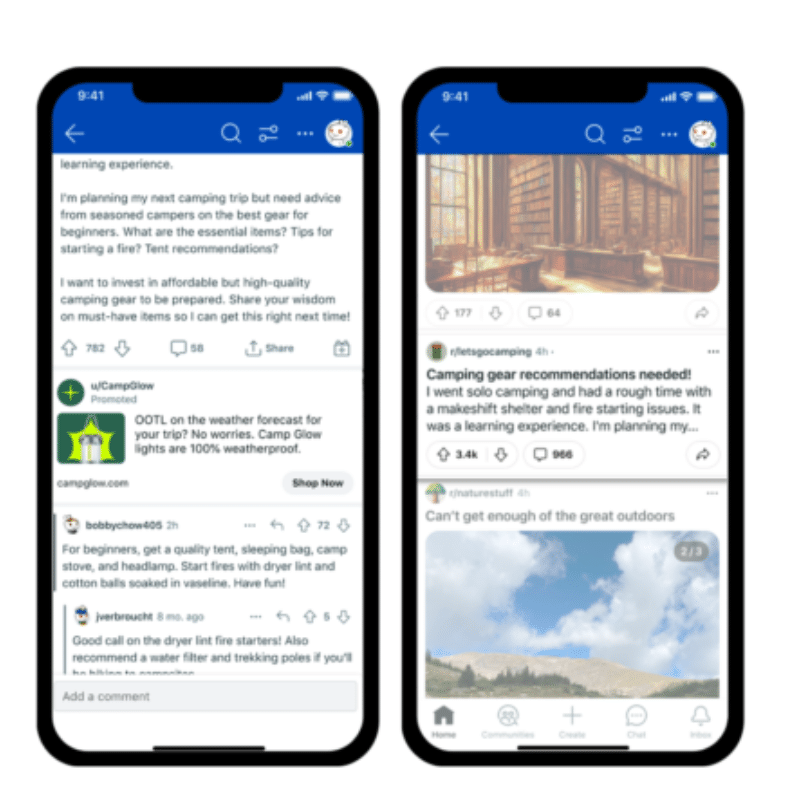
Reddit announced a major revision to its conversation page ads, including a new placement within discussion threads.
Trying to position itself as a leader in contextual advertising, Reddit is emphasizing the power of authentic conversations in an AI-dominated digital landscape.
Why it matters. Reddit said that 2 in 3 users would purchase a product after seeing an ad on the platform, indicating it is a key platform during the consumer buying journey for product/brand decisions.
Why we care. This news represents a significant development in paid social media advertising, offering new opportunities for advertisers to reach engaged audiences in a highly contextual environment.
Details.
- The new “Conversation Ads” feature larger, more premium media and will appear between individual comments.
- 47% of Reddit screenviews happen on conversation pages, making it a prime advertising real estate.
- New brand safety controls, including machine learning tooling, are coming later this year.
By the numbers.
- Combining Feed and Conversation Ads drives Action Intent more than twice as strongly as Feed only (+2.44% to +5.46%), Reddit said.
- Campaigns using both placements saw 83% higher brand awareness compared to Feed only.
Case study. Lenovo’s use of Conversation Ads resulted in:
- 40% lower cost per acquisition (CPA) than the campaign average in 2023.
- 30% year-over-year improvement in CPA.
- Early achievement of 2024 campaign goal.
Bottom line. Reddit is leveraging its unique position as a conversation-driven platform to offer advertisers highly contextual and engaging ad placements.
Courtesy of Search Engine Land: News & Info About SEO, PPC, SEM, Search Engines & Search Marketing
Tuesday, June 18th, 2024
Google has successfully maneuvered to have its adtech antitrust case heard by a judge rather than a jury, potentially reducing unpredictability in the high-stakes lawsuit.
Driving the news. Google submitted a $2.3 million cashier’s check to cover potential damages, effectively removing the monetary aspect of the case and securing a bench trial.
- The case, brought by the Justice Department and eight states, is now set for a bench trial on Sept. 9.
- The lawsuit seeks to break up Google’s online advertising business.
Why we care. This update in the antitrust lawsuit represents a significant step in a case that could reshape one of the world’s most influential companies and the digital advertising landscape as a whole. With it being a bench trial as well, advertisers will unlikely have to wait as long as if it were a jury trial therefore seeing the effects of the decision a lot quicker, if any at all.
Why it matters. This is a setback for the Justice Department, which had pushed for a jury trial in this first antitrust suit against a Big Tech company brought by the Biden administration.
Between the lines. Google argued that antitrust laws don’t prevent companies from refusing to deal with rivals and that the government hadn’t proven its market dominance.
- The judge also blocked a former FBI agent, who had consulted for Google on cybersecurity, from testifying as an expert for the company.
Background. Here’s how we ended up here:
- Google preemptively paid damages to the U.S. government, Reuters reported on May 20.
- A judge decided that Google’s fate would be decided by a judge rather than a jury, the AP and others reported on June 7.
What’s next. The trial begins on Sept. 9, with significant implications for Google’s advertising technology business.
The bottom line. This case is part of a broader legal landscape for Google, including:
Courtesy of Search Engine Land: News & Info About SEO, PPC, SEM, Search Engines & Search Marketing
Tuesday, June 18th, 2024
There is a lot of content out there. And guess what? 99% of it is terrible.
Then, there is that 1% of content – the really good to absolutely phenomenal stuff.
Sometimes, that is hot news, like the recent Google Search leak, but there are also pieces of content that are so powerful, useful and memorable that just a single piece can propel a business forward.
Your job as an SEO and content marketer is to try to catch lightning in a bottle. Easier said than done.
The solution to this problem is to generate unique ideas. Again, easier said than done.
One tool that can help is the Value Proposition Framework (VPF). The VPF can help you understand your customer segments’ minds and generate ideas that are focused on helping them make their lives easier, solve their problems and achieve their goals.
However, even with this value-orientated approach, it can feel like everything has already been done and is often done to a good standard.
This results in reams of published content that bring nothing new. This may be OK if you drive traffic by other means, but it will never get you to the top of Mount Google.
This is where SCAMPER comes in
SCAMPER helps you examine your content ecosystem from various perspectives to develop radically new ideas.
SCAMPER is another trendy marketing acronym for:
- Substitute
- Combine
- Adapt
- Modify
- Put-to-another-use
- Eliminate
- Rearrange/Reverse
Each aspect challenges your current approach and encourages you to think differently. This is powerful as a lone-gun content writer but even more so when used to stimulate discussion with a team of conspirators.
SCAMPER was initially designed to encourage creativity and problem-solving, but it can also be a powerful tool for aiding in SEO planning and developing a truly unique SEO strategy.
Why SCAMPER, and why now?
As of this writing, Google has just provided some guidance for struggling sites, as summarized in this piece by Danny Goodwin.
The key takeaways are:
- Continue creating high-quality content – do what you think is best for your readers.
- Diversify your traffic sources and promote your content across multiple channels.
- Build an engaged audience that comes to you directly or via email and social media.
We can summarize that further:
Create high-quality content and promote it to your audience through social media and email (duh).
While much SEO chatter is currently focused on the big Google SEO leak, the big win in SEO or any marketing is to deliver value to your prospects that connect with your product offering. Content, in its many incarnations, is still the best way to do that.
The only wrinkle here, seemingly further confirmed by the leak, is that you just have to make the most of that content by promoting it everywhere. It needs to be promoted so people (including Google) know and engage with it.
Any serious SEO professional will tell you that despite what Google may have said historically, you can’t just build it and expect it to come. You have always had to create and promote something great, so nothing new here. However, it does help us validate some aspects of the approach.
The true purpose behind these efforts should be to create something that blows your audience’s socks off – something so good that it almost promotes itself. Build it, promote it, then it will rank and they will come (just make sure you have a well-optimized website so the foundations are ticked off).
SCAMPER is a tool to help you think outside the (sand)box and create something truly unique and different that will stand out from the crowd – and that is half the battle!
The SCAMPER method explained
The SCAMPER method was put together by Bob Eberle from a series of questions devised by Alex Osborn (the creator of brainstorming).
SCAMPER was initially designed to help create new products, but it can equally be applied to content marketing or even your overall marketing strategy.
The seven elements of the SCAMPER mnemonic break down as follows:
- Substitute: Replace a part of the product, process or concept with something else. This could involve substituting materials, ingredients, people or approaches.
- Combine: Merge two or more elements to create something new. This could involve combining functions, features or concepts to form a new product or idea (much like Blue Ocean Strategy).
- Adapt: Adjust or modify to serve a new purpose or to improve. This involves looking at existing solutions and finding ways to adapt them to the current problem.
- Modify (or magnify/minify): Change the size, shape or other attributes. This could mean enlarging, reducing, exaggerating or altering certain features to create a different outcome. (I particularly like making things smaller in this time and attention-challenged world!)
- Put to another use: Find new uses for an existing product or process. This involves thinking about how the current solution can be applied to a different problem or context.
- Eliminate: Remove unnecessary or cumbersome parts of the product or process. This simplifies and streamlines by eliminating components, steps or features.
- Rearrange (or reverse): Change the order or layout of components in a product or process. This could mean reordering steps, reversing roles or approaching the problem differently.
That is the general idea of SCAMPER and how it is applied to creative problem-solving. In the rest of this article, we will look at how to use SCAMPER to create helpful, people-first content that your prospects and Google love.
Get the daily newsletter search marketers rely on.
Using SCAMPER for SEO and content marketing
To use SCAMPER to integrate substitution, combination and adaptation to your content marketing, simply download the template below and work through the questions.
Remember, these questions are just a guideline. I strongly advise doing this in a group and brainstorming to develop as many weird and wonderful ideas as possible. Then, discuss and critique those ideas; the ones that are still standing at the end will be the opportunities to pursue.
To help make this easier, I have created a simple SCAMPER SEO Template you can use here:
Step 1: Topics
You can start with a list of articles, keywords or ideas. To generate ideas, you can use an ideation tool like the Value Proposition Canvas or simply conduct keyword research.
Step 2: Landscape analysis
Then, when you have your keywords or topics, you will want to search those keywords and topics and review what is out there. There may be clear patterns, or you may find it helpful to do an SEO SWOT analysis to help you understand the strengths and weaknesses of what is currently ranking.
I would typically recommend looking at the first 10 elements on Page 1, as it would have been called, but the SERPs are a lot more dynamic now, so just review the first 10 links and/or features and go from there.
Step 3: SCAMPER
We can now run through SCAMPER and use the questions to help us develop new ideas for making our content different, so it stands out and adds extra value.
Substitute
- Many aspects can be substituted to create something new. It could be the language or angle covered or more practical elements like video, images, gifs, downloads, tools, etc.
Example: Substitute a series of written instructions with animated GIFs.
Guide questions:
- What keywords or topics can we substitute to attract a different audience?
- Can we substitute the format (e.g., blog post, video, podcast) to engage our audience better?
- What tools or resources can we replace to improve content quality or efficiency?
- Can we substitute case studies from one industry with examples from another?
Combine
- You can often create something entirely new by merging existing elements – the intersection of these two creates uniqueness and value.
Example: Combine an infographic with a detailed blog post.
Guide questions:
- Can we combine two or more popular blog topics into a comprehensive guide?
- How can we merge multimedia elements (e.g., video, infographics) with written content to enhance engagement?
- What if we combine user-generated content with our professional insights?
- Can we integrate industry reports and expert interviews into a single content piece?
Adapt
- Adaptation in content creation means repurposing content for different contexts, mediums or audiences.
- For example, turning a popular blog post into a podcast episode or creating an infographic from a case study. This approach maximizes the value of your content and broadens your audience.
Example: Create a YouTube video covering the same topic as your most popular blogs (remember, good ideas are the hard part, so make them work in all formats).
Guide questions:
- How can we adapt trending topics to fit our brand’s voice and message?
- Can we repurpose a successful content format from another industry for our audience?
- What content ideas from competitors can we adapt to better suit our audience’s needs?
- How can we adjust our content to be more culturally relevant or timely?
Modify
- Modifying your content means updating it with new stats, trends or use cases to improve its quality and relevance.
- This keeps your content current and valuable and boosts your reputation as a reliable, top-quality source.
Example: Modify a listicle into a comprehensive guide or add detailed statistics to illustrate your case better.
Guide questions:
- How can we modify the structure of our content to improve readability and SEO?
- What small changes can we make to our content to better match user intent?
- Can we modify the tone or style to be more engaging or authoritative?
- How can we enhance our content with additional data, research or case studies?
Put to another use
- Repurpose existing content in new ways to reach different audiences.
Example: Turn a webinar into a series of blog posts. Turn a blog post into a series of Instagram posts.
Guide questions:
- How can we repurpose old blog posts into new formats (e.g., ebooks, webinars)?
- Can we turn our frequently asked questions into a series of blog posts?
- How can we use our internal data to create compelling case studies or reports?
- Can we use customer testimonials and reviews in our content?
Eliminate
- Remove unnecessary elements to streamline your content and make it more effective.
Example: Eliminate jargon and overly complex explanations. Focus on distilling the key points to give the most value in the least time!
Guide questions:
- What unnecessary jargon or complex language can we remove to simplify our content?
- Can any sections of our content be cut without losing value?
- How can we streamline our content to focus on key messages?
- What multimedia elements are slowing down our page load times and can be removed?
Rearrange/reverse
- Change the order of your content or reverse the usual approach to gain new insights.
Example: Start with the conclusion and then explain how you arrived there.
Guide questions:
- Can we present our conclusions or key points first to capture immediate interest?
- How would our content look if we reversed the usual order (e.g., start with the end)?
- Can we rearrange our content to follow a different narrative structure?
- What if we approach our content from a beginner’s perspective rather than an expert?
Some thoughts before you SCAMPER off
SEO is not getting any easier or cheaper to execute effectively.
While Google can’t truly tell the difference between good and great content, your users can, and those user signals help Google determine what should rank highly.
The SCAMPER method offers a structured yet flexible approach to brainstorming and developing new content ideas that are both creative and effective for SEO.
By systematically applying Substitute, Combine, Adapt, Modify, Put to Another Use, Eliminate and Rearrange/Reverse to your content strategy, you can consistently generate fresh, engaging and SEO-friendly content.
Remember to integrate keyword research and SEO best practices at each stage to maximize the impact of your content in search.
SCAMPER content marketing template
You made it this far, so you may as well download the template:
Courtesy of Search Engine Land: News & Info About SEO, PPC, SEM, Search Engines & Search Marketing
Tuesday, June 18th, 2024
Traditional search engines like Google, once the uncontested gatekeepers of online discovery, are now sharing the stage with the likes of TikTok, Instagram and Pinterest. These social platforms are becoming new hubs for information discovery.
This shift, which I call the migration to social search, is largely driven by Gen Z and millennials, who prefer the visual, interactive and community-driven nature of these platforms.
For brands, this means rethinking strategies to meet audiences where they spend time and engage most.
This article tackles the factors fueling social search, from user-generated content (UGC) to the power of authenticity. We’ll also discuss how you can adapt your brand’s marketing approach to thrive in this changing landscape, offering practical insights for leveraging social search effectively.
How social search is redefining online discovery
Social search is a major change from traditional search engines, focusing on social signals, user-generated content and community-driven discovery of information and brands.
Unlike traditional search engines like Google, which use algorithms to index and rank webpages by factors like keywords and backlinks, social search uses data from social platforms to provide more personalized and relevant results while still considering traditional search factors like keywords at times.
Traditional search engines operate by users entering a query and getting a list of results based on the algorithm’s relevance. It can also be a friction-filled experience where publishers and brands are concerned with sending signals to Google instead of focusing on meeting audience needs. This can be frustrating for late millennials and Gen Z, who grew up with social platforms at the forefront of their online experience.
Social platforms, on the other hand, integrate users’ preferences, behaviors and interactions. This means search results are influenced by what the user regularly engages with, leading to a more personalized and dynamic search experience than traditional search.
For example, searching [best restaurants] on Google typically shows results based on online reviews and search rankings.
On social platforms like Instagram or TikTok, the same search emphasizes restaurants that friends, favorite creators and top influencers in their demographic have visited and tagged or are trending within their engaged communities.
Dig deeper: How to leverage social search for effective on-site optimization
The rise of social search among Gen Z and millennials
The move toward social search is led by Gen Z and millennials, who are digital natives and avid social media users. They tend to prefer social platforms’ interactive, visual and community-focused aspects for finding information and making choices.
Platforms like TikTok, Instagram and Pinterest have become essential tools for these audiences. TikTok, for instance, is not just a platform for entertainment but a powerful search tool where users can find everything from cooking recipes to travel tips, all delivered through engaging short-form videos. The hashtag system and algorithm-driven feed ensure that users constantly discover new and relevant content based on their interests and the latest trends.
Instagram, with its visually rich environment, serves as a search engine for lifestyle content. Whether looking for fashion inspiration, home decor ideas or dining options, users rely on the visual content and influencer recommendations that populate their feeds.
Pinterest operates similarly but focuses on idea generation and project planning, making it a go-to for DIY enthusiasts and hobbyists. It has also become a place users turn to when they are ready to buy but seek inspiration, meaning it can be leveraged to gain conversions quickly when other platforms move users through the buyer journeys at a much slower pace.
The preference for these platforms is rooted in their ability to provide instant, visually engaging and socially validated information.
Gen Z and millennials trust recommendations from peers and content creators they follow, influencing their choices of brands and products. This makes social search a powerful tool for discovery and decision-making.
As these generations dominate digital engagement, social search’s influence will grow, compelling brands to adapt their strategies.
Your brand must create content optimized for both traditional search engines and social platforms, leveraging UGC, engaging with communities meaningfully and repurposing content to ensure wide coverage across this emerging search universe.
Factors driving the migration
User-generated content
User-generated content (UGC) is key in enhancing search relevance and engagement on social platforms. Brands like Gymshark have effectively used user-generated content on TikTok and Instagram to create a more engaging and authentic connection with their audience.
By encouraging users to share their own content featuring Gymshark products, the brand amplifies its reach and enriches the pool of content available for search marketing queries.
This user-driven content includes workout routines, progress photos and testimonials, all tagged with the brand’s hashtags and shared widely within the community. This enables Gymshark to gain visibility for searches it wouldn’t ordinarily rank for.
Gymshark’s use of UGC, especially during Gymshark66, has turned its customers into brand ambassadors who generate buzz and foster community around the brand.
This content boosts the brand’s visibility and authenticity, making it more relatable and trustworthy to potential customers while continuing to develop fanatics and advocates.
Trust and authenticity
Social search thrives on trust and authenticity, leveraging peer/creator/influencer reviews, testimonials and real-life experiences to influence purchase decisions.
Unlike traditional search results that may feel impersonal, social search results often include personal endorsements and experiences from real users. This peer validation is crucial for users who highly value the opinions of their peers and favorite influencers.
Instagram and TikTok excel at providing these authentic experiences. When users search for product reviews or recommendations on these platforms, they often encounter genuine, unscripted content from everyday users. The algorithm will also return influencers they trust.
This layer of social proof is powerful, as it builds credibility and influences purchasing behavior more effectively than traditional advertising ever could.
Dig deeper: Search, social and retail: The future of digital brand experiences
Visual and interactive content
The appeal of visual content and short-form videos is a significant driver of the migration to social search.
Younger audiences, particularly Gen Z, are drawn to visual content’s dynamic and engaging nature, which is more immersive and easier to consume than text-heavy formats.
Social platforms cater perfectly to these preferences by prioritizing video content that demands attention and conveys information quickly.
Short-form videos, in particular, are highly effective for social search. They offer concise, engaging snippets that are easy to watch and share. This format aligns well with the fast-paced consumption habits of younger audiences.
For example, TikTok’s algorithm curates content based on user interactions, ensuring that the most relevant and engaging videos surface at the top, thus enhancing users’ overall search experience .
And here is where an “ace” of social search emerges. Social algorithms can show users relevant content before they even search for it. This means brands can engage users earlier in their journey, placing themselves at the center of the conversation from the start – something traditional search can’t do.
Additionally, social platforms’ interactive elements (e.g., likes, shares and particularly the extension of conversation via comments) further boost engagement and content visibility.
Users are more likely to trust and act on content widely endorsed by their peers, creating a feedback loop that continuously elevates the most relevant and popular content within social searches.
Get the daily newsletter search marketers rely on.
Implications for brands and marketers
Adapting SEO strategies
As social search gains prominence, you must adapt your brand’s SEO strategies to include platforms beyond Google, embracing this search universe.
This means understanding the unique algorithms and search behaviors on social media platforms like TikTok, Instagram and Pinterest.
Traditional SEO practices such as keyword optimization, link building and on-page SEO remain relevant but must be integrated with social search techniques alongside this, allowing you to amplify what is possible with search marketing.
Brands should create content optimized for both traditional search engines and social platforms. This requires thorough research to understand platform-specific keywords and hashtags and integrate them into content.
Engaging with trending topics (e.g., “challenges”) further enhances visibility and relevance in social search results through continuous trend monitoring.
Dig deeper: How to navigate SEO in a multi-platform world
Content creation and distribution
To succeed in social search, you must develop a robust content creation and distribution strategy.
- Leverage influencers/creators: Collaborate with influencers aligned with your brand values to amplify reach. Their endorsement can enhance engagement and credibility, especially when integrated as contributors to your online blog content.
- Engage with communities: Actively participate in relevant online communities to boost brand presence and cultivate an engaged fan base. Respond to comments, join discussions and share UGC.
- Content quality is key: Prioritize high-quality visual and video content that is engaging, shareable and visually appealing to capture audience attention.
- Repurpose and recycle content: Extend reach by repurposing content across platforms. For instance, a blog post can be transformed into Instagram stories, a Pinterest infographic or a TikTok video. This strategy maximizes content value and effectively reduces SEO and marketing costs by leveraging each activation.
Dig deeper: Why creator-led content marketing is the future of search
A social search case study: Sephora’s ‘Black Beauty is Beauty’ campaign
Sephora’s “Black Beauty is Beauty” campaign exemplifies the effective use of social search to enhance brand engagement and authenticity.
This initiative celebrates Black beauty and amplifies Black voices, leveraging social search strategies to create a resonant and inclusive movement at a time when traditional search missed the intent of audiences.
UGC
- Sephora encouraged customers and influencers to share their beauty stories using the hashtag #BlackBeautyIsBeauty on platforms like Instagram and TikTok.
- This strategy boosted campaign visibility and fostered a sense of community. Customers shared authentic content, such as photos and videos of their beauty routines, which increased the campaign’s credibility and relatability.
Trust and authenticity
- The campaign’s success hinged on trust and authenticity. By partnering with Black influencers alongside black-owned brands, Sephora ensured that the campaign message reached a wider audience through trusted voices.
- This peer validation was critical in building credibility and influencing purchase decisions, making the campaign more effective than traditional advertising.
Visual and interactive content
- Sephora utilized visually rich content, including a short film, to demand audience attention. Makeup tutorials, product reviews and personal beauty stories were shared widely, enhancing user engagement.
- The visually appealing content ensured the campaign was both informative (meeting search needs also) and captivating.
Sephora’s “Black Beauty is Beauty” campaign showcases the power of social search. By leveraging UGC, fostering trust and authenticity and creating engaging visual content,
Sephora successfully connected with its audience and amplified its inclusive message. This case study highlights the importance of adapting to social search trends and building meaningful community connections.
Adapting your brand strategy to the era of social search
The migration to social search represents a fundamental shift in how audiences discover and engage with content online. As platforms like TikTok, Instagram and Pinterest continue to redefine the search landscape, brands must evolve to meet users where they are most active and receptive.
By embracing user-generated content, fostering authenticity and creating visually engaging experiences, you can tap into the power of social search to build deeper connections with your audiences.
The key takeaway is clear: social search is not just a trend but a transformative force in digital marketing. Brands that adapt quickly, prioritizing community engagement and platform-native content, will be best positioned to thrive in this new era.
As we navigate this search universe, the opportunities for meaningful interaction and impactful brand storytelling are boundless. The future of search is social, and the time to embrace it is now.
Dig deeper: Search universe analysis: A deep dive
Courtesy of Search Engine Land: News & Info About SEO, PPC, SEM, Search Engines & Search Marketing
Friday, June 14th, 2024
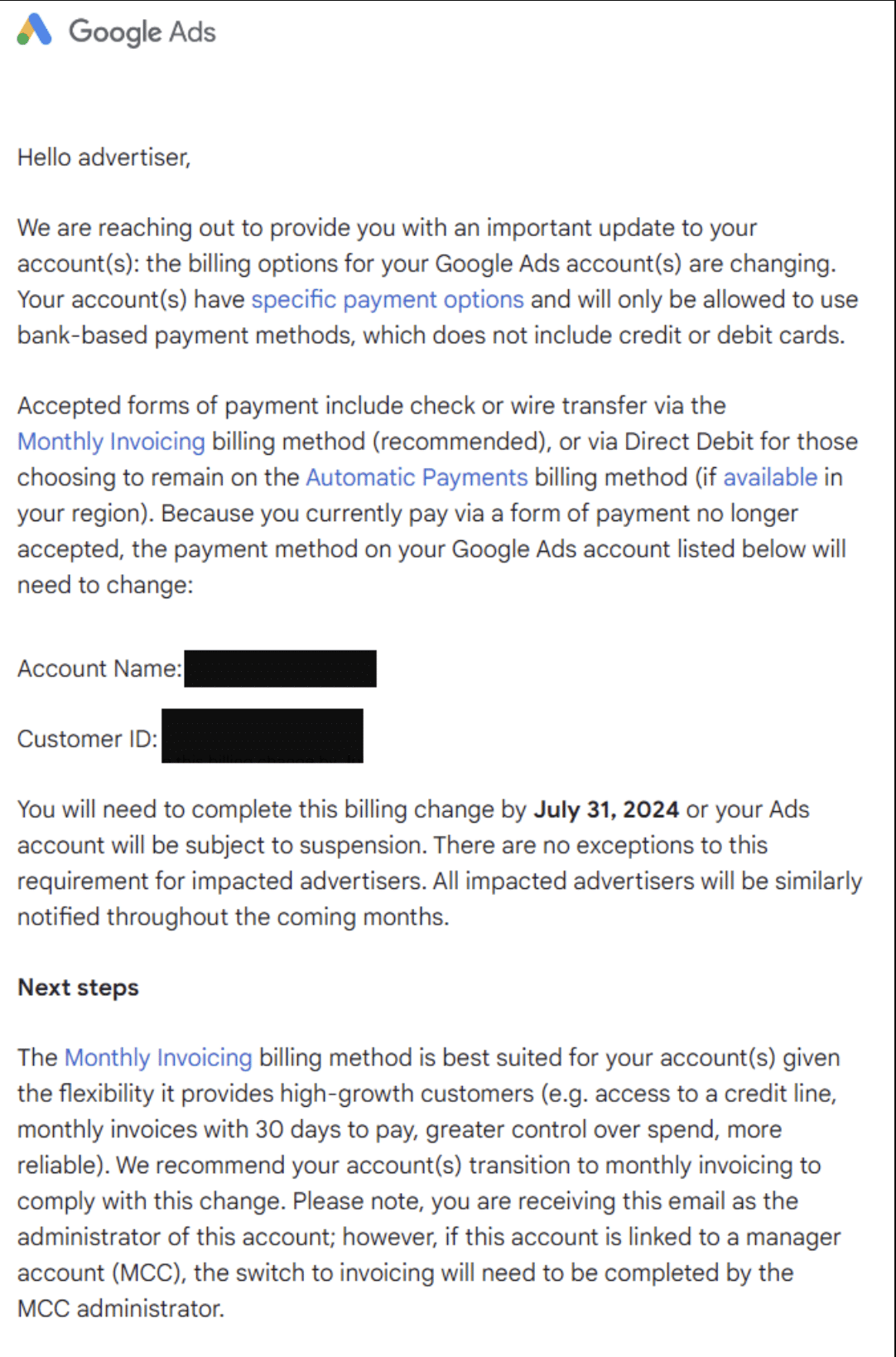
Google is notifying some advertisers that they must transition away from paying for Google Ads via credit or debit card by July 31 or face account suspension.
The big picture. The move is part of Google’s effort to steer high-spend advertisers toward more automated payment methods better suited for scaling ad investment.
Details. Impacted advertisers will only be allowed to use bank-based payment options going forward:
- Monthly Invoicing (Google’s recommended approach) with 30-day payment windows
- Direct Debit for Automatic Payments, where available
Cards will no longer be accepted for these accounts, which Google says provides “flexibility” and “control” benefits for high-growth spenders.
Why we care. While this creates a system for more frictionless, automated monetization for Google, this could lead to account suspension and cashflow issues for advertisers.
The catch. While more automated, the change eliminates a popular payment option that provides cashflow flexibility via cards for some advertisers.
Who is affected. Google is notifying impacted “high-growth” accounts throughout 2024, though criteria like spend thresholds are unclear. Manager accounts must also update billing centrally.
The email & reaction. Jeremy Brandt founder of We Buy Houses shared the email he received:
Brandt isn’t happy with this update:
- “This change will cost us $250k+ per year. It does not benefit the customer in any way. In speaking with other business owners, I think this is going to cause a lot more negative press/blowback than may have been expected.”
What they’re saying. “The Monthly Invoicing billing method is best suited for your account(s) given the flexibility it provides high-growth customers,” Google told impacted advertisers.
Ginny Marvin, Google Ads Liaison, posted about the update on X:
- “We notified a small segment of advertisers that the billing options available for their Ads accounts are changing. This means that some customers will move to bank payments via monthly invoicing or direct debit from a bank account. To make this transition as easy as possible, we already launched new tools and features to help customers through this process and to ensure minimal disruption to their accounts.”
What’s next. July 31 is the deadline for impacted advertisers to update billing methods before facing potential ad account suspensions.
Courtesy of Search Engine Land: News & Info About SEO, PPC, SEM, Search Engines & Search Marketing
Friday, June 14th, 2024
Pinterest is rolling out new AI-powered ad tools and measurement partnerships to drive better performance and brand safety for advertisers.
The big picture. Pinterest is investing heavily in generative AI capabilities for more engaging, personalized ad formats and automating campaign optimization.
What’s new. Pinterest is launching an “Ad Labs” innovation program to test prototypes like:
- Personalized background generation using its visual search AI to create aesthetically tailored lifestyle backgrounds for Product Pins.
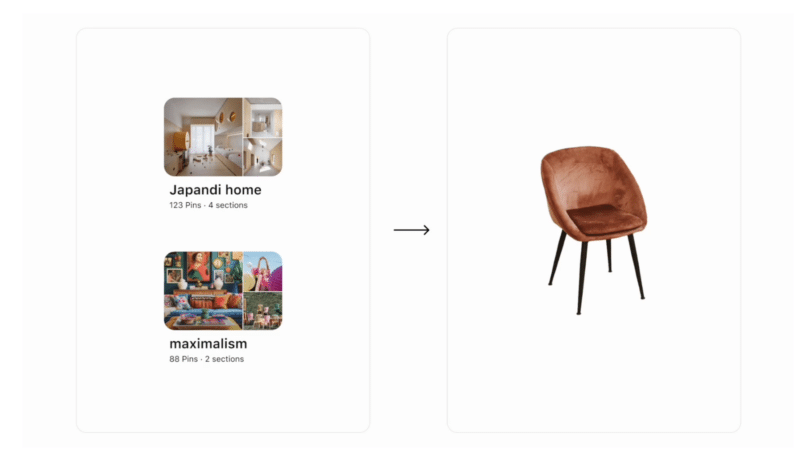


- Interactive, shoppable collage ads that let users curate brand imagery, with early tests driving strong engagement.
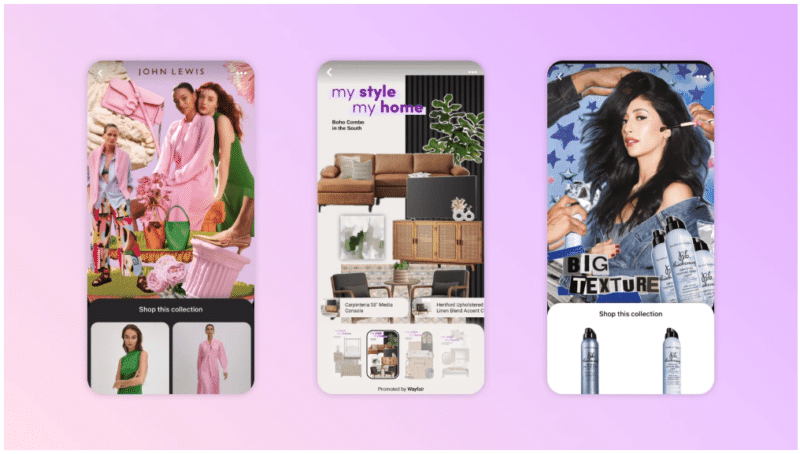 Brands like John Lewis, Wayfair and Bumble are testing collages for advertisers.
It’s also expanding brand safety validation through partnerships with measurement firms IAS and DoubleVerify.
Why we care. These AI-powered updates show a desire for Pinterest’s to evolve their ad platform with cutting-edge technology that can drive performance, effective personalisation, efficiency, improved brand safety and unique experiences for advertisers aiming to effectively reach its audience.
The AI boost. Pinterest Performance+, currently in closed beta, uses automation and AI to optimize campaigns for better cost efficiency.
- Early tests showed 10%+ improvements in cost per acquisition for conversion campaigns.
- It also reduced campaign setup time by 50% thanks to automated inputs.
Get the daily newsletter search marketers rely on.
What they’re saying. “We saw the unique opportunity with collages to take customers from inspiration to action with a single ad creative,” said Wayfair’s Sandro Corsaro, an early Ad Labs partner.
Brand safety matters. Pinterest says 99% of measurable ad impressions were rated brand safe by IAS and DoubleVerify during testing.
Limitation. The collage ads are initially limited to select brands like Nike, Wayfair and NYX Cosmetics, with more advertisers to come.
What’s next. Expect further AI-powered upgrades as Pinterest aims to stand out through automation and personalization at scale.
Courtesy of Search Engine Land: News & Info About SEO, PPC, SEM, Search Engines & Search Marketing
Friday, June 14th, 2024
Google is making it easier for merchants to pull in product listings from their sites through automated “website crawl” feeds in Merchant Center.
How it works. Google uses structured data markup on merchant websites to automatically extract up-to-date product information like titles, pricing, availability and images.
The big picture. The automated feeds aim to reduce the work required to keep product listings current as assortment and pricing changes – a challenge with traditional feed file uploads.
Why we care. This update could help reduce manual grunt work when it comes to updating product listings in the Merchant Center, although there may be a learning curve to ensure all products have the correct schema markup, which may not be the advertisers’ role in the marketing team.
The details. To use automated feeds, merchants must implement required schema.org markup for product details like:
- Title [title]
- Price [price]
- Availability [availability]
- Image [image_link]
Additional attributes like GTIN, brand, size and condition can further enrich listings when provided via markup or supplemental feeds.
What’s new. Some merchants now see an alternative “Website” feed experience that allows them to simply toggle automated product ingestion on/off in the Merchant Center.
Products get automatically added or removed from the Merchant Center based on the website crawl.
It complements other product data sources without duplication.
The challenges. Proper structured data implementation is key, as is managing crawl directives via sitemaps and robots.txt to avoid indexing issues.
What they’re saying. “Supplemental feeds provide additional information…and you can refresh [them] more often,” per Google’s automated feed documentation.
Between the lines. Automated feeds align with Google’s push toward entities and structured data as core to its modern “AI-first” approach across products.
First spotted. This update was first spotted on Thomas Eccel’s profile:

Bottom line. By reducing manual feed labor, automated product ingestion could lower barriers for merchants to participate across Google’s growing array of surfaces like Search, Shopping, Images and more.
Courtesy of Search Engine Land: News & Info About SEO, PPC, SEM, Search Engines & Search Marketing
Thursday, June 13th, 2024
YouTube tapped its machine learning capabilities to analyze over 8,000 of the top ads on its platform this year, surfacing five key creative trends that resonated.
Why it matters. The findings, extracted using custom AI models that processed text, visuals, audio and more, provide a data-backed playbook for how brands can stand out on YouTube.
Trend 1: Spotlighting underrepresented voices. Campaigns actively challenged stereotypes and celebrated people with disabilities and diverse backgrounds in prominent roles. Here are examples from Apple, Google Pixel and Maybelline:
Trend 2: Celebrating individuality. Ads leaned into characters’ unique personalities, styles and self-expression. Here’s an example from Tissot that got 42 million views:
Trend 3: Reinforcing community. Storytelling evolved from pandemic isolation to public gatherings and affectionate human connections. Here are examples from BMW and Nintendo Switch:
Trend 4: Sparking wonder. Through dreamlike backdrops and fantastical settings allowed viewers to imagine varied destination possibilities. Here are examples from Yugiohtae and Pedigree:
Trend 5: Building trust via creators brands. Leveraging creator endorsements and authenticity to foster connections. Here are examples from Lululemon, Axe and Pizza Hut:
Get the daily newsletter search marketers rely on.
Why we care. These insights can help brands get more value from their YouTube ads. The key is making your content more engaging and targeting your audience more accurately.
Between the lines. Tried-and-true tactics like strong openers, pop culture ties and humor still resonated. But the top ads went beyond to tap into deeper emotional insights.
The report. We used AI to analyze over 8,000 top ads. Here’s what we learned
Dig deeper. 4 elements of good content, according to Google research
Courtesy of Search Engine Land: News & Info About SEO, PPC, SEM, Search Engines & Search Marketing
Thursday, June 13th, 2024
YouTube is testing serving ads directly embedded into video streams – the latest move in its war on ad-blockers.
Why it matters. The “server-side ad injection” approach bakes ads into the core video file itself, making them indistinguishable from content for client software and extensions that try to filter out advertising.
Why we care. By embedding ads directly into video streams, this approach will have an advertiser’s ads mirror the look of the content, effectively bypassing ad-blockers and enhancing the visibility and effectiveness of ad campaigns.

The details. SponsorBlock, a crowdsourced extension to skip sponsored segments, said on X YouTube is “experimenting with server-side ad injection.”
- This offsets all timestamps submitted to SponsorBlock, as ads become embedded into the actual video stream.
- To prevent bad data, SponsorBlock is temporarily rejecting submissions from users encountering the embedded ads.
The big picture. YouTube’s latest technical maneuver is part of its broader crackdown on ad-blocking over the past year.
- It first targeted browser ad-blockers, then third-party YouTube apps popular on mobile.
- The goal is to protect YouTube’s key revenue stream from advertising.
What they’re saying. “Users are encouraged to subscribe to YouTube Premium,” Google suggests, offering an ad-free paid tier.
Between the lines. Google is unlikely to detail how the server-side ad embedding works, but it requires changes to YouTube’s core video delivery infrastructure.
What’s next. The embedded ad test is still limited but likely to expand as YouTube aims to make ad-blocking tools ineffective.
Courtesy of Search Engine Land: News & Info About SEO, PPC, SEM, Search Engines & Search Marketing
Thursday, June 13th, 2024
Google is rolling out an update to attribution models in Google Analytics 4 (GA4) to more accurately credit paid search campaigns for driving conversions.
Why it matters. The change addresses an issue where conversions that should be attributed to paid search clicks were sometimes incorrectly assigned to organic search, especially for single-page applications.
Why we care. This attribution adjustment in GA4 is aimed at giving advertisers more accurate data to make informed decisions, invest efficiently and optimize based on actual paid search performance – which is critical as measurement and attribution grow more complex.
How it works. Currently, the ‘gclid’ parameter that identifies a paid search click doesn’t always persist across pageviews.
The upcoming update will adjust how GA4 captures campaign data on the first event of each new page.
If users leave and return through a different channel, the attribution will update accordingly.
What to watch. The attribution fix may increase the number of conversions counted as coming from paid search campaigns.
This could have an impact on advertisers’ Ads campaign budgets and spending. Google recommends reviewing and adjusting budget caps before the update rolls out over the next two weeks.
Get the daily newsletter search marketers rely on.
Between the lines. Accurate attribution has long been a challenge as user journeys grow more complex across multiple sessions and channels. This update aims to resolve a specific blind spot in how GA4 tracks paid search conversions.
The big picture. As Google moves toward a cookieless future with initiatives like Topics API, robust first-party analytics and attribution capabilities across its products will be crucial for advertisers.
Courtesy of Search Engine Land: News & Info About SEO, PPC, SEM, Search Engines & Search Marketing