Archive for the ‘seo news’ Category
Monday, June 24th, 2024
In the early days of digital advertising, it was pretty straightforward. Put in some keywords, set budgets and track your clicks and click-through rate.
As ad platforms evolved to measure actual conversions, we improved our PPC ads to better achieve our business goals.
In recent years, ad platforms have evolved even more, introducing smart bidding options that allow advertisers to control bidding to generate the most conversions, highest conversion value or lowest cost per conversion.
However, when utilizing these bid strategies, your ad performance can only be as effective if your data is correct.
You may have heard the term GIGO – garbage in, garbage out. In data analysis, if we put bad data into the system, regardless of its advancement, the data we get out of that system will not be accurate.
How accurate is the data we’re feeding back into these ad systems?
Take the target ROAS (return on ad spend) as an example. Suppose the revenue data we feed back into the ad platform is incorrect. In that case, our ROAS calculation will be incorrect and may falsely inflate or deflate the ROAS, leading to potentially higher costs for a campaign.
Users create data inaccuracy
Despite your organization’s best efforts, it’s probably a safe bet that employees created data inaccuracies.
From incorrect destination URL tagging to missing tracking tags on key website pages to applying the wrong conversion actions in campaigns, inevitably, your organization has some data inaccuracy.
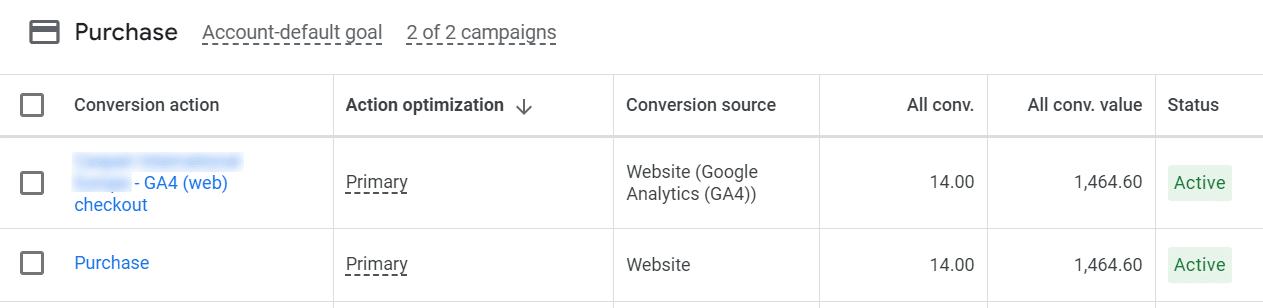
Here’s an example I recently found for a new Google Ads client. In this scenario, the client is using both the Google pixel and the GA4 purchase event to track purchase conversions in Google Ads.
The two purchase events (pixel-driven and GA4 event-driven) are both being counted as a purchase conversion in Google Ads, and their combined conversion value would count as the total purchase conversion value.
This means that although the actual purchase conversion total is 14, it would be counted as 28, and the conversion value, which should be $1,464.60, would be doubled to $2,929.20.
Let’s review how these inaccuracies affect campaign performance.
For a campaign that uses a bid strategy of target CPA, the campaign would use the 28 purchase conversions as the total instead of the actual 14 purchase conversions.
If we set our target CPA at $10/conversion, the campaign then believes that the total cost for the campaign should be as high as $2,800 for 28 conversions; whereas the total cost should only be $1,400 for the actual 14 conversions. Incorrect data can lead to the campaign spending too much based on our stated goals.
Organizations need to minimize inaccuracy to help ensure that the data that passes back to the ad platforms is as correct as possible. Perform an analytics and advertising audit and check to be sure data is passed correctly.
Dig deeper: How to combine GA4 and Google Ads for powerful paid search results
Get the daily newsletter search marketers rely on.
Cookie tracking creates data inaccuracy
In addition to user-created data inaccuracy, cookie tracking, which has traditionally been how we measure conversions from digital ads, can also create data inaccuracy. Cookies, by the very nature of how they work, have limitations to their data visibility.
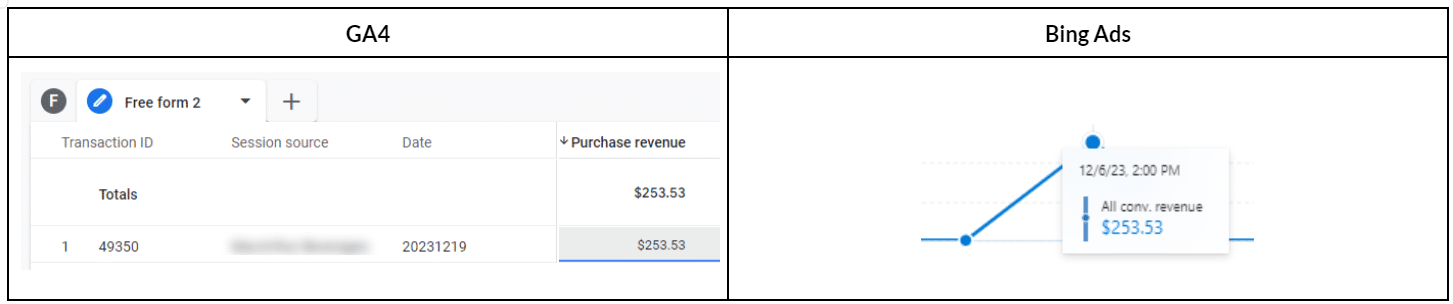
Here’s an example of how cookies can lead to data inaccuracy. In this client’s case, they are running Microsoft Ads and are tracking with the Microsoft UET tag. The client also sends email promotions to its email list. Both channels are also tracked using events in GA4.
The company had a purchase for $253.53. In GA4, the session source for this conversion on 12/14 was an email marketing campaign.
However, in Microsoft Ads, the same purchase event was tracked by the pixel and attributed to the original Microsoft Ad, which the buyer clicked on 12/6, even though the buyer didn’t purchase until after the email on 12/14.
Microsoft Ads’ pixel claims the purchase conversion wholly for Microsoft Ads because the pixel doesn’t have the holistic view we have in GA4, where we track multiple channels’ performance.
While the ad contributed to the conversion, it was not ultimately the last touch channel. In reality, Microsoft Ads should likely only have 50% of the credit for this purchase, but because the pixel cannot see all of the data, it attributes 100% of the credit to Microsoft Ads.
If we spent $126.77 on the campaign and generated the reported $253.53 in revenue, then our ROAS is 200%. But if we were tracking and attributing the sale to only give 50% to the Microsoft Ad, then the actual ROAS would only be 100%.
So, if our bid strategy is a target ROAS of 200%, the pixel assumes we have met this threshold when perhaps we have not.
While this is a simple, two-step customer journey, many customer journeys are much more complex, with multiple steps in between.
Additionally, if your organization does not use a single source of truth (SSOT), such as GA4, for reporting, then each channel manager may attribute the same conversions to their channel.
In our client example, the Microsoft Ads manager and the email manager would both count this single purchase as $253.53 in revenue for a total across both platforms of $597.06 in revenue generated, which will not match our actual purchase revenue.
Dig deeper: Tracking in 2024: Where we are and how to prep
Third-party cookie tracking is being phased out
Ad platform cookies are considered third-party cookies because they are not cookies generated directly by your website.
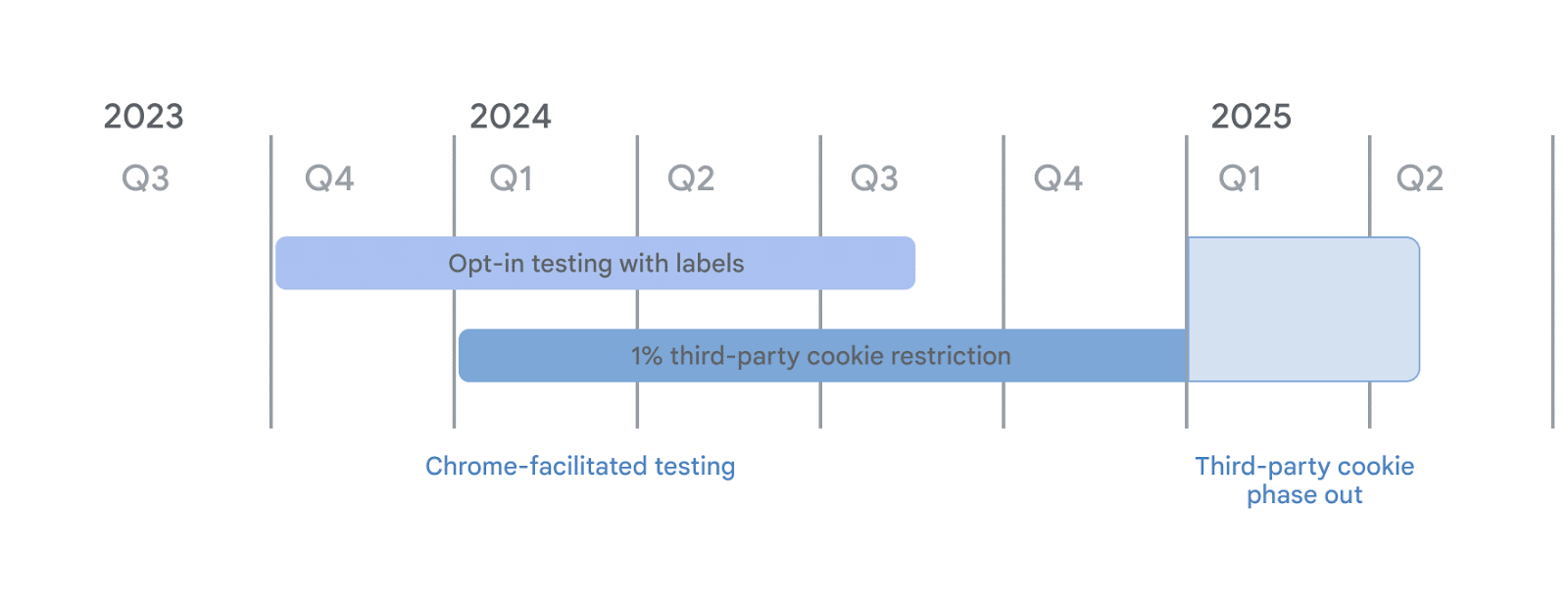
To become more compliant with various privacy laws, Google is in the process of phasing out third-party cookie tracking.
While cookie tracking hasn’t always provided the most accurate data, it’s been the workhorse we’ve relied on as digital marketers. However, there’s a new option your organization should be moving to now, ahead of the cookie phase-out, to ensure data continuity and accuracy.
Conversion APIs fix cookie tracking inaccuracy
If you advertise on Google, Facebook, LinkedIn, TikTok, Pinterest or Snapchat, you may have seen their attempts to have advertisers adopt their conversion APIs.
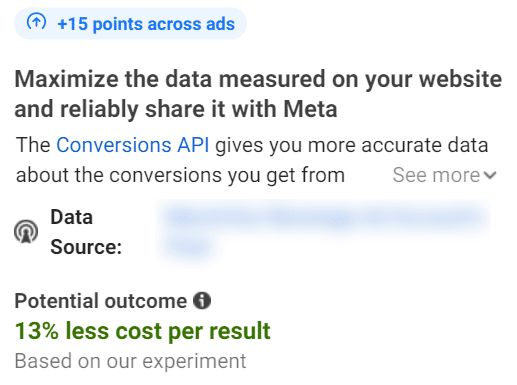
Unlike third-party cookies, which rely on the browser to set and be read, conversion API-based tracking sends user information directly from the platform’s server.
Since the conversion API method works on the server side and doesn’t rely on the browser, it can provide more accurate data because it doesn’t face certain limitations, such as ad and cookie blocking software and the tunnel vision that pixel tracking incurs.
Getting the data right
Your organization can take two main steps now to shore up your conversion data with ad platforms.
- First, audit your ads to ensure that users are tagging and tracking conversions correctly. Look for common missteps, similar to the Google Ads purchase example.
- Second, convert to the conversion API (CAPI) method. Implementing CAPI can be a bit technical, so you may need your web developer to assist.
Courtesy of Search Engine Land: News & Info About SEO, PPC, SEM, Search Engines & Search Marketing
Friday, June 21st, 2024
Google is discontinuing Universal Analytics, its legacy web analytics platform. This is the final shift in the transition to Google Analytics 4 (GA4).
Why it matters. Businesses that relied on Universal Analytics for website measurement and data analysis need to act quickly to avoid losing access to their historical data and maintain continuity in their analytics capabilities.
Key dates.
- July 1: Users will lose access to Universal Analytics data and interface.
- After July 1: All Universal Analytics data will be permanently deleted.
Why we care. We’ve finally reached the “now or never” moment. Export your historical data or you’ll lose it all in July.
The big picture. This transition marks a significant shift in Google’s analytics offerings, with GA4 designed to be more privacy-focused and adaptable to future changes in technology and regulations. However, search marketers remain unimpressed with GA4 – many of them still absolutely hate GA4.
Details:
- Universal Analytics properties are identifiable by tracking codes starting with “UA-“.
- Google has been automatically creating GA4 properties for users since March 2023.
- Several features, including real-time reports and certain advertising capabilities, have already been deprecated.
- There will be no visibility of historical UA bidding, audience or conversion data.
- Universal Analytics 360 contract holders will no longer be able to create standard Universal Analytics properties.
- Publisher or other product integrations (e.g. UA audience list, BigQuery exports, UA API requests) will be unavailable when services have stopped.
What to do.
- Export your Universal Analytics data before July 1, 2024.
- Set up and configure a Google Analytics 4 property if you haven’t already.
- Migrate Google Ads links and create new conversions based on GA4 events.
Bottom line. If you haven’t already, you need to act swiftly to preserve your historical Google Universal Analytics data.
Courtesy of Search Engine Land: News & Info About SEO, PPC, SEM, Search Engines & Search Marketing
Thursday, June 20th, 2024
Google has unleashed a new search spam update today, the June 2024 spam update. This spam update may take up to one week to complete, Google wrote.
Google posted this update and wrote:
One week to roll out. Released the June 2024 spam update. The rollout may take up to 1 week to complete.
Spam updates. Google linked to its standard spam updates documentation that reads:
While Google’s automated systems to detect search spam are constantly operating, we occasionally make notable improvements to how they work. When we do, we refer to this as a spam update and share when they happen on our list of Google Search ranking updates.
For example, SpamBrain is our AI-based spam-prevention system. From time-to-time, we improve that system to make it better at spotting spam and to help ensure it catches new types of spam.
Sites that see a change after a spam update should review our spam policies to ensure they are complying with those. Sites that violate our policies may rank lower in results or not appear in results at all. Making changes may help a site improve if our automated systems learn over a period of months that the site complies with our spam policies.
In the case of a link spam update (an update that specifically deals with link spam), making changes might not generate an improvement. This is because when our systems remove the effects spammy links may have, any ranking benefit the links may have previously generated for your site is lost. Any potential ranking benefits generated by those links cannot be regained.
Previous spam updates. The last spam update was on March 5, 2024 and was named March 2024 spam update, it completed on March 20th.
Here’s our past coverage of confirmed Google spam updates:
Why we care. This is the first Google search algorithm update we had since the massive March 2024 core update and spam updates. It is unclear exactly what type of spam this targets but if you notice any ranking changes over the coming week, it might be related to this spam update.
Courtesy of Search Engine Land: News & Info About SEO, PPC, SEM, Search Engines & Search Marketing
Thursday, June 20th, 2024
Google will make Display & Video 360’s instant reports accessible through the Bid Manager API over the next few months as part of a migration from offline reporting.
The big change. Once a partner is migrated, instant reports will be included in responses from the queries.list API endpoint.
Why we care. Instant reports provide advertisers with real-time or near real-time reporting data, as opposed to waiting for offline/batch reports. This allows for more timely analysis and optimizations.
What’s happening.
- Existing standard, reach, YouTube, and URA reports will only be available under the Instant Reporting tab, with same query/report IDs.
- Any new standard, reach, YouTube, and URA reports must be built under the Instant Reporting tab.
- The migration will happen in batches by partner over the coming months, with all reports for a partner migrating at once.
Context. This follows Google’s previously announced move to migrate certain report types to instant reporting for faster data access.
Support.
The big picture. The API integration allows advertisers to programmatically access DV360’s real-time reporting data for analytics and optimizations.
Courtesy of Search Engine Land: News & Info About SEO, PPC, SEM, Search Engines & Search Marketing
Thursday, June 20th, 2024
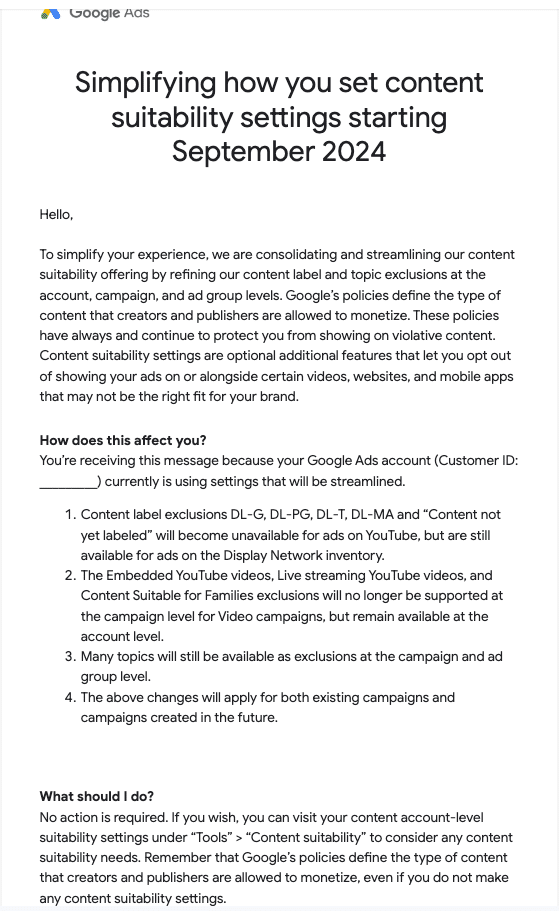
Google is consolidating its content suitability levers for advertisers across YouTube and the Display Network starting in September.
What’s changing:
- Several content label exclusions will be removed for YouTube ads (DL-G, DL-PG, DL-T, DL-MA, “not yet labeled”) but remain for Display
- “Embedded YouTube videos”, “Live streaming”, and “Families” exclusions only available account-wide, not per YouTube campaign
- Many topic-based exclusions still offered at campaign and ad group levels
Why we care. The updates could have implications for brand suitability, campaign targeting strategies, and ultimately return on ad spend on YouTube and Display campaigns that advertisers will want to get ahead of.
Why it matters. The updates aim to simplify Google’s array of brand suitability controls while preserving flexibility for advertisers.
Key details.
- Changes impact both existing and new campaigns created after September
- No action required for advertisers currently using affected exclusion settings
- Google’s core ad policies prohibiting violative content remain in place
The email. Search Engine Land contributor and Founder of JXT group Menachem Ani shared with me the email he received from Google.
The big picture. As brand safety remains a priority, Google is looking to streamline suitability options and controls across its advertising platforms.
What’s next? Check account-level suitability settings closer to the September rollout for any needed adjustments.
Courtesy of Search Engine Land: News & Info About SEO, PPC, SEM, Search Engines & Search Marketing
Thursday, June 20th, 2024

Are you ready to move beyond basic personalization? Today’s customers expect more than just their name being recognized. They crave interactions that feel genuine and tailored to their needs.
Join Deloitte Digital’s personalization experts for a deep dive into how you can transform personalization into a win-win proposition. Learn how to craft meaningful customer interactions that build stronger connections, drive business growth, and enrich the lives of your customers, no matter their age.
In this webinar, you’ll discover:
- Generational Shifts: Uncover the evolving preferences for personalization across different generations. Find out which touchpoints and channels hold the most influence for your target audiences.
- The Art of the Win-Win: We’ll explore how to create personalized interactions that deliver value to both your customers and your business.
- The Personalization Evolution: We’ll explore how preferences for personalized marketing and advertising have changed in the past two years. See how you can adapt your tactics to stay ahead of the curve.
Don’t miss this opportunity to gain actionable insights and practical strategies for turning personalization into a powerful value exchange for your brand. RSVP today for How Brands Are Turning Personalization Into A Value Exchange With Customers.
Courtesy of Search Engine Land: News & Info About SEO, PPC, SEM, Search Engines & Search Marketing
Wednesday, June 19th, 2024
Stop worrying about ranking fluctuations with every Google update. Learn how to build a resilient SEO strategy that thrives amidst algorithm shifts. This in-depth guide equips you with 14 powerful strategies to optimize your website. You’ll learn how to:
- Enhance crawlability and indexability: Discover how to create an XML sitemap and optimize for search engines.
- Improve user experience: Learn how to optimize images, structure your data, and boost website speed.
- Build authority and trust: Fix broken links and maintain a healthy website to signal trustworthiness to Google.
Get the essential technical SEO strategies you need to future-proof your online presence and skyrocket your search rankings – even during the most volatile algorithm changes.
Visit Digital Marketing Depot to download Technical SEO Tips to Master Google Core Updates.
Courtesy of Search Engine Land: News & Info About SEO, PPC, SEM, Search Engines & Search Marketing
Wednesday, June 19th, 2024
White-label link building can transform your SEO strategy. It allows you to focus on other crucial parts of your digital marketing or an SEO agency.
How?
You simply outsource your link building to a professional team while keeping full control.
Sounds easy, right?
Specialized agencies create backlinks for your brand. They handle the entire process, often including creating content and linkable assets.
Why is this important?
Picking the right white-label link building agency is key. A team of experts will deliver results without compromising your brand.
In this article, you’ll learn:
- How to wisely select the best white-label link building services.
- How it works.
- What to look for in a service provider.
What are white-label link building services?
White-label link building services involve a specialized agency building backlinks on behalf of another agency. The primary agency then presents these links to their clients as their own work.
These services are essential for SEO campaigns but require specialized skills, which many digital marketing and SEO agencies lack.
This is where white-label services come in.
Who benefits from white-label link building:
- SEO agencies without a dedicated link building team. They need to deliver high-quality links but lack the resources to do so internally.
- Independent SEO experts. They may need to scale their efforts without the time or manpower to handle link building themselves.
White-label link building services include everything from guest posting to securing high authority backlinks – or, simply, websites that have demonstrated credibility and trustworthiness and are typically rewarded with organic visibility by search engines. The main goal is to boost a client’s search engine rankings through effective strategies.
Here’s why you might consider white-label tactics:
- Your client demands high-quality links, but your team lacks the expertise.
- Your in-house team is overwhelmed with requests.
- You want to offer link building services without the overhead of hiring a full team.
- Testing the waters with such services before committing to an in-house team.
Professional services allow you to access experts who know how to build effective links quickly and efficiently.
How white-label link building works
The white-label method involves a specialized agency managing the entire process of acquiring backlinks on behalf of another agency. This allows the primary agency to offer comprehensive link building services to its clients without having to build an in-house team.
Here’s how a professional white-label link building team operates:
Step 1: Understanding client needs
The process begins with understanding a client’s product, service and goals.
The primary agency provides this information to the white-label partner, outlining the target landing pages and desired outcomes.
Step 2: Identifying relevant opportunities
The white-label agency identifies the most suitable websites. They focus on sites that align with the client’s goals and industry, ensuring the links are relevant.
Step 3: Creating content and outreach
Next, the agency creates high-quality content. This can include guest posts, linkable assets or other types of content.
They then contact publishers, collaborating to secure placements and ensuring the content is published on authoritative sites – sites that are helpful, useful and trusted and respected by other websites, people and search engines.
Step 4: Reporting and analytics
Once the links are placed, the agency provides detailed reports and analytics.
The primary agency can then present these results to their clients under their own branding, maintaining full transparency and control.
Why hire a white-label link building agency?
Here’s a list of only a few advantages you can get from hiring a professional white-label link building agency:
- Expertise: These agencies hire experienced outreach specialists who know all the ins and outs of getting effective links. Their expertise ensures high-quality results that meet the specific needs of different industries.
- Connections: Pro agencies have built relationships with trusted publishers and websites. They have the tools and connections to secure high-quality results faster than an in-house team.
- Quality links: Professional agencies use best practices to get quality backlinks from reputable sources, boosting your SEO.
- Scalability: A good agency can easily adjust to your requirements. Whether you need a few high-quality links or many, they can manage it effectively.
- Full service: Such agencies often go beyond just link building. They can create content and offer other relevant services, such as SEO audits, keyword research, and social media management, adding value for you or your clients.
By hiring a team of experts, SEO firms and independent specialists can deliver excellent link building services, improving their clients’ SEO results.
How to choose a white-label link building agency
As you may already have guessed, choosing the right team is essential for delivering top results to your clients.
Here are key factors to consider before making up your mind.
Case studies
A reputable agency should have a portfolio of genuine, successful case studies that showcase their expertise and specialization in your niche.
Look for detailed examples of their past work and verify their authenticity to gauge the agency’s ability to deliver the results you need.
Reviews
Client reviews provide insights into an agency’s performance.
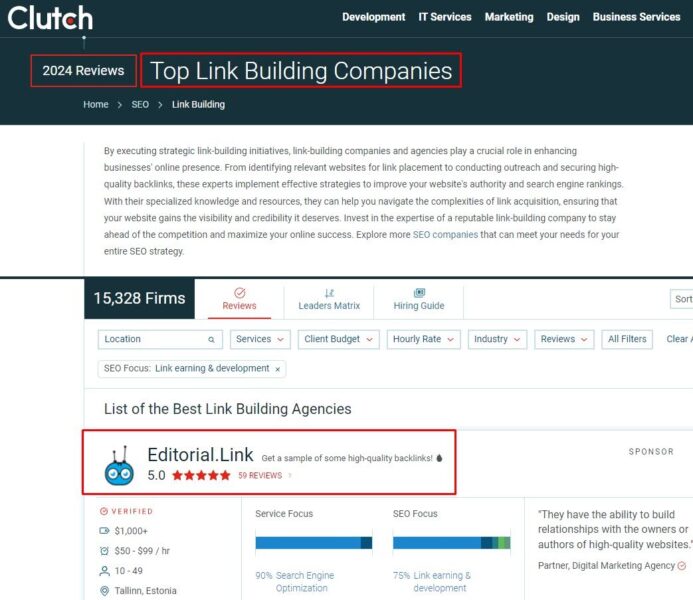
Platforms like Clutch and G2 offer scores and detailed feedback from previous clients. Checking these reviews will help you assess the agency’s reliability and effectiveness.
For example, if you search “top link building companies” on Clutch, here’s what you’ll see:
Realistic guarantees
A reliable agency will give you a clear idea of the results you can expect.
They provide realistic expectations and focus on delivering quality links rather than quantity. Therefore, they should specify how many links they can build and their quality.
Steer clear of agencies that make unrealistic promises.
Safe link building practices only
Ensure the agency uses only no-risk or low-risk methods.
These can be, for example:
- Guest posting: Writing and publishing valuable articles on reputable websites in your niche to build authority and reach a wider audience.
- Skyscraper technique: Creating high-quality content that improves upon existing popular content and reaching out to sites linking to the original.
- Connectively (ex-HARO): Providing expert quotes to journalists which can potentially result in backlinks and increased visibility.
- Linkable assets: Creating valuable content like infographics, videos and comprehensive guides that attract natural backlinks.
Using these methods indicates they focus on proven tactics for building backlinks.
Getting just what you need
Depending on your business niche and requirements, you can get links only from websites suitable for your needs. This helps you maintain control over the quality and relevance of the links being built.
Many agencies skip this step, but it’s a valuable feature to look for.
That’s why we have it at Editorial.Link.
Note: Once you choose an agency, remember that detailed reporting is crucial. The agency should provide clear and comprehensive reports that show the progress and impact of its efforts. This transparency helps you keep track of the campaign’s effectiveness.
Choosing a white-label agency: Red flags
Knowing what to avoid when choosing your perfect white-label agency will help you make a smart choice and safeguard your investment.
Here are some red flags to keep an eye on.
Low-quality link building
Low-quality link building can damage your SEO efforts. To ensure a white-label agency avoids these practices, ask for their methods, request case studies and inquire about their approach to maintaining quality and compliance with search engine guidelines.
Avoid agencies that use link farms, which are sites created solely to host paid links. These sites often have poor content and low relevance.
For example, Google has deindexed many websites for deceptive link schemes, excessive link exchanges, paid links and other manipulative practices that violate its guidelines.
Similarly, beware of Private Blog Networks (PBNs) and forum links, as they offer minimal to no SEO value and can even result in penalties.
Unrealistic guarantees
Be cautious of agencies that make grand promises, like guaranteeing top rankings or a massive number of backlinks quickly.
These “pie in the sky” promises are often too good to be true.
Low prices
Quality comes at a price. And obtaining high-quality links requires significant effort and resources.
Attractive offers like “600+ links for $10” on platforms like Fiverr.com often result in low-quality links that do more harm than good. So your best bet is to stay away from such “experts.”
Building a solid link profile requires investment; cheap solutions rarely deliver the desired results.
By avoiding these pitfalls, you can select a team that provides genuine value and supports your SEO goals.
Conclusion
White-label link building is a smart move for agencies and SEO experts. It lets you offer top-notch services without overextending your resources. This approach ensures quality results and allows you to focus on other important things.
A good white-label program is flexible and can be customized to fit your needs and your clients’ requirements, making the process smooth and efficient for everyone.
Partnering with a reputable team of experts at Editorial.Link means you can provide your clients with an added service that enhances the work you’re already doing.
Courtesy of Search Engine Land: News & Info About SEO, PPC, SEM, Search Engines & Search Marketing
Wednesday, June 19th, 2024
Google added new capabilities to its Display & Video 360 API – including advertiser-level keyword management and an optimization objective field for insertion orders.
The additions. Here’s what’s Rolling out as part of the June update:
- Advertiser keyword targeting: Advertisers can now retrieve and manage keyword targeting lists assigned at the advertiser level through the API.
- Insertion order optimization objective: The new “optimizationObjective” field has been added to the InsertionOrder resource, allowing select advertisers to set optimization goals.
Why we care. The ability to retrieve and manage keyword targeting lists at the advertiser level through the API allows for more centralized and efficient keyword optimization across campaigns. The new optimization objective makes programmatic advertising more customizable and scalable.
The details.
- The optimization objective field is only writable for allowlisted advertisers.
- To use the new features, advertisers must update to the latest version of the API client library.
Get the daily newsletter search marketers rely on.
Support. Google has launched a new technical support contact form specifically for the Display & Video 360 API for any issues.
Bottom line. Google is steadily enhancing its APIs to offer more features and customization for automated campaign management.
Courtesy of Search Engine Land: News & Info About SEO, PPC, SEM, Search Engines & Search Marketing
Wednesday, June 19th, 2024
Meta introduced a slew of new AI and business tools aimed at driving performance and engagement for brands.
The big unveils.
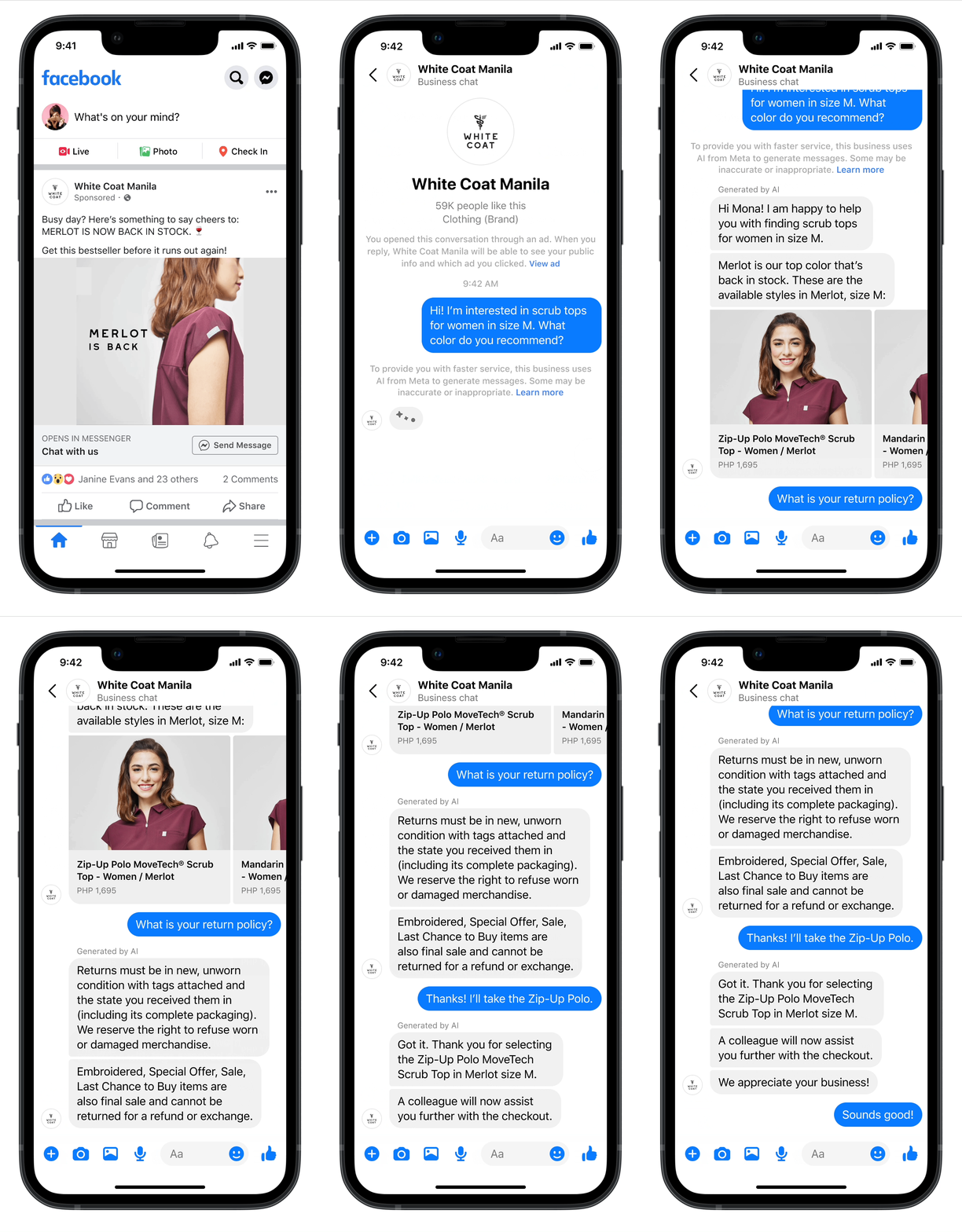
- AI Chatbots on Messenger
Built with Meta’s latest large language model LLaMa 3, the chatbots can converse with customers about products and provide support — saving businesses like White Coat Manila 20% on service costs.
- Paid Marketing Messages on Messenger
Select advertisers can now create, organize and send paid marketing messages on Messenger to opted-in customers, similar to WhatsApp’s recent marketing messaging capabilities.
- Threads API
The new API allows businesses and creators to publish posts, engage with replies, and access insights across Threads at scale using third-party apps.
Why we care. The updates provide more AI-powered tools that look to be driving revenue, reducing costs and improving engagement. This will help advertisers to scale operations efficiently across Meta’s apps.
By the numbers. Every $1 spent on its ads generates $3.71 in revenue for advertisers on average — a 12% increase in ROAS from 2022, according to Meta. Campaigns using AI-powered “Advantage+” tools see even higher $4.52 ROAS.
Driving performance. Brands like Unilever’s Living Proof saw gains of 15% lower CPP and 18% higher purchase volume using Meta’s new generative AI ad creative tools.
What they’re saying. “AI for business messaging is a game changer…saving at least 20% of customer support costs,” said Franco Ongkingco of White Coat Manila.
Yes, but. Privacy concerns around AI persist, highlighting the need for Meta to build safeguards into its new AI systems.
Courtesy of Search Engine Land: News & Info About SEO, PPC, SEM, Search Engines & Search Marketing







 Source:
 Source:
  Source: