Archive for the ‘seo news’ Category
Tuesday, July 9th, 2024
Google Ads made broad match the default setting when creating new Search campaigns, a departure from its previous default of having broad match turned off.
Why it matters. This change could significantly impact campaign performance and budget spend if advertisers aren’t vigilant.
Key details:
- Broad match is now enabled by default for new Search campaigns
- Could lead to increased costs if proper negative keywords aren’t in place
Between the lines. This move aligns with Google’s push towards more automated, AI-driven campaign management, potentially simplifying campaign setup for novice advertisers.
Yes, but. Experienced advertisers may need to be more cautious when setting up new campaigns to avoid unintended broad targeting. With broad being the most inefficient of the match types, this just adds an extra layer of check advertisers will need to take into consideration when setting up their campaigns.
First seen. We first were alerted to this update by Thomas Eccel on LinkedIn:
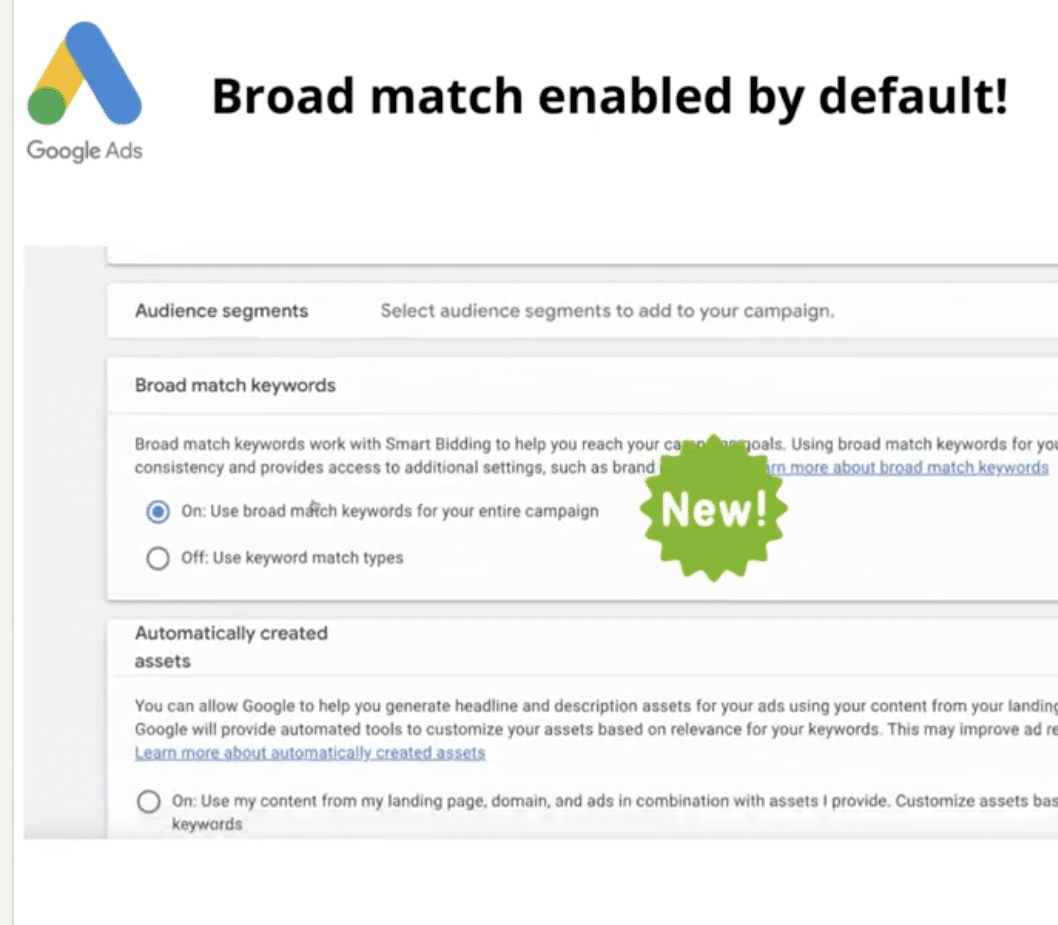
What to watch. How this change affects campaign performance, especially for advertisers who prefer to start with more precise targeting using phrase or exact match.
Bottom line. Advertisers should double-check their match type settings when creating new Search campaigns to ensure they align with their intended strategy.
Courtesy of Search Engine Land: News & Info About SEO, PPC, SEM, Search Engines & Search Marketing
Tuesday, July 9th, 2024
Google indefinitely paused its planned Healthcare and medicines policy update that would have allowed certified advertisers to discuss opioid painkillers without promoting or selling them.
Why we care. This reversal affects advertisers in healthcare, public policy and addiction treatment sectors who were preparing for new advertising possibilities.
Key details:
- The original update was set for June.
- It would have allowed discussion of public policy solutions for opioid abuse.
- It required a new certification for advertisers.
What they’re saying. Google stated:
- “Due to implementation challenges, Google will be indefinitely pausing this policy update. We apologize for any inconvenience.”
Between the lines. The implementation challenges hint at potential complexities in verifying and monitoring certified advertisers.
The big picture. This policy shift and subsequent pause reflect the ongoing challenges in balancing public health discussions with responsible advertising practices.
Get the daily newsletter search marketers rely on.
What’s next. Advertisers should continue to follow existing policies, which prohibit ads promoting or selling prescription opioid painkillers.
Bottom line. While the pause maintains the status quo, it also delays potential opportunities for legitimate discussions about opioid issues in advertising.
Courtesy of Search Engine Land: News & Info About SEO, PPC, SEM, Search Engines & Search Marketing
Tuesday, July 9th, 2024
There’s a new search strategy in town! Generative engine optimization (GEO), the younger sibling of search engine optimization (SEO), has arrived at the station.
There’s a good chance you’re already familiar – if you head to Google and ask it a question, you’ll likely see an AI-generated blurb at the top of your search results.
If you own a business and have spent time and resources vying for that top search position with SEO, this shift might be frustrating. Do you need to start all over again to optimize your content for this new type of search?
Good news: There’s no need to reinvent the wheel, but it is time to adjust strategy slightly.
Your existing SEO best practices will handle most of the heavy lifting, but there are a few clever shifts to make to stay visible, relevant and competitive.
Understanding generative engine optimization
Acronyms abound in the digital marketing world. What does this new one mean and why is it important going forward? Here’s what you need to know.
What is generative search?
Generative search relies on artificial intelligence (AI) to pull together information from multiple sources and compile unique, coherent responses to user queries.
With generative search, users receive AI summaries with direct answers at the top of their search results page instead of a traditional list of links.
When generative search results are accurate, they can save time and increase helpfulness for the end user.
For people creating internet content, however, this signals a slight shift. To get your content featured in that top-result AI summary, your content needs to be AI-ready.
The rise of generative engine optimization
Generative engine optimization is how you get AI-ready content.
GEO combines traditional SEO practices with an understanding of how AI models process and prioritize content. If you apply GEO principles well, your content will be poised for visibility in generative search engines such as Google’s AI Overviews and Microsoft Copilot.
Fortunately, best GEO practices don’t exclude human readers. You can (and should) write for both human and AI audiences – but more on that in a moment.
First: Why is it critical to focus on this now?
GEO is a brand-new concept and an area of AI use that’s getting understood and structured right now. That means there’s a lot of uncertainty surrounding the adoption of these strategies.
And there are a lot of opportunities for those who do adopt these strategies to stand out.
The upcoming shift in SEO practices
In a nutshell, traditional SEO relies heavily on keyword and backlink placement, good content structure and back-end technical site optimization.
Although these elements are and will remain important, it’s time to shine a spotlight on creative, authoritative and relevant content to succeed with GEO.
Your mission is to write content that is clearly helpful and well-structured so that both AI and human readers instantly understand the value you’re bringing to the table. That’s a big ask, but I have some practical tips to share.
Strategies for navigating generative search
Are you interested in being an early adopter of GEO best practices and taking advantage of this paradigm shift?
Start weaving these practices into your content creation routine.
1. Focus on content fluency and structure
Here’s a term to keep in mind: Fluency optimization. This trendy phrase boils down to keeping your content easy to read for robots and humans alike.
Here’s a quick checklist for accomplishing this:
- Make sure your content flows smoothly. Get rid of jargon and long sentences. (Reading your content out loud is an easy way to identify these!)
- Use clear headings and subheadings – often. Make these headings descriptive and down to earth.
- Use bullet points and lists. These break information down into easily digestible formats to improve readability.
Keeping your content organized and skimmable makes your information accessible for all readers, AI and otherwise. A clear, strategic content structure also makes it easier for you to stay on track.
Dig deeper: Mastering content quality: The ultimate guide
2. Leverage E-E-A-T principles
As you learn more about GEO, E-E-A-T is an acronym you’ll see often.
It stands for experience, expertise, authoritativeness and trustworthiness.
The more you sound like a trustworthy, authoritative, experienced expert in your content, the more humans and AI want to read, remember and rank your pieces.
To do this, consider:
- Experience: Share personal anecdotes and case studies to demonstrate hands-on knowledge.
- Expertise: Cite reliable sources and include detailed, accurate information.
- Authoritativeness: Highlight credentials, awards or recognitions related to your field.
- Trustworthiness: Use clear language, avoid clickbait and ensure your content is free of errors.
Get the daily newsletter search marketers rely on.
3. Optimize for both humans and AI
The Venn diagram of content that’s written well for both machine and human writers may be a circle. Keep your language structured and clear, with personable asides to delight human readers and crisp, to-the-point headers so robots can hone in on shareable information.
Your goal is to make it very, very easy for AI to extract key points for use in generative search and keep your content fun and valuable for humans to read.
This may seem like a tall order, but with consistency, structure and clarity, you’ll be well on your way.
Dig deeper: 25 tips to optimize your content for people and search engines
4. Consider using AI tools for content creation – at first
The thought may have already crossed your mind that if you’re writing for AI, at least in part, then using AI to write may be a strategic choice.
This depends on your familiarity with AI and your comfort as a writer. Relying on AI as an assistant for initial content outlining, brainstorming and even content analysis can be valuable. (It certainly helps with the hardest part of any project – getting started!)
One word of caution: Although AI can help you generate initial drafts or iterate engaging headers, you should still plan on editing, fact-checking and refining the content before publishing. For one thing, AI can make things up (or “hallucinate” information) and you wouldn’t want to put your readers or your own reputation at risk with false content.
In addition, it will become increasingly important to differentiate what you say from the growing mass of purely AI-generated content out there. (E-E-A-T, remember?)
Dig deeper: AI content creation: A beginner’s guide
The two things you need to remember for successful GEO
As you expand your experience with generative search techniques and tweak your content with GEO, two factors will help you succeed:
Why?
- Education will help you use AI better. Investing in AI training, staying up to date about generative search and keeping an eye out for the latest AI tips and tricks will help you (and your team!) get the most out of AI tools.
- Learning more about GEO will keep you ahead of the curve. This is brand-new tech and the best practices will likely shift over the coming months. Knowing about those shifts will help you take advantage of every single one.
- Regular training will reduce fear and boost adoption. If anyone on your team is leery of AI or GEO, that makes sense! These are big concepts to take in. Educate your team on the benefits of AI in content strategy, reinforce the idea that AI is a tool to enhance human talent (not replace it) and start with small, manageable AI integrations.
- Play the long game. Applying GEO techniques requires upfront labor in exchange for a delayed payoff. Remind yourself and your team that, even if progress seems incremental, it’s a critical strategy that will benefit your company with time.
- Balance your SEO and GEO efforts. GEO is not the end of traditional SEO! Continue to invest in technical SEO, keyword research and a backlink strategy. Your efforts will build off each other if you’re consistent, so make each a part of your ongoing content strategy.
Generative search is giving savvy business owners an opportunity to rethink online visibility. By investing in both GEO and SEO techniques, you can boost the relevancy and competitiveness of your content.
The main thing to remember is that your content needs to be high-quality, authoritative and relevant.
Write to your strengths and prioritize clear content structure, and you’ll be well on your way to winning the game with generative engine optimization.
Courtesy of Search Engine Land: News & Info About SEO, PPC, SEM, Search Engines & Search Marketing
Monday, July 8th, 2024
Google Ads is automatically upgrading Shopping and Performance Max campaigns from Country of Sale to Feed Label functionality to match Merchant Centre feeds, in August.
Why we care. This change affects how advertisers manage product feeds across different markets, potentially streamlining operations for multi-country campaigns.
Key details:
- Affects all campaigns using Country of Sale.
- No action is required from advertisers.
- Campaigns will continue to run without interruption.
- New campaigns can’t use Country of Sale after the change.
What it means. Feed Labels offer more flexibility in organizing products across geographic locations and language similarities.
First seen. We were alerted to this update via Navah Hopkin on LinkedIn, when she shared an email sent by Google:
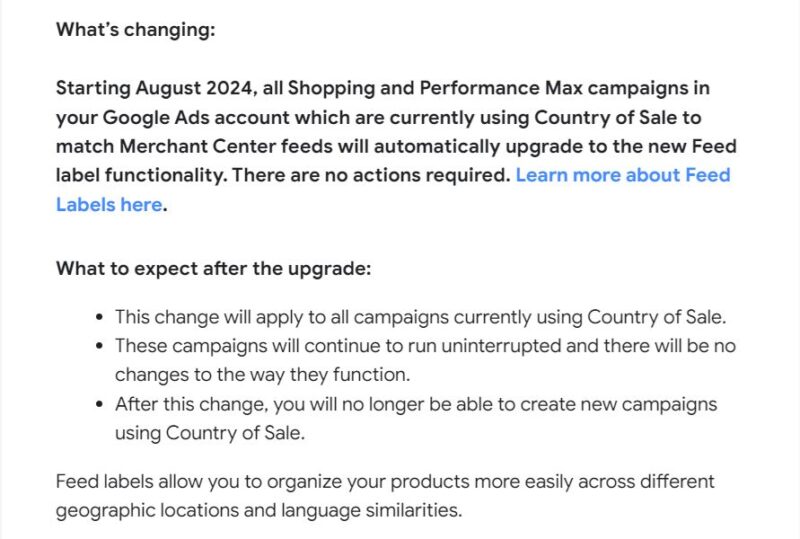
In her post, Hopkins said the update “will give you more control over how your shopping feeds and campaigns are managed in traditional shopping and PMax campaigns.”
The big picture. This shift reflects Google’s efforts to simplify campaign management for global advertisers.
What to watch. How this change impacts campaign performance and management efficiency for international ecommerce advertisers.
What’s next? Advertisers should familiarize themselves with Feed Labels functionality before the August rollout.
Courtesy of Search Engine Land: News & Info About SEO, PPC, SEM, Search Engines & Search Marketing
Monday, July 8th, 2024
Google Search Console (GSC) is a free gift from Google to SEO professionals that tells you how your website is performing.
With data-packed amenities, SEOs can scavenge through GSC to locate stashes of hidden nuggets like clicks and impressions from search queries, Core Web Vitals and whatever other surprises lay within your website.
Custom regex filters take you around your million-page website.
And while all SEO professionals hope to avoid any catastrophic SEO-related events with Google’s AI Overviews, all we can really do is be prepared.
For starters, keep reading this guide below to Google Search Console. It’s engineered to withstand zombie pages, panda claws and even penguin attacks, so it’s exactly what you need when the SEO industry gets dicey.
What does Google Search Console do? And how does it help SEO?
Google Search Console is a free website analytics tool Google provides. Google Search Console tracks your website’s performance in search results on Google.
As an SEO director, I use Google Search Console daily. I check website performance for content updates and troubleshoot any technical changes. It helps me make informed business decisions about where to dedicate my team.
How do I set up Google Search Console?
Getting set up on Google Search Console is quick and easy but may require technical support.
First, you need to have a Google account.
Next, go to Google Search Console: https://search.google.com/search-console.
If you don’t see any profiles listed, you’ll need to choose a domain or prefix URL and verify your website ownership.

How do you choose between domain vs. prefix URL? Let me walk you through the differences.
Domain property paints the full picture of your website
A domain property includes all subdomains but no protocols (HTTP:// or HTTPS://) and no path strings (/sub/folder/).
A domain property provides a holistic view of how your website is performing Google search results.
I recommend setting up domain properties first.
To set up a domain property in Google Search Console, remove the HTTPS and trailing slashes.

GSC website domain
After you hit continue, you can verify your ownership via DNS record through TXT files.
I recommend going this route as it is the easiest.
You’ll need to log into your hosting provider to submit the TXT file.
Another option is to verify through the CNAME. If you have technical support, this could be an easy alternative.
URL prefix property allows you to dissect sections of a site
A URL prefix property includes the HTTPS or HTTP protocol and path string. This means that if you want to really dive into a section of your website like /blog/ subfolder or a blog.website.com subdomain, you can do this.
After I set up my domain property, I set up individual URL prefix properties for each subdomain, HTTP versions and /blog/ subfolders.
By having multiple URL prefix properties, I can dig deeper into sections of the website to help troubleshoot.
I can also create reporting specific to the website’s sections that may be more relevant to my co-workers.
For example, I work with customer support team members looking for data on how their Help Center content is performing.
Key moments in history for Google Search Console
Some really crazy stuff has happened with Google Search Console over time. Google Search Console is notorious as a delicacy for many SEO professionals, an incessant phantom of manual actions and the culprit behind better understanding our website health.
I’ve compiled a short history of my SEO bromance with Google Search Console over the years to give you a glimmer of how we got here.
- June 2005: Google Webmaster Tools (now called Google Search Console) was launched.
- May 20, 2015: Google changed the name to Google Search Console from Google Webmaster Tools.
- June 21, 2016: Google Search Console tests new mobility usability report.
- Sept. 6, 2016: Google Search Console improves Security Issues report.
- Sept. 8, 2018: Google Search Console released Manual Actions report, “Test Live,” and request indexing features added for the URL inspection tool and upgraded to 16 months of historical data.
- Nov. 8, 2018: Google experiments with domain properties.
- June 26, 2019: Google Search Console adds mobile-first indexing features.
- May 27, 2020: Google Search Console adds Core Web Vitals report.
- Nov. 22, 2021: Google Search Console rolls out new design.
- Sept. 14, 2022: Google Search Console launches new HTTPS report.
- Nov. 16, 2022: Google Search Console adds Shopping tab listings feature.
- Sept. 11, 2023: Google Search Console rolls out new Merchant Center integrated reports.
- Nov.r 15, 2023: Google released a new robots.txt report.
- The future: New Google AIO reports will be coming soon!
Breakdown of Google Search Console for SEOs
While some SEO professionals may be waiting in the tunnels for Skynet and AIO to take over, there’s one thing we can all still depend on: Google Search Console.
So before you join your freelance mission with SEAL Team 6, walk through the anatomy of Google Search Console.
Overview
The Overview section in Google Search Console provides a bird’s eye view of all data sets users can uncover in Google Search Console.
Search Console Insights
If you click the top section under “Search Console Insights,” you’ll see a snapshot of the past 28 days.
It gives you a high-level overview of achievements you can share with your client or team.
Performance
The performance section is also called the “search results” section.
On my end, I only see this called “Performance” under some of my international sites, specifically in China.
Similar to the “search results” section found below, the “Performance” section showcases metrics like search traffic over time, search queries, search queries based on mobile devices and page performance.
URL inspection
The URL inspection tool lets you see what Google sees per URL.
The URL inspection tool is one of my favorite SEO tools.
Unfortunately, today, you can only inspect one URL at a time. However, if you use the Search Console URL inspection API, you can test up to 2000 URLs per day.
The test will show if the URL is indexable and explain why it may or may not be indexed.
You can also request a URL be indexed.
Search results
Search results are every content marketer’s favorite report in Google Search Console. It shows search traffic over the past 16 months (with comparisons) and search queries, devices, counties and search appearances.
It will also show you which pages are ranking for certain queries.
I leverage this report to show which pages are performing best vs. worst. It also helps troubleshoot if there are any major drops or spikes in traffic.
You can segment this report based on clicks, impressions and CTR.
Discover
The Discover report in Google Search Console showcases your content’s performance in Google’s Discover feed.
You can filter by pages, countries, search appearances and devices like the search results report.
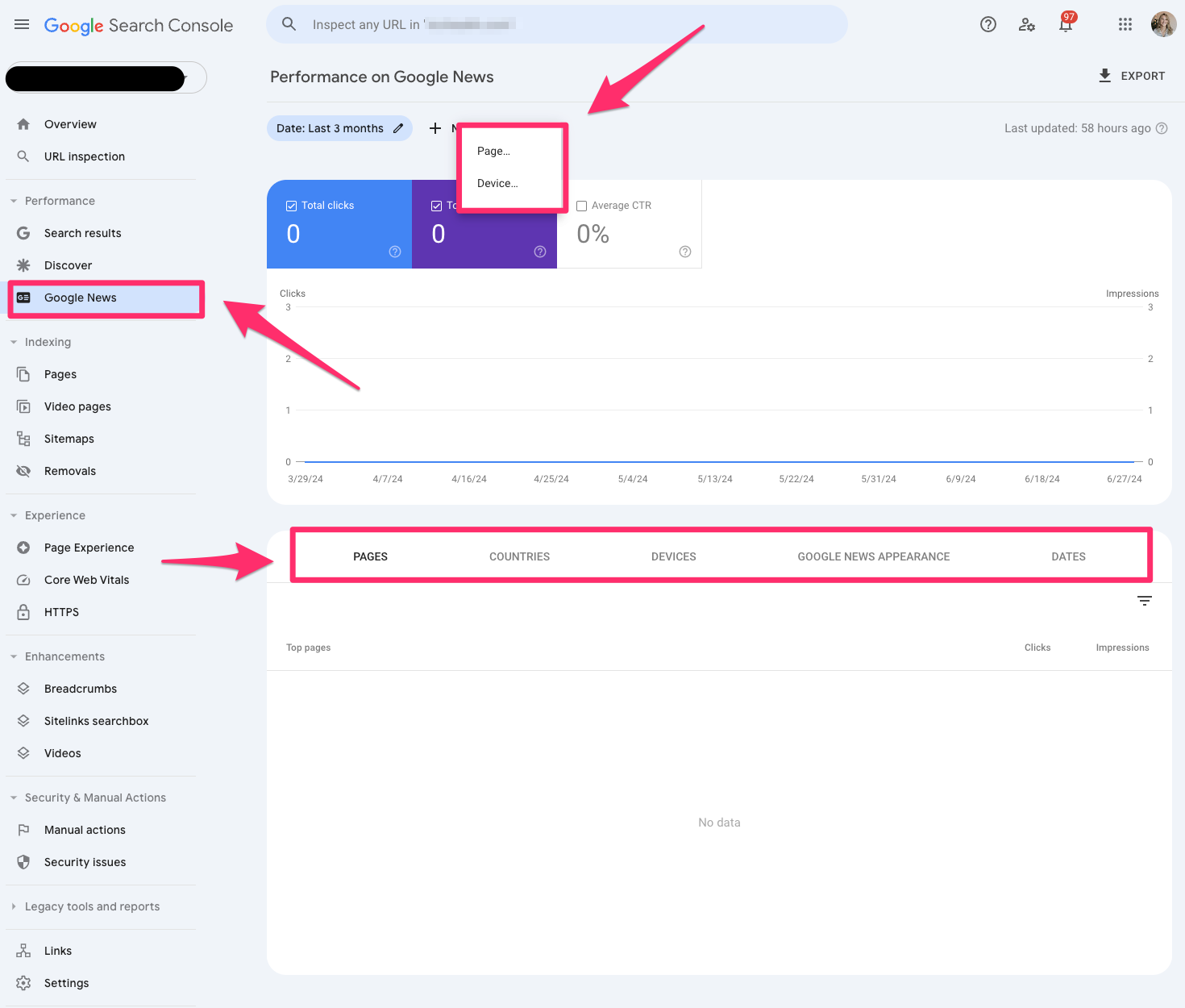
Google News
The Google News report in Google Search Console tells you how your content performs under Google News in Google search results.
You can filter the report by page and device.
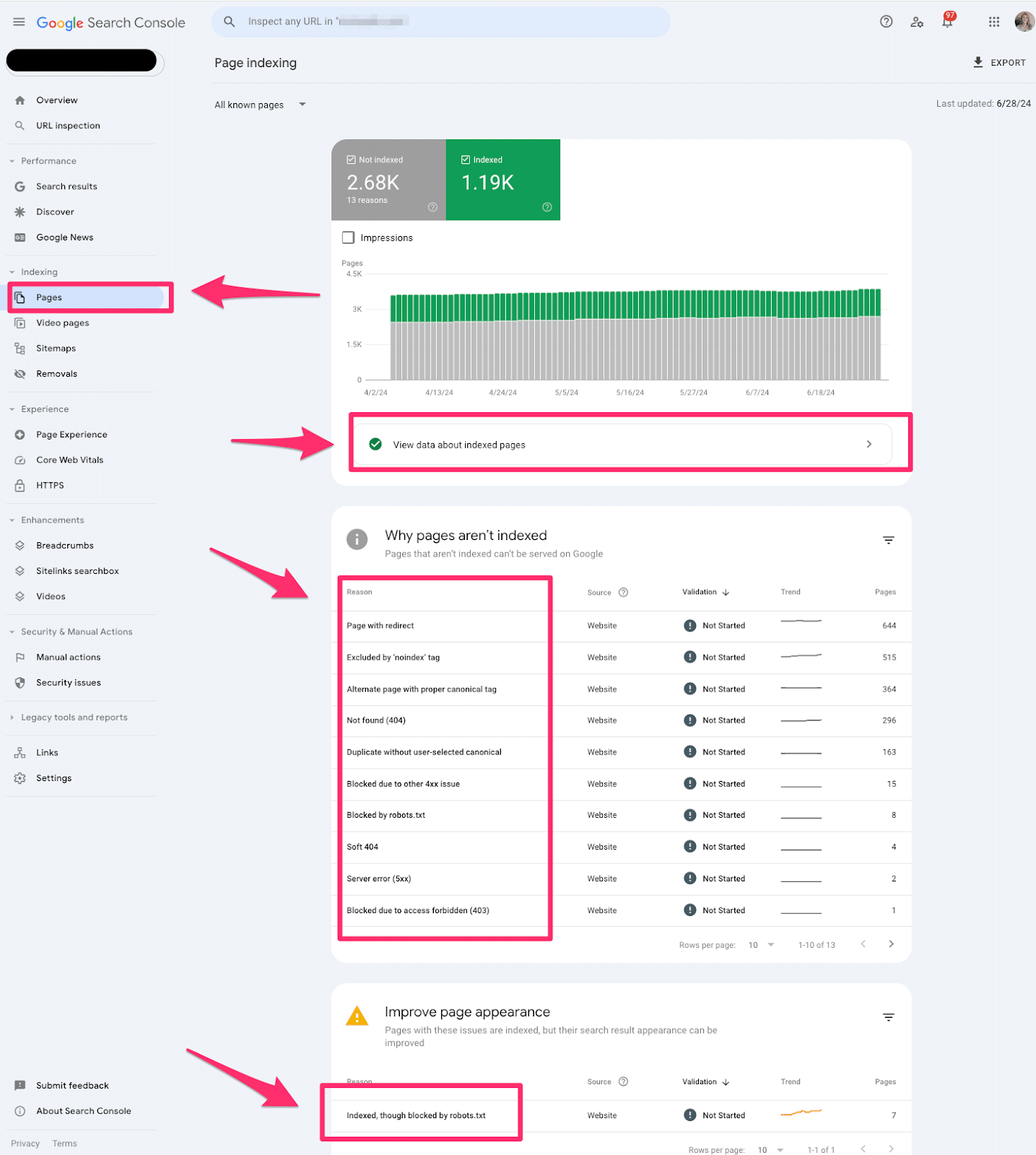
Pages
Pages indexing report in Google Search Console shares which pages in Google can find (or not find) on your website.
The Pages report is valuable for every technical SEO. This report offers tons of quick wins for technical SEO. I always like to start with this section when I’m auditing a website.
If you see an increase in pages indexed or not indexed, you’ll want to investigate why it’s happening.
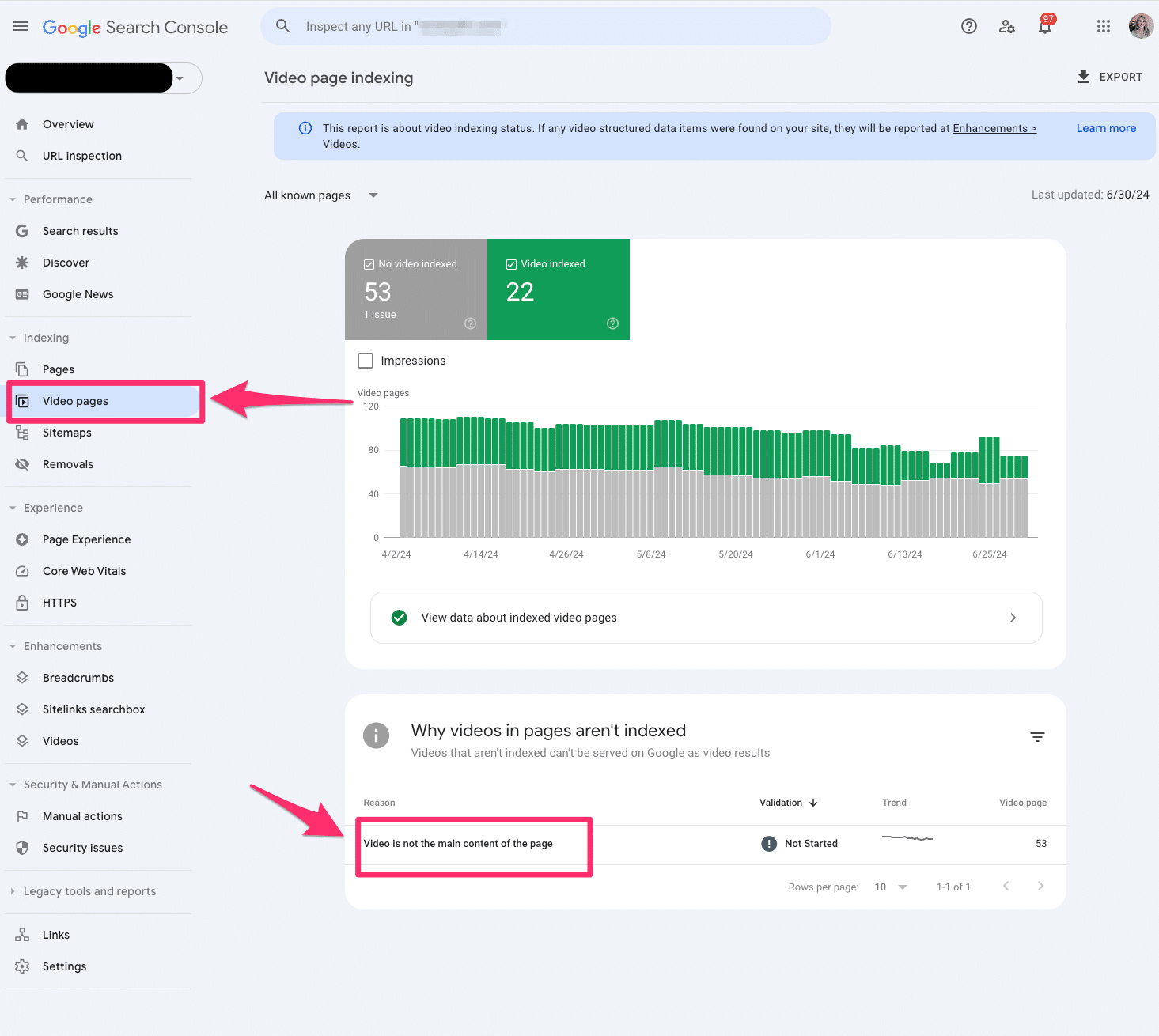
Video pages
The video indexing report displays how many pages on your website are indexed with video content somewhere on the page.
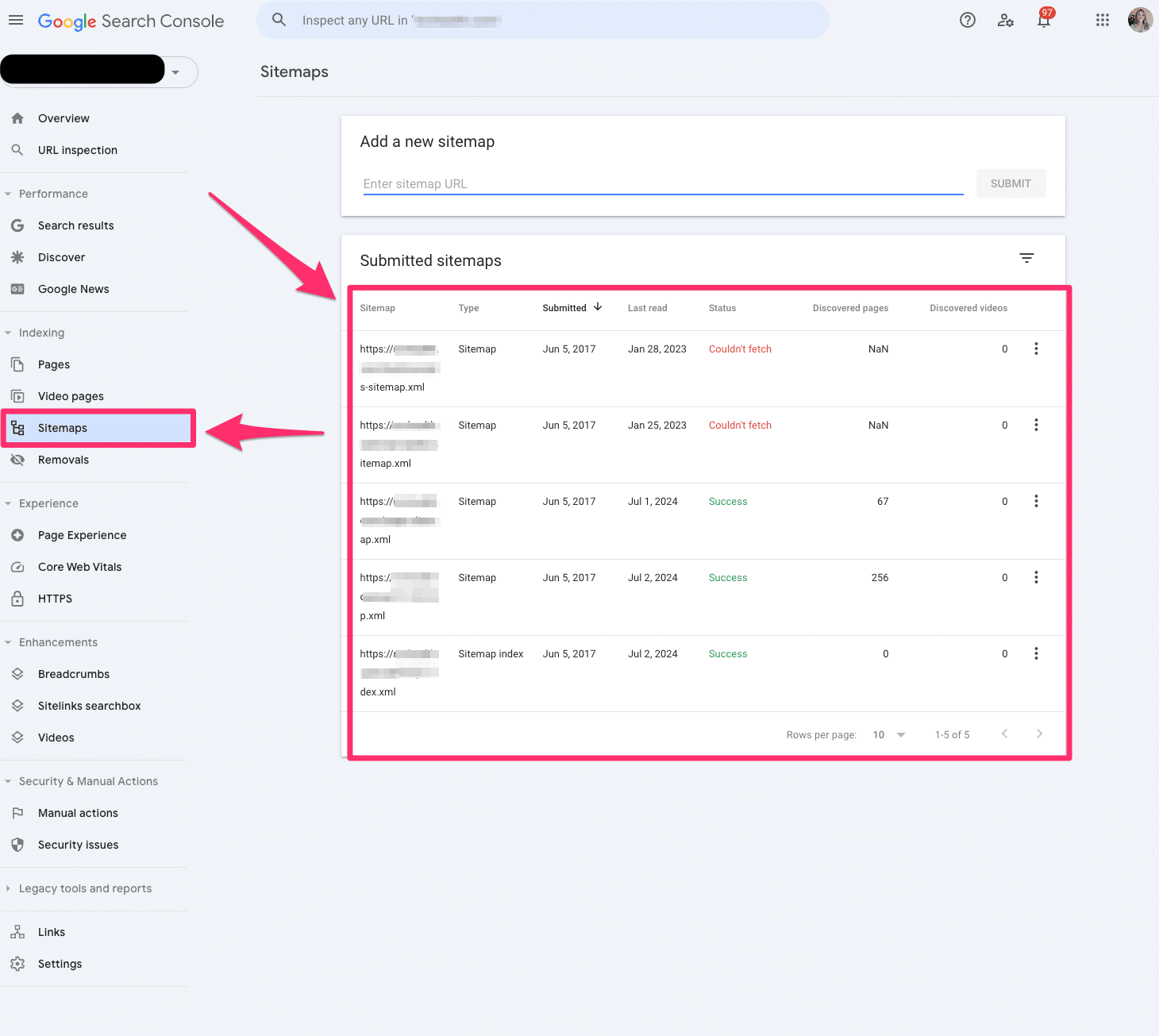
Sitemaps
The sitemap report allows you to submit all your XML sitemaps to Google Search Console. Ideally, you have at least one XML sitemap to submit.
You’ll have to submit all your XML sitemaps if you have video, image, or language-specific XML sitemaps.
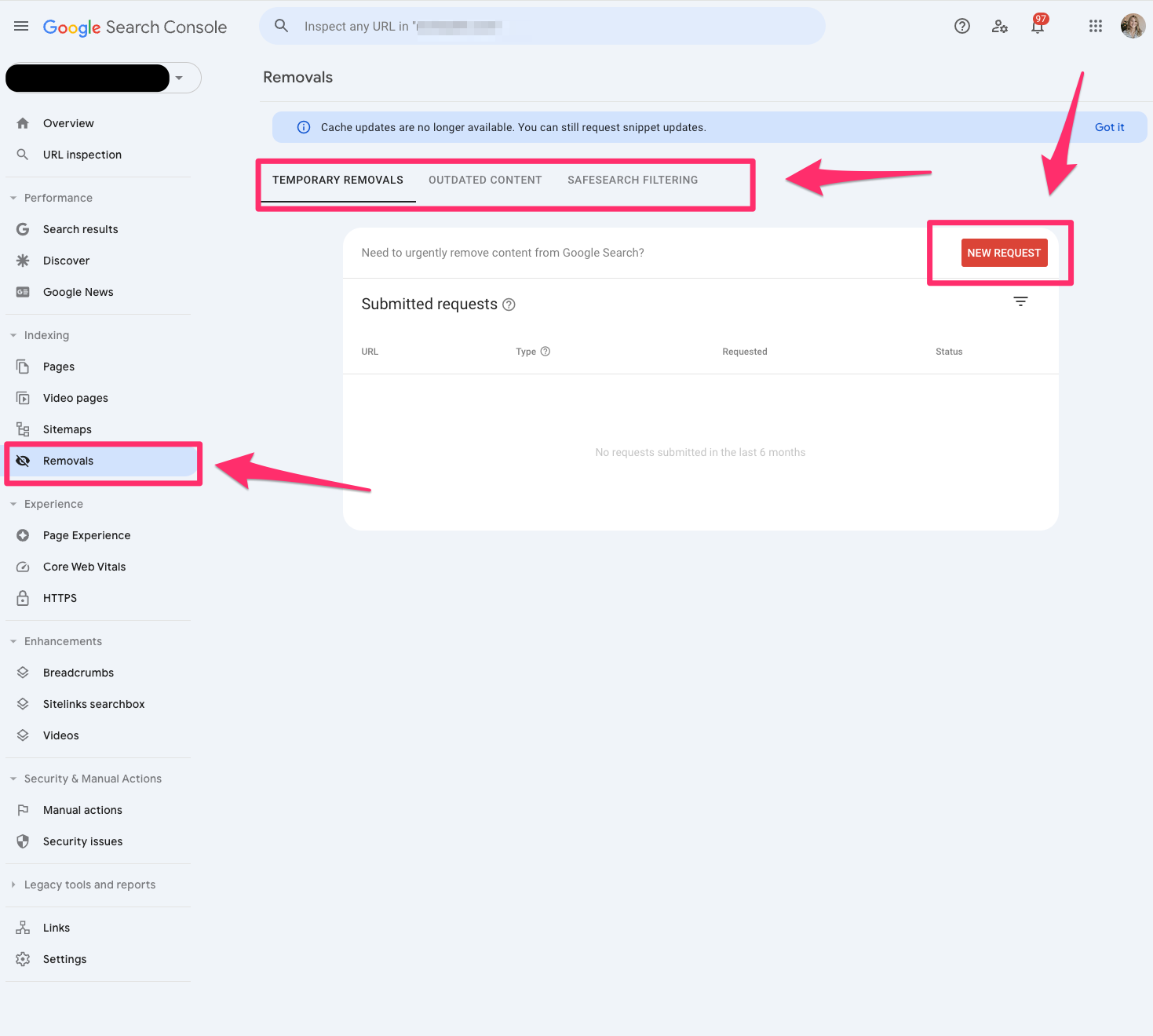
Removals
The removals tool in Google Search Console allows you to block pages from Google temporarily.
Remember, these must be pages that you own on your website. You cannot submit pages you do not own.
This is the fastest way to remove a page from your website. However, I recommend working on a long-term solution if you want this web page permanently removed.
Page Experience
The Page Experience report in Google Search Console provides a glimpse of how user experience is on your website.
It’s important to remember this is based on URL level.
The page experience report includes Core Web Vitals and HTTPS usage.
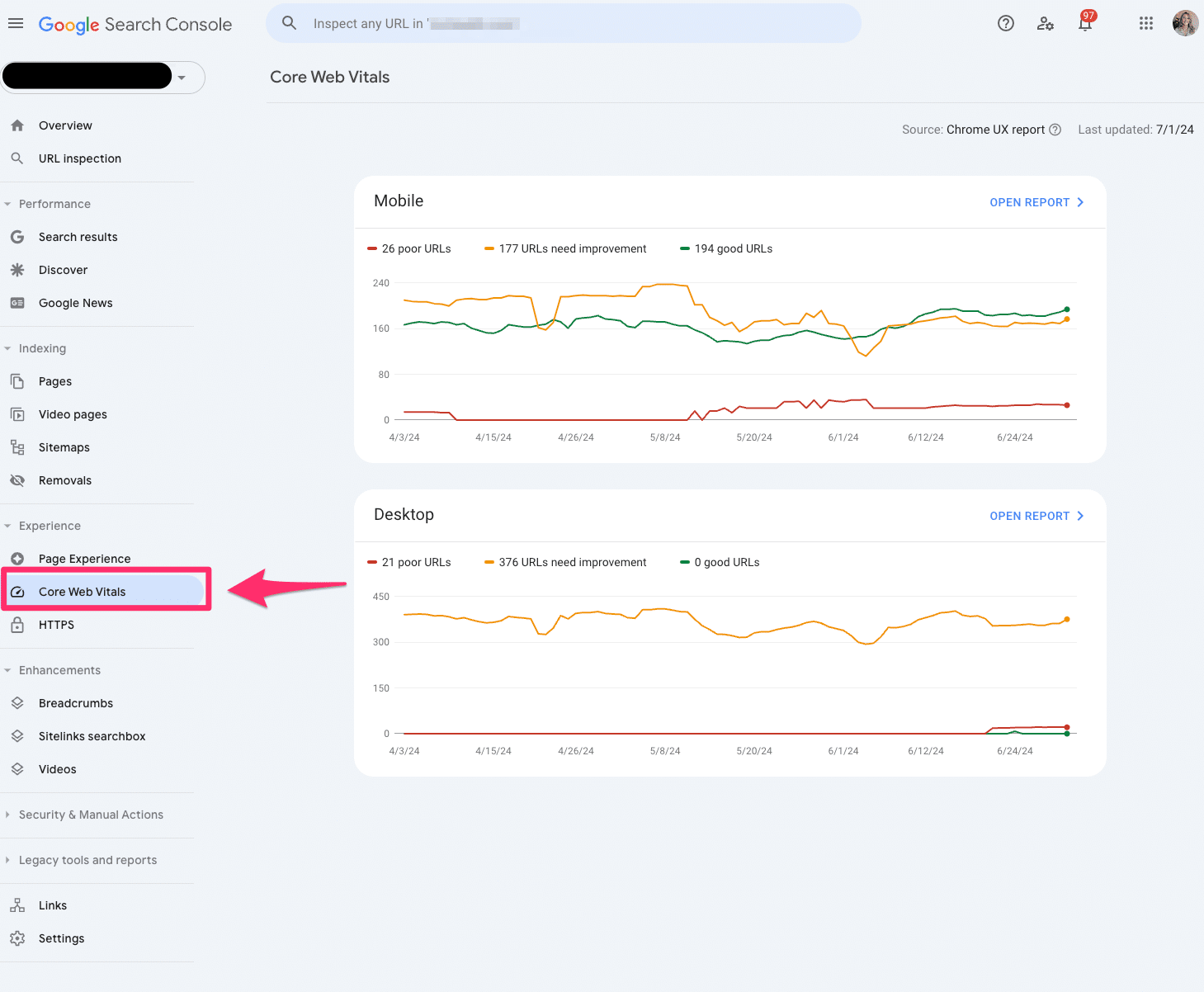
Core Web Vitals
The Core Web Vitals report uses real-world data to tell you how your pages perform.
Again, this is based on a URL level.
The report is grouped into mobile and desktop with segments of poor, needs improvement and good.
The report is based on LCP, INP and CLS user data.
Only indexed pages will be included in the Core Web Vitals report.
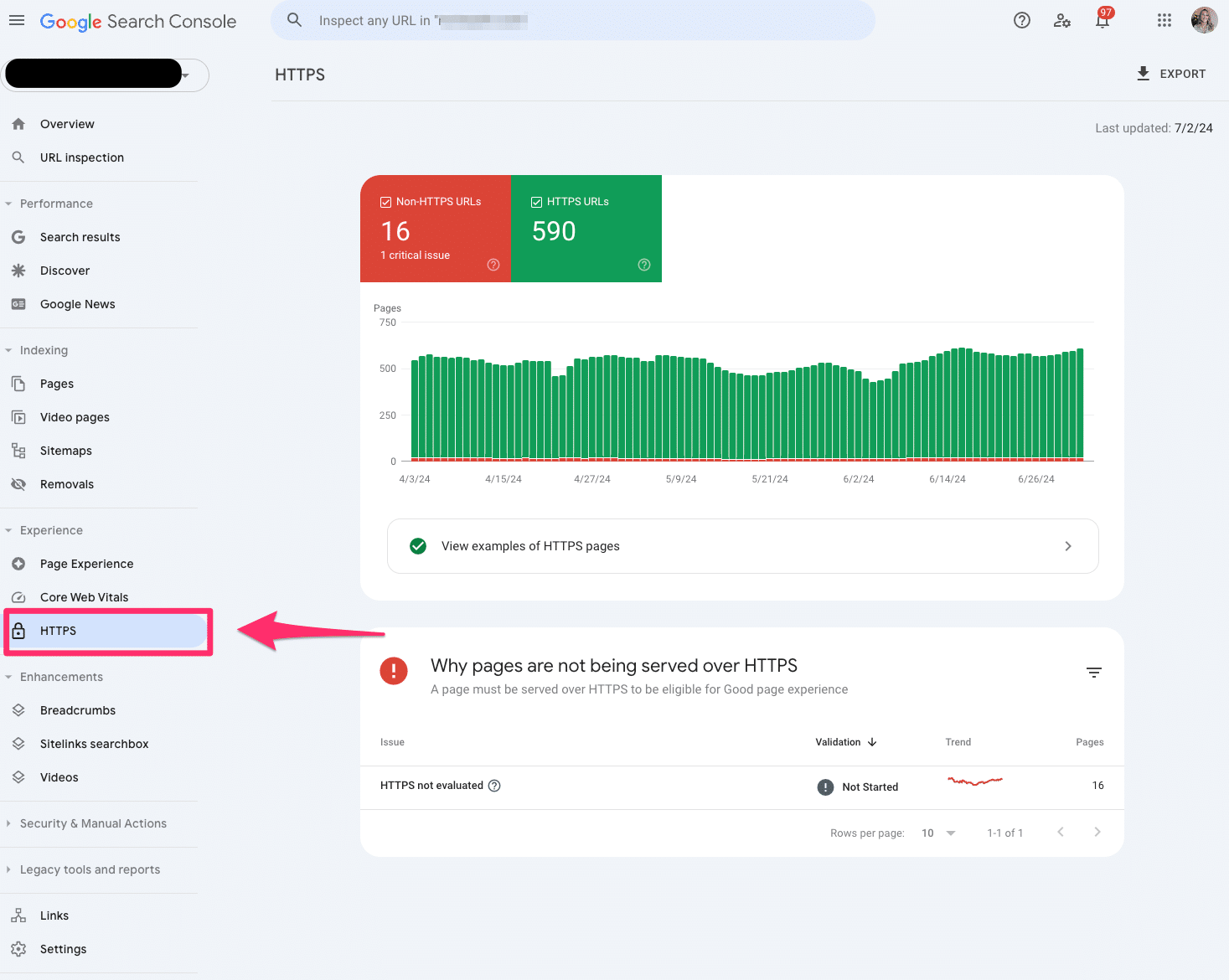
HTTPS
The HTTPS report tells you how many indexed pages on your website are HTTP or HTTPS.
If you notice any HTTP pages on your website, you should convert them to HTTPS. Google indexes the HTTPS version to protect searchers’ security and privacy.
Product snippets
Product snippets are part of the structured data reporting in Google Search Console that showcases which products have product markup on the page.
Currently, Google only supports product snippets for pages with one product.
Be aware of Google’s algorithm updates; there can be changes in impressions and clicks for product snippets.
Merchant snippets
Merchant snippets are also part of the rich result report in Google Search Console and serve as extensions of your Product snippet.
Merchant snippets are like getting a golden ticket. It provides more enhanced features in the SERPs like carousels or knowledge panels.
Shopping tab listings
Shopping tab listings are also part of the rish result reports in Google Search Console and showcase the pages listed in the Shopping tab in Google search results.
If you’re an ecommerce marketer, you’ll want to live inside this report.
Pro tip: If you don’t see this information in Google Search Console, make sure your website’s structured data fits within the Merchant listing structured data requests.
AMP
The AMP report in Google Search Console shows all the AMP pages on your website and potential issues you may need to troubleshoot.
If AMP is a big part of your SEO strategy, you’ll want to ensure you reach zero in the critical errors section of the report so Google can detect your AMP pages.
Breadcrumbs
The breadcrumbs report is also part of the rich result report in Google Search Console, which tells you if your breadcrumb structured data is correct and readable by Google.
Breadcrumbs are essential to maintain a healthy site architecture and user experience. If you see any errors in the breadcrumbs, I recommend prioritizing this quickly.
FAQ
The FAQ report is also part of Google Search Console’s rich results report, which shares insights into which pages received the FAQ snippet.
However, with Google’s changes to visibility of HowTo and FAQ rich results, you may see this fluctuate quite a bit.
Profile page
The Profile page report reflects which pages are getting the profile page markup. You’ll want to validate and clean up any makeup you may be missing because these offer interesting SERP features.
It’s almost like a card functionality similar to the recipes.
Review snippets
Review snippets showcase your validation of review markup on pages.
You should check that all your markup is valid. If you notice any errors, work on updating those specific pages.
With Google’s algorithm updates, I’ve seen significant fluctuations in review snippets. Always double-check if it’s a bug, algorithm update or a true markup error.
Sitelinks searchbox
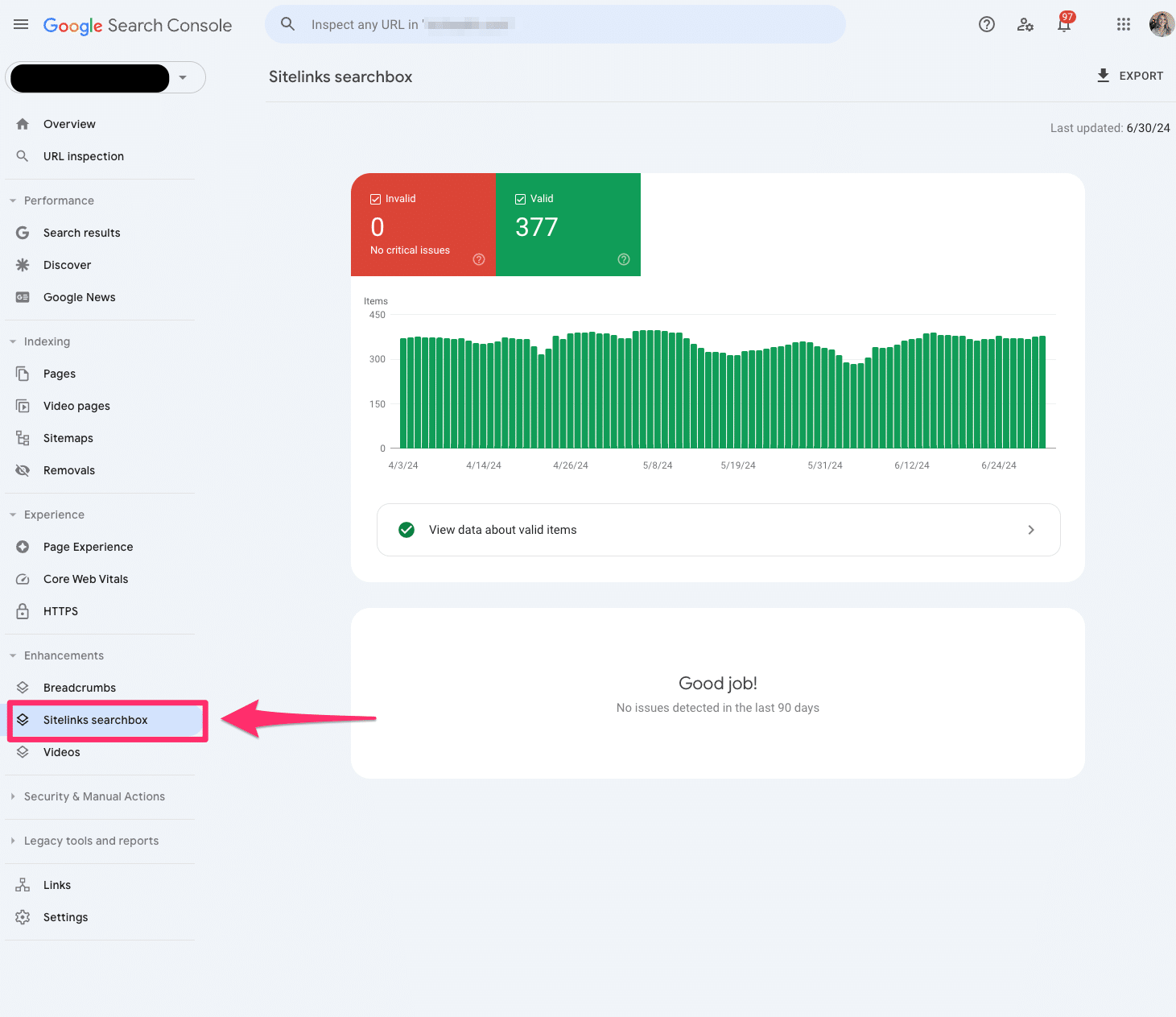
The sitelinks searchbox is a feature of the rich result report in Google Search Console that tells us in more detail any errors you may have to your Sitelinks Searchbox markup.
Unparsable structured data
The unparsable structured data report in Google Search Console aggregates structured data syntax errors that prevent Google from identifying the specific structured data type.
Videos
The video indexing report in Google Search Console has expanded dramatically over the last few years, giving us more detailed information on how your videos perform in search results.
You can dissect whether the video is outside the viewport, too small or too tall. If you’re building a video content strategy, it really helps to elevate your game with your UX team.
Manual actions
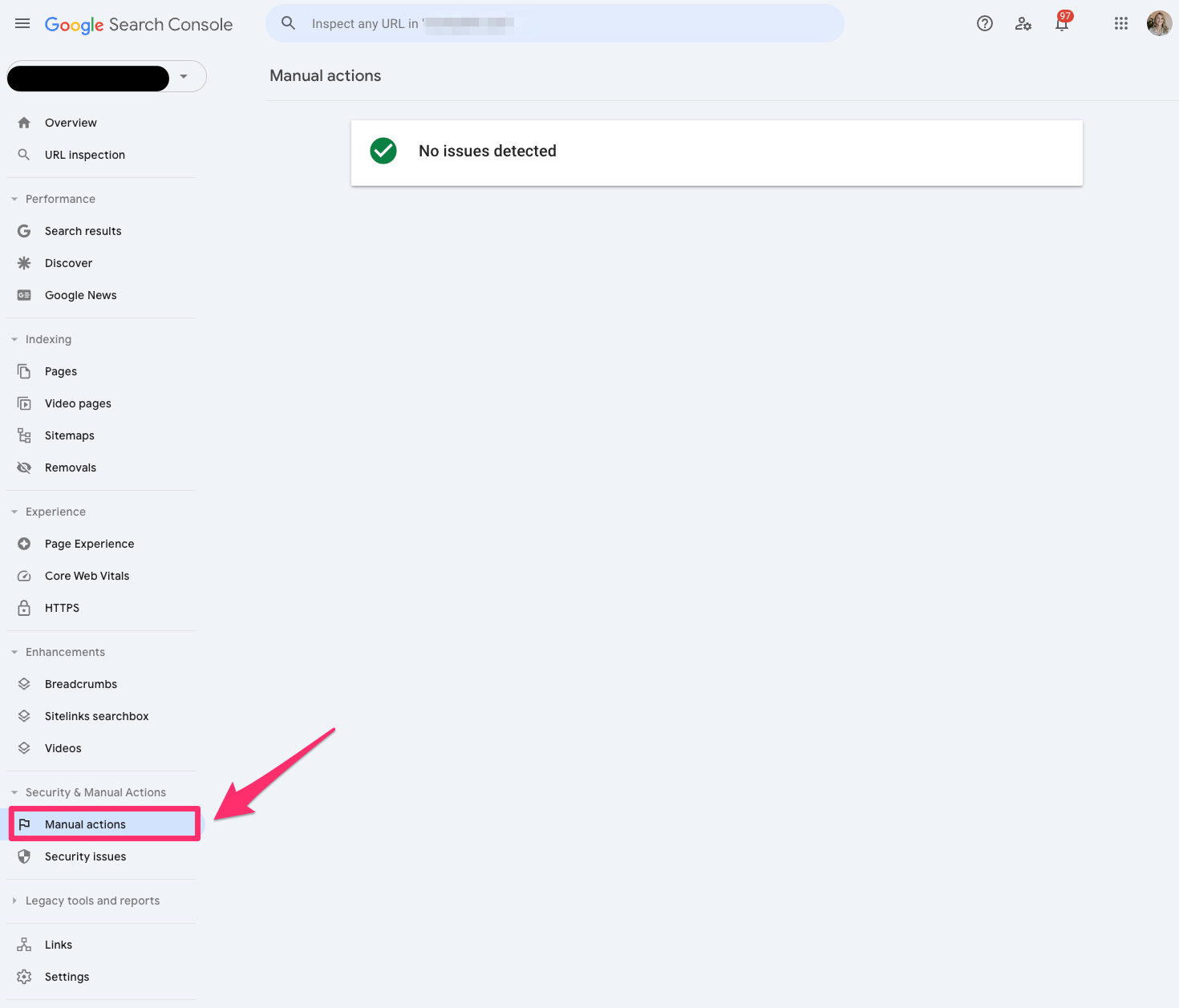
If you’re running your SEO strategy properly, you’ll hopefully never have to worry about the manual action report.
But if you’re one of the unlucky ones who gets hit with a manual action, Google will tell you in this report in Google Search Console.
A manual action occurs when a human reviewer at Google determines that a specific page or pages are not compliant with Google’s spam policy.
Security issues
The Security issues report in Google Search Console will tell you if your site was hacked or harmful.
Google now emails you to notify you when you receive a security issue.
Check out this beauty I received within the first week of starting to work on a new site.
Links
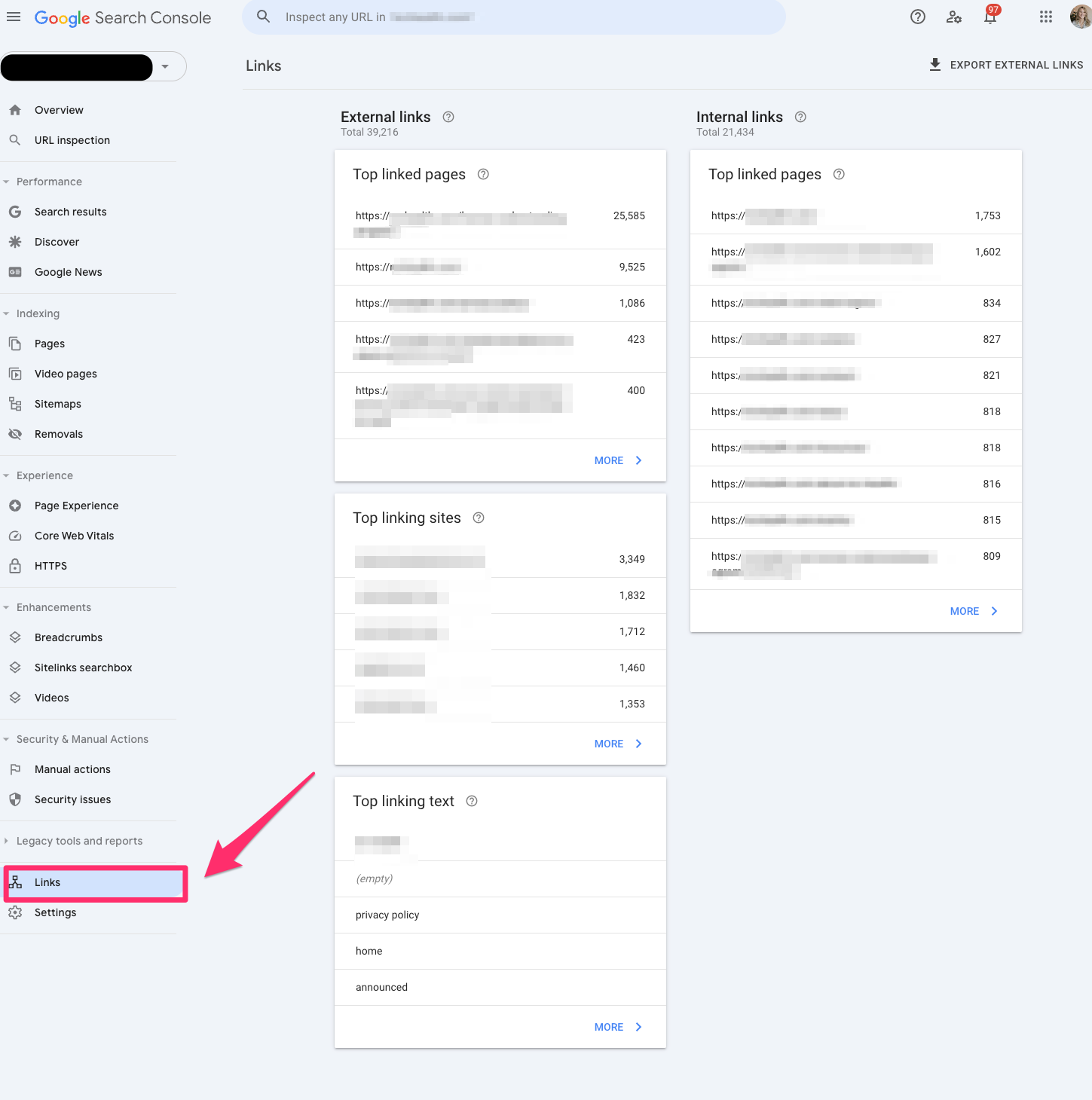
The Links report in Google Search Console allows you to view all your site’s internal and external links. You can view the top link pages, top linking sites and top linking text.
This is a legacy report, so I’d be cautious about relying on it in case Google decides to depreciate it.
Settings
If you need to verify ownership or add a new user, you should check the settings in Google Search Console.
Two cool reports under Settings in Google Search Console go undiscovered, but these are two of my favorite reports.
Robots.txt
The robots.txt report tells us which pages Google can crawl or any potential issues preventing Google from crawling your site.
One of the challenges I run into when working with developers is that they often choose to disallow it in the robots.txt file instead of adding a noindex, nofollow tag.
This report will help audit any technical updates with your dev team.
The robots.txt report is only available if you set up a domain property.
Crawl stats
The crawl stats report shows Google’s crawling history on your website. It can be sorted by how many requests were made and when, server response and availability issues.
It tells SEO professionals if Google is encountering problems when crawling your website.
This report is only available if you have a domain property or a URL prefix at a root level.
Unlocking the power of Google Search Console for better SEO
That’s a lot to unpack. But the gist is that Google Search Console is a place that helps you better understand how your website is performing.
All of the above is just part of the early phases of Google Search Console’s transformation. Google also hopes to add Google’s AI Overviews data in the future. That seems like a worthwhile endeavor, seeing as no tool supports AIO data today.
And I know you all must be hoping Google’s AI Overviews don’t overtake your jobs.
But in the insane event it does, at least you’re covered on how Google Search Console got here today.
Until then, you’ll have to make do with luxe URL inspections, regex filters and manual action surprises.
Courtesy of Search Engine Land: News & Info About SEO, PPC, SEM, Search Engines & Search Marketing
Monday, July 8th, 2024
The EU sent Amazon a new request for information (RFI) on Friday, focusing on the ecommerce giant’s recommender systems, advertising transparency and risk assessment measures.
- This is Amazon’s third RFI since being designated a very large online platform (VLOP) under the DSA.
- The company must respond by July 26.
Why it matters. The European Commission’s latest request for information (RFI) to Amazon signals intensifying oversight of big tech under the Digital Services Act (DSA), potentially leading to hefty fines for non-compliance.
Details. The EU is seeking information on:
- Transparency of Amazon’s recommender systems.
- Design and implementation of its ad repository.
- Risk assessment reporting.
Why we care. The EU’s focus on recommender systems could lead to more transparency in how ads are displayed and targeted on Amazon’s platform. This may provide advertisers with:
- Better insights into ad performance.
- More clarity on how their ads are being served to consumers.
- Potentially fairer competition in ad placement.
The big picture. The DSA aims to regulate digital services and protect users from online harms, with stricter rules for larger platforms like Amazon.
Between the lines. The Commission’s focus on these areas suggests concerns about the potential societal impact of AI-driven systems and the need for greater transparency in digital advertising.
What they’re saying. Amazon stated it’s “working closely with the European Commission” and shares the goal of creating a “safe, predictable and trusted shopping environment.”
What to watch. The EU’s response to Amazon’s information could lead to a formal investigation, with potential fines up to 6% of global annual turnover for DSA violations.
Courtesy of Search Engine Land: News & Info About SEO, PPC, SEM, Search Engines & Search Marketing
Monday, July 8th, 2024
The mere mention of math can bring back haunting memories of unfinished exams and complex equations. But what if I told you that the math we’re about to explore confirms a lot of what you already intuitively know about SEO?
As SEOs, we often have hunches about what factors influence rankings. Maybe you’ve noticed that pages with more backlinks tend to rank higher or that faster-loading sites seem to perform better in search results.
Today, we will look at mathematical tools that can help us validate (or sometimes challenge) these hunches. By the end of this article, you’ll see how these tools will help you separate SEO fact from fiction and boost your confidence in recommending strategies.
The value of applied mathematics in SEO
In the 1985 study “Usefulness of Analogous Solutions for Solving Algebra Word Problems,” researchers found that students often struggled to apply mathematical concepts to similar problems, let alone to real-life situations where these concepts could be beneficial.
This difficulty arises because these concepts are typically learned in isolation. By seeing how these concepts are applied in specific, real-life contexts, students can begin to recognize more opportunities to use them practically.
Today, by examining these tools in the context of SEO, we can start to identify other SEO scenarios that may benefit from applying mathematical concepts.
At my agency, we apply correlation analysis in several critical areas:
- The role of quality vs. quantity of referring domains in a given industry.
- The relationship between content and traffic. Is the quantity of content important in an industry?
- The importance of various ranking factors in specific SERP result pages. How important are referring domains to a specific result?
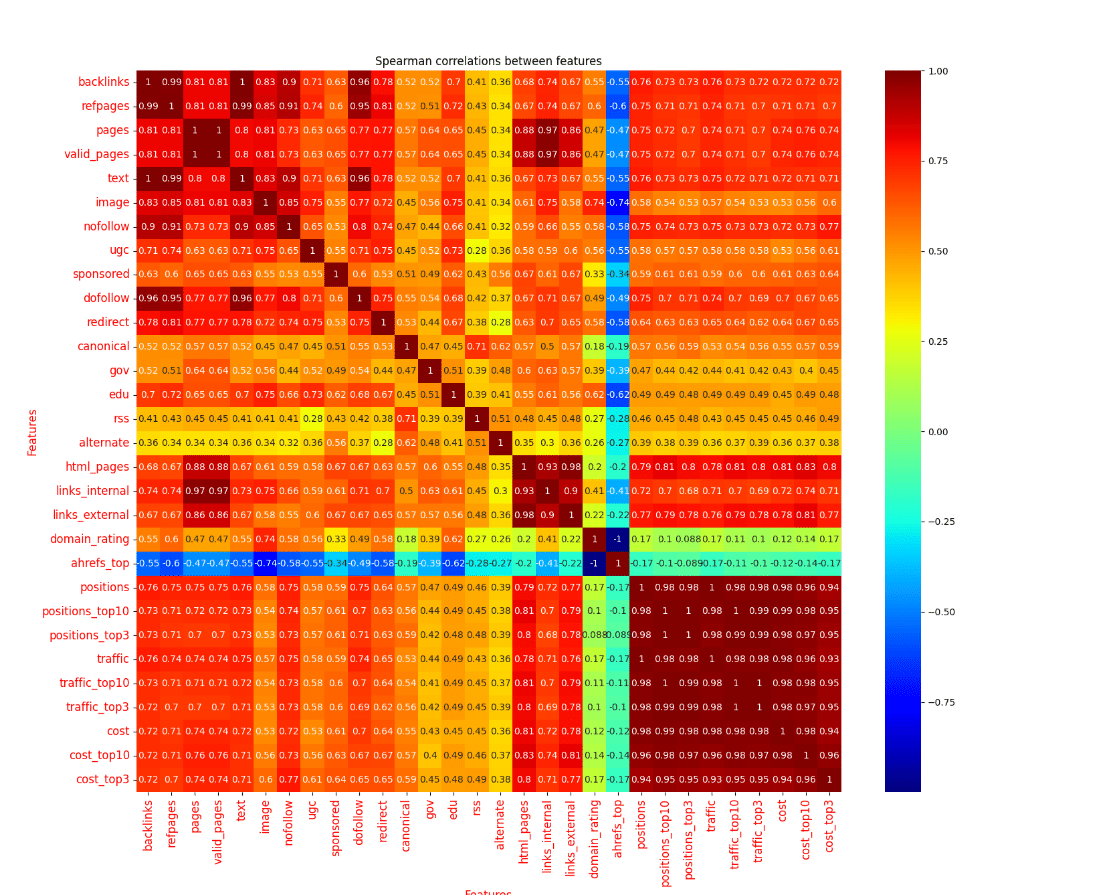 The visual above shows the Spearman correlation of Ahrefs’ metrics to traffic and keyword rankings. This is for a niche medical space but shows how correlation can be used to understand whether referring domains, quantity of content or quality of links relate to traffic in the niche.
The promise and limitations of correlation analysis in SEO
If we are confident that the Google algorithm has certain ranking features, could we just use correlation analysis of search results to see their influence?
Like most SEO questions, the answer is “it depends.”
Identifying the role of ranking factors and their importance for a SERP is tricky because different ranking factors may not correspond to rankings in a linear or consistently increasing/decreasing way.
For example, consider the impact of page load speed on rankings. A website might see significant ranking improvements when reducing load time from 10 seconds to three seconds, but further improvements from three seconds to one second might yield diminishing returns.
In this case, the relationship between page speed and rankings isn’t linear — there’s a threshold where the impact becomes less pronounced, making it challenging to accurately assess its importance using simple correlation methods.
Before we dive into analyzing specific ranking factors for a SERP, we need to understand the basics of correlation and which method would give us the best results and for which ranking factors. You’ll quickly learn that even though we use mathematics, domain expertise and our expectations about data play a critical role in using mathematics effectively.
Dig deeper: How research on learning can help you understand advanced SEO concepts
So, what is correlation? Let’s go over the two most popular strategies.
Pearson correlation in SEO
Pearson correlation looks for straight-line relationships between two factors. In SEO, this might be useful for factors that tend to increase or decrease steadily with rankings.
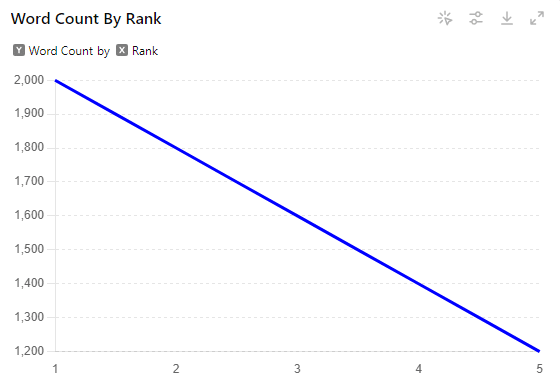
Example: Let’s look at the relationship between content length and search engine rankings for a specific keyword.
- Rank 1: 2000 words
- Rank 2: 1800 words
- Rank 3: 1600 words
- Rank 4: 1400 words
- Rank 5: 1200 words
Run Python code
import numpy as np

from scipy.stats import pearsonr

# Data

ranks = [1, 2, 3, 4, 5]

word_counts = [2000, 1800, 1600, 1400, 1200]

# Calculate Pearson correlation

correlation, p_value = pearsonr(ranks, word_counts)

print(f"Pearson correlation coefficient: {correlation}")

print(f"P-value: {p_value}")
In this example, we see a perfect Pearson correlation. As the content length decreases, the ranking position steadily increases (gets worse). Each drop of 200 words corresponds to a drop of one ranking position.
(In mathematical terms, this would be a perfect negative linear correlation with a value of -1.)
However, real SEO data is rarely this perfect. If the page at Rank 3 had 1,750 words instead of 1,600, we’d still have a strong correlation, but it wouldn’t be perfect.
Pearson correlation in SEO is most useful when we expect a factor to have a consistent, linear relationship with rankings.
Useful tip on statistical significance
The “30 rule” for Pearson correlation suggests that for a correlation to be statistically significant, a sample size of at least 30 is typically needed.
This is based on the Central Limit Theorem, which states that with a sufficiently large sample size (n ≥ 30), the sampling distribution of the correlation coefficient will be approximately normally distributed, allowing for more reliable and valid significance testing.
Spearman correlation in SEO
Spearman correlation is often more useful in SEO because it examines whether one factor tends to increase as another increases (or decreases), even if the relationship isn’t perfectly steady. The beauty of Spearman is that it’s just a Pearson correlation on ranked data.
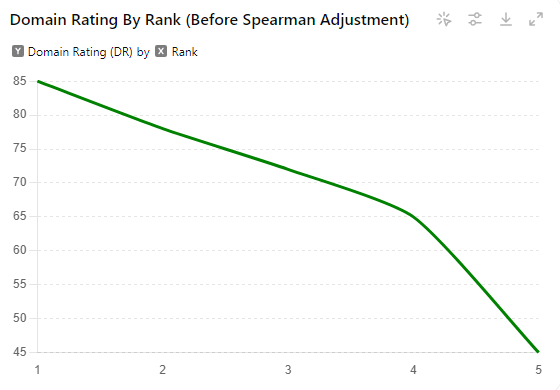
Example: Let’s look at the relationship between a page’s Ahrefs Domain Rating (DR) and its ranking for a specific keyword.
- Rank 1: DR 85
- Rank 2: DR 78
- Rank 3: DR 72
- Rank 4: DR 65
- Rank 5: DR 45
Now, let’s convert this to ranked data:
Step 1: Rank the DR values (highest to lowest):
- 85 (Rank 1)
- 78 (Rank 2)
- 72 (Rank 3)
- 65 (Rank 4)
- 45 (Rank 5)
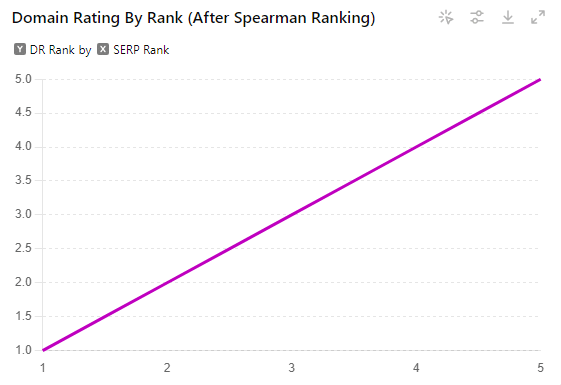
Step 2: Pair the DR ranks with the SERP ranks:
- SERP Rank 1: DR Rank 1
- SERP Rank 2: DR Rank 2
- SERP Rank 3: DR Rank 3
- SERP Rank 4: DR Rank 4
- SERP Rank 5: DR Rank 5
Run Python code
from scipy.stats import spearmanr

# Data

serp_ranks = [1, 2, 3, 4, 5]

dr_ranks = [1, 2, 3, 4, 5]

# Calculate Spearman correlation

spearman_correlation, spearman_p_value = spearmanr(serp_ranks, dr_ranks)

print(f"Spearman correlation coefficient: {spearman_correlation}")

print(f"P-value: {spearman_p_value}")
In this case, we end up with a perfect Spearman correlation, even though the original data wasn’t perfectly linear. The Spearman correlation looks at the relationship between these ranks, rather than the raw values.
Here’s why this is powerful: Even if the original DR values were wildly different (say, 1000, 500, 200, 100, 50), as long as they maintained the same order relative to the SERP rankings, the Spearman correlation would be the same.
This approach helps smooth out non-linear relationships and reduces the impact of outliers. In SEO, where many factors don’t have a perfectly linear relationship with rankings, Spearman correlation often gives us a clearer picture of the general trends.
(In technical terms, Spearman correlation looks at the monotonic relationship between variables using ranked data rather than raw values.)
Using this ranking method, Spearman correlation can capture trends that Pearson might miss, making it valuable in our SEO analysis toolkit.
Applying correlation to SEO ranking factors
With correlation, we can begin to think through a basic ranking heuristic for a given search result. For example, let’s imagine a basic formula like this:
We can start making educated guesses about the weights (w1, w2, w3, etc.) of these factors based on correlation analysis.
The multitude of ranking factors
Google’s algorithm is incredibly complex, with hundreds of ranking factors at play. As SEOs, we often find ourselves trying to decipher which of these factors are the most crucial.
Over time, through a combination of experience, testing and official Google statements, we typically develop a list of 10-20 factors that we believe are the most impactful.
This list might include elements like:
- Content quality and relevance.
- Backlink profile (quantity and quality).
- User experience signals.
- Page speed.
- Mobile-friendliness.
- Keyword usage and optimization.
- Content freshness.
- SSL security.
- Schema markup.
While this list isn’t exhaustive, it gives us a starting point for our correlation analysis.
Get the daily newsletter search marketers rely on.
Types of ranking factors and what we’d expect
Let’s dive deeper into how different types of ranking factors might behave in our analysis.
Increasing factors
These are factors where we generally expect that more is better. For example, with referring domains, we’d typically expect that sites with more high-quality backlinks would rank higher.
If this factor is significant, we’d see a strong negative correlation between the number of referring domains and ranking position (remember, lower ranking numbers are better).
- Expected correlation: As the number of referring domains increases, ranking position decreases (improves).
Linear ranking factors
These factors tend to have a more straightforward relationship with rankings. Content length could be an example here. If it’s a significant factor, we might see a consistent relationship where longer content correlates with better rankings, up to a point.
- Expected correlation: As content length increases, ranking position decreases (improves) in a relatively consistent manner.
Decreasing ranking relationships
These are factors where lower values are generally better. Site speed is a classic example. We’d expect faster-loading sites to rank higher.
- Expected correlation: As page load time decreases, ranking position decreases (improves).
Binary ranking factors
These are yes/no factors, like whether a site has SSL or not. For these, we might look at the proportion of top-ranking sites that have the factor compared to lower-ranking sites.
- Expected pattern: A higher proportion of top-ranking sites would have the factor compared to lower-ranking sites.
Threshold-based and non-linear factors
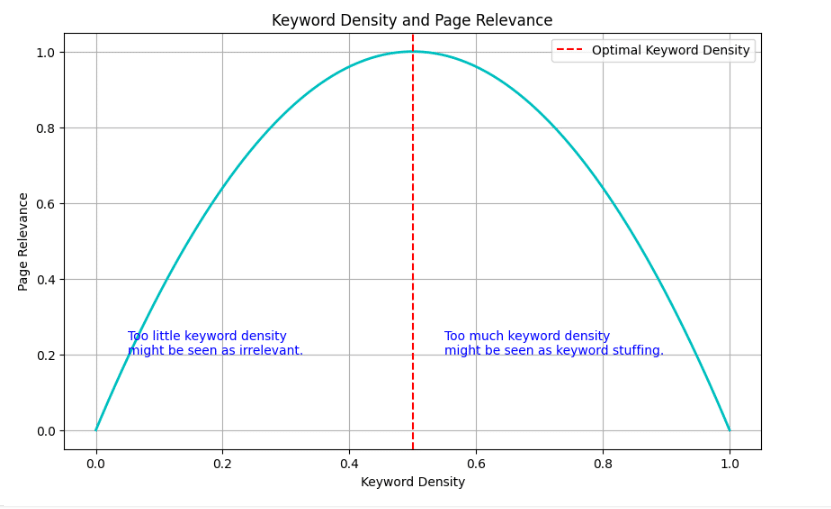
These are perhaps the trickiest to analyze with simple correlation. Keyword density is a good example. If it is too little, the page might not be seen as relevant. Too much and it might be seen as keyword stuffing.
- Expected pattern: This is where we might see an “upside-down parabola” shape, which we’ll discuss more in the next section.
The difficulties of using correlations
While correlation analysis can be incredibly useful, it comes with several challenges that are crucial to understand.
Factors in isolation vs. in tandem
When we examine ranking factors individually, we risk overlooking important interactions between them.
For instance, consider a website with high-quality content but fewer backlinks. It might still outrank a site with more backlinks but lower content quality.
This highlights the necessity of looking at multiple factors together to get a true picture of what influences rankings.
Example of Google Ranking factors in parallel
Imagine you are evaluating the impact of various ranking factors on your website’s performance.
Let’s say you consider content quality, backlink quantity and mobile-friendliness. While each of these factors individually contributes to your ranking, their combined effect is what truly matters.
A website that excels in content quality and mobile-friendliness but has fewer backlinks might still perform well due to the synergy between high-quality content and a user-friendly mobile experience.
Overpowering ranking factors
It’s also crucial to understand that some ranking factors can greatly overpower others.
For example, if a website has an exceptionally high number of authoritative backlinks, this might significantly boost its rankings even if its content quality is moderate.
This dominance can make it challenging to see the impact of smaller factors, such as page load speed. Because the effect of the stronger factor overshadows the weaker one, a site with excellent backlinks might not need to focus as heavily on improving load speed to see ranking improvements.
Quadratic nonlinear relationships
Some factors have what we call an “upside-down parabola” shape. Keyword usage is a perfect example. Let’s say we’re analyzing the keyword density of “best running shoes” in product reviews:
- 0% density: The page likely won’t rank at all for the term.
- 0.5% density: This might be ideal, helping the page rank well.
- 1% density: Still good, maybe ranking slightly lower.
- 2% density: Starting to look like keyword stuffing, rankings drop.
- 5% density: Likely seen as spam, rankings plummet.
If we plotted this, we’d see an upside-down U shape, with the best rankings in the middle and worse rankings at both extremes.
Analyzing non-linear factors
To analyze factors like this, we might need to get creative. Instead of looking at the raw keyword density, we could:
- Look for the min and max frequency in the top-ranking results and correlate that instead. This gives us a “sweet spot” range.
- Use a quadratic regression instead of linear correlation, which can capture this parabolic relationship.
- Transform the data. For example, we could calculate the absolute difference from the “ideal” density (say, 0.5%) and correlate that with rankings. This would show that being close to the ideal in either direction correlates with better rankings.
Other issues
Confounding variables: Sometimes, what looks like a correlation might be explained by another factor entirely. For instance, we might see a correlation between word count and rankings, but this could be because longer content tends to be more comprehensive and valuable, not because Google has a “word count” factor.
Causation vs. correlation: Just because two things are correlated doesn’t mean one causes the other. For example, we might see a correlation between the number of social shares and rankings. But this doesn’t necessarily mean social shares directly influence rankings; it could be that great content both ranks well and gets shared more.
Sample size and variability: When we’re looking at a single SERP, we’re dealing with a small sample size, which can lead to misleading conclusions. It’s often better to analyze patterns across multiple SERPs in the same niche.
Time lag: Some factors might have a delayed effect on rankings. For instance, new backlinks might take time to influence rankings, making it hard to spot the correlation if we’re looking at current backlink numbers and current rankings.
By understanding these complexities, we can use correlation analysis more effectively, combining it with other analytical tools and our SEO expertise to draw meaningful conclusions about ranking factors.
Additional hurdles in correlation analysis for SEO
Unknown algorithm weights: Without knowing the exact weights Google assigns to different factors, our correlation analysis may not accurately reflect their true importance.
Relevance effects: Tools like BM25, named entity recognition and TF-IDF attempt to quantify relevance, but how these interact with other factors like backlinks can be complex and difficult to capture in a simple correlation analysis.
Domain-level metrics: The leaked information suggests that overall domain metrics may be factored into the scoring algorithm. Since we’re only looking at the SERP itself and individual page factors, these domain-level influences act as a black box that could dramatically change rankings.
Spurious correlations: It’s important to be aware that correlation does not imply causation. Some factors may show strong correlations but not actually be causal in determining rankings.
Correlated factors: Many SEO factors are not independent of each other, making it difficult to isolate their individual effects through correlation analysis alone.
These hurdles underscore why domain knowledge and expertise are crucial. As the person conducting the analysis, you need to have some idea of what you would expect these factors to do to be able to interpret the results meaningfully.
What is a strong correlation in a SERP result?
Obviously a .99 correlation is great, but given the interplay of so many variables when should we really take notice of a ranking factor and its importance?
In the messy world of SEO, a 0.99 (or -.99) correlation would be suspiciously high. More realistically, we should start paying attention to correlations around 0.2 to 0.5, especially if they’re consistent across multiple analyses.
As a result, when correlations emerge in SEO analysis, they tend to be much smaller than we might expect in more straightforward relationships. This doesn’t diminish their importance, however.
Even these smaller correlations can provide valuable insights into the factors influencing search rankings, especially when viewed as part of a broader pattern rather than in isolation.
Here’s when you should really take notice:
- Repeatability: If you’re seeing similar correlations for a factor across different keywords, time periods, or industries, it’s more likely to be important.
- Alignment with SEO knowledge: If the correlation aligns with what we know about SEO best practices or Google’s stated preferences, it’s more likely to be meaningful.
Where can correlation help beyond our SEO intuitions?
Now, you might be thinking, “This is all well and good, but how does it actually help me in the real world? Could’t I just eyeball the search results and see the factors that matter?”
Great question! Here are some practical applications where correlation analysis can give us additional insights that go beyond our gut feelings.
- Ruling out the influence of some factors: Sometimes, what we think matters… doesn’t. For example, you might believe that using exact-match keywords in H2 tags is crucial for ranking. But when you run a correlation analysis, you find no significant relationship between H2 keyword usage and rankings. This doesn’t mean H2 tags are useless, but it suggests they might not be as important as you thought.
- Unveiling industry-specific ranking factors.
- Prioritizing SEO efforts.
- Measuring the impact of algorithm updates: If you monitor how correlations change with algorithm updates, it can help point out which underlying factors may have changed in the update.
Advanced strategies and future directions
While correlation analysis is a useful first step in understanding ranking factors, more advanced techniques can be applied that can better handle the multivariate nature of ranking factors and the many different types of relationships ranking factors may have with scoring.
- Regression analysis: This can help determine the relative importance of multiple factors simultaneously.
- Decision trees: These can capture non-linear relationships and interactions between factors.
- Machine learning at scale: Combining correlation techniques with machine learning can reveal complex patterns across large datasets.
Using correlation analysis to inform your SEO strategy
Correlation analysis can be a powerful tool for SEOs seeking to understand the relative importance of various ranking factors. However, it’s crucial to approach this analysis with a solid understanding of statistical concepts, awareness of the limitations and strong domain expertise.
By combining correlation analysis with other advanced techniques and always grounding our interpretations in SEO best practices, we can gain valuable insights to inform our strategies and decisions.
Dig deeper: Analyze content publishing velocity with this Python script
Courtesy of Search Engine Land: News & Info About SEO, PPC, SEM, Search Engines & Search Marketing
Saturday, July 6th, 2024
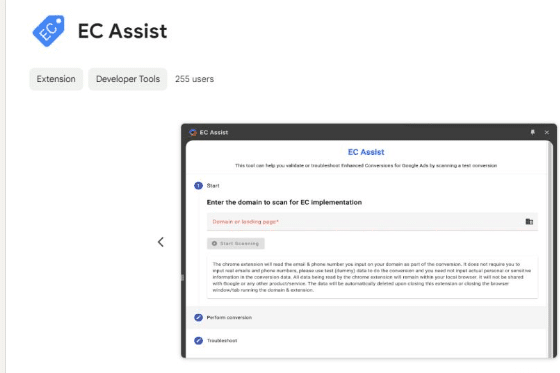
Google rolled out a Chrome extension designed to help advertisers troubleshoot their Enhanced Conversions setup called EC Assist.
Why we care. Enhanced Conversions are crucial for improving Google Ads performance, but setting them up correctly can be a challenge.
How it works:
- Advertisers install the EC Assist Chrome extension
- They run a test conversion on their website
- EC Assist identifies potential issues and suggested next steps
Between the lines. This tool reflects Google’s efforts to make advanced advertising features more accessible to a broader range of users.
What advertisers think. We first spotted this update on Head of PPC, Scott Carruthers’ LinkedIn
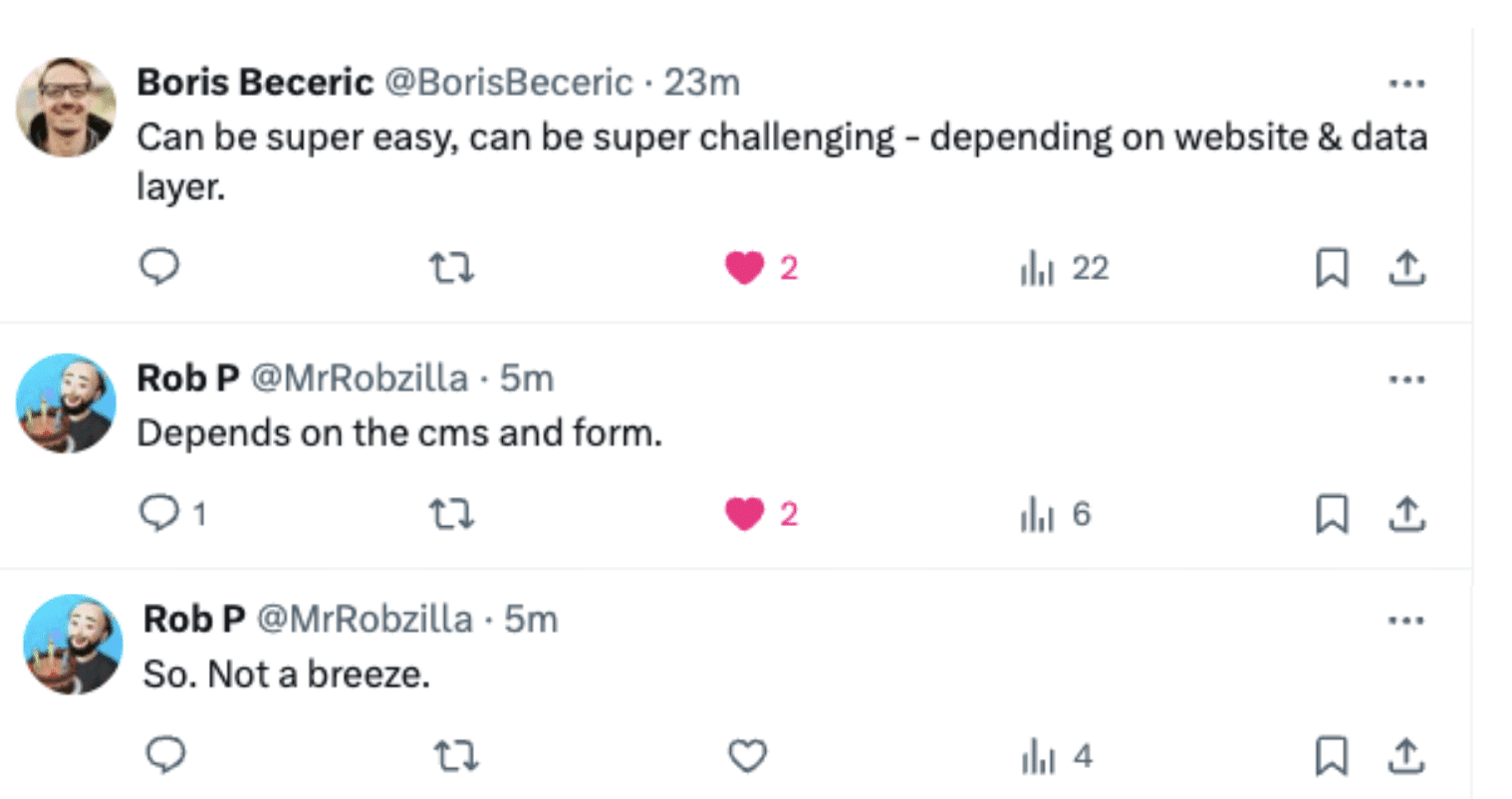
I ran a poll on X to gauge how challenging people are finding setting up Enhanced Conversions. Not everyone finds it cumbersome. The amount of complexity is related to the architecture of a website, according to several sources. Boris Beceric and Rob P commented on X:
The big picture. Enhanced Conversions allow advertisers to send hashed first-party conversion data to Google, powering tools like Smart Bidding, for better ad performance.
Where to get it. The EC Assist Chrome extension is available for download now.
Courtesy of Search Engine Land: News & Info About SEO, PPC, SEM, Search Engines & Search Marketing
Saturday, July 6th, 2024
It’s rare that you always get what you want in life.
As SEO professionals, we all know the sheer pain of not having enough resources because “others are not understanding the value of SEO.”
You can’t win all the time. But, often, we lie to ourselves.
It is not that the other side is wrong but that we are not doing a job that is good enough.
You will not improve your position by seeing yourself as a victim.
You need to break out of this cycle of learned helplessness.
Dale Carnegie wrote this in 1936:
“Do you know someone you would like to change and regulate and improve? Good! That is fine. I am all in favor of it. But why not begin on yourself? From a purely selfish standpoint, that is a lot more profitable than trying to improve others – yes and a lot less dangerous.”
To get more of what you want in SEO, you need to change yourself.
The common denominator here is communication.
We are great at everything SEO and bad at dealing with people. This article will help you overcome this problem.
If you are short on time, here are the takeaways:
- Derive SEO goals from company goals and use input metrics, not just output metrics.
- Deliver a hot story of how SEO helps achieve company goals, not just ice-cold statistics.
- Sell SEO as growth, not marginal optimization.
- Improve your communication skills, not your SEO skills.
- Work with others in united clockwork, not isolated silos.
- Make SEO easy and uncomplicated, not nerdy, esoteric and too complex.
How to get more SEO buy-in and budget
To do anything in SEO, you need two things:
- Buy-in.
- Budget/resources.
To get both, you need to show that you understand how the business works and how SEO will impact it. Then, tell the right story and reframe how you sell SEO.
Company goals > SEO goals: Get in line and leverage input metrics to get more buy-in
I see SEO failing most often due to a lack of execution and throughput. Why does this happen?
There is a severe lack of understanding of SEO’s value. But it’s not that other people are stupid. Instead, it’s that we are not doing a good enough job communicating this value.
Adam Goyette hit the nail on the head with this statement:
- “The problem isn’t that your CEO ‘doesn’t get marketing’ as many marketers love to lament. The problem is they care about how marketing is impacting revenue and you are making that impossible to understand or even worse hiding from it.”
You need to show that you understand what the company wants. Then, you must demonstrate to the company how organic search can help to achieve that.
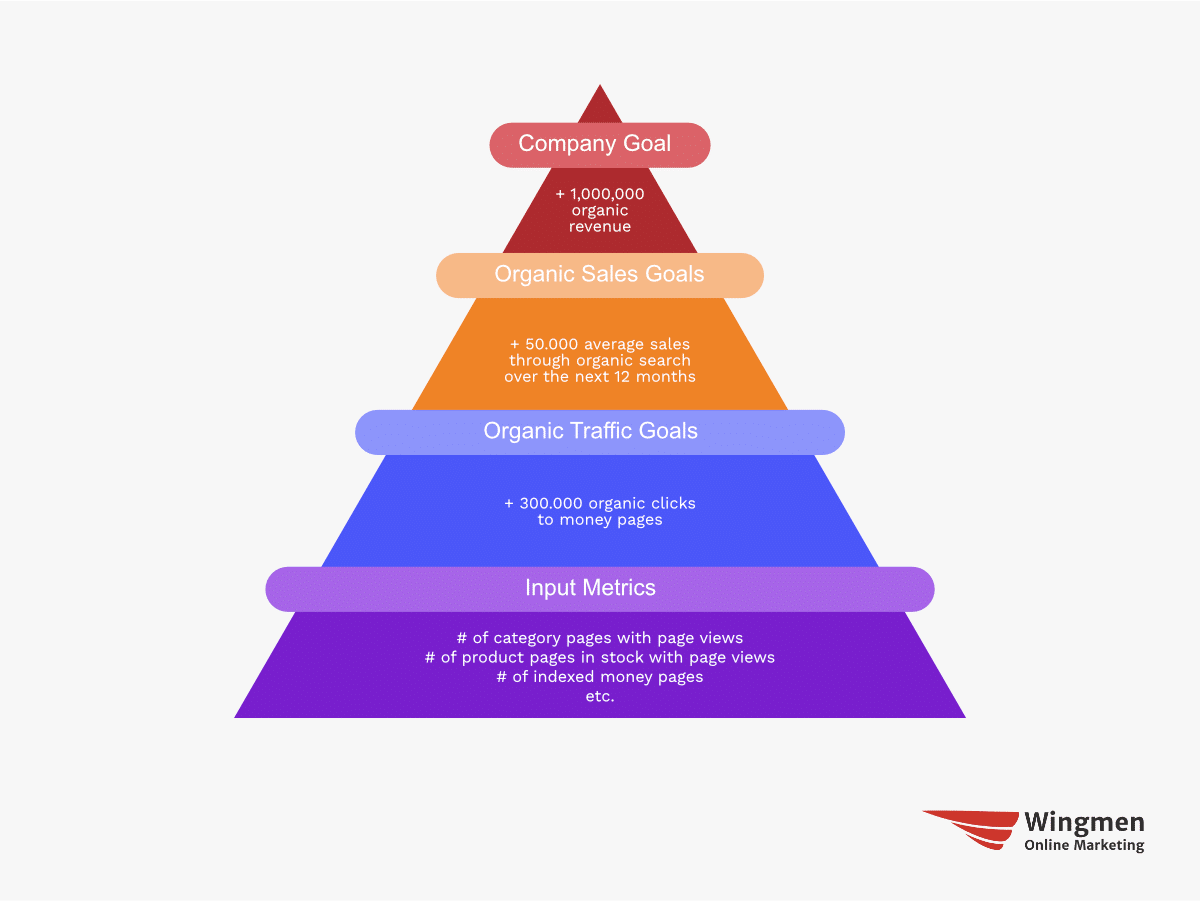
The solution: Derive SEO goals evidently from business goals.
For example:
- The company needs to reduce paid media costs.
- As a result, the goal is the same amount of paid media revenue ($1 million) but in organic revenue, so about 50,000 average sales.
- SEO can help achieve that goal by:
- Getting a certain number of leads/sales deducted from existing numbers.
- You will need 300,000 organic page views to money pages (old and new).
- To get there, we need to meet more market demand (keyword coverage).
- As a result, we need to have more category/product pages, sales enablement content, etc.
- To create these pages we need writers, designers and developers.
- This will cost us $100,000.
Going from business goals to SEO goals to input metrics is a concept made famous by Amazon and covered in the book “Working Backwards.”
In brief, instead of reporting only on output (something you cannot influence directly), you derive metrics that, when increased, influence the output.
Amazon, for example, started with a number of product detail pages.
Input metrics often need to be refined over time because you will not always find the best denominator immediately.
Amazon refined the metric to the number of product detail page views because a product page no one sees is a product page no one needs.
This was again refined to the percentage of product detail page views but only counting when products were in stock.
 A product no one can buy is a product no one can buy.
 The final input metric was refined as the percentage of product detail page views where products were in stock and immediately ready for two-day shipping.
Here’s an example of how this could be visualized for the company described earlier:
Note: The goal is not to avoid using outputs but to communicate how your actions contribute to increasing them. SEO takes more time than PPC, for example, so your report should include the fact that you are working on the right things.
It can also motivate you, your team or your client to see what the SEO (team) achieved in a month or any other period.
Make the invisible visible – both your understanding of how the company works and your work to create profit.
Dig deeper: SEO outcomes vs. SEO outputs: Understanding the difference
A compelling story will get you more SEO budget than ice-cold statistics
In “Same As Ever,” Morgan Housel states:
“There is too much information in the world for everyone to calmly sift through the data, looking for the most rational, most correct answer. People are busy and emotional and a good story is always more powerful and persuasive than ice-cold statistics.”
Human beings are not rational, even if we think we are. When you are pitching to get more of an SEO budget, what you need is a good story.
Here’s a quick example:
Here’s an example slide (inspired by a client we are consulting) to show the “urgency” to act on the developments in their industry and the opportunity it presents:
We don’t see stillness but movement. With the right slides for your pitch, you can show two states: going from downfall to dream outcome.
Show how your plan, as outlined before, is supposed to meet this challenge and opportunity.
People think they want accuracy. What they actually want is certainty.
People don’t “buy” something. What they actually buy is an emotion that is tied to their dream outcome.
Dig deeper: How communication issues prevent you from getting buy-in for SEO
Get the daily newsletter search marketers rely on.
Reframe how you sell SEO: Growth > optimization
Something can logically or mathematically be the same thing, yet be perceived differently psychologically. You can use this fact to your advantage by reframing how you communicate and sell SEO.
SEO is a long-term investment in organic growth. Because of that, it is only logical not to use monthly numbers but yearly numbers.
To say you will get 10,000 page views or 100 leads per month can be reframed to 120,000 page views or 1,200 leads per year. Technically the same, perceived differently though.
Another example is the CTR of positions on page 1:
- We assume the SERP to be quite crowded with SERP features.
- Position 1 has a CTR of around 15% and position 10 of around 1%.
You could now say this: By going from position 10 to position 1, we can increase our CTR by 14%.
While that sounds good, something else sounds much better:
By going from position 10 to position 1, we can 15x our traffic for this keyword.
It’s technically the same, though perceived differently.
Another thing is the tonality of your language. Instead of making SEO seem uncertain, esoteric and unpredictable, you can use high-modality language to communicate the opposite: Certainty, tangibility and predictability.
What you need less are the following words:
- Can
- Could/Couldn’t
- Might
- It depends, haha
Instead, use these:
- Is
- Will/Won’t
- It depends on X, Y and Z
Also, SEO is often perceived as “some kind of optimization.” I know what the O stands for, but it’s a problem with how SEO is being perceived.
Optimization sounds marginal, while growth sounds infinite. We need to stop communicating SEO as something marginal because it isn’t.
Reframing is the martial arts of language.
Use your words wisely because they can be turned into weapons of persuasion.
How to influence others as an SEO
Dealing with people trumps hard SEO skills.
You will get absolutely nowhere if all you do is talk over others in a cryptic language only the deepest nerds will understand.
The recipe for success is being good with people, listening carefully, working together instead of against each other and understanding the human brain.
Communication skills > SEO skills: Let others ‘steal’ your idea and listen carefully
You can have the greatest SEO knowledge. However, if you don’t understand how people work, this knowledge is multiplied by zero, resulting in zero.
25% SEO skill + 75% communication skill > 75% SEO skill + 25% communication skill.
One thing I would avoid is pushing others. It makes everyone uncomfortable. We resent being told what to do.
Orders irritate.
Opportunities excite.
A common mistake many people, including myself, have made is trying to convince others of our ideas.
Someone might say something wrong. It’s an instinct to correct them. Or to convince them they are wrong and you are right.
Instead, try to lead them to your idea. Let them take your idea and think it is theirs. The human brain is wired to distrust information from the outside and prefer information from the inside.
We negotiate all the time, in life and in SEO. We tend to miss that we are rooted in very basic emotions like wanting to feel important or understood. To give other people that feeling we must listen to them.
When you go fishing you are thinking about what the fish want. We somehow fail to use the same logic when dealing with people.
To be interesting, be interested. It’s blatantly obvious but gets ignored just as blatantly. Be a better listener and people will open up to you, revealing their real motives, problems, pains and unmet objectives. Then you can sell them on your proposal to help them (like explained earlier).
The greatest thing you can do to influence people is to show them that you understand them and that you can help them achieve what they want.
Think of others and yourself as clockwork, not silos
Instead of viewing other people as roadblocks, we have to see them as opportunities.
If we fail to do that, we are not talking with each other but over each other. Everyone is just listening to their own voice in their head.
I see SEOs as lions hunting for their prey, aka resources of others. As a result, no one really likes SEOs. We always want to take but rarely give.
We should aim to be seen differently like beekeepers helping others produce more honey. We rely on many people, such as writers, developers and PR, but we can also serve and support them.
For example, we can help writers get more exposure for their work. Or we can help PR people understand how high-quality links influence organic performance, resulting in an even bigger impact of their work.
What we need is connected clockwork, not detached silos.
To make people do something, make it easy
Why do a lot of pitches fail?
We know too much about the topic we are pitching.
We often think what happens in our mind is what happens in the minds of other people.
It’s not.
We need to make SEO as easy to understand as possible.
Others need the basics, not the details.
Avoid talking about Ascorer, Twiddler, vector similarity of content, link juice, SERP overlap, etc.
Instead, communicate what matters to everyone:
- There is an organic demand in organic search.
- We need to meet it with the right offer.
- Google is a business that earns more money if users are happy and satisfied with their search results.
We need to meet expectations by creating content that aligns with our offering for existing and new search demand.
Oren Klaff said the following in “Pitch Anything”:
“You don’t send a cargo container full of information to your customers or potential investors and say, ‘Here, look through this stuff. See what you can make of it.’ They can’t absorb it and if they could, they don’t have the time. This is part of the presenter’s problem: Deciding what to pitch and how is not like a math or engineering problem that can be worked out by having more and more information.”
Less is more, more is less.
Don’t make people think too much.
You can do better, and if you do, you become undeniable
SEO requires a lot these days.
Pure SEO knowledge isn’t going to cut it anymore.
Communication, however, has always been part of being good at SEO, so there are no excuses to make.
Life and SEO are complicated, but nobody cares about them except you.
If we want to be taken seriously, we need to grow up, take accountability for not getting what we want and be willing to improve communicating properly. To do that, we have to
- Show that we think like businesspeople.
- Tell convincing and persuasive stories.
- Empathize with the perspective of others.
- Make things easier to understand.
It should be your desire to become undeniable.
If you can do that, you will get what you want more often and, at the same time, make the people around you, both in life and in SEO, happier.
Courtesy of Search Engine Land: News & Info About SEO, PPC, SEM, Search Engines & Search Marketing
Saturday, July 6th, 2024
Working in SEO requires various tools for research and analysis.
We need to understand website performance, market trends, user behavior, competitor activity and the effort needed to achieve our goals.
While premium tools offer many useful features, several free tools can significantly enhance your SEO efforts.
If you are a freelancer just starting out or working in-house with little budget to spend on tools and software, the following can provide you with (almost) everything you need.
1. Screaming Frog SEO Spider
Screaming Frog SEO Spider is probably the best free tool available. It is a powerful website crawler that allows you to analyze your website’s SEO performance in various ways.
The free version allows you to crawl up to 500 URLs, making it ideal for small to medium-sized websites. It helps identify technical issues and analyze on-page elements such as page titles and metadata.
2. AlsoAsked
AlsoAsked is a fantastic tool for understanding the questions people are asking in relation to your target keywords. It aggregates data from Google’s “People Also Ask” feature, providing a visual representation of how questions are related.
This is a great website to use to identify topics to write about, especially for blog posts. You search based on a specific topic, and the results will give you a whole host of ideas.
3. Ahrefs Webmaster Tools
While Ahrefs is predominantly a paid tool, its Webmaster Tools are available for free. This suite includes tools for checking your website’s health, analyzing backlinks and conducting keyword research.
Ahrefs’ extensive backlink database and keyword analysis capabilities make it a must-have for any SEO professional.
Dig deeper: 5 free SEO tools and plugins to try
4. Microsoft Clarity
Microsoft Clarity is a free user behavior analytics tool that provides deep insights into how users interact with your website. It offers heatmaps, session recordings and comprehensive dashboards to help you understand user behavior and identify areas for improvement.
Clarity is particularly useful for improving user experience and conversion rates. To give you a real-life example, if you have a website with a lot of functionality that is slowing the website down, you can see if users are using it.
5. SEOquake
SEOquake is one of my personal favorite browser extensions. It provides a wealth of SEO metrics, including an on-page SEO audit, keyword density analysis and social metrics.
SEOquake can be integrated with Google Search Console and Google Analytics, making it a versatile tool for quick SEO checks and analyses.
6. AnswerThePublic
AnswerThePublic is an excellent tool for content ideation and keyword research. Similar to AlsoAsked, it is a great resource for understanding the longer-tail phrases people are searching for related to a specific topic.
It visualizes search queries in a unique and intuitive way, displaying questions, prepositions and comparisons related to your chosen keywords. It can also help you understand user intent.
Get the daily newsletter search marketers rely on.
7. Google Search Console
Google Search Console is an essential tool for any SEO professional. It provides comprehensive data on your website’s performance in Google Search, including search traffic, indexing status and any issues affecting your site.
Search Console is invaluable for monitoring your site’s health and identifying opportunities for improvement. It also identifies keyphrases that a website is ranking for that you may not have previously been aware of.
8. Google Analytics
Google Analytics is a powerful tool for tracking and analyzing website traffic. It offers detailed insights into user behavior, traffic sources and conversion tracking. By understanding how visitors interact with your site, you can make data-driven decisions to enhance your SEO strategy.
You can use it along with tools such as Looker Studio to pull and manipulate data, enabling you to drill down to the information you need. While much data is now hidden, it’s still an essential tool.
9. Keyword Surfer
Keyword Surfer is a browser extension that provides keyword search volumes directly in Google’s search results. It also offers related keyword suggestions and domain-level traffic estimations.
This tool is incredibly convenient, and while it’s not designed for more in-depth work, it’s incredibly useful as a way of providing a high-level overview.
10. GTmetrix
GTmetrix is a free tool that analyses your website’s speed and performance. It provides detailed reports on how quickly your site loads, identifies issues slowing it down and offers recommendations for improvement.
Page speed is a crucial factor for user experience and, therefore, SEO, making GTmetrix an invaluable tool for optimizing site performance.
11. Rank Math
Rank Math is a free SEO plugin for WordPress that simplifies website optimization. It offers a set of tools to improve on-page SEO, including schema markup, keyword tracking and content analysis.
Rank Math’s user-friendly interface and detailed recommendations make it an excellent choice for WordPress users, and it is fast catching up with similar plugins.
With thanks to the Women in Tech SEO community for their input into this article.
Dig deeper: Supercharge your SEO tool stack for 2024 with AI
Courtesy of Search Engine Land: News & Info About SEO, PPC, SEM, Search Engines & Search Marketing




















 Graphic inspired by
![A graphic showing how you can tell the right story to get more SEO buy-in and budget. You need a situation (Organic Traffic is declining). Then you need Evidence (Because of a test we did in the US we know we can drive significant organic growth). After that comes what you are asking for (We should invest $ 100,000) followed by the coherent actions (in SEO, UX, and Accessibility teams to compete with [insert key competitor] to achieve a result (to achieve $ 100,000-150,000 / year incremental growth). Lastly, communicate why the ask is aligned with the company strategy (This aligns with our company strategy because we focus on inbound traffic and are an inclusive company).](https://searchengineland.com/wp-content/seloads/2024/07/How-to-get-SEO-buy-in-by-Tom-Critchlow.png) Graphic inspired by
Graphic inspired by