Archive for the ‘seo news’ Category
Monday, May 23rd, 2022

A sublime customer experience allows customers to move from channel to channel without losing their place or the information they’ve entered. To successfully deliver these experiences, brands must meet current data, security, and personalization challenges with ambitious strategies and first-rate technology.
Join seasoned experts from Redpoint Global in a live webinar and learn how you can creatively collect first-, second- and third-party data to engage and retain consumers.
Register today for “Data-Driven Answers to Achieve Omnichannel Success” presented by Redpoint Global.
The post Webinar: Overcome third-party data challenges for CX success appeared first on Search Engine Land.
Courtesy of Search Engine Land: News & Info About SEO, PPC, SEM, Search Engines & Search Marketing
Monday, May 23rd, 2022
Time has grown more scarce after having a child, so I rarely blog anymore. Though I thought it probably made sense to make at least a quarterly(ish) post so people know I still exist.
One of the big things I have been noticing over the past year or so is an increasing level of automation in ways that are not particularly brilliant. 
Just from this past week I’ve had 3 treat encounters on this front.
One marketplace closed my account after I made a bunch of big purchases, likely presuming the purchases were fraudulent based on the volume, new account & an IP address in an emerging market economy. I never asked for a refund or anything like that, but when I believe in something I usually push pretty hard, so I bought a lot. What was dumb about that is they took a person who would have been a whale client & a person they were repeatedly targeting with ads & turned them into a person who would not recommend them … after being a paying client who spent a lot and had zero specific customer interactions or requests … an all profit margin client who spent big and then they discarded. Dumb.
Similarly one ad network had my account automatically closed after I had not used it for a while. When I went to reactivate it the person in customer support told me it would be easier to just create a new account as reactivating it would take a half week or more. I said ok, went to set up a new account, and it was auto-banned and they did not disclose why. I asked feedback as to why and they said that they could not offer any but it was permanent and lifetime.
A few months go by and I wondered what was up with that and I logged into my inactive account & set up a subaccount and it worked right away. Weird. But then even there they offer automated suggestions and feedback on improving your account performance and some of them were just not rooted in fact. Worse yet, if they set the default targeting options to overly broad it can cause account issues in a country like Vietnam to where if you click to approve (or even auto approve!) their automated suggestions you then get notifications about how you are violating some sort of ToS or guidelines … if they can run that logic *after* you activate *their* suggestions, why wouldn’t they instead run that logic earlier? How well do they think you will trust & believe in their automated optimization tips if after you follow them you get warning pop overs?
Another big bonus recently was a client was mentioned in a stray spam email. The email wasn’t from the client or me, but the fact that a random page on their site was mentioned in a stray spoofed email that got flagged as spam meant that when the ticket notification from the host sent wounded up in spam they never saw it and then the host simply took their site offline. Based on a single email sent from some other server.
Upon calling the host with a friendly WTF they explained to the customer that they had so many customers they have to automate everything. At the same time when it came time to restoring hosting that the client was paying for they suggested the client boot in secure mode, run Apache commands x and y, etc. … even though they knew the problem was not with the server, but an overmalicious automated response to a stray mention in a singular spam email sent by some third party.
When the host tried to explain that they “have to” automate everything because they have so many customers the customer quickly cut them off with “No, that is a business choice. You could charge different prices or choose to reach out to people who have spent tens of thousands on hosting and have not had any issues in years.” He also mentioned how emails can be sent to spam, or be sent to an inbox on the very web host that went offline & was then inaccessible. Then the lovely customer support person stated “I have heard that complaint before” meaning they are aware of the issue, but do not see it as an issue for them. When the customer said they should follow up any emails with an SMS for servers going offline the person said you could do it on your end & then later sent them a 14-page guide for how to integrate the Twillio API.
Nothing in the world is fair. Nothing in the world is equal. But there are smart ways to run a business & dumb ways to run a business.
If you have enough time to write a 14-page integration guide it probably makes sense to just incorporate the feature into the service so the guide is unneeded!
Businesses should treat their heavy spenders or customers with a long history of a clean account with more care than a newly opened account. I had a big hedge fund as a client who would sometimes want rush work done & would do stuff like “hey good job there, throw in an extra $10,000 for yourself as a bonus” on the calls. Whenever they called or emailed they got a quick response.
I sort of get that one small marketplace presuming my purchases might have been a scam based on how many I did, how new my account was, and how small they were, but the hosting companies & ad networks that are worth 9 to 12 figures should generally do a bit better. Though in many ways the market cap is a sign the entity is insulated from market pressures & can automate away customer service hoping that their existing base is big enough to offset the customer support horror stories that undermine their brand.
It works.
At least for a while.
A parallel to the above is my Facebook ad account, which was closed about a half decade or so ago due to geographic mismatch. That got removed, but then sort of only half way. If I go to run ads it says that I can’t, but then if I go to request an account review to once again explain the geographic difference I can’t even get the form to submit unless I edit the HTML of the page on the fly to seed the correct data into the form field as by default it says I can not request a review since I have no ad account.
The flip side of the above is if that level of automation can torch existing paid accounts you have to expect the big data search & social companies are taking a rather skeptical view of new sites or players wanting to rank freely in their organic search results or social feeds. With that being the case, it helps to seed what you can to provide many signals that may remove some of the risks of getting set in the bad pile.
I have seen loads of people have their YouTube or Facebook or whatever such account get torched & only override the automated technocratic persona non grata policies by having followers in another channel who shared their dire situation so it could get flagged for human review and restoration. If that happens to established & widely followed players who have spent years investing into a platform the odds of it happening to most newer sites & players is quite high.
You can play it safe and never say anything interesting, ensuring you are well within the Overtone Window in all aspects of life. That though also almost certainly guarantees failure as it is hard to catch up or build momentum if your defining attribute is being a conformist.
Courtesy of SEO Book.com
Monday, May 23rd, 2022
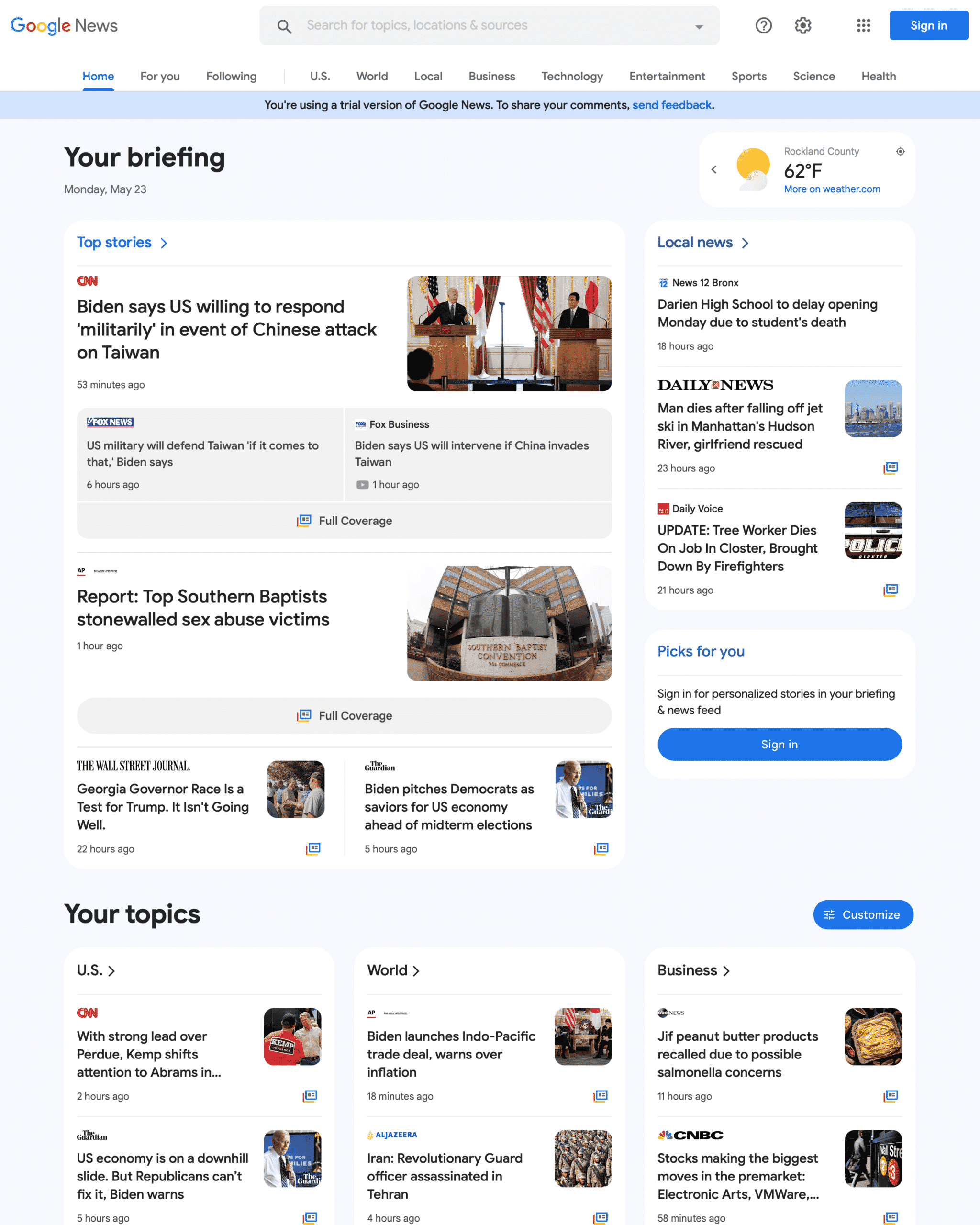
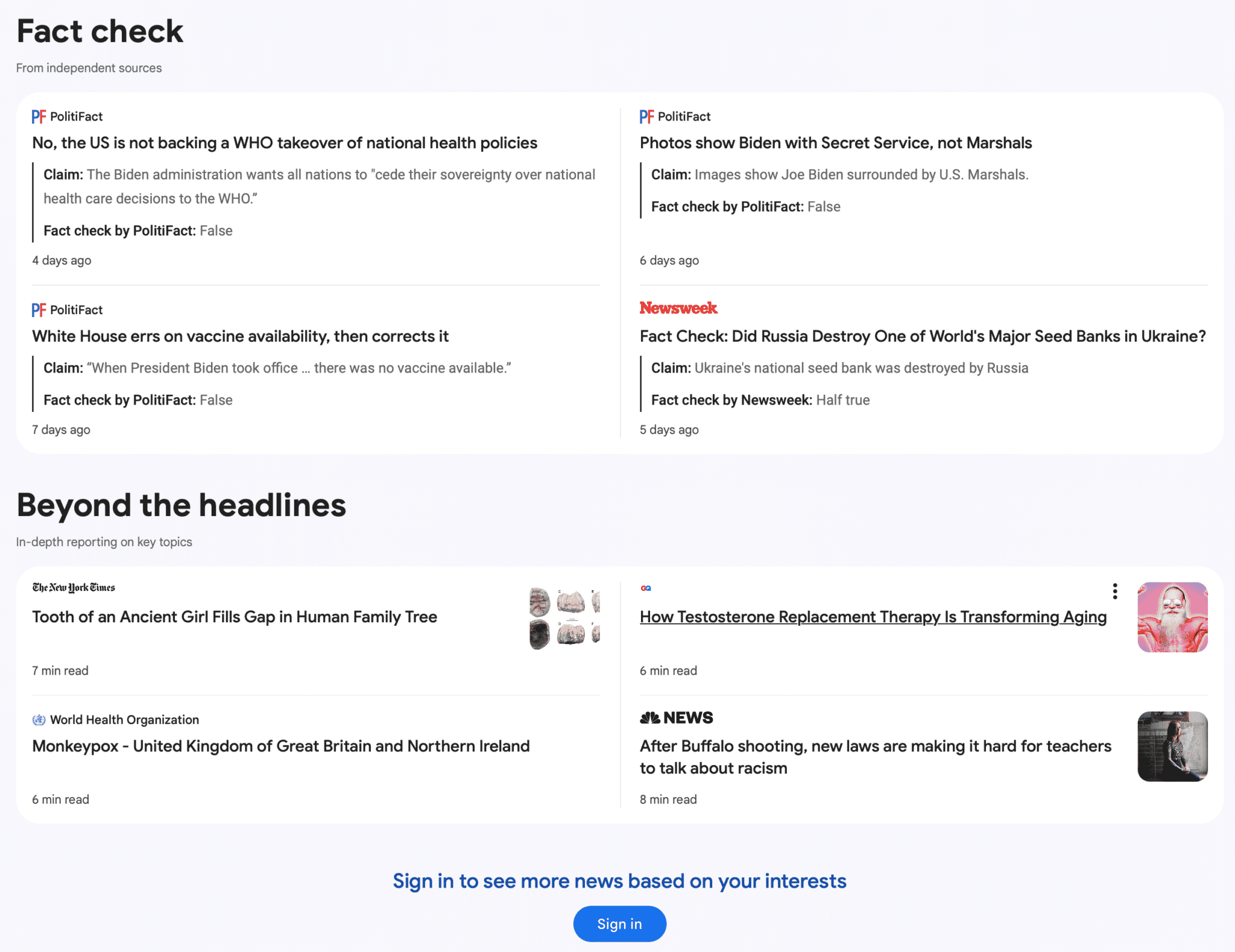
Google is testing a new trail version of the Google News portal at news.google.com. It is a limited trail, I was only able to bring it up once in Safari private mode, but then I lost it. The new home page is more visual, brings the navigation menu from the left side to the top and overall cleans up the look of the home page.
What it looks like. Here is a screenshot of the top of the page that I was able to screen capture when I saw the test – you can click on it to enlarge it:

Here is the bottom portion of the page where you can see the “Fact check” section. Again, you can click on it to enlarge it:

When will you see it. Again, this is just a test, just a trial, Google is running to see if those in this test group like the new Google News design and if the responses they expect from the new design is positive or negative. Google is constantly testing new user interfaces across all their platforms, so this should come as no surprise.
Why we care. Whenever Google releases a new design or user interface in Google Search or Google News, that can impact ones visibility and clicks to their web site. So keep these user interface tests in mind when understanding any risks or rewards you might see in the future with Google News interface changes.
Again, this is just a test – it is hard to know if and when this new design will go live.
The post Google News new design being tested appeared first on Search Engine Land.
Courtesy of Search Engine Land: News & Info About SEO, PPC, SEM, Search Engines & Search Marketing
Monday, May 23rd, 2022
Google Search seems to be showing fewer sitelinks in the search results. Google would show as many as six sitelinks per search result snippet, now Google seems to be showing a maximum of four sitelinks and often just two sitelinks.
What are sitelinks. Sitelinks are links from the same domain that are clustered together under a web result. Google Search said it “analyzes the link structure of your site to find shortcuts that will save users time and allow them to quickly find the information they’re looking for” in the search results.
What changed. Google seems to have changed to a vertical format for large sitelinks and is only showing up to 4 sitelinks. Even the example from Google’s very own help documentation shows six sitelinks.
Screenshots. Here are screenshots showing how a search for [tesla] is showing four sitelinks:

A year or so ago, the same search displayed six sitelinks:

My site has always showed at least four sitelinks, now I see it showing only two:

If you search for rustybrick with a space, [rusty brick], Google does show four:

Why we care. Fewer sitelinks may lead to less of a chance to get clicked on from the Google Search results. That may lead to less site traffic from Google search and ultimately lead to less revenue.
We have emailed Google to confirm this was changed and to learn more about why it has changed.
Hat tip to this Reddit thread for spotting this.
The post Is Google Search showing fewer sitelinks appeared first on Search Engine Land.
Courtesy of Search Engine Land: News & Info About SEO, PPC, SEM, Search Engines & Search Marketing
Monday, May 23rd, 2022
Everyone’s talking about privacy. When Google announced the deprecation of third-party cookies in early 2020, privacy became a hot topic.
The loss of third-party cookies impacts all advertisers and is especially challenging for B2B marketers, who struggle to reach the right audience even with third-party cookies in play.
Let’s review how today’s privacy changes came about – and then look ahead to what it all means for marketers.
Get the daily newsletter search marketers rely on.
How did we get here?
In the early days of the internet, it was the Wild West. No one cared about privacy.
As with anything new, consumers were enamored with going to a website, ordering whatever they wanted and having it show up at their door.
Sure, mail-order had been around for a long time. But it wasn’t exciting to fill out a form, write a check and send it in – only to wait 6-8 weeks for the order to arrive.
The internet changed buying habits forever.
It was possible to find and buy nearly anything online easily. Still, the internet also offered a treasure trove of user data that marketers could tap into for insights into buyer behavior.
Somewhere around the mid-2000s, retargeting was introduced.
I remember being at a search conference around 2005, watching a demo of a new technology that would dynamically serve ads based on users’ search activity and the websites they visited.
My mind was blown. Do you mean we can show different ads to different users based on things we know about them? Sign me up!
No one thought about privacy then either. We were so enamored with this new technology that we never gave privacy a thought.
Privacy becomes a thing
Fast forward to today.
Retargeting is everywhere. Everyone knows when they are being retargeted. And advertisers are often doing it poorly.
Every digital marketer can come up with a handful of bad retargeting they’ve experienced personally.
For me, a memorable one was just after I’d made an online reservation at a hotel for a business trip to Seattle. I was immediately bombarded with ads – from the same hotel I’d just booked, saying, “Book your trip to Seattle now!”
Come on.
I believe that lazy marketers are partly responsible for the privacy changes coming later this year. People are sick of poorly targeted ads that follow them incessantly.
How privacy affects B2B search marketing
B2B search marketing is challenging under any circumstances. Searchers don’t self-identify as B2B users when they perform a search.
And often, the keywords they use are the same keywords a consumer might use, even though each is looking for two different things.
Terms like “insurance,” “security” and even “design software” are vague. The searcher could be looking for services for themselves or their business.
That’s where third-party cookies came in.
Advertisers got excited when Google introduced audience targeting options like affinity and in-market audiences. Finally, a way to layer on audience signals based on search and browsing behavior!
However, audience targeting options are hopelessly consumer-focused. Here are Google’s current affinity segments:
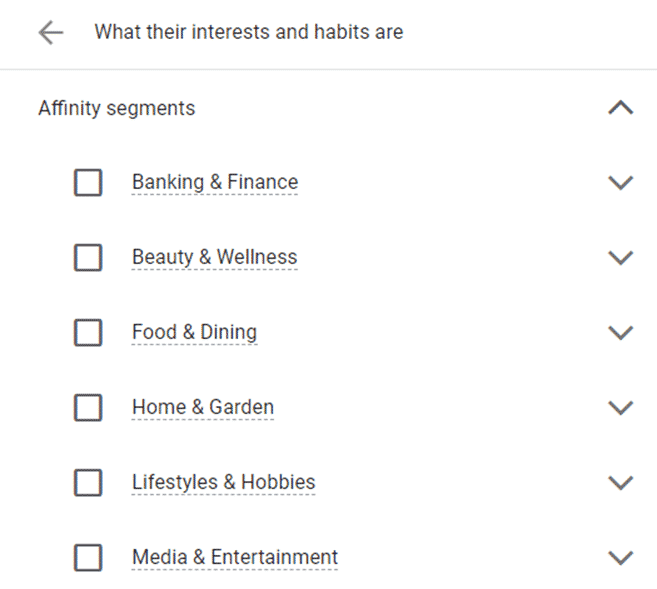
See anything that looks remotely like B2B? Me neither.
In-market segments aren’t much better. Here’s one for Business Services:
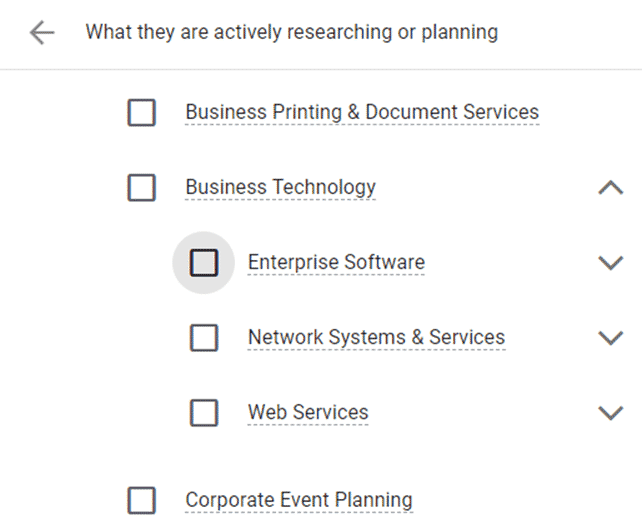
The “Business Technology” category isn’t bad, but the others, such as “Business Printing & Document Services,” seem tailored to small businesses, not enterprises.
The death of third-party cookies
So what does all this have to do with privacy?
Targeting options like affinity audiences and in-market audiences are built from third-party cookies. Search engines use signals (e.g., which websites users visited) to compile the audiences.
Google has announced the deprecation of third-party cookies from Chrome within the next year.
In other words, most of these targeting options are going away soon.
First-party audiences to the rescue
First-party audiences are great for B2B. They remove many obstacles B2B advertisers face: consumer-focused targeting, or targeting that’s too broad for the business need.
But first-party audiences also pose challenges for B2B.
The biggest hurdle is creating the audiences in the first place.
To efficiently use first-party audiences, advertisers need some way to compile audience data, group users into cohorts and securely pass the data to advertising platforms like Google Ads and Bing Ads. Usually, this is done through a data management platform (DMP)
Advertisers who use a DMP have a relatively easy time using first-party audiences in their PPC campaigns. The DMP can be used to upload audiences directly to search engine platforms.
Unfortunately, even among our enterprise clients, surprisingly few have a good DMP setup. This means most advertisers are not able to use first-party audiences effectively.
And even for advertisers who do have a suitable DMP, we often find that the first-party audiences are too small to target.
Unlike e-commerce, B2B is a smaller universe. There aren’t as many people researching enterprise business software as there are people buying shoes on a given day.
There are even fewer people from companies with more than 5,000 employees researching ERP software for the enterprise.
See where I’m going with this?
Audiences that are too small to target aren’t much help.
Or are they?
Search engines use audiences as a signal for targeting ads. Think of an audience as a way to tell Google and Bing who you’re trying to reach.
One way to amplify the signal of a small first-party audience is by using similar audiences (also called lookalike audiences).
Similar audiences are often 2-10 times bigger than first-party audiences. Here’s an example:


The first-party audience only has about 5,000 members – it’s large enough to target but won’t drive much traffic.
But the similar audience has anywhere from 10,000 to 50,000 members for search and up to 1 million for display – a much larger reach.
Similar audiences are especially helpful for B2B, which tends to have a low audience match rate). We’ve seen strong performance from similar audiences for our B2B clients.
Let paid social help
Another way to create B2B audiences is to use paid social to inform paid search.
Paid social is usually used for upper-funnel activity – awareness and consideration. But we’ve used paid social to create audiences for paid search retargeting.
The great thing about paid social is that we know a lot about our target audience. We can target based on employer, job title, company size, education, skills and other factors that indicate the user is a good target for B2B.
Create a dedicated landing page for paid social traffic for your B2B audience targets and tag it for retargeting. Then target people who visited that page with Google Ads.
We’ve done this with YouTube videos too. People who watch a 30-60 minute keynote from a B2B conference make a great audience for follow-up with RLSA or display retargeting.
And don’t forget about LinkedIn targeting in Microsoft Ads. Being able to use LinkedIn profile attributes to target is a big differentiator for Microsoft Ads, and it’s especially useful for B2B advertisers.
Use micro-conversions as signals
Another way to create retargeting audiences is to use micro-conversions as signals for intent.
B2B has a long sales cycle – usually 12-18 months or longer. No one buys a six-figure business software system in a single visit with a credit card.
The process usually involves a lot of research, with multiple touchpoints along the way.
Users might follow these steps on the way to purchase:
- Read an article
- Download a whitepaper
- Read an ebook
- Request a demo
- Sign up for a free trial
- Contact sales
- Purchase
Each of these actions represents a micro-conversion.
You could create audiences for people who downloaded a whitepaper. You could even segment this further by creating audiences based on the type or product of the whitepaper they downloaded if you’re selling multiple products or targeting multiple audiences.
Retarget users who downloaded a whitepaper with an offer for a free demo or trial. Then retarget users who signed up for a demo or trial, asking them to contact sales.
If you sell to multiple business sizes, you can also start to segment by small business vs. large enterprise based on the content they consumed.
Using first-party data is an investment – of time and money
The days of simply picking an audience based on in-market traits or affinity groups are numbered. Lazy marketing is soon to be a thing of the past.
Now is the time to start building your first-party audiences and think about your buyer journey.
Get serious about creating micro-conversions and paid social audiences to reach your target.
The post How privacy changes affect B2B paid search marketing appeared first on Search Engine Land.
Courtesy of Search Engine Land: News & Info About SEO, PPC, SEM, Search Engines & Search Marketing
Friday, May 20th, 2022
We reported yesterday the sad news that Bill Slawski has died.
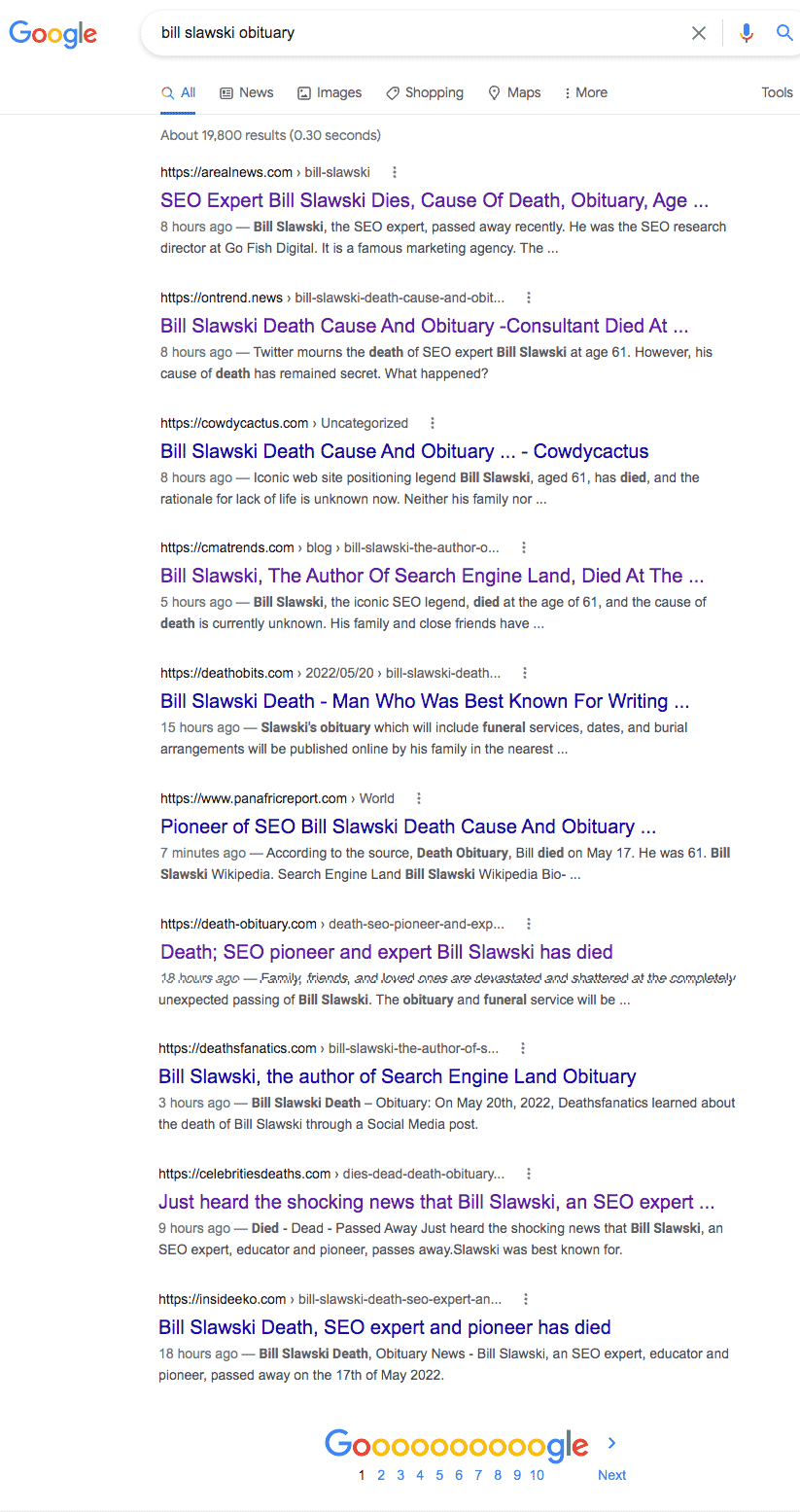
It’s less than 24 hours later and no actual obituary has been published (either by a news site or funeral home). Yet, Google’s search results are littered with spammy results.
Look at what is ranking on a Google search right now for [bill slawski obituary]:
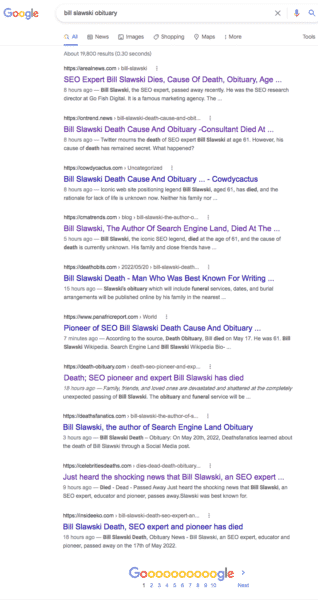
This is a horror, especially for anybody seeking trustworthy information on Slawski’s funeral arrangements.
To me, this SERP looks like Google, before the Panda Update, for certain queries where content farms reigned. That’s the easiest way to describe it.
A ton of low-quality websites have created thin content with the sole purpose of optimizing it to rank whenever someone searches for an obituary for Bill Slawski. And they are monetizing whatever traffic they get through display ads.
What’s worse – there are many of these types of sites. And these sites have one thing in common: the content reads like it was either automatically generated or written (poorly) by people whose first language is not English.
Let’s look at some of the sites so you can understand how gross this all is:
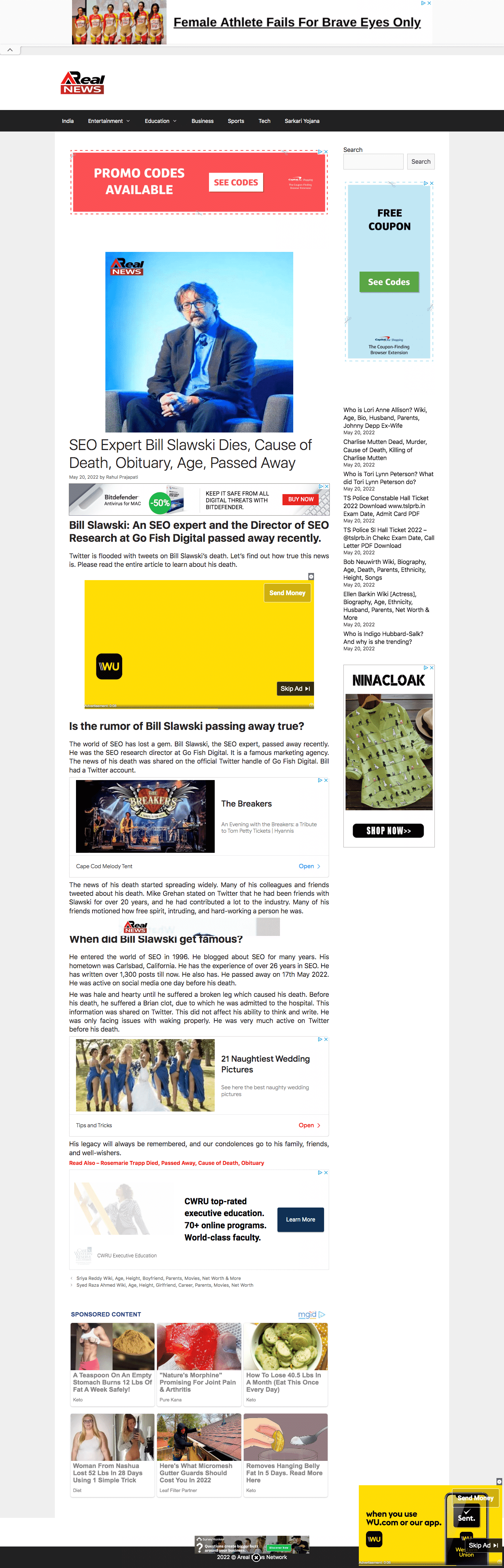
1. AReal News

The content is pure garbage. Look at this paragraph:
“He was hale and hearty until he suffered a broken leg which caused his death. Before his death, he suffered a Brian clot, due to which he was admitted to the hospital. This information was shared on Twitter. This did not affect his ability to think and write. He was only facing issues with waking properly. He was very much active on Twitter before his death.”
Aside from the obvious content problem, this site looks like it should be in clear violation of Google’s page layout algorithm (aka Top Heavy). Before you even get to the content, you get nothing but ads, ads, ads.
And searching for [obituary site:arealnews.com] reveals this isn’t a one-off. It’s a strategy:

2. OnTrend

Some of the garbage content:
“No doubt, he was surrounded by his wife and children when he took his last breath peacefully. The further insights of Bill’s partner are inaccessible at this time. We are keeping an eye on this topic.”
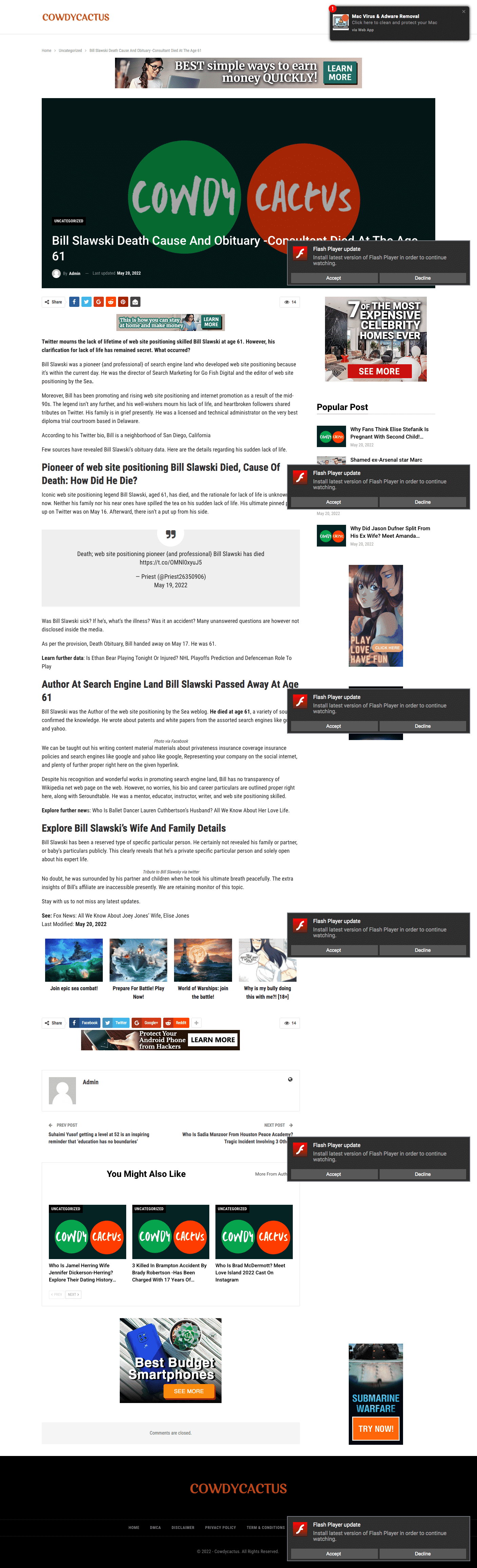
3. CowdyCactus

If this isn’t outright search spam, it’s certainly about as low-quality content as you can publish before reaching that threshold:
“Twitter mourns the lack of lifetime of web site positioning skilled Bill Slawski at age 61. However, his clarification for lack of life has remained secret. What occurred?”
In fact, when I turned my adblocker off to take that screen capture, it was infested with so many ads and redirects to spam I could no longer even view the site. Hopefully, my computer didn’t get a virus.
4. CmaTrends

Before we look at this example, make sure you check out this site’s homepage title tag: “CmaTrends « We SELL Entertainment Periodt!”
And the opening of their “article”:
“Bill Slawski, the author of Search Engine Land, died at the age of 61, #Bill #Slawski #author #Search #Engine #Land #died #age Welcome to O L A S M E D I A TV N E W S, This is what we have for you today:”
I could cite more examples, but you get the point.
Google’s new information problem. The quality of this search result is bad. But it goes beyond just Slawski.
This is a known issue. For certain new search queries, often there isn’t enough content on the web for Google to rank. So you get a bunch of content that, otherwise, has no reason to have any visibility.
Sometimes you also see this after a broad core algorithm update. Suddenly, Google starts surfacing iffy content from suspect sources – as if they hit a sort of reset button. Typically, Google eventually figures it out and more appropriate content returns to where it should be (though not always).
The profits of death. Aside from the clearly bogus “news” sites, there are a couple of spammy obituary websites in there – deathobits.com and death-obituary.com. Both are also loaded up with display ads. Including Google ads.
Yet this is not a new problem. And it goes far beyond Slawski. In fact, some brands are even helping fund this low-quality content.
Marketing Brew published a report in November detailing how spammy sites rip off obituaries and actually end up being monetized by ads from major brands (e.g., Nike, Nordstrom, Zola, Burt’s Bees). Google told Marketing Brew it has:
“strict policies that explicitly prohibit Google–served ads from running on sites that use disruptive advertising formats, including pages with more ads than publisher content. We also prohibit ads from running alongside content that’s been copied from other sites. When we find pages or sites that violate these policies we take appropriate enforcement action.”
I’ve reached out to Google to comment on this story. I will update if/when I receive a response.
The post Google search results spam for ‘Bill Slawski obituary’ shows the dark side of SEO appeared first on Search Engine Land.
Courtesy of Search Engine Land: News & Info About SEO, PPC, SEM, Search Engines & Search Marketing
Friday, May 20th, 2022
Google has confirmed that the search company is experimenting with a new Google Ads label display, this was after this has been spotted in the wild by some in the industry. The test includes different verbiage like “advertisement” and “sponsored” above mobile search ads, instead of just saying “Ads.” In many cases, the site’s favicon is featured directly to the left of the ad domain & display URL.
What it looks like. Here is a screenshot from Brodie Clark of a few variations:
Here's an interesting test. Google is currently showing new ad label variations on mobile, now with the words 'advertisement' and 'sponsored'. This is matched with another URL + favicon test from March – lots going on here. More info: https://t.co/j6IUtkSa1z pic.twitter.com/FLSnZcmzWc
— Brodie Clark (@brodieseo) May 17, 2022
Courtesy of @brodieclark
Google confirmed. A Google spokesperson confirmed the test saying “This is part of a series of experiments to help users more easily identify the brand or advertiser associated with the Search ads they may see for a given query. We are always testing news ways to improve the experience for users on the search results page, but we don’t have anything specific to announce right now.”
A more organic feel? Google has consistently evolved the visual display of ads over the past 15 years. Ads have graduated from a heavy blue background to today’s smaller bolded “Ad” text typically found to the left of the domain:
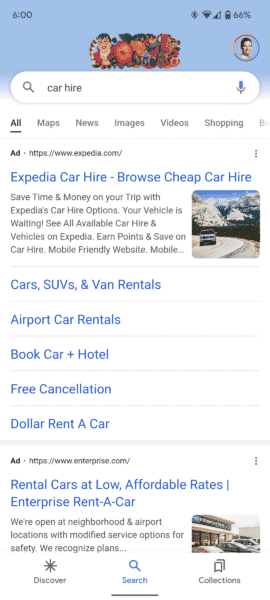 A current ad in the wild.
One can argue that this new test has ads taking yet another step towards replicating an organic result. In this view, the ad/sponsored/advertisement text is removed from the right side of the ad and moved above the site and domain. Replacing that label in some cases in now a favicon that is appearing to the left of the domain/display URL, much like a mobile organic result:
Image courtesy of Bastiir
The combination of the removal of the ‘ad’ notification horizontally next to the ad along with the favicon may well drive more clicks for those thinking they are clicking on an organic listing.
Why we care: If this experiment goes mainstream, both PPCers and SEOs could see a slight change in click-through rates. While the Google spokesperson isn’t wrong that users may more “easily identify the brand or advertiser associated with the Search ads” it is possible that they may less easily identify ads. With the Favicon on the left of the results, webmasters may notice increased CTR on ads, and less clicks on organic listings.
The post New mobile Google ad experiment puts favicon in-line with display URL appeared first on Search Engine Land.
Courtesy of Search Engine Land: News & Info About SEO, PPC, SEM, Search Engines & Search Marketing
Friday, May 20th, 2022

We have just learned the shocking news that Bill Slawski, an SEO expert, educator and pioneer, has died.
Slawski was the Director of SEO Research at Go Fish Digital, a digital marketing agency. His company just shared the news of his passing on Twitter, moments ago.
We're devastated to share that our colleague and dear friend, @bill_slawski has passed away. Words simply cannot express our sadness. We are forever grateful for the opportunity to have worked with Bill. We’ll share much more info and arrangements as it comes available to us. pic.twitter.com/5mD6jqw7XR
— Go Fish Digital (@GoFishDigital) May 19, 2022
We don’t know many details about his death. He was last active on Twitter on May 16 and passed away on May 17.
What we do know is he leaves an incredible void in our industry. Slawski was a wealth of knowledge. Countless SEOs are better off – both directly, and indirectly – as a result of his mentorship, insights and expertise.
About Bill Slawski
Slawski did SEO before Google existed. Heck, he did SEO before SEO was even called SEO.
He started when all of this online stuff was simply known as internet marketing and web promotion, in 1996. He provided consulting services to help make websites easier to find online, help make them easier to use, and increase conversions and revenue for clients.
Throughout his career, Slawski worked on all types of sites – nonprofits, Fortune 500, educational institutions, e-commerce, professional services, consumer goods, B2B and more.
Prior to his search marketing career, Slawski earned a Juris Doctor degree and was a legal and technical administrator at the highest level court in Delaware for 14 years. Slawski lived in Carlsbad, California.
SEO by the Sea
For many in our industry, Slawski was probably best-known for researching, analyzing, interpreting and writing about Google and search-related patents and algorithms at SEO by the Sea. He started the SEO by the Sea blog in June 2005.
On SEO by the Sea, Slawski covered it all – from the classics (PageRank, TrustRank, information retrieval) to today (machine learning, the Knowledge Graph, entities).
Contributions to the search community
They were many.
Aside from writing on his own blog, Slawski contributed articles to the Go Fish Digital blog and other search marketing publications. Slawski was a contributing author here at Search Engine Land from December 2006 to July 2008. You can read Slawski’s articles here.
Slawski was also a popular speaker at several search conferences, including several SMX events. He also did several webinar presentations and was an in-demand guest for multiple SEO podcasts.
Slawski had been active in SEO forums, including serving as a co-administrator on Cre8asite Forums.
In addition to all of that, he was extremely active on Twitter, sharing his own insights and content, as well as from others. He was particularly vocal about debunking SEO myths and misinformation.
‘Our teacher, our professor, our mentor’
That is how Search Engine Land’s own Barry Schwartz described Slawski in 2020.
After Slawski suffered a stroke, Schwartz created a tribute site: billslawski.com. Schwartz asked SEOs for stories about how Slawski had helped them in their career. And they sure delivered.
The site is filled with hundreds of stories and memories, published on a near-daily basis, from Dec. 15, 2020 until May 10, 2021.
One of those stories from Slawski himself, who updated the community on his status:
Thank you to everyone who took a moment to write something, or to send me something while I was in the hospital. I had a small brain clot, and am now taking aspirin as a blood thinner. The clot caused a stroke, which had the effect of throwing off my center of balance, and made it difficult to walk and made me concerned about falling over. I was in hospitals for 2 months going through 3 hours of rehab a day. A lot of that was learning to use a wheeled walker and then a cane to help me get around. By the time I was discharged, I had started walking unassisted. At home, I spent a lot more time walking without a walker or a cane. I am a little clumsier than I was before but can walk fairly well. I am riding a stationary bike 40 minutes a day, and tracking my steps walking too. The stroke did not impact my ability to think or talk or do SEO. The Speech therapists checked me on that, giving me logical puzzles to work through to make sure that I could. They were puzzles that could have fit into spreadsheets, and to someone used to doing site audits were just not very challenging – they kept on saying that they needed more advanced books.
A shoutout to my team at Go Fish Digital, who sent me plants to look at, and to a number of local SEOs who sent me a succulents and a couple of Doordash gifts so that I could order breakfasts directly from them. I managed to keep my connection to Twitter working during that time, and a couple of people who were local ending up helping me make sure that I made it home, and took care of some issues with the DMV and paying my bills during the hospital stay. After 2 months away from a computer, it took me a few tries to write and send emails. I have written about a few patents already, and am now chatting weekly about SEO. I agreed to a chat this week on the future of SEO, 9 years after Penguin, on Twitter Spaces. Have to learn how to use that first. I hope to talk to everyone soon Thank you for setting this website up, Barry. It really has been nice to see a new post on it every day as I continue to work on relearning how to walk.
Community reaction
We are all still in shock and processing this devastating loss.
News quickly spread of Slawski’s passing on Twitter and word-of-mouth. Here’s just a small sampling of reactions from the search community, upon learning of Slawski’s death.
Bill was a shining beacon for all those who wanted to understand often complicated search patents. And SEO generally. I knew and appreciated his kindness and thoughtfulness. This is a terrible loss. Thoughts to his family, friends and coworkers. You'll be missed, Bill. https://t.co/yXRzVQEAvj
— Danny Sullivan (@dannysullivan) May 19, 2022
So, so sad.  He was such a smart and generous man. A true legend in SEO. We'll all miss him tremendously.
— Matt McGee (@mattmcgee) May 19, 2022
RIP Bill. He had a huge influence on me, and I'm thankful he came to see me speak that time I built a huge part of my presentation as a tribute to ways of thinking I learned from him. So sorry to hear this.
— Will Critchlow (@willcritchlow) May 19, 2022
So sad. I've known Bill for more than 20 years. He dropped me a note just recently when he found out my new HQ was in San Diego and I'm due to go there in a couple of weeks. I really valued our long time friendship, and such a great contribution to the industry. RIP Bill.
— Mike Grehan (@mikegrehan) May 19, 2022
I JUST spoke to him a couple of weeks ago about us getting together here in San Diego. He seemed fine and in good spirits.
I was honored to call Bill a friend. An incredible loss personally, and professionally. My deepest sympathies.
— Casey Markee (@MediaWyse) May 19, 2022
Condolences to he entire family, and our entire industry. Bill had such a unique take on SEO that it made everyone stop and rethink what we thought we knew. He will be missed.
— Brett Tabke (@btabke) May 19, 2022
Few people have made as big an impact on the SEO industry as @bill_slawski. The place won't feel the same without him.
— Andrew Shotland (@localseoguide) May 19, 2022
I'm speechless… without words! My dear friend, mon ami, my confident in SEO, patents, algo's, flowers, sunsets, sunrise, my go to chat friend is gone?! You will be missed Bill, R.I.P.
— Gabriella (@SEOcopy) May 19, 2022
Bill gave so much knowledge and love to the SEO community. Your kind spirit and generosity will be greatly missed.
— Chris Long (@gofishchris) May 19, 2022
This is very sad news, thoughts for his family. And our industry is losing a very valuable person, who passed on so much knowledge to our large SEO community around the world. Bill will leave a very big void. Thank you for your generosity!
— David Eichholtzer (@DEichholtzer) May 19, 2022
Rest in peace, Bill. We all miss you.
The post SEO pioneer and expert Bill Slawski passes away appeared first on Search Engine Land.
Courtesy of Search Engine Land: News & Info About SEO, PPC, SEM, Search Engines & Search Marketing
Friday, May 20th, 2022
Maximizing the return on video inventory is a problem likely to be found at the top of most publishers’ lists. Help is on the way for those using Ad Manager thanks to new video specific tools from Google.
The new features are part of the Programmatic Video Health Tools and real-time video reporting, both with goals of using automation to surface insights and information quickly.
Programmatic video signals
This card will create views that show performance across the various video platforms being used.
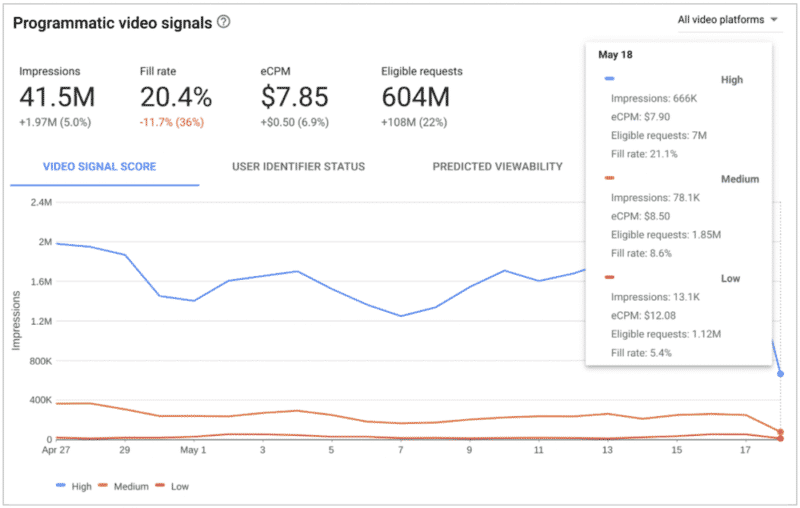
Some elements that are automatically reported on include: app/web domain, viewability and audience information. Users will also be able to see the impact of each on revenue.
According to Google “publishers with high programmatic inventory signal coverage see an average 25% revenue uplift compared to inventory with low programmatic inventory signal coverage.”
VAST errors
The Video Ad Serving Template (VAST) errors insight cart will help with error reporting on lost ad requests. This automated view will surface the number of errors on inventory caused by improper settings or broken creative.
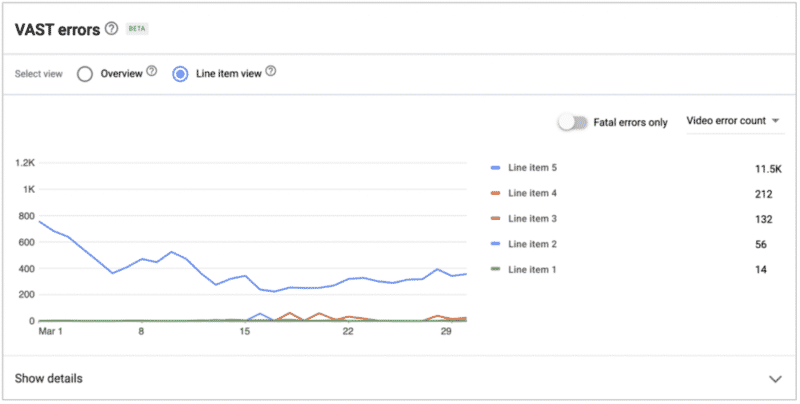
These can also be sorted to find errors that are having the highest impact on revenue.
Video performance alerts
Publishers will also have the ability to configure custom alerts based on requirements most important to them. This tool, Video Performance Alerts, can create a customized email based around campaign metrics and dimensions. The Video Performance Alerts feature is currently in beta.
Real time video reporting
Lastly a final tool, real-time video reporting, will help users resolve problems sooner.
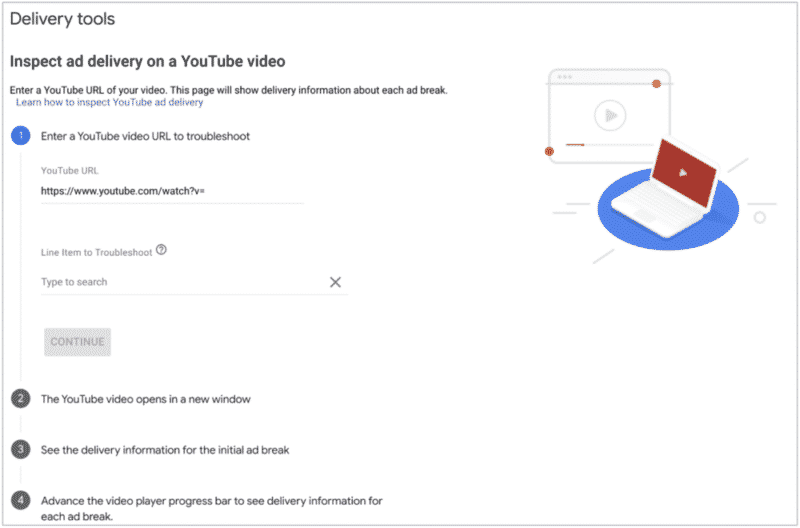
This is for those serving ads on YouTube via Ad Manager and will give them the ability to test ad delivery and view ad requests, key values and details on the winning line items.
Why we care: Publishers that run video ads through Ad Manager have more tools to help identify and fix issues with their campaigns. These tools bring automation to your troubleshooting and should help save publishers time and revenue.
The post Google launches video health tools to help publisher monetization appeared first on Search Engine Land.
Courtesy of Search Engine Land: News & Info About SEO, PPC, SEM, Search Engines & Search Marketing
Thursday, May 19th, 2022
A recent Think With Google article suggests that optimizing for “near me” searches will pay out a bonanza in extra good rankings and qualified referral traffic.
“Near me” has been one of the term optimizations that many of us have recommended for local SEO benefit for years now.
But, there are reasons to think this tactic has completely jumped the shark, making it a waste of time.
And for those who optimized by creating a business name around the phrase, Google’s changes have essentially destroyed their brand name search in Maps.
‘Open now near me’ searches up 400%
In March, Bill Ready, president of commerce, payments and next billion users at Google, penned 2022 Retail Marketing Guide: Drive foot traffic and in-store sales. This part grabbed my attention:
“Searches for “open now near me” have grown globally by over 400% YOY.”
“Near me” searches are queries for local products or services that include qualifier terms like “near me” when consumers want to narrow down to see the businesses closest to them only or primarily.
Also, during its Q1 earnings call, Google revealed that Maps searches for [shopping near me] were up 100% globally year-over-year.
“Open now” is a similar type of qualifier that is often used outside of the typical 9-to-5 timeframe or used later at night, such as to find restaurants that are still open, or clinics and other types of stores that stay open late at night.
While searches for businesses “near me” or “open now” separately are used more frequently, it is not surprising that both qualifying phrases might be used simultaneously in queries.
The rise of ‘near me’ search optimization
If you’ve worked in local SEO for a good length of time, this isn’t particularly surprising. We’ve known for about a decade that “near me” search optimization held huge potential for many types of businesses in many markets.
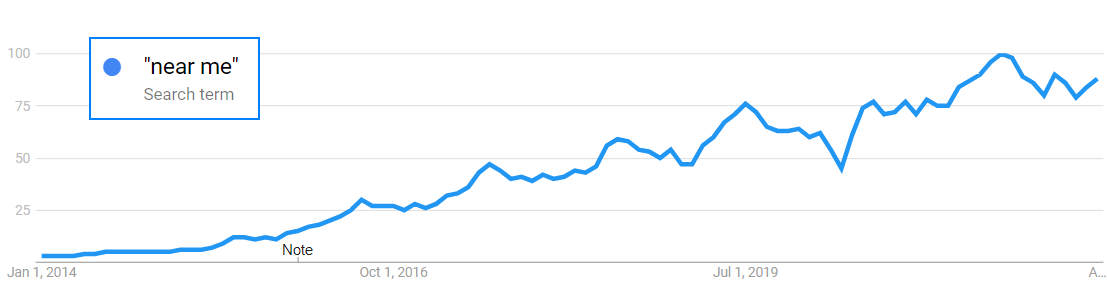
The 400% YOY growth rate is eye-opening, indicating that consumers have increasingly grown to expect that these qualifiers will help them locate more precisely what they need.
The rising use of mobile devices when conducting searches has influenced the “near me” trend a lot and has helped to drive overall increases in the volume of local searches.
Google Trends demonstrates the increasing popularity of “near me” searches, which is what Ready based his statement upon:
The related searches including “open now” also show considerable growth over time:
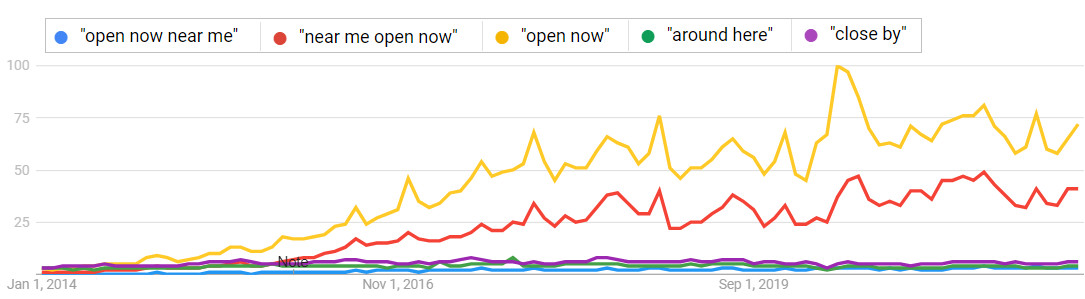
Along with others in the industry, I strongly recommended that local businesses optimize for their ideal keywords in combination with “near me” phrases. There are a number of these types of phrases that are used by consumers, including:
- “around here”
- “nearby”
- “close by”
- “close to me”
- “local”
I also performed optimizations using these phrases on behalf of clients. In one case (a specialized attorney), keyword research showed that no other competing attorneys in the niche were using “near me” phrases. I created an optimized page for his “near me” specialization phrase. His referrals increased by about 20%.
Get the daily newsletter search marketers rely on.
Optimizing for “near me” phrases was a solid gold recommendation for a long time in local search. It was nearly a slam-dunk.
Why?
Because when you had a website and webpages that included a page or pages for “near me,” along with the industry business category name, for many businesses where people wanted local providers this would connect local consumers with webpages and Google Maps boxes for those businesses that had optimized for it. As a great many businesses were clueless about the optimization, this provided a stealth marketing weapon that virtually guaranteed valuable referral increases.
The rise of ‘near me’ businesses
In the last few years, several businesses have taken this optimization to the next level.
How?
By engineering their business name itself to include “near me”.
If you check the business registration databases across the U.S., you quickly find there are a number of businesses across the U.S. that have included “near me” into their official business names.
This includes many business categories beyond just a few of the more predictable kinds (e.g., locksmiths).
Clearly, many companies took the idea of optimizing for “near me” queries and made it into a core piece of their strategy that could be expected to return a lot of referrals.
With all of their online collateral materials associating “near me” with their business, how could they not rank for these searches?
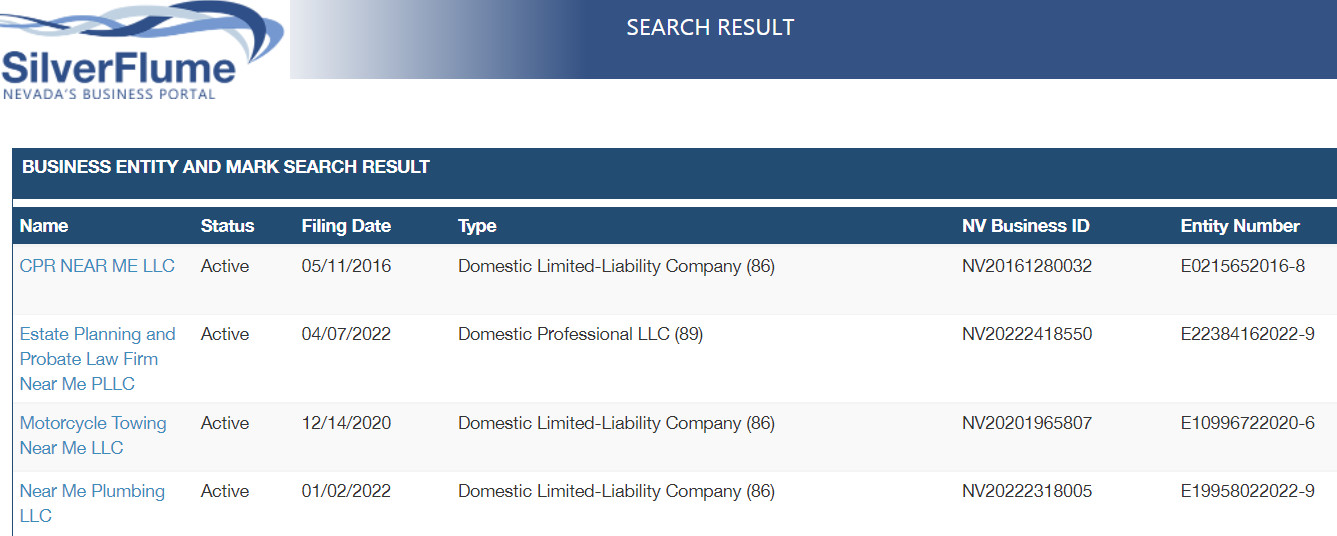
Business registrations for “Near Me” in Nevada
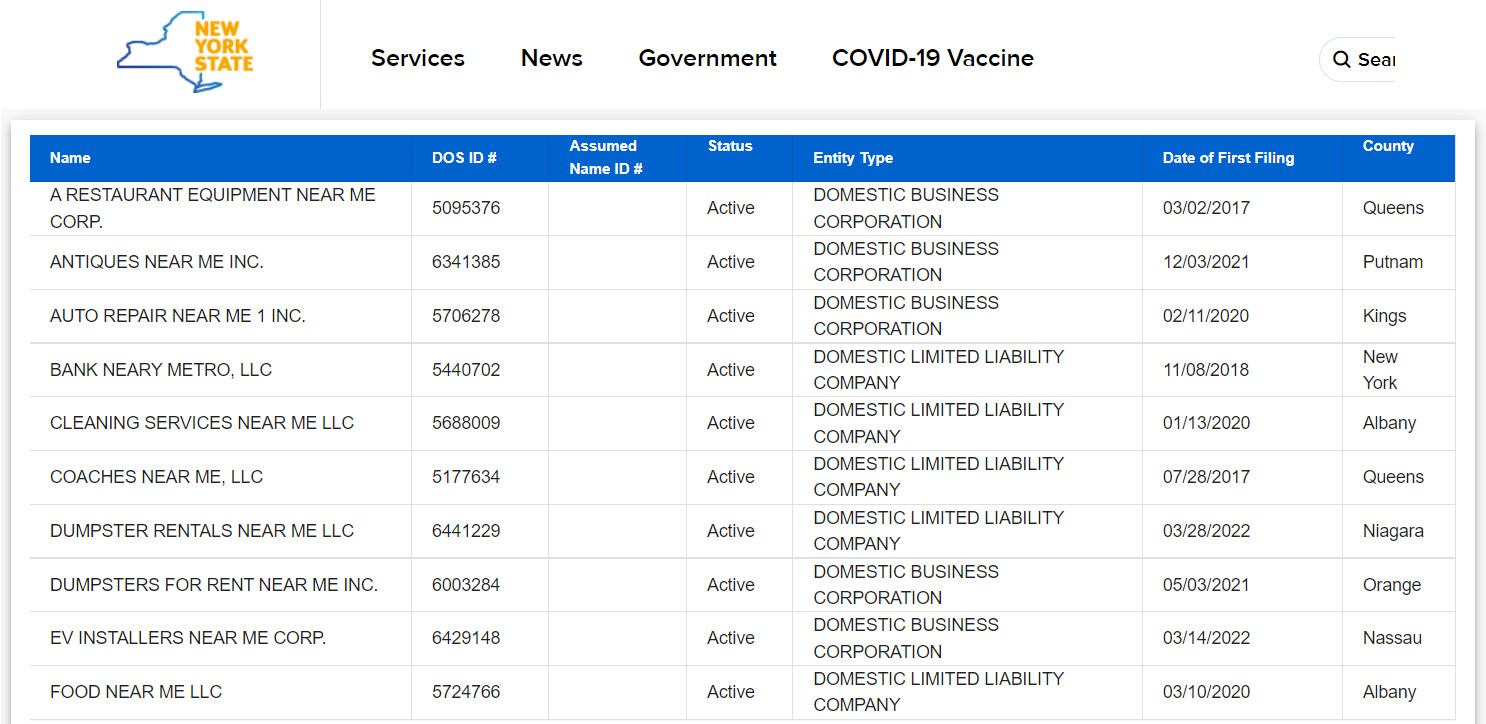
Business registrations for “Near Me” in New York (partial list).
The examples are hilarious:
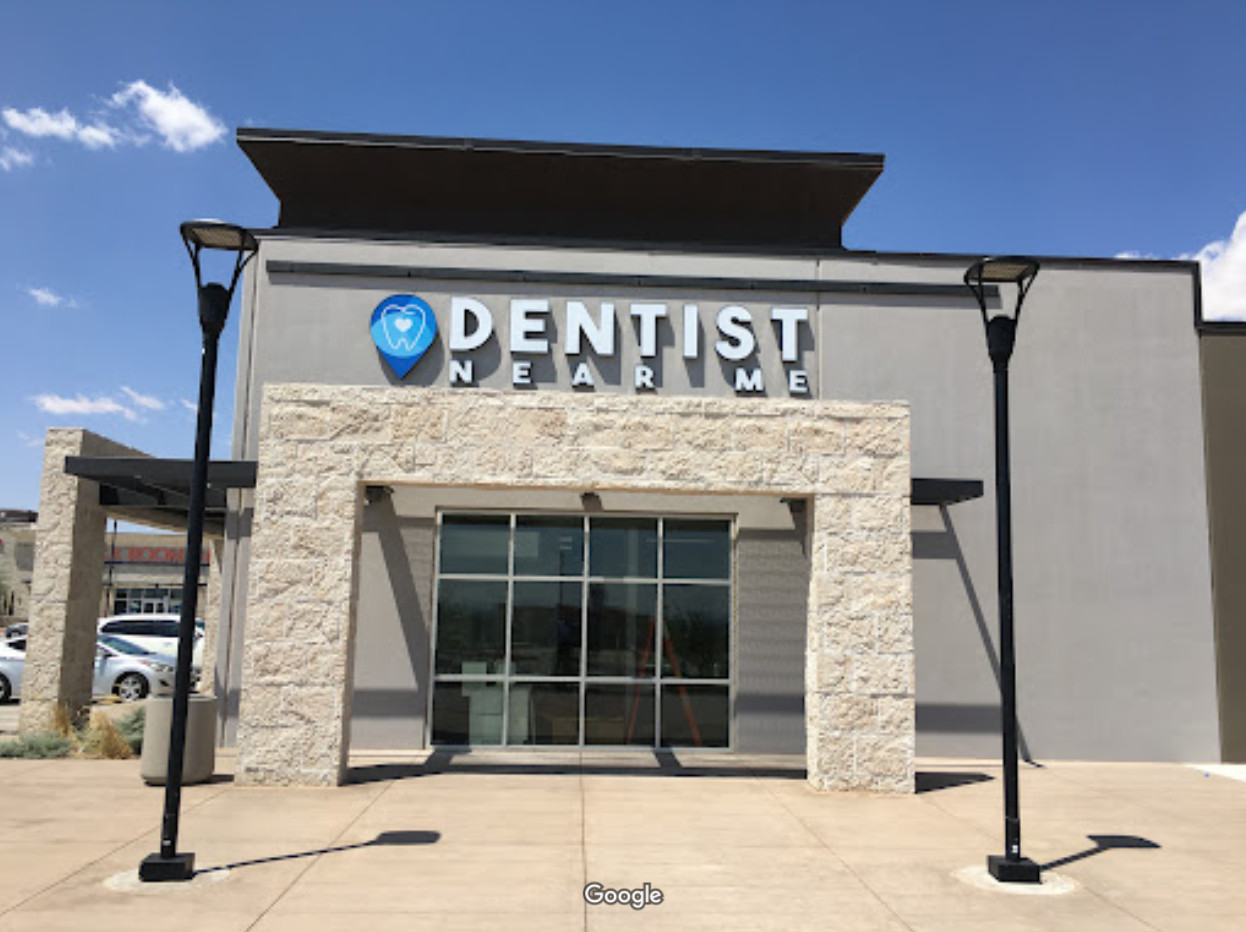
Dentist Near Me in El Paso, Texas
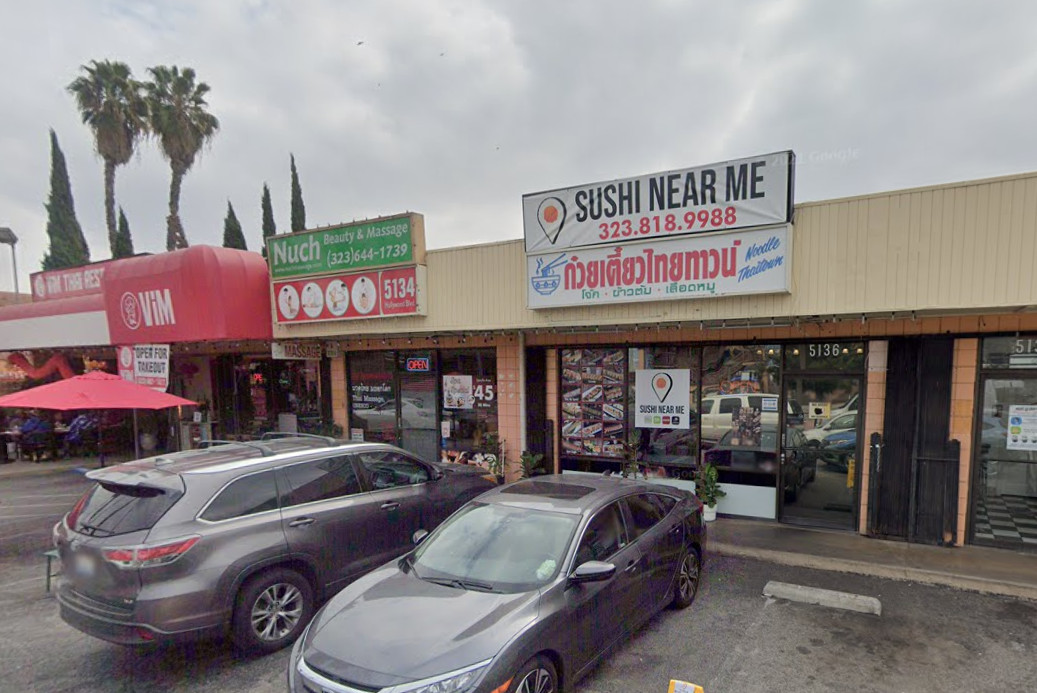
Sushi Near Me in Los Angeles, California
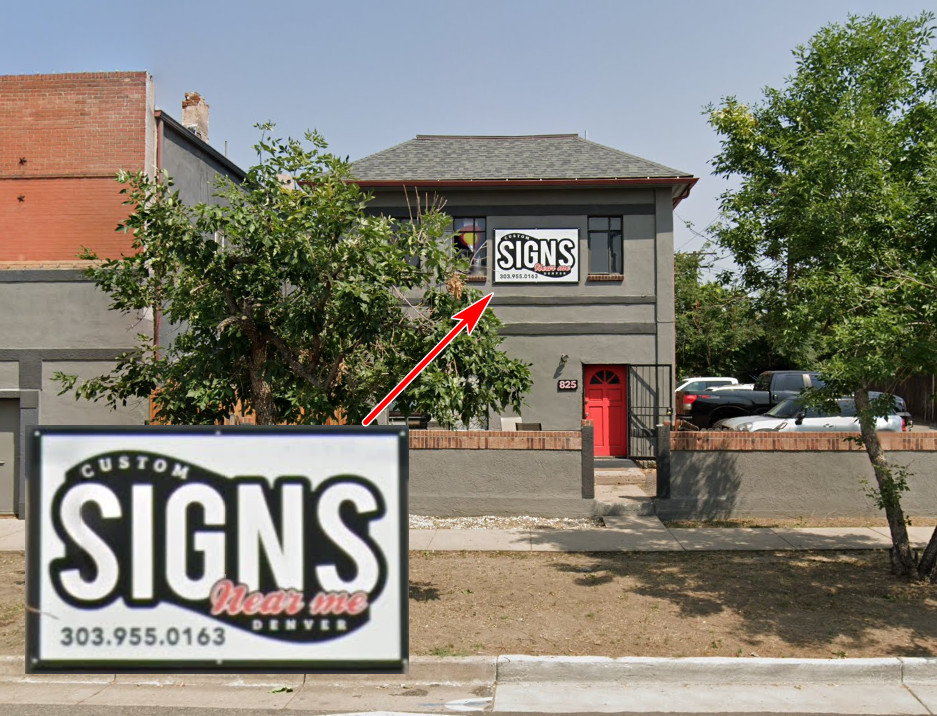
Custom Signs Near Me, Denver, Colorado
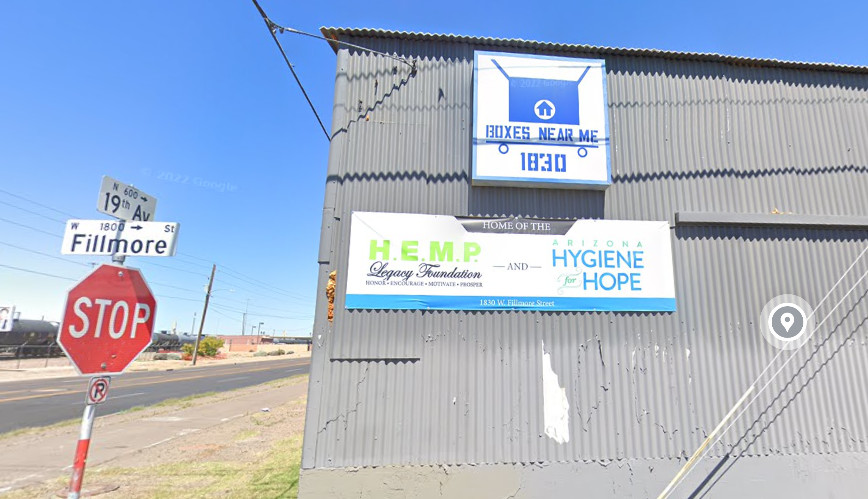
Boxes Near Me, Phoenix, Arizona
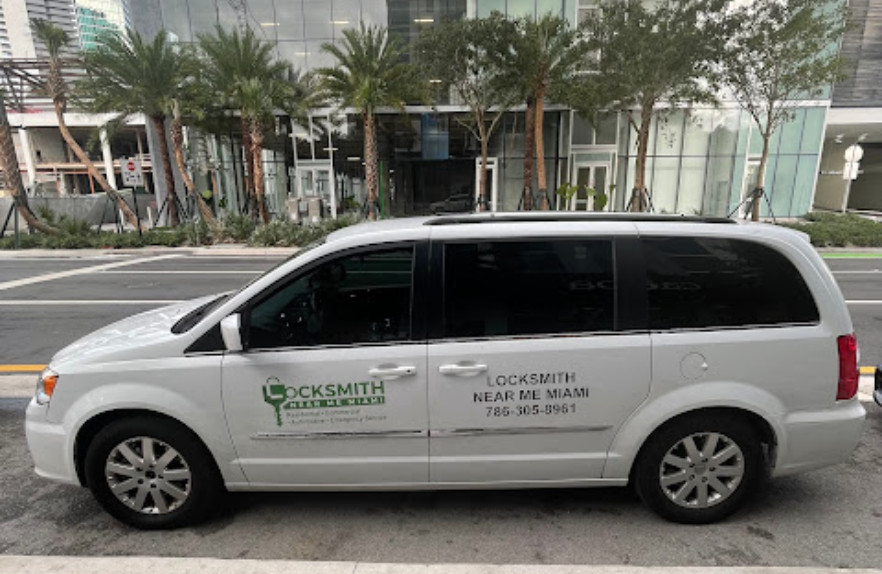
Locksmith Near Me Miami, Florida – a service area business
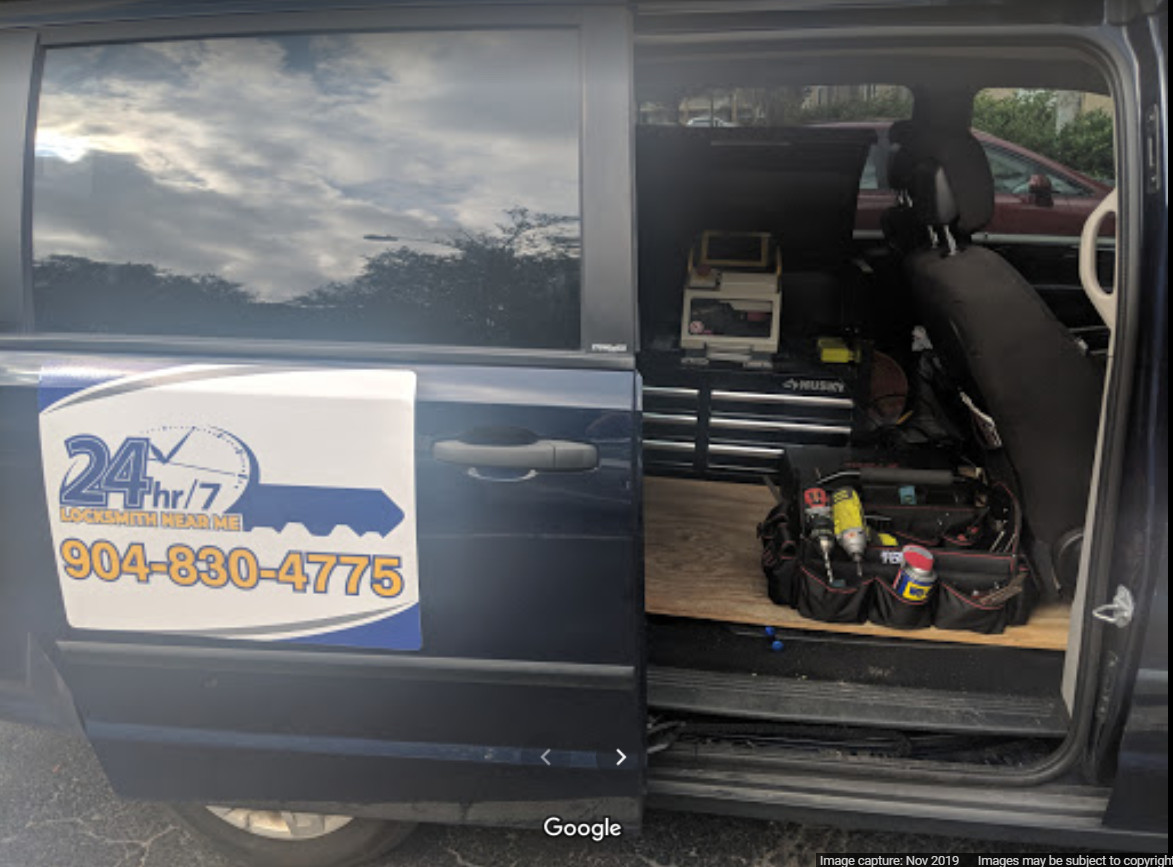
24 HR Locksmith Near Me, Jacksonville, Florida – a service area business
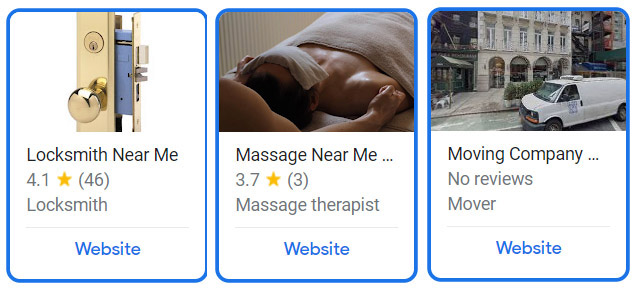
Locksmith, Massage, and Moving Company “Near Me” businesses, Manhattan, New York
It is unclear if these are service area businesses or fake alternate name business listings.
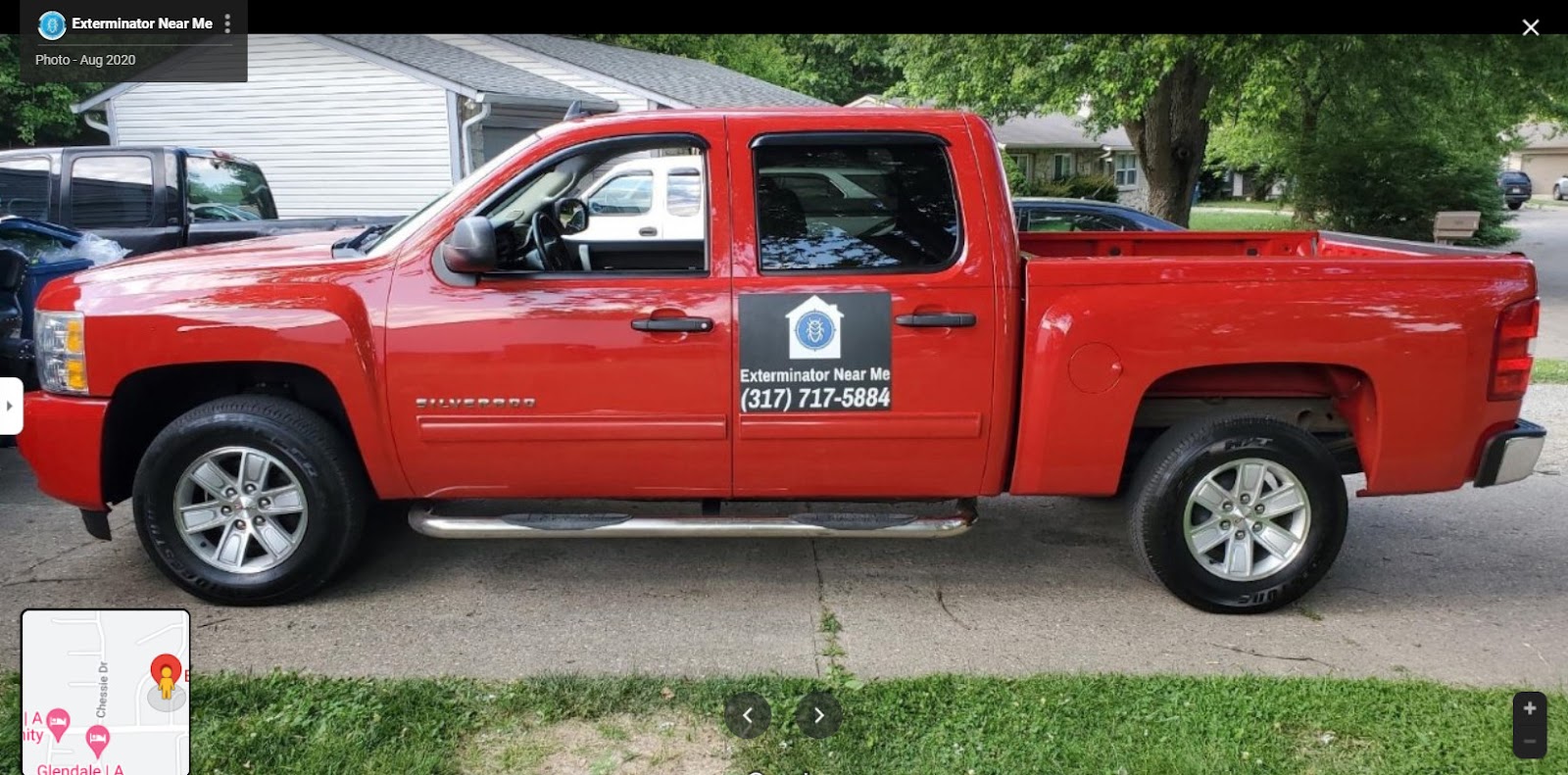
Exterminator Near Me, Indianapolis, Indiana
I’ll take some of the blame for this.
In the distant past, I jokingly promoted some “extreme local SEO tactics” – such as the infamous advice to “change your business name to include a few of the top keywords that users type into search engines when seeking your type of business in your area.” (This was not against the rules at that time, by the way.)
I also had blogged some “ultimate local SEO tactics” which included the idea of having streets named after one’s company, or even having a city or country named after one’s company or brand name!
Part of the point of these joking articles was to educate people as to how Google, and Google Maps search, relied so heavily on literal keyword matching that finagling of keyword optimizations could hotwire a company into appearing more prominently for local business searches.
Google has finally figured it out
Around 10 years ago – when it became clear that consumers were increasingly searching for local businesses while combining the phrase “near me” in their queries – I wondered why Google did not engineer special handling for the phrase.
I asked a Google Maps representative about this issue and was told they had many things on their development priority list – but this was something they would likely get around to.
Well, it seems that Google finally got around to it.
Google has made it now so that a “near me” query will return the closest matching local businesses for one’s search terms within the Maps/Local listings. To do this, Google clearly extracts the “near me” portion of the user’s query and matches the remainder of the query with businesses and websites it believes are closest in location proximity to the user. This handling negates the efficacy of performing keyword optimizations with “near me” phrases for Google Maps/Local search.
Local ranking showdown: business name vs. proximity
I saw this was happening anecdotally, but after locating a number of the businesses pictured above to investigate how they were ranking in their localities for “near me” search phrases that exact-match their business names, the results are striking.
When searching with a Dallas IP address for “ER near me,” 11 businesses come up in the Maps results before a listing for the “ER near me” business is listed. By contrast, searching for other businesses in the list by name results in them being displayed first in the list, and sometimes by themselves in the results.
Searching for another generic-sounding brand by name, “ER of Texas,” produces results listing two of their locations first in Google Maps, followed by other businesses interspersed with more locations for “ER of Texas”.
This is what makes the results for the “ER near me” searches interesting – if Google determined that query was likely a business name search, their listing would come up first in the list.
This dynamic is truly striking. Google has done a lot of work to try to feature a business’s listing first in the search results for its exact brand name search. This is being negated for those listings with “near me” in the business names.
There is a caveat for ranking for the name search if the name appears to be spammy (such as those with keywords crammed in). One could conjecture that the businesses with “near me” names could be treated as keyword-stuffed, which would then negate their keyword benefit. However, I found that they can still rank for the “near me” queries – it’s just dependent upon proximity to the searcher.
Testing for “dentist near me” searches in El Paso in Google Maps, I found a hundred lists in Maps and gave up – the business named Dentist Near Me did not show up when using an IP address location associated with the downtown area of El Paso.
However, the business is located on the eastern edge of town, and by changing the browser’s IP address to a location much closer to that address, I was able to get the Dentist Near Me listing in the fourth organic position in Maps. “Locksmith near me” in Miami was in the 16th position.
Searching for “Sushi near me” in Los Angeles likewise did not return the business with that name in the first three search results. Searching for “Boxes Near Me” in Phoenix produced the business’s listing in the fifth position. The “24hr Locksmith Near Me” was in the 24th position in Maps for a “locksmith near me” search in Jacksonville. Search for “Exterminator Near Me” in Indianapolis placed the business’s listing in the 56th position.
“Custom Signs Near Me” in Denver seems to be an exception to how this is working. But, I believe that is largely because the business is located near the centroid of Denver, and there are few other custom sign businesses that close to the center point.
Switching to a search from Lakewood, which is smack next to Denver, moves the listing’s position down a number of slots. It also could be that “custom signs” might be less-recognized as a business category than “sign shops” by Google. Performing a “sign shops near me” search in Denver places the business’s listing down at the fifth position. It is likely the business only ranked prominently due to its location near the city’s centroid – not because of keyword optimization for “near me” in its business name.
While searching to find examples of businesses with “near me” in their official names, I ran across a great many more instances that are fake business names and locations. A number of companies have created additional listings in Google Maps for “_______ near me” names. These often use the same exact address as their regular business, perhaps expecting consumers to search “near me”, see the location, and arrive in a hypnotized state to walk into the business with the real brand name signage.
The three listings I show above from Manhattan (a locksmith, a moving company and a massage provider) potentially could be fake listings. In many cases, some “near me” listings appear to be completely fake, appearing for service area businesses, and once you view their pinpoint locations they are next to police stations, under overpasses, next to parks or next to shared workspace locations. Predictably, these listings are for moving companies, locksmiths, roofing contractors, plumbers and the categories of businesses that have long been rife with fake listing issues.
Now, for the real “near me” businesses I documented, a number of their websites did appear prominently in the regular, keyword search results outside of Google Maps – often in the first organic position, but not always.
The “near me” keyword optimization does appear to still work there, and there may be some level of value to that in terms of referral traffic. But, experience indicates that the greater value was to be had in Maps search.
Many consumers seeking a local provider are conducting searches directly in the Google Maps app, and those will see other businesses the majority of the time for “near me” searches, and not these over-optimized companies.
Google itself indicates that consumers are showing local intent with these queries, because every one of the test queries reflected blended search results with the Maps 3-Pack at the top, before regular keyword search results.
Is ‘near me’ optimization a detriment to businesses?
When those of us in local SEO first began recommending keyword optimizations for “near me,” there was some light criticism that the keyword optimization was difficult to incorporate on websites and directory listings in a natural-looking manner. But doing so, by adding it into business names, is far more of a smack-you-in-the-face option than merely including it in some isolated paragraphs, page titles and headings.
Incorporating it into business names seems likely to detract from building a non-generic-sounding brand.
While including valuable keywords in a business name can often have a synergetic value if done well, these near me brand names seem to be brute-force functional search marketing above all other marketing and brand-building considerations.
Some would undoubtedly call these brand names spammy-sounding. I think these would not work as well for word-of-mouth marketing or repeat business.
Because Google is now using the “near me” parts of users’ queries as a type of proximity indicator, rather than a literal keyword matching phrase, the use of this in brand name optimizations is arguably a serious disadvantage at this point.
Customers inclined to use a business again will often search online by business name, and if they do so in Maps they will have a lot of trouble finding these businesses because Google’s functionality is now damaging their ability to rank well for their brand name searches.
I do not believe this is necessarily any sort of a penalty. Google simply determined that the “near me” queries are far more frequently consumers’ expressions that they desired to get the specific types of businesses nearest to their physical locations rather than businesses with names that match “near me” queries.
For established businesses, one of the top types of search queries that will refer traffic over time is brand name queries. Whereas using “near me” in brand names may have paid dividends in the past, the tactic is now a major detriment to a local business’s online strategy.
A gimmick whose time has passed
The Think With Google article that references the 400% YOY growth of “open now near me” searches advised businesses to optimize for local to capitalize on those queries. Google didn’t provide instructions on how to do that.
However, I believe this optimization should no longer mean the inclusion of “near me” keywords, in the web marketing materials, much less should it involve hotwiring the business name to include the “open now” and “near me” phrases.
Optimizing for this will mean updating your hours of operation, truthfully, in your Google Business Profile, and including all the address and location signals in your online collateral materials to make your location signals very strong.
Proximity to the user isn’t the sole criteria. Optimizing for prominence signals is vital (e.g., volume and velocity of reviews, having other websites mention and link to your business website).
Bottom line: Any benefits of Incorporating “near me” in your business name are largely canceled out by the disadvantages.
The post Surprise: ‘Near me’ brand names don’t rank higher for ‘near me’ searches appeared first on Search Engine Land.
Courtesy of Search Engine Land: News & Info About SEO, PPC, SEM, Search Engines & Search Marketing




 Seen yesterday while driving on the Tollway.