Archive for the ‘seo news’ Category
Saturday, June 11th, 2022
Google has just announced that they are pulling back restrictions on some previously prohibited categories from showing on the YouTube masthead.
Effective today. Google will now allow booking for masthead ads for the following categories:
- Sports betting (US only)
- Alcohol (where legal)
- Prescription drugs (US, CA, NZ)
What Google says. A spokesperson from Google stated “We’re constantly reviewing our ad requirements to improve our products and services. Given the evolving regulatory landscape for sports betting and following our successful implementation of our new “per market” YouTube masthead format, we believe that this decision balances the needs of advertisers and consumers.”
Categories for election and political ads, as well as (non-sports) gambling remain restricted.
Additional YouTube masthead changes. In 2020 we reported on Google’s announcement that they would discontinue full-day masthead reservations and replace them with more targeted options. The new CPM option allowed mastheads to be more accessible to a broader market of advertisers.
View the changelog. You can view the changelog and new policies here.
Why we care. Mastheads are just one of many YouTube and Google advertising formats, and only a fraction of overall ad impressions for YouTube on any single day. But advertisers in any one of the previously restricted categories above can now select that placement, giving them more options for their ad campaigns.
The post YouTube lifts some restrictions for mastheads ads appeared first on Search Engine Land.
Courtesy of Search Engine Land: News & Info About SEO, PPC, SEM, Search Engines & Search Marketing
Saturday, June 11th, 2022
LinkedIn has just announced that they’re expanding the Boost button to the LinkedIn Events page. This means that advertisers will be able to promote events and drive registrations.
Last year LinkedIn gave advertisers a new feature to Boost organic posts from their page. This allowed them to promote an organic post to more of their followers, or specific professional audiences of their choice.
How it works. To Boost an event, simply navigate to the Boost button on your Events page. Select the target audience you want to see the ad. Set the schedule, and budget, and enter the payment info. This will create an event ad that will appear in the feed of professionals you’ve selected as your target audience.
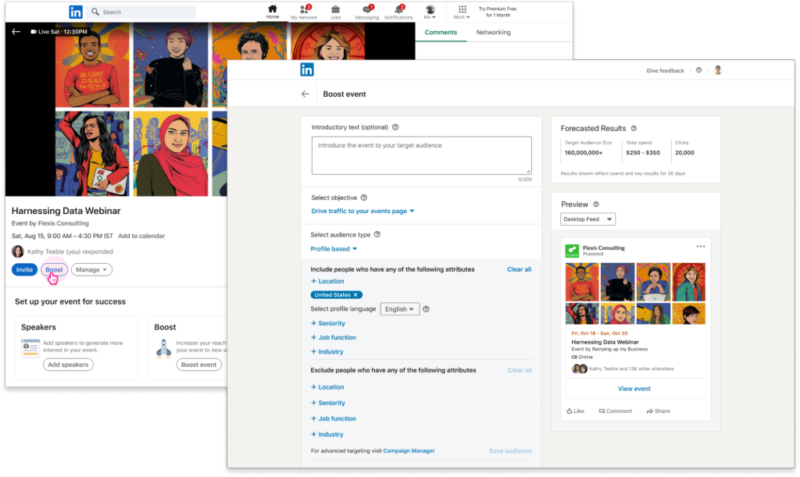
What LinkedIn says. “Over the last few years, we have seen virtual events bringing communities together. Companies across industries have used LinkedIn Events to promote their content and continue building on their community of professionals.”
Learn more. Read the full article here.
Why we care. Boosting posts isn’t new. Facebook has been allowing advertisers to boost posts for years. The option allows time-sensitive content to be shared easily, without having to navigate the ads manager dashboard. This week LinkedIn also announced the introduction of a centralized Business Manager. While we’re glad they’re finally catching up to where the rest of the platforms have been, we are curious, what’s next?
The post LinkedIn announces boosting for Event posts appeared first on Search Engine Land.
Courtesy of Search Engine Land: News & Info About SEO, PPC, SEM, Search Engines & Search Marketing
Saturday, June 11th, 2022
Want to publish great content on LinkedIn?
Coming up with content ideas can be a challenge.
Sometimes the hardest part is coming up with the right idea.
It also can be easy to talk yourself out of your own ideas.
So if you’re in need of some ideas or inspiration, here are 10 quick and easy tips to come up with topics.
All of the following tips were provided by various LinkedIn for Creators team members during their live What Creators Need to Know: Episode 4. I’ve summarized those for brevity and also sprinkled in a few of my own thoughts to add some context.
1. Look up common hashtags
Focus on hashtags that are used by, and relevant to, your industry.
Click on the hashtag to find high-performing posts. Use this for some inspiration on topics.
However, don’t steal or slightly reword posts from other creators. You will more likely than not be called out.
2. Talk about timely topics
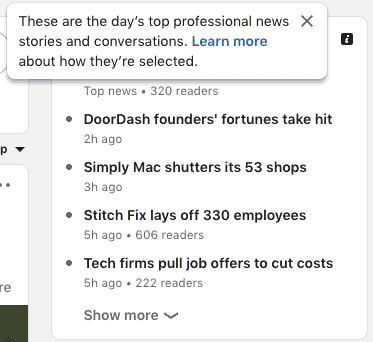
This can be current events or industry news. You can also use LinkedIn’s trending section to find popular news stories and conversations, which you can use as inspiration for your next post.
Do you have to weigh in on partisan or controversial issues? That’s your call. Just know that your post could get filtered out if it’s political or you could lose followers who disagree with you.
3. Experiment with formats and publishing times
Try out a variety of content formats – mix up photo, video and text posts. See what works with your audience.
If you do livestreams, for example, figure out what works best for your audience. Try out a couple of different days of the week and times of day to see which gets you the most views.
Consider polling your followers to find out when they would be most likely to watch. Once you figure out your time, be consistent to make watching you a habit.
4. Quality over quantity
Not every LinkedIn post has to go viral.
Focus on creating content that could directly help one person – or even just a few people.
If that post also happens to go viral, that’s an awesome bonus.
But numbers shouldn’t be the only way you measure success.
Before hitting Post, think about your audience. Could your content help them:
- Become better at their job.
- Advance in their career.
- Solve a problem they’re experiencing.
- Learn something new.
- Understand current events, an issue, or other types of changes.
5. Share your truth
The good, the bad, the ugly. Show your personality.
People want to see your real life, voice and story.
LinkedIn is a professional network, but that doesn’t mean you always have to be super polished and super professional.
6. Spark conversations – and keep them going.
Ask your audience a question that will elicit a response and also encourage them to share their insights and thoughts. Help keep the conversation going by responding to comments.
Aside from adding questions to your post, you can use polls or tag others who you think would be beneficial to the conversation or anyone your audience would like to hear from.
That said, tag wisely. Don’t just make a post and tag dozens of your contact – those people may find it annoying and it may do more harm than good.
Also, avoid sales pitches.
You want to be approachable. Selling is the exact opposite of being approachable. It will turn off people and can hurt your engagement.
7. Be authentic
Be yourself. Tell your story. Just be you and stay true.
Hair, makeup, lighting, audio – it doesn’t always have to be perfect. Show up as your best, most authentic self. Do what you love and show it on video.
I believe it was Dr. Seuss who said “There is no one alive who is Youer than You.”
8. Share your experiences
Share your entire journey with your followers – your wins, challenges, losses, and everything else in between.
Be vulnerable. Be open with your audience.
Great content doesn’t have to be perfect. Life is a little messy – so record it.
9. Stop overthinking content
Approach content with a mindset of documenting rather than creating all the time.
Things you read or hear, conversations you have, questions you answer, problems you solve – all of this is content just waiting to be created every day.
10. Ask for a quarter off for metrics
This ties back to experimenting.
Sometimes you need space to test, learn and set a baseline to measure performance. It typically takes time to see results on a new platform – so the last thing you want to do is think you have no traction when, in fact, you’re just starting to build the traction you will need for start seeing tangible results in three, six, or 12 months.
The best time to start creating great content on LinkedIn was years ago. But the second-best time is now.
The post 10 quick and easy tips from LinkedIn for creators appeared first on Search Engine Land.
Courtesy of Search Engine Land: News & Info About SEO, PPC, SEM, Search Engines & Search Marketing
Thursday, June 9th, 2022

Ever feel like you’re shouting into the void with your email campaigns? You send thousands and thousands of messages; the only response you get is link clicks. It’s useful to see who’s at least somewhat paying attention, but how do you handle all those leads who clicked and didn’t convert?
Join experts from Conversica and learn how companies using conversation automation as part of their email flow see an average of 9.88% response rate, nearly 4x more opportunities and over 10x ROI.
Register today for “Beyond the Blast: Next-Level Email Strategy Requires Conversation,” presented by Conversica.
The post Webinar: Get beyond the blast with this next-level email strategy appeared first on Search Engine Land.
Courtesy of Search Engine Land: News & Info About SEO, PPC, SEM, Search Engines & Search Marketing
Thursday, June 9th, 2022
Merchants have a new Twitter feature, called Product Drops, to help engage their followers and stay on top of new product releases.
What are Product Drops. Product Drops from Twitter is a new feature that allows brands to notify their followers when they launch a new product. The feature is the first of its kind for a social media platform.
How does it work. When a merchant tweets about an upcoming launch, followers will see a “Remind me” button at the bottom of the tweet. They’ll simply tap that button to be reminded of the launch day.
On the product’s launch day, they’ll receive a notification in the app 15 minutes before, and at the time of the drop. Clicking the notification will bring them to the merchant’s website where they can shop for the product and (hopefully) grab it in time.
The devil is in the details. Before followers click the “Remind me” button they can view the full details of the product that’s dropping. To do this, they’ll just click on the tweet and the Product Details page will open. From there, they can view the price, description, and more.
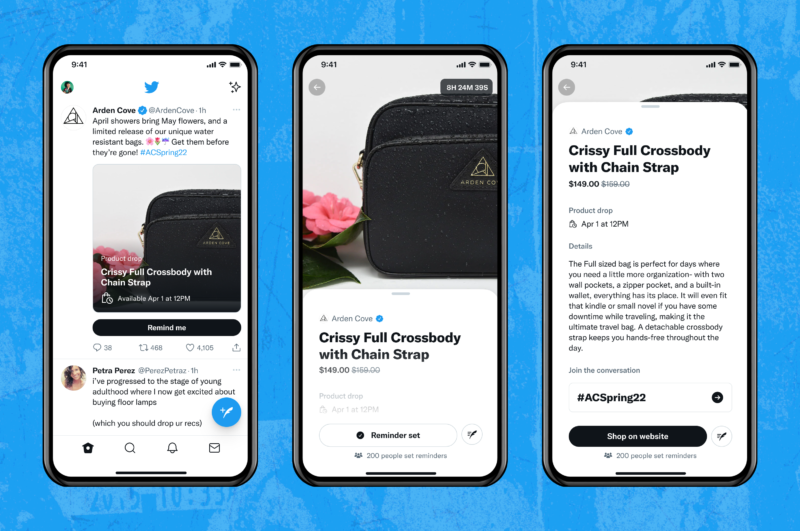
Ready. Set. Launch. Twitter is rolling out Product Drops to merchants in the US only, on English iOS devices. It’s being tested with select partners including:
- Dior
- Fossil
- Jeff Staple
- Home Depot
There is no word on when the feature will roll out to all merchants.
What Twitter says. “People come to Twitter to talk about products and product drops every day. And merchants have long been dropping products on Twitter without any native product support. We’re excited to change that and introduce new shopping features that empower shoppers to stay on top of the launches that matter most to them and provide merchants with another way to engage shoppers around big product moments.”
Check it out. Read the full announcement from Twitter here.
Why we care. Shopping on Twitter isn’t new. But until recently, there hasn’t been any native support surrounding it. This feature aims to help alleviate some of the frustration people feel around missed product drops, angry customers, and overwhelmed brand reps. However, not all of a brands followers are on Twitter. And even if they are, this feature requires they be near their phone or logged into Twitter to receive the notifications. This feature is a good start to increasing brand engagement, but may miss the mark with many of their fans.
The post Twitter announces Product Drops for merchants appeared first on Search Engine Land.
Courtesy of Search Engine Land: News & Info About SEO, PPC, SEM, Search Engines & Search Marketing
Thursday, June 9th, 2022
Since its launch in May 2003, WordPress has become the most-used website platform globally. The WordPress platform powers almost 37% of the top 1 million trafficked websites, according to BuiltWith data.
Given the low cost (you really only pay for hosting), ease of installation and use and flexibility, WordPress is ready for websites of all sizes, from personal blogs to enterprise businesses.
Count me as a fan. I’ve advocated for its use, going back to nearly the beginning of its existence in 2003.
I’ve worked on many WordPress websites, and one of the most common questions I still get is about pages versus posts – which one should be used?
Before answering that question, let’s review how WordPress pages and posts differ.
Get the daily newsletter search marketers rely on.
WordPress pages
Pages in WordPress are intended to hold content that may be considered more “evergreen,” such as the home page, product/service pages, or about us-type content.
Pages can be nested to create a directory structure by making one page the “parent” of another.
Generally, pages cannot leverage categories, tags and authors and are usually not included in RSS feeds from the website.
WordPress posts
Posts in WordPress link the platform back to its roots as a blogging platform. Posts were intended to hold news-related, time-sensitive, and other content that might be associated with websites that are strictly blogs.
Posts are time-driven and can leverage categories, tags, and authors for archive pages and on-site search. Posts are included in RSS feeds.
Content authors can make posts appear in a directory structure by setting up categories, which can be in parent/child relationships, and creating the structure in the Permalinks settings in the WordPress settings.
One crucial thing to remember: Both pages and posts are content for your users and the search engines.
The website owner sets their appearance and use. Pages and posts can be used interchangeably for any purpose – though it’s a terrible idea to mix similar content between the two formats.
| WordPress pages |
WordPress posts |
| Intended for evergreen content |
Intended for news or “blog” content – very time-driven |
| Can be nested together in parent/child arrangements to create a directory structure |
Can fit into a directory structure using categories that can be nested in parent/child relationships |
| Cannot leverage categories, tags or authors |
Leverages categories, tags, and authors |
| Cannot use RSS feeds to share content |
Can use RSS feeds to share content |
| Can be styled any way the website owner wishes |
Can be styled any way the website owner wishes |
| Is considered content to the website visitors and search engines |
Is considered content to the website visitors and search engines |
Evolving recommendations
In the past, I most often recommended that “evergreen” content be created as pages. These would include items like the home page, product/service pages and “about us,” etc.
Other news-related, time-sensitive, instructive, blog-type content would be created as posts. As mentioned above, this follows what most consider the intention of pages and posts.
Although this way of working is still quite valid, I’ve been rethinking this advice lately.
Why?
A large number of websites I’ve worked on lately have had terrible information architecture.
For many of these sites, most, if not all, content is in the website’s root folder. Some sites have content on the same topic mixed between pages and posts. The former issue is relatively easy to fix, the latter, not so much.
Part of the problem is that WordPress is set to put all content at the website’s root by default. Another part is a misunderstanding of how pages and posts are intended to function.
My recommendations now are slightly different if a site is being built from scratch or undergoing a significant reorganization.
In that case, I have two recommendations based on the type of content that will comprise the majority of the website:
- For sites with a majority of evergreen-type content, I recommend the site be all pages.
This allows pages to be built and nested together in parent/child relationships to construct a logical folder structure. Even if there is timely blog-type content, pages will work quite well unless there is an absolute need for tag or author connections.
- For sites with a majority of timely, blog-type content, I recommend the site be all posts.
This allows for content to be organized along category lines. Posts also allow for tag and author archives to be used. This type of setup also allows for easy RSS feeds. The home page can be set up to show the latest posts to help keep it fresh with the newest information.
Either of these arrangements would work well because pages and posts are just content to website visitors and search engines. Both content formats can be styled to suit the needs of the website.
If forms and other interactive features are needed, they can be applied equally well to pages or posts.
From an SEO perspective, the content format on the back end is irrelevant – it’s what is presented to users and search engine spiders that matters.
Should I uproot everything and change the structure of my site?
As I mention above, I recommend building this type of structure on a new site or if a site is undergoing significant work like a re-platforming onto a new theme or migration to a new design.
If your website is working well and you don’t notice any significant problems, it’s OK to take an “If it ain’t broke, don’t fix it” approach.
Final thought
The main reason for my changing recommendations is the lack of a logical directory structure on many sites I support. While it is quite possible to create a logical structure with a mix of pages and posts, it is certainly much simpler to set up and maintain if the site is set up with all one type of content.
The post WordPress pages or posts: Which should you use? appeared first on Search Engine Land.
Courtesy of Search Engine Land: News & Info About SEO, PPC, SEM, Search Engines & Search Marketing
Thursday, June 9th, 2022
Search marketing channels are experiencing a surge in revenue. Macroeconomic and hiring impacts the world over have led to companies like Google experiencing massive growth, highlighting how search has become a key channel for marketers.
“It’s great for Google, but that means rising costs for us,” said Sean O’Connor, senior CSM and sales engineer at Adthena, in a recent webinar (scroll down to watch the video).
Attribution is one reason why these developments have made it difficult for paid search marketers to succeed in the space.
Google holds more data than ever before but doesn’t always show marketers the full picture when it comes to their campaigns. At the same time, its growth in the search space, and the decline of other marketing avenues, mean growing pressure on paid marketing teams.
“We are going to experience a higher level of scrutiny for Google Ads than we have in the past few years,” O’Connor said. “Search is the first thing you start, and the last thing you stop, when it comes to brand advertising. That isn’t going to change, but it is going to put the microscope over all the activities that we’re doing.”
“We need to have a clear attribution to the success we’re bringing to our businesses,” he added.
Here’s how paid search marketers can better attribute success using Google Ads’ auction insights tool and search intelligence.
Google Ads auction insights
“Auction insights is particularly valuable in providing context on what our competition is doing, but not how they are gaining ground,” O’Connor said. “Impression share and overlapping position rate are somewhat relevant, but they’re not the metrics I particularly care about.”
While many marketers long for the days of “old school” metrics such as average position for individual terms, auction insights still provides useful campaign stats. These include information such as marketing trends, which essentially gives marketers Share of Search data so they can see where they stand.
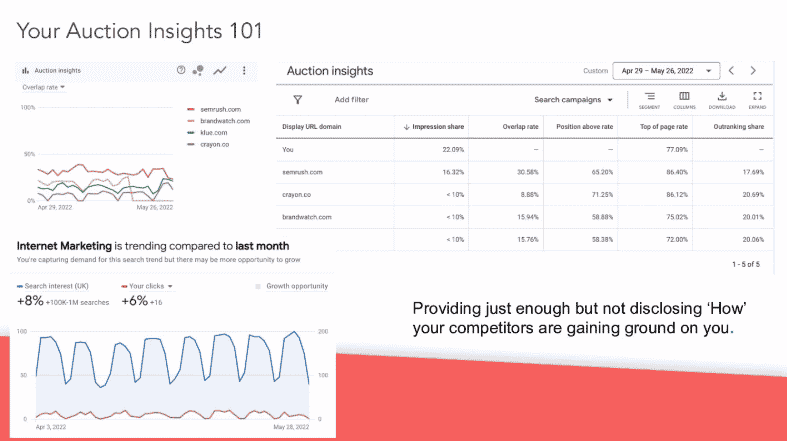
Source: Sean O’Connor
“It’s not so much about campaign optimization, but rather an insurance policy,” O’Connor said.
To get the most out of auction insights, he recommends the following:
- Installation: Build out enhanced dashboards to review campaign data alongside business metrics.
- Establish a new workflow: Segment campaigns to enable messaging and market share analysis.
- Take action: Focus on product roadmap development, regional/local segmenting, and spend adjustments.
Get the daily newsletter search marketers rely on.
Search intelligence
“Google is taking information away from the auction insights section, so we need to be able to shed some light behind the curtain,” O’Connor said. “Considering automation policies, do we let it run? How long does it take to learn? How bundled does it need to be?”
“We need to be able to get past this ‘black box,’” he added.
Auction insights give a good amount of campaign information (e.g., impression share, positive above rate, outranking share), but limit your ability to gauge their efforts against competitors in areas they’re not showing up in, according to O’Connor.
This is why he suggests teams craft their own “formula” that combines data gained from auction insights and a search intelligence platform.
“This creates a ‘whole marketing view,’ which [includes] your terms and closely related competitor terms,” he said. “That whole marketing view is going to show your market opportunity.”
Apply the formulas for success
Acquiring and analyzing search data from auction insights and search intelligence tools isn’t enough to improve Google Ads campaigns. Marketers need to activate the combined data to adjust targets and set benchmarks.
“With enough evidence from auction insights and analytics, you can combine them into a nice visualization that can justify your job and make it easier,” he said.
However, marketers should note when it’s time to conserve budgets. The additional insights gained from these formulas will help teams spend more carefully – when it’s called for – and go after new targets when it makes sense.
“Google’s showing you just what you’re focused on,” O’Connor said, “But we need the context of everything else happening.”
Register to watch the full webinar now:
The post How to win in the SERPs with Google’s auction insights and search intelligence appeared first on Search Engine Land.
Courtesy of Search Engine Land: News & Info About SEO, PPC, SEM, Search Engines & Search Marketing
Wednesday, June 8th, 2022
Google announced today that it is expanding its Ads Financial Products and Services policy to Australia, Singapore and Taiwan.
Last year Google announced the implementation of measures aimed at verifying the legitimacy of advertisers in the financial services industry in the UK. These measures were added to prevent financial product scams and scammers from exploiting the Google Ads platform for their benefit.
As Search Engine Land reported last year, the verification process included proving that the advertiser is “authorized by the UK Financial Conduct Authority,” or must qualify for an exemption.
Verification requirements for advertisers. As part of the verification process, “financial services advertisers in these markets will need to demonstrate that they are authorized by their relevant financial services regulator and have completed Google’s advertiser verification program in order to begin promoting their products and services.”
Launch date. Advertisers will be able to apply for verification at the end of June, and the policy will go into effect on Aug. 30. Advertisers that have not completed the new verification process by this date will no longer be allowed to promote financial services.
What Google says. “We work tirelessly to make sure the ads we serve are safe and trustworthy, and we know that partnering and collaborating with government regulators is critical to our success,” said Alejandro Borgia, Director, Ads Privacy and Safety. “That’s why we’re closely coordinating with regulators in these three markets to make sure this program is effective at scale. In the coming months, we plan to further expand these verification requirements to advertisers in additional countries and regions.”
The results are in. Google launched the verification program in the UK in September 2021. Since then, Google states that they have seen a “pronounced decline in reports of ads promoting financial scams.” According to Google’s 2021 Ads Safety Report, they blocked 58.9 million ads for violating their financial safety policies.
Why we care. Although nothing is 100% foolproof, it’s a good effort by Google to combat financial scams. If you’re running ads for financial services in Australia, Singapore or Taiwan, mark your calendars and keep an eye out for a notification inside your Google Ads dashboard. Review the procedures for exemptions and start the verification process ASAP so your account doesn’t get suspended.
The post Google expands financial services verification policy to Australia, Singapore, Taiwan appeared first on Search Engine Land.
Courtesy of Search Engine Land: News & Info About SEO, PPC, SEM, Search Engines & Search Marketing
Wednesday, June 8th, 2022
In the era of short attention spans and social media bombardment, it’s no surprise that quick, entertaining video clips perform well.
After the seemingly overnight success of social media short-form video app TikTok – and all of the platforms that offer Stories, Reels or other variations of short-form, mobile-first content – YouTube has released their own micro-video product, YouTube Shorts.
What are YouTube Shorts?
Here’s how YouTube describes Shorts:
“Shorts is the spot to shoot, share, and binge short videos (think 60 seconds or less) on YouTube. It’s where you can go to start trends, try out a dance challenge, bring your hilarious ideas to life, and more.”
Much like TikTok, Shorts have seen a quick rise among viewers and creators alike since their introduction.
In fact, many audiences prefer quick videos over longer-form content and shows.
While this may have initially had older generations scratching their heads in confusion, it’s no secret that these apps and their content are wildly popular among users of all ages.
YouTube has proven repeatedly that content does not have to be long to get, and keep, people’s attention. It appears that after decades of working to remove commercial breaks from television shows and other entertainment, we’ve come full circle and are now even seeking them out.
What is the point of YouTube Shorts?
While professional video often requires time and budget for filming and production, YouTube Shorts were developed as a mobile-friendly way for creators to share short content on a whim. This encourages them to quickly film and share right in the middle of everyday life, which helps creators promote and grow their channels without the effort of a full-scale video.
If your audience is viewing content from their mobile devices, you should be creating Shorts.
Users love this content because it is quick and to the point, and because they feel that they are getting to see the creators in their real, everyday environments.
While this may not always be the case, it helps increase trust in an audience, which increases loyalty, which increases income.
Qualifying Shorts channels generate anywhere from $100 to $10,000 per month from their Shorts. Creators love this content because it’s quick and easy, and they often see substantial increases in overall channel traffic in addition to increased revenue.
Shorts are a new product, so the platform is giving them a lot of attention in an effort to ensure they are successful.
Why not jump in and grab some of that increased attention for your brand as well?
Creating YouTube Shorts
Because YouTube Shorts are designed to be quick, on-the-go content, creating the videos is relatively simple.
YouTube breaks it down into six easy steps:
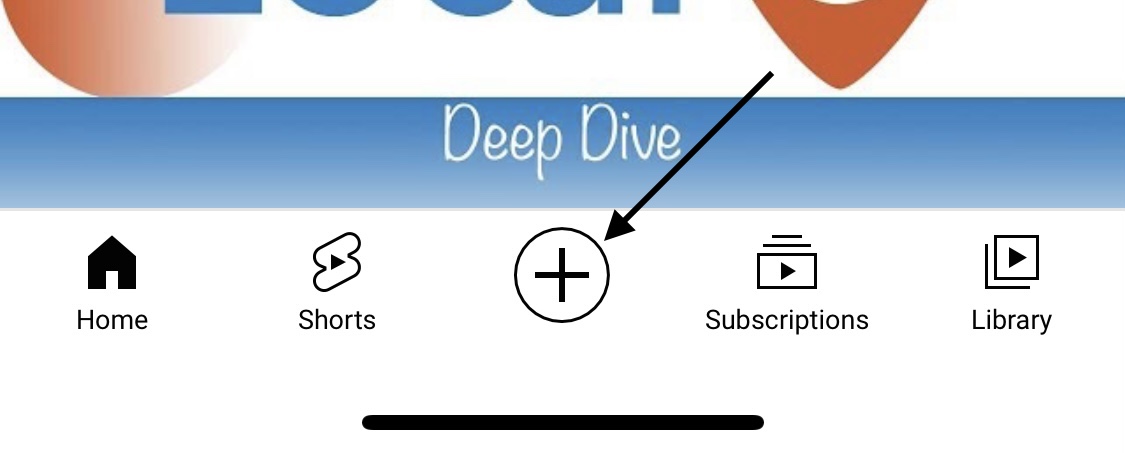
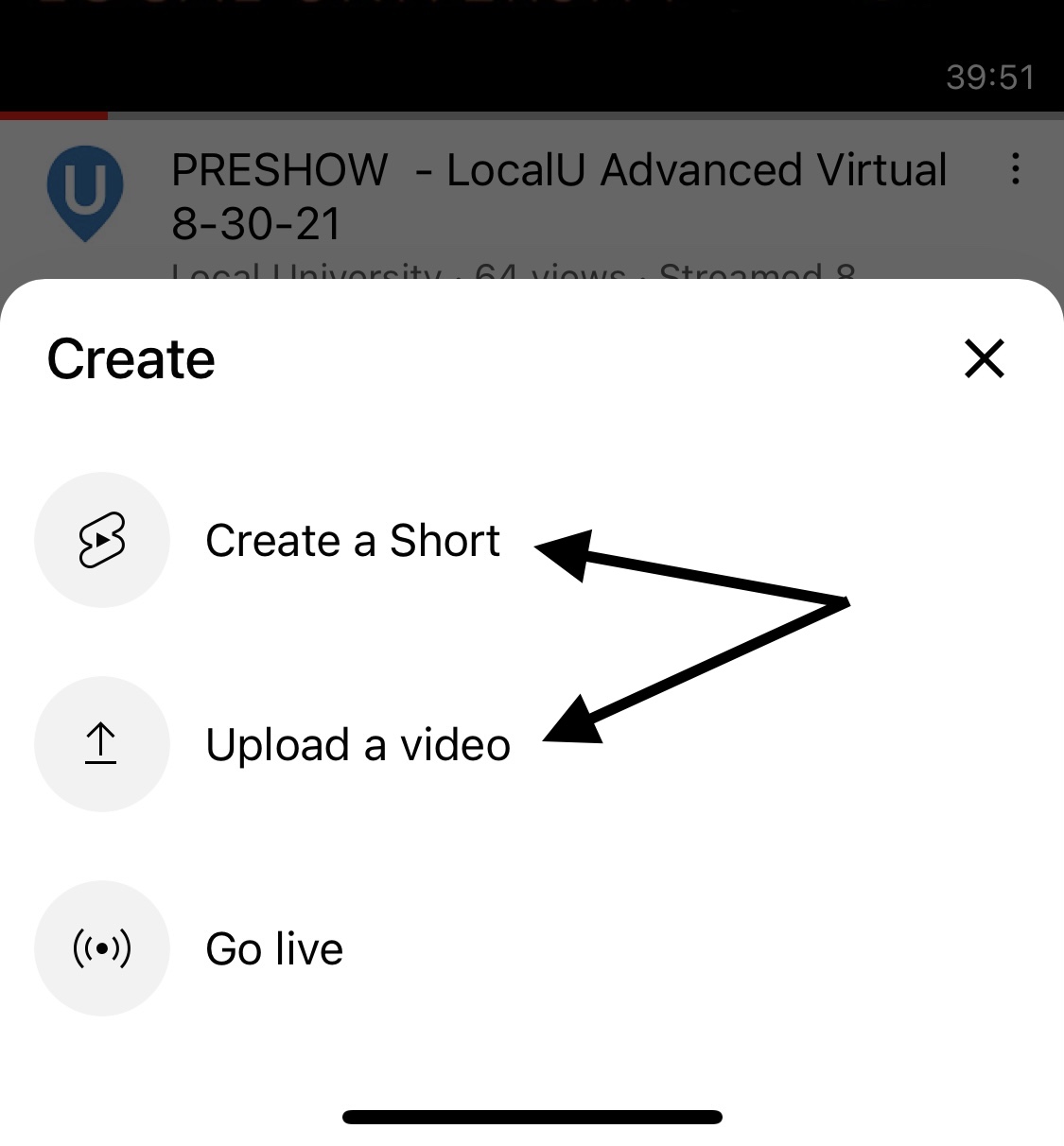
1. Log into your YouTube account from the app. Tap the Create (+) button, and select Create a Short or Upload a video if you already have the footage you’d like to use.
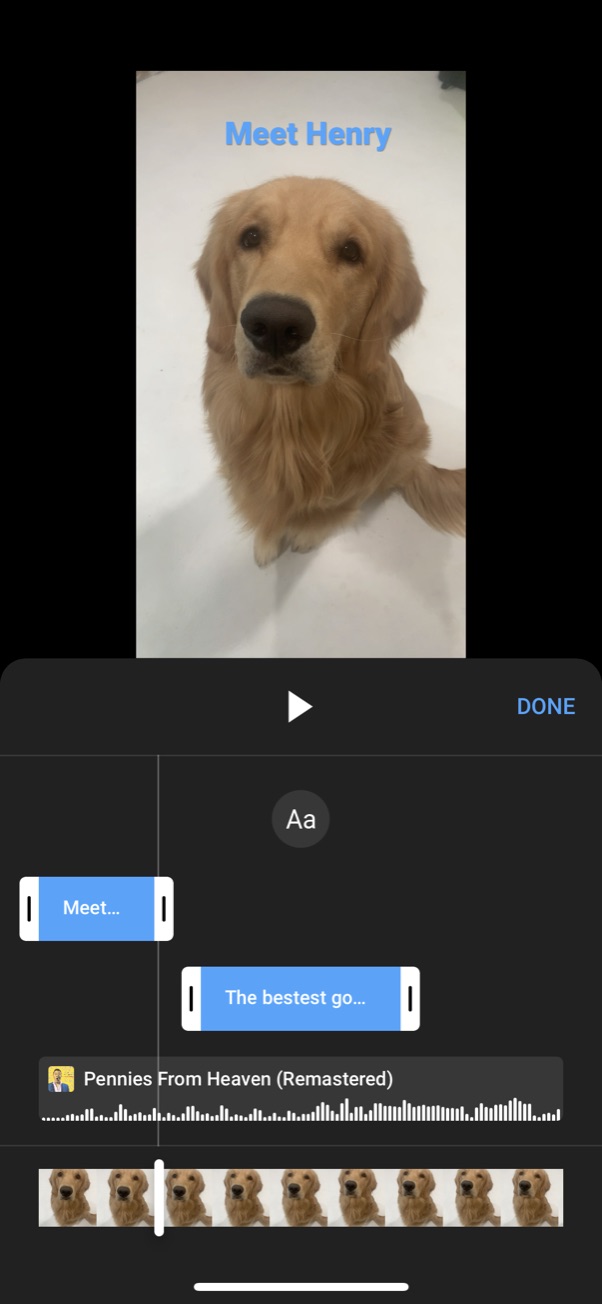
2. Add audio. Once you’re all set up, you can select music or other YouTube audio to use as the soundtrack to your video.
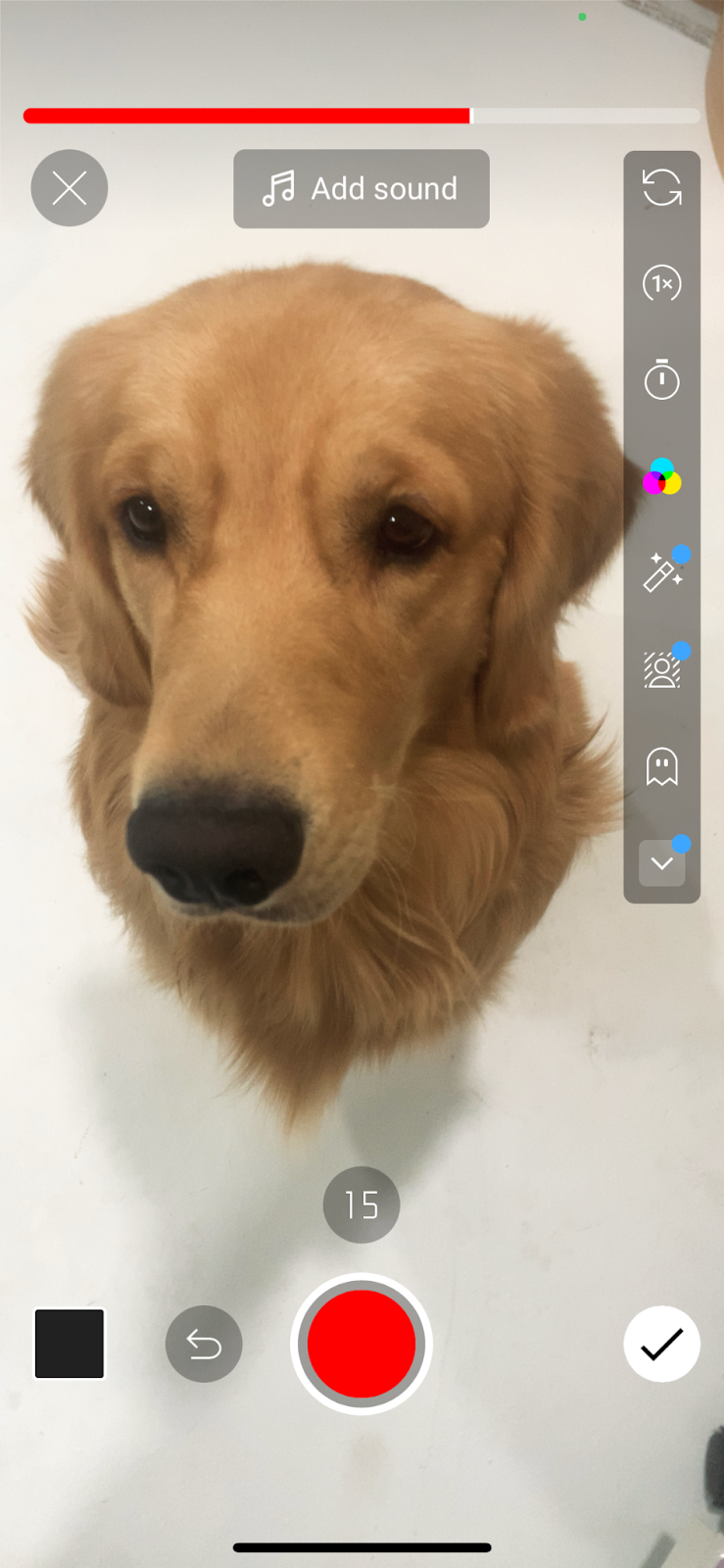
3. Record the video. Creators can start and stop recording, adjust recording speed, set a timer and even merge various recorded clips together.
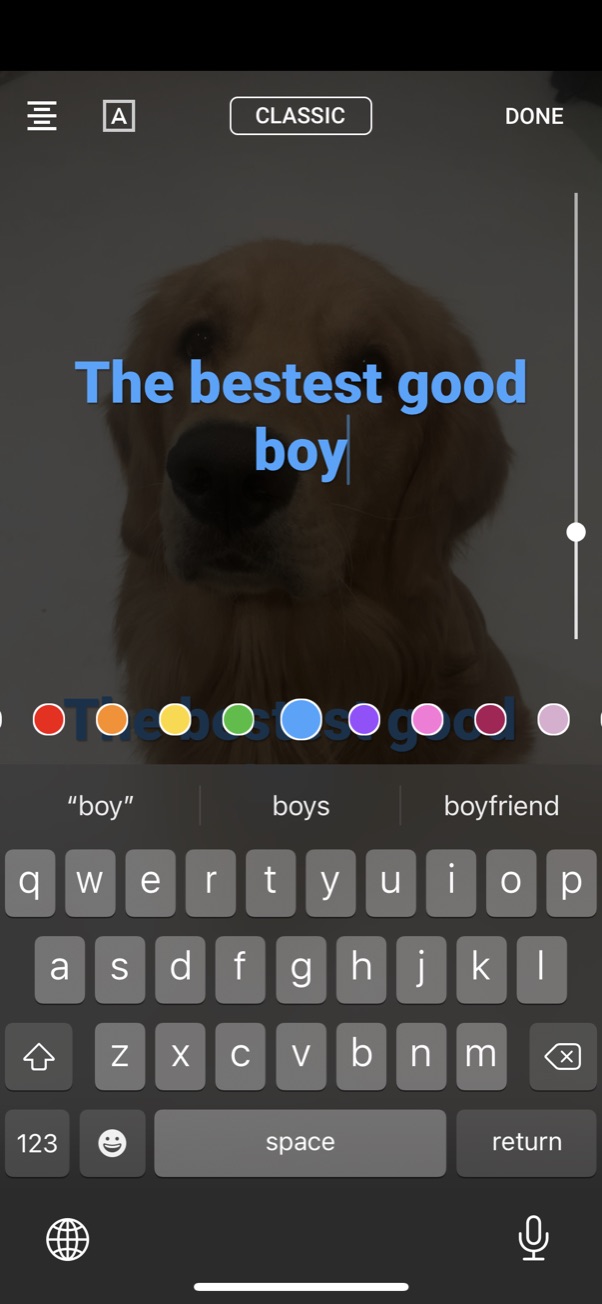
4. Edit your Short. Add filters, captions, and text snippets to videos. When you’re happy with your editing, tap Next, and add a title.


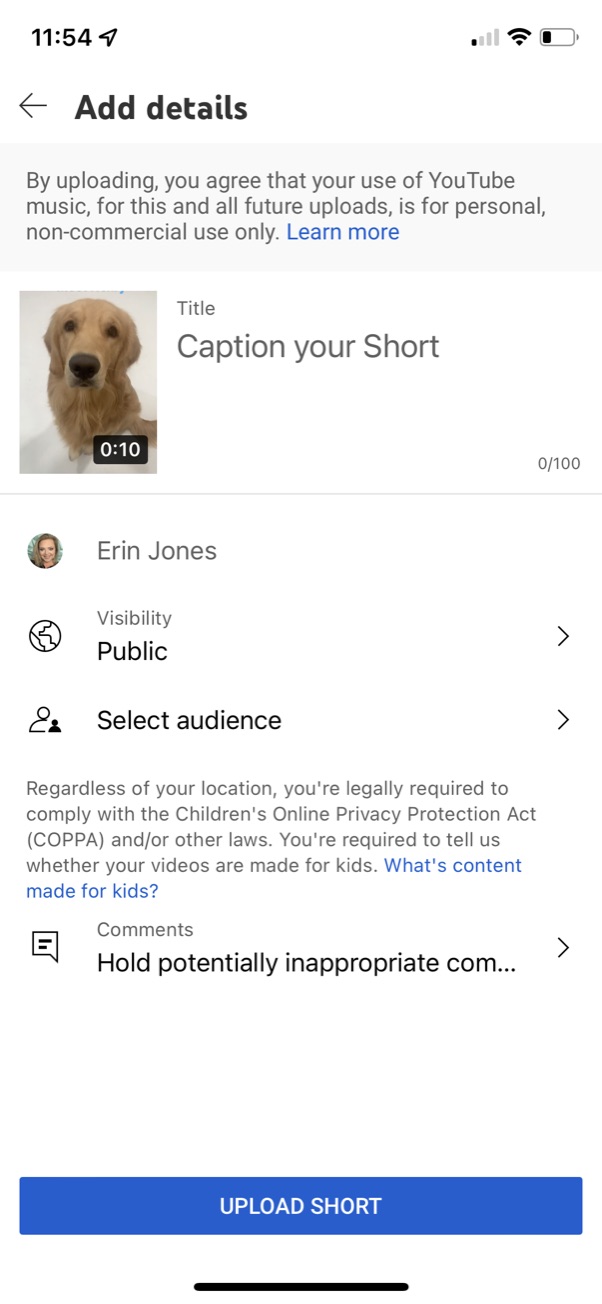
5. Select your audience. Add any restrictions, and share it with the world! Once you’ve filmed, edited, and gotten your video where you want it, it’s time to get it out to your audience.
6. Upload. Tap “Upload” and you’re all set!
General tips for success with Shorts
Content length
While you have 58 seconds, don’t feel like you need to use them all.
Most of the highest viewed shorts are 30 seconds or less.
If you can get your point across or tell your story more quickly, do it.
And remember to eliminate dead air or unnecessary footage.
Be consistent
Try to keep length relatively consistent among videos if possible.
Users like to know what to expect. That familiarity can help increase trust in your brand.
Entertain and inform
How is your content benefitting the viewer? What might make them want to come back for more?
Provide valuable information while entertaining to keep users coming back for more.
Set expectations with value
At the beginning of each video, briefly tell users who you are and what you’ll be sharing with them.
Custom thumbnails matter
Shorts can also be viewed as regular YouTube videos, and users will see video thumbnails if they happen upon your shorts in their normal feeds.
A title screen or something eye-catching can be the difference between views and new subscribers and someone scrolling right past your content.
If you do not specify a thumbnail, YouTube will pull a still from your video. Do you want to take that chance?
Incorporate catchy titles
Use your title to attract users and let them know what your video will be about.
Keep it interesting and informative.
Bonus points if you can make them laugh.
Utilize stories
Create YouTube stories that highlight your top shorts, and ask users to subscribe and comment.
Keep it simple
Users are most often going to be on mobile. Don’t expect them to be able to see fine detail or read big blocks of text.
Consistency is key! Maintain consistency in:
- Style.
- Length.
- Post frequency.
- Subject matter.
- Overall tone and voice.
People want to feel like they know your brand. So make it easy for them.
How to increase view counts on YouTube Shorts
Remove the intro
For a longer video, intro music and/or screens are great. For a short, they steal valuable seconds that could be used to get a new viewer’s attention and curiosity.
Shoot vertical
Viewers are expecting vertical content, do not annoy or confuse them by changing what they’re used to seeing.
Jump right in
Just like in TikTok videos, jumping in and getting to the purpose of the video will likely increase views and engagement on Shorts.
Utilize captions and text effects
Add subtitles or text effects to increase interest and engagement.
Loop your shorts
Increase watch time by looping your shorts.
If your videos do not have a clear beginning and end, many viewers will watch your video more than once – especially if they’re not paying close attention.
You may have more than one opportunity to gain that subscriber this way.
Just remember: the longer a video is, the less likely a viewer is to watch multiple loops.
It never hurts to ask
Ask users to like and comment on shorts, and to subscribe to your channel on every video.
Start with one still frame
YouTube has a one-second delay at the beginning of each short.
Take advantage of this by replacing your intro song with a single frame still with your thumbnail image at the beginning and end of each video.
Incorporate a catchy title and image to attract more views.
Use pinned comments
Add a pinned comment to each video to encourage viewers to check out your channel or website.
People like clear direction. Again, it never hurts to ask!
Be careful with music
Timing music in Shorts can be hard.
An abrupt cutoff makes looping obvious and can be jarring to users, causing them to scroll on to the next video.
If you’re using music, make sure it flows well when looped.
Set thumbnail
What’s one thing that many Shorts with low view counts have in common?
They don’t show the user what they’re about or set an expectation for the viewer.
Let viewers know what you want them to get from your video so their expectations are set properly from the beginning.
Hashtags
Hashtags are important with shorts, especially the #shorts hashtag.
Include this in your description, and at the end of your title if it makes sense.
Take a shot on YouTube Shorts
Between the explosive audience growth, ease of use, mobile-friendly format, and potential for extensive reach, it makes sense to give Shorts a try.
Add in the fact that you don’t need expensive equipment or time-consuming production and it feels like a no-brainer.
However, YouTube Shorts are not a magic bullet. They may not be a single element solution for most brands. But they’re a fantastic way to increase brand and product awareness, reach and conversions.
YouTube is a massive brand, and has more staying power than newer platforms, so it is a relatively safe place to invest time and resources into creating content for their platform.
Shorts are likely going to be around for a while, so dive in and see how they can help your brand’s marketing efforts.
The post YouTube Shorts guide: How to get noticed appeared first on Search Engine Land.
Courtesy of Search Engine Land: News & Info About SEO, PPC, SEM, Search Engines & Search Marketing
Wednesday, June 8th, 2022
Developers take note. Google Ads just announced v11 of their API.
What’s new. This version includes updates to the following client codes:
- Campaign performance max upgrade status
- Added support for Smart campaigns using business profiles optimized for ads as landing pages
- Accepting the resource names of the Google Business Profile location
- Support for Manual CPA, maximize conversions bid strategies, and ad schedules for local services campaigns
- Added asset source to show the source of asset or asset link for whom generated the entity
- Added new fields to support retrieving co-viewing metrics in Reach Forecast
View the complete list of updates. View the full list of updates and read the announcement here.
Launch date. The updated client libraries and code will be published next week.
Why we care. Developers who use API’s to manage and report on Google Ad campaigns will have an easier time making changes, migrating campaign types, and preserving budgets, assets, and settings. Further updates also allow more functionality options regarding the use of Business Profiles as landing pages, and ad schedules for local services.
The post Google Ads launches v11 of API appeared first on Search Engine Land.
Courtesy of Search Engine Land: News & Info About SEO, PPC, SEM, Search Engines & Search Marketing

