Archive for the ‘seo news’ Category
Wednesday, August 10th, 2022

Effective digital transformation can accelerate organic marketing growth—and maintain that growth despite future economic or regulatory challenges.
Join search experts from Conductor in an upcoming webinar and learn:
- The crucial role organic and SEO play in enterprise digital transformation.
- The importance of diversifying marketing efforts and what that looks like.
- How to apply data-driven insights to elevate the customer experience.
Register today for “Beyond the Buzzword: Transform Digitally to Drive Organic & SEO Growth,” presented by Conductor.
The post Webinar: The crucial role SEO plays in digital transformation appeared first on Search Engine Land.
Courtesy of Search Engine Land: News & Info About SEO, PPC, SEM, Search Engines & Search Marketing
Tuesday, August 9th, 2022
Technical SEO issues are more common than most users expect, but you do not have to hire a team of specialists to resolve them.
Developers and web designers want to assure everything on their website is up and running at optimal levels. Therefore, similarly to your website’s site health, monitoring your website’s SEO is important to keep your ranking growing.
In this article, we will discuss some of the issues that affect your website’s technical SEO and how to find and solve them. Included will also be tools that you can use to better manage and monitor your website’s SEO rank and Domain Authority score.
Domain Authority
Your Domain Authority (DA) is a score for your website created by Moz, which gives you a ranking from 1-100 in order to predict if your site is likely to appear higher in a search engine search.
The score is calculated on different factors; therefore, your domain’s score will fluctuate with time. It uses an algorithm to compare how often Google search uses your domain over a different domain within that same search.
Therefore, if your domain ranks higher than a competitor’s domain, it regards it as having more authority. For example, Amazon will have a higher domain authority than a regular eCommerce website.
Why does Domain Authority matter?
Domain Authority is not a Google ranking factor in and of itself. However, it does provide some insight into your website, its links, and how it compares to your competitors.
You do not have to strive to make your DA 100, as that is the highest it can go and likely very hard to compete with other large companies such as Facebook or, as previously mentioned, Amazon.
For comparison, you can review Moz’s Top 500 Websites.
Webmasters should therefore focus on their links, keywords, and other SEO aspects that will affect their Google ranking.
Backlinks
Sometimes referred to as inbound or incoming links, backlinks occur when one website is linked to another.
When your website receives a backlink from an authoritative website, you gain what is known as a “vote of confidence.”
If multiple sources of information link to your website or the same content, SEO regards your content to be of high quality.
However, what happens when links to your website are deemed as “bad” or low-quality backlinks, and what does this mean?
Toxic backlinks
Google defines bad backlinks as:
Any links intended to manipulate PageRank or a site’s ranking in Google search results may be considered part of a link scheme and a violation of Google’s Webmaster Guidelines. This includes any behavior that manipulates links to your site or outgoing links from your site.
This means if any of the backlinks on your website are from a malicious or manipulative source, your SEO will be negatively affected, as it is reflected as bad content.
Google Search Central has further examples and information on what can cause your backlinks to be flagged as toxic or bad content.
How to find toxic backlinks and how to get rid of them
A link analysis is the best way to identify where your backlinks are coming from. You can use Google Search Console to see your entire linking profile; however, for a more in-depth look at your backlinks and their sources, you can use other resources.
Semrush has a Backlink Analysis tool that lets you review your links before making any changes. It is to be noted that Semrush is a paid resource.
In order to address toxic backlinks, you can put in a request in Google Search Console to Disavow them. This lets Google know to ignore the links and not to count them against your SEO score.
Disavowing backlinks is a resource that should only be used if the links to your website are actively targeting your site and bringing your rank down.
Valid markup
Although drag and drop builders are amongst the most popular ways to design a website today, all sites are still made out of code, and this will also be reviewed by search engines.
W3C coding standards
The World Wide Web Consortium (W3C) is an international community that works together to develop Web standards.
It offers free access to these standards as its principle is Web for all, Web on everything. This means all sites should be accessible to users across browsers and devices.
What do coding standards have to do with SEO?
These standards assure that your content is available everywhere, which means if your code is not validated by these rules, it might mean there will be cross-compatibility issues and errors that can negatively impact your SEO.

Validating your code per W3C standards does not affect your SEO, but it can resolve a couple of issues, including:
- Malformed code
- Content rendering
- Microdata markup
- Heading structure
It is possible to validate your code in a variety of ways. Including URL, file upload and direct input on the W3C website.
Having your code validated will also assure you that you are available across the globe and platforms, reduce code bloat, and create a better user experience overall. All of which will contribute to better SEO management.

Other factors that might affect your technical SEO
The following are some further issues you might encounter after auditing your website.
- Resources blocked by robots.txt – If you block CSS or JS here, search engines cannot render your content.
- Broken links – Not only are broken links bad for the user experience but because your website is setting outbound links to pages that do not exist anymore or are misspelled, it reflects as bad content on your website.
- Missing images – Similarly to broken links, missing images occur when the image that was in place on a page was removed, or its link updated. Ensure your images are up to date and optimized for search engines.
- Server errors
- 404 not found – per Google, there are a variety of ways a 404 page could affect your website. Having multiple 404 pages with no 301 redirects or custom 404 pages can reflect bad content or issues with your links as they oftentimes will continue to be crawled.
- 301 redirect loops – this error occurs when one of your links redirects to a new website, that in turn continues to redirect it. As Google Search engine cannot process your final link, it is not able to gather information from that page. Ensure to update your links to point to the correct destination to eliminate the need for a 301.
- Mixed content warnings – Mixed content happens when an HTTPS page contains HTTP elements. Non-secure HTTP elements mean a page is not secure and could be attacked, negatively affecting your SEO.
Further resources
There are multiple tools to check your SEO standing and how to improve it. These are just some of our recommendations.
- Backlinko is a great resource for SEO training and link-building strategies.
- Google Core Web Vitals is one of the most thorough tools to check your site speed and what might be affecting it.
- Google Search Console is Google’s free tool for link and page checks and much more.
- ScreamingFrog is desktop-based software that crawls your entire website and integrates with data from your Google services. The audit scans for broken links, duplicate content and server errors amongst technical data points.
- SEORCH can give you vital information on your keyword density, heading structure, and code-to-text ratio.
- Semrush is a paid resource with incredible tools that help you understand your links, keywords, ranking, and more. They also offer courses, e-books and community support.
Final words
Technical SEO can be intimidating for some users as it is not as readily available to change as general SEO modifications. Oftentimes it requires changes to code, site architecture and the web server in order to resolve issues.
Keeping an eye out for these issues with consistent monitoring and full site audits helps you catch issues early on. Using tools like Semrush and Google Search Console will help your site grow not only its rank but also its Domain Authority.
If you are interested in learning more about improving your SEO ranking and optimizing your website, amongst other things, check out InMotion Hosting’s blog.
The post Top technical SEO issues every webmaster should master appeared first on Search Engine Land.
Courtesy of Search Engine Land: News & Info About SEO, PPC, SEM, Search Engines & Search Marketing
Tuesday, August 9th, 2022
Business investment in marketing these days is soaring, especially in digital marketing.
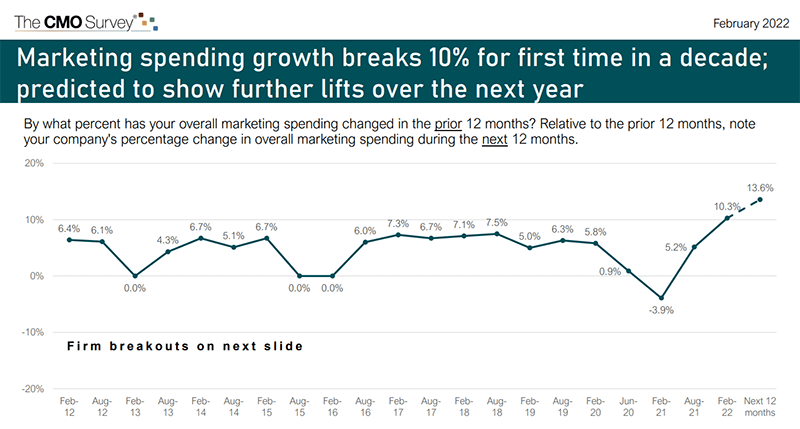
In fact, for the first time in a decade, marketing growth topped 10% from February 2021 to February 2022. According to the latest CMO Survey report, marketing spending grew by 11.8% compared to the previous 12 months. And it’s projected to grow even faster over the next year, to 13.6%.
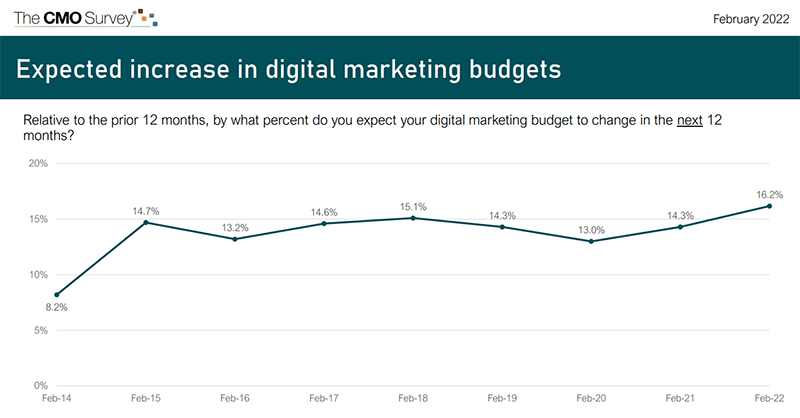
The digital marketing channel specifically accounts for the bulk of that marketing spend, at 57.1%. According to that same report, digital marketing spend is expected to grow by a whopping 16.2% over the next year.
But how much of digital marketing spending goes toward search engine optimization?
In 2019, U.S. companies spent $73.38 billion on SEO out of a total of $776.30 billion for all digital marketing – roughly 9.5%, according to an earlier report by Borrell Associates.
Those who do SEO in-house (at least with local businesses) report higher costs and lower returns versus hiring a consultant and agency, which yields lower costs and higher returns, according to the report.
According to the report:
“Those who use third parties rate the third party’s effectiveness higher than their internal skill. SEO and web design/development particularly skew towards third parties being more effective.”
That said, SEO is an investment in your business’s future revenue. Think about it:
- What drives a business is sales.
- What drives sales is leads.
- Digital leads come in through a website.
- People find a website through impressions in the search results.
SEO allows businesses to own the top of the sales funnel: impressions of your website in the search results. And, some sectors find organic search drives 2x more revenue than other channels.
So what determines your SEO budget? I’ll touch on that next.
Factors that determine your SEO budget
What percentage of your budget should go toward SEO?
It’s not black and white, but the following factors should determine how much you invest:
- Your revenue
- Your competition
1. Your revenue
I recommend that the greater of $8,000 per month or 5% to 10% of your business revenue go toward SEO. In a highly competitive space, you should lean toward the high end. This is what you will see for businesses that are serious about competing.
Spending at least $8,000 a month usually allows for a good starting point with ample expert resources. At the high end, we have clients at six times that each month.
Also, consider how much money you’re putting toward paid advertising. For example, a national brand that runs PPC campaigns to attract new customers should spend approximately 25% as much additionally on organic SEO. The two channels complement each other to help drive website traffic.
I think it’s useful to say 25% of PPC spend, or at least $8,000 a month, is a reasonable estimate of SEO spending for companies that use ads.
2. Your competition
Consider that most search engine queries yield at least a million search results. And you have to be on Page 1 to even matter.
Any business that is competing in organic search has their work cut out for them. But, if you are in a difficult niche or are up against big brands with bigger budgets, you may have to work a little harder and faster.
This often requires a bump in your SEO budget. And you have to be willing to do this or risk being irrelevant in the search results.
Get the daily newsletter search marketers rely on.
How to decide your SEO budget
So you know that two basic factors influence your SEO budget: your revenue and your competition. Let’s put this into perspective.
We know that there is massive competition in the search results. So the question isn’t only: “How much do you want to spend on SEO?” But also: “How fast do you want to beat the competition?”
This is really what determines your budget. At a minimum, you should spend 5% to 10% of your revenue on SEO. But if you want to get ahead faster, you typically spend more.
That does not mean blindly investing in SEO with the promise that more money = better results.
But you do need resources. You need to know who you are hiring, and they need to have an excellent reputation and deep expertise.
If you’re using a third-party SEO agency, make sure you only hire experts. Unfortunately, many businesses settle for inexpensive SEO services. Cheap SEO is a near-death experience, and it will cost you more time and money to crawl out of the grave you’ve dug than if you were to invest in a healthy SEO strategy upfront.
With a nice budget that affords a true expert, you can learn how to make the most impactful SEO moves with the resources you have. And, if you can be more nimble than the competition in making those changes, you have a better chance of getting ahead.
If you are able, take advantage of downturns when possible. Those who do not have the knee-jerk reaction of pulling budget for digital marketing when the outlook is shaky will have the chance to ramp up and pass their competition.
Consider diverting budget to SEO
If your marketing budget is already maxed out on other channels, consider diverting some of your budget to SEO.
For instance, say you are spending a significant amount on PPC ads. Carving out 5% to 10% of that for SEO shouldn’t be an issue.
Especially when you consider how SEO trumps PPC on average conversion rates, you will thank yourself later. And, SEO has staying power for your brand’s presence online. You can’t say that for ads – if you turned off your advertising tomorrow, you’d have no residual value in the search results.
SEO is more cost-effective in the long run because your optimized webpages can continue driving traffic for years.
Yes, you must maintain leads coming in today (be it through PPC or something else), so I’m not suggesting you shut those activities off. But, if you have a good stream of leads coming in now, invest some of your budget into the future – and SEO will get you there.
The post What percentage of your budget should go toward SEO? appeared first on Search Engine Land.
Courtesy of Search Engine Land: News & Info About SEO, PPC, SEM, Search Engines & Search Marketing
Tuesday, August 9th, 2022

New ad channels pop up seemingly overnight. Headlines tout the popularity of the latest and greatest options, and marketers feel the rush to participate. For those in the B2B space, it can be even more complex trying to decipher whether the newest trend is worth investing the time and effort to help you reach your target audience.
Join experts at MNTN who share performance metrics used to determine the effectiveness of ad channels they’ve tested—whether it’s a new social channel or even Connected TV.
Register today for “Leap or Linger: Determining Which Ad Platforms to Test for Your B2B Brand,” presented by MNTN.
The post Webinar: What ad channels work best for your brand? appeared first on Search Engine Land.
Courtesy of Search Engine Land: News & Info About SEO, PPC, SEM, Search Engines & Search Marketing
Tuesday, August 9th, 2022
Last night at about 9:30 pm ET Google had a widespread outage with Google Search, the issue lingered through the night but restoration efforts seemed to mitigate some of the connectivity issues many have experienced. But this seemed to result in a cascade of other issues with Google Search around search quality in general.
The Google Search issues. It seems that the outage, although the most noticeable issue, is not the only issue. I’ve seen issues with the overall search results impacting search quality. These issues include:
- Outages and inaccessibility of Google Search
- Old pages dropping out of Google Search
- New pages not being indexed by Google Search
- Google Search results look stale and outdated
- Huge ranking fluctuations
I posted some screenshots of the issues on the Search Engine Roundtable.
What happened? It seems a Google data center in Council Bluffs, Iowa caught on fire and the result of the fire injured some workers and causes these issues in Google Search. The incident occurred at 11:59 a.m. local time on Monday, the Council Bluffs Police Department told SFGATE. A Google spokesperson told them:
“We are aware of an electrical incident that took place today at Google’s data center in Council Bluffs, Iowa, injuring three people onsite who are now being treated. The health and safety of all workers is our absolute top priority, and we are working closely with partners and local authorities to thoroughly investigate the situation and provide assistance as needed.”
Google is aware. Google is aware of the issue, as you can see from the statement above. But Google is also aware of the overall Google Search issues related to this fire. John Mueller from Google commented on Twitter about how things should come back to normal as restoration efforts are underway. Here is what he posted:
I'd keep an eye on it today, and please let me know if it doesn't look like the main URLs are settling down again. (We don't index everything, so I'd focus on the important URLs for things like this.)
—  johnmu of switzerland (personal) (@JohnMu) August 9, 2022
Why we care. If you notice ranking changes, both positive or negative, or big swings in traffic from Google Search, this might be why. Things should return to normal as this issue gets resolved but it is unclear how long it will take for everything to come back to the state it was prior to this fire.
Our thoughts and prayers should be with those who were injured in this data center fire.
The post Google Search outage causing major issues with search quality and indexing appeared first on Search Engine Land.
Courtesy of Search Engine Land: News & Info About SEO, PPC, SEM, Search Engines & Search Marketing
Monday, August 8th, 2022
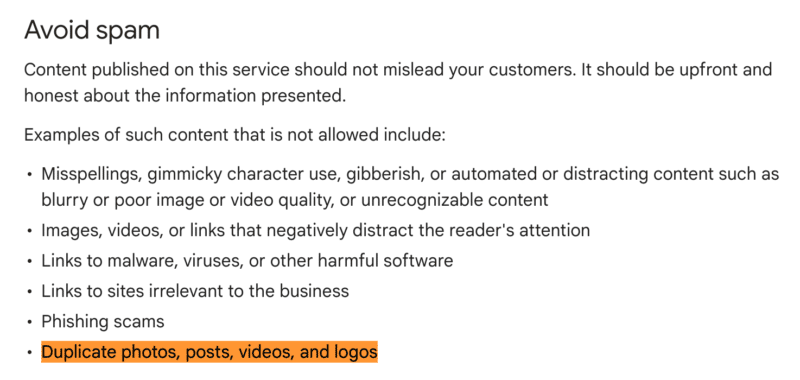
Google has updated what it considers to be spam when it comes to Google Business Profile posts in the Business Profile posts content policies. The new line added under the avoid section says “examples of such content that is not allowed includes “duplicate photos, posts, videos, and logos.”
Duplicate. Yes, the new line says that “duplicate photos, posts, videos, and logos” was added as an example of Google posts that would be rejected or removed because it is considered spam. That line was not on the Google document prior and was just recently added.
Screenshot. Here is a screenshot of the addition:
Consequence. What happens if you are caught posting duplicate photos, posts, videos, or logos in your Google Business Profile posts? Well, those posts may be rejected or removed from Google Search and Google Maps.
Joy Hawkins and Colan Nielsen posted this on Friday:
We have been hearing a ton of complaints about rejected posts recently. If you're using logos in your images or stock photos ("duplicate photos"), that could be why. https://t.co/ajVe9VfkZj
— Joy Hawkins (@JoyanneHawkins) August 5, 2022
Why we care. If you do a lot of Google Business Profile posts, make sure not to duplicate photos, posts, videos, or logos in your Google Business Profile posts. If you see some of your posts being rejected recently, it might be related to the revised guidelines Google has added the other day.
The post Google updates Business Profile posts spam policies appeared first on Search Engine Land.
Courtesy of Search Engine Land: News & Info About SEO, PPC, SEM, Search Engines & Search Marketing
Monday, August 8th, 2022

Since its inception in 2015, the Search Engine Land Awards has recognized exceptional marketers on an annual basis — showcasing their outstanding work, providing well-earned exposure in coverage and interviews, and bestowing upon them the highest honor in search.
But the road between deciding to begin an application and winning the award can be a long one. Although this year’s submission process has been significantly streamlined — it’s never been faster or easier to apply to the Search Engine Land Awards — there’s still a story that has to be told. And while the way in which you tell that story is entirely up to you, we thought we’d look back on some advice from past judges about what really wows them, what they would love to see more of, and what areas are best avoided...
Keep reading for 17 tips for creating an award-worthy submission:
What impresses the judges most:
- “What impresses me is when people have clearly aligned the tools and features they’re using to the goals they want to achieve. It sounds simple, but the entries that are goal-oriented rather than focused on tactics are always strongest.” – Ginny Marvin
- “When entries have a new take on a situation or feature and talk about into how their strategy is different from the norm, and demonstrate why is their strategy or tactics are award-worthy.” – Brad Geddes
- “When submissions are succinct but concrete in their campaign summaries, show examples (i.e., ad creative where relevant) and use straight-forward English rather than marketing speak.” – Greg Sterling
- “When applicants are able to go beyond percentages of increases and show tangible results of how the campaign directly impacted the bottom line of the business. Also, it helps to put results into perspective — so instead of simply saying: ‘Before the campaign, the client was only bringing in this # of leads, clicks, etc — but the campaign raised that number to XXX’ offer an example of how the campaign impacted the business overall and not just the analytics. – Amy Gesenhues
- “When entrants share a lot of technical data around their case studies.” – Barry Schwartz
- “When entries prove their point with stats, graphs, and especially screenshots of GA/PPC Engine/ other paid search tech providers. Too many just say, ‘we increased business [some huge number]’ with no way to back it up.” – Brad Geddes
- “It really impresses me when entrants show how they retooled, revitalized [a campaign] or did something extraordinary to achieve extraordinary results. Or, how they outfoxed a competitor in a clever way – anything that shows how extraordinary results came from really extraordinary work.” – Matt Van Wagner
What judges want to see more of:
- “I love to see orchestration — when teams use tools, tactics and features in interesting ways to solve problems and execute on a strategy.” – Ginny Marvin
- “Images from the campaign and data illustrating concrete outcomes. Calling out what was innovative or especially significant or effective about the campaign.” – Greg Sterling
- “Stories around how the campaign was unique from other campaigns the agency and/or client had implemented in the past and the tools used to implement the campaign. Also, did you learn anything from the campaign that you’ve been able to introduce to other campaigns/clients. Were there any unexpected benefits that played out during the course of the campaign?” – Amy Gesenhues
- “I’d love to see more data from our entrants that pinpoint successes or failures in their case studies.” – Barry Schwartz
- “Entries that show the challenges they had to overcome that are outside of the norm (the scrappy startup against goliath, goliath showing it can innovate still against the scrappy startups stealing market share, etc), which might be market conditions, a business change, etc.” – Brad Geddes
What entrants need to stop doing:
- “It’s great to test new betas, but having access to betas doesn’t make you a great marketer. Be sure your entry doesn’t lean on implementing the newest beta features as evidence of running a successful campaign. That’s not enough.” – Ginny Marvin
- “Padding their discussions, using marketing jargon or bloated writing. I’d also like to see less self-congratulation.” – Greg Sterling
- “Using language like world-class, best-in-class, etc. to define your campaign. Talk specific numbers and results. Using flowery language to build up the campaign takes away from actual/quantifiable results. (In other words, let the numbers speak for themselves.)” – Amy Gesenhues
- “Not differentiating on strategy or tactics. While it’s important that we see ‘best or standard practices are in place in an account, we are also looking for a detailed explanation of strategy that truly differentiates the work from others… For example, an account testing new ad extensions/formats or a landing page that breaks convention but delivers impressive conversion data.” – Brad Geddes
- “Claiming increases of 200% when you really mean 100%. A 100% increase means you doubled your number. Going from $100 to $137 is not a 137% increase. It is a 37% increase. I’d like it that when you say ROAS, you show the formula you used to calculate it. A 1000% increase is almost always ignored as a metric. It is the opposite of impressive – it is suspicious. It is most likely you were doing very little before and now you are doing a little more than nothing.” – Matt Van Wagner
Don’t miss your chance to enter the 2022 Search Engine Land Awards… the final deadline is Friday, September 9! Review the categories and begin your application here.
The post How to craft a winning Search Engine Land Awards entry: Past judges share their advice appeared first on Search Engine Land.
Courtesy of Search Engine Land: News & Info About SEO, PPC, SEM, Search Engines & Search Marketing
Monday, August 8th, 2022

Winning an industry award is a rewarding, cost-effective way to generate publicity, attract new business, boost team morale, and stand apart from the competition. Enter the 2022 Search Engine Land Awards now for your chance to take home the highest honor in search!
The final deadline is coming up fast – submit your application by Friday, September 9 to be considered by our esteemed judging panel, featuring John Lee – Head of Evangelism at Microsoft, Cyrstal Carter – Head of SEO Communications at Wix.com, Thom Craver, Director of Consumer Products at CBS News, and more.

Not sure where to begin? Check out How to craft a winning Search Engine Land Awards entry: Past judges share their advice for insights on what makes a winning application. If you have any other questions, send them our way at awards@searchengineland.com and we’ll get back to you ASAP.
Winners will be announced on October 17 in exclusive coverage on Search Engine Land – the industry publication of record.
Take the first step now by creating your account and exploring the application process. If you have questions, please reach out to us at awards@searchengineland.com.
Best of luck! We look forward to your submission!
The post T-minus 1 month to submit your Search Engine Land Award entry! appeared first on Search Engine Land.
Courtesy of Search Engine Land: News & Info About SEO, PPC, SEM, Search Engines & Search Marketing
Monday, August 8th, 2022
SMX Next returns online November 15-16, 2022, focusing on what’s working in search now and how to prepare for 2023.
Search marketing is ever-changing. And we’ve seen a lot of big changes so far in 2022. Algorithm updates and SERP feature changes are making organic search harder. Automation is proving frustrating in paid search and social. Plus, the death of third-party cookies has been delayed. Again. Oh, and Google Analytics 4. It’s a lot.
SMX Next will help marketers regain control.
If you’re an enthusiastic search marketer who has a passion for sharing knowledge and wants to give back to the industry, please consider submitting a session pitch for SMX Next. We’re looking for subject matter experts to share insights, strategies and tactics that are working now and will help SEO and PPC marketers prepare to be successful in 2023 and beyond.
Whether you’ve been speaking for years or are just dipping your toes into speaking, please consider submitting a session pitch. We are always looking for new speakers with diverse points of view.
The deadline for SMX Next pitches is September 15.
Here are a few tips for submitting a compelling session proposal:
- Present an original idea and/or topic not commonly covered at other search events. The focus of Remember: SMX Next focuses on what’s new (and working well) and what’s next (trends and opportunities).
- Include details about what attendees will be able to do better or different as a result of viewing your session.
- Include a case study or specific examples and explain how they can be applied in different types of organizations.
- Be realistic about what you can present in the time allotted. You can’t cover everything about your topic. Going more in-depth on a narrow topic is often more valuable to the attendee.
- Provide tangible takeaways and a plan of action.
Jump over to this page for more details on how to submit a session idea, or directly to this page to create your profile and submit a session pitch.
If you have questions, feel free to reach out to me directly at kbushman@thirddoormedia.com. I’m looking forward to reading your proposals!
The post Want to speak at SMX? Now’s the time to submit a pitch! appeared first on Search Engine Land.
Courtesy of Search Engine Land: News & Info About SEO, PPC, SEM, Search Engines & Search Marketing
Saturday, August 6th, 2022
Technically the new feature was released in 2021, but only to a small number of users. But now Google is slowly ramping up a tool they label “Organise keywords into ad groups.” This was first brought to our attention on Twitter by Tauqueer Aziz, and confirmed by a Google spokesperson today.
What Google says. Google confirmed the new feature in a statement today:
You could always manually choose to add keywords to ad groups (manually picking which ones to add where). This feature adds the ability to use an automated machine learning system where we suggest which ad groups are the best ones for the keywords, instead of you manually doing the placement.
This should hopefully save advertisers time and effort if they have thousands of keywords/ad groups to sift through. The ability to manually add keywords still exists.
Why we care. This new feature aims to save advertisers time by automatically allocating keywords into relevant ad groups. But just like with most automation, use with caution. Test, analyze, and adjust as necessary.
The post Google Keyword Planner gets a new feature appeared first on Search Engine Land.
Courtesy of Search Engine Land: News & Info About SEO, PPC, SEM, Search Engines & Search Marketing