Archive for the ‘seo news’ Category
Monday, September 19th, 2022
When it comes to tools, we all have our favorites as SEO professionals. Ahrefs, Moz and Semrush aim to accomplish the same things at a high level, but you’d be hard-pressed to find an SEO professional who doesn’t have strong opinions on each tool’s ability to do so.
Any seasoned SEO practitioner knows opinions alone can get you roughly as far as asking Google’s John Mueller about domain authority (hint: not far).
Our SEO team recently put our opinions to the test and biases to the side to compare the keyword size of Google Search Console (GSC), Ahrefs, Semrush and Moz for the clients we manage.
While you can read more in the Methodology and Caveats and considerations sections below, the nod to this data not being definitive in the title is that it isn’t. The data was only pulled for 51 domains, all of which live in the pharmaceutical space. So, it’s a small, non-representative sample. You’ve been warned.
GSC had over 36% more keywords than the other sources combined
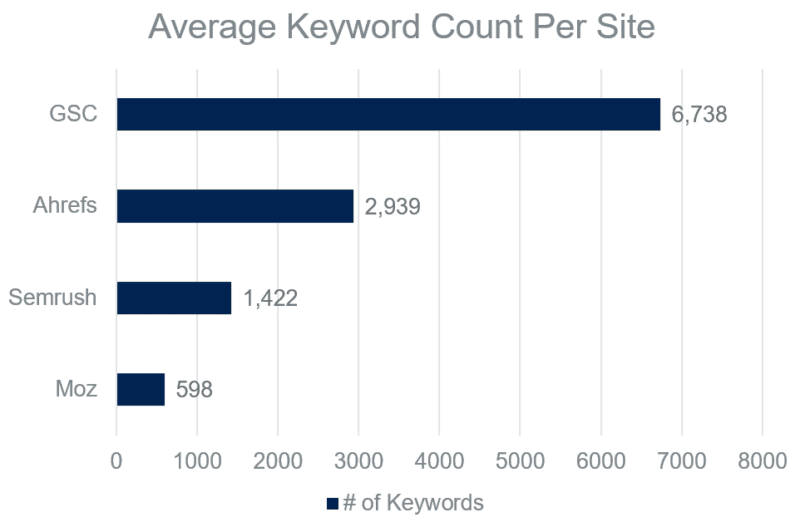 A comparison of Google Search Console, Ahrefs, Semrush and Moz for the average number of ranking keywords or keywords registering at least one impression among 51 domains in May 2022.
Patrick Stox from Ahrefs published a fantastic study about keywords hidden in Google Search Console. I encourage you to read it, but the gist is while the number varied greatly by site, almost half of the overall clicks were attributed to hidden terms.
Given that Google Search Console hides lower volume keywords, which make up the majority of search queries, this likely means significantly more than half of the keywords are obstructed to the end user.
But here’s the reality. GSC still might be the best we have when it comes to keyword visibility size.
Among the three, Ahrefs had the most keywords for 98% of websites
Relative keyword ranking size by domain
| Source |
1st |
2nd |
3rd |
| Ahrefs |
50 domains |
0 domains |
1 domain |
| Semrush |
0 domains |
50 domains |
1 domain |
| Moz |
1 domain |
1 domain |
49 domains |
A ranked order of Ahrefs, Semrush and Moz by keyword ranking size of 51 domains in May 2022
In many ways, it’s unfair to compare Ahrefs, Semrush and Moz to Google Search Console. GSC’s metrics and intended use contrast quite a bit from the other three tools.
So, when removing GSC, we ranked the keyword size for each of the 51 sites in our data warehouse. I’ll be honest; I was shocked at the consistency in the results.
Ahrefs nearly had a clean sweep of first-place finishes, with Semrush and Moz continually coming in second and third.
On average, Ahrefs had twice the ranking keywords as Semrush, which had over twice as many as Moz. Ahrefs had nearly five times the amount of ranking keywords for our clients as Moz. That’s an incredible disparity!
You might be wondering, if Ahrefs has such a dominant lead on Semrush and Moz, why not just use Ahrefs?
As strong as Ahrefs was, it missed 87% of keywords
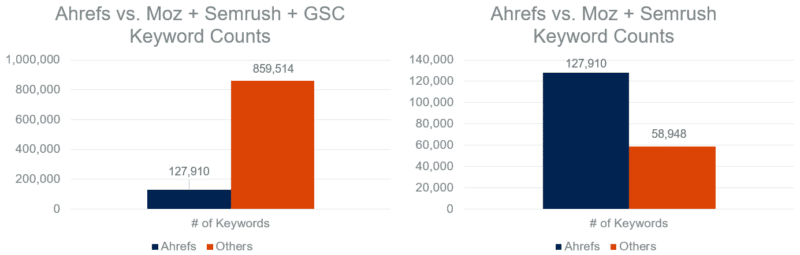
First chart: The total ranking keywords in Ahrefs compared to the total ranking keywords or keywords registering at least one impression found in Moz, Semrush and/or Google Search Console and not in Ahrefs for 51 domains in May 2022.
Second chart: The total ranking keywords in Ahrefs compared to the total ranking keywords found in Moz and/or Semrush and not in Ahrefs for 51 domains in May 2022.
First, the fact that Ahrefs is even able to be compared to the other sources stacked together is powerful. This is far from a knock on it. However, if all of our eggs were in the Ahrefs basket, we would be missing out on a consequential amount of keyword data.
Even if you remove Google Search Console, Ahrefs still didn’t contain 32% of keywords.
At the same time, not using Moz (our smallest source), leaves some blindspots.
When compared to Ahrefs and Semrush, 13% of keywords were exclusive to Moz
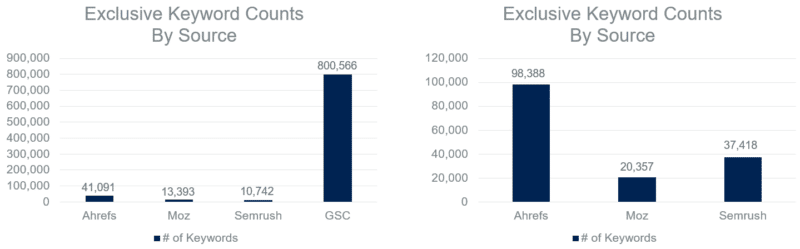
First chart: Total ranking keywords or keywords registering at least one impression exclusive to one source comparing Ahrefs, Moz, Semrush and Google Search Console for 51 domains in May 2022.
Second chart: Total ranking keywords exclusive to one source comparing Ahrefs, Moz and Semrush for 51 domains in May 2022.
When looking at the chart on the right, missing out on 13% of total keywords is hard to ignore.
Moz’s exclusive numbers dropped drastically when GSC was added to the mix with under 2% of keywords. But as I’ve previously mentioned, these tools aren’t exactly equivalent in what they cover.
Semrush’s exclusivity percentage jumped to 24% when compared to Ahrefs and Moz, but it was also sitting at under 2% when GSC was included.
Let’s look at the opposite end of the spectrum. Instead of exclusivity, where was there complete coverage? If we drew a random keyword out of a hat, how likely would it be found in each of the four sources we analyzed?
Fewer than 1% of keywords were found in all four sources
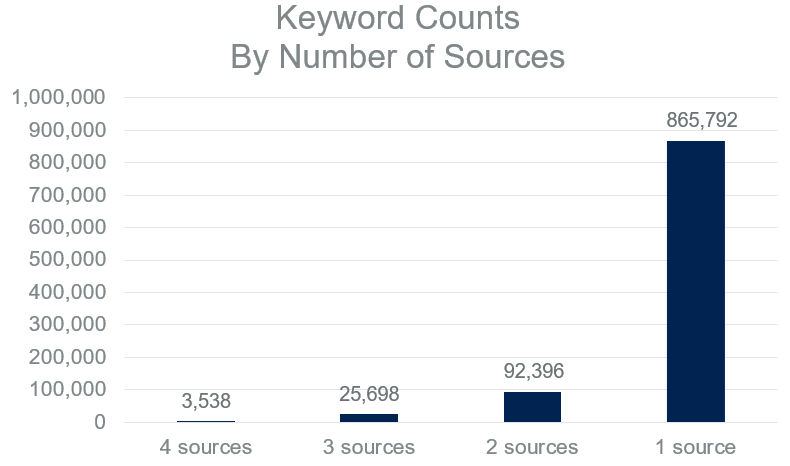 Number of ranking keywords or keywords registering at least one impression by represented source count among Ahrefs, Google Search Console, Moz and Ahrefs for 51 domains in May 2022.
A staggering amount of keywords in our dataset were only found in one source. Conversely, just a select few were represented in all four sources.
The keyword counts increased modestly from 0.4% to 2.6% when moving from four sources to three. Even two sources didn’t cover 10% of the total keywords.
Get the daily newsletter search marketers rely on.
<input type=”hidden” name=”utmMedium” value=”” />
<input type=”hidden” name=”utmCampaign” value=”” />
<input type=”hidden” name=”utmSource” value=”” />
<input type=”hidden” name=”utmContent” value=”” />
<input type=”hidden” name=”pageLink” value=”” />
<input type=”hidden” name=”ipAddress” value=”” />
Methodology
Data collection
- Google Search Console: Unfiltered, query-level search data was stored in our data warehouse via Google Search Console’s API each day from May 1 to May 31 for 51 client domains. Keywords were deduplicated by domain and aggregated into a monthly total.
- Semrush: One live API call via Semrush’s Domain Organic Search Keywords report was stored in our data warehouse in May for 51 client domains. The U.S. was the designated region.
- Moz: Organic search keyword rankings were manually exported from the front end of Moz’s Keyword Explorer using the default settings in May for 51 client domains.
- Ahrefs: Organic search keyword rankings were manually exported from the front end of Ahrefs’ Keywords Explorer using the default settings in May for 51 client domains.
Processing and analysis
A query-source matrix was created in order to determine where there was overlap and exclusivity among Ahrefs, Google Search Console, Moz and Semrush per client domain and in aggregate.
Caveats and considerations
Data sample
I mentioned this in the introduction, but it’s worth repeating. Our analysis featured both a small and industry-specific sample of domain rankings. You should not draw any conclusions around overall relative keyword size comparisons of these tools.
So, why publish the results? As also touched on in the key takeaways section below, beyond the data being interesting and potentially sparking beneficial dialogue, I wanted to stress the value of analyzing these tools under the lens of your industry.
Source availability
Ahrefs, Google Search Console, Moz and Semrush are not the only products with unique keyword visibility datasets. Serpstat, seoClarity, Brightedge’s Data Cube and other tools could have been part of this study to make it more comprehensive. If any reps from those tools are reading this, we would be interested in comparing your tool to the rest next time around. Hit me up!
Source comparability
With Ahrefs, Moz and Semrush, these were one-time data pulls within the month of May. However, with Google Search Console, 31 separate API calls were made. This may have inflated GSC’s numbers a bit.
Had we pulled rankings each day in May for the other tools, more unique keywords would have been added either from shifting domain rankings or keyword database updates. For what it’s worth, I don’t believe it would have impacted any overarching trends or takeaways.
Additionally, Google Search Console data included mobile and desktop keywords from all countries, while we only included U.S. desktop rankings from the other sources. This again would inflate GSC’s numbers, but not likely to a degree that would change any of the trends in a meaningful way.
Keyword volume exclusion
Keyword volume was not included in this exercise, which limits its potential value. With all else being equal, I’d be more worried if Moz missed a 25,000 MSV keyword than a 25 MSV keyword.
The next time this analysis is run, we plan on incorporating volume. However, we’ll need to create logic around how to best include GSC impressions as an MSV proxy, as well as how to calculate the volume for keywords found in multiple tools.
Data freshness
Data freshness was not considered in this analysis. Due to the way its metrics work, Google Search Console is inherently fresh. In other words, if we pulled GSC data from May, those keywords were definitely visible in May (even if only for a moment).
However, it’s possible the other sources contained keywords without a refreshed rankings pull since before May. If any of these tools had disproportionately stale data, it could have altered the results.
Key takeaways
1. Challenge your assumptions
Before revealing the results to my team, I asked them to rank the four sources in order of keyword coverage based on their own gut feeling. Around 10 people guessed, including me, but not one of us was correct!
Semrush was routinely ranked lower than we predicted, and GSC was not given nearly enough credit. However, with GSC, that’s more likely due to them being used to pulling the data from the front-end user interface.
We all can be guilty of trusting our gut feelings and hunches a little too much, and this goes far beyond SEO tools. As marketers, we should continually pressure test our positions and be willing to change our minds.
2. Use the GSC API
When pulling data directly from Google Search Console’s user interface, you are limited to 1,000 rows of data. If we had simply downloaded data from GSC with the date range of May 1 to May 31, this tool would no longer have been leading the pack (far from it).
Querying GSC from the API still has its limitations, but it increases the amount of available data by a considerable margin.
3. Use all the tools
Admittedly, this takeaway is a bit of a contradiction coming from me. As stated in the section above, we don’t even use all of the tools, nor do we plan to. However, I have consistently advocated for not using just one SEO tool.
My actual advice is this: invest in one-month subscriptions and/or free trials to gauge the relative performance in your specific category. From there, you can choose the best tool(s) for you based on your particular verticals, budget and goals. Our pharmaceutical client ads often say, “Results may vary,” and the same is true with this. Take the extra time to see what’s best for you.
Also, when testing out tools for your specific industry and needs, don’t just look at keyword sizes. Size, accuracy, user experience, customer support, technology integrations and so much more can also be considered.
4. Repeat and improve your tests
Our first official test is done, but we don’t plan on calling it quits. Semrush recently went public. Moz was acquired just over a year ago. Ahrefs launched a search engine.
This is an arms race, and if we don’t refresh these results periodically, we could be making decisions on outdated and inaccurate data.
The post The by-no-means-definitive keyword size showdown: GSC vs. Ahrefs vs. Semrush vs. Moz appeared first on Search Engine Land.
Courtesy of Search Engine Land: News & Info About SEO, PPC, SEM, Search Engines & Search Marketing
Monday, September 19th, 2022
When it comes to tools, we all have our favorites as SEO professionals. Ahrefs, Moz and Semrush aim to accomplish the same things at a high level, but you’d be hard-pressed to find an SEO professional who doesn’t have strong opinions on each tool’s ability to do so.
Any seasoned SEO practitioner knows opinions alone can get you roughly as far as asking Google’s John Mueller about domain authority (hint: not far).
Our SEO team recently put our opinions to the test and biases to the side to compare the keyword size of Google Search Console (GSC), Ahrefs, Semrush and Moz for the clients we manage.
While you can read more in the Methodology and Caveats and considerations sections below, the nod to this data not being definitive in the title is that it isn’t. The data was only pulled for 51 domains, all of which live in the pharmaceutical space. So, it’s a small, non-representative sample. You’ve been warned.
GSC had over 36% more keywords than the other sources combined
A comparison of Google Search Console, Ahrefs, Semrush and Moz for the average number of ranking keywords or keywords registering at least one impression among 51 domains in May 2022.
Patrick Stox from Ahrefs published a fantastic study about keywords hidden in Google Search Console. I encourage you to read it, but the gist is while the number varied greatly by site, almost half of the overall clicks were attributed to hidden terms.
Given that Google Search Console hides lower volume keywords, which make up the majority of search queries, this likely means significantly more than half of the keywords are obstructed to the end user.
But here’s the reality. GSC still might be the best we have when it comes to keyword visibility size.
Among the three, Ahrefs had the most keywords for 98% of websites
Relative keyword ranking size by domain
| Source |
1st |
2nd |
3rd |
| Ahrefs |
50 domains |
0 domains |
1 domain |
| Semrush |
0 domains |
50 domains |
1 domain |
| Moz |
1 domain |
1 domain |
49 domains |
A ranked order of Ahrefs, Semrush and Moz by keyword ranking size of 51 domains in May 2022
In many ways, it’s unfair to compare Ahrefs, Semrush and Moz to Google Search Console. GSC’s metrics and intended use contrast quite a bit from the other three tools.
So, when removing GSC, we ranked the keyword size for each of the 51 sites in our data warehouse. I’ll be honest; I was shocked at the consistency in the results.
Ahrefs nearly had a clean sweep of first-place finishes, with Semrush and Moz continually coming in second and third.
On average, Ahrefs had twice the ranking keywords as Semrush, which had over twice as many as Moz. Ahrefs had nearly five times the amount of ranking keywords for our clients as Moz. That’s an incredible disparity!
You might be wondering, if Ahrefs has such a dominant lead on Semrush and Moz, why not just use Ahrefs?
As strong as Ahrefs was, it missed 87% of keywords
First chart: The total ranking keywords in Ahrefs compared to the total ranking keywords or keywords registering at least one impression found in Moz, Semrush and/or Google Search Console and not in Ahrefs for 51 domains in May 2022.
Second chart: The total ranking keywords in Ahrefs compared to the total ranking keywords found in Moz and/or Semrush and not in Ahrefs for 51 domains in May 2022.
First, the fact that Ahrefs is even able to be compared to the other sources stacked together is powerful. This is far from a knock on it. However, if all of our eggs were in the Ahrefs basket, we would be missing out on a consequential amount of keyword data.
Even if you remove Google Search Console, Ahrefs still didn’t contain 32% of keywords.
At the same time, not using Moz (our smallest source), leaves some blindspots.
When compared to Ahrefs and Semrush, 13% of keywords were exclusive to Moz
First chart: Total ranking keywords or keywords registering at least one impression exclusive to one source comparing Ahrefs, Moz, Semrush and Google Search Console for 51 domains in May 2022.
Second chart: Total ranking keywords exclusive to one source comparing Ahrefs, Moz and Semrush for 51 domains in May 2022.
When looking at the chart on the right, missing out on 13% of total keywords is hard to ignore.
Moz’s exclusive numbers dropped drastically when GSC was added to the mix with under 2% of keywords. But as I’ve previously mentioned, these tools aren’t exactly equivalent in what they cover.
Semrush’s exclusivity percentage jumped to 24% when compared to Ahrefs and Moz, but it was also sitting at under 2% when GSC was included.
Let’s look at the opposite end of the spectrum. Instead of exclusivity, where was there complete coverage? If we drew a random keyword out of a hat, how likely would it be found in each of the four sources we analyzed?
Fewer than 1% of keywords were found in all four sources
Number of ranking keywords or keywords registering at least one impression by represented source count among Ahrefs, Google Search Console, Moz and Ahrefs for 51 domains in May 2022.
A staggering amount of keywords in our dataset were only found in one source. Conversely, just a select few were represented in all four sources.
The keyword counts increased modestly from 0.4% to 2.6% when moving from four sources to three. Even two sources didn’t cover 10% of the total keywords.
Get the daily newsletter search marketers rely on.
<input type=”hidden” name=”utmMedium” value=”” />
<input type=”hidden” name=”utmCampaign” value=”” />
<input type=”hidden” name=”utmSource” value=”” />
<input type=”hidden” name=”utmContent” value=”” />
<input type=”hidden” name=”pageLink” value=”” />
<input type=”hidden” name=”ipAddress” value=”” />
Methodology
Data collection
- Google Search Console: Unfiltered, query-level search data was stored in our data warehouse via Google Search Console’s API each day from May 1 to May 31 for 51 client domains. Keywords were deduplicated by domain and aggregated into a monthly total.
- Semrush: One live API call via Semrush’s Domain Organic Search Keywords report was stored in our data warehouse in May for 51 client domains. The U.S. was the designated region.
- Moz: Organic search keyword rankings were manually exported from the front end of Moz’s Keyword Explorer using the default settings in May for 51 client domains.
- Ahrefs: Organic search keyword rankings were manually exported from the front end of Ahrefs’ Keywords Explorer using the default settings in May for 51 client domains.
Processing and analysis
A query-source matrix was created in order to determine where there was overlap and exclusivity among Ahrefs, Google Search Console, Moz and Semrush per client domain and in aggregate.
Caveats and considerations
Data sample
I mentioned this in the introduction, but it’s worth repeating. Our analysis featured both a small and industry-specific sample of domain rankings. You should not draw any conclusions around overall relative keyword size comparisons of these tools.
So, why publish the results? As also touched on in the key takeaways section below, beyond the data being interesting and potentially sparking beneficial dialogue, I wanted to stress the value of analyzing these tools under the lens of your industry.
Source availability
Ahrefs, Google Search Console, Moz and Semrush are not the only products with unique keyword visibility datasets. Serpstat, seoClarity, Brightedge’s Data Cube and other tools could have been part of this study to make it more comprehensive. If any reps from those tools are reading this, we would be interested in comparing your tool to the rest next time around. Hit me up!
Source comparability
With Ahrefs, Moz and Semrush, these were one-time data pulls within the month of May. However, with Google Search Console, 31 separate API calls were made. This may have inflated GSC’s numbers a bit.
Had we pulled rankings each day in May for the other tools, more unique keywords would have been added either from shifting domain rankings or keyword database updates. For what it’s worth, I don’t believe it would have impacted any overarching trends or takeaways.
Additionally, Google Search Console data included mobile and desktop keywords from all countries, while we only included U.S. desktop rankings from the other sources. This again would inflate GSC’s numbers, but not likely to a degree that would change any of the trends in a meaningful way.
Keyword volume exclusion
Keyword volume was not included in this exercise, which limits its potential value. With all else being equal, I’d be more worried if Moz missed a 25,000 MSV keyword than a 25 MSV keyword.
The next time this analysis is run, we plan on incorporating volume. However, we’ll need to create logic around how to best include GSC impressions as an MSV proxy, as well as how to calculate the volume for keywords found in multiple tools.
Data freshness
Data freshness was not considered in this analysis. Due to the way its metrics work, Google Search Console is inherently fresh. In other words, if we pulled GSC data from May, those keywords were definitely visible in May (even if only for a moment).
However, it’s possible the other sources contained keywords without a refreshed rankings pull since before May. If any of these tools had disproportionately stale data, it could have altered the results.
Key takeaways
1. Challenge your assumptions
Before revealing the results to my team, I asked them to rank the four sources in order of keyword coverage based on their own gut feeling. Around 10 people guessed, including me, but not one of us was correct!
Semrush was routinely ranked lower than we predicted, and GSC was not given nearly enough credit. However, with GSC, that’s more likely due to them being used to pulling the data from the front-end user interface.
We all can be guilty of trusting our gut feelings and hunches a little too much, and this goes far beyond SEO tools. As marketers, we should continually pressure test our positions and be willing to change our minds.
2. Use the GSC API
When pulling data directly from Google Search Console’s user interface, you are limited to 1,000 rows of data. If we had simply downloaded data from GSC with the date range of May 1 to May 31, this tool would no longer have been leading the pack (far from it).
Querying GSC from the API still has its limitations, but it increases the amount of available data by a considerable margin.
3. Use all the tools
Admittedly, this takeaway is a bit of a contradiction coming from me. As stated in the section above, we don’t even use all of the tools, nor do we plan to. However, I have consistently advocated for not using just one SEO tool.
My actual advice is this: invest in one-month subscriptions and/or free trials to gauge the relative performance in your specific category. From there, you can choose the best tool(s) for you based on your particular verticals, budget and goals. Our pharmaceutical client ads often say, “Results may vary,” and the same is true with this. Take the extra time to see what’s best for you.
Also, when testing out tools for your specific industry and needs, don’t just look at keyword sizes. Size, accuracy, user experience, customer support, technology integrations and so much more can also be considered.
4. Repeat and improve your tests
Our first official test is done, but we don’t plan on calling it quits. Semrush recently went public. Moz was acquired just over a year ago. Ahrefs launched a search engine.
This is an arms race, and if we don’t refresh these results periodically, we could be making decisions on outdated and inaccurate data.
The post The by-no-means-definitive keyword size showdown: GSC vs. Ahrefs vs. Semrush vs. Moz appeared first on Search Engine Land.
Courtesy of Search Engine Land: News & Info About SEO, PPC, SEM, Search Engines & Search Marketing
Friday, September 16th, 2022
WordPress is one of the most SEO-friendly content management systems today. If you have a WordPress website, there are many things you can do to improve your SEO. But if you’re not careful, you could also harm your site’s ranking without realizing it.
In this post, you’ll discover 12 settings to consider if you want your WordPress website to reach its full SEO potential.
In SEO, security is an often overlooked but important consideration. Beyond general SEO settings, we’ll review some necessary security settings that can help prevent negative SEO attacks.
SEO settings for WordPress
Below are simple settings that should be the foundation of all WordPress sites looking to improve their SEO efforts.
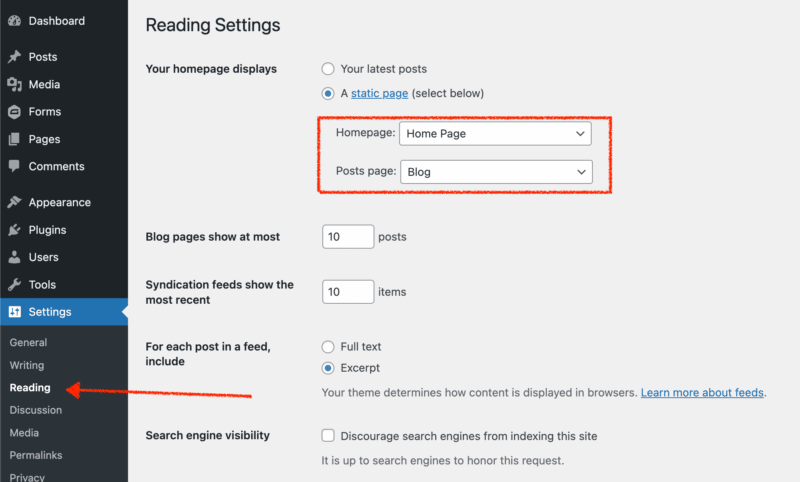
1. Set up homepage and blog settings
Before you start building out the pages and posts, you must ensure that your homepage and blog pages are set up and ready to go. This may seem like a minor detail, but it’s essential. Your homepage is the first thing people will see when they visit your site, so you want to make sure it makes a good impression.
Likewise, your blog is a great way to connect with your audience and build an engaged following. By setting up these essential pages before you start adding content, you’re more likely to end up with a successful website that people will enjoy visiting.
By default, WordPress has your latest posts page as the home page. You will need to select ‘A static page’ option and select which page is your home page and which is your blog page.
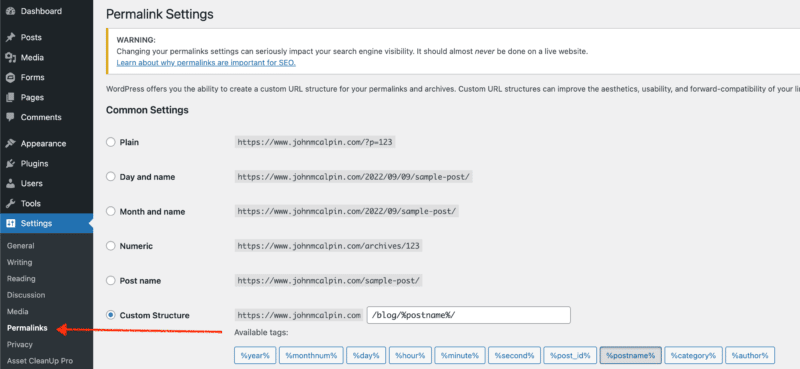
2. Optimize permalinks
When you set up your blog, one of the first things you need to decide is how you want your URLs to be structured.
A scalable URL taxonomy will make it much easier for search engines to crawl and index, and it will also be more user-friendly. As a result, it is worth taking the time to choose a permalink structure that will work well for your blog in the long run. There are a few different options, so take some time to experiment and find the one that works best for you and your blog.
You may choose whichever structure works best for your site, but I recommend using a custom structure and staying away from a date-based structure. A permalink structure that uses month and day or day and name can create a convoluted site architecture.
3. Dynamic sitemap
A dynamic sitemap is an essential tool for any website. It helps search engines index your site and makes it easier for users to find the information they are looking for.
On the other hand, a static sitemap is a lot less effective, can be difficult to keep up to date, and doesn’t offer the same level of scalability.
Plenty of plugins offer dynamic sitemap options with various customizations. So if you’re looking for the best way to improve your website’s SEO, a dynamic sitemap is the way to go.
4. Set up an automated image optimizer
To maintain a fast WordPress site, you need to have optimized images. The SEO benefits of having optimized images are numerous, from increased website speed to better search engine rankings. The simplest way to optimize your images is to use a plugin.
Many WordPress plugins will automatically optimize images as you upload them. While some are paid, many free options work just as well.
5. Set up default title and meta descriptions
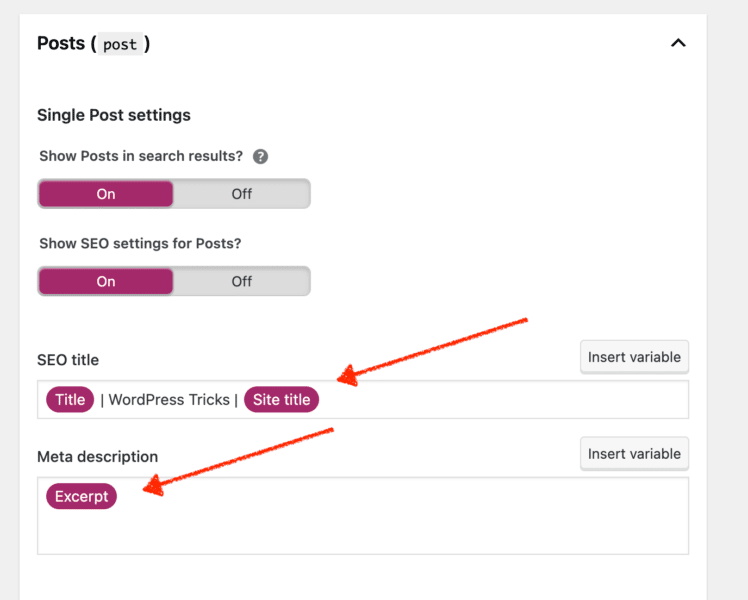
Many SEO plugins offer default settings for titles and meta descriptions, guaranteeing that all new pages are optimized for search. This is a lifesaver for large websites with many pages or teams unfamiliar with SEO best practices. By taking advantage of these tools, you can help to ensure that your website is visible and easily found by potential visitors.
In the screenshot below, I’m using Yoast to set defaults for my blog posts. In my title, I put a structured format to make it user-friendly.
For meta descriptions, I’m pulling an excerpt from the beginning of the blog post. This is a simple default setting that anyone can deploy.
Protect your SEO with these WordPress security settings
SEO is starting to become a crucial element of website security. Website security has always been important, but it is becoming even more so as the web becomes more and more a part of our everyday lives.
Websites are now being used for everything from online shopping to online banking, and if a website is not secure, the consequences can be serious.
Google has penalties for websites infected with malware and those that may be practicing social engineering. If your website is not secure, you could be losing out on potential customers and rankings in Google’s search engine. Website security is, therefore an important element of SEO and should not be ignored.
Here are some simple tips to better secure your WordPress website.
Get the daily newsletter search marketers rely on.
<input type=”hidden” name=”utmMedium” value=”” />
<input type=”hidden” name=”utmCampaign” value=”” />
<input type=”hidden” name=”utmSource” value=”” />
<input type=”hidden” name=”utmContent” value=”” />
<input type=”hidden” name=”pageLink” value=”” />
<input type=”hidden” name=”ipAddress” value=”” />
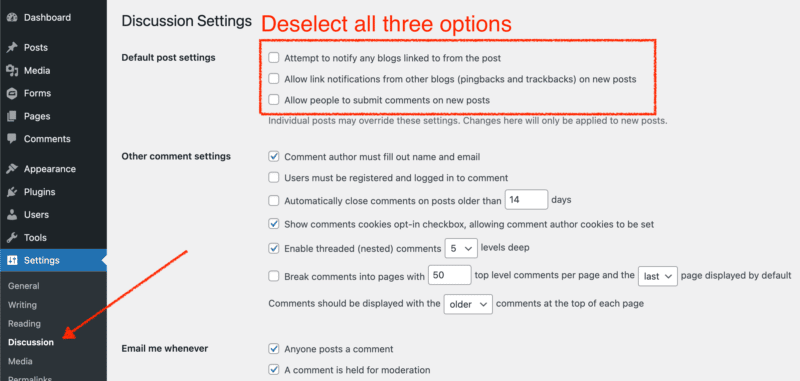
6. Deactivate comments
While the SEO value of comment sections has been debated, there is no doubt that they can be a security risk.
Spammers often use comment sections to add links to their websites, which can contain malicious code. Hackers can also attempt SQL injections and XSS attacks through online forms.
As a result, it is vital to be aware of the risks associated with comment sections. If you choose to use a comment section on your WordPress site, monitor it closely and delete any spam or suspicious comments.
You should consider disabling the comment section if you are unwilling to put in the extra effort to keep it secure. Below is a screenshot that shows how to disable the content section.
7. Deactivate and remove XML-RPC
One of WordPress’s most common security vulnerabilities is brute force attacks on the XML-RPC file. By default, this file is activated and can be used to access the WordPress site remotely.
However, it also provides a perfect target for hackers using automated tools to guess the username and password. Once they gain access, they can wreak havoc by deleting files, installing malware, or even taking over the entire site.
An easy way to protect against these attacks is by deactivating the XML-RPC file. Doing so will prevent remote access to the site and disable some features such as pingbacks and trackbacks.
SEO experts believe that the increased security outweighs the drawbacks. So if you’re concerned about brute force attacks on your WordPress site, deactivate the XML-RPC file.
There are three ways to deactivate the xmlrpc.php file on WordPress sites.
- Use a plugin: Search the plugin directory for “remove xmlrpc”
- Add this code to functions.php file:
add_filter('xmlrpc_enabled', '__return_false');
- Disable it in the .htaccess file:
# Block WordPress xmlrpc.php requests
<Files xmlrpc.php>
order deny,allow
deny from all
</Files>
8. Set user permissions
As a WordPress site manager, you must ensure that the site runs smoothly and that all stakeholders have the necessary access. That said, not all stakeholders need access to every aspect of the site.
Setting user permissions allows you to give each stakeholder access to only the sections they need – keeping the site organized and preventing unauthorized changes from being made.
In addition, you should review user permissions regularly to ensure that they are still accurate.
WordPress provides an excellent summary of what each role can do.
9. Ensure all users have secure passwords with 2FA
Having secure passwords and enabling two-factor authentication (2FA) are effective ways to make a WordPress site more difficult to hack.
Hackers attempting brute force login attacks use large password lists that contain millions of the most common passwords. Having a complex password can help render these password lists ineffective.
If a hacker were to get access to your password, having 2FA enabled can help act as another method to prevent hackers from gaining access to your site.
Many security plugins offer 2FA settings.
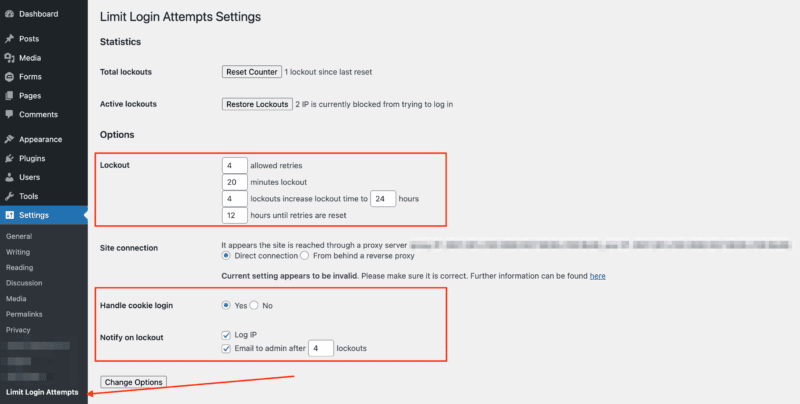
10. Set up limit login attempts
A brute force attack happens when an attacker tries to guess a user’s password by repeatedly entering different combinations of characters. One way to prevent brute force attacks is to configure your WordPress site to limit login attempts.
This security measure will block an attacker’s IP address after a certain number of unsuccessful login attempts, making it more difficult for them to gain access to your site.
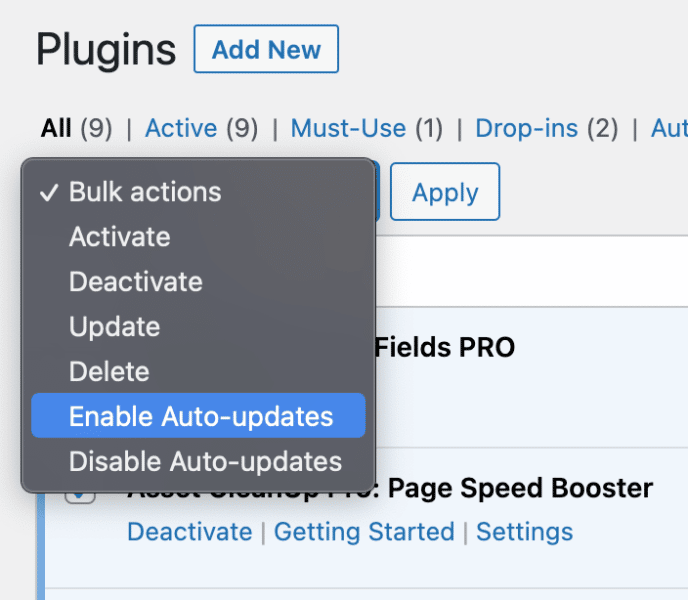
11. Auto-update plugins
Unfortunately, many people don’t realize that their plugins can be a security risk. If a plugin is outdated, it may be vulnerable to known exploits. This is why it’s ideal to go with auto-updating plugins.
12. Set up recurring backups
You shouldn’t overlook a solid website security plan in today’s digital age. One of the best ways to protect your site is to ensure that you have daily backups taken. If your site is hacked or experiences any other security breach, you’ll have a recent copy of your site that you can restore.
While many plugins offer this service, it’s often best to find a WordPress host to manage backups. This way, you can be sure that your backups are being taken care of regularly.
Wrapping up
As your site gains more visitors, ensuring its foundation is strong will be increasingly important. Applying the settings mentioned in this article is essential to start SEO on WordPress. By following these tips, you are taking a vital step toward creating a scalable website that will grow with your business.
The post 12 WordPress site settings that are critical to your SEO success appeared first on Search Engine Land.
Courtesy of Search Engine Land: News & Info About SEO, PPC, SEM, Search Engines & Search Marketing
Friday, September 16th, 2022
Google just announced that ad extensions will be rebranded to assets in the Google Ads UI. The change will be rolled out over the next couple of weeks.
What this means. Previously, creating and managing assets such as call extensions or sitelinks were done in a separate step of the campaign creation process. Now, when you set up a Search or Performance Max campaign, the extensions (now assets) are created in the same step.
What it looks like. The preview tool in the ads manager will automatically update so you can see the extension assets for your ads. Google will also show recommended assets based on your campaign goals. Assets that are created during this stage of the setup process will be available when you work on other campaigns and ad groups.
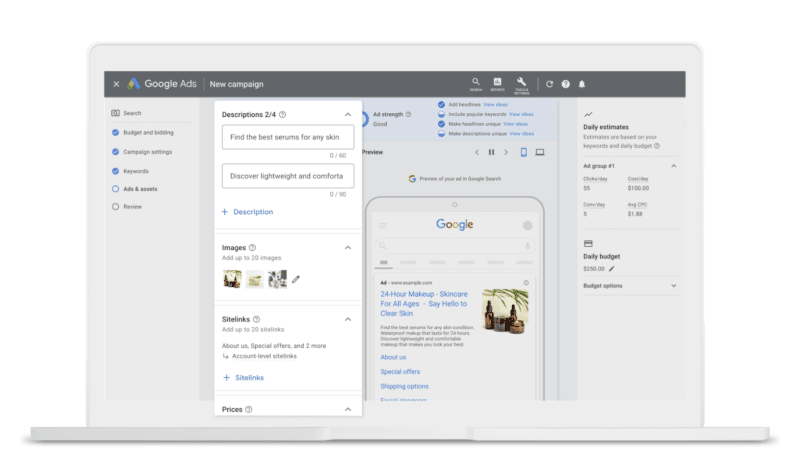
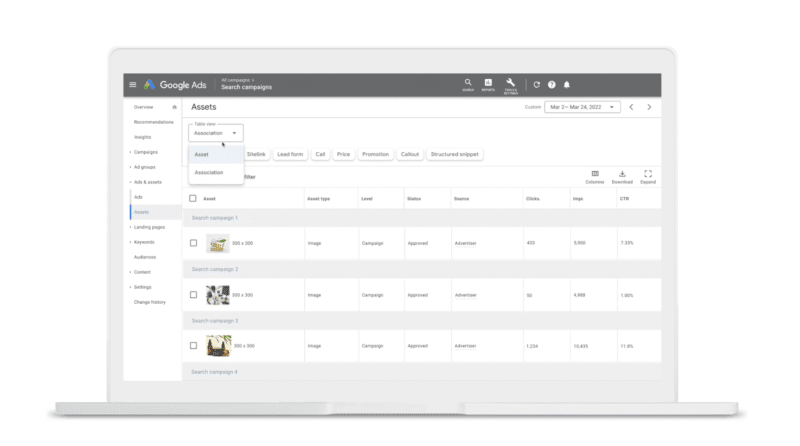
The new “Ads & assets” menu. The “Assets” page will have reports for all assets across the account. Headlines and descriptions are in the “Asset” view while the “Association” table shows segments such as images and prices. For easier viewing and performance analysis, you can also filter the reports by asset type.
A new combinations report. With this report, you’ll be able to see how assets such as callouts and sitelinks perform against headlines and descriptions.
Launch ETA. Unified reporting in the “Assets” page will roll out over the coming weeks for all campaign types that previously supported ad extensions and the updated combinations report will roll out in the next few months.
Get the daily newsletter search marketers rely on.
<input type=”hidden” name=”utmMedium” value=”” />
<input type=”hidden” name=”utmCampaign” value=”” />
<input type=”hidden” name=”utmSource” value=”” />
<input type=”hidden” name=”utmContent” value=”” />
<input type=”hidden” name=”pageLink” value=”” />
<input type=”hidden” name=”ipAddress” value=”” />
Dig deeper. You can read the full announcement from Google here.
Why we care. New workflows and reports could give advertisers more insight into how their campaigns and assets are performing. The rearrangement of the Google UI could also make creating and managing assets faster and easier since it can now be done in the same step as the main campaign creation.
Keep an eye on your account to see if you have access to the new reports and familiarize yourself with the new layout. As always, be mindful of any assets that are created using machine learning and review them before they go live.
The post Google ad extensions are being rebranded as assets appeared first on Search Engine Land.
Courtesy of Search Engine Land: News & Info About SEO, PPC, SEM, Search Engines & Search Marketing
Friday, September 16th, 2022
The news of a Google algorithm update rolling out can be concerning for SEO practitioners. Shifts in the search landscape are inevitable, and as SEOs, we must always be ready to face them.
When you see changes in your SERPs performance, the first thing you can do is to figure out whether you were indeed affected by an algorithm update.
Want to know if the patterns you are seeing are connected to an update or something else entirely?
In this article, I will share an exhaustive list of data and events to rule in or out. Use this as your guide so that you have all the answers you need for your own knowledge or to reassure those you report to before they even ask you what’s up.
The following advice applies to any update, be it a core update or a new aspect of rank evaluation.
1. Check primary sources of information
Whenever you first become aware of the existence of the latest update, I’d recommend tracing back to a credible primary source of information for first-hand explanations of the update and its characteristics.
In the case of a Google update, this will often be formally announced and explained on the Google Search Ranking Updates page.
I’d also recommend following the people who write about the content or engineer the change, such as Danny Sullivan, Google’s public liaison for search, or John Mueller, Google’s search advocate.
If updates are related more to performance or Core Web Vitals, then you should follow Addy Osmani, senior staff engineering manager for Google Chrome.
Starting with the right primary sources for information helps you establish some of the real characteristics of what the update is designed to do and often what the outcomes may be if your pages fall foul of this.
2. Review your activities objectively
Try to be as objective as possible, mainly if this is your own website. Don’t let your emotional and financial investment cloud your judgment.
Do the primary sources describe your pages or tactics? In the case of the helpful content update, Google has shared some provocative questions to evaluate if you can objectively consider your content helpful.
• Is the content primarily to attract people from search engines, rather than made for humans?
• Are you producing lots of content on different topics in hopes that some of it might perform well in search results?
• Are you using extensive automation to produce content on many topics?
• Are you mainly summarizing what others have to say without adding much value?
• Are you writing about things simply because they seem trending and not because you’d write about them otherwise for your existing audience?
• Does your content leave readers feeling like they need to search again to get better information from other sources?
• Are you writing to a particular word count because you’ve heard or read that Google has a preferred word count? (No, we don’t).
• Did you decide to enter some niche topic area without any real expertise, but instead mainly because you thought you’d get search traffic?
• Does your content promise to answer a question that actually has no answer, such as suggesting there’s a release date for a product, movie, or TV show when one isn’t confirmed?
Now, we all know how hard it is to spot our own spelling mistakes or proof our writing. I would challenge you to pass your content to a family member or mentor and see if they will provide some honest perspective.
3. Check to see if the dates of your anomalous traffic patterns line up with the update
If pages or aspects of your site are questionable in the confines of the latest update characteristics, make sure to:
- Monitor your site analytics packages.
- Understand what the intended consequences of the update will be.
First, let’s understand what a “rollout” means. The way an algorithm update “rolls out” doesn’t always mean you will see a pronounced negative impact scythe through your traffic like an Old Testament plague of locusts.
Look at this query and how many different rollouts are described in these historical and real updates. To summarize, what rolling out can look like in terms of an algorithm update – be it core or new – may be as follows.
- Sector-specific rollouts. For example, YMYL, or “Your Money or Your Life,” content has been highlighted frequently in recent years – and quite rightly – because providing poor quality information in these areas can hurt users.
- Geographic rollouts (particularly when it comes to content-related updates).
- Volatile rollouts. For example, where an impact may appear very sharp initially, with some recovery, as engineers try to find the right balance for the new algorithm outside of testing.
- Progressive rollouts that may get stronger and stronger or take longer to get out of. In the case of the helpful content update, the classifier process is entirely machine-learned, meaning “sites identified by this update may find the signal applied to them over a period of months.”
4. Check other search engine traffic sources
This one can be a little difficult as Google is so dominant in most markets. However, you may have a site that is big enough to have a reliable amount of data from Microsoft Bing, DuckDuckGo, Yandex (or combine them together to see Google vs. “other search” in a graph).
If your other search engine sources of traffic are following the same sort of data patterns as usual and Google is the only one showing the anomalous pattern then that’s a really good indication that it’s Google specific, and you need to go deeper into the update.
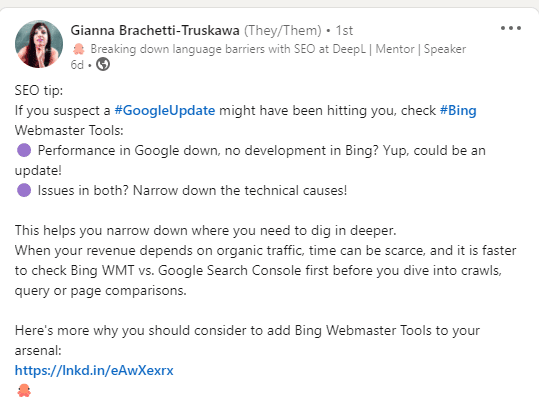
Have a look at this tip from Gianna Brachetti-Truskawa, where they’ve reminded us to check Bing Webmaster tools and what to look for.
5. Check your data sources – but don’t come to final conclusions
So you’re checking your analytics package of choice, and your Search Console data and secondary sources (which we will come to in more detail next). If you see no initial volatility or notable shift in any direction immediately, this may be due to the pace of the rollout. Don’t come to any final conclusions until the update rollout is complete.
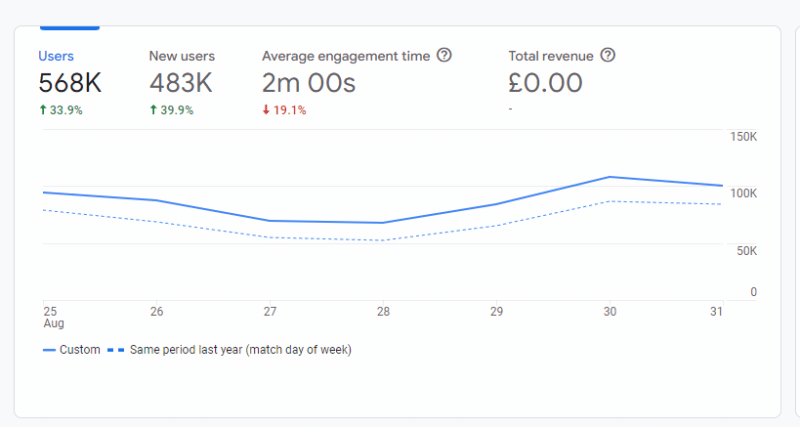
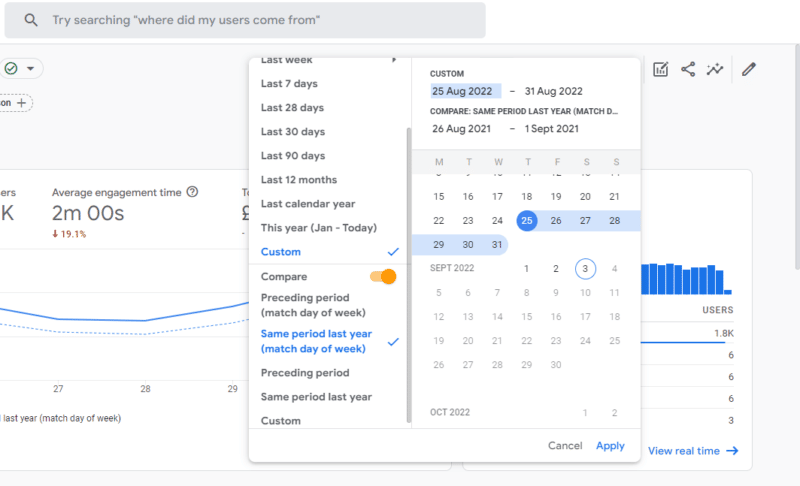
Also, consider your comparison periods and get your date patterns and pages lined up. Regardless of your business sector, most traffic has a weekly cycle, so it’s always a good idea to compare the first week of rollout to the equivalent week in the preceding year as opposed to the exact same dates.
In the case of the helpful content update, I’d be looking at the week of Thursday, Aug. 25, 2022 to Wednesday, Aug. 31, 2022, and comparing it to Thursday, Aug. 26, 2021 to Wednesday, Sept. 1, 2021.
You can see in this graph that the numbers follow the same smooth pattern for the weekly flow. Regardless if you are up or down from last year, the thing to watch out for is an anomalous pattern in the current period.
Also, props to GA4 for actually suggesting this as a comparison period. See how when you choose to compare a custom period, the second pre-set option is Compare: Same period last year (match day of week)?
Get the daily newsletter search marketers rely on.
<input type=”hidden” name=”utmMedium” value=”” />
<input type=”hidden” name=”utmCampaign” value=”” />
<input type=”hidden” name=”utmSource” value=”” />
<input type=”hidden” name=”utmContent” value=”” />
<input type=”hidden” name=”pageLink” value=”” />
<input type=”hidden” name=”ipAddress” value=”” />
6. Check secondary sources of information
At the beginning of this article, I mentioned the importance of primary sources for the first stage of information. The industry being what it is, there will then follow a lot of speculation which may or may not be useful to you depending on where you are in your learning process.
I say “speculation” as providing real insight requires a lot of data, experience and time. Once a rollout is close to completion, it is then a good idea to be looking for reputable secondary sources. In the case of new updates, this is where tool providers can provide fantastic insights.
At the same time, a great secondary source, like in this case the Sistrix team, has the credibility, data and authority to announce that there’s pretty much nothing to report one week in.
But keep an eye on reputable news sources like Search Engine Land, Moz, Sistrix, and Semrush as these are where the people with data and years of experience will be publishing if and when there’s something to talk about.
7. My traffic went up! Did I ‘win’ the update?
When it comes to (generally speaking) linear rankings, if the pages that precede yours are negatively impacted by a rollout, you will “go up” – like SEO Whac-A-Mole!
This does not mean that you have “won” or are necessarily doing a great job. You may very well be. But you should also not take it for granted that this stage of this rollout benefited you. If this happens to our clients our immediate checks are to see:
- Are there notable absences from stable competitors?
- What does the realignment look like? Is it volatile? A lot of movement or just one or two high-ranking contenders now absent?
- Has the SERP layout changed at all recently?
- Are there any differences in SERP layout and aggregate rankings across main markets? (For us, this tends to be the U.S. and U.K. as both are great high-volume markets with the same language so makes for good comparison data.)
When we look into the above, we’re looking at characteristics and commonalities between the pages that are now absent. We’re comparing our clients to those, to see if we think there is any risk at all or if we are, as usual, ahead of the curve. (This will happen if you optimize for users first and let Google catch up to you!)
8. My traffic went down. How do I confirm it is the update?
Let’s say:
- Your traffic has taken an anomalous downturn from the start of the rollout.
- You can tick the box on the questions to ask yourself about the characteristics of the update.
In that case, there are still a few ways you can confirm this with data. But this will vary from update to update depending on the characteristics. In this recent helpful content update example, I’d be confirming this with my site data by slicing my analytics in the following ways:
- Using regex or filters to exclude non-content pages.
- If my website is a brand I’d also look at organic performance outside of the homepage.
- Remember that this particular update can have a sitewide impact if the majority of the site is classified as unhelpful, so all content on your site may be impacted in some way.
9. My traffic patterns are still fluctuating – what else could it be?
If you have anomalously patterned organic search traffic commensurate with an algorithm update period and can’t confidently rule out the update completely, here are some things to check which may explain the data patterns:
Other media
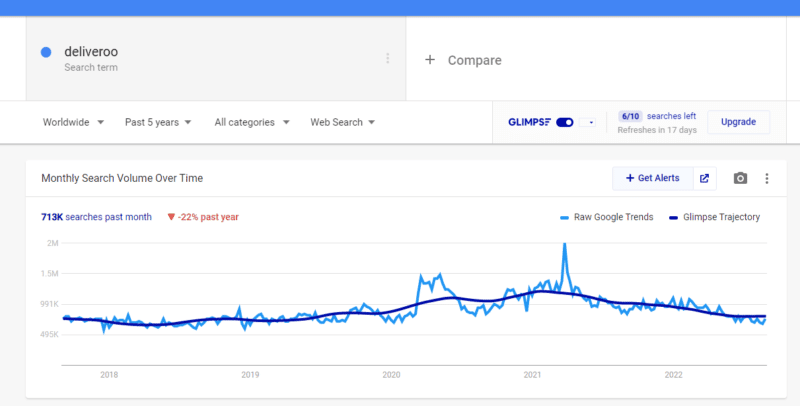
If your organization is mid- to large-sized, it’s a good idea to check out what activities are going on in other marketing and advertising departments. TV for example can often cause a really big positive spike in visits. We like to use Google Trends with Glimpse Chrome extension to give both the pattern and the actual volume here.
In this example, you can clearly see spikes in the brand term volume that coincide with the 2020 sponsorship (and weekly airing) of one of the UK’s most popular TV programs, “Ant and Dec’s Saturday Night Takeaway,” in a deal that started late Feb. 2020.
Social media influencers
This can be a hard one to trace if it’s not a link click, but do consider the characteristics of anomalous traffic patterns against brand references from social media influencers.
We had a situation once with a client who used a particular ingredient in a drink and ranked in the top 3 for a page explaining this ingredient. Using a process of thorough rule-outs, we managed to establish that the ingredient was mentioned as having health benefits by a very popular YouTube influencer.
Such instances can be very difficult to work out. But by checking the primary volume-driving-term for the spiking landing page in Google Search Console, you can use that query in the search of each of the social platforms to see if you can spot who may have name-dropped you.
Spam traffic
Perhaps it is unfortunate timing and you may see a spike in traffic due to an increase in spam. Or alternatively a drop in traffic due to the sharp absence of it.
Get hold of your server logs for the anomalous data periods and ask the following questions:
- Is it a particular country that’s driving the pattern?
- Have there been changes with your host, firewall, or CDN that could explain sudden anomalous drops in traffic?
Lost links
It’s also possible that you’ve lost a significant number of quality backlinks. (Maybe a site that links to you frequently has gone out of business.) While the traffic from that should show up in referrals, it can have an impact on rankings. If you have tens of thousands of ranking keywords, just a few little drops in rank across the board can look like an anomalous drop.
The inverse of this can also be true. If you nail a killer digital PR campaign and accrue a lot of high-quality links from sites that have traffic, this can lead to:
- An overnight bump in referral traffic.
- Increase in brand demand.
- Across-the-board rank improvements.
DebtBuffer experienced a 1,500% spike in brand-driven search traffic as soon as one of their stories went live, as Tom Johnson of ReactivePr shares in a recent case study. The story itself was topical, timely and an expose of big energy companies and how they allocate energy top-up cards against customer debt, so it did get a lot of consumer interest.
Manual penalties
While much less common to see in SEO today, you can still receive a manual action if Google identifies or determines that you’re engaging in any practices that contravene their guidelines. Check Google Search Console for notifications, just in case.
SERP layout change
In this phenomenally comprehensive CTR study from Sistrix, the single biggest takeaway was “Click rates are determined by the SERP layout”. Simply put, if the Google landing page for one or some of your high-volume keywords changes, that is going to have a knock-on effect on your traffic patterns.
This isn’t always a bad thing. For example, we have a client with a physical destination. One of their biggest drivers of traffic used to be “[brand name] postcode”. By using schema to mark up the structure of that kind of data, we are now able to allow Google to answer that question in-SERP.
This reduces unnecessary server costs and gives a more accurate picture of the conversion rate for the site, as those people are customers who now need to find the venue. A change like this can have a sudden anomalous drop pattern, but actually, it’s a positive overall.
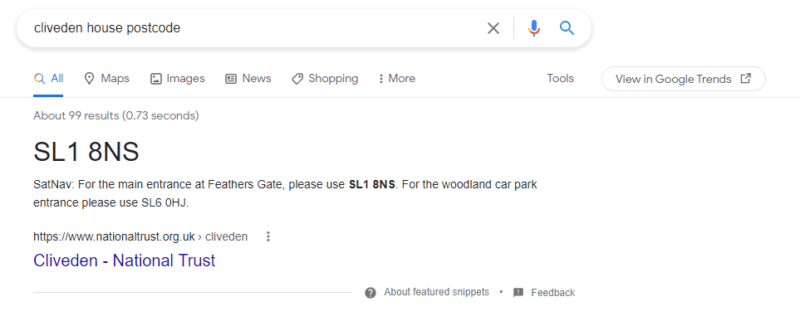
This is an example of the type of featured snippet described above where the query is answered in the SERP.
As we can see in this example, the answer to this query is presented clearly in large bold letters, extracted from the listing from The National Trust. Therefore, a click is not required to satisfy the intent.
Front-end changes
I’ve mentioned how getting access to your server logs and ruling out changes in the stack (CDN, firewall etc.) can help understand if spam is a factor. However, it is also worth checking to see if any front-end changes have occurred that have been positively or negatively perceived.
Hopefully, your business will have a change log or some form of editorial control for those who are able to make changes to the front end. Things to look out for could be:
- Page deletions: Has a well-meaning colleague deleted an out-of-date post rather than updating or redirecting?
- Have we added things to the site that can slow it down causing a significant increase in time to get the page fully rendered and interactive?
- Has the aesthetic changed in any way?
- Look at a total redesign to the addition of a huge banner video on the homepage. Things that may seem cosmetic can have short sharp positive and negative impacts on how search engines rank your pages because these changes significantly impact human perception too.
Figure out whether it was an update or something else
Hopefully, this article has provided some useful information and some reasoned approaches you can consider in your own reaction to Google update announcements.
The post How to tell if you’ve been hit by an algorithm update appeared first on Search Engine Land.
Courtesy of Search Engine Land: News & Info About SEO, PPC, SEM, Search Engines & Search Marketing
Wednesday, September 14th, 2022

Unfortunately, we’ve all been there. Every now and then, we make cringe-worthy mistakes. But the mistakes that haunt us in our personal lives often aren’t as public as email marketing mistakes, which go out to hundreds and thousands of subscribers.
This webinar covers the eight most common email marketing pitfalls, including deliverability, subject lines, design and more, to help you understand how to avoid or fix them.
Register today for “The 8 Biggest Email Mistakes and How to Avoid Them,” presented by Adobe.
The post Webinar: How to avoid these 8 big email mistakes appeared first on Search Engine Land.
Courtesy of Search Engine Land: News & Info About SEO, PPC, SEM, Search Engines & Search Marketing
Wednesday, September 14th, 2022
Google Analytics now has tailored recommendations to help users become aware of new features by reviewing your property’s history, settings, and trends across Analytics.
The recommendations appear in the Insights and Recommendations section of the homepage, as well as throughout Analytics wherever they’re relevant.
Learn more. You can read more about Analytics recommendations in their help documentation.
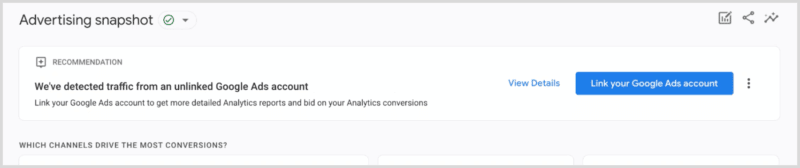
Why we care. Advertisers should check their Google Analytics accounts regularly for outages, updates, and, now, recommendations. As always, we suggest never enabling auto-apply recommendations and always testing new features. Isn’t Google just so helpful?
The post Google now has recommendations for Analytics appeared first on Search Engine Land.
Courtesy of Search Engine Land: News & Info About SEO, PPC, SEM, Search Engines & Search Marketing
Wednesday, September 14th, 2022
Instagram is internally testing a new tool for creators to make money called “Gifts.”
What it looks like. The new feature was first shared on Twitter by developer Alessandro Paluzzi.
Tipping. Not new on social platforms. Instagram is not the first platform to try tipping. In fact, Facebook, Instagram, and TikTok already have tipping tools in place for creators to further monetize their platforms.
- Facebook Stars. Live stream viewers can buy stars and send them to creators as they’re streaming. For every star received, Facebook pays only $0.01 USD.
- Instagram Badges are a feature that allows users to show support to creators during a live video. Viewers can purchase in $0.99, $1.99 and $4.99 increments. Badges come in different price tiers between $1 and $5 and Meta will not take a cut of the revenue creators earn from Badges until 2024
- TikTok tips. Users can send TikTok creators a monetary tip on their profile. The creator will receive 100% of the tip amount (Stripe, our payment provider, fees may apply). TikTok doesn’t take any fees from tips
Creator tool graveyard. Last month Instagram shut down its affiliate program after a year of testing. The program allowed influencers to earn a commission for products they helped sell through tagged posts or live videos.
Facebook is also ending its $1 billion pledge to creators they committed to through 2022. In a statement, Facebook CEO Mark Zuckerberg said, “Investing in creators isn’t new for us, but I’m excited to expand this work over time.”
Get the daily newsletter search marketers rely on.
<input type=”hidden” name=”utmMedium” value=”” />
<input type=”hidden” name=”utmCampaign” value=”” />
<input type=”hidden” name=”utmSource” value=”” />
<input type=”hidden” name=”utmContent” value=”” />
<input type=”hidden” name=”pageLink” value=”” />
<input type=”hidden” name=”ipAddress” value=”” />
Read more. You can read the full article from Business Insider here.
Why we care. Additional ways for creators to earn revenue is good news for both the creator, as well as the brands they’re advertising. Creators may feel more incentivized to promote brands on their live feeds if they know they’ll be earning additional revenue outside their initial agreement.
The post Instagram is testing a “Gifts” monetization feature for creators appeared first on Search Engine Land.
Courtesy of Search Engine Land: News & Info About SEO, PPC, SEM, Search Engines & Search Marketing
Wednesday, September 14th, 2022
Walmart Connect, the retailer’s marketplace media platform, is expanding and making it easier for advertisers and brands to promote their products by introducing self-service.
Introducing Search Brand Amplifier. Search Brand Amplifier gives products listed in the Walmart marketplace higher visibility by boosting advertised products to the top of search results. Walmart says this benefits newer and smaller brands that haven’t achieved high organic listings within the Walmart platform.
Search Brand Amplifier was previously limited to only managed sellers and a limited number of suppliers, but now it’s widely available to Marketplace brand owners that are registered with Walmart’s Brand Portal.
Sellers can access the Search Brand Amplifier through Walmart Platform Partners.
Enter self-serve. Eligible Marketplace sellers will be able to launch and manage their own ad campaigns through the Walmart Ad Center. Once a three-day enrollment period, users can now complete it in a matter of minutes. Additionally, existing Marketplace sellers will be onboarded automatically.
Walmart is also updating the look of the Ad Center and easier instructions to “reduce the guesswork” for launching and optimizing campaigns.
The platform. Walmart offers sellers two different ad choices. Display and Sponsored Products.
- Display. Display ads are featured both on the Walmart site and off, across the website and social channels
- Sponsored products. These are featured on the Walmart website in visible placements as users browse
Get the daily newsletter search marketers rely on.
<input type=”hidden” name=”utmMedium” value=”” />
<input type=”hidden” name=”utmCampaign” value=”” />
<input type=”hidden” name=”utmSource” value=”” />
<input type=”hidden” name=”utmContent” value=”” />
<input type=”hidden” name=”pageLink” value=”” />
<input type=”hidden” name=”ipAddress” value=”” />
Global expansion. Walmart has also pushed to expand its Marketplace internationally. They’re now available in Canada, the UK, and India. They’ll also add additional API partners to focus on countries with more sellers such as China.
Walmart is America’s largest omnichannel retailer claiming to serve 90% of US households and their global ad business surpassed $2 billion in revenue in 2021. Their retail focus has always been centered around low prices, which could prove beneficial this holiday season with inflation and an uncertain economy.
Additional resources. If you’re new to the Walmart Ad center, they have resources available to help sellers optimize their search campaigns here. You can also read the announcement from their blog here.
The Walmart Ad Center also integrates with several PPC management tools. If you’re an advertiser or brand that manages several different campaigns or product feeds in the Walmart Ad Center, these tools can help streamline and automate various aspects including keywords, bids, reporting and analysis.
Interesting fact. Walmart announced a partnership with Paramount Global last month to offer its Walmart+ members the streaming service for free as part of their benefits. The Paramount+ Essential Plan will give Walmart+ members access to Paramount+’s catalog of content, from movies to live sports.
There isn’t any speculation yet as to what the partnership means long-term, but it could be Walmart’s first introduction to planning CTV ads.
Why we care. On one hand, the ability for any seller to set up an ad account and sell through Walmart is a great tool, especially ahead of the holiday season. On the other, it’ll be interesting to see how the platform differentiates from Amazon, what its market share is, and how many advertisers are on one or both platforms. Additionally, giving sellers in China access to the platform could cause issues with authenticity and customer support.
The post Walmart is expanding their self-service Marketplace platform appeared first on Search Engine Land.
Courtesy of Search Engine Land: News & Info About SEO, PPC, SEM, Search Engines & Search Marketing
Tuesday, September 13th, 2022
Google has added a “Manage” tab to give advertisers more control and flexibility over how recommendations are applied.
Two flexible options. In the new “Manage” tab, Google is giving advertisers two different bundle options with pre-checked recommendation types.
- Maintain your ads. This option includes recommendations to improve your responsive search ads, remove redundant keywords, and update your conversion tracking
- Grow your business. This option helps with advanced recommendation optimizations such as upgrading keywords to broad match, maximizing conversions with auto bids, and adding store visits as conversions.
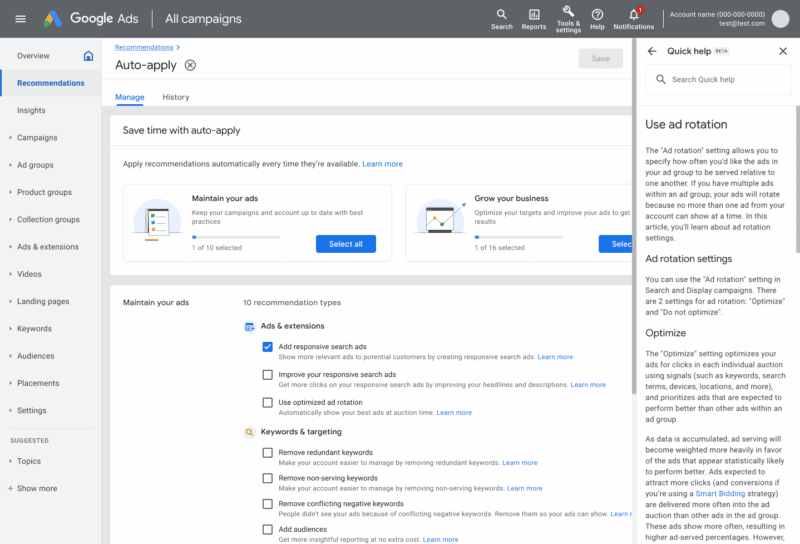
Learn more about the recommendations. If you need to learn more about the specific recommendations being suggested, you can do so directly from the “Manage” tab. It’ll include descriptions of the recommendations and “benefits” to your account. The Quick Help guide also provides explanations, links, and additional resources.
You can read the update from Google here.
Get the daily newsletter search marketers rely on.
<input type=”hidden” name=”utmMedium” value=”” />
<input type=”hidden” name=”utmCampaign” value=”” />
<input type=”hidden” name=”utmSource” value=”” />
<input type=”hidden” name=”utmContent” value=”” />
<input type=”hidden” name=”pageLink” value=”” />
<input type=”hidden” name=”ipAddress” value=”” />
Why we care. Google says these new bundled recommendations give advertisers more flexibility, but this seems to do the opposite. You can select and deselect the options you want, but the options are broad and don’t provide any details on what’s being changed. If you don’t know specifically what updates are being made, then the element of control is lost and Google gets the upper hand in terms of how “flexible” they can really be.
Like any new Google feature, always make sure auto-apply is turned off until you’ve had the chance to test it for yourself.
The post Google has introduced bundled ad recommendations appeared first on Search Engine Land.
Courtesy of Search Engine Land: News & Info About SEO, PPC, SEM, Search Engines & Search Marketing



 The feature has been renamed to "Gifts"