Archive for the ‘seo news’ Category
Tuesday, November 1st, 2022
While most people associate first impressions with meeting someone in person, the same phenomenon occurs when someone lands on your website for the first time. Sometimes you know who they are, but often they are anonymous. In fact, 67% of the buyer’s journey is done before they indicate any buying signal, and about two-thirds of potential buyers walk away after a bad experience.
When you think about it, your website is your storefront, it’s the window into your brand. It says who you are, what you do and tells the visitor what they can expect and how they should feel.
Many companies fall short because they don’t spend enough time thinking about the first time someone will experience their website. They usually have one static homepage and then create zillions of landing pages to personalize for promotions because it’s troublesome to get the website changed. Even if you have first party data, much of what you do will be lost on anonymous visitors because they’ll land on your site and leave before they’ve had a chance to soak in all you have to offer. The static homepage is dead.
Research shows that people make up their minds about something in less than half a second. They form an impression when they first see your site. If that impression is positive, it’s likely they’ll continue to explore your site. If they don’t like what they see, they’ll leave. Studies show that customers who have a positive experience tend to spend 140% more with a given brand.
So, what should you be doing?
- Check your site speed often. Page load times have the biggest impact on your website’s first impression. For example, a recent study showed that a 2-second delay in load time resulted in abandonment rates of up to 87%.
- Focus on the customer experience and put your critical content and messaging above the fold. While customers are used to scrolling through websites, you have less than half a second to get your point across, and once you grab their attention, it takes approximately 2.6 seconds for the consumer’s eyes to focus and influence their first impression.
- Avoid flicker whenever possible. Flicker refers to when a webpage loads in one state and then quickly transitions to show a different website experience—typically a dynamic variation with personalized elements. While this may seem like a somewhat innocuous side effect of website personalization, it can have lasting effects on your conversion rates. In fact, in a recent study by Radware, Walmart found that for every one second of improvement in regards to their page load time they increased their conversions by two percent.
- Personalize for all visitors, even anonymous ones. When you know some attributes about your web visitors, such as the ad they clicked on to get to your site, machine learning powered personalization can help you take it a step further and dynamically customize your message or product or image shown based on firmographic, behavioral and contextual data. According to a study by Segment, 71% of customers feel frustrated when their experience with a brand feels impersonal.
- Beauty is in the eye of the beholder and poor design is often associated with mistrust of a brand. According to a recent study, first impressions are 94% design related. The most important things you can take into account are the imagery, typography and overall aesthetic. Does the image or video convey the feeling you want the buyer to experience? Does it inspire the visitor to take the desired action?
Regardless of whether you’re a B2B brand doing Account Based Marketing (ABM) or a D2C brand with an online store, first impressions matter, don’t waste yours. To learn more about making a great first impression with your website, talk to our experts and request a demo.
The post The static homepage is dead appeared first on Search Engine Land.
Courtesy of Search Engine Land: News & Info About SEO, PPC, SEM, Search Engines & Search Marketing
Tuesday, November 1st, 2022
As we head into another seasonal period, it’s time to prepare our holiday strategies to maximize client visibility for the deal-getters and the peak shoppsouing period.
During the next quarter, many of us acknowledge that we’re likely to see a change in traffic levels as we attribute this to seasonality.
This does not affect all business models. Still, for some (outside of the ecommerce spectrum), interest begins to slow down as consumer focuses are laid elsewhere, and company priorities change.
One thing that may not necessarily factor into your SEO strategies – as a threat and an opportunity – is how Google’s search results pages (SERPs) behave to the changes in both user search frequency and search intent.
Why does seasonality affect search results pages?
Google’s end goal is to provide a high-quality SERP that caters to user needs and supports a query by presenting high-quality results.
Google determines if a query requires a seasonal or temporary change to how specific value propositions and beneficial purposes are presented in the SERPs. They might consider:
- Has there been an increase in searches for this query? (Comparing period Y to X.)
- Has there been a change in user SERP behavior for this query? (Changes in click patterns, scroll, quick-backs.)
- Has there been an increase in users performing further queries to refine it?
- Has there been a change in the additional terms or stop words being introduced to the secondary query?
If Google detects changes in these user patterns, it may choose to begin experimenting with the SERP and rotate results and source-types – or even introduce new source-types and SERP features altogether.
This isn’t something new. In 2018, JR Oakes tweeted his observations on how rankings changed month-over-month, with major changes around December 2017.
Over time, Google will learn these patterns and refine future SERP adjustments over time.
With seasonality, most marketers have an almost predictable data pattern used for planning marketing activities, content, and onsite messaging. Often, this is where the assessment stops.
Many strategies I’m privy to don’t go one step further to assess how the SERPs will change during these seasonal periods. Yet, it is important to understand so we can inform our SEO strategies (including content type and publishing frequency).
Get the daily newsletter search marketers rely on.
<input type=”hidden” name=”utmMedium” value=”” />
<input type=”hidden” name=”utmCampaign” value=”” />
<input type=”hidden” name=”utmSource” value=”” />
<input type=”hidden” name=”utmContent” value=”” />
<input type=”hidden” name=”pageLink” value=”” />
<input type=”hidden” name=”ipAddress” value=”” />
Identifying seasonally affected SERPs
A lot of ecommerce SERPs we are familiar with will experience some form of seasonality, and we can usually predict and identify these through experience and common sense.
But what if you start seeing a change in traffic and rankings for particular URLs? How can you identify whether or not your SERPs are beginning to fall into a seasonality experiment?
The answer is through data. Understanding what your SERPs look like during “normal times” is important, and comes from:
- Recording and monitoring SERP features.
- Monitoring the source types (and their positions) within the results page.
Several third-party tools record this information and retain it historically.
Let’s take the search term [beard oil]. It is a query with more than one dominant interpretation, as I could be looking to make a purchase, research different brands, or even research different oils.
This query has already changed several times over the course of this year. This October, it is beginning to show signs of changing to a seasonal SERP:
| March 2022 |
July 2022 |
October 2022 |
Reviews
People also ask
Video carousel |
Reviews
Sitelinks
Images
People also ask
Video carousel |
Reviews
Shopping ads
Map pack
FAQ
Images
People also ask
Video carousel |
As we get closer to peak ecommerce periods and more users are searching for the term, Google’s SERP features are favoring and introducing commercially focused elements with Shopping Ads and the Map Pack (to cater to those wanting to buy both online and in-person).
We can also see a change in which source types are being ranked highest for the query.
So if we look at the top 5 ranking URLs for July 2022:
| Rank / Website |
Source Type |
| #1 Men’s Health |
Non-commercial entity, informational |
| #2 CNN |
Non-commercial entity, informational |
| #3 GQ Magazine |
Non-commercial entity, informational |
| #4 Amazon |
Commercial entity, commercial |
| #5 Amazon |
Commercial entity, commercial |
And we compare them to October 2022:
| Rank / Website |
Source Type |
| #1 Amazon |
Commercial entity, commercial |
| #2 Men’s Health |
Non-commercial entity, informational |
| #3 Beard Brand |
Commercial entity, commercial |
| #4 Dr. Squatch |
Commercial entity, commercial |
| #5 Bad Ass Beard Care |
Commercial entity, commercial |
Looking at third-party metrics, one would argue that websites like Dr. Squatch don’t have the same backlink profile, brand, or content levels as the likes of GQ. But they’re a different source type, so the threshold required to rank is lower.
As Google is altering the SERP with a heavier commercial focus, the only thing that GQ can do in this scenario is to try dislodging Men’s Health as the second result or wait it out for Google to determine that a different source type is required.
This, of course, is not taking into account that October 2022 also has a Map Pack and Shopping Ads taking up SERP real estate and clicks.
Looking at data from 2021, the SERPs followed a similar pattern before reverting back around March.
If we look at Google Trends data, we can correlate these SERP changes with the peaks and troughs of [beard oil] searches in the United States (outside of an increase around the time of the first pandemic lockdown).
Communicating seasonal SERPs to wider stakeholders
Not all SEO stakeholders who receive reports and updates are au fait with how search engines work. Changes in rankings and traffic can unnecessarily set off alarm bells and lead to poor short- and long-term decision-making.
Identifying if your key traffic-driving search terms are susceptible to seasonality changes, or have been so in the past, is vital. Ensure that tags or classifications are in place and monitor them more closely around seasonal periods.
This is especially useful if the organization you are working with has a turnover of VP and C-level. They might not know the vertical as well as the previously established person in that position.
Creating awareness of how rankings and traffic may change will mitigate the conversations when it does happen. It also helps build a business case for different content types to maintain brand visibility.
This might involve a strategy in which the brand is made visible through a different source type or adjacent search queries that aren’t as affected by the seasonality changes.
Investing in brand or digital assets outside of your website is an important consideration for creating an SEO strategy that can weather Google changes.
The post How seasonality affects the SERPs and what it means for SEO appeared first on Search Engine Land.
Courtesy of Search Engine Land: News & Info About SEO, PPC, SEM, Search Engines & Search Marketing
Tuesday, November 1st, 2022
Starting in May 2023, similar audiences segments will stop being generated, and existing similar audiences segments will no longer be added to campaigns and ad groups on Google Ads and Display & Video 360.
In August 2023, similar audiences segments will be removed from all ad groups and campaigns.
What this means. More automation. Google says that similar audiences segments will transition to “more powerful, tested, privacy-centric automated solutions. These solutions help advertisers connect with relevant audiences, all while meeting people’s expectations for privacy.”
“We are committed to creating durable, resilient solutions for our advertisers to help them reach an engaged and relevant audience, even as fewer third-party cookies are available. Automation is a big part of this commitment.”
Enter Optimized Targeting and Audience Expansion
Replacing similar audiences segments is Optimized Targeting (for video, display discovery and performance campaigns) and Audience Expansion (for brand campaigns).
Optimized Targeting. For Discovery, Display and Video action campaigns on Google Ads and Display & Video 360, optimized targeting will help businesses find new and relevant audiences that are likely to convert without relying on third-party cookies.
Google says. Advertisers who use optimized targeting on Display and Video 360 can see, on average, 55% improvement while using first-party audiences.
Audience Expansion. For Awareness and Reach video or Consideration video campaigns, audience expansion makes it easier for businesses to reach more people likely to convert.
Availability. This solution is already available in Google Ads and will be launched for Display & Video 360 in the first half of 2023.
Things to know. Keep in mind the following features and best practices when creating or updating your Smart Bidding and Optimized Targeting settings.
- Advertisers can still use Customer Match lists for Smart Bidding or Optimized Targeting.
- Use Smart Bidding for store sales and offline conversions.
- You can (and should) adjust Smart Bidding conversion values.
Dig deeper. To understand how these automated solutions work towards advertisers’ marketing objectives, they can use Audience Insights – a new feature on the Insights Page that helps businesses learn more about their customers’ interests and how they engage with their ads.
You can read more info about these changes on the Google Help Center post.
Why we care. Similar Audiences segments will be available for (at least) the next 6 months. If your campaigns are using these segments, you can continue to do so until after the holiday season. However, you should still plan and test your transition to Smart Bidding and Optimized Targeting so the impact will be less harmful.
The post Google is getting rid of similar audiences segments appeared first on Search Engine Land.
Courtesy of Search Engine Land: News & Info About SEO, PPC, SEM, Search Engines & Search Marketing
Monday, October 31st, 2022
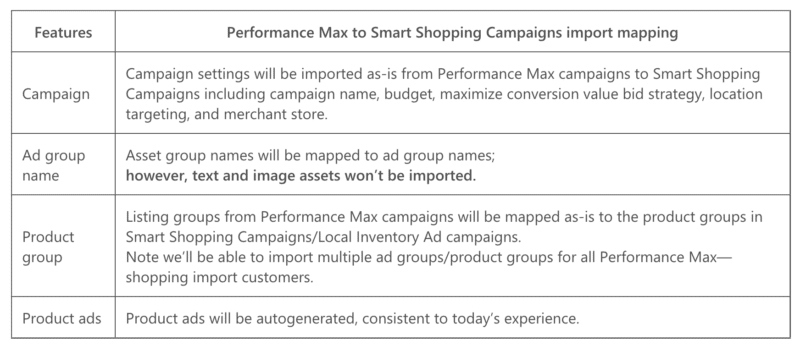
Microsoft Ads has just launched a solution within the Google Import tool to simplify duplicating your Performance Max campaigns across platforms.
They’ve also started a pilot program for importing Performance max campaigns that aren’t using a Merchant Center. The new experience will import these campaigns as Search campaigns and create Dynamic Search Ads (DSA).
Best practices. Microsoft outlines the following best practices for importing Performance Max campaigns using the Merchant Center.
The following are best practices for importing Performance Max campaigns without Merchant Center.
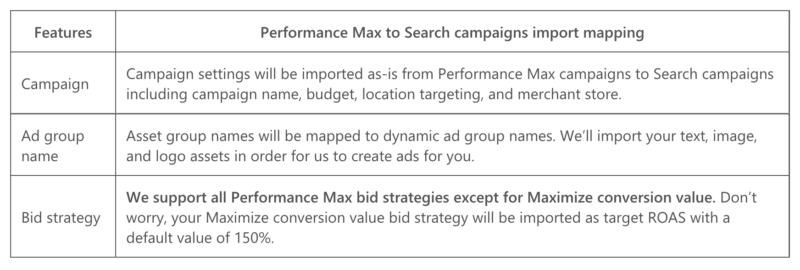
Use the Google Import Tool. You can access the Google Import Tool here.
Dig deeper. Read the Microsoft blog announcement and access the setup checklist here.
Why we care.
The post Microsoft Performance Max import updates appeared first on Search Engine Land.
Courtesy of Search Engine Land: News & Info About SEO, PPC, SEM, Search Engines & Search Marketing
Monday, October 31st, 2022
Delivering an outstanding customer experience (CX) is no longer a function; failing to meet customer expectations can jeopardize business growth. A recent Qualtrics study found that bad experiences put a business at risk of losing an average of 9.5% of its revenue. But linking CX to business value and the bottom line is a challenge when siloed data and a lack of technology can’t deliver the multi-channel experience customers expect.
In this episode of the Solution in Focus series, you’ll listen in as Allison Windon, senior vice president of strategy at Qualtrics, discuss how to elevate CX based on insights you generate from customers’ real-time journeys. You’ll also hear how to fully leverage Qualtrics solutions in your AWS Cloud.
You’ll hear how Qualtrics helps you:
- Reduce the cost to serve by understanding and optimizing inefficient journeys and customer touchpoints.
- Improve customer retention by identifying and prioritizing strategic areas of improvement across the entire customer journey.
Increase customer lifetime value by understanding and improving loyalty behaviors that drive repeat purchases.
Listen now
The post Make business more human with Qualtrics solutions appeared first on Search Engine Land.
Courtesy of Search Engine Land: News & Info About SEO, PPC, SEM, Search Engines & Search Marketing
Monday, October 31st, 2022
It was a cold, dark night. At the end of the long path was an old, rundown mansion covered in cobwebs. Inside was a candle flickering next to the shadow of a person.
You rub the frost off the stained-glass window on the doorstep, and there’s just enough light to see what the man inside is doing. He’s moving his body from side to side, chanting numbers – what could it be? Black magic?
You put your ear to the window to find out what you can hear – and you can make out … something:
“One, two, three, four paid links!”
Alas – he’s not a sorcerer at all – but something even more chilling: A marketer performing the ancient practice of black hat SEO!
Does this tale spook you as much as it does me? It’s almost 2023, and if you’re involved in buying links – or any of the 10 things I’m about to detail in this article – you won’t have a chance to compete in the search results.
So without further ado, here are 10 spooky SEO practices to axe in 2023.
1. Not getting buy-in from the top
Your company may say that you can “do SEO” without actually understanding what SEO means.
Fast-forward to a few months down the road when you need to make big decisions about the site, and management is nowhere to be found.
To be successful in SEO, you need commitment from the top.
In addition, SEO needs to be thought of even when you, the marketer, are not in the room.
Every decision on the website impacts SEO. When you have proper buy-in, you can solve so many other issues featured in this article.
2. Hiring people that know less about SEO than you
You’ve hired a big, brand-name agency because you heard they were the best.
The company assigns an SEO professional with a fancy title to your account – what could go wrong?
Except after only a few weeks, it is apparent that you know more than your SEO team does.
And, with a little digging, you find that the person servicing your account has only a few years of SEO under their belt.
This is a real phenomenon, folks.
Make sure you research the people you hire before you sign that contract. Otherwise, your working relationship will not be fruitful.
3. Being sure you have a plan that will stick
“Man plans, Google laughs.”
OK, that isn’t quite how that old expression goes, but the reality is that the only thing constant in SEO is change.
With Google making thousands of changes to search each year, and your competitors even more, how can you seriously plan for SEO six months from now?
You do not have any knowledge about the changes you will encounter. So come to terms with the fact that a long-term SEO plan is worthless.
What to do instead?
Run in four-week sprints and re-evaluate what the website needs after each sprint.
4. Getting SEO advice and not implementing it
If you’ve invested time and money into hiring an SEO only to ignore their recommendations, then don’t be surprised by the results you don’t get.
I understand. Sometimes it seems like an uphill battle to get things done.
That is why having buy-in and a plan for how you will implement SEO strategies is the first step before engaging in SEO services.
5. Ignoring the hard changes
When faced with business silos, competing priorities and a lack of resources, it may seem impossible to get the “hard” changes done to a website.
Sometimes, they are partially or even poorly implemented to try and move the needle.
The hard changes, though, are those changes that can make a fundamental difference to your SEO program.
If the recommendation is to do them, make a case for getting them done and, if you need to, hire outside expertise to do them the right way.
6. Thinking any content is good content
If you go to the heart of almost any Google algorithm update, you will find it centers on quality content.
To succeed now and in the future, you need helpful content – expert, authoritative and trusted content.
You must somehow stand out from the competition rather than regurgitate what everyone else is saying.
Spinning others’ ideas equates to average content. And Google does not reward the average.
7. Thinking all keywords are equal
Inventing keywords does not mean that anyone would search for them. Thus they may get no traffic.
That is just one point, but you must also consider that there are many keyword strategies, and they vary by industry.
Matching your content to query intent can help you perform better in search – and is the key to being considered an expert and gaining ranking.
And if it is not ranked, then the content is nearly worthless.
8. Not looking at PPC data
Unfortunately, PPC data is often ignored. And SEO and PPC teams often feel at odds with one another.
Knowing what converts in PPC is a solid indication of the ROI for each keyword.
Also, by studying the negative keywords in PPC that identify ambiguous keywords, the SEO sees issues that point to the need for schema.
Bottom line: If certain keywords have a clear meaning and great conversion, then you may want them in your SEO program.
9. Buying links
By now, we shouldn’t still be having the “paid links” conversation.
Yet many websites still engage in this practice – unknowingly or knowingly.
To be fair, link buying is not always a black-and-white issue; there are shades of gray.
For example, if I pay someone to write an article and place it on another site, is that a paid link? Google thinks so.
The remedy to paid links? Create things worth linking to and then let others know about them.
10. Not taking any SEO training
How will you have meaningful discussions with your SEO team if you don’t know what they are talking about?
How will you get Bob in IT to actually make changes to the website if he has no SEO knowledge?
It is so critical that in-house teams have a baseline understanding of SEO, as well as to keep up with emerging strategies.
SEO training is an excellent way to get teams up-to-speed on SEO.
This proactive step helps ensure you are making sound decisions and can keep things moving forward.
Let go of these spooky SEO tactics
These are spooky times and, unfortunately for many websites, scary SEO tactics still exist.
Give the axe to the 10 items in this article and you will have a chance at competing in the search results in 2023.
The post 10 spooky SEO tactics to axe in 2023 appeared first on Search Engine Land.
Courtesy of Search Engine Land: News & Info About SEO, PPC, SEM, Search Engines & Search Marketing
Monday, October 31st, 2022
If you’re just getting started with Google Looker Studio, you’ve probably experienced blank-page syndrome.
You get your data source connected, open up a new file, and you have no idea what to do next.
There are no instructions. No guide rails. Just you and an empty page to fill.
And while you can start with a template (Google Looker Studio Report Gallery has several), it’s still tough to know how to customize it to perfectly fit your needs.
Here are some tried-and-true elements to include in PPC dashboards and reports that will banish blank-page syndrome and give your stakeholders the insights they crave.
1. Titles, subheads and context
When you add a chart in Google Looker Studio, you select the data source, dimensions, metrics and date range from the Data Panel to populate your visualization.
But your reader doesn’t see the Data Panel and won’t know what your chart is about unless you take an extra step to include it in your dashboard.
The two graphs below show identical data visualizations. Figure A includes only the chart, while Figure B includes written titles and context.
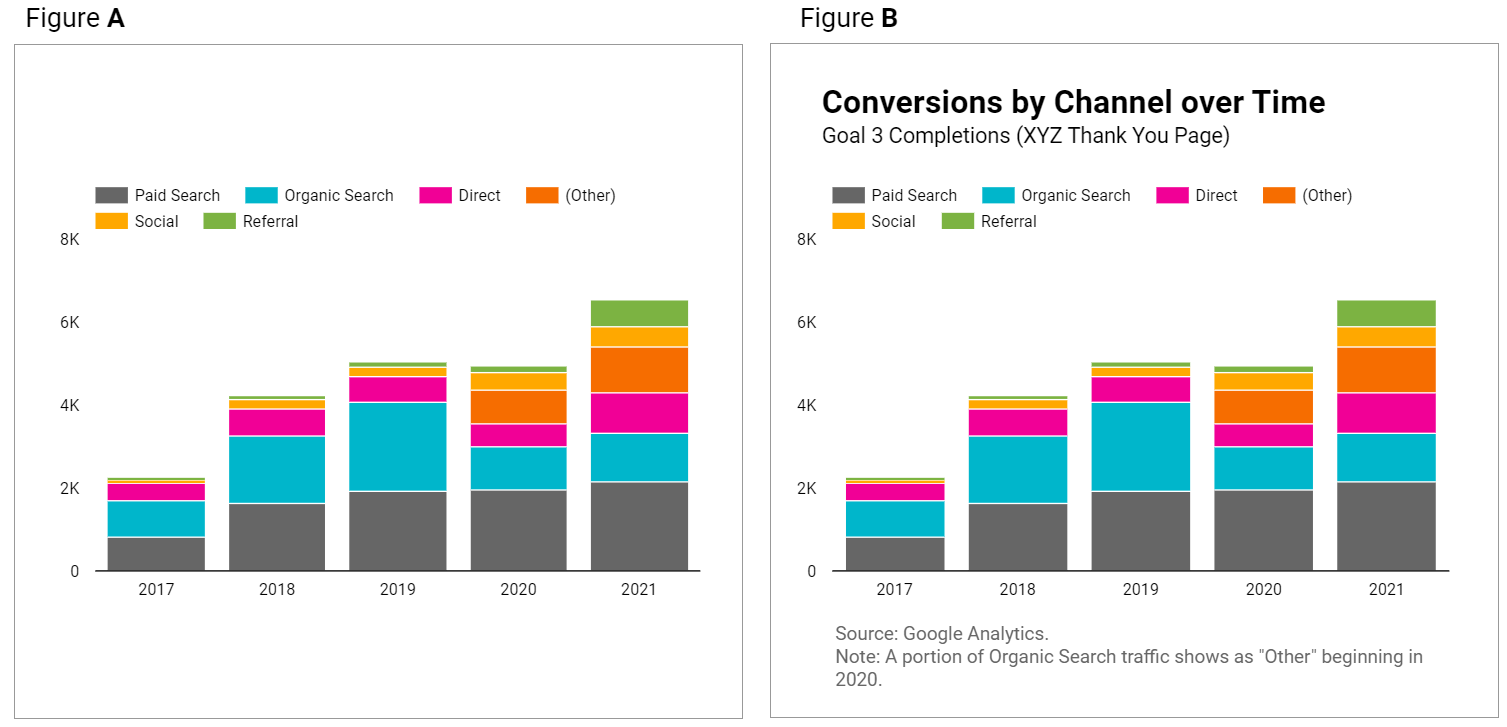
Figure A leaves questions in your reader’s mind that Figure B answers.
You can make your graphs and tables easier to understand at a glance with these tips:
- Give your data visualizations a title.
- Use subheadings and microcopy for additional context.
- Use legends.
- State the date range if it’s not included in the chart. (Note: “auto” date range defaults to last 28 days.)
- If multiple data sources are used throughout your dashboard, clarify which is used in specific charts.
How to do it:
- Add a text box and write out your titles and descriptions.
- This will open up a “Text Properties” panel to edit fonts, text size, and styling elements.
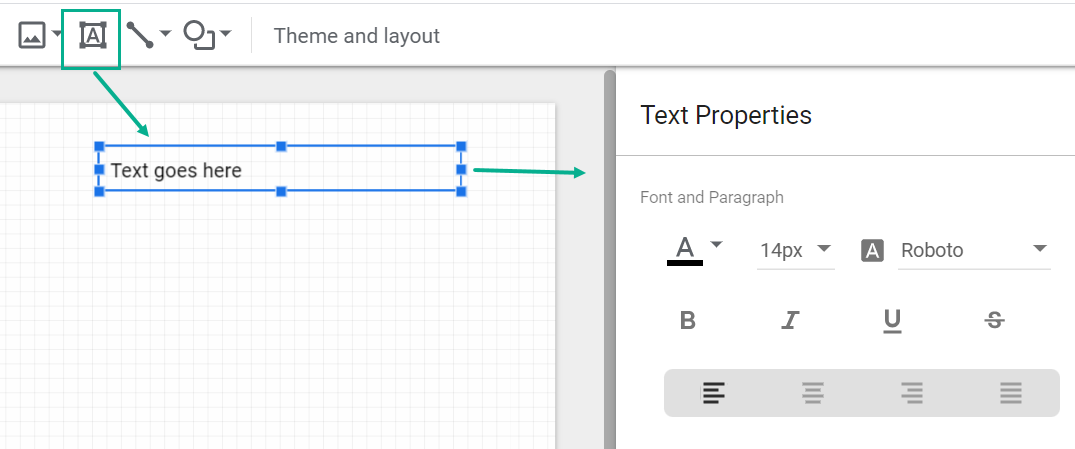
It’s worth the small manual effort it takes to add a text box and include context!
2. KPI scorecards
You don’t need an article to tell you that your dashboard should include your key performance indicators (KPIs).
But while you’re planning out your dashboard, pay special attention to where to include them.
Your KPIs matter most in your report and deserve top billing.
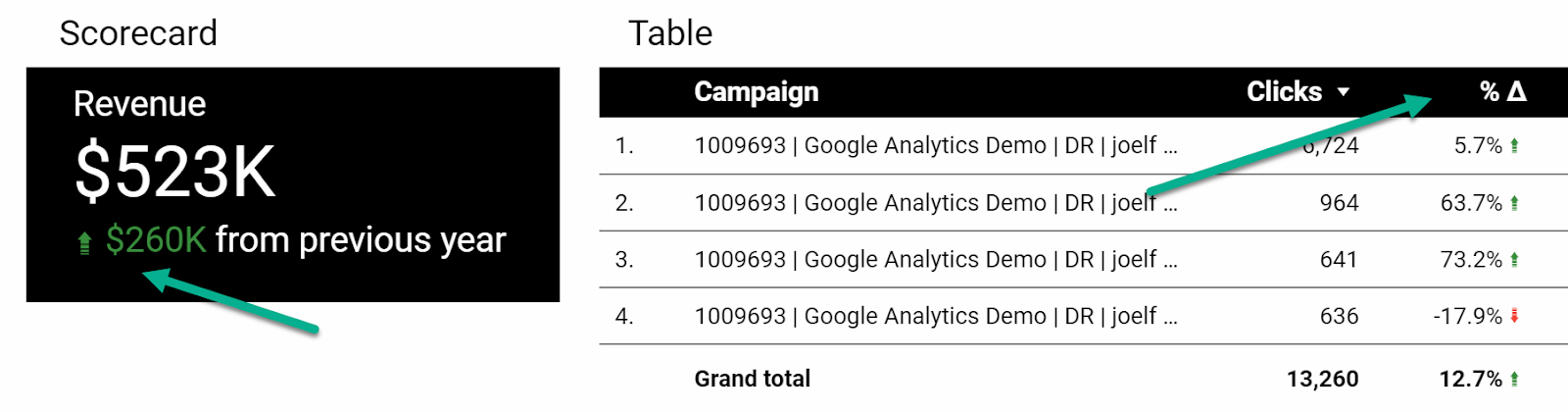
That means showcasing your KPIs with scorecards like so:

Not as afterthoughts at the end of a table:
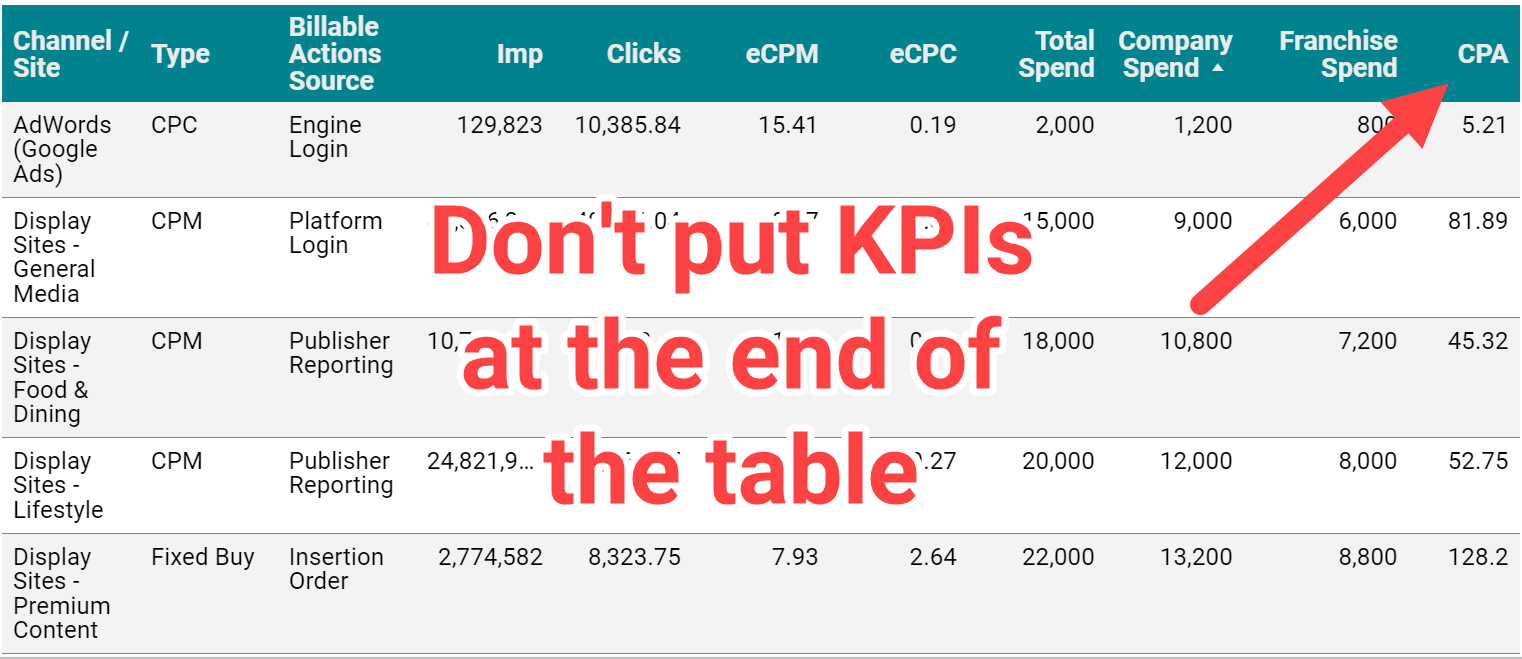
Not only do tables make it hard to identify KPIs, for languages that are read left to right, tucking KPIs on the far right of the table tells your reader these metrics are low priority.
Keep your reader focused on your key growth metrics like lead volume, revenue, or return on ad spend (ROAS), rather than vanity and traffic metrics like impressions and clicks.
How to do it:
- Use Chart > Scorecard.
- In the “metric” section of the Data Panel, add your KPI. Repeat as needed.
- Control format and size in the Style Panel.
Having KPIs appear in tables and other charts isn’t a problem, but give them added attention by using scorecards.
3. Goal pacing
Some advertisers use fixed monthly or annual marketing budgets with no room for adjustments.
Others have sales or efficiency goals they need to hit with flexible budgets.
No matter what the approach, your dashboard should answer the question:
Are we meeting our objectives, and how do we know?

Account objectives aren’t standardized, and neither is the approach for including goal pacing in your dashboard.
Fortunately, Looker Studio gives you many options for adding objectives and pacing, from literally charting against a goal to adding a written description of the target.
Here are some examples of how you might anchor performance to a goal:
How to do it:
- Option: Add a header that states the objective
- Option: Use a pacing chart such as bullet or gauge
- Option: Add a calculated field with progress to goal (metric/target)
Including goal pacing gives your reader confidence in how to interpret performance data.
4. Trends and historical comparisons
Trends and historical comparisons let your reader know if things are improving – or need improvement – over time.
Maybe you fell short of the goal, but you always miss it because it’s unrealistic.
Maybe you hit your goal, but you’re down compared to last year, and you need to take corrective action.
Don’t make your reader wonder whether current performance is average, down or “best month ever.”
Snapshot (single-metric) comparisons
Tables and scorecards give you an easy way to show your reader how performance for this period compares to another, using color-coded arrows to indicate the direction of the change (delta).
How to do it:
- Under “Date range,” select your comparison date range:
- Fixed
- Previous period
- Previous year
- Advanced
- In the Style Panel:
- Control the color of positive or negative change arrows
- For Scorecards only, you can select whether to show absolute or percentage change and whether to include a description of the previous time period (comparison label).
- You can also format Scorecards to show both YoY and MoM comparisons.
Line charts
You can get a complete picture of performance trends using time series charts.
Rather than just comparing this period to the last period, you’ve got an entire history revealing trends in seasonality, market impact and more.
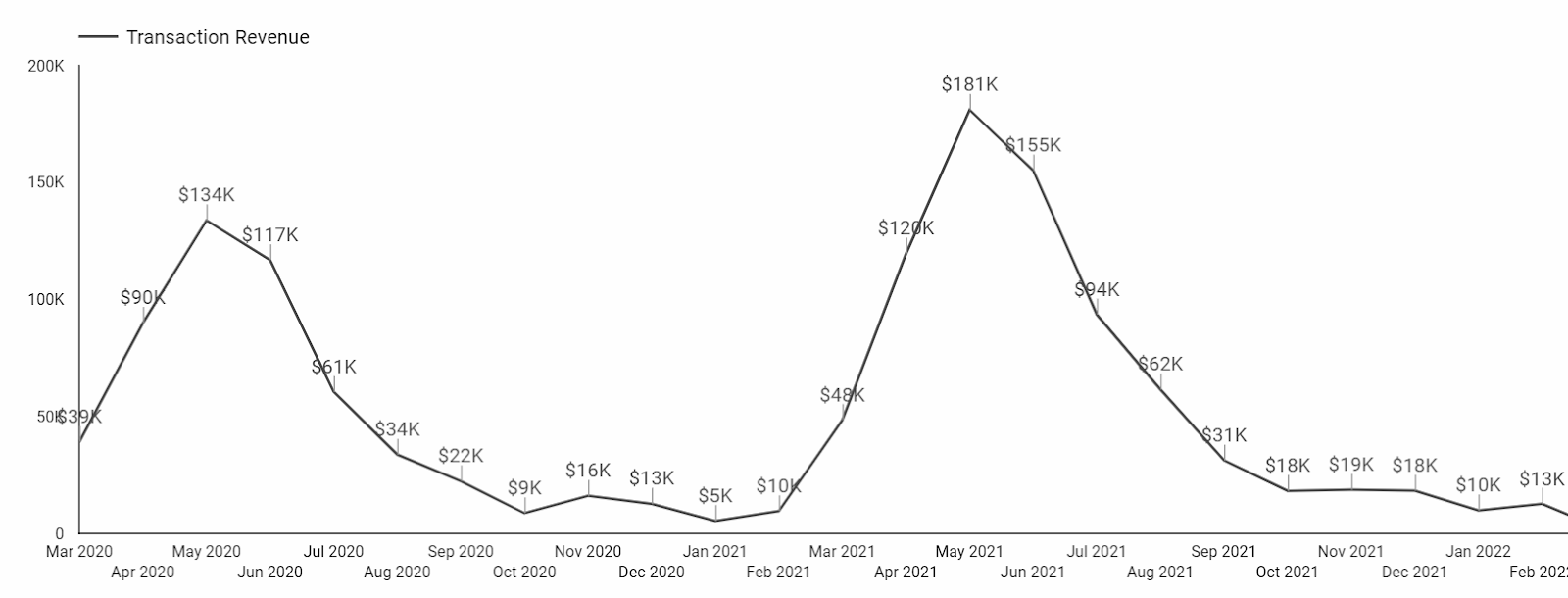
You can use a continuous Time series chart (shown above) or designate a comparison time period.
Here’s how that same data looks as a Year over Year (YoY) Time series chart. Note that the comparison year will show as a lighter shade of this period’s line:
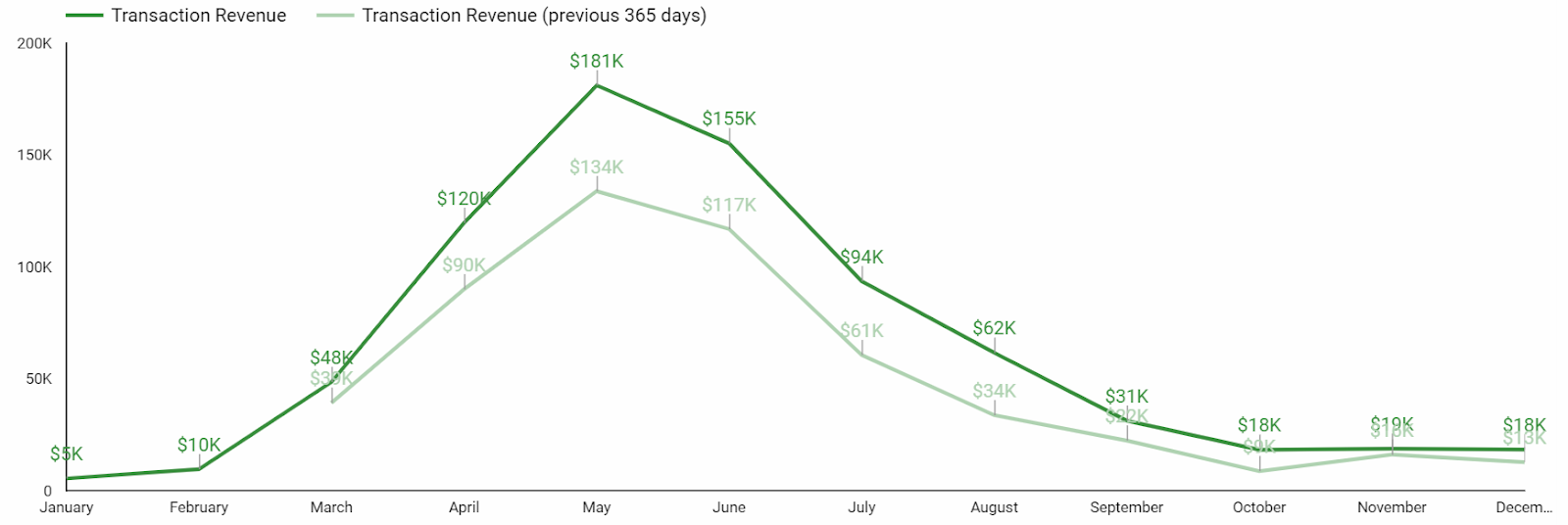
Another way to show historical performance is with a line chart that uses a time period as a breakdown dimension.
This Line chart is from a report comparing CPCs before and during the Covid-19 pandemic:
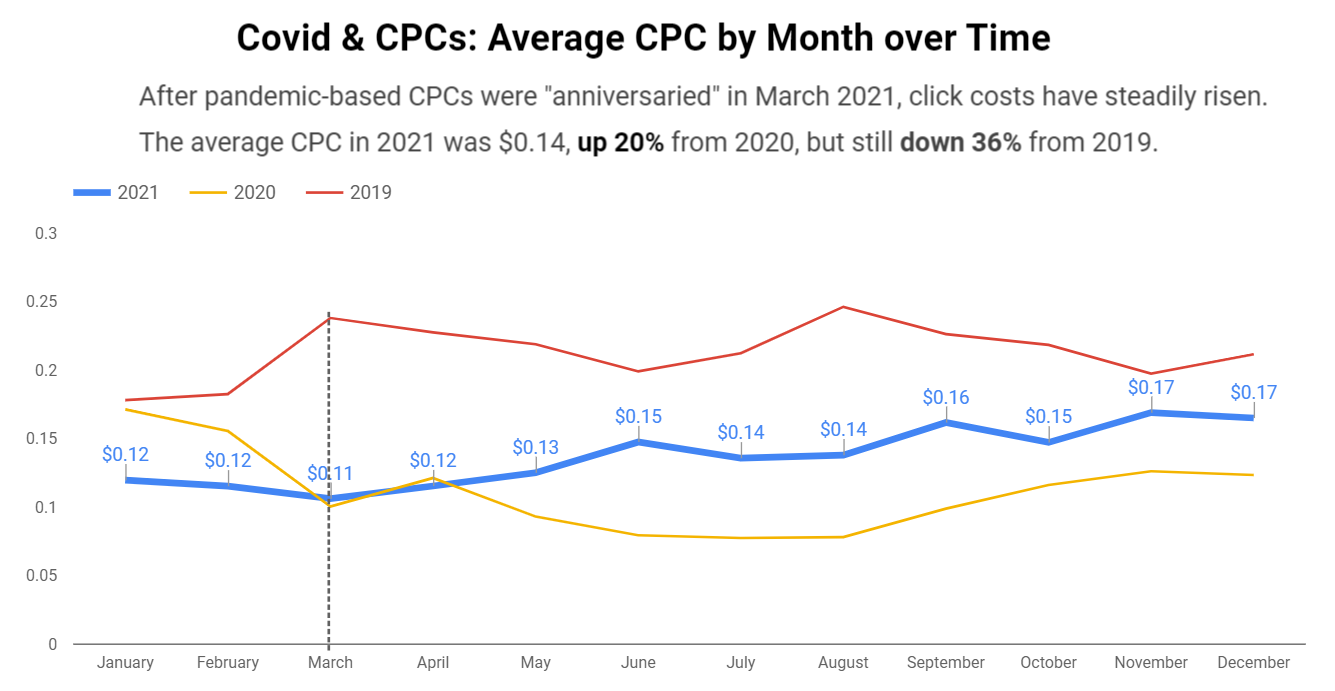
How to do it:
- To compare two time periods: Use a Time series chart and select a comparison date range.
- To compare three or more time periods (shown here for years):
- Select a Line chart
- Set the “Dimension” to Month
- Set the “Breakdown Dimension” to Year
- Set the “Sort” to Month
- Set the “Secondary sort” to Year
A few important notes for trends and historical comparisons –
- Only use these for your KPIs or metrics that directly contribute to your KPIs. Don’t add a CTR trend chart just for the sake of including a trend chart.
- There’s almost never a reason to show daily granularity in these charts. Zoomed in that closely, you’ll miss the signal for the day-to-day noise. Look for trends at a monthly level.
5. Categorical tables
Okay, so tables aren’t that glamorous.
But if your Looker Studio dashboard doesn’t have a table, something’s probably missing.
Why? Because there are times when your audience needs to compare multiple categories across multiple metrics. And nothing does that more efficiently than a table.
Tables are great for comparing default categories like:
- Campaigns
- Ad groups
- Keywords
- Search terms
- Final URLs
And depending on the complexity of your PPC dashboard, you can create tables for:
- Engines and platforms
- Channels and networks
- Funnels / intent / stages of awareness
- Brand vs. nonbrand
- Pivots of time segments, conversion types, and other categories
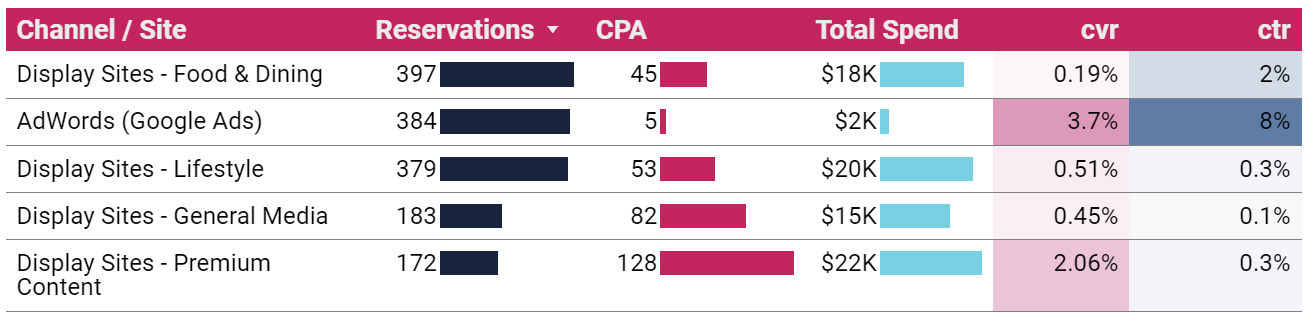
How to do it:
- Chart > Table (or Pivot table)
- Dimension(s): the category or categories you want to compare
- Metrics: your KPIs and supporting metrics
- From the Style Panel, you can format your table to include heatmaps, bars and targets
It’s easy to build tables and add metrics, and it’s easy to get carried away. Exercise some restraint and limit the number of metrics in your table, so it remains useful to your reader.
Bonus: Shiny charts
Our list constrained us to five categories, but here’s one bonus for making it to the end:
Shiny charts.
What are shiny charts?
Shiny charts are visualizations that your audience loves and gets excited about, even if they’re not super actionable.
Your readers may not learn anything new, but they’ll feel like they learned something new.
Maps are a great example.
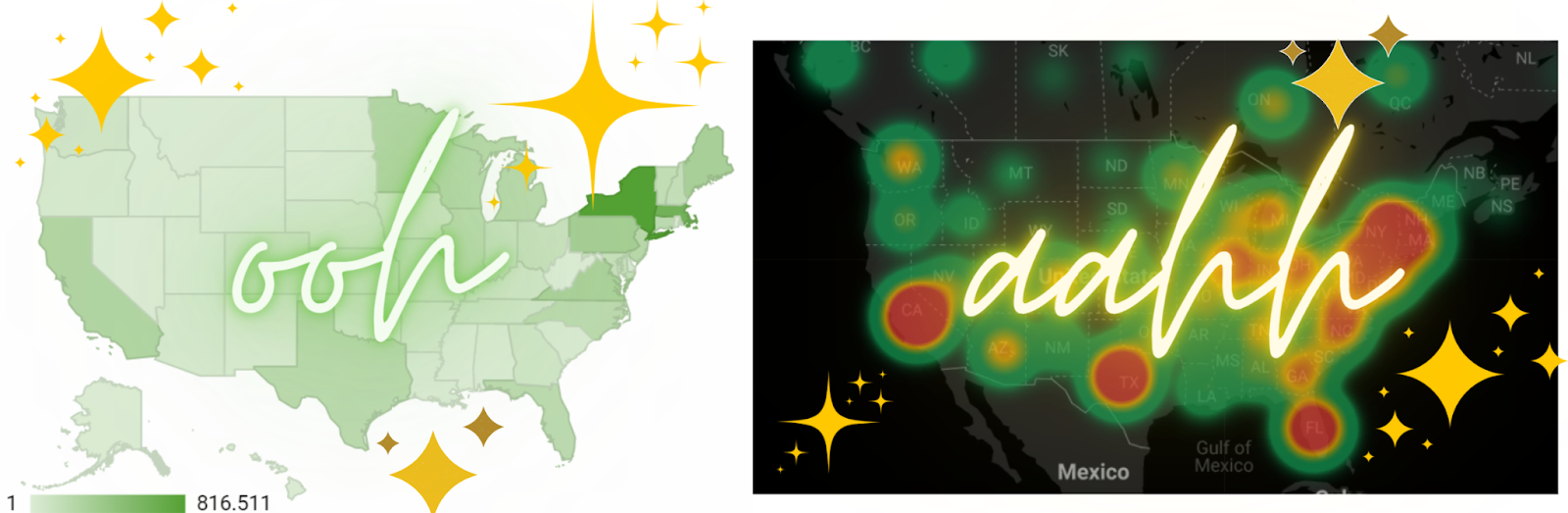
Many dataviz experts say not to use map charts; there are better ways to communicate location data.
But try to find a client or stakeholder who doesn’t love to see performance data on a map. Go ahead. I’ll wait.
Sure it’s a bit counterintuitive when you’re trying to build out an actionable dashboard. Maybe even a bit controversial. And you don’t have to do it. But a chart that makes your audience feel good just for seeing it has its own merit.
Putting it all together
While your Looker Studio dashboard can technically include whatever you want, it should at a minimum include:
- Title and context
- KPI scorecards
- Goal pacing
- Historical comparisons
- Categorical tables
These don’t need to (and can’t) all be discrete sections. One scorecard can include a title, KPI, pacing, and time comparison.
There are many other charts and visualizations that can take your PPC dashboard from good to great. Getting started with this list will set you up for success and give you a dashboard worth the time it took to build.
The post 5 things your Google Looker Studio PPC Dashboard must have appeared first on Search Engine Land.
Courtesy of Search Engine Land: News & Info About SEO, PPC, SEM, Search Engines & Search Marketing
Sunday, October 30th, 2022
Performance Max is one of the biggest shifts to automation that we’ve seen from Google. How do we make it work this holiday shopping season?
Ideally, you should’ve prepared everything in advance.
Black Friday is in ~30 days! If you’re just starting now, you’re already behind.
Below are some ways you can still get ahead.
1. Audience signals
This is the most underrated part of Performance Max, but likely the most important.
Google gives you the ability to input signals on who the system should target. Upload your customer and email lists, compile top keywords, use interests etc.
We’ve found success with the following audience signals:
- Customer match
- High-value customers
- 2021 holiday shoppers
- Email subscribers
- Custom intent
- Competitor names and URLs
- High-intent (bottom-funnel) keywords
Tip: Use the Klaviyo and Google Ads integration.
2. Asset groups
With PMax, it’s important not to shock the system by making drastic changes. It’s better to make smaller and more incremental changes.
You can use these approaches:
- Create a new asset group for promotional items.
- Layer new promo creative and extensions.
If you’re creating a new asset group, do it within the same campaign so that the product-level historical performance will be utilized.
Be patient and give it some time to collect data and ramp up. It can take time!
Keep in mind: Creating new Performance Max campaigns for BFCM is not recommended because the learning period takes too long to ramp up.
You’re best off adding new asset groups to existing Performance Max campaigns or layering on promotional assets with the current asset groups.
Get the daily newsletter search marketers rely on.
<input type=”hidden” name=”utmMedium” value=”” />
<input type=”hidden” name=”utmCampaign” value=”” />
<input type=”hidden” name=”utmSource” value=”” />
<input type=”hidden” name=”utmContent” value=”” />
<input type=”hidden” name=”pageLink” value=”” />
<input type=”hidden” name=”ipAddress” value=”” />
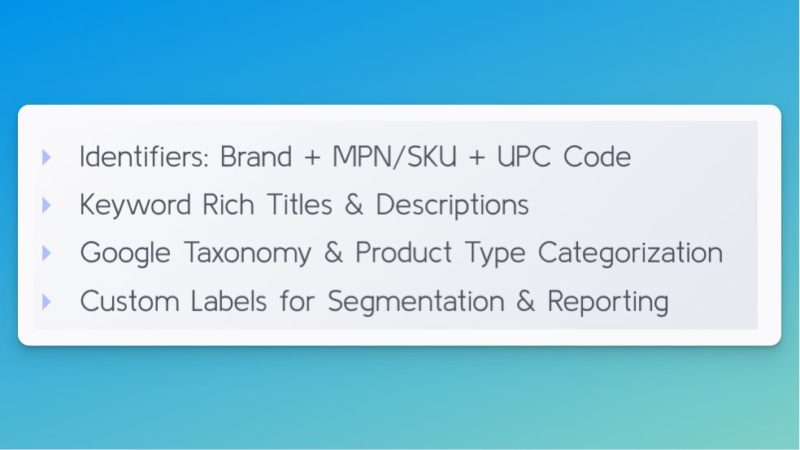
3. Datafeed
The datafeed is important all year round, but especially important now!
Google Shopping and Performance Max do not allow you to target based on keywords.
The system uses your product information to understand what search queries should show your ads.
4. Ad extensions
Ad extensions (assets) are an easy way to launch promos without making campaign changes that can throw off the system.
You can and should add promo extensions in two places:
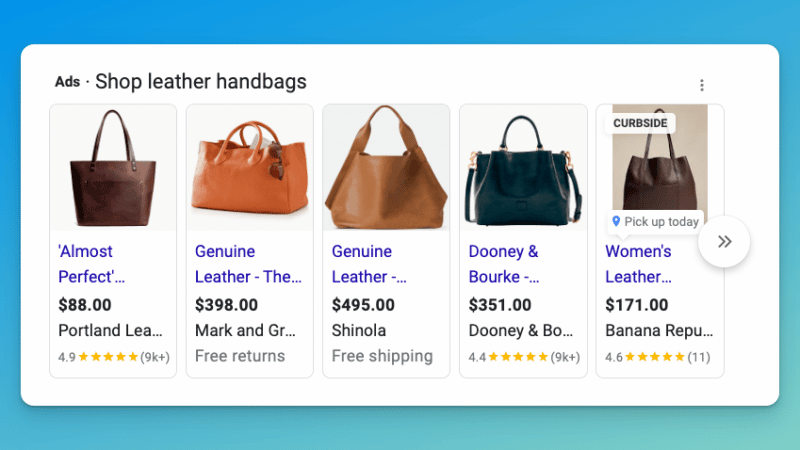
- Google Merchant Center for Shopping
- Google Ads for Search, YouTube, etc.
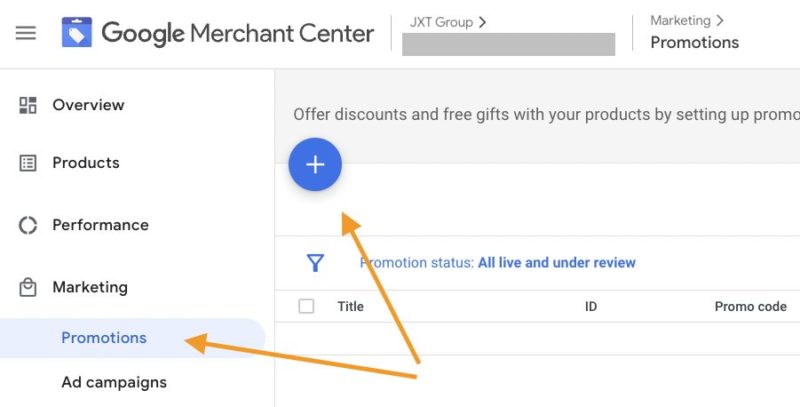
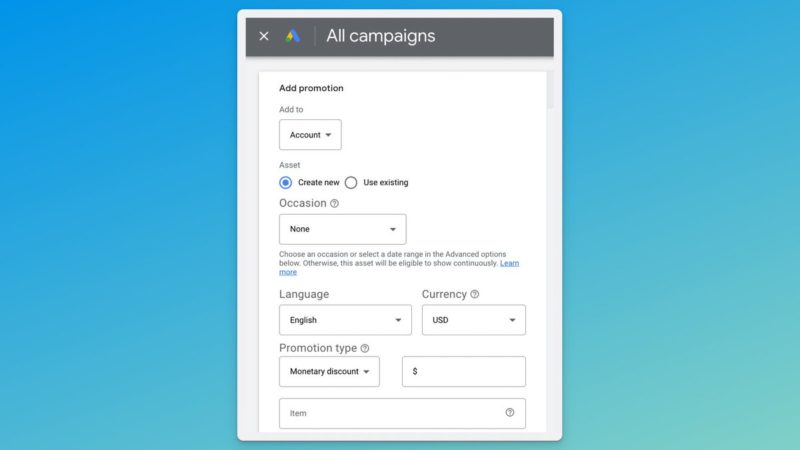
In Google Merchant Center (GMC), you’ll want to make sure you have Promotions enabled under Growth > Manage Programs.
Once you have the option to create promos, go to Marketing > Promotions, then click the big blue button to submit your promotion info.
Note: GMC promos are very finicky and subject to manual approval so make sure to set this up correctly. It’s especially important to get the product selection right. (Step 2 below.)
Give yourself time and submit all promos in advance, just in case.
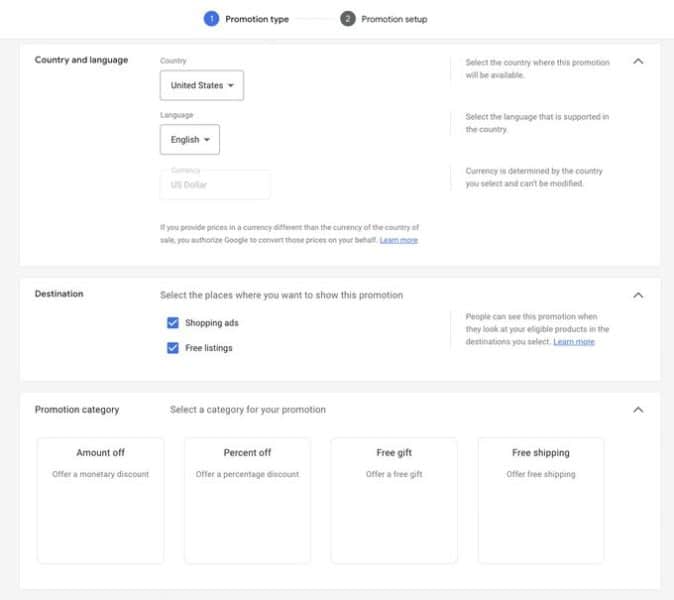
Step 1: Promotion type
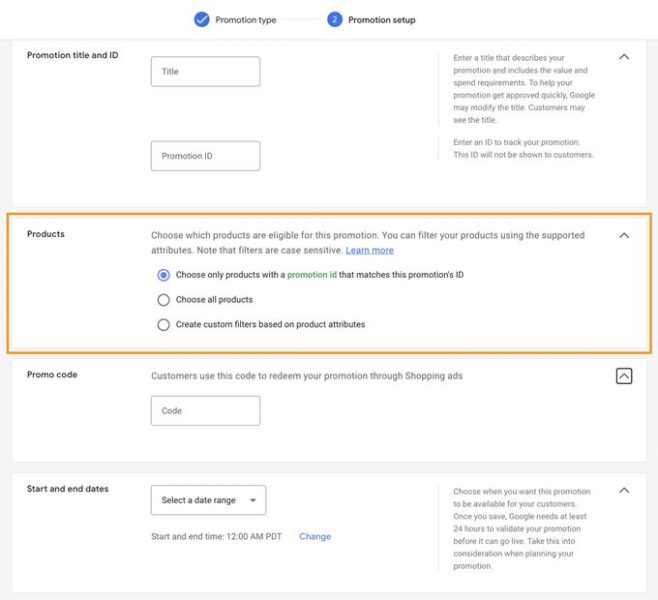
Step 2: Promotion setup
In Google Ads, promotion extensions (assets) can be added on the account level or campaign level. Just click the Assets tab and add new.
5. Bids and budget
Give the system space to perform but don’t make super-drastic changes.
We recommend increasing budgets and decreasing tROAS targets incrementally. Again, don’t shock the system.
Anytime you increase the budget, you force the system to find new audiences. It can take time for the algorithm to find a new audience that’ll perform well.
Also, keep in mind that as you increase your budget, you’ll likely see your ad costs increase as well.
6. Smart Shopping style
You can run Performance Max without any assets, only using your product datafeed. This forces the system to run in a similar manner to Smart Shopping with more placements available.
This is a great way to capture high-intent traffic at scale.
7. Paid social style
Additionally, you can run Performance Max without a datafeed which will exclude the Shopping placements and run display ads only.
If you see success with Facebook, Instagram, and TikTok, this can work very well for you.
And make sure you’ve got the setup, reporting and optimization basics of PMax covered by reading the following articles:
The post How to make the most of Performance Max this holiday shopping season appeared first on Search Engine Land.
Courtesy of Search Engine Land: News & Info About SEO, PPC, SEM, Search Engines & Search Marketing
Sunday, October 30th, 2022
To succeed as a small or medium-sized business (SMB), employees must work smarter. Tight budgets and scrappy teams require innovation at every level — from the Founder and CMO, e-commerce Marketing Director to VP of Marketing, Social Media Director to Paid Search Strategist. This opportunity to bring creativity and agility to the table is one of the many reasons why employees find SMBs rewarding workplaces. Employees can help define the company vision. They can imagine ways to actualize this vision. And often, with SMBs, the product offering aligns with employee values and belief systems.
But let’s face it. The job of a digital marketing decision-maker within an SMB can be challenging— from the long hours to shifting budget priorities. Some might say digital marketing for an SMB is just as hard as creating the company product, thanks to ever-changing platforms, resources, content demands, and time constraints. Getting seen by the right audience can be difficult.
A challenging digital marketing world
Tasked with a new campaign, the digital marketing lead faces questions on how to create, target and execute digital advertising: When do you launch a digital campaign? What platform do you advertise on? How do you reach your target audience? What do you even post?
Digital marketers understand online advertising is key to amplifying their brand, but often they’re not clear where to begin; SMB advertising starts to feel like a ball-and-chain. Rapid changes in the advertising industry also contribute to marketer overwhelm. Consumer behaviors and demands for privacy are forcing brands to adapt how they reach and best serve people’s needs. While the digital marketing space can feel overwhelming, now is a crucial time for marketers to forge deeper relationships with people.
“You need to continually create and revamp the things that work, staying timely. It never ends. We have to keep tweaking our graphics to make sure they’re going to catch attention. It’s not like back in the day when you could run an ad in a newspaper and that same ad was going to run for six weeks, and you were done with it. You constantly have to make content to stay top-of-mind.“
To help accelerate SMB growth, Microsoft developed a quantitative and qualitative research program to better understand how SMBs manage their digital marketing today and to identify the pain points digital marketing leads face. Advertising decision makers of companies with less than 200 employees participated in a 15-minute survey to understand their needs and top pain points within the digital advertising landscape. Microsoft later conducted qualitative interviews to dig deeper into SMB needs. Most respondents noted they had few internal resources to support their efforts and often relied on agencies or freelancers for support (typically for content production or digital campaign management and optimization).
Four universal digital marketing pain points
The SMB founders and employees surveyed had different marketing POVs and experienced challenges unique to their roles. Some respondents were big-picture thinkers struggling to keep up with the ever-changing digital landscape, while others valued flexibility, optimization and results but had a tough time justifying marketing dollars spent. Many focused outward, eager to explore new ways to become and stay relevant on emerging social platforms like TikTok, while other leaders spent a large amount of time inside marketing brainstorming sessions, developing strategy with their team.
Although the findings were as diverse (and interesting) as the businesses surveyed, four clear SMB challenges emerged as shared frustrations: content creation, time and resource constraints, platform fragmentation, and evaluating ROI/ROAS. Read on for details about shared SMB marketer pain points.
Content creation
A shared frustration with SMB respondents was the volume and type of content deliverables required per campaign — and the reality that content takes time and effort to create. Many people and review cycles are necessary to strategize, envision, develop, write, design, update and optimize a successful digital marketing campaign. This constant demand for content tests SMBs’ bandwidth to fully execute the planned marketing vision.
“Coming up with the right content and being able to put that content together…that’s driving everything these days. Having the right content and current content. For me, it’s a resource thing, I don’t have the resources to generate content in a timely manner. Keeping it fresh.“
Time and resource constraints
The list of tasks for digital advertising marketers is extensive — from determining the marketing budget to developing and distributing content, managing digital campaigns, to analyzing and optimizing marketing efforts…and everything in between. Marketers have much to do but little time or resources to get the work done. The study shows that, out of necessity, SMB digital marketers are forced to either become marketing “Jacks and Jills of all trades” or are left scrambling to find freelancers or agencies to get tasks accomplished. The result? Mixing varying resources produces varying results.
“You spend a lot of time to do a quality check on content, because once it goes up there, it’s up there…Creating and monitoring content has been the thing that takes the most time because it’s only one piece of what I do here, and I’m the only person that’s doing it right now…it just takes time.“
Platform fragmentation
The stress of platform fragmentation is another shared SMB hurdle, as marketers face large quantities of information to learn, manage, and analyze. This is because digital marketers use many campaign and reporting platforms with unique algorithms and ad formats. Plus, these platforms and tools are continuously evolving. Digital advertising leaders experience overwhelm, not only with the many CMS platforms, reporting tools and analytic insights available but also with feature updates within each tool. Forced to keep up with platforms and upgrades, marketers experience pressure to hire more people to diversify the learning load.
“Algorithms change all the time. You have to be specialized in digital marketing to understand everything. My marketing department also works in shopper marketing and trade marketing. The amount of specialization that we can get to a degree is limited.“
Evaluating ROI/ROAS
Evaluating a campaign’s return on investment (ROI) and return on ad spend (ROAS) has always been challenging — but respondents note that it is even harder to track conversions and gauge true campaign ROI/ROAS with recent privacy changes. Another shared challenge is the perceived lack of standardized metric consistency or transparency across platforms. When developing reports for executives, respondents are tasked with piecing together multiple reports from different platforms to paint a clear picture of a campaign’s tangible return on investment.
“I think conversions are really frustrating. Some of that is the iOS update stuff that happened recently…it’s not accurate because it’s not giving conversions from Facebook. I want to have a completely accurate ROI for digital campaigns, and I don’t feel I’m getting that.“
SMB digital advertising solutions
In today’s digital space, businesses need smarter solutions to grow their business online and find new customers. SMBs are time-constrained and know every click matters. That is why Microsoft Advertising offers its newly redesigned Smart Campaigns experience to make online advertising easier and help small to medium-sized businesses reach more customers across leading advertising and social media platforms.
Smart Campaigns empowers digital marketing leaders to easily reach high-value customers across the web who have higher buying power, spend more online, and are more likely to engage with ads. It’s easy to get started. Marketers set up ads in a matter of minutes while they watch in real-time as the platform intuitively improves the ad, measures its performance, and shows understandable results across platforms.
A new feature within Smart Campaigns is Multi-platform. With Multi-platform, SMBs can expand their reach and maximize their investment by using one ad tool to target many channels like Google Ads, Facebook, Twitter, Instagram, LinkedIn and Microsoft Advertising. Instead of creating ads on fragmented platforms to launch and monitor a campaign, SMBs can save time by running ads on multiple platforms in minutes.
Smart Campaigns with Multi-platform is a new digital marketing ecosystem designed to eliminate SMB digital marketing pain points and connect marketers with people at the right moments across work and life.
“Hearing that everything could be in one place and that you could manage it all on different platforms, that’s exciting and innovative…I would be very interested. Being able to log on and do everything and see everything in one spot would save me time. That would be amazing.”
The post 4 digital marketing pain points SMBs face today appeared first on Search Engine Land.
Courtesy of Search Engine Land: News & Info About SEO, PPC, SEM, Search Engines & Search Marketing
Sunday, October 30th, 2022
What is the greatest skill in SEO?
If you believe this tweet, it’s patience.
Although patience is a great answer, I would never say there is a “greatest” SEO skill.
Why?
Because SEO requires various hard skills (things you can learn or be taught) and soft skills (how you work and interact with others) to succeed.
As I’ve always found, asking many SEO professionals one question will get a wide variety of opinions. So I asked several SEO professionals what they would consider the greatest skill in SEO.
Here’s what they told me.
1. Research and troubleshooting
Dave Davies, Lead SEO, Weights & Biases
- “As far as greatest skills go, I have to go with the stock SEO answer: It depends. In this case, though, it really does.
If the practitioner is content-focused, then writing skills combined with strong research abilities (both SEO and subject-based) would definitely top my list. If the practitioner is a technical SEO, then the most important skills skew to technical knowledge – but even that branches out.
If they work as a contractor, then they likely need to have a broad understanding of different tech and a strong ability to research specifics and work with developers. If they’re an in-house SEO or platform-specific contractor, then they would likely need a stronger grasp of a specific stack, and possibly deployment capabilities.
The one skill that every SEO needs is research and troubleshooting capabilities. If they can’t do that, their career will be short. Thankfully, if you’re reading this, you do your research.”
2. Critical thinking
Dan Taylor, Head of Technical SEO, SALT.agency
- “For me, one of the greater skills for SEO professionals to develop is critical thinking. The SEO ecosystem is awash with noise and claims, with varying levels of data and anecdotal evidence to support them. Far too often, much of this content and advice is taken verbatim and applied to own situations without a second thought, with the expectation that the implementation will yield the same results.
A common example in SEO happens when working with a client (and other stakeholders) on a website redesign. More often than not, the designs, and some proposed technical implementations, will be taken from other websites without considering the ‘other’ factors that go into how a website ranks. Just because eBay, the BBC, Amazon, etc. do X, doesn’t mean X will work for Bob’s Hardware or Bob’s Finance Co.
With critical thinking, SEOs should read a study online, see the inputs and outcomes, and then intentionally find other studies that contradict these results – and then form their own opinions and influence their strategies with application to the current client scenario.”
John McAlpin, Director of SEO Strategy, Cardinal Digital Marketing
3. Problem-solving
Elmer Boutin, VP of Operations, WrightIMC
Corey Morris, Chief Strategy Officer, Voltage
- “The greatest skill in SEO is problem-solving. It rarely goes according to plan.
Adapting, finding new ways, and exploring all resources for technical, on-page, IT, UX and off-page factors are all critical to success. Using a checklist, and checking boxes, won’t get you far.”
4. Experimenting
Himani Kankaria, Founder, Missive Digital
- “The greatest skill in SEO is experimenting. One thing that works for one business or industry is not necessarily what would work for another. You cannot judge that without testing.
Also, most of the projects have different audience buying and browsing perspectives, technologies for the website UX, content, how we build the navigation, etc. So you need to keep checking what works for your website, client, or employer because SEO is ever-evolving, and one cannot learn or unlearn new or outdated things without experimenting. Sometimes, we learn from someone else’s experiments, so experimenting is a super duper skill in SEO.”
5. Business acumen
Trond Lyngbø, Founder, Search Planet
Connie Chen, SEO Specialist, Moving Traffic Media
- “Commercial awareness (ROI) and soft skills because you need to be able to translate the work that you’re doing into measurable impact for your stakeholders. You must also know how to distill technical ideas into concepts that make sense to those stakeholders.”
6. Adaptability
Maria White, Head of SEO, Kurt Geiger
- “SEO is a spectrum. As such, it is hard to dominate all skills (Technical, Data, Content, PR, Story Telling, Management and more). These skills change as Google and search evolve. Every Google algorithm shapes the way we do SEO.
Given that the only constant is change, then the best skill to succeed is the ability to adapt. Changes are the norm when working in an agency: new clients, bigger clients, various budgets, fast pace and more. If, along with that, we add constant changes to the algorithm that involves changing the way we work, then here is where only those with the ability to adapt will not only survive but they will thrive.”
Holly Miller Anderson, Lead SEO Product Manager, Under Armour
- “The greatest skill in SEO is adaptability. SEO is a learned skill from technical to content. But adaptability is a choice.”
7. Communication
Casey Markee, Owner, Media Wyse
- “SEO requires an ability to clearly explain concepts and objectives, usually in many different ways, to many different people. Your ability to do so, professionally and emotionlessly, is a big part of your daily success.”
8. Ability to learn
Chris Silver Smith, President, Argent Media
- “The greatest skill in SEO is the ability to learn. One constant in SEO is change – one must learn new things and flex to adapt to new ways constantly.”
9. Persistence
Ludwig Makhyan, Co-founder, MAZELESS
- “Persistence is the greatest skill, where you don’t get disappointed by failures and continue to learn, push to improve, engage with other teams and cooperate for the greater success of the business you represent.”
10. Cross-collaboration
Jon Clark, Managing Partner, Moving Traffic Media
- “Cross-collaboration is an incredibly valuable skill. SEO is one of the few skills/roles that sits at the crossroads of nearly every department in an organization: design, development, content, UX, PR, marketing, engineering, quality assurance, analytics, and more.”
11. Understanding the user
Mike Grehan, SVP of Corporate Communications, NP Digital
- “The greatest skill of an SEO is to fully understand the “information need” of an end user. They don’t start their research as a consumer or a B2C customer or B2B, or anything other than a human being trying to solve a problem. Help Google to help them – and Google will surely help you!”
12. Inquisitiveness
Mark Jackson, President and CEO, Vizion Interactive
- “An inquisitive mind. In SEO, you can be a technically gifted and super bright person or a content marketing expert, but if you lack an inquisitive mind, you may not be looking at a project from all the possible angles.”
13. Ability to know what matters
Olaf Kopp, Co-founder and Head of SEO, Aufgesang
- “The greatest skill in SEO is “ranking experience.” You can do a lot in SEO. But only 20% of that ensures 80% of success. Only with enough experience in knowing which tasks are effective, in which case makes the difference between good and average SEOs.”
Joe Devita, Managing Partner, Moving Traffic Media
- “The ability to stay focused on the optimization signals that matter rather than be distracted by all the noise.”
The post 13 essential SEO skills you need to succeed appeared first on Search Engine Land.
Courtesy of Search Engine Land: News & Info About SEO, PPC, SEM, Search Engines & Search Marketing