Archive for the ‘seo news’ Category
Tuesday, November 15th, 2022
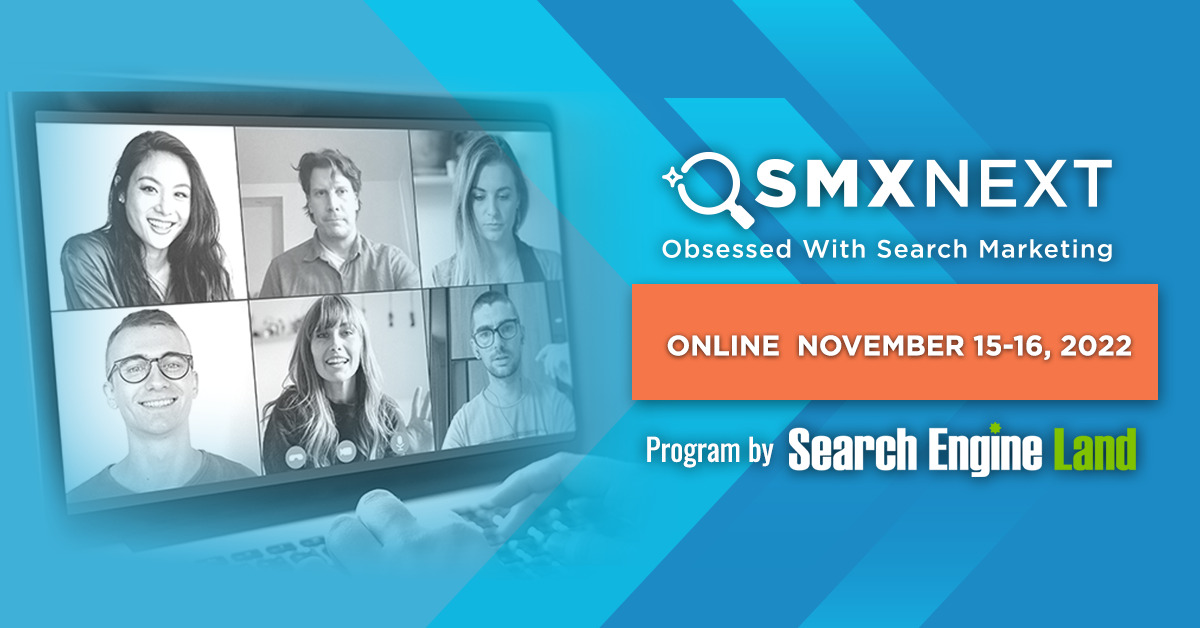
Head into 2023 ready to drive more traffic, leads, and conversions: Join us online tomorrow and Wednesday (Nov. 15-16) at SMX to learn the actionable tactics that can make it happen… for free!
Your free All Access pass unlocks nearly 50 tactic-rich sessions that explore critical SEO and PPC topics, tactics, and trends – everything from E-A-T to GA4, PPC automation, Performance Max, and more.
Stick around for Overtime – live Q&A following SEO, PPC, and select Solutions sessions, to continue the conversation, dig deeper into the material, and get your specific questions answered in real time.
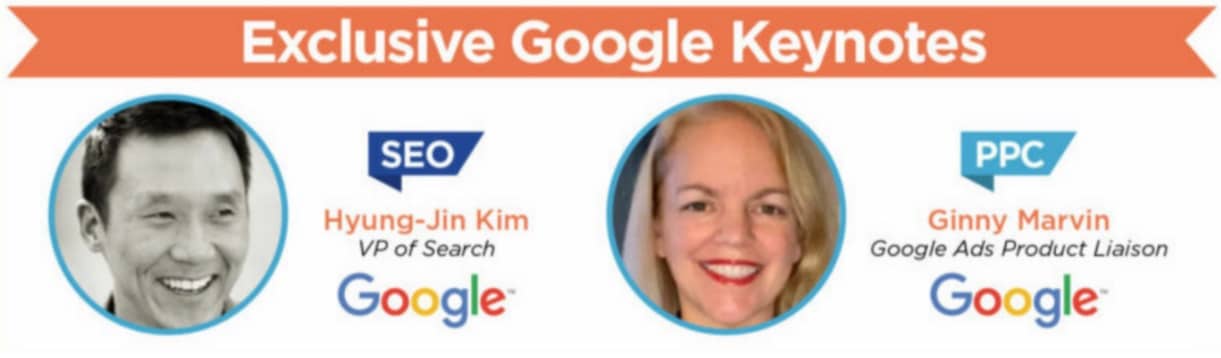
You’ll also unlock two exclusive keynote conversions with Google – loaded with first-hand insights and actionable advice straight from the source – plus your choice of engaging Coffee Talk networking groups designed to connect you with like-minded marketers.
After two exciting days of training with some of the smartest marketers on the planet, you’ll be ready to implement reliable, actionable tactics to end the year on a high note – and prepare for whatever 2023 has in store.
What are you waiting for? Secure your FREE All Access pass now and join us online tomorrow at SMX. The show kicks off at 11:00am ET… don’t miss out! Grab your free pass now!
The post [Tomorrow] Attend SMX online for free! appeared first on Search Engine Land.
Courtesy of Search Engine Land: News & Info About SEO, PPC, SEM, Search Engines & Search Marketing
Tuesday, November 15th, 2022
There are numerous cases of businesses losing all of their reviews that they have acquired over the years in their Google Business Profile listings. The issue seems to be related to Google automatically applying suggested edits from the web to those business profile listings, which in turn can create a new CID for that business listing, and with that, the reviews get disassociated from that business listing. The result, when you look at the business listing in Google Search or Google Maps, the reviews no longer exist.
The report. Mike Blumenthal covered the issues in greater detail where he documents numerous cases of businesses having their reviews disappear overnight from their business profiles on Google Maps and Google Search. Mike said Google is changing the business listing CIDs, the unique identifier for the business listing, when the suggested edits are automatically applied. That change leads the reviews to stick with the old CID and are not transferred or moved to the new CID.
Reviews disappear. When the new CID is created, Google is not moving the reviews over to that CID, and thus all the reviews appear to disappear from the business profile listing. In reality, the reviews are still there, but on the old business profile listing and not on the new one.
What can you do. You should capture and document your old CID by using either Gatherup’s Google Review Link Generator chrome extension or Pleper’s free Google CID converter, as Mike said. Take screenshots or store your reviews in some sort of database, some even archive the emails they receive from Google Business Profiles with the reviews.
If this happens to you, you can then tell Google that your CID changed and the reviews were not migrated. Either Google can put back your old CID or maybe transfer the reviews, maybe – if you are lucky.
The best thing to do is to stay on top of the emails you receive about suggested edits and disapprove them if they are incorrect, most are likely incorrect if you maintain a good business profile listing.
Why we care. Reviews on your local listings can be the lifeblood of your local Google Search and Maps business. Many searchers look at the reviews before calling the business, many look at the reviews before placing an order and before driving to your location and some even suggest reviews play a roll in local Google search rankings. If your reviews disappear that can be a huge loss for the business.
The post Report: Google Business Profiles bug causing reviews to disappear appeared first on Search Engine Land.
Courtesy of Search Engine Land: News & Info About SEO, PPC, SEM, Search Engines & Search Marketing
Tuesday, November 15th, 2022
For the last several hours, Google Ads users have been noticing issues logging in.
Google Ads product liaison Ginny Marvin tweeted the following response, stating that the problem was caused by an authentication issue:
An issue with Google account authentication is preventing some users from accessing Google services, including Google Ads and Display & Video 360. The issue is being investigated. Please see the dashboard for updates: https://t.co/SyAbk6b458
— AdsLiaison (@adsliaison) November 14, 2022
Other issues. Melissa Mackey also noticed that any changes made on the platform took several minutes to update. We’re not sure if the two are related, but it wouldn’t surprise us.
Why does it take @GoogleAds several minutes to save a simple budget change? The slowness of the UI is unworkable #ppcchat
— Melissa L Mackey (@beyondthepaid) November 14, 2022
Watch for updates. Keep an eye on the Google Ads Status Dashboard for updates.
The post Google Ads authentication issue causing login problems appeared first on Search Engine Land.
Courtesy of Search Engine Land: News & Info About SEO, PPC, SEM, Search Engines & Search Marketing
Friday, November 11th, 2022
Advertisers will now have the option to select “Action – Online Conversions” as a goal when setting up your plans in Reach Planner and can also add Video Action Campaigns to existing plans.
What is the Reach Planner. The Google Ads Reach Planner makes it easier for advertisers to plan for Conversions, Views, Reach, and Impressions-based metrics. It provides a forecast for how your media plan might perform, based on your desired audience, budget, and other settings such as geographic location and ad formats.
How it works. Google says that forecasts are modeled on trends in the ad market and the historical performance of similar campaigns run in the past.
Why we care. Advertisers using video will now be able to predict campaign performance using the new tool. This could be helpful for budgeting during the holiday season.
The post Google Ads Reach Planner now forecasts Video Action campaigns appeared first on Search Engine Land.
Courtesy of Search Engine Land: News & Info About SEO, PPC, SEM, Search Engines & Search Marketing
Friday, November 11th, 2022
Third-party cookies are on their way out. You’ve probably been thinking and talking about this for a few years now.
And you’ve likely seen many blog posts, articles, webinars, podcasts, etc. talking about how first-party data is the path forward for adapting to the cookieless future.
What isn’t being talked about?
The role that search plays in collecting that precious first-party data.
The role of search in capturing first-party data
Oftentimes it’s commerce, loyalty programs, and the like that are deemed responsible for discovering the ins and outs of your customers.
But search plays a critical role, too. It’s uniquely positioned for a few reasons.
Users are purposefully engaging with your site
So many marketing channels engage with consumers during a non-commerce moment – while they’re sitting on the couch binge-watching The Office, drooling over their best friend’s Insta-perfect pictures from that recent trip to Tuscany, etc.
Search is a rare exception. The consumers we engage with are actively raising their hands, and we’re helpfully showing up to meet their needs.
That means that every engagement we have with potential customers is highly intentional. They’ve made the choice to not just look for something we offer, but also to visit our site. What that means is…
Clicks have both high intent and strong timing signals
We can learn a ton of valuable information about a person, even if they don’t immediately make a purchase.
Clicks are considered a first-party cookie, meaning the advertiser has a consented ability to:
- Tag the consumer’s browser.
- Use that information to improve their customer experience and future engagements and interactions with the brand.
We can also very directly and confidently infer interest.
Someone looking for a tent on our ecommerce website shows a much stronger signal of “interest in buying camping gear” than a person browsing an outdoorsy blog or looking up the top 10 tips for hiking the Appalachian Trail.
We also know that they’re thinking about buying that camping gear now.
Search is a demand-capture channel that reveals high intent and purposeful engagement with the benefit of a first-party cookie.
Nothing new, right?
What’s new is the relative importance of each first-party click that comes through search.
As the opportunities to mine data from third-party cookies become fewer and fewer and walled gardens build their fences taller and taller, that importance will only continue to rise.
Search has a new responsibility to take its high-intent first-party data and use it across the marketing ecosystem.
Search data on its own can be valuable, but it becomes even more powerful when paired with other first-party data sources. So, what does that look like?
Search + site behavior data = better user experiences
Garnering an ad click is only half of the battle.
As the consumer digests the website, text, imagery, and value proposition, a lot can happen.
Sometimes, consumers bounce nearly immediately, while other times, they will view 10+ pages and spend over 15 minutes browsing the site.
This metadata can and should be used to build customer segments. Purchase propensity scores can be derived based on on-site behavior.
We recommend using this information to better inform automated customer targeting and suppression lists to be added to digital marketing and remarketing initiatives.
Get the daily newsletter search marketers rely on.
<input type=”hidden” name=”utmMedium” value=”” />
<input type=”hidden” name=”utmCampaign” value=”” />
<input type=”hidden” name=”utmSource” value=”” />
<input type=”hidden” name=”utmContent” value=”” />
<input type=”hidden” name=”pageLink” value=”” />
<input type=”hidden” name=”ipAddress” value=”” />
Search + CRM = better digital engagement
Extending the view on-site behavior, we can further couple search intent to known online and offline customer engagement.
Is the consumer on our email list or mailing list, or have they previously purchased?
If yes, how active have they been, and what metadata and activity can we add to our customer segmentation models?
These signals can allow brands to alter messaging and value propositions in real time on the website and can also lead to improved customer engagement – a feeling that the brand knows who they are and wants to provide a personalized and tailored experience.
Beyond the site, brands will also have the ability to reach these first-party customers in other paid and organic digital experiences, such as custom-tailored social ads and emails.
Search + CRM = better non-digital outreach
When we’ve historically talked about cross-channel marketing, especially when it pertains to search, the typical “other channels” are paid social, e-retail, display, etc.
We need to start including our offline channels in those conversations, too.
In today’s data-driven world, every brand-to-consumer touch point short of a friend saying “Hey, check out my new backpack!” can be part of a connected journey.
Take direct mail, for example.
Having the ability to tailor a brand’s direct mail campaign by refining the who, the what, and the how is powerful and performant.
By understanding the customer’s intent and product/service desires, as well as the fact that their need is now, we have a unique ability to build propensity models.
Firstly, these customer segment models can be built on the likelihood to purchase – leading to top segments as well as customers to suppress.
Second, the content can be altered to match the exact products/services the customer has expressed interest in.
Finally, the physical mail can be tailored to match the individual and their needs. Delivering a postcard flyer, an envelope, or a catalog to different customer segments becomes possible.
The role of search in creating great customer experiences
Search has always been an important channel (in my extremely unbiased opinion), and it’s only getting more critical as its role in creating great customer experiences grows.
Our guiding light as search marketers has always been to meet hand-raisers with what they’re seeking, when they’re seeking it, in a way that’s responsible for our business.
Now we have another imperative: taking the data those hand-raisers give us to make all of their experiences with our brand better.
The post The search marketer’s new imperative: Capturing first-party data appeared first on Search Engine Land.
Courtesy of Search Engine Land: News & Info About SEO, PPC, SEM, Search Engines & Search Marketing
Friday, November 11th, 2022
People outside of the world of marketing rarely know what SEO is or what the initialism even stands for.
Within the industry, it’s a familiar term to all formidable marketers. Far less is SEO – search engine optimization – actually understood, though.
First, it’s important to understand that, while SEO stands for search engine optimization, it is also often used interchangeably to describe the people who do SEO (a.k.a., SEO professionals). An SEO – or search engine optimizer – does SEO. SEOs do SEO.
To avoid any further confusion, we’ll refer to the people who do SEO as SEO professionals.
SEO professionals are a special breed of marketers from many walks of life.
But there are some characteristics and experiences many of us have in common that I will attempt to organize as some of the most useful and shared professional qualities possessed by SEO professionals.
I’ll also cover what the career path to becoming one may look like.
How do you start an SEO career?
Historically speaking, most SEO professionals didn’t plan on SEO as a career – at least until recently (starting in the late 1990s and early 2000s). That was because they couldn’t, really.
Early in their educational journey, a marketer or digital marketer very rarely – if ever – declared, “I want to optimize websites and chase the Google algorithm for brands to revolutionize the way humans and businesses connect forever.”
The latter part of that dubious statement was probably similar to something many marketers-in-training did declare.
But getting there through website and brand optimization to gain organic visibility on a search engine was not likely the vehicle they had in mind at the time for accomplishing it.
It’s also rare to meet multiple SEO professionals who’ve forged the same path to becoming one.
But there are certainly overlapping journeys, professions and experiences.
Some common previous areas of expertise for SEO professionals that commonly intersection include teaching, journalism, various math-focused professions and the obvious traditional marketing focuses.
But as the worldwide web evolved the way it has over the last 30 years, opportunities to help brands and people in new ways arose in the marketing realm. And some became more specialized – and lucrative – than ever.
Organic search, paid media and social media are all suitable channels for successful marketing strategies. And they indirectly or directly were created (or adapted to be used) for the growth, prominence, and usefulness of websites.
Today, as a result, high schoolers and college students are able to set their aims on a digital marketing gig specializing in SEO. This will continue to become more common as secondary-education institutions evolve with the world’s needs, job demand, and technology.
Get the daily newsletter search marketers rely on.
<input type=”hidden” name=”utmMedium” value=”” />
<input type=”hidden” name=”utmCampaign” value=”” />
<input type=”hidden” name=”utmSource” value=”” />
<input type=”hidden” name=”utmContent” value=”” />
<input type=”hidden” name=”pageLink” value=”” />
<input type=”hidden” name=”ipAddress” value=”” />
Possible SEO career routes
Like most careers, there are multiple directions an SEO professional can take.
It’s probably most likely to start at an agency, and that’s a wonderful place to kick off almost any career related to marketing (or design, account management, video production or sales).
There are typically a bunch of talented people with a plethora of knowledge and direction to share, so it’s like obtaining an education while getting paid.
You also get the chance to really find your niche in whatever facet of digital marketing you end up in, whether that be SEO itself, or a more-specific component within SEO.
Your first couple of years in SEO are likely to shape your long-term future, at least to some extent.
You can also reinforce and/or stand out demonstrating strengths with the critical soft skills mentioned above and your ability to effectively communicate with internal and external stakeholders.
Agency life allows those skills to shine while also finding out if agency life is for you.
You have to be able to juggle multiple deliverables and multiple deadlines constantly, oftentimes jumping between various projects throughout the same day and throughout the week.
The other direction you could go into is directly in-house at a company.
But if you’re looking to strengthen your SEO skillset as a novice, that could prove difficult without a good SEO at the company to guide you and teach you many of the basics needed to be successful.
Bigger companies would be more likely to have multiple skilled SEO professionals hired on a team at once. Getting into an opportunity like that is tough for someone with little to no experience.
One other potential direction an SEO career could go is strictly freelance or as an independent consultant.
This was probably the most common way to get into SEO back when Google and the marvel of search were still in their adolescent years. Today, it’s become harder as search has become more complex and the choices for vendors have increased significantly across the world.
These are three different potential career routes an SEO could follow. They usually overlap at some or multiple points based on what the SEO wants to do which steers them in that direction.
All three directions also offer the ability to work in a variety of environments (i.e., working in a traditional office setting, working at home, or a hybrid set-up).
SEO, like most digital marketing careers, offers flexibility when it comes to the location worked and also the time of day of which you do that work.
SEO job levels and salary ranges
The SEO career path will likely move from entry-level to experienced roles. And when it comes to salary, like all things in SEO, it depends.
Many variables influence compensation, including your location, work environment, whether you work in-house or agency-side, and experience level, among others. (We’ve done our best to put a general range to put at these levels.)
Entry-level
Salary range: $49K–$72K per year
So many jobs start with a basic, lower-tier position, but it’s also a lot like getting paid to continue hands-on education in your specific field.
Landing that first entry-level position is usually the tougher task. Once you assume the post, you’re going to want to learn as much as you can as fast as you can. Make sure you are absorbing everything you can.
Unfortunately, (or fortunately, for the lucky ones) having a great or terrible leader to guide and train you at this critical stage of your early career could make or break you. Make the most of it.
Junior SEO (SEO analyst, SEO specialist, etc.)
Salary range: $62K–$101K per year
Once you have the basics down and carry out the day-to-day with limited assistance, your entry-level position should move up to something a little bit more senior, like an SEO analyst or specialist (it’s not actually a senior position, though).
These junior SEO positions usually do a lot of the data pulls and living-in-Excel that builds a solid, effective SEO. These are long-winded tasks that build SEO professionals at the core, and they can’t be replaced or abbreviated.
You’ll likely work closely with an SEO manager and their senior SEO leader to:
- Carry out tasks that can have a big impact on a client but take quite a bit of data-diving.
- Explain (then recommend and implement) to get the needle moving significantly.
SEO strategist
Salary range: $69K–$110K per year
After time as a junior SEO, be ready for a bit more reasonability, a bit more account ownership, and even some chances to start training other new hires (regardless of experience levels).
Some of the “training” you do will likely not be highly complicated SEO tasks but rather internal tasks related to the SEO process at the company. This could include:
- Using tools and datasets.
- Working closely with internal and client stakeholders.
- Reviewing and delivering client deliverables.
- And more.
SEO manager
Salary range: $80K–$120K per year
SEO managers are typically the first managing-oriented SEO roles within agencies. New SEO managers usually oversee one or two SEO professionals to get a feel for their style, effectiveness, strengths and weaknesses.
These managers also usually manage several client accounts and their own workloads, too.
This period in an SEO career can also allow people to see what their next role may look like by identifying things they do and don’t like.
For instance:
- Some people love the in-the-trenches SEO work more likely tied to an SEO strategist or analyst.
- Other people clearly prefer the management-oriented role that has a big impact on the teams around them but doesn’t need to get their hands as dirty or as often as the more-junior-level SEO mentioned above.
Senior manager (head of SEO, director of SEO, etc.)
Salary range: $109K–$192K per year
Following successful posts at the helm as an SEO manager, a senior version of that usually follows.
As a senior manager, which could also be a head of SEO or even a director, you assume significantly more responsibilities, not just as an individual, but as a representative of the agency or company you work at, as well as the clients you work with and represent as the leader of their organic initiatives.
These senior managers tend to:
- Be some of the biggest players in agency-client relationships.
- Bring some of the best and brightest ideas.
- Be able to explain – and sometimes even convince – client stakeholders of the best reasons why some of the hardest, most laborious tasks are very much worth the effort and time.
Vice president
Salary range: $124K–$224K per year
VPs tend to be some of the highest-ranking, SEO-focused positions in the climb to the top.
Whereas VPs of SEO/organic are still highly integrated with SEO efforts and usually oversee entire teams or more in that area, they still are very much responsible for:
- SEO strategies.
- Client communication.
- New business pitches and research.
- Operational responsibilities.
- And much more.
C-suite (CMO, CEO, etc.)
Salary range: $192K–$550K per year
This is likely the ultimate goal of many digital marketers, not just SEO professionals.
Some start their own companies, others join companies as veteran thought leaders and try to take said companies to the next level, and others are just so right for the job, there’s nowhere else they really belong.
Good, effective marketers are always going to be in demand, and the better ones are going to be leading the best companies and their organic-growth initiatives.
By the time an SEO makes it to the C-suite, they are likely:
- Focused on so much outside of SEO, like all marketing channels – usually both paid and organic – the “big picture” and the “bottom line” that guides the company.
- Working to achieve the most important goals to ensure growth and profitability for that company and their clients, if they have them.
Of course, these are not definitive paths through the SEO ranks.
Every company and agency has its own way of doing things. Sometimes it looks like this, other times it looks slightly different, and occasionally it looks extremely different.
It’s important to stay on the path that works for you and to take the steps needed to get to where you want to be.
Best ways to advance your SEO career
It’s imperative to understand that SEO education never stops. Staying ahead of the game is one shining factor that separates decent from great SEO professionals.
As such, educating yourself on the many facets of SEO and digital marketing should be a top priority for someone trying to get their feet wet for the first time in the profession.
Stay on top of changes and developments in the industry through online forums and SEO-related news publications. Keep a constant eye on Google’s Search Blog.
From there, once a gig is landed, the most important aspect of building an SEO career comes at you every day: real-life SEO experience with clients, internal stakeholders, vendors, and/or agency partners, among others.
You’ll continue your education after that, too. Pretty much every day you’ll be reading blogs and news in the ever-changing industry.
You’ll attend cutting-edge conferences and virtual seminars. Eventually, you too may be speaking at these events and guiding SEO professionals from around the world.
SEO professionals love to help each other as much as they love to learn from each other. It is one of the best parts of being an SEO and it’s why you’ll be hard-pressed to find any great SEO who dislikes another great SEO. We’re in this together and there’s plenty to go around!
The everyday trials and tribulations in the field are the best way to find your path as an SEO.
This allows you to learn:
- The many unique problems that may arise.
- How to strategically develop solutions.
- The very real (and sometimes complicated) relationship struggles with clients, stakeholders, vendors, and more.
Most of all, you should know if SEO is right for you early and often. I know I did, and still very much do.
The post The SEO career path: What it may look like and how to level up appeared first on Search Engine Land.
Courtesy of Search Engine Land: News & Info About SEO, PPC, SEM, Search Engines & Search Marketing
Friday, November 11th, 2022
In addition to its most recent shopping features, TikTok has just launched TikTok Shop, where users can now make purchases directly through the app.
Availability. TikTok officially began testing in the U.S. this week. It was previously only available in the UK and seven countries in Southeast Asia.
Invite only. TikTok is currently inviting select U.S. businesses to participate in the initiative. That means live streamers from places where the feature is not live will need to continue directing shoppers to third-party websites.
What TikTok says. “We’ve seen the positive impact of TikTok Shop, and we’re excited to continue experimenting with this new commerce opportunity to support businesses of all sizes.”
In other TikTok news. TikTok has released several new features and products this year, including:
Why we care. The new feature is invite-only, but if the Shop feature becomes available to advertisers and brands globally, you should start testing it as an alternative way to promote your products.
The post TikTok has launched an in-app ecommerce feature appeared first on Search Engine Land.
Courtesy of Search Engine Land: News & Info About SEO, PPC, SEM, Search Engines & Search Marketing
Thursday, November 10th, 2022
All parties involved in the content creation process know just how much time, effort and financial resources go into it. Writing a piece of content with a chance of ranking at the top of the search results takes up a good chunk of those resources. As companies grow and develop, the resources available for projects (especially time) can diminish.
In this article, we will discuss how to leverage content research and automation tools to cut corners and preserve valuable resources. Take advantage of these tips and tricks to create quality content that both Google and people will love.
What is content automation, and why do you need it?
Content marketing automation involves identifying repetitive content marketing tasks and then using relevant tools to automate those tasks.
Think about it. If your content automation software is doing all the heavy lifting, SEOs will no longer have to waste hours of their time each week writing out detailed content briefs for content creators. Instead, your copywriters can skip the SEO learning curve and focus on crafting compelling sentences to create even more compelling content.
With automation software, your SEO and content teams can save time, cut costs, make smarter decisions, and focus on crafting marketing strategies that really make a difference.
From doing research to creating content and optimizing it, content automation tools can improve your productivity across the entire content life cycle.
Creating content is a process that includes some indispensable steps, namely:
- Determining the article topic
- Creating a content brief
- Writing an optimized article copy
Performing these tasks manually would take up a lot of the SEO and content teams’ time. Luckily, content research and automation tools help you cover and fast-track your entire content creation journey—all in one place.
There is a range of content tools on the market, but for the purpose of this article, we’ll illustrate how to automate your content creation by using SE Ranking’s content tool, the Content Marketing Platform. It helps you craft content briefs in just a few minutes and write full-fledged articles in as little as a few hours.
To elaborate, SE Ranking’s Content Marketing Platform relies on AI when analyzing your competitors’ content. It pulls data from top-ranking pages to let you know what to aim for in your content in order to outrank them.
This tool also uses NLP to suggest the most suitable keywords to use in your content. It points out the terms that both Google and people expect to find on a page relative to the topic.
Let’s move on to dissecting the content creation process.
Step 1. Determine the article topic
Many SEO and content marketing specialists bank a good chunk of their content creation efforts on keyword research. After all, doing keyword research is the first step towards searching for an article topic. It’s how to find out what people are talking about the most. You’re discovering which topics are currently in higher demand.
By optimizing content pieces for search, SEOs and content marketers generate a steady flow of traffic to their websites. They cover various search intents to help users move down the search funnel.
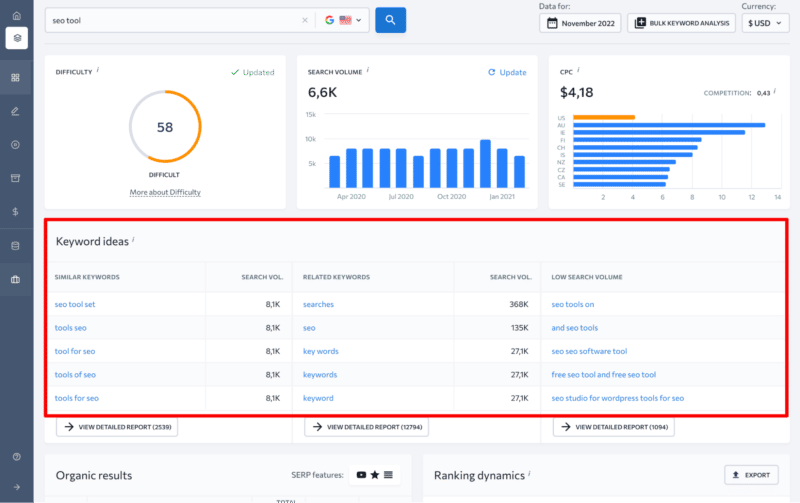
To make sure you’re automating the entire process, check to see if your keyword research tool can:
- Suggest similar, related and long-tail keywords with various search volumes based on a seed keyword.
- Provide you with complete and accurate data on keyword metrics, including search volume and keyword difficulty.
- Highlight SERP features for every keyword.
- Indicate a keyword’s user intent.
- Show you how volatile a keyword SERP is and how authoritative its players are.
Pay close attention to how large your keyword research tool’s database is and how much you can rely on it in terms of accuracy.
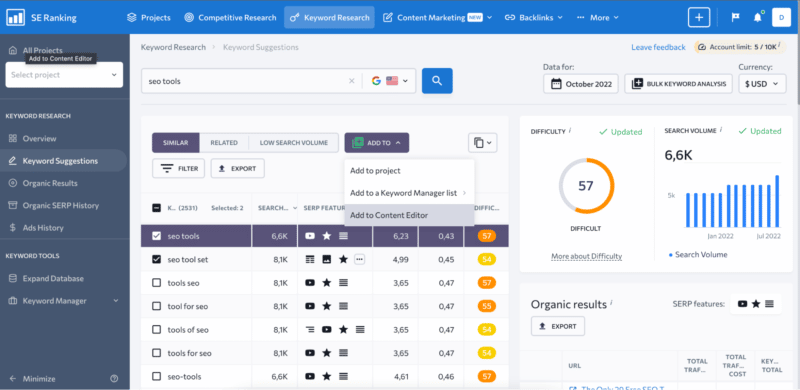
SE Ranking’s Keyword Research tool ticks every box in this respect. Plus, it’s a part of a larger ecosystem of tools, meaning you can seamlessly manage all of your site’s data from one central hub.
With this tool, you don’t have to export anything to Excel. No more working with data in a dull environment.
Instead, you can directly add the keywords you’re interested in targeting to one of SE Ranking’s tools. These include Keyword Manager, Keyword Rank Tracker and Content Editor (this tool is where all the content creation magic happens).
After finishing your research and choosing the main keyword (or several related keywords) that you want to focus your new piece of content on, settle on the article’s main topic. Then, start creating an SEO content brief for your copywriter.
Step 2. Create a content brief
Since your copywriter relies on you to be the SEO expert, specify in the content brief what you want the article to look like.
Start by analyzing the top-ranking SERP players in your selected region to understand what works for them. Use that information to write out a detailed brief. Filter out the competition, so it only includes websites similar to yours in terms of user intent.
To do this, visit each competitor’s website to make sure they are properly communicating the topic at hand to their audience. Their content should be tailored not just to the right audience, but to the stage they’re at on the buying journey.
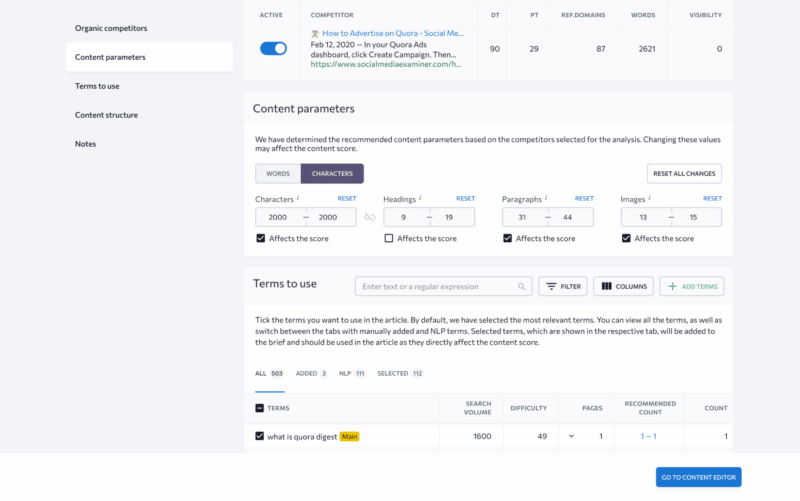
Once you’ve selected the right digital rivals, go over your upcoming article’s content parameters. Note that the default values in SE Ranking’s Content Marketing Platform are displayed as an average of every selected competitor, but you are free to change them as you see fit. Consider deciding on your own how many words or characters should be included in the text, how many headings and paragraphs the text should be broken down into, as well as how many images will make the text easier to read.
Every SEO pro knows that you should include specific keywords in your text to increase its chances of appearing in Google for a related search. This is where you can get additional help and get a list of NLP keywords that Google considers essential.
Last but not least, analyze competitor page heading structures to create a detailed outline of your upcoming article. You can either copy competitor headings as is or draw inspiration from them and create your own structure with unique headings.
Your copywriters will then have a detailed article outline specifying everything from its length to the number of times a keyword should be used on the page.
Step 3. Write an optimized article copy
As a content creator, use the detailed SEO content brief as a basis for writing the article copy.
You can take the traditional route and write the text right on the spot, or you can turn to an AI rewriter for help if you feel stuck.
Practically every modern content marketing automation tool gives you the opportunity to take a piece of text from a competitor’s website and insert it into your own copy. It then offers plagiarism-free alternatives for you to use in your article.
If you’re in a hurry, you can take this method to its extreme by pulling relevant chunks of texts from competitor articles and letting the AI rewrite plagiarism-free alternatives. But, of course, it’s always better to let the experts do their thing.
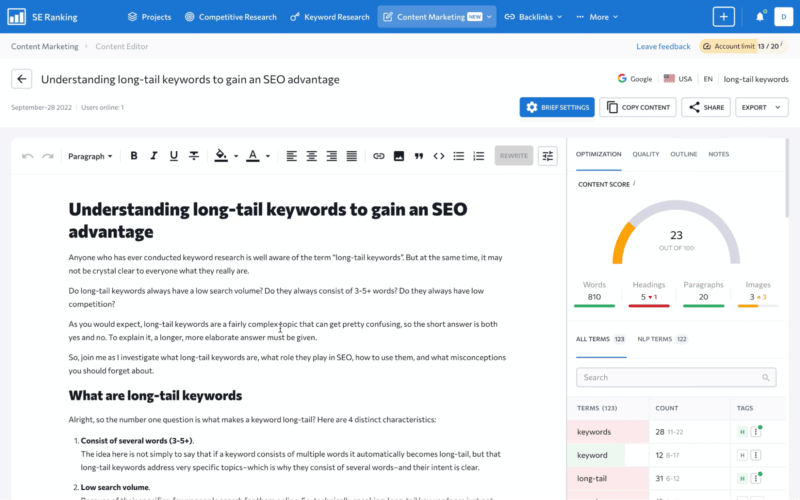
Once you, as a copywriter, are happy with the text of your soon-to-be-published article, optimize it to increase its chances of outranking the top competition.
Since all of the requirements are right there next to your text, along with gauges, you can see exactly how well the text is optimized.
Make sure the copy has enough total words and that specific keywords aren’t used too much. Get rid of any punctuation and grammar mistakes, and make sure the readability level is appropriate.
All data is clearly laid out in the Content Marketing Platform so that content creators don’t have to jump through any additional hoops to create SEO-friendly texts.
Until the end of the year, you can get a 30% discount on your first purchase of the Content Marketing Platform by using the promo code Content30 at checkout.
Bonus: Keeping track of your pages’ Google rankings
After publishing your brand new piece of content, keep track of its performance in search. This is to gauge the ROI of all the time and effort you put into creating it.
SE Ranking’s Keyword Rank Tracker delivers extensive ranking data with pinpoint accuracy across every major search engine. Add your website, specify the search engines and competitors, and keep daily track of your target keywords’ ranking positions.
This is so you can act quickly if your rankings change or if another competitor pulls out all the stops to outrank your pages.
Recap
The best way to leverage content marketing automation tools is to use them to help humans—not to replace them. Let your content automation tool do most of the heavy lifting so you can automate repetitive manual processes. Free yourself up to do higher-value creative tasks.
When content marketing automation tools are used correctly, they can skyrocket your digital business’s efficiency, save you a small fortune each month, improve your customer service and improve the overall quality of your products and services.
Do less and get more done!
The post 3 simple steps to automating content creation for businesses appeared first on Search Engine Land.
Courtesy of Search Engine Land: News & Info About SEO, PPC, SEM, Search Engines & Search Marketing
Thursday, November 10th, 2022
YouTube has just announced an expansion of its comment translation tools, as well as broader access to Smart Replies, its streamlined, template response option which allows fast replies on videos.
Comment translations. Last year YouTube announced the availability to comment translations within the app via a Google Translate integration.
YouTube said the feature became so popular that it has now added comment translations to Studio Mobile as well.
Smart Replies. The experiment, which provides comment suggestions and templated responses, is also being expanded.
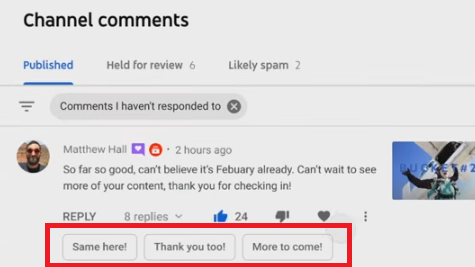
Smart Replies have been available to some users for a while, but now, YouTube is making them available to all creators in the main app, while it’s also launching a new experiment of Smart Replies on Studio Mobile.
Dig deeper. To learn more about the new translate and smart features, you can watch the video from Creators Insider.
Why we care. The translation feature could make video interaction and engagement easier and more robust for viewers in different countries, and those who speak different languages. If you’re a creator, interacting with your viewers and receiving feedback is a great way to help grow your community.
The post YouTube has expanded its comment translations and smart replies appeared first on Search Engine Land.
Courtesy of Search Engine Land: News & Info About SEO, PPC, SEM, Search Engines & Search Marketing
Thursday, November 10th, 2022
Google just announced the rollout of Ads Editor v2.2. This version adds 12 new features and also eliminates one. Let’s take a look.
Asset library
The new version includes added support for enhanced leveraging of images in asset libraries. It also includes:
- Adding, removing, and renaming images
- Assigning images to folders
- Integrating asset library features into the image picker, for example, filtering by folder and searching by asset name
Notifications
You can now use notifications to help you get the important information you need to manage your accounts in Editor. There are also alerts to let you know when there are active notifications for review. You also get one-click access to notifications directly from the toolbar.
New UI for editing ad schedules
You can now visually edit ad schedules for campaigns and certain ad assets. Previously, ad schedules could only be changed by CSV import or by copying from another campaign or asset.
Support-friendly network logs
Logs containing API errors and details of the operations that triggered them are now provided in an easy-to-understand format.
Out-of-sync indicator
The Editor will now periodically check to determine if account changes have been made since the last sync and notify you to sync them if needed.
Google says that not all changes may be detected and it is still recommended to get recent changes before posting.
Global offers
In the shopping settings for Shopping and Performance Max campaigns, you can now choose to:
- Make the country of sale optional (allow it to be empty or cleared if it’s not already empty)
- Include support for an optional feed label
Recommended Video campaign budgets
The Editor will now show a recommended budget based on your Target CPA bid for Video action campaigns. It will also warn you if your current budget amount is below this recommendation.
Video campaign target frequency
The Editor now includes full support for Target frequency video campaigns.
Video campaigns with shopping
Editor now supports all video campaign sub-types (except Outstream and Audio) via the shopping setting (Product feed) and product groups.
More recommendations support
Editor provides support for additional recommendation types, including the ability to add lead form ads to get more leads.
Basic support for all recommendations
Basic support for additional recommendation types is now shown in Editor. Recommendation types appear under Recommendations > Other recommendations.
Optimized targeting
The ad group “Targeting expansion” setting slider has been replaced with an “Optimized targeting” setting, which can now be enabled or disabled with a checkbox.
Removed
Gmail display campaigns support. Editor version 2.2 no longer supports Gmail display ads and campaigns.
Why we care. Advertisers who use Ads Editor will benefit from these changes and new features. The ability to manage accounts from a separate, offline, platform allows you to save time and make changes in bulk.
You can download the new Ads Editor here.
The post Google rolls out Ads Editor v2.2 with optimized targeting, 11 other features appeared first on Search Engine Land.
Courtesy of Search Engine Land: News & Info About SEO, PPC, SEM, Search Engines & Search Marketing