Archive for the ‘seo news’ Category
Thursday, November 17th, 2022
Walmart released its Q3 earnings this week and things were looking up for the retail giant. Their advertising revenue grew about 30% since Q2.
On the earnings call, President and CEO Doug McMillon attributed the growth to “More items and sellers driving GMV (Gross Merchandise Volume) and improving customer satisfaction.” He continued that success with advertising is “mutually reinforcing. If we double-click on advertising with Walmart Connect in the U.S., we see it’s benefiting from growth in e-commerce and from improvements made within the business itself. And we’ve seen strong growth in return on ad spend over last year.”
Walmart Connect. Connect is Walmart’s self-service ad platform that was recently announced. The platform allows retailers to create an account and upload their product SKUs to the Walmart platform, without the need to go through an approved vendor and wait three days for approval.
As with advertising, growing our marketplace business also unlocks fulfillment services opportunities through both fulfillment centers and last-mile delivery. We’re scaling these businesses in the U.S., and we’re starting to ramp up in Mexico and Canada. The team in Mexico increased the number of sellers on our marketplace by 20% during the quarter. In the U.S., the marketplace on Walmart.com now offers about 370 million SKUs.
That’s an increase of more than 50% from Q2. Many of these sellers want to leverage our fulfillment network. They also want to use our advertising capabilities to drive demand, and we’re making that easier for them. We recently shared that all new marketplace sellers in the U.S.
will be automatically onboarded onto our self-service ad platform. We believe this seamless integration will help both businesses scale even faster. What you see in our results is that we can run compelling stores and clubs, scale of first- and third-party e-commerce business, and connect them together in an omnichannel fashion that saves customers and members money and time. Our strategy unlocks growth opportunities for us and a thread that runs from digital retail to fulfillment and advertising, and opens up even more opportunities with health and wellness and financial services.
Doug McMillon
Roku, TikTok, and Snap partnerships. Walmart also expanded its own ecommerce platform by powering ads on TikTok, Roku, and Snap. Walmart will also have the capability to measure any sales that come from those ads.
Dig deeper. You can review the earnings announcement here.
Why we care. If you’re an ecommerce retailer or brand, Walmart might be a great platform to test if you’re looking to expand your reach and connect with new buyers.
The post Walmart’s ad revenue increased 30% in Q3 appeared first on Search Engine Land.
Courtesy of Search Engine Land: News & Info About SEO, PPC, SEM, Search Engines & Search Marketing
Thursday, November 17th, 2022

Businesses know they need an engaging, scalable way to connect with leads and customers. That’s why they’ve invested big bucks in marketing automation tools, chatbots and other technologies to automate outreach and handle high volumes of contacts.
Unfortunately, many of these once-innovative solutions are falling short as needs evolve and customer expectations mature. What you need is a paradigm shift—a strategic step-change that gives your team the power to engage all your leads and customers in natural, human-like conversations not only while they’re on your site but after they close the window, too. The scripted bot is dead; welcome to the AI-powered revolution.
Join Conversica in a webinar that examines old and new models of automating conversations with customers to drive revenue.
Register today for “The Chatbot Is Dead: It’s Time to Modernize Your Online Experience,” presented by Conversica.
Click here to view more Search Engine Land webinars.
The post Webinar: It’s time to modernize your online experience appeared first on Search Engine Land.
Courtesy of Search Engine Land: News & Info About SEO, PPC, SEM, Search Engines & Search Marketing
Thursday, November 17th, 2022
Businesses know they need an engaging, scalable way to connect with leads and customers. That’s why they’ve invested big bucks in marketing automation tools, chatbots and other technologies to automate outreach and handle high volumes of contacts.
Unfortunately, many of these once-innovative solutions are falling short as needs evolve and customer expectations mature. What you need is a paradigm shift—a strategic step-change that gives your team the power to engage all your leads and customers in natural, human-like conversations not only while they’re on your site but after they close the window, too. The scripted bot is dead; welcome to the AI-powered revolution.
Join Conversica in a webinar that examines old and new models of automating conversations with customers to drive revenue.
Register today for “The Chatbot Is Dead: It’s Time to Modernize Your Online Experience,” presented by Conversica.
Click here to view more Search Engine Land webinars.
The post Webinar: It’s time to modernize your online experience appeared first on Search Engine Land.
Courtesy of Search Engine Land: News & Info About SEO, PPC, SEM, Search Engines & Search Marketing
Thursday, November 17th, 2022
Google has announced a boatload of new search features across Google Search, Google Lens, Shopping and Maps all aimed at bringing search to more users in more helpful ways. These improvements cross over Multisearch, Google Leons, Google Shopping and Google Maps.
Note that some of these were announced at the Search On event a few months ago.
Find food through Multisearch
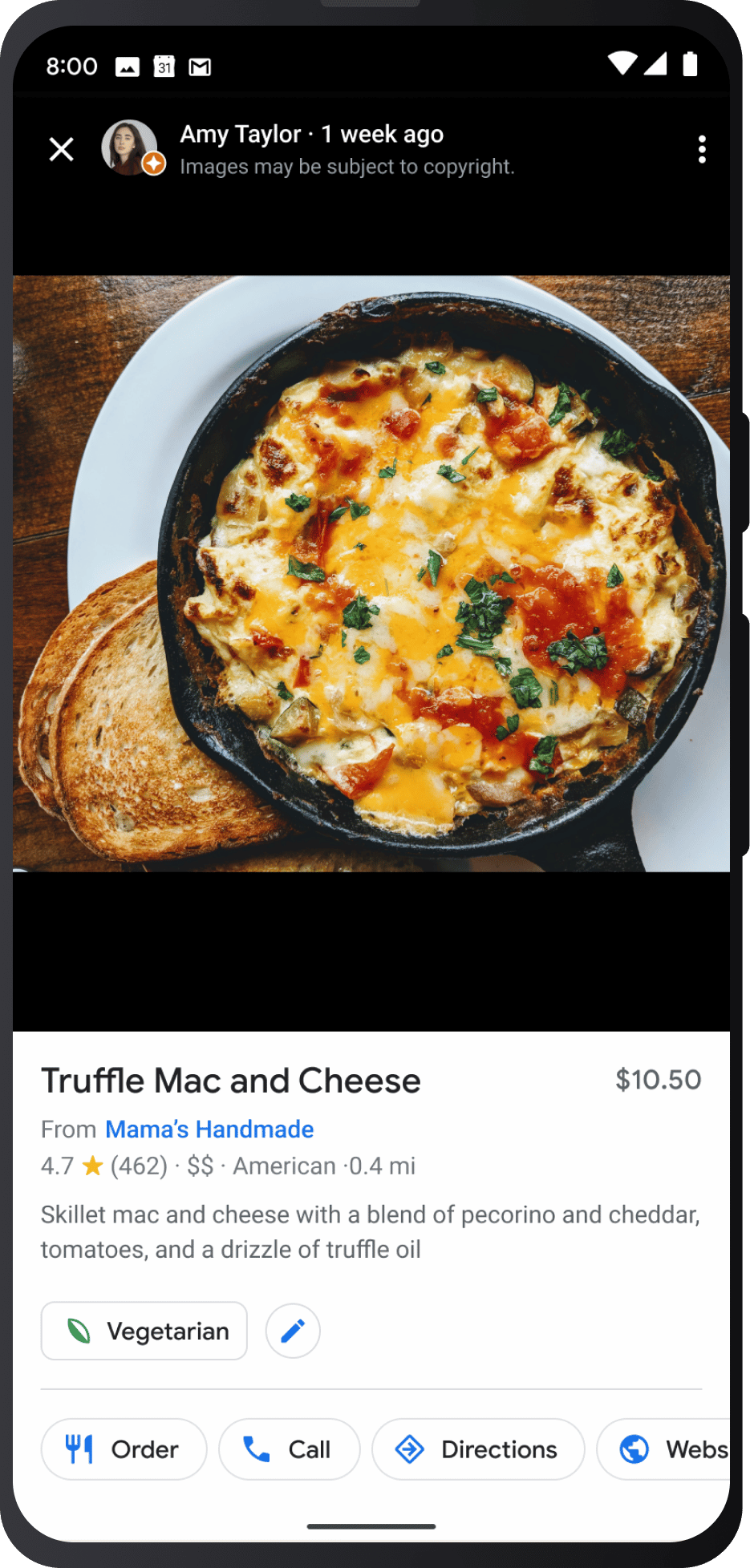
See a food dish you think looks tasty and it makes you hungry? Well, now with Google Lens, you can take a photo of that dish and add then type “near me” in Google Multisearch to have Google show you restaurants where you can order that dish off their menu.
“This new way of searching will help me nd local businesses in my community, so I can more easily support neighborhood shops during the holidays,” said Cindy Huynh, Product Manager, Google Lens.
This feature is launching today in English in the U.S. mobile search results.
Here is a GIF of that in action:

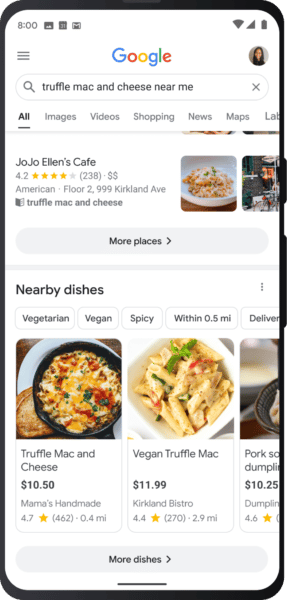
Search for specific dishes
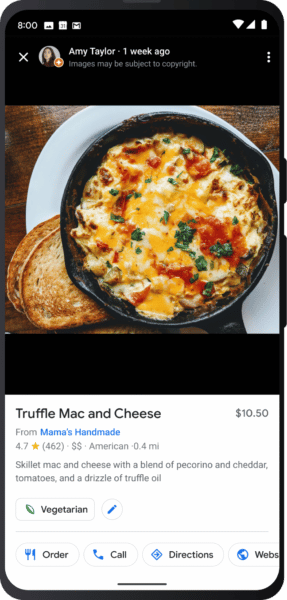
In addition to searching by photo for dishes near you, you can also type in your search to find those specific dishes. Google will show you nearby restaurants to find this dish and Google will also give you more information about pricing, ingredients and additional menu information.
This feature is also launching today in English in the U.S. on mobile devices and in the Google app on Android and iOS.
Here is what it looks like:
Google Lens translate getting an upgrade
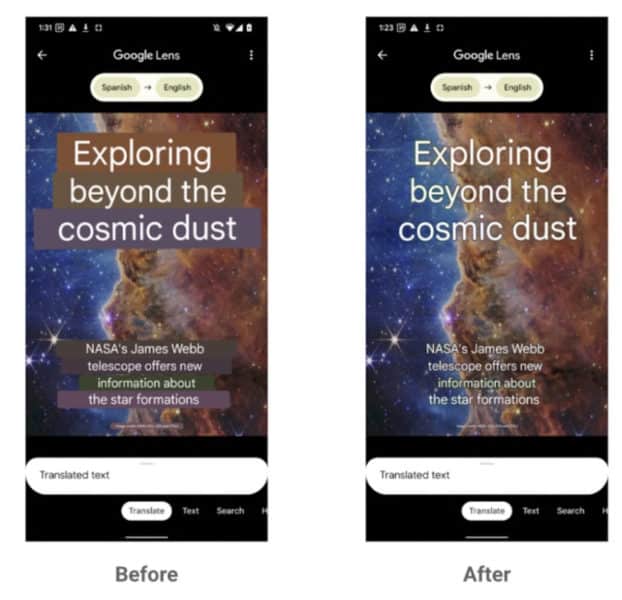
Google is rolling out a big update to the Google Lens augmented-related translate capabilities. This update lets searchers translate text on more complex backgrounds. Instead of covering up the original text, Google will erase the original text and recreate the pixels underneath with an AI-generated background, then Google will overlay the translated text on top of the image.
Google is using generative adversarial networks, also known as GAN models, to present the translated text better. It is the same technology Google uses in the Pixel devices as the “Magix Eraser” feature on photos.
Here is a sample showing how Google Lens is overlaying the translation in an easier way for searchers to comprehend:
This is launching later this year, before the end of 2022.
Google Shopping with AR shoes
Google is also released shopping features to help you see shoes in AR, augmented reality, over your own shoes. Google said this new shopping AR experience for sneakers, allows you to spin, zoom and see shoes in your space. This will work across brands such as Saucony, VANS and Merrell.
Starts rolling out in the US today, Google said.
Here is a screenshot of what this looks like:

New shopping models for AR beauty
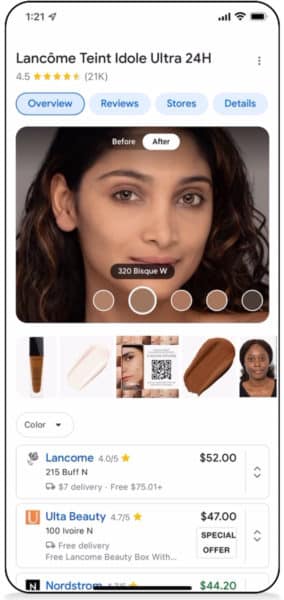
Also, Google has added new augmented reality search features for you to try product on models with various features, skin tones and more. Google added a new photo library with 150 models representing a diverse spectrum of skin tones, ages, genders, face shapes, ethnicities and skin types to help you accurately test over 2,000 foundation shades from a wide selection of brands.
This is a feature we covered a while back but now it is going live today in the US.

Google Maps live view search
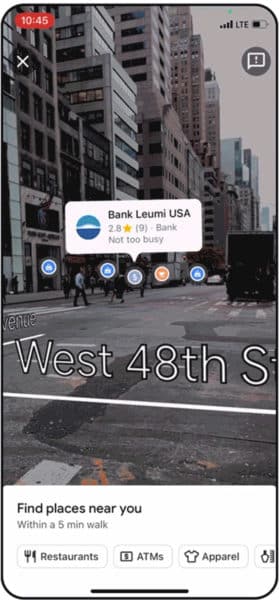
Now you can search and explore neighborhoods with augmented reality using the Google App on your phone. You can now take the Google Maps app on your phone, click on the camera icon and look through the screen to see overlays of what is right near you in real-time.
Google has been demoing this feature for some time but starting next week, this feature will start rolling out in London, Los Angeles, New York, Paris, San Francisco and Tokyo.
Here is a screenshot of what this looks like:
Google Maps adds EV charging filters and wheelchair accessibility
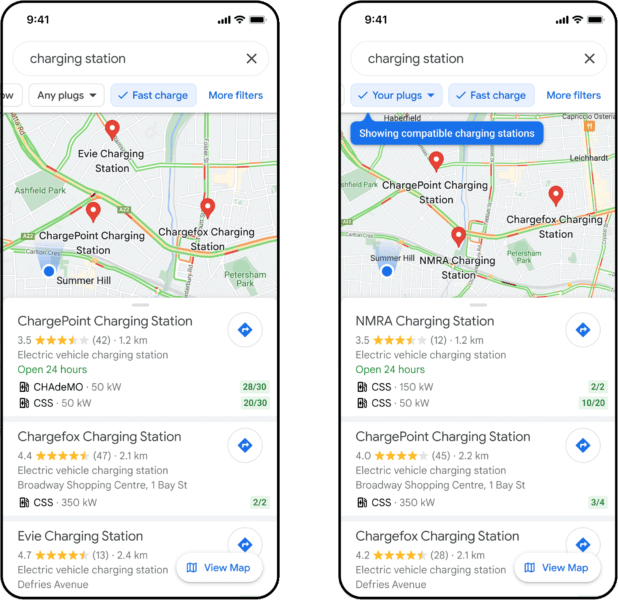
Google also added the ability to filter Google Maps for charging stations with fast-charging plugs, or stations with plugs compatible with your EV. This can show CSS and CHAdeMo charges that do 350kW or even 50Kw, plus Google may even show their availability. This will be available globally on Android and iOS wherever EV charging stations are available.
Plus, Google added filtering Google Maps for if a place has a wheelchair-accessible entrance thanks to the wheelchair icon on Google Maps. This will be available globally on Android and iOS wherever EV charging stations are available.
Why we care
If you or any of your customers are in any of these businesses and can leverage any of these features, you likely should as you may get more exposure from Google Search for doing so. As a searcher, these features are not just fun and useful but also, many are downright cool.
The post Google launches new search, shopping and maps features appeared first on Search Engine Land.
Courtesy of Search Engine Land: News & Info About SEO, PPC, SEM, Search Engines & Search Marketing
Thursday, November 17th, 2022
Google has announced a boatload of new search features across Google Search, Google Lens, Shopping and Maps all aimed at bringing search to more users in more helpful ways. These improvements cross over Multisearch, Google Leons, Google Shopping and Google Maps.
Note that some of these were announced at the Search On event a few months ago.
Find food through Multisearch
See a food dish you think looks tasty and it makes you hungry? Well, now with Google Lens, you can take a photo of that dish and add then type “near me” in Google Multisearch to have Google show you restaurants where you can order that dish off their menu.
“This new way of searching will help me nd local businesses in my community, so I can more easily support neighborhood shops during the holidays,” said Cindy Huynh, Product Manager, Google Lens.
This feature is launching today in English in the U.S. mobile search results.
Here is a GIF of that in action:
Search for specific dishes
In addition to searching by photo for dishes near you, you can also type in your search to find those specific dishes. Google will show you nearby restaurants to find this dish and Google will also give you more information about pricing, ingredients and additional menu information.
This feature is also launching today in English in the U.S. on mobile devices and in the Google app on Android and iOS.
Here is what it looks like:
Google Lens translate getting an upgrade
Google is rolling out a big update to the Google Lens augmented-related translate capabilities. This update lets searchers translate text on more complex backgrounds. Instead of covering up the original text, Google will erase the original text and recreate the pixels underneath with an AI-generated background, then Google will overlay the translated text on top of the image.
Google is using generative adversarial networks, also known as GAN models, to present the translated text better. It is the same technology Google uses in the Pixel devices as the “Magix Eraser” feature on photos.
Here is a sample showing how Google Lens is overlaying the translation in an easier way for searchers to comprehend:
This is launching later this year, before the end of 2022.
Google Shopping with AR shoes
Google is also released shopping features to help you see shoes in AR, augmented reality, over your own shoes. Google said this new shopping AR experience for sneakers, allows you to spin, zoom and see shoes in your space. This will work across brands such as Saucony, VANS and Merrell.
Starts rolling out in the US today, Google said.
Here is a screenshot of what this looks like:
New shopping models for AR beauty
Also, Google has added new augmented reality search features for you to try product on models with various features, skin tones and more. Google added a new photo library with 150 models representing a diverse spectrum of skin tones, ages, genders, face shapes, ethnicities and skin types to help you accurately test over 2,000 foundation shades from a wide selection of brands.
This is a feature we covered a while back but now it is going live today in the US.
Google Maps live view search
Now you can search and explore neighborhoods with augmented reality using the Google App on your phone. You can now take the Google Maps app on your phone, click on the camera icon and look through the screen to see overlays of what is right near you in real-time.
Google has been demoing this feature for some time but starting next week, this feature will start rolling out in London, Los Angeles, New York, Paris, San Francisco and Tokyo.
Here is a screenshot of what this looks like:
Google Maps adds EV charging filters and wheelchair accessibility
Google also added the ability to filter Google Maps for charging stations with fast-charging plugs, or stations with plugs compatible with your EV. This can show CSS and CHAdeMo charges that do 350kW or even 50Kw, plus Google may even show their availability. This will be available globally on Android and iOS wherever EV charging stations are available.
Plus, Google added filtering Google Maps for if a place has a wheelchair-accessible entrance thanks to the wheelchair icon on Google Maps. This will be available globally on Android and iOS wherever EV charging stations are available.
Why we care
If you or any of your customers are in any of these businesses and can leverage any of these features, you likely should as you may get more exposure from Google Search for doing so. As a searcher, these features are not just fun and useful but also, many are downright cool.
The post Google launches new search, shopping and maps features appeared first on Search Engine Land.
Courtesy of Search Engine Land: News & Info About SEO, PPC, SEM, Search Engines & Search Marketing
Wednesday, November 16th, 2022
Pop quiz: What’s the definition of “SEO culture” at an enterprise company?
Sorry, your answer of “Another meeting, email, or team bonding event that I have to fake smile through that has no hope of success” is incorrect.
I’m looking for “That warm cozy feeling you get when laundry first comes out of the dryer that makes you feel safe, comfortable, and trusting.”
It’s OK, I’m here to educate you.
Look, SEO at an enterprise company is fun.
Except for the part where you have to learn a dozen different brands and educate yourself on internal lingo terms like “BU” and “QBR.” And that doesn’t even include the fact that you have more than one (sometimes 10 or 20) different business leads you to have to sell and win over with your SEO strategy.
The fact stands: If you want to gain the respect and trust of your peers for your SEO strategy at an enterprise company, you have to dedicate 50% of your time to education and culture.
If you’re thinking “why,” then you’re doing it wrong.
Too often, the idea of “SEO culture” is to over-promise and under-deliver, which is why I’ve done the heavy lifting for you.
After 12 years of working on SEO at enterprise companies, I’m pulling together some golden nuggets of knowledge I’ve learned to help build “SEO culture.” Ahead are a few of my favorites.
‘Office hours’ for enterprise SEO professionals is more than a meeting – it’s a culture shift
The idea of “office hours” started to trend in the tech world when Jason Fried, CEO of 37Signals, announced he was hosting CEO office hours in 2009.
Reread that sentence again – 2009, people.
It’s safe to say that “office hours” needs a makeover.
Let me be clear: I don’t mean this level of a makeover.
in office hours yesterday i said “i feel completely fucked, i’m so behind” and then my prof hit his vape and blew the smoke into the screen on zoom and told me to take my “stimulant of choice (legal or not) to catch up on missing work”
— grace (@chamberofgrace) November 3, 2022
Within my first 3 months at an enterprise company, I make an effort to create SEO office hours.
Why?
It is all about setting the initiative that SEO is a part of a wider movement – promoting it across the company and different marketing channels.
Even Google’s John Mueller hosts SEO office hours.
If you have SEO / Search questions, please drop them into our new SEO office hours form at https://t.co/KeLoq7p10V — we'll be using this as a basis for the next office hours episodes. Thanks!
— John Mueller is mostly not here  (@JohnMu) October 31, 2022
The key to succeeding with your SEO office hours at a giant company with thousands of employees is having a thorough plan and schedule in advance.
While I set the schedule and agenda for the SEO office hours in month 3, I don’t kick them off until month 6.
I then host the event biweekly, leaving it open to people with questions. If no one has questions, I use the time as an educational opportunity to share a new update.
The biggest lesson I learned from actively listening and learning during these office hours is the importance of establishing trust. Think of your SEO office hours as an open door where people can share their gripes with the SEO team.
I heard about potential worries from the editorial team about SEO delaying work. I listened to complaints from the product marketing team that our keywords don’t align with the brand vision. I had to hear out what the web development team thought of some of the technical SEO recommendations.
At first, it may seem like you’re a punching bag. But the reality is, when you bring SEO into an enterprise company that’s been around for years, you’re bringing change.
People fear change.
Eventually, you’ll settle in. Conversations will flow. Laughs will be had.
You’ll learn stuff about your coworkers that you probably wish you hadn’t (like this person is dating this person). At this point, it would behoove you to grab a frosted donut and pour that bourbon you’ve been saving for a special moment into your lukewarm coffee.
Get the daily newsletter search marketers rely on.
<input type=”hidden” name=”utmMedium” value=”” />
<input type=”hidden” name=”utmCampaign” value=”” />
<input type=”hidden” name=”utmSource” value=”” />
<input type=”hidden” name=”utmContent” value=”” />
<input type=”hidden” name=”pageLink” value=”” />
<input type=”hidden” name=”ipAddress” value=”” />
Lunch-and-learns help build SEO into the company culture
First order of business: Let’s remove the “lunch” from lunch-and-learns.
No one wants to shovel 63 burritos into their mouth in less than 10 minutes like Joey Chestnut in a hot dog eating contest to pretend to participate.
The most important part of lunch-and-learns is the “learn” part.
Use this as an opportunity to walk through something related to your next quarter plan.
For example, if I’m managing 1,000+ domains and I want to start implementing best practices in Q1 for all domains, I would walk through schema markup best practices, which help set the stage for the next quarter.
It helps generate buy-in for your quarterly plan, and if there are any questions that push back, this opens the floor for a bigger conversation.
Creating a culture around enterprise SEO is more than just drinks on Friday
Defining how you create an SEO culture at an enterprise company is difficult.
As the SEO lead, director or VP, you set the tone. If you want to deliver solid SEO results, it requires a culture and mindset of trust in you and your SEO achievements.
When you can align your enterprise SEO strategy and your leadership, a strong SEO culture engraining within the company will drive positive outcomes for all teams.
The post Enterprise SEO is 50% education and culture appeared first on Search Engine Land.
Courtesy of Search Engine Land: News & Info About SEO, PPC, SEM, Search Engines & Search Marketing
Wednesday, November 16th, 2022
Google is rolling out a new Shopping tab within Google Search Console that contains more information about your product snippets, merchant listings and shopping tab listings in Google Search.
What is new. Google announced “eligible online store owners that have implemented product markup will see a new section called Shopping tab listings.” This is rolling out “gradually over the next few weeks,” Google said, “so you might not see any changes for now.”
What it looks like. Here is a screenshot of this screen:
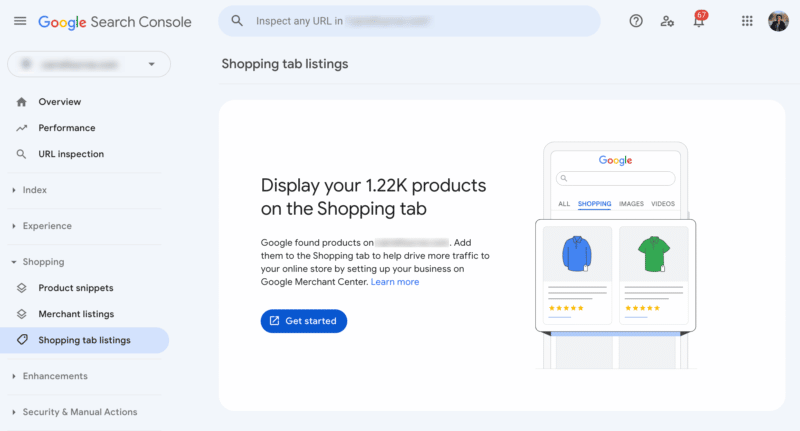
How to access it. If you are an eligible merchant, you can access this feature at google.com/search-console/shopping-tab-listings.
More information. Google wrote “From there, merchants will be able to easily create a Merchant Center account using a simplified assisted sign-up process without the need to re-verify website ownership. With this new option, there is no need to submit a product feed; merchants only need to keep product structured data up-to-date. This streamlined experience will get products quickly on the Shopping tab on Google and help merchants reach people looking for products.”
Why we care. More information from Google on how well you are performing in Google Search, especially as we approach the holiday shopping season, is super useful. So dig in and see how your products are performing in Google Search and see where you can optimize as the holiday shopping season kicks into gear.
The post Google Search Console adds Shopping tab listings feature appeared first on Search Engine Land.
Courtesy of Search Engine Land: News & Info About SEO, PPC, SEM, Search Engines & Search Marketing
Wednesday, November 16th, 2022
Day 2 of SMX Next starts with a keynote from former Search Engine Land editor-in-chief and now Google Ads Liaison Ginny Marvin.
Marvin helps answer questions about how Google ads products and policies work and bring marketers’ insights and perspectives back to the teams working on them.
The keynote today will cover hot topics from 2022 including:
- How Google is preparing for a cookieless future.
- The importance of implementing GA4 now.
- How is GA4 a move toward a more privacy-centric landscape.
- Google Analytics vs 360 sunset dates.
- RSAs – will we ever be able to measure individual assets.
- What metrics Google uses to assign ratings to RSA assets.
- Automation and brand safety.
- Top three best practices for using automation for both lead gen and commerce.
- Marvin’s advice on irrelevant recommendations.
- Broad match keywords.
- A recap of 2022.
- What’s coming in 2023.
Grab your free pass now and join us online for this exclusive keynote with Google Ads Liaison Ginny Marvin.
The post SMX Next day 2 kicks off in 1 hour with Google’s Ginny Marvin appeared first on Search Engine Land.
Courtesy of Search Engine Land: News & Info About SEO, PPC, SEM, Search Engines & Search Marketing
Wednesday, November 16th, 2022
Link building is one of the most misunderstood aspects of an effective digital marketing strategy. Being difficult to properly scale, some avoid it altogether while others outsource the work and hope for the best. Getting it right either internally or with a link-building partner can catapult your SEO performance. Still, in doing so, you must avoid these common link-building myths and mistakes to succeed in the long term.
Myth 1: Links must meet a minimum DA or other score in order to pass value.
A common mistake webmasters make is relying on third-party metrics like Domain Authority, Domain Rating, or Citation Flow when deciding on link opportunities.
It’s important to understand what these numbers represent – and what they don’t.
As an example, Domain Authority is Moz’s best guess at a website’s ability to rank itself and has no bearing on a website’s ability to pass link equity to other sites.
Domain scores from various data providers often vary from one to the next, so who should you rely on? We’d argue none of them.
These solutions have a fraction of the crawl Google has. Their datasets and algorithms all differ from one another, and there’s a lot they miss when determining a site’s score.
Obviously, Google does not use any of these scores when deciding how to rank websites or treat links from them.
A link from a low-scoring domain like a town library or relevant resource site can not only pass link equity. It can drive direct traffic as well.
Rather than tossing link opportunities due to low DA, use common sense. Would the site link to you in a natural way because your content compliments theirs? Is the site authentic, meaning without SEO or commercial intent? If so, it’s likely an opportunity you shouldn’t pass up – even with a low score.
Myth 2: Links must be from relevant websites or they won’t count.
In an ideal world, other websites within your vertical would link to you – it’s a natural fit. For many of you, these are often your competitors and unlikely links to achieve.
Stretching the relevancy gap when looking for link opportunities is often needed in competitive verticals in order to achieve high-quality links on a consistent basis.
When considering websites to earn links from, think outside your core business and look for opportunities a step or two away.
In doing so, the quantity and quality of link prospects can increase tenfold and help you discover link-earning opportunities you would have otherwise missed.
Pretend you sell life insurance. Rather than trying to solely get links from other life insurance websites, you could search for websites in supplementary niches like healthy living and family planning, which are generally more resource-heavy.
This will also allow you to find powerful domains to source links from (ones with a lot of high-quality backlinks pointing to them), therefore passing more link equity to you.
To accomplish this, you’ll need to develop a robust linkable content plan focused on these audiences, giving them something worthy of linking to—more on this in the above-linked video.
Myth 3: Relying on guest blogging or link networks is worth the effort.
Google has been clear on this for many years – guest blogging and link buying as link-building tactics violate their webmaster guidelines.
You can find their messaging regarding this here and here; they also rolled out a link spam update last year detailed here. Some more guidance on this from Search Engine Roundtable is here and here.
TLDR: If you are currently obtaining these types of links, especially in large numbers or as a large percentage of your backlink profile, it’s time to stop.
It’s understandable why many folks lean into these tactics. They’re cost-effective and easy to scale. They can even provide a short-term boost, but it’s only a matter of time before Google discounts them, and you’re back to square one.
The good news is Google’s default for the past couple of years has just been to ignore these types of links in your backlink profile rather than penalize you for them. However, penalties are still imposed in certain cases, so why take the risk when there are alternative options?
At best, you’ve wasted time, dollars, and other resources obtaining them. At worst, they can cause a link penalty if they remain a cornerstone of your link-building efforts.
Myth 4: Internal linking isn’t as important.
One area we find a lot of webmasters ignore is their internal linking optimization.
It can be difficult to manage and keep up with, especially for large e-commerce websites and other very large websites with pages that come and go on a regular basis.
The truth is internal linking optimization is one of the quickest ways to boost your SERP visibility, especially for mid & long-tail keyword phrases.
Internal linking gives you an opportunity to vary internal link anchor text to individual pages, boosting their rankings for a larger volume of keywords.
We optimize internal linking early on in most SEO campaigns, and it almost always produces a measurable lift in a site’s share of search – that is, the number of keywords ranking in Google, the average ranking of those phrases as a whole, and the total non-paid Google organic traffic coming to the site. And this often times happens within 30 days after optimization.
It also allows you to control where links appear throughout your website and provide a secondary navigation path for users and Googlebot.
Not sure where to start? We’ve put together an internal linking guide here, but one of the first things to do is link like-minded content and commercial pages together throughout your website, especially if any of those pages have backlinks to them. Not only will that help establish thematic authority, but it will also pass link equity through to the pages that matter most.
Myth 5: Link building alone will get the job done.
While links are often a necessity to rank in most competitive verticals, they’re not the only piece of the puzzle.
People often view links as the “magic answer” to help them rank better. And in some circumstances, it is links that they need most. But the ability for links to pass maximum value has a lot of assumptions associated with it.
While they can be the biggest needle mover, you won’t get their full benefit if your website is full of technical errors, has poor content, or has a poor user experience.
The latter is especially true once your site begins to rank on Page 1. If you provide a poor user-experience, you’ll unlikely remain there for long.
It’s also important to realize Page 1 of Google continues to move further away from the “10 blue links” of days past. If you’re not optimizing for a variety of search features – images, videos, People Also Ask, carousels, and so on then, you’re leaving a lot of traffic opportunities on the table.
Often, there are dozens of results to click on before reaching the #1 organic result, especially on mobile. And links alone won’t help you capture many of these placements.
While organic rankings remain a top priority, don’t ignore all of the other real estate opportunities on Page 1. You’ll need an optimized content, image, video and schema plan in place to maximize your SERP visibility.
Myth 6: Link building is dead!
We’ve heard this shouted time and time again over the years.
Just last week, John Mueller suggested that links may become less important as time goes on. It’s important to notice the language used: “I imagine,” “my guess,” “over time,” and so on.
In reality, Google has been saying this for nearly a decade. One of the things that historically sets Google apart from every other search engine is its link data and reliance on it to determine search engine rankings. That remains true to this day.
Yes, there are more ranking considerations now than 10 years ago. And as mentioned previously, Page 1 of Google looks much different now than it did then. These present additional optimization opportunities that links alone won’t help with, and in that sense, Mueller is correct.
It’s also likely Google wants to continuously discourage artificial link building through their communications just as they always have, so it’s not surprising to see this messaging as we close out the year.
Interestingly enough, we do find consistent quality link building to produce stronger results as time goes on, likely as Google continues to discount low-quality link-building tactics. The cream always rises to the top.
But ranking a website for high-value keywords in a competitive vertical without strategic linking will remain difficult for the foreseeable future.
Wrapping it up
Link building is an evolving but important ranking factor. If your business relies on SEO traffic, ongoing link earning should be a cornerstone of your digital marketing strategy.
Read (or watch) more about how to approach link building heading into 2023 on the Internet Marketing Ninjas blog.
The post 6 link-building myths and truths appeared first on Search Engine Land.
Courtesy of Search Engine Land: News & Info About SEO, PPC, SEM, Search Engines & Search Marketing
Tuesday, November 15th, 2022
Only the spammiest of spammy SEOs “guarantee” anything.
“Guaranteed” first position rankings, “guaranteed” traffic estimates, and “guaranteed” ROI only live in the deepest, darkest pits of spammy LinkedIn InMails. And only the unsuspecting, naive, plus frankly ignorant businesses fall for these flagrant falsehoods.
But…
That’s not to say you can’t forecast or predict page rankings, traffic estimates, or search ROI.
Nuance and context make all the difference.
You can – if you know what you’re doing – predict the odds of success or failure ahead of time. Even before publishing a single piece of content or building a single link for a keyword.
In this article, you’ll learn the framework I’ve used to help scale seven, eight, and nine-figure companies into 10-figure companies.
Why ranking takes forever
Ranking for something new can take a looooooooong time.
Anywhere from weeks to months for already-big sites, to years for smallish ones. And it’s why you can’t really “guarantee” much in SEO with a great degree of accuracy.
Here are a few common reasons why.
Catch-22
You need to be a big site to rank for good keywords.
But you need to rank for good keywords before you can build a big site. Therein lies your first dilemma.
Inputs vs. outputs
Rankings, traffic, and sales are lagging indicators.
This means we need to focus instead on leading indicators like keyword and topic selection before we’ll ever see the “outputs” possibly years later.
Balancing act
Selecting “good” keywords involves a balancing act of:
- Relevance.
- Demand.
- Competitiveness.
- Authority.
- Buying intent.
Yet, there’s no such thing as the perfect balance. And you often have to either prioritize or sacrifice different elements based on your short vs. long-term objectives.
Less ‘at bats’
Zero-click SERPs, knowledge graphs, instant answers, new advertising slots, People Also Ask questions, blended SERPs, and more mean that:
- You have fewer organic slots to possibly rank in.
- Those are being pushed well below the fold.
The bar keeps rising
Your direct and indirect competitors are getting smarter and spending more money. So it’s an arms race to the top.
All of these problems affect every single company, brand or person trying to rank anything today.
And all of these problems are only going to get worse over the next few weeks, months, and years.
Over a decade ago, ranking was easy. Then, Panda and Penguin and a slew of other algorithm updates changed everything.
So now, we all have to navigate an ever-growing complex world of whatever AI + search monopolies dream up next.
Get the daily newsletter search marketers rely on.
<input type=”hidden” name=”utmMedium” value=”” />
<input type=”hidden” name=”utmCampaign” value=”” />
<input type=”hidden” name=”utmSource” value=”” />
<input type=”hidden” name=”utmContent” value=”” />
<input type=”hidden” name=”pageLink” value=”” />
<input type=”hidden” name=”ipAddress” value=”” />
How to reliably predict success
The primary benefit of working with hundreds of companies over the past decade in a variety of spaces and niches is pattern recognition – which is the ability to reliably see what works and what doesn’t to consistently produce results across time or context.
(As opposed to what works one time, for one company, in one very specific context, because they were able to exploit some temporary arbitrage to their advantage.)
And it led to the Planning Predictor framework that we now use for our companies to help de-risk SEO and content planning so that we’re only focusing, right now, on what’s mostly reliably expected to produce results.
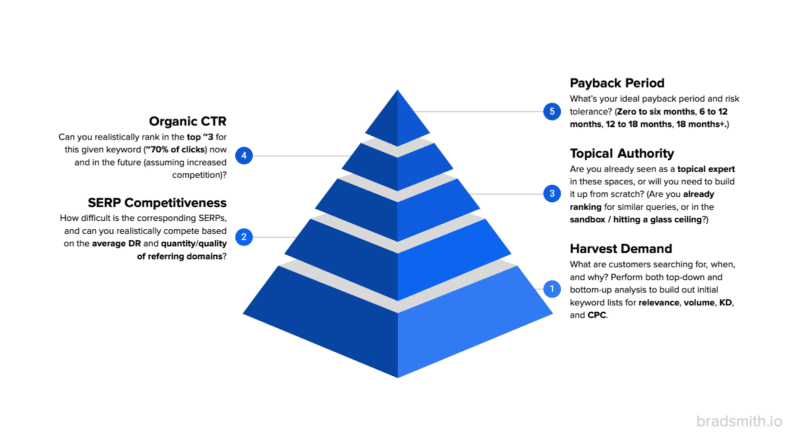
Here’s a high-level overview of the five decision-making criteria:
- Harvest demand: What are your customers searching for, when, and why? Perform both top-down and bottom-up analyses to build out initial keyword lists starting with relevance, volume, keyword difficulty (KD), and cost per click (CPC).
- SERP competitiveness: How difficult are the corresponding SERPs, and can you realistically compete based on the average domain rating (DR) and quantity/quality of referring domains – right now and in the years to come?
- Topical authority: Are you already seen as a topical expert in these spaces, or will you need to build it from scratch? (i.e., Are you already ranking for similar queries or hitting a glass ceiling?)
- Organic CTR: Can you realistically rank in the top ~3 for this given keyword now and in the future (assuming increased competition)?
- Payback period: What’s your ideal payback period and risk tolerance? (Zero to six months, 6-12 months, 12-18 months, 18+ months, etc.)
This might sound complicated at first. But it isn’t when you know how to analyze each one. So let’s get started.
1. Harvest demand
There’s a saying in the SEO world: “You can’t create search demand, you can only harvest it.”
In other words, the vast majority of mortals out there (read: 99% of the people reading this) aren’t going to be able to create a brand new category of searches from scratch. It’s too difficult and costly.
Instead, most of our job is to identify what’s already out there, what’s already being searched, and how it lines up with both:
- Our customers.
- Our widgets or products or services.
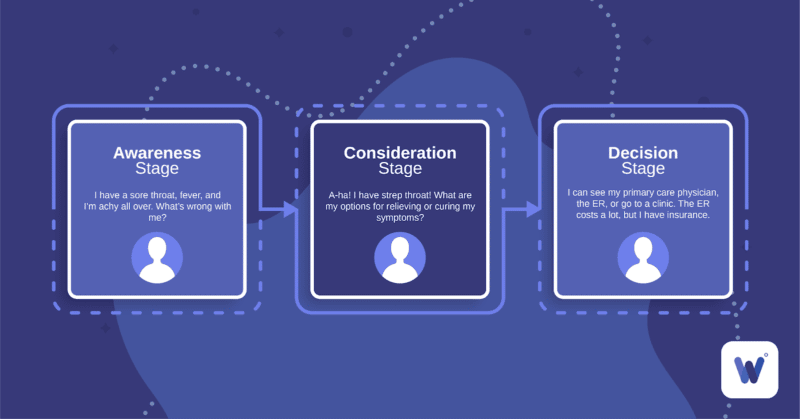
Think of the typical buyer’s journey or jobs-to-be-done process, where you analyze the decision-making process of customers when they:
- Develop need awareness for a problem in their life, to…
- Begin searching for potential solutions and their respective pros vs. cons, before…
- Deciding on purchasing the ideal solution (hopefully yours).
This top-down analysis leads to uncovering all the potential problems, pain points, alternatives, and solutions your customers might face.
Additionally, it should result in dozens to hundreds of potential keywords to target (or potentially thousands if you have multiple customer personas, segments, products, or services).
The next step is to break these down into varieties of variables, like:
- [Customer segment vertical] + [problem or pain point]
For example, [construction] + [project management]:
Then, you want to expand these initial keyword ideas for all the potential long-tail variations, weighing up the respective relevance, volume, KD, and CPC of each.
(Fun fact: CPC, while 100% focused on advertising, can help indicate keywords with higher potential buying intent.)
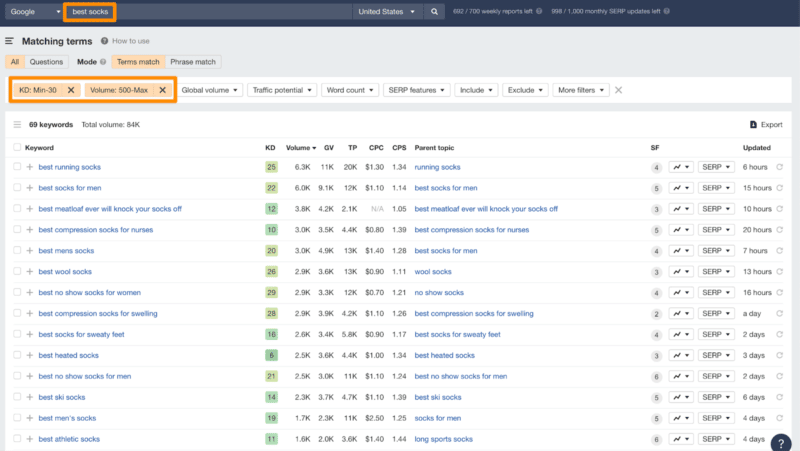
Another example for “best socks” then results in a giant list of related terms, that you can filter, to help cut through the signal-to-noise ratio for stuff you’re most likely to rank for right now (relative to your own site strength).
In truth, this is part art and part science. You’re looking to unearth gems. But it’ll take sorting through a lot of junk, first.
2. SERP competitiveness
Psssst. Come closer.
I have a dirty little secret to let you in on.
All SEO tools (even the best ones pictured here!) lie.
Not on purpose necessarily, but out of necessity. Because what they’re trying to do – imitate and classify what Google’s doing – is insanely difficult. Near impossible.
Case in point: the “keyword difficulty” metric.
It’s helpful to understand the perceived difficulty of potentially ranking for a keyword. Nice in theory.
However, in reality (where we all live), it’s badly skewed.
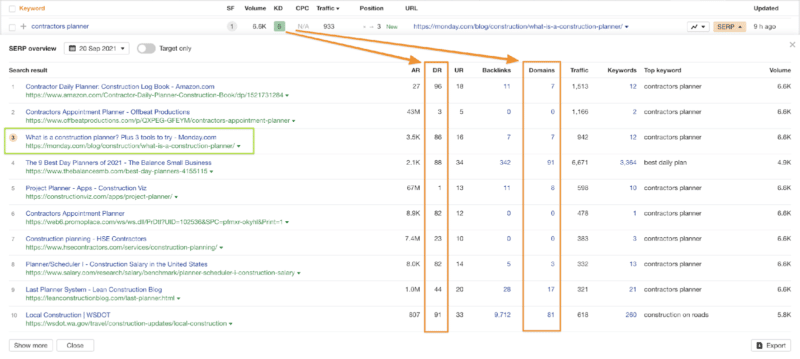
For example, a keyword can have a very low KD (like “6″ out of 100), and yet not be easy to rank for. That’s because it largely focuses on links as a proxy for strength (and page-level referring domains at that).
TL;DR?
The average/median page-level referring domains might indicate the keyword is “less competitive,” even though the domain-level strength (plus content quality) of the ranking sites are actually very competitive.
Like this example:
That’s troubling because it can (and often does) lead people to make bad choices about which keywords to target – when and why – and ultimately overestimate how quickly they’ll rank for it (i.e., not as soon as they think!).
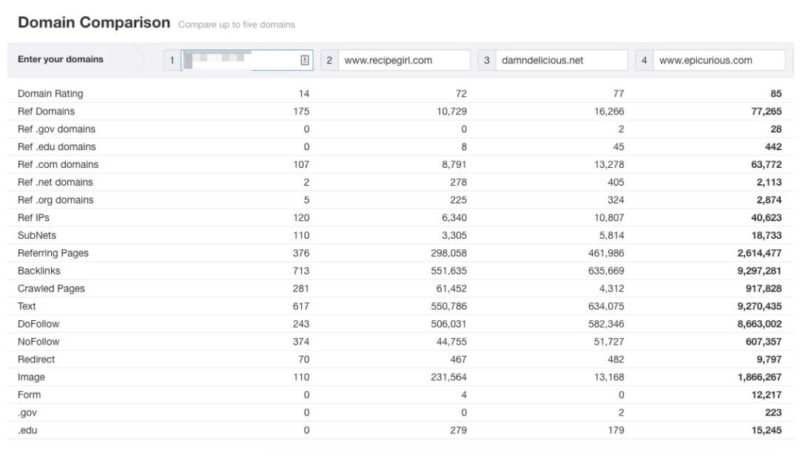
As a general rule, if your own site-level strength is significantly below the ones already ranking for a given keyword (like the example below), then forget it.
Or, at least, add another XX months (and more $$$) to your estimated time to rank.
This is a giant problem because position 5 might as well be position 50 today. I’ll explain why in the fourth section below on organic CTR.
But first, let’s look at personalizing your keyword difficulty based on whether you already have topical authority on these terms.
3. Topical authority
Contrary to popular belief, HubSpot didn’t invent “inbound marketing.”
Seth Godin did “permission marketing” about a decade earlier. And the Michelin Guide did a century before that.
What’s old is new again.
Take pillars or clusters or hub and spoke models or whatever your favorite marketing guru charlatan comes up with next. All are semantics for describing content hubs that have literally been used for decades.
(OGs like Ian Lurie have been going on and on and on about these since most of you marketers today were still in diapers.)
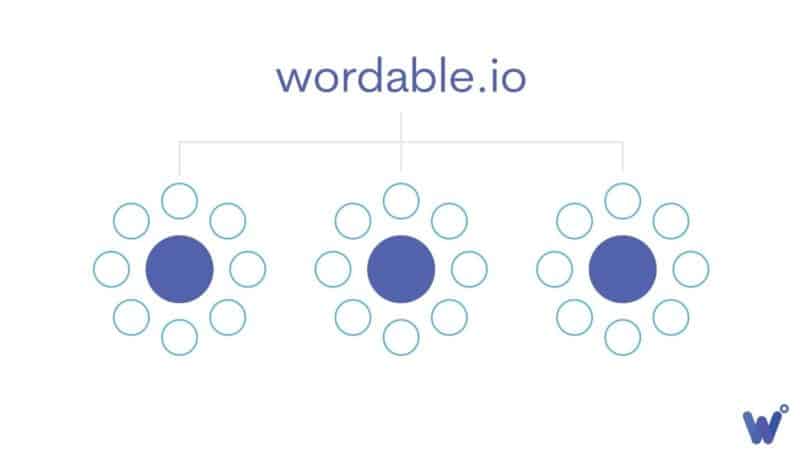
These pillars or clusters or what-have-yous relate back to site architecture and content hierarchies, creating dense webs of information to help increase your topical authority on certain subjects.
In practice, you should be purposefully planning new keywords and topics in clusters like this, in bulk – vs. a bunch of one-off grab bags – so you can organize it with internal links to develop these silos.
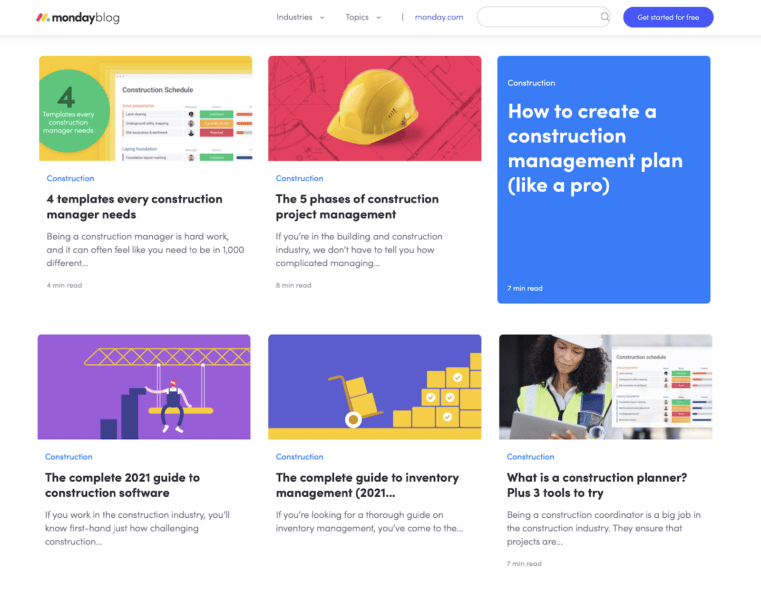
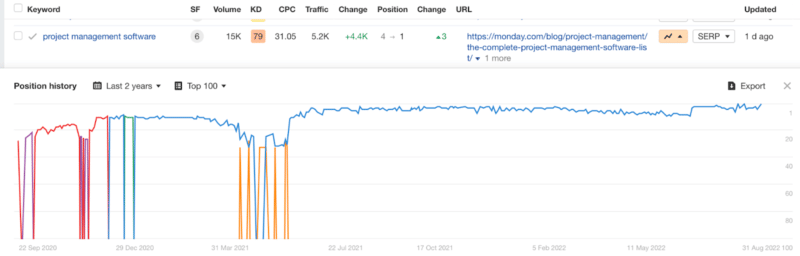
For instance, the monday.com blog organizes topics around specific customer industries. Then, they use a parent-and-child hierarchy to help reinforce topical authority. (Disclosure: My companies have worked with monday.com.)
A rising tide lifts all boats.
Topical authority helps you rank higher and faster for related terms.
But the inverse is also true: little to no authority means it’s going to be more difficult (and costly and take longer) to rank vs. those that do already possess it.
So ask yourself:
- Are you already ranking for similar terms? If so, you probably already have some level of topical authority. The more stuff you have ranking higher in a single cluster, the more likely you’ll rank faster with brand-new stuff in this space, too.
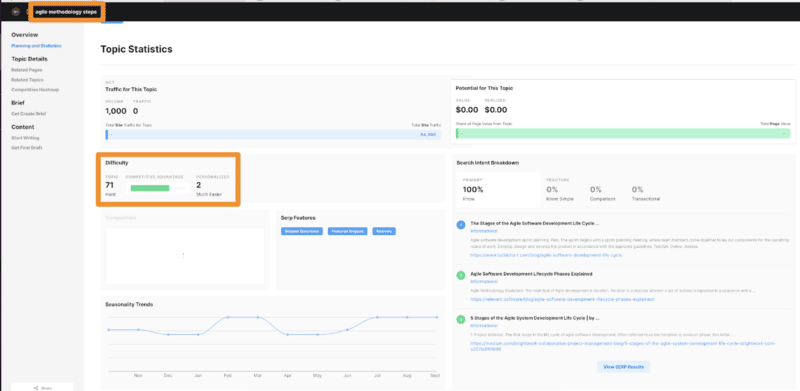
- You can also use tools like the MarketMuse Inventory feature to analyze “personalized difficulty,” which helps predict your own personalized topical authority (and therefore the difficulty of ranking for it) vs. relying on vague, general aggregate scores a random SEO tool spits out.
See?
Nuance and context are everything.
A good keyword for your competitor might not be good for you right now.
And what’s good for you right now, when starting out, might not be what’s good for you in two years’ time when you’re trying to make bank.
4. Organic CTR
Position 5 on a SERP might as well be position 50. Why?
Because you can virtually expect the same level of traffic (read: zero, zilch, zip!). Why?
Because based on SERP CTR studies (the number of people who click on different positions), the top three results routinely net around ~70% of the clicks, eyeballs, and therefore credit cards.
(You know, like that whole Pareto thing?!)
A quick glance through Advanced Web Ranking’s CTR studies will bear this out.
So, what does this mean?
It means:
- Ranking in the top 3 is all that matters at the end of the day.
- It’s often better to pick less popular and less competitive and more relevant keywords so that:
- You have a better shot at success (ranking top 3).
- You can rank more stuff, faster, and shrink the time to value (traffic, leads, sales).
And, it means that to compete for the most lucrative keywords in your space, you need to get big ASAP or go somewhere else and feed off the scraps of the competition.
Got it? Good.
Then why is all of this important?
Because SEO and content marketing comes down to a simple cost vs. benefit analysis:
- What is it going to cost you to rank in the top three for a given keyword?
- And what’s the potential payoff if / when you do?
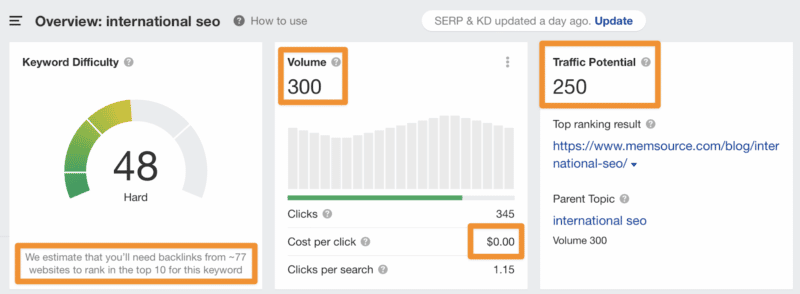
The “international SEO” keyword is a perfect example. (Plus, a solid meta-reference you can’t pass up.)
Weigh up the potential volume, traffic potential, KD, number of links to rank, and CPC of this term below:
Now. Ask yourself, can you break into the top 3 within the next ~12-24 months?
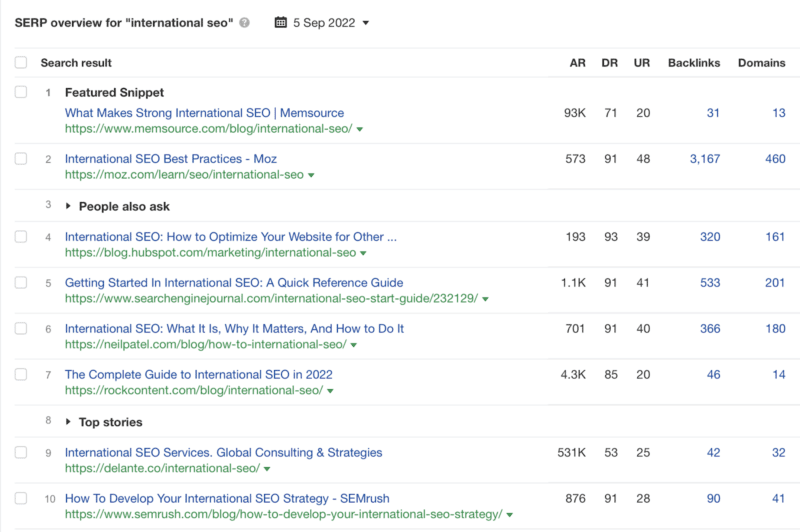
To answer this questions, we must look at the SERP competitiveness:
Pretty difficult!
Especially when you consider the loooooooow traffic you’ll get even if you did rank in the top 3. Plus, there’s virtually zero buying intent, too.
Meaning?
Even if you thought you had a shot at ranking for this term in the next ~12-24 months (based on topical authority), why would you even bother?
Unless you literally sold “international SEO” services or similar, it’s most likely not worth it for 99% of sites out there.
So adjust expectations accordingly.
- Pick a new keyword and topic to target.
- Or, adjust your patience and budget and timeline to build a giant site and enough topical authority it might take to rank for this keyword one day.
5. Payback period
Paid search gets the most love (and $$$) because:
- It’s relatively easy to see which specific keyword leads to which specific conversion and how much money you made in return.
- And because marketers + C-suites are lazy. (OK, maybe just “impatient” as well.)
Organic SEO and content, on the other hand, also have a defined payback period. But it’s often harder to track because it might take 6, 12, or even 18+ months to see the true ROI.
Exhibit A: the best converting keywords – even for the web’s biggest brands – might take years to rank in that coveted top 3 position that drives all the pesos or yen or Bitcoins or whatever:
So, your job is to figure out:
- Which keywords are “worth” the “risk” or investment (literally the first four criteria listed in this article)?
- Will the potential ROI make up for the investment of time, money, and resources?
- Can you really wait that long to see the payoff?
This leads you to a simple decision-making tree:
- If the answer is “Yes,” then full speed ahead! Go big and bold, doing hundreds, if not thousands, of new content pieces to dominate your space in the years to come (~18-24+ months).
- If the answer is “Maybe,” then it’s time to get creative. Realistically, which new keywords and content can you prioritize in the next ~12 months to deliver enough results that provide enough of a positive ROI to double down in the future?
- And if the answer is “No,” then it’s time to shift focus onto what you already have – typically updating existing content ranking bottom of page one, top of page two, or adding new content only in spaces you have topical authority – so that you can generate some tangible momentum within ~6 months time.
Simple, right?
Not really.
Because this last part is entirely subjective.
A lot depends on your role, the company you’re in, internal stakeholders or champions, the broader market conditions, and more factors that can be outside your control.
In truth, after working with hundreds of companies over a decade, I’ve seen that most companies fall into #2 or #3 above. Only Unicorns and public companies live in the rarified air of #1.
(Trust me, the air really is better up there!)
Predicting future SEO success is doable
Ranking today is difficult.
And unfortunately, it’s only going to get more expensive and complicated over time.
That means most outside of the web’s top 1% need to prioritize keywords and content to show results within 6, 12 or 18 months’ time.
Showing some short-term results often buys you more time and money to double down later, whether that’s from your boss, clients, spouse, or your own gut.
This typically means going back to the drawing board, starting again at the top of this article, and then:
- Adjusting your keyword selections based on potential traffic and buying intent filters down to target less competitive stuff,
- Scrutinizing SERP competitiveness to make sure the domains and content you’re up against are as “easy” as the link-biased KD makes it out to be,
- Prioritizing areas you already have existing content ranking or some validation of topical authority in these spaces, and
- Can reliably break into the top 3 by publishing enough, building enough links, and/or increasing content quality faster than everyone else, otherwise
- Readjust your payback period expectations to stick it out for the long haul or compete for more realistic, short-term targets.
It’s not easy. You can’t “guarantee” anything.
But it is doable. And you can predict future success if you weigh each category carefully.
The post How to reliably predict SEO success before publishing content appeared first on Search Engine Land.
Courtesy of Search Engine Land: News & Info About SEO, PPC, SEM, Search Engines & Search Marketing




![[construction] + [project management] query on Ahrefs](http://www.atomiccdrom.com/blog/wp-content/plugins/wp-o-matic/cache/7fa3f_ahrefs-keywords-explorer-construction-and-project-management-800x590.png)