Archive for the ‘seo news’ Category
Friday, January 20th, 2023
Google will demonstrate a version of its search engine with chatbot features this year, according to a New York Times report.
Why we care. AI – and OpenAI’s ChatGPT in particular – has been discussed ad nauseum over the past two months. Microsoft already is reportedly working on adding ChatGPT features to Microsoft Bing search. This has the potential to reshape SEO significantly. If you thought featured snippets were stealing your traffic, just wait until Google starts being able to accurately answer some even more complex questions which your existing content is designed to answer.
Code Red at Google. In December, following the launch of and reaction to ChatGPT, Google CEO Sundar Pichai reportedly issued a “code red,” realizing the technology was an urgent and significant threat to Google’s search business.
Founders return. Google executives reportedly called in Google founders Larry Page and Sergey Brin, who stepped down in December 2019, for several meetings about the company’s A.I. product strategy. Prior to this, neither had been involved with Google search since leaving Google, according to the Times.
What’s coming? According to the Times:
Google now intends to unveil more than 20 new products and demonstrate a version of its search engine with chatbot features this year, according to a slide presentation reviewed by The New York Times and two people with knowledge of the plans who were not authorized to discuss them.
Three priorities were discussed in that chatbot search presentation:
- Getting facts right.
- Ensuring safety.
- Getting rid of misinformation.
Google may block certain words to avoid hate speech and will try to minimize other potential issues relating to hate and toxicity, danger and misinformation, according to the report.
Dig deeper. The New York Times has all the details in Google Calls In Help From Larry Page and Sergey Brin for A.I. Fight (registration required).
The post Report: Google search will debut chatbot features this year appeared first on Search Engine Land.
Courtesy of Search Engine Land: News & Info About SEO, PPC, SEM, Search Engines & Search Marketing
Friday, January 20th, 2023
The Verge has a piece up today named Inside CNET’s AI-powered SEO money machine. It covers much of what we reported in Google search responds to BankRate, more brands using AI to write content last week. It also dives more into how the company has been using machines to replace low-cost humans to generate low-quality content designed to rank well in search.
Google’s algorithms. All of this reminds me of the Google Panda update days, where Google built algorithms to detect content farms and content written with the purpose of generating search traffic. Now, with the helpful content update, that specifically aims to discount content written for search rankings (and not for users) – this strategy deployed by the Red Ventures websites seems like it is set up to fail ultimately – that is, if Google’s algorithms do what they say they will do.
Red Ventures goal. According to The Verge:
“Red Ventures’ business model is straightforward and explicit: it publishes content designed to rank highly in Google search for “high-intent” queries and then monetizes that traffic with lucrative affiliate links.”
That specifically goes against Google’s latest helpful content update algorithm, which aims to downgrade sites where content is written for search engines first (i.e. content written to rank in search and not help people).
The article goes on to explain how these sites are trying to rank well in the credit card space, and turn that traffic into clicks to affiliate revenue. “Red Ventures has found a major niche in credit cards and other finance products,” the article explains.
This goes beyond just CNET. Red Ventures also owns The Points Guy, Bankrate, and CreditCards.com, “all of which monetize through credit card affiliate fees,” they add.
“The CNET AI stories at the center of the controversy are straightforward examples of this strategy: ‘Can You Buy a Gift Card With a Credit Card?’ and ‘What Is Zelle and How Does It Work?’ are obviously designed to rank highly in searches for those topics. Like CNET, Bankrate and CreditCards.com have also published AI-written articles about credit cards with ads for opening cards nestled within.”
Sound familiar?
Content farms. Replace humans with AI to build content farms, content that is aimed to rank well in search, generate traffic, clicks on ads, revenue from affiliates and other publishing goals.
The article goes on to say:
“Viewed cynically, it makes perfect sense for Red Ventures to deploy AI: it is flooding the Google search algorithm with content, attempting to rank highly for various valuable searches, and then collecting fees when visitors click through to a credit card or mortgage application. AI lowers the cost of content creation, increasing the profit for each click. There is not a private equity company in the world that can resist this temptation.”
Didn’t Google already tackle such efforts with Panda with the downfall of content farms? I guess not. Not yet.
Wordsmith. The tool being used to generate this content is Wordsmith, something they have been using for well over a year now, and something other companies have been using as well.
“A former CNET employee says that Red Ventures was using automated technology for content long before the AI byline began cropping up in November. They say a tool called Wordsmith — nicknamed “Mortgotron” internally because of its use in mortgage stories — has been used for at least a year and a half.”
Not new. Yes, for a year and a half, this has been going on. But it has been going on longer.
You see it a lot with financial earnings news analysis, sports scores news stories and anything that can be somewhat templated. Machines can pull out the metrics and then write up a sensible article using the revised data.
It is cheap and serves the purpose. But is this the type of content that Google wants to rank?
Here is a tweet from Glenn Gabe showing how it worked years ago:
I know a lot of people have focused on AI content recently based on ChatGPT, but many forget that Wordsmith, and others like Heliograf, have been doing this forever. Here's a tweet of mine from 2017 showing AI articles ranking well at the time  https://t.co/qFgZknMEgX
— Glenn Gabe (@glenngabe) January 20, 2023
Good enough to rank. So with the layoffs at these publishing companies, they came up with more and more ways to have machines write content that ranks in search. The Verge wrote that it just needs to be good enough to rank,
“But the robot articles published on CNET don’t need to be ‘good’ — they need to rank highly in Google searches so lots of people open them and click the lucrative affiliate marketing links they contain.”
It can’t last. I mean, it can’t last, it can’t continue to work in the long run, right?
If Google has their say, and they do, Google wants content written in a way that is designed to help users. If The Verge is accurate in saying the intent of this content that AI writes is to just rank well in search, then Google’s new helpful content update should tackle that. It might not tackle it today but it should in the future.
Why we care. It is tempting to find low-cost ways to generate endless content that can rank well in Google Search. I mean, who doesn’t want to make a lot of money fast, for very little cost? But how long will those efforts last? Is this a long-term strategy? Will we look back at these efforts and say this is why Google rolled out the helpful content update?
Time will tell, but it is super interesting to watch this all play out, just like we did with the Panda, Penguin and other Google Search algorithm updates over the years.
The post Is AI-written content replacing cheap old content farms? appeared first on Search Engine Land.
Courtesy of Search Engine Land: News & Info About SEO, PPC, SEM, Search Engines & Search Marketing
Friday, January 20th, 2023
According to six sources and documents reviewed by Forbes, TikTok and ByteDance employees frequently engage in “heating,” which is a manual process that guarantees certain videos receive a specific amount of views.
Heating is cheating. Six current and former employees of TikTok and its parent company, ByteDance, as well as internal documents and communications reviewed by Forbes, TikTok and ByteDance staff use a practice called “heating” to artificially boost the distribution of certain videos in addition to relying on the algorithm to determine what becomes popular.
According to one of those sources:
“The heating feature refers to boosting videos into the For You feed through operation intervention to achieve a certain number of video views,” an internal TikTok document titled MINT Heating Playbook explains. “The total video views of heated videos accounts for a large portion of the daily total video views, around 1-2%, which can have a significant impact on overall core metrics.”
TikTok doesn’t publicly disclose this, of course. Sources stated to Forbes that TikTok has used “heating” to attract influencers and brands by artificially increasing the view count of their videos, indicating that this practice may have benefited some influencers and brands that TikTok has business relationships with at the expense of others it does not have partnerships with.
“Heating” suggests that some videos on the For You page may not be based on personal preference but rather intended to increase views for specific brands or creators. Without labeling, it isn’t easy to distinguish these videos from regular content.
Potential abuse cases. Sources have informed Forbes that employees have misused “heating” by using it to boost the view count of their own or their loved ones’ accounts in violation of company policies. Documents reviewed by Forbes also support this, showing that employees have used “heating” on their own accounts and the accounts of people they have personal relationships with. One document revealed that an account had received over 3 million views due to this type of “heating” incident.
How TikTok has responded. “We promote some videos to help diversify the content experience and introduce celebrities and emerging creators to the TikTok community. Only a few people, based in the U.S., have the ability to approve content for promotion in the U.S., and that content makes up approximately .002% of videos in For You feeds.” TikTok spokesperson Jamie Favazza wrote.
Dig deeper. You can read the full article from Forbes here.
Why we care. If TikTok is artificially inflating the view count of some videos through “heating,” it could skew the metrics that marketers use to evaluate the success of their campaigns. This could lead to brands investing in partnerships or collaborations with influencers or channels that may not have as large of an audience as they appear to have, ultimately reducing the ROI of their marketing efforts.
Additionally, artificially inflating view counts could also lead to misleading metrics and data, which could cause issues with transparency, trust and reputation of the platform and brands on it.
The post TikTok has a secret “Heating” (cheating?) button appeared first on Search Engine Land.
Courtesy of Search Engine Land: News & Info About SEO, PPC, SEM, Search Engines & Search Marketing
Thursday, January 19th, 2023
Google has just rolled out Performance Max experiments, and Twitter has taken notice.
Why we care. If you’re an advertiser using Performance Max, you can use this feature to test changes to your account before applying them permanently.
Recommendations as experiments. Last year Google launched the ability for advertisers to apply recommendations as experiments. In October, they announced that additional experiments were coming “in the following months.” Now, they have taken it a step further by giving you the same features for Performance Max campaigns.
Google has not officially announced the update.
The post New Performance Max experiments have just rolled out appeared first on Search Engine Land.
Courtesy of Search Engine Land: News & Info About SEO, PPC, SEM, Search Engines & Search Marketing
Thursday, January 19th, 2023
The State of Technical SEO Report 2023 is out from digital marketing agency Aira and the Women in Tech SEO community. So what matters in 2023? Here’s a quick summary of some of the more interesting results.
Resources matter. The biggest risk the report highlighted was an organizational lack of resources. A lack of resources means changes don’t get made or are very slow to get made – which means less than stellar SEO results. So if you work at a company where resources are lacking, prioritization of tasks will continue to be critically important.
Tools and technology that matter. Google Search Console was the most popular tool for technical SEOs overall – 92% reported using it. It was also the top tool used (78%) for measuring organic search rankings.
Screaming Frog SEO Spider was popular choice for crawling and log file analysis. Meanwhile, Semrush was the top choice for assessing the search visibility of a website.
For non ecommerce platforms, technical SEOs most preferred working on WordPress. Wix was considered the most problematic to work on.
Time matters. Sadly, waiting months for technical SEO changes to happen is fairly common – 88% of respondents waited anywhere from a month to 24+ months for technical SEO changes to be made.
Perhaps a bit surprising: 22% reported waiting only a month for technical SEO changes to be implemented. Meanwhile, 20% reported waiting 12 months (which was down slightly from the prior year). And 11% of respondents reported waiting 24 months or longer.
Skills that matter. What are the top three skills a technical SEO should have? According to the respondents:
- Data anaysis (72%)
- Reading and understanding HTML/CSS (58%)
- Content strategy (39%)
It was surprising to see content strategy ranked so highly. But as Steph Greaves pointed out in the report comments:
- “It’s definitely helpful to know how content relates on a website to fully understand internal linking opportunities that serve the user.”
Technical SEO = marketing. Search Engine Land contributor Mark Jackson has made the case that SEO is marketing. So it was nice to see that marketing (74%) was the top answer to this in-house specific question: “In your organisation, in which team does accountability for technical SEO sit?
Dig deeper. There’s much more to read. Here’s the full, ungated report: The State of Technical SEO Report 2023
Why we care. Overall, this report is good news for our industry. Clearly, we’re facing issues, most notably an uncertain economic outlook. Plus there have been many layoffs. But it’s encouraging that the report finds the outlook for SEO is still relatively positive and demand for SEO remains in a good place.
The post Technical SEO report reveals what matters in 2023 appeared first on Search Engine Land.
Courtesy of Search Engine Land: News & Info About SEO, PPC, SEM, Search Engines & Search Marketing
Thursday, January 19th, 2023
Google has updated the video indexing report in Google Search Console to improve the accuracy of the error reporting. Google said you might see “missing thumbnail” errors reclassified under new error types. Google also added that the total number of errors reported should not change, and that this is just a reclassification of errors.
January 19, 2023. This change went into affect today, January 19, 2023.
Google’s statement. Google wrote, “Search Console can now more accurately classify thumbnail indexing issues. As a result, you may see a reassignment of “Missing thumbnail” issues to more specific issue types. The total number of affected videos should remain the same.”
What is the video indexing report. The video indexing report shows how many indexed pages on your site contain one or more videos, and how many of those pages a video could be indexed. Google said the report can help you understand the performance of your videos on Google, and identify possible areas of improvement.
What it looks like. Here is a screenshot of this report for one of my sites in Google Search Console:
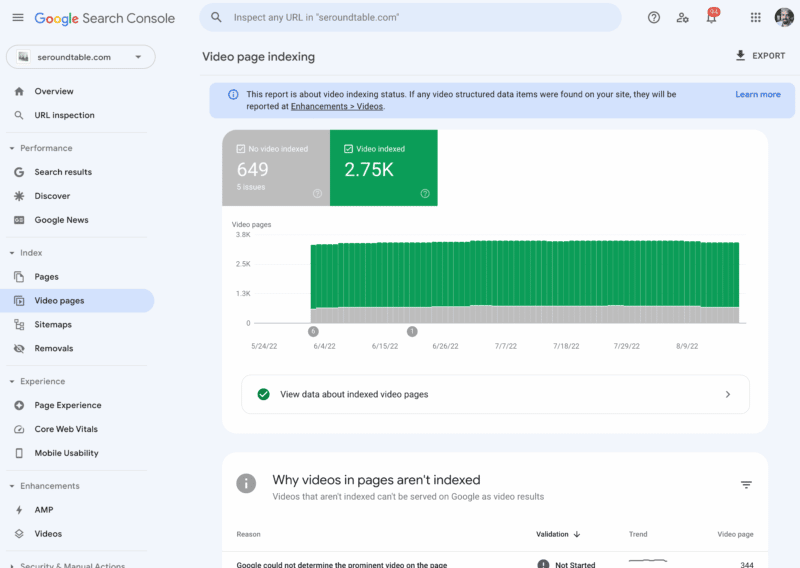
When the report shows. Google said if Google detects videos on your site, the Video indexing report will appear on the left navigation bar in the coverage section. If Google has not detected a video on your website, you will not see the report.
What it tells you. The report shows the status of video indexing on your site. It helps you answer the following questions:
- In how many pages has Google identified a video?
- Which videos were indexed successfully?
- What are the issues preventing videos from being indexed?
In addition, if you fix an existing issue, you can use the report to validate the fix and track how your fixed video pages are updated in the Google index, Google explained.
Why we care. You may want to recheck some of the errors in this report and see if some were reclassified from “missing thumbnail” to a different error type. This way you can resolve any errors that might not have been resolved earlier.
The post Google improves error classification in video indexing report appeared first on Search Engine Land.
Courtesy of Search Engine Land: News & Info About SEO, PPC, SEM, Search Engines & Search Marketing
Thursday, January 19th, 2023
Of all the ridiculous and sublime ways to spend $10,000 a month of your enterprise SEO budget, your least greatest ROI has come from link exchange emails like this below, where a C-note can get you a backlink on a website with a domain authority of 80+ – potentially evening out that PBN you created for another $10k.
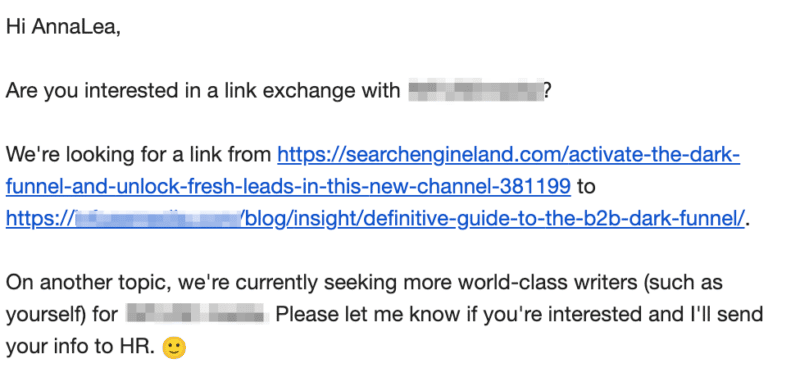
The author took the screenshot.
If you missed that hint of sarcasm above, let’s be clear, you should not be spending your enterprise SEO budget on link exchanges or PBNs.
Instead, you should be looking to spend your enterprise SEO budget on SEO tactics that bring value to the company and align with the overall business objectives of your leadership team.
And when it comes to reporting to your C-suite, they want to connect the dots between your SEO budget and the bottom line.
We’ve all been there. You agonize over creating the Looker Studio dashboard and including the right metrics. You email your boss an impressive, in-depth SEO report and hope for the best.
But you are struggling to articulate clearly how your enterprise SEO strategy impacts ROI.
Well, it’s time to put your money where your mouth is. Don’t let feelings guide your decisions. Instead, you need hard, cold data to build your enterprise SEO report that will win over your leadership team.
My enterprise SEO monthly report template to answer all your boss’s questions
Based on inspiration from Tom Critchlow’s The SEO MBA and Adam Gent’s SEO Roadmap, I created this enterprise SEO monthly report template.
This report includes screenshots of all my Looker Studio and Tableau dashboards.
Caveat: I hate presentation decks. It’s a giant waste of time. But the reality is your boss and your bosses boss will likely want a deck. So give them what they want and what they are comfortable reading.
Here’s how to deliver your monthly enterprise SEO report to your boss and across departments
Every month I send two emails to my bosses, direct reports, and cross-departments. The main goal of these biweekly emails is to begin to build an SEO culture within the company.
The second email of the month, typically on the 15th, is the previous month’s report. I call out 3-5 highlights, lowlights, and next steps to give the C-suite a high-level overview.
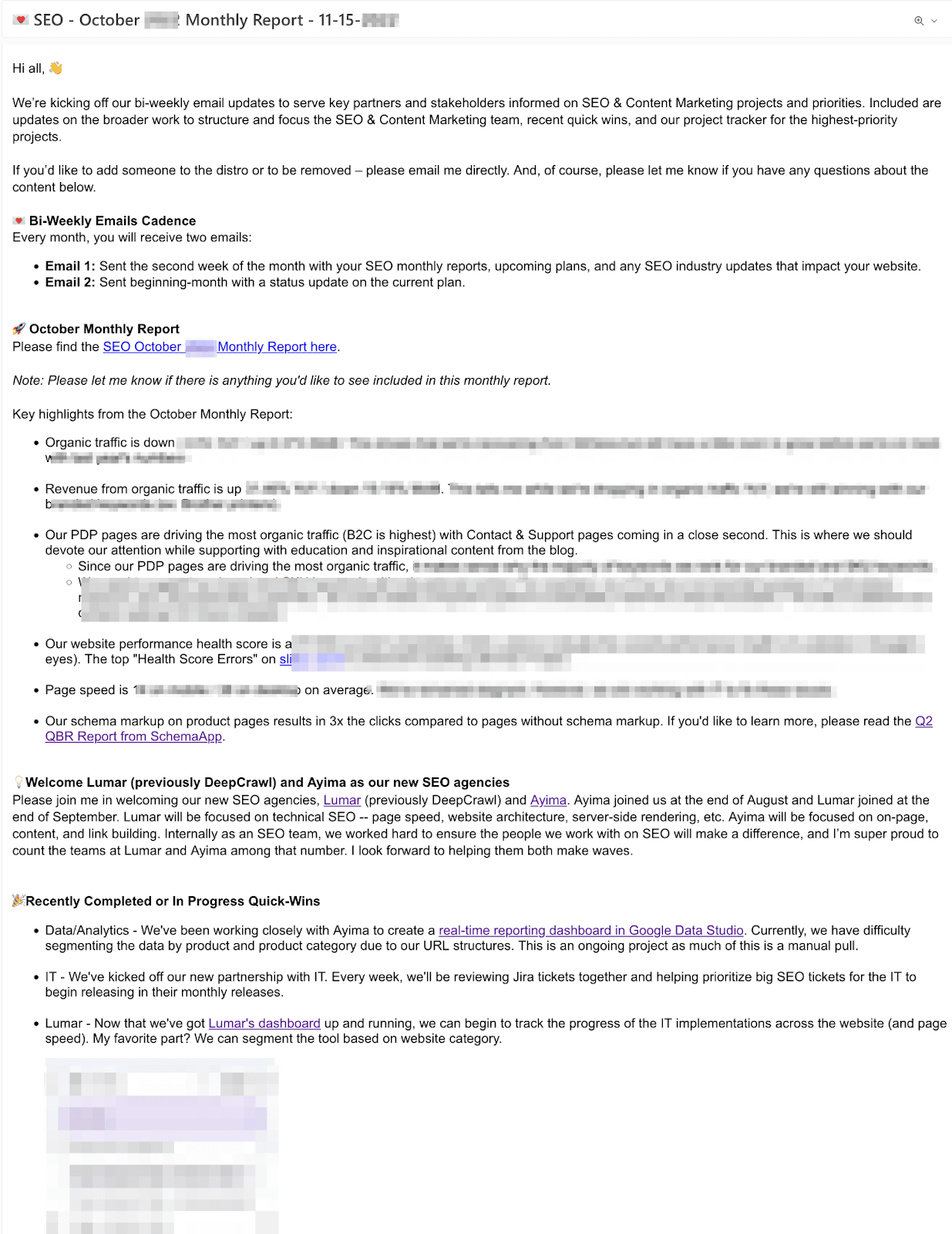
Screenshot taken by author.
Get the daily newsletter search marketers rely on.
<input type=”hidden” name=”utmMedium” value=”” />
<input type=”hidden” name=”utmCampaign” value=”” />
<input type=”hidden” name=”utmSource” value=”” />
<input type=”hidden” name=”utmContent” value=”” />
<input type=”hidden” name=”pageLink” value=”” />
<input type=”hidden” name=”ipAddress” value=”” />
72 enterprise SEO metrics to include in your monthly enterprise SEO dashboards
Below is a list of enterprise SEO metrics I include in all my dashboards.
It’s important to note that not all of these metrics are shared with my leadership team. Use these metrics to help understand the story you want to tell the leadership team.
Also, remember you are an enterprise SEO lead, not a data scientist or Google Analytics expert.
If you’re working at an enterprise-level company, you will likely have a data analytics team to collaborate with to build these dashboards with you.
In your first 90 days as an enterprise SEO lead, I recommend copying/pasting this as a starting conversation with your data team.
All reports listed below should be available to segment by:
- Market (Locations)
- Device (Mobile, Desktop)
- Branded, Non-Branded, Combined
- Directory breakdown (blog, product pages, category pages, support pages, etc.)
- Month-over-month, year-over-year
Website organic dashboard
All should be available to segment by organic, direct, or referral traffic.
Organic overview
- Website Organic traffic sessions
- Website Organic traffic sessions compared to direct and referral
- Website Organic traffic sessions branded
- Website Organic traffic visits / sessions non branded
- Website Organic traffic users
- Website Organic traffic new users
- Website Organic traffic new users vs. returning
- Website Organic traffic pages/sessions
- Website Organic traffic avg session duration
- Website Organic traffic bounce rate
- Website Organic pageviews broken
Leads overview
- Organic
- Website Organic traffic sessions
- Website Organic traffic users
- Website Organic traffic leads
- Website Organic traffic MQLs
- Website Organic traffic SQLs
- Website Organic traffic sign ups
- Website Organic traffic sign ups %
- Website Organic traffic revenue
- Direct
- Website Direct traffic sessions
- Website Direct traffic leads
- Website Direct traffic MQLs
- Website Direct traffic SQLs
- Website Direct traffic sign ups
- Website Direct traffic sign ups %
- Website Direct traffic revenue
- Referral
- Website Referral traffic sessions
- Website Referral traffic leads
- Website Referral traffic MQLs
- Website Referral traffic SQLs
- Website Referral traffic sign ups
- Website Referral traffic sign ups %
- Website Referral traffic revenue
Organic content overview
- Website Organic # of pages driving organic traffic
- Website Organic All URLs driving most organic traffic – display top 10, should list all URLs if deep dive needed
- Website Organic All URLs driving most leads – display top 10, should list all URLs if deep dive needed
- Website Organic All URLs driving most MQLs – display top 10, should list all URLs if deep dive needed
- Website Organic All URLs driving most SQLs – display top 10, should list all URLs if deep dive needed
- Website Organic All URLs driving most sign ups– display top 10, should list all URLs if deep dive needed
- Website Organic All URLs driving most revenue– display top 10, should list all URLs if deep dive needed
- Website Impressions – pull from Google Search Console
- Website Impressions biggest winners based on based on search queries filtered by impression difference
- Website Impressions biggest losers based on based on search queries filtered by impression difference
- Website Clicks
- Website Clicks biggest winners based on based on search queries filtered by clicks difference
- Website Clicks biggest losers based on based on search queries filtered by clicks difference
- Website Avg. Position
- Website Impressions vs. URL CTR By Device
- Website Top 10 Landing Pages broken down by Impressions, Clicks, CTR
- Website Top 10 Queries broken down by Impressions, Clicks, CTR, Avg Position
- Website Domain rating – Pulled from Semrush/Ahrefs
- Website Keyword rankings from Top 10 Overall – segmented by page type (blog, product, support, etc.)
- Website Keyword rankings from #1-3 spots, #4-11, #11-20 – segmented by page type (blog, product, support, etc.)
- Search visibility compared to key competitors
- % of visibility
- Organic Backlinks Overview – Pulled from Semrush/Ahrefs
- Link growth
- Referring domains
- Top 10 links with the highest domain authority
Organic technical overview
- Website pages with crawlability issues (crawl errors) broken down by 3xx redirects, broken 4xx errors, server errors 5xx
- Number of pages crawled
- Number of new issues
- Number of total issues bucketed into high, medium, and low priority
- What percentage of page loads are slow, average or fast? – Please pull % YoY comparison and quarterly
- How has the page load time changed over the last year?
- Homepage speed score desktop
- Homepage speed score mobile
- Competitor Homepage 1 speed score desktop
- Competitor Homepage 1 speed score mobile
- Competitor Homepage 2 speed score desktop
- Competitor Homepage 2 speed score mobile
- Competitor Homepage 3 speed score desktop
- Competitor Homepage 3 speed score mobile
- How does the site perform for each of the CruX metrics?
- Top 10 URLs segmented by performance score, LCP, TBT, CLS, Status
14 enterprise SEO tools to make your SEO report look so fresh and so clean
Below is a list of enterprise SEO tools I use to create my monthly reports:
Free enterprise SEO tools
- Looker Studio (previously Google Data Studio)
- Google Search Console
- Google Analytics
- Google Lighthouse
- Bing Webmaster Tools
Paid enterprise SEO tools
- Semrush or Ahrefs (depending on your preference)
- Screaming Frog
- Lumar (previously DeepCrawl, but comes at a minimum $10k per month price point now)
- Conductor
- Supermetrics (this is the only tool to connect all your platforms into Looker Studio)
Enterprise SEO tools I wish I had the budget for:
- Clearscope or MarketMuse
- Sistrix
Avoid overwhelming your C-level executives with SEO metrics they don’t care about
The chances of your boss or any C-level executives reading your 50-page SEO report are about as high as Tom Hanks finding Wilson.
It’s our job as SEO professionals to get under the hood to see how the car works. It’s our job to diagnose the issues. But it’s not our job to explain how the motor works or why.
You must choose wisely the metrics you share.
Before you hit send, ask yourself: Is SEO worth it from this report?
After all, you must make a compelling case for SEO in your reporting, or SEO will be left behind.
The post How to create an enterprise SEO monthly report appeared first on Search Engine Land.
Courtesy of Search Engine Land: News & Info About SEO, PPC, SEM, Search Engines & Search Marketing
Tuesday, January 17th, 2023
Google’s Core Web Vitals first became a ranking factor back in 2021. In February 2022, the change was fully rolled out to all mobile and desktop searches.
Since then, Google has also worked on delivering new technologies to optimize web performance as well as experimenting with a potential new performance metric.
What are the Core Web Vitals, and what do they mean for rankings?
The Core Web Vitals are a set of three user experience metrics:
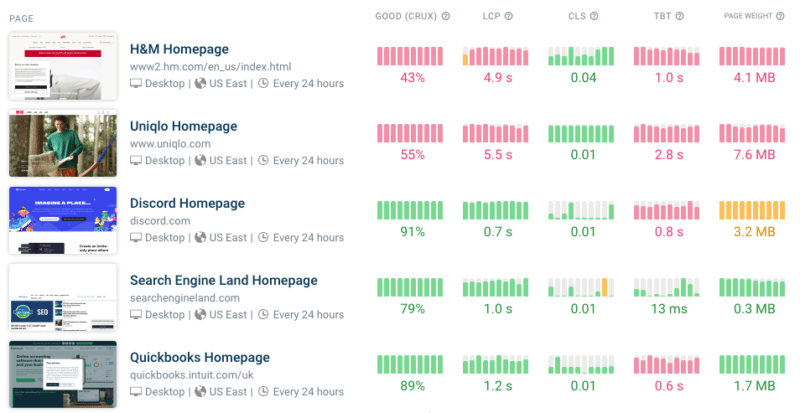
Google collects data for these metrics from real users as part of the Chrome User Experience Report. Pages that do well on these metrics rank higher in search results.
Use priority hints to speed up your website
Last April, Chrome released Priority Hints, a new HTML feature that gives website owners a way to mark the most important resources on a page. This is especially useful for images that cause the Largest Contentful Paint.
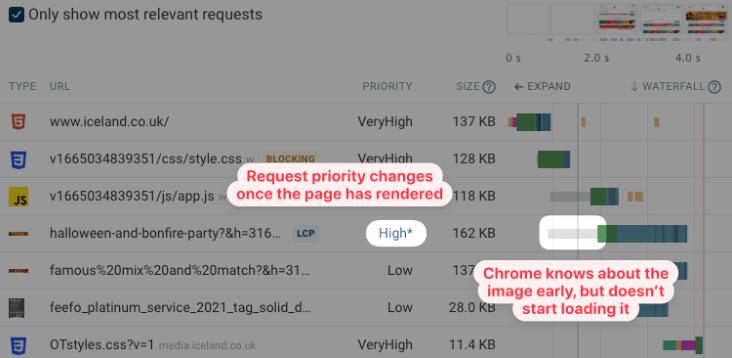
By default, all images on a page are loaded with low priority. That’s because before the initial render of the page, the browser can’t tell whether an image element will end up as the hero image or as a small icon in the website footer.
Therefore it’s common for LCP images to be loaded with low priority at first and then switch to high priority later on. That means the browser will wait longer before starting to download the image.
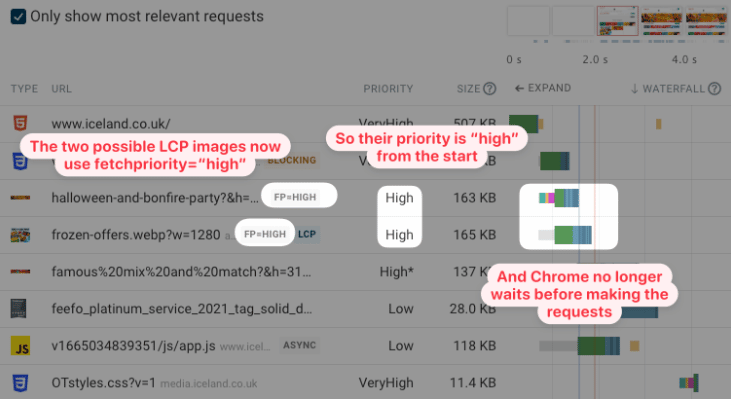
This request waterfall shows an example of that. Note the long gray line where the browser knows about the image but decides it doesn’t need to start loading it yet.
Adding the fetchpriority="high" attribute fixes this problem. The browser starts loading the LCP image as soon as it’s discovered, causing the Largest Contentful paint to happen much sooner.
Run high-quality site speed tests
There are many free site speed tools available across the web. However, many that are based on Google’s Lighthouse tool use something called simulated throttling, which can lead to inaccurate metrics being reported. This also applies to Google’s PageSpeed Insights tool.
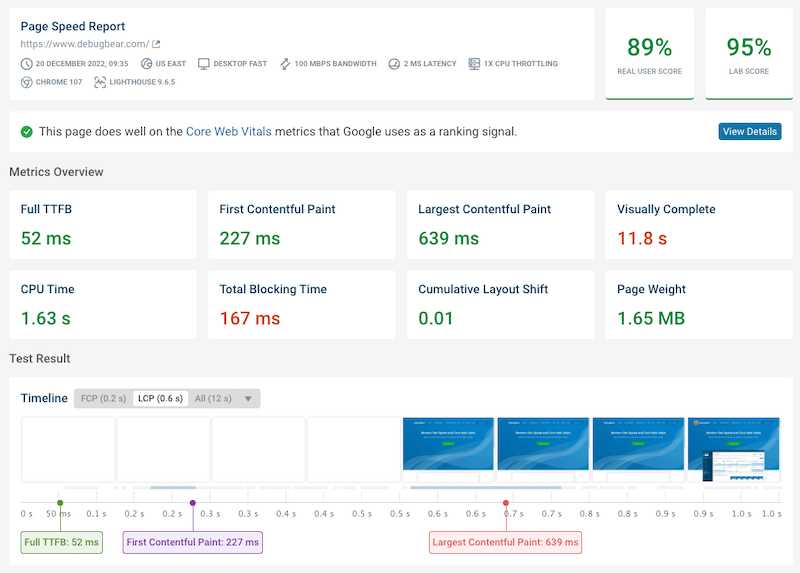
You can use the free DebugBear website speed test to get accurate performance data for your website. The reports include both detailed lab test results and real user data from the Chrome User Experience Report (CrUX).
The new Interaction to Next Paint (INP) metric
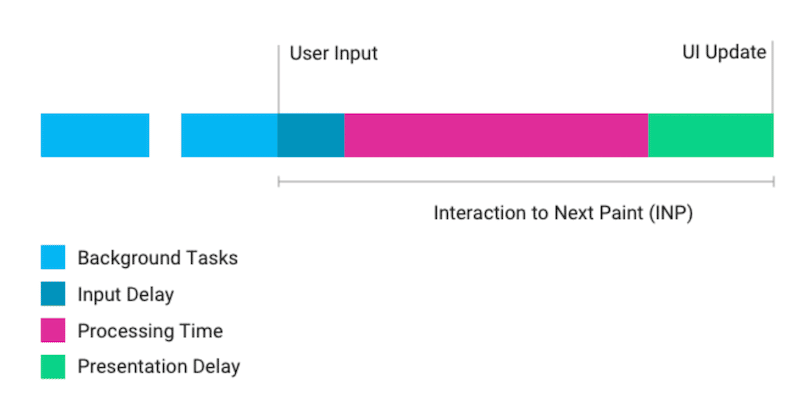
Core Web Vitals will evolve, and in 2022 Google released an experimental new metric called Interaction to Next Paint. It measures how long it takes for the user to update after a user interacts with the page.
A user interaction often triggers JavaScript to run on the page, which updates the page’s HTML. Then those page changes need to be rendered by the browser to display the updated content to the user.
Interaction to next paint seeks to address two limitations of the First Input Delay metric:
- FID does not include time spent processing user input
- FID only looks at the first user interaction
More than 90% of sites currently do well on the First Input Delay metric, far more than is the case for the two other Core Web Vitals. INP may therefore replace First Input Delay in the future, as it provides a better assessment of how good the user experience of a website is.
Take advantage of better image support in Safari
Downloading images takes up a lot of bandwidth, so browser makers are constantly working on new image formats and platform features. Unfortunately, it takes a while for these features to be fully supported in all major browsers.
Luckily there has been some progress in Safari last year. Safari was the last major browser to start supporting the new, more compact AVIF image format. Safari now supports native image lazy loading using the loading="lazy" attribute.
Identify and eliminate render-blocking resources
Render-blocking resources can have a big impact on the speed of your website. Many CSS stylesheets and JavaScript requests block rendering, which means no content will show on your website until these files have been downloaded.
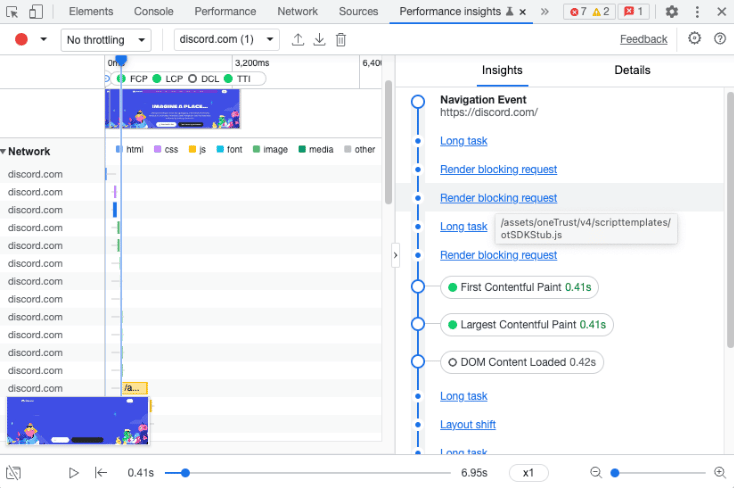
To help website owners optimize page load time Google has started on better tooling to report render-blocking resources. For example, the new Performance Insights tab in Chrome DevTools indicates which requests are render-blocking.
Monitor Core Web Vitals over time
Ready to put some of these tips into practice?
Using a tool to continuously monitor your website lets you verify that your performance optimizations are really working and ensures you get alerted when performance gets worse. You can also look back at past test results to understand what changed.
DebugBear can monitor the Core Web Vitals of your website and those of your competitors over time and provides the in-depth reports you need to optimize your website. The reports also let you demonstrate the impact you’ve had on clients and the rest of your team.
DebugBear also keeps track of the Lighthouse scores for performance, SEO and accessibility. You get a detailed breakdown of what audits you need to improve. Start your free 14-day trial today and meet the Core Web Vitals this year.
The post How to optimize Core Web Vitals in 2023 appeared first on Search Engine Land.
Courtesy of Search Engine Land: News & Info About SEO, PPC, SEM, Search Engines & Search Marketing
Tuesday, January 17th, 2023
Imagine this: A small business owner, relying on Google Ads to make sales on his Shopify store, has had his livelihood crushed by Performance Max in two months. Sales are practically zero, cost per conversion is up 20x ($6 to $120), yet his Optimization Score is at 100%.
It’s a real and unfortunate situation that contradicts Google’s stance that their automation makes online advertising easier.
In fact, it illustrates how desperately the PPC advertising community needs better education on ad platform automation, especially when it comes to something as prominent as Performance Max.
That business owner did everything Google recommended, nearly destroying his online business in the process, and it’s unlikely he’ll recover without the help of a seasoned Google Ads professional.
This is the future that Google’s automation was supposed to prevent, but instead, we’re still trying to understand the basics of a campaign type that’s largely a black box.
Let’s fix that. Here are seven mistakes I’ve seen people make with Performance Max campaigns that you can avoid repeating.
Mistake 1: Thinking audiences and audience signals work the same way
Audience signals don’t work the way audience segments do in other campaigns, because you can’t target specific audiences in Performance Max. Instead, you provide signals that tell Google who to start showing your ads to, and Google uses the initial data to expand your audience.
Many account managers underestimate the importance of audience signals (I’ve seen some skip it completely). But anything that relies this much on automation won’t work as intended unless you provide the strongest possible inputs.
That’s why my top recommendation is to make sure you start every Performance Max campaign with strong audience signals. These can include:
- Everyone who converted on your website.
- Email subscriber lists.
- Historical customer data.
- Repeat or high-spending customers.
- Anyone else who you know is worth money to your business.
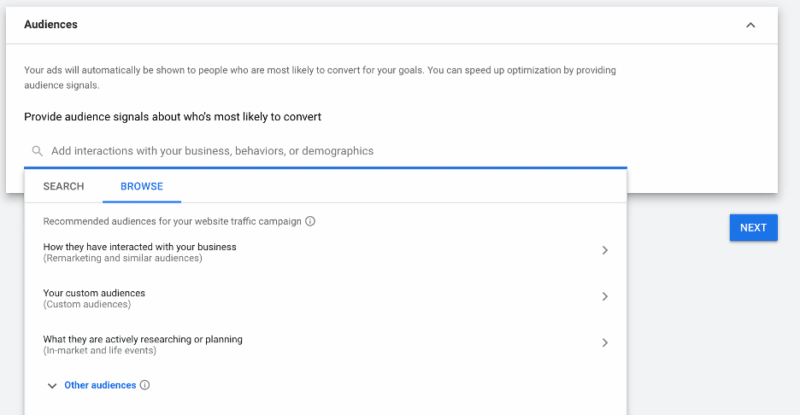
Source: Google.com
When you import those audiences at the start of a campaign, Google will analyze them for the millions of signals it tracks. And your campaign can begin with strong, relevant audience input instead of wasting money on guessing games.
Mistake 2: Neglecting your data feed
Because retail Performance Max and Standard Shopping campaigns rely on data feeds for keyword targeting, an incomplete feed means you’re missing out on potential opportunities.
A lot of brands advertising on Google don’t pay enough attention to their data feed, and that goes for Standard Shopping campaigns, too. It’s tempting to get started in Google Ads immediately, but take a step back to the Merchant Center and optimize your data feed for the best results.
Some of the things my agency checks for include making sure that:
- All products are categorized properly.
- UPC codes are included where applicable.
- Titles and descriptions are fully fleshed out.
- Titles and descriptions feature keywords and search terms related to a product.
Provide Google’s systems with high-quality inputs, and stay on top of the data you share to keep it accurate and up-to-date.
Mistake 3: Picking the wrong campaign structure
I’ve seen many Performance Max campaigns with several asset groups targeting different audience signals, but with the same creative or products. In my experience, that goes against the spirit of how Performance Max works.
Instead, we build asset groups around product categories or services. Because our targeting is based on audience signals rather than lists, splitting them this way provides little to no benefit. The lack of reporting at the asset group level for Performance Max means it’s unclear how this is helpful.
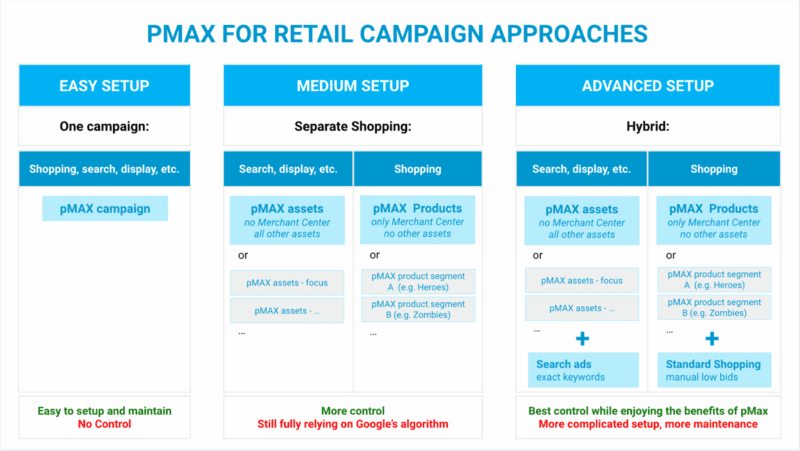
Source: Producthero.com
If you use different UTM parameters to send multiple traffic sources to a page, you could view the data in Google Analytics or offline conversions. But different audience signals can still target the same cohort. You can’t target a fixed audience in Performance Max.
It may seem counterintuitive if you’re new to these campaigns, but my experience says that building asset groups around audience signals only confuses the system.
Get the daily newsletter search marketers rely on.
<input type=”hidden” name=”utmMedium” value=”” />
<input type=”hidden” name=”utmCampaign” value=”” />
<input type=”hidden” name=”utmSource” value=”” />
<input type=”hidden” name=”utmContent” value=”” />
<input type=”hidden” name=”pageLink” value=”” />
<input type=”hidden” name=”ipAddress” value=”” />
Mistake 4: Ignoring standard Shopping campaigns
Many of my peers aren’t happy with the lack of control over where Performance Max places your ads, but there’s one way to counter this.
To set up Performance Max to work as Smart Shopping only, you have to do two things:
- Remove all creative assets from the asset group.
- Shut off URL expansion at the campaign level.
When you do those two things, the campaign will likely spend the core budget on Shopping with very little spilling over to placements like Search, YouTube, and Display.
On the flip side, if you remove the data feed entirely, your ads typically won’t show up in Search and Shopping as Google focuses more on YouTube, Gmail, Discovery and Display.
Outside of that and a few account-level exclusions, there really isn’t much you can do to control placement by the campaign.
So when we work with ecommerce clients with larger catalogs, we typically recommend running Performance Max and Shopping campaigns together.
That means running one product segment in Shopping – whether by category, sub-brand, or other attributes – and others (like top items) in Performance Max.
Our team is auditing an account and the same SKUs are being targeted in both Smart Shopping and Performance Max campaign.
Not sure what this agency was thinking but this won't work. PMax is going to steal the show.
— Duane Brown 
 4x Vax'ed! (@duanebrown) March 30, 2022
If a client is already active in Shopping and it’s working, we move some products that aren’t selling well to Performance Max. We may even do the opposite and move the top-performing products over. All we’re doing is testing what works to find the path to optimal profitability.
If you’re starting out with Performance Max and want to test Standard Shopping alongside it, what we recommend is looking for the subsets of products that are not getting:
Exclude those from Performance Max and put them in a Standard Shopping campaign where you have greater control.
Use manual bidding, be more aggressive with search term blocking, and use the added control to push those products to a stronger place.
Mistake 5: Saying ‘yes’ to all Google Ads recommendations
I can’t stress this enough: You should be the one making decisions about how to optimize your accounts and campaigns.
Google’s recommendations often focus on applying more automation and rely on the average of tens of millions of accounts. Only you have the ability to exercise judgment based on the nuances of your business.
Watch: How to turn off Google Ads auto-applied recommendations
During the automatic transition from Smart Shopping to Performance Max (now complete), the system automatically created a handful of non-Shopping assets – one or two images with your logo plus a couple of generic headlines – and began spending more of the budget outside of the data feed.
Smart Shopping may have split your budget 90/10 between Shopping and retargeting, but an “auto-upgraded” Performance Max campaign would spend a higher portion of your budget on prospecting ads using auto-generated assets that don’t convert well.
What helped us was making sure those assets were stripped away, and going back to core assets so the campaign could only target and create ads from your data feed. It might still spend more on prospecting than Smart Shopping, but it would be a much smaller expense with the focus largely on Shopping.
Mistake 6: Not optimizing assets to sculpt traffic
When I analyze a Performance Max campaign, I first look at total campaign spend and performance versus listing groups, data feed spend, and performance.
That gives me a breakdown of total spend on creative assets versus ads created from the feed. It’s not necessarily going to be 100% Shopping, it could be Display ads created using your feed.
When I see the performance of data feed ads versus creative assets, I better understand what direction to push the campaign in.
- Is the campaign working much better on the data feed side? I’ll lean in and move to a Smart Shopping style campaign.
- Is it getting better performance from creative assets? I’ll focus on putting out even better ones, like introducing top-performing assets from paid social campaigns.
While you won’t be able to see landing page performance reports in Performance Max, you can still revisit the “all campaigns” level and filter for Performance Max. This will show you which pages on your website Performance Max is driving traffic to.
From there, exclude pages from being served in the campaign (via campaign settings), or exclude certain products or categories from the data feed so that it stops sending traffic to those pages.
There’s much you can do to sculpt where ad spend goes, but this information isn’t native or accessible to newer advertisers.
Mistake 7: Using the wrong bid strategy at the wrong time
Performance Max is a fully automated bidding zone and manual bidding doesn’t enter this conversation. So across all campaign types, our goal is going to be getting on Smart Bidding with a target ROAS – the closest to profitable campaigns.
For brand new campaigns outside of Performance Max, we usually recommend starting with Manual CPC or Maximize Clicks for the first couple of weeks. It might not convert as well, but the goal is to drive traffic so the system starts to see what people are clicking and converting on.
Then we typically switch to Maximize Conversions, which is where we start Performance Max campaigns because it’s the lowest level in that funnel.
- Start with Maximize Conversions.
- Let the system spend its full budget.
- Win maximum traffic and study the data for patterns.
- Change to Maximize Conversion Value.
- Once you’re driving revenue, add a target ROAS.
A target ROAS tells Google you have a sales goal so it can push to meet that benchmark. Starting with it makes it difficult to gather enough data fast enough, which keeps you in the costly learning phase longer than necessary.
Our approach is to first make sure Google is spending the full budget and driving a nice amount of traffic, then to make sure we’re getting as many conversions as possible for that amount of traffic, and finally to push it to a place of profitability.
Google claims that a change in bid strategy puts the campaign back in a learning phase. But a change to your actual target – CPA for Maximize Conversions and ROAS for Maximize Conversion Value – should allow Google to adapt and continue. That said, I recommend changing targets in increments of no more than 10-20%.
The name of the game with Performance Max is “don’t shock the system.” Any drastic change will force it to look for new sources of converting traffic, resetting the learning phase. We’ve seen situations where it took up to six weeks to get campaigns back to a good place.
Getting comfortable with Performance Max
I get why there are mixed feelings around Performance Max.
When I started my search marketing career in 2003, I was resistant to change too. Any time Google introduced a new way to do things, I’d look for reasons it didn’t make sense.
But when you’ve seen as much change as I have in these two decades, you realize that ad platforms will keep moving forward. Google has a vision, they run the show, and it’s our job as search marketers to find ways to make it work for our clients and us.
Are there problems with automation, absolutely. But denying it, especially when we still have the opportunity to revert, means you ultimately end up behind the industry.
It's coming so we need to adapt and be a part of the conversation (and hopefully heard) #ppcchat
— Amalia Fowler (she/her) (@AmaliaEFowler) March 16, 2021
In some ways, what we do is like a Performance Max campaign. We put in the work upfront to learn something new, hoping we’ll reach a place where things run smoothly without our constant intervention.
The first step is accepting change, even if you don’t agree with it. The longer you fight it, the more you’ll have to catch up with those who already began looking for solutions.
So don’t try to hack the system or look for shortcuts. Accept the new status quo, put in the work to evolve, and claim a place for yourself in the future of search engine marketing.
The post How to avoid 7 mistakes that tank retail Performance Max campaigns appeared first on Search Engine Land.
Courtesy of Search Engine Land: News & Info About SEO, PPC, SEM, Search Engines & Search Marketing
Tuesday, January 17th, 2023
Every article you can find online about Google ranking factors will tell you there are at least ~200 or so odd variables that contribute to how a site will perform in the SERPs.
That being said, there’s an enormous difference between what might impact SEO, what’s actually confirmed as a ranking factor, and what is simply a good principle to rank well.
It might sound like semantics, but “best practices” don’t just automatically translate into confirmed ranking factors in and of themselves.
So let’s separate these confirmed facts from fiction and all the other stuff you simply should be doing as a good marketer on a daily basis.
In this article, we’ll analyze all of the known, confirmed, rumored, and absolute myth-level Google ranking factors in an easy-to-read, highly condensed way.
Confirmed ranking factors
These are all the ranking factors that have been confirmed as true. We know they definitely impact your results in Google’s search engine to varying degrees.
Core Web Vitals
Your Core Web Vitals assess page experience signals to evaluate how engaging the user experience is. They confirmed in 2021 that they are a ranking signal, so make sure your site has a “good” ranking standing.
Source: Timing for Bringing Page Experience to Google Search
Anchor text
Google has confirmed that they use concise anchor text (read: “SEO strategies” as the anchor text and not “click here”) to better understand what’s on your pages, which can directly lead to them placing your page higher in the SERPs.
This isn’t the strongest ranking factor on the list (especially after the Penguin update), but it can still help.
Source: Search Engine Optimization Starter Guide
Domain history
You may be running an up-and-up, fully legitimate business now, but what if a sketchy business was using the domain before to scam customers?
Domain history does matter, and it’s a confirmed ranking signal, though Google’s John Mueller has gone on to say that the issue will resolve itself over time. Still, we recommend playing it safe on this one.
Source: English Google Webmaster Central office-hours hangout (Nov. 13, 2018)
E-A-T
Google’s E-A-T framework assesses expertise, authoritativeness, and trustworthiness – and while it isn’t a ranking factor in and of itself, many of the factors that go into its calculation are ranking factors. So we’re putting this one in the confirmed column, but with a little “but only kind of” note.
Source: How Google Fights Disinformation
Headings
Headings – including H1s and H2s – can absolutely be a ranking factor, as they help Google understand the content on the page. They aren’t the only ranking factor, but they matter, so have them clearly written and keyword-friendly.
Source: English Google Webmaster Central office-hours (Aug. 7, 2020)
HTTPS
Secure search, or HTTPS – compared to HTTP – is a known and confirmed ranking factor. It also is an important part of a safe user experience, so make sure you get on this one fast if you haven’t already.
Source: HTTPS as a Ranking Signal
Content
It’s abundantly clear that content is used as a search ranking signal, and the quality of the content, including how directly it answers a question, can be vital to performance in the SERPs. The content on its own (and not just headings) is assessed by Google.
Source: English Google Webmaster Central office-hours (Aug. 7, 2020)
Backlinks
Links coming to your site from other sites have long been a general SEO best practice. That’s because PageRank established backlinks as “votes” from the very beginning, offering a new way to analyze quality that was originally modeled after citations to academic papers.
Source: Ranking Results – How Google Search Works
Keyword prominence
Keyword density isn’t a ranking factor (we’ll get to that later), but keyword prominence is. This is the location of the keyword, and the closer to the title or beginning of the text, the more prominent it is.
Source: English Google SEO office-hours (June 18, 2021)
Keyword stuffing
Keyword stuffing – which involves over-stuffing your content with keywords in an attempt to get it to rank well – is a negative ranking factor, as confirmed by Google. Doing this will hurt you, so avoid it.
Source: Spam Policies for Google’s Web Search
Known paid links
If you’ve paid for backlinks and you get caught (which is admittedly very difficult) it is a negative ranking factor. It’s best to stay away from this.
Source: Spam Policies for Google Web Search
Mobile-friendliness
Mobile-friendliness is confirmed as a ranking factor, and it’s been strengthening as a ranking signal for years. It’s particularly important for mobile search results, which have eclipsed desktop searches for at least seven years now. So here’s where mobile responsive best practices and confirmed ranking signals overlap nicely.
Source: Continuing to Make the Web More Mobile Friendly
Page speed
We know that page loading speed is a confirmed factor for Google’s SERPs (and has been since 2010) – and it’s an important one. It also directly impacts the user experience, so make sure that your site loading times are as quick as possible.
Source: Speed is Now a Landing Page Factor for Google Search and Ads
Physical proximity to the searcher
Google absolutely takes the physical closeness of the searcher into account when determining what results to show them, especially in local search. While you can’t change the location of your business, make sure that all of your business information (including location citations) are up-to-date and accurate.
Source: How to Improve Your Local Ranking on Google
RankBrain
RankBrain is an AI system released in 2015 (and significantly updated in 2016) to integrate AI into search queries for improved results, which is particularly helpful for ambiguous queries or long-tail keywords. It’s a confirmed ranking factor, but there’s no clear or distinct way to intentionally optimize for it.
Source: Google Q&A
Relevance, distance and prominence
Confirmed by Google as ranking factors, these three signals determine the popularity and geographical closeness of a business along with how relevant it is to the specific search. They are each vital for local search results, so take that into account when optimizing your local business page and remember to generate reviews.
Source: How to Improve Your Local Ranking on Google
Title tags
There’s plenty of evidence that optimizing title tags can have a correlative increase with ranking, though we know they’re not nearly as critical of a ranking factor as the rest of the content itself. It’s a small detail in a bigger picture, but they also say that Google looks for keyword stuffing here as a negative factor.
Source: English Google Webmaster Central office-hours hangout (Jan. 15, 2016)
URLs
URLs are a minimal search ranking factor, which means that keywords in a URL are assessed when Google is crawling your site. Mueller has repeatedly stressed that this is not a ranking factor worth spending a lot of time on.
Source: @JohnMu on Twitter
Get the daily newsletter search marketers rely on.
<input type=”hidden” name=”utmMedium” value=”” />
<input type=”hidden” name=”utmCampaign” value=”” />
<input type=”hidden” name=”utmSource” value=”” />
<input type=”hidden” name=”utmContent” value=”” />
<input type=”hidden” name=”pageLink” value=”” />
<input type=”hidden” name=”ipAddress” value=”” />
Unconfirmed but suspected ranking factors
Google hasn’t confirmed every single ranking factor out there, but that doesn’t mean that these elements below don’t have some sort of impact on the ranking algorithms. This is the unconfirmed but suspected-by-expert ranking factors that could impact your SEO.
Alt text
Having alt text for your images is definitely considered an SEO best practice, having alt text in and of itself is not a confirmed ranking factor. That being said, using it correctly and with keywords can help your SEO strategy by giving Google more context about what you have on the page.
Source: Google Image SEO Best Practices
Breadcrumbs
Breadcrumbs help Google to assess the hierarchy of how your pages are arranged. Right now, we know it can help Google categorize pages, and that Google treats breadcrumbs as normal links in PageRank. We think they can have an impact on ranking, even if they aren’t confirmed as a direct ranking factor.
Source: @methode on Twitter
Click depth
Click depth, or the number of clicks it takes to get from your home page to the destination page, is very likely to be a ranking factor based on remarks from Mueller. But not a significant one. Think about how easy it is for users to get to the end page.
Source: English Google Webmaster Central office-hours hangout (June 1, 2018)
Local citations
Location citations that mention your key business information like name, address, and phone number, and while having these appear online aren’t officially confirmed as a ranking factor, it’s close. Google has noted that local results favor the most relevant results and that businesses with complete information will be prioritized.
Source: Improve your local ranking on Google
Co-citation
Co-citation and co-occurrence help Google assess how closely two unrelated sites or pages may be related and may give them clues as to how the pages are related and in what context. A few high-quality, trusted links to your site can help Google put together some of the puzzle pieces, but still, this is unlikely to be a significant ranking factor.
Source: Google patent on related entities and what it means for SEO
Language
It only makes sense that someone searching for shoes in Mandarin is less than likely to come across a site written in Spanish. To reach users in different locations, you’ll want to create content in the languages they speak.
Source: Ranking Results – How Google Search Works
Internal links
These are links to your own content on your site, but they need strong use of anchor text. At the very least, they definitely don’t hurt. That being said, they’re unlikely to be a strong ranking factor compared to others like site loading speeds.
Source: Learn About What Sitelinks Are
Schema
Schema markup is highly valuable when it comes to driving clicks, and it also provides microdata that Google is able to understand easily.
It isn’t confirmed as a known ranking factor but we know it can help you rank for queries you may not have otherwise. So it may help as a ranking signal, but the worst-case scenario is it just helps your overall SEO.
Source: Understanding How Structured Markup Data Works
The user’s own search history
Each user is different, and Google knows that. The algorithm do take the past search history into account when delivering search results as best as possible.
This, however, is not something that you can influence at all, and the impact is rarely significant (other than prominent locally personalized SERPs or frequently visited pages).
Source: @searchliaison on Twitter
Rumored but unlikely ranking factors
These are ranking factors that have long been speculated about, and while they have not been outrightly denied so far, we have a good reason for thinking they’re unlikely to be official signals.
301 redirects
While former Googler Matt Cutts said in 2012 that Google would follow an unlimited number of redirects from one page to another, there may be a slight PageRank lost in the process.
However, not much has been officially said, and, likely, they’re not a page ranking factor. In any case, you still want to manage redirects and linking closely to avoid issues in potential redirect chains. This is often more of a best practice for site performance.
Source: When migrating from HTTP to HTTPS Google says to use 301 redirects
Canonical links
Canonical links do have a connection with search rankings, but we know that even when they’re used correctly, Google might ignore it and pick their own canonical URL to show in the search results instead. Think Captain Barbosa’s famous quote from Pirates of the Caribbean here, “The code is more what you’d call guidelines than actual rules.”
Source: Google selects canonical URLs based on your site and user preference
Outbound links
Outbound links are way too easy for people to game to be a ranking factor, but it is important to note that the anchor text and the links you choose can help Google better understand your content so it can bring in value indirectly.
Source: English Google Webmaster Central office-hours hangout (Jan. 26, 2016)
Disproven ranking factors
While some rumored ranking factors are hanging in limbo, some have been disproven. Let’s look at what you don’t have to worry about, at least as far as SEO is concerned.
Worth pointing out – there’s a lot that isn’t on this list, but we wanted to cover the big ones.
Bounce rate
We’re listing this one first because it’s a common misconception that bounce rate impacts ranking. Google has repeatedly confirmed that bounce rates are not a ranking signal.
Source: @methode on Twitter
404 and soft 404 pages
Google itself has confirmed 404 pages do not impact how your other URLs rank, easily dispelling that ranking factor myth. Broken links and pages, however, can provide a poor user experience (so they should be found and updated when possible).
Source: 404 (Page Not Found) errors
Google Display Ads
This one has a bit of an asterisk.
Having ads from Display Ads on your page can lower site loading speeds, especially if you have a large number of them. So the concern was that these ads could hurt your ranking. And they don’t directly hurt your ranking just by appearing on your page.
They won’t directly impact your SEO ranking, though you will want to make sure that you aren’t overloading your pages with so many ads that performance (including site loading speed) isn’t impacted, because you don’t get a pass if they do.
And for that matter, using Google Ads, Google Search Console, and Google Analytics won’t automatically impact your ranking, either.
Source: The Top Heavy Update: Pages with too many ads above the fold now penalized by Google’s “Page Layout” algorithm
AMP
This one is simple: AMP is not a ranking factor, and we know that because Google has confirmed it multiple times, since 2016 at least.
Source: This Week in Google Podcast 341
BBB
While Better Business Bureau (BBB) reviews can impact consumer buying decisions, there is no evidence at this point in time that it can impact your SEO rankings, and one of Google’s team members confirmed it.
Source: English Google Webmaster Central office-hours hangout (Nov. 13, 2018)
Click-through rate
Your click-through rate (CTR) has long been rumored to be a ranking factor, but it’s confirmed this isn’t the case – especially since Google knew that people were trying to game this years ago. So sure, it’s great for your site to have a higher CTR, but don’t expect it to help your rankings.
Source: CTR in the Google Algo: Google’s Gary Illyes and Stone Temple’s Eric Enge Discuss
Code to text signal
This one is not a direct ranking factor, but it can still impact the performance of the page, including ranking factors like loading speeds, along with user experience. So not important for ranking, but still good to keep in check.
Source: English Google Webmaster Central office-hours hangout (Mar. 27, 2018)
Meta descriptions
We know that having a strong meta description is a great SEO best practice to drive a higher CTR to your site, but Google hasn’t used it as a ranking signal since sometime between 1999 and the early 2000s.
Source: @JohnMu on Twitter
Manual action
Manual actions are those that manually adjust a website’s visibility in search results by demoting or removing a site or specific pages from Google Search. These are conducted by Google – and they’re a penalty, not a ranking factor.
Source: Manual Actions Report
Content length
SEO writers will swear up and down that you need at least 1,000 words or 2,000 words or whatever that magic number is in order to be ranked by Google. That’s not true.
Google doesn’t look at content length as a ranking factor, but you should have enough quality content to be competitive on any given keyword to rank well.
Source: johnmu on /r/bigseo
Domain age
The age of your domain can help with site authority overall (see below), but Google has confirmed that it is not currently a ranking factor.
Source: @JohnMu on Twitter
Domain authority
Google has repeatedly confirmed that domain authority is not a ranking factor, as any “site authority” score is created by a third-party tool.
Sites with higher domain authorities may correlate with improved SEO because some of the calculations may be close, but they’re correlative and nothing more. Really, this one is common sense.
Source: johnmu on r/SEO/
Domain name
Your domain name is important (“www.coolshoes.com” can absolutely drive clicks), but it is not a ranking factor and hasn’t been for a while.
Source: English Google Webmaster Central office-hours (Sept. 11, 2020)
First link priority
Google doesn’t care which link comes first. This isn’t the magic hack some people insist that it is. They care about the quality of the links. And remember, anchor text matters more than where the link is placed.
Source: English Google Webmaster Central office-hours hangout (Feb. 20, 2018)
Recency of content
Is Google automatically prioritizing a brand-new article over one written last year? No.
That being said, the thoroughness and quality of the article matter. If you need to refresh to stay competitive, that can help your ranking.
Source: @JohnMu on Twitter
Types of links
Think that having a .gov or .edu at the end of your domain will make a difference? Maybe to users, but unfortunately not to Google. Not a ranking factor.
Source: @JohnMu on Twitter
Keyword density
This may have influenced ranking at one time, and though it’s a general best practice, it is not a ranking factor. And remember: keyword stuffing doesn’t do you any favor.
Source: What is The Ideal Keyword Density of a Page?
‘We have no idea’ if these are legitimate ranking factors (or not)
Looking for a potential ranking factor that we haven’t discussed so far? There are a few that are still currently up in the air, with evidence that they may be a ranking factor but nothing to confirm that they actually are.
Authorship of your content
Does a specific author’s byline impact how Google will rank your page? Honestly, we’re not sure, but it certainly doesn’t hurt to use reliable authors who your audience will trust.
Google has recommended adding author information into article schema and we suspect that authorship expertise does play a part in E-A-T. But again, it’s inconclusive at this time. (Note that we’re speaking about “authorship” more broadly here than referring specifically to Google’s old Authorship.)
Source: 14 ways Google may evaluate E-A-T
HTML lists
Orders or unordered HTML lists could be a ranking factor, but we really don’t know. If it is, it’s not a particularly strong signal, but it can help with SEO, especially if it can help you snag a featured snippet spot.
Source: How to get Google featured snippets: 9 optimization guidelines
MUM
The Multitask Unified Model (MUM) was rolled out in 2021 to help the algorithms better understand language so Google can more effectively answer complex search queries. It’s not a known ranking factor right now, but it could be in the future, especially since Google has discussed how it’s improved some search results in early tests.
Source: Using AI to Keep Google Search Safe
Text formatting
Using HTML elements to format text can help both readers and Google’s crawling tools quickly find important parts of your content. There’s evidence that bolded or italicized wording, for example, may receive extra weight in importance. Since it can help you tell Google what you want it to notice on the page, it may impact ranking, but the jury is still out here.
Source: @JohnMu on Twitter
Conclusion
There you have it – an expansive list of all the known, confirmed and refuted Google ranking factors, along with everything in between to keep us guessing.
And that’s just the point. This list will change in the future. That’s probably the only thing we can guarantee at the end of the day.
Because while the SEO rumor mill has speculated on what exactly Google’s “200 ranking factors” for nearly two decades, the truth is probably a lot murkier than that.
As Google continues to employ AI, machine learning, and other advanced technologies to slice and dice data, the true “ranking factors” that will move the needle for marketers tomorrow aren’t likely to be the same old static ones we used to rely on yesterday.
The post Google ranking signals: A complete breakdown of all confirmed, rumored and false factors appeared first on Search Engine Land.
Courtesy of Search Engine Land: News & Info About SEO, PPC, SEM, Search Engines & Search Marketing