Archive for the ‘seo news’ Category
Tuesday, February 7th, 2023
Google will be removing the podcast carousel fully from Google Search on February 13, 2023. There is a notice in the Google Podcast Manager about the podcast carousel going away.
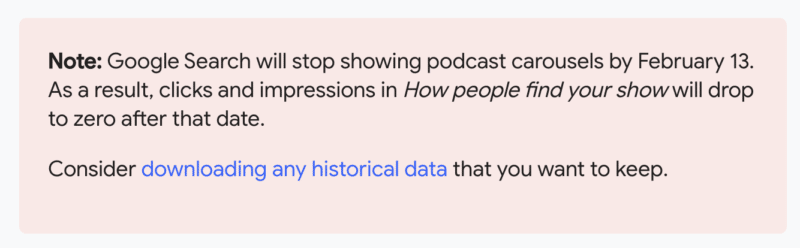
The notice. The notice reads, “Note: Google Search will stop showing podcast carousels by February 13. As a result, clicks and impressions in How people find your show will drop to zero after that date.”
Here is a screenshot:
Didn’t it already go away. A few weeks ago, a bunch of SEOs who manage popular podcasts or like to consume podcasts, noticed that the podcast carousel was gone from the Google Search results. I guess it is not 100% gone until February 13th.
Reaction. Here is some of the reaction around this feature going away:
Yeah I feel (at the moment) that it's an opportunity wasted. I'm not sure how AI could take over podcast search though, but it would certainly be an interesting development!
— Azeem (@AzeemDigital) February 7, 2023
Why we care. If you manage a podcast and that podcast you may see less impressions and clicks on your episodes from Google Search. You should also consider downloading your historical data, just in case Google removes that data over time.
The post Google Search podcast carousel going away on February 13 appeared first on Search Engine Land.
Courtesy of Search Engine Land: News & Info About SEO, PPC, SEM, Search Engines & Search Marketing
Monday, February 6th, 2023
If you’re intimidated by writing any piece of content longer than 1,000 words, don’t be.
Long-form content can be just as straightforward as dashing off a 500-word piece.
It will take you slightly longer to do it, but there are huge benefits to reap from spending time creating long-form pieces.
For one thing, longer content tends to perform better than short content. It earns more backlinks and is most likely to appear on Google’s first page.
Plus, bloggers continually report that longer content formats such as guides and ebooks are most effective. The ones who write ultra long-form posts (3,000+ words) are 2.5x more likely to say their results are strong vs. bloggers who write shorter posts of 1,500 words or less.
Ultimately, writing long-form content that gets results is a skill, and once you learn, you can leverage it to meet your content marketing goals.
What is long-form content? Why does it matter?
Long-form content is any piece of written content that’s over 1,000 words in length.
Some people will quibble about the exact word count, but almost everyone agrees that short-form content is always under 1,000 words. That means a good long-form content benchmark is 1,000 words or over.
That’s not the only defining factor of long-form content, however. To be truly long-form, the content must have depth. It needs to dive deep into a topic and provide value. It should be useful and helpful to readers, giving them the information they need.
For SEO purposes, long-form content helps you hit three connected goals:
- Rank higher in search engines: Comprehensive content outranks thin content. Usually (but not always), comprehensive content is long-form.
- Engage leads and keep them on your site: Long-form content should be chock-full of interesting, valuable information targeted to a specific reader. This engages them, keeps them on your page longer, and improves your bounce rate.
- Build your reputation: Lengthy guides and blog posts demonstrate your expertise on your topic and industry, establishing trust. Publish many high-quality, long-form posts, and your authority will build on itself.
Finally, as we move further into the age of multimedia content, don’t discount alternative content types when discussing the long-form format.
Videos, webinars, and podcasts can have just as much depth as a piece of written content and can help you meet your goals, too – and they might invite even better engagement.
Get the daily newsletter search marketers rely on.
<input type=”hidden” name=”utmMedium” value=”“>
<input type=”hidden” name=”utmCampaign” value=”“>
<input type=”hidden” name=”utmSource” value=”“>
<input type=”hidden” name=”utmContent” value=”“>
<input type=”hidden” name=”pageLink” value=”“>
<input type=”hidden” name=”ipAddress” value=”“>
How to write long-form content in 7 steps and examples
Writing long-form content doesn’t have to be an onerous chore. If you look at it as a big puzzle that needs to be put together, it becomes a fun challenge.
The key to writing long-form content is to break it into manageable chunks – the individual puzzle pieces. Here’s how.
1. Choose the right topic
One of the first things to understand about creating long-form content is: Not all topics are suitable for this format.
If you choose a topic that’s wrong for a long-form piece right off the bat, you’re setting yourself up to struggle. You probably won’t have enough to write about and may find yourself writing just to pad out the length – a recipe for fluff and useless filler no one wants to read.
To avoid these mistakes, look at your potential topic critically before writing. The right topic for a long-form piece will be:
- Complex. There will be a lot of different parts to explain or walk the reader through.
- Specific. A general explanation of the topic won’t give your reader the kind of understanding they need to grasp it fully.
- Uncommon or unique knowledge. Your audience shouldn’t have a deep understanding of your topic going in, because the knowledge is unique or uncommon to them. This will vary depending on who you’re targeting, so make sure you understand your audience before hunting for long-form topics.
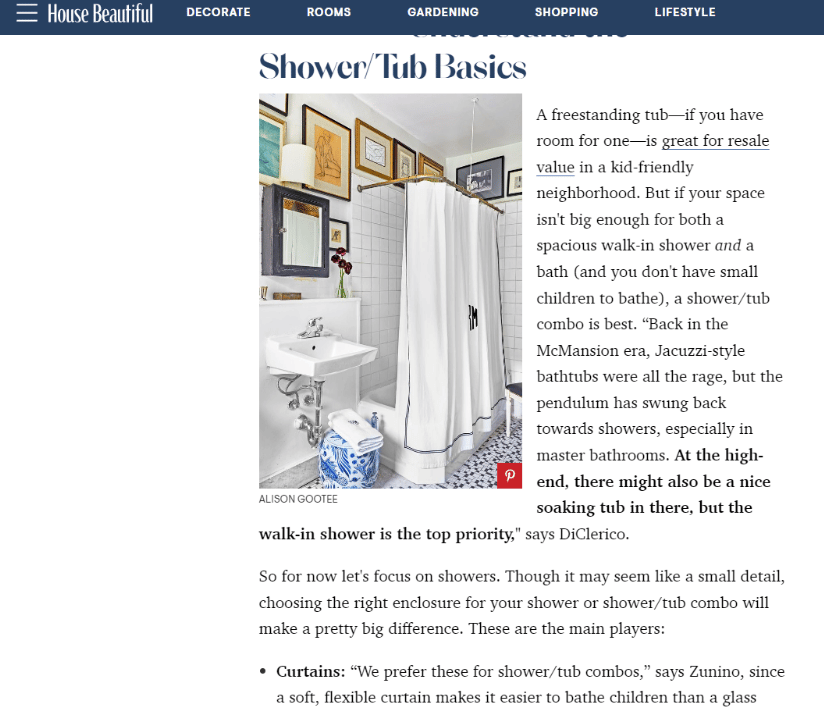
“The Pros’ Guide to Renovating Your Bathroom” by House Beautiful is a great example of a long-form blog sharing uncommon knowledge about things to consider when renovating a bathroom.
2. Study the search intent of your topic
Once you have a topic that can easily bear the weight of many words, it’s time to figure out exactly how many of them you should use.
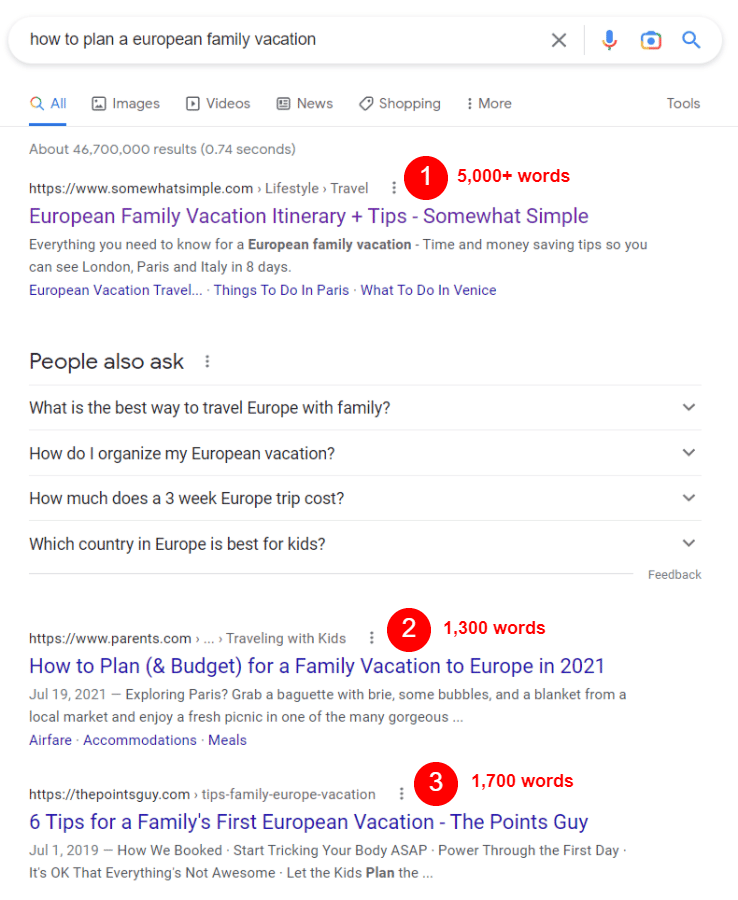
Should your long-form guide on planning a European vacation be 1,500 words? 2,000? 3,000 or more?
To find out what searchers looking up your topic want to see (their search intent), look at the top results in Google and try to answer these questions:
- What kind of information is your audience looking for when they search for this topic?
- How much information do they need to understand it?
- How much information about the topic is satisfying to a searcher looking for answers?
For example, googling “how to plan a European family vacation” will show you a bunch of guides at the top with a mix of word counts.
Browsing through these results (and taking notes) reveals a few key details:
At a base level, all of the guides include tips for traveling in Europe with families. Two guides (in the top two spots) provide additional information on booking airfare and accommodations. The top guide (”European Family Vacation Itinerary + Tips” by Somewhat Simple), however, went above and beyond and included a full itinerary for traveling from London to Paris to Italy.
So, how many words does your long-form guide need, based on all of this?
- When you’re not sure how many words you should write, average the word count of the top 3 results for your topic and shoot for that number. For the above topic, I would try for a 2,500-3,000-word guide.
- To find the word count of any page on the internet, use a word counter tool like Word Counter Plus.
- Think about what you can add to the topic that’s useful and hasn’t already been said. How can you put your unique spin on it based on your brand expertise to provide more value to readers?
- Don’t forget to consider what the top articles in Google are missing. Are there any gaping holes you can fill?
- Always include the base information that searchers are looking for. In this instance, I would include tips for traveling to Europe with families, plus strategies and tips for booking airfare, hotels, and transportation.
3. Create an outline and structure the content
From your search intent research, you should already have a few notes about what your long-form post should include. Now it’s time to mix that with your expertise about the topic, plus any additional necessary research, to create an outline.
Why? It’s super important for long-form content to be structured and organized well to maximize readability and engagement. Outlining helps you build that structure.
To that end, always create a loose outline for your long-form content pieces. Since outlining gives you the skeleton structure of your post, it’s useful for playing with the order and flow of your points. Are they arranged logically? Are they all useful and necessary?
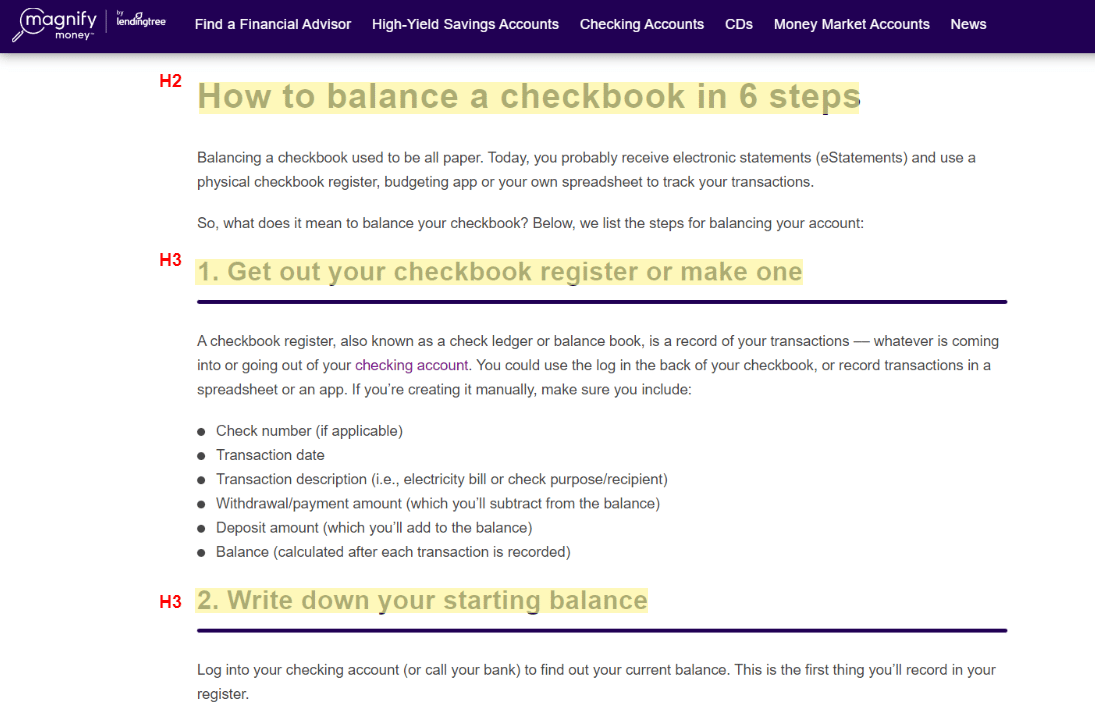
Your skeleton outline also gives you key places to include headings in your finished piece. In general, each major point and sub-point should have a heading attached to it. Including headings organizes the post, breaks up the text, makes it more scannable, eases readability, and even helps with SEO.
Here’s a rundown on headings you should use in your long-form content:
- H2 – Used for titles of sections and main ideas.
- H3 – Used for points that support the main idea in your H2.
- H4 – Used for additional sub-points that support an H3.
You’ll rarely use H5s, and probably never use H6s, so no need to worry about those. H1s are strictly for your post title and nothing else.
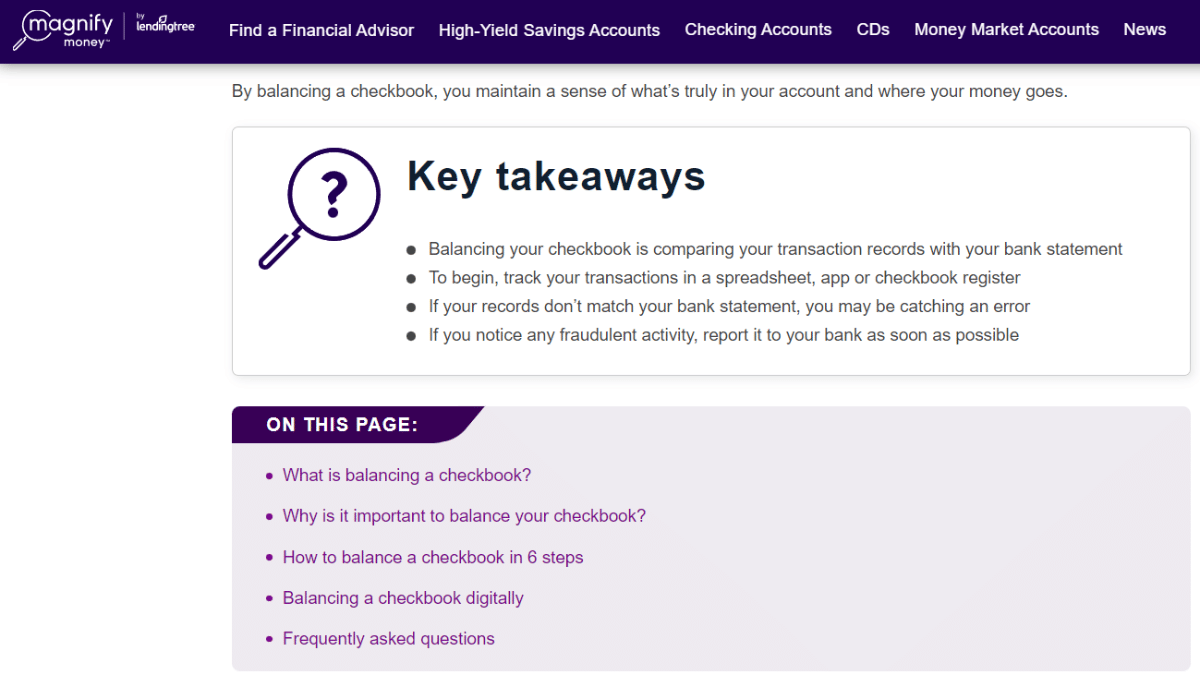
This guide by MagnifyMoney on how to balance a checkbook is well-structured and probably started with an outline of the major points, which also serve as the headings.
4. Think about your audience as you write
As you research, structure, and write your long-form post, your audience should be top-of-mind the entire time.
What do they need to know about the topic? What do they want to know?
Do you have particular insight on these things from your research or interactions with them? Include those details in your content.
For example, say I’m writing a post for beginning photographers. My team has had a conversation with a member of our audience who told us they struggle with understanding exposure and need help remembering the basic concepts. I could take that straight into my long-form post and dedicate an entire section to demystifying exposure with pro tips.
Your audience research should guide what you include in your long-form content just as much as what you learn from studying Google and the competition. In many cases, this will help differentiate your content, too.
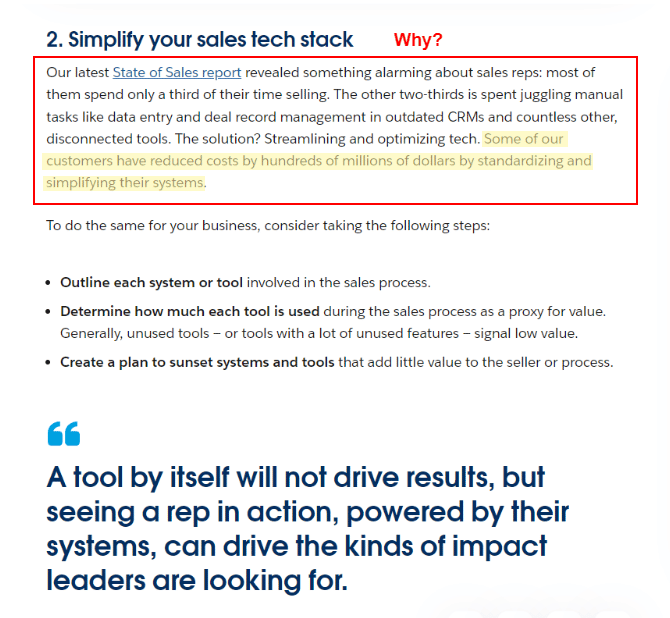
5. Expand on your points and answer, ‘Why should I care?’
As you fill in your outline and expand on each of your points, don’t just offer rote explanations. Instead, also answer the implied question your reader will have as they scroll through your content:
“Why should I care?”
Tell them why the information is important – why it’s crucial to understand in the scheme of things, how it benefits them, what it will ultimately help them do, and/or why it matters.
Great example – this Salesforce article, “3 Ways to Promote Efficient Growth with Resources You Already Have,” has an explanation for each point on why the advice matters and why business owners should care. Even better, Salesforce provides data on why it matters.
6. Add visuals, like images and videos, to break up long-form content
More than any other type of content, long-form begs for visual elements to help break up the text.
This includes headings, but more importantly, you need relevant images or videos in there, too. Otherwise, your engagement will be much lower than if you didn’t include these elements.
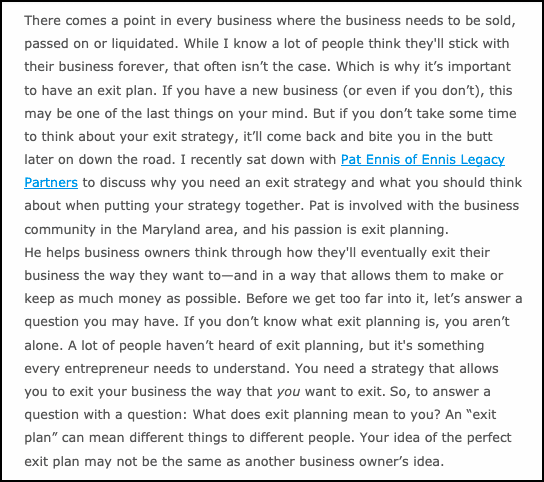
After all, you don’t want your blog to look like this:
You want it to be readable, scannable, and visually engaging. For that reason, along with smart structuring and formatting, a good rule of thumb is to include one relevant image or video every 200 words.
For instance, in this beginner’s photography guide by Expert Photography, the text is punctuated with colorful custom diagrams and images that illustrate key concepts of photography.
7. Consider creating a table of contents
Are you taking the plunge and writing a truly epic long-form guide? If your post is longer than 2,500-3,000 words, consider adding a table of contents to the top of the post.
This helps ground your reader in the face of an overwhelming amount of content. You’ll show them a clear overview of what’s inside your post, giving them the lay of the land before they head out on the trail you’ve laid for them through the topic.
It’s immensely helpful for any kind of reader, no matter the industry. Here’s a good example from a blog I mentioned earlier by MagnifyMoney, which includes “key takeaways” at the top followed by a table of contents:
Other types of long-form content to consider
Finally, don’t forget about the other types of long-form content out there that are not written – videos, webinars, and podcasts.
These content types will take just as much planning and research as written long-form content but can be just as effective for building authority and trust with your audience.
Webinars
According to a survey by Demand Gen, B2B buyers prefer webinars over any other content type (tied with ebooks, another long-form hero, at 57%).
Webinars are simply live presentation events broadcast over the internet to a select group of people. Participants can stream the presentation and participate virtually.
Brands produce educational webinars for the same reasons that you publish long-form content – to build trust with your audience and to grow your brand authority. Plus, webinars can be recorded and published as standalone long-form videos (“replays”) that anyone who couldn’t attend live can watch later.
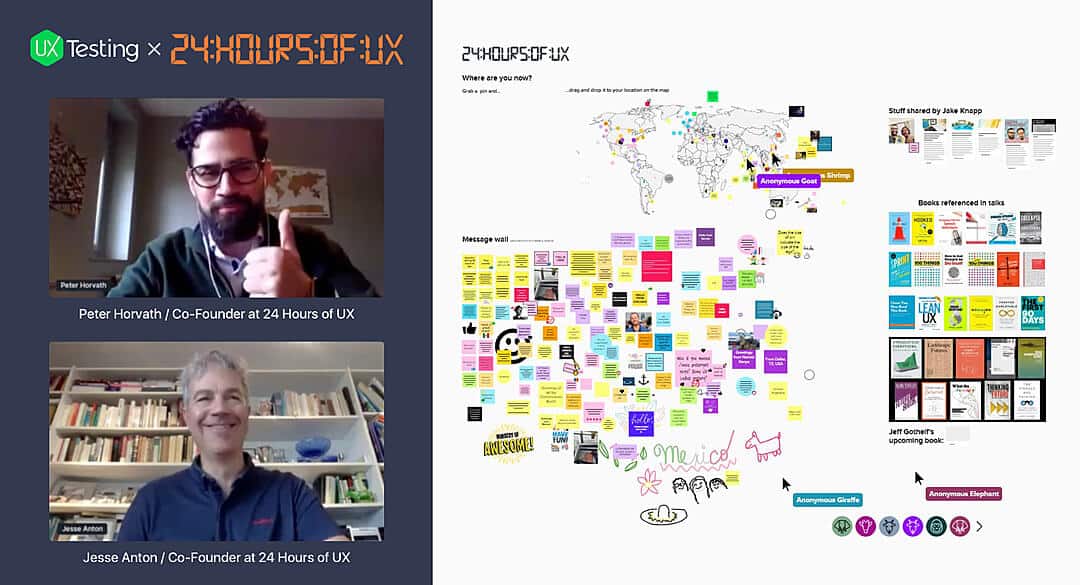
A great example of a webinar is this free event hosted by UX Testing, “24 Hours of UX.”
The webinar featured multiple speakers who talked about UX topics for a total of 24 hours. Over 7,000 people worldwide signed up to watch.
Long-form videos
Generally, long-form videos are around 15 minutes to a full hour in length and dive into a topic in the same vein as written long-form content, except with a visual or storytelling focus.
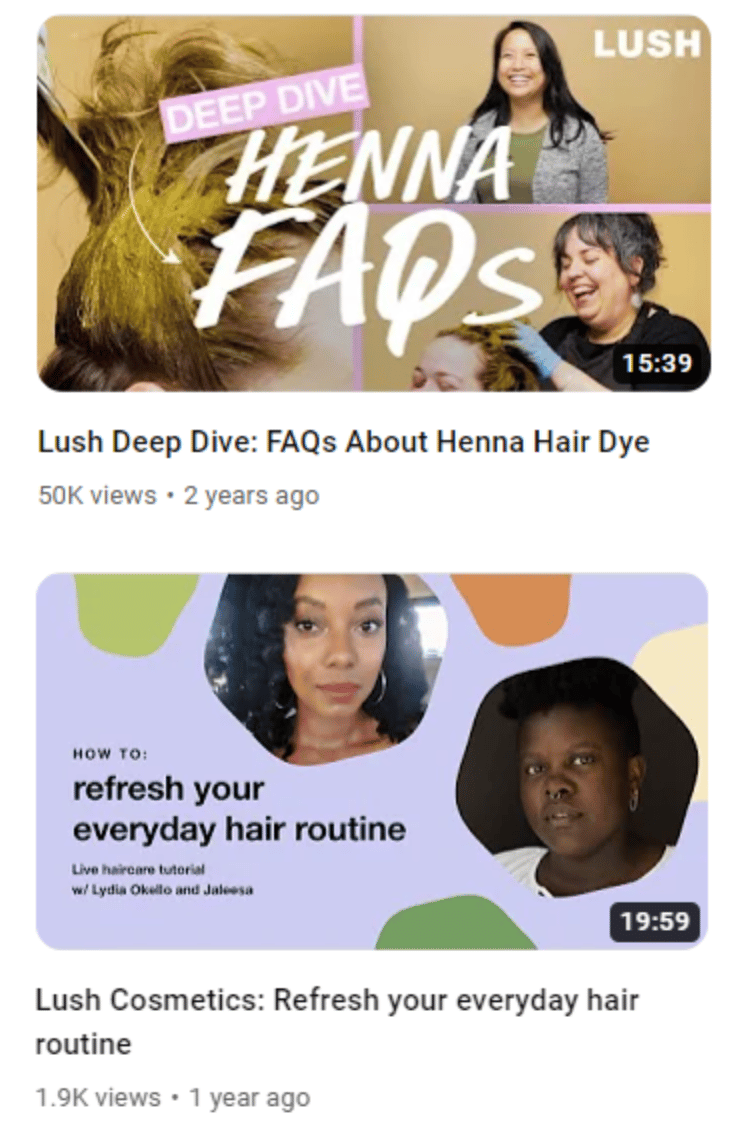
One example of a brand with a robust library of video content (both long and short-form) is Lush, a cosmetics company. Generally, their long-form videos focus on skincare and haircare guides, such as their guides to henna hair dye and refreshing your hair routine.
Podcasts
In the last decade, podcasts have risen in popularity. 78% of Americans are familiar with podcasting, and over 50% have listened to one.
It makes sense: They’re easy to listen to in the car or on public transport while doing chores or cooking dinner. They’re easy to download or stream from your mobile device. And there are limitless choices for topics.
Podcasts are also a great choice for long-form content creation. Your brand can tell stories and share valuable information with minimal investment, and you’ll reap the same benefits as publishing long-form content.
A good example is the Dear Headspace podcast, from the people behind the Headspace app.
In the podcast, meditation experts answer listener questions and provide mindful advice on everything from loss to learning new skills to dealing with negativity in the news.
Commit to writing long-form content and beef up your content strategy
There’s no question that writing long-form content takes commitment. And, if you don’t know what you’re doing, it can seem like a monumentally difficult task.
It takes more time, effort, and resources to create than its short-form sibling, but ultimately, long-form will bring more and better results.
That’s because long-form content is more comprehensive. It aims to explore a topic fully, demonstrate the breadth of your brand expertise, offer valuable insights, and teach your audience something they don’t know.
Done right, comprehensive content ranks better. It keeps your readers on your page longer. Last but not least, it builds trust better than short-form content.
The time you spend learning to write long-form content won’t be wasted. It’s a highly-valuable skill that will help your content marketing bring in more ROI, and one you will use over and over to create profitable content that wins with readers and search engines.
The post How to write long-form content: 7 smart steps and examples appeared first on Search Engine Land.
Courtesy of Search Engine Land: News & Info About SEO, PPC, SEM, Search Engines & Search Marketing
Monday, February 6th, 2023
Google AdWords announces Enhanced Campaigns
In 2013, Google AdWords announced Enhanced Campaigns. This major update was designed to simplify campaign management across multiple devices and increase adoption rates of mobile advertising among small and medium-sized businesses.
Among the notable changes:
- Tablets and desktops would be grouped together, rather than treated as separate devices.
- Advertisers would set a baseline bid that applied to both desktop and tablet, and then set the mobile bid as a multiplier of the desktop/tablet bid.
- Targeting at the operating system level would no longer be available.
Google planned to upgrade all campaigns in June 2013 (though the full rollout would actually begin July 22 and would take several weeks to complete).
Read all about it in The Big AdWords Update: Enhanced Campaigns Puts The Focus On Mobile.
Also on this day
2020: Google introduced a refreshed version of its app for Android and iOS with some new features.
2020: Google kept finding more places to show Shopping ads as merchants prioritized them over text ads.
2019: Starting at the end of March 2019, Google would change how the Google Search Console Performance reports counted metrics.
2019: Google would display that information to searchers looking for more information about those times.
2018: The beta version had reached nearly everyone as of a couple of weeks ago.
2018: Less than a year after it launched, Google removed the shortcuts offering quick answers on weather, sports and entertainment info.
2018: Bing believed there were many questions where getting just one point of view was not sufficient, convenient or comprehensive
2018: Quora offered more options for behavioral and contextual targeting to either narrow or widen audience targets.
2017: The AMP header area would display a link or chain icon, what it called the “anchor” button. Clicking on this would make the publisher’s direct URL appear.
2017: Both advertisers opted to drive users to their own sites instead of YouTube.
2017: Swiping up from the bottom of the Google Maps app home screen on Android displayed a Places tab, Driving tab and Transit tab.
2015: Google said he latest update the SEO community noticed was not related to the Penguin or Panda algorithms.
2015: Google censored out the Google autocomplete results to show ISIS for the search term [how can I join].
2015: Changes were designed to make quality score easier to use as a guide to where to focus your optimization efforts.
2015: The spike in Gemini traffic appeared to come almost entirely at the expense of mobile ads served by Bing.
2014: He added that Google would be going after more Germany link schemes in the near future.
2014: Some business owners received emails from Google requiring them to reverify their listings within three weeks or their listings would be deleted from Google Maps and Google+ Local.
2014: Two new link tools were available for those looking to analyze their own links or competitor links.
2014: The logo included a quote stressing that the official Olympic Charter was against discrimination and using the colors of the rainbow gay pride flag.
2014: Yahoo inserted a Search Shortcut that displayed not only the live start time but the TV broadcast time at the top of the search results.
2013: Matt Cutts said the “writing is on the wall” for this feature. Google would remove Toolbar PageRank just over three years later, in March 2016.
2013: The Australian Competition & Consumer Commission sued Google six years earlier, claiming that certain travel-related ads appearing in search results were misleading.
2013: Despite reports that Naver controlled somewhere between 70-80% of the search market in South Korea, StatCounter was showing Google soundly defeating Naver since February 2012.
2013: Channel Intelligence offered a range of services built around data management and product feed optimization.
2013: Eighty percent of brands bought AdWords for branded searches and 50% bought AdWords for commercial taglines.
2013: The new feature overlayed lifts and trail maps for 38 major ski areas in the U.S.
2013: The Search, Discover and Connect tabs were all updated.
2012: If you went to the search preferences it would say Google Instant was only enabled when “my computer is fast enough” and then showed whether Google thought your computer was fast enough.
2012: Insufficient funding, a lack of education or just plain ignorance were the factors behind the flawed national-local approaches.
2012: The tool scanned for HTML Microdata, Microformats, RDFa, Schema.org and Open Graph.
2012: As an app search tool, it was quite nice. Neither Google nor Bing offered anything comparable in their main search engines.
2012: The law made online publishers potentially liable for the acts of individual users and third parties.
2010: His tweet suggested that Google would run its first major broadcast television commercial during the Super Bowl.
2009: Forrester Research had concluded that Google, for lack of user loyalty, was vulnerable to being dethroned and that another “Google killer” was lurking just around the corner.
2009: An example of overreaching in an effort to gain (media) attention.
2009: An interesting look into how Google tested its search results pages and how searchers interacted with them.
2009: The latest images showing what people eat at the search engine companies, how they play, who they meet, where they speak, what toys they have, and more.
2008: No real news other than Yang telling employees no decision had been made, proposals were being evaluated, and people loved Yahoo.
2008: Several internal groups were slated for leadership changes.
2008: 7% of Baidu’s traffic was to access free music, but Baidu had been a target of copyright actions because of this.
2008: It was similar to Google News, with a side of Digg.
2008: There wasn’t much map content about the tornadoes that tragically tore through the Southern U.S.
2008: Coverage of first SphinnCon event in Jerusalem, Israel.
2008: The company was hiring in its Nairobi, Kenya headquarters and opening new offices in several Africa countries.
2007: With the new ad ranking system in place, Yahoo hoped people would start looking at the results more as a whole.
2007: How marketers were using search volumes to help conduct research and development, launch new products and predict potential product success based on perceived consumer demand.
2007: They described the flatlining of the Google pen to cause “considerable inconvenience and loss of data.”
2007: IAC’s profits dropped 98 percent in the fourth-quarter.
2007: How Search Engine Land was growing.
Past contributions from Search Engine Land’s Subject Matter Experts (SMEs)
These columns are a snapshot in time and have not been updated since publishing, unless noted. Opinions expressed in these articles are those of the author and not necessarily Search Engine Land.
< February 5 | Search Marketing History | February 7 >
The post This day in search marketing history: February 6 appeared first on Search Engine Land.
Courtesy of Search Engine Land: News & Info About SEO, PPC, SEM, Search Engines & Search Marketing
Sunday, February 5th, 2023
Moz upgrades its Domain Authority metric
In 2019, SEO tool Moz announced an update to how they measured Domain Authority (DA).
Basically, DA is a score, from 0-100, that “predicts how likely a website is to rank in search engine result pages.”
Curious about what changed? Read all about it in Moz upgrades controversial ‘domain authority’ metric.
To be clear, Google does not use Domain Authority to determine ranking. “We don’t use domain authority at all in our algorithms,” according to a tweet. by Google’s John Mueller.
I bolded that part above because the DA metric has caused confusion within the SEO industry, as many have basically assigned it value as a meaningful SEO metric, akin to the old visible Google PageRank scores. And you will often see it in spammy SEO and link building emails.
Even Rand Fishkin, who created the metric, essentially disowned Domain Authority as something he didn’t care much about anymore (“I know. I created it, but still”) during Milestone’s Engage conference in August 2022.
Also on this day
2020: The feds were interviewing publishers and ad-tech rivals about whether Google has too much control “over the monetization of digital content.”
2020: The subscription-based product could also be used to identify review trends across sites.
2020: In this installment of Barry Schwartz’s vlog series, he also chatted with Boykin about Google penalties, algorithm updates and the importance of featured snippets and people also ask for SEO.
2019: Google executives discussed search experience, campaign, device and performance updates.
2018: The popular auditing tool used by developers and search marketers enabled users to run basic SEO checks against site pages.
2018: Google’s partnership with WordPress aimed to jump-start the platform’s support of the latest web technologies, particularly those involving performance and mobile experience.
2018: “Major content mismatch” were due to a processing error on Google’s side.
2016: After being quiet for over a year on link network penalties, Google said it had penalized a large, Japanese-based link network.
2016: New conversion columns were also available in the latest update.
2016: Google updated its store name guidelines in the Merchant Store policy center to specifically cite emoticons and emoji among its don’ts.
2016: The latest images showing what people eat at the search engine companies, how they play, who they meet, where they speak, what toys they have and more.
2015: Twitter confirmed that it had a deal again to supply Google with access to its full stream of tweets.
2015: Would it be Bing, Yahoo or Apple itself that supplied Safari’s search engine?
2015: Lack of keyword attribution created a “blind spot” for search marketers.
2015: Google Webmaster Tools email notifications drove app deep linking awareness in terms of errors and impression and click statistics.
2014: Google escaped any significant fines or penalties. More coverage: Wow! See How Much Screen Real Estate Google Is Giving Rivals In Its EU Antitrust Settlement
2014: How to get it: marking up content that was invisible to users, marking up irrelevant or misleading content, and/or other manipulative behavior that violated Google’s Rich Snippet Quality guidelines.
2014: Ramaswamy and Wojcicki shared the title of SVP, Ads & Commerce, and had been jointly running the ads division for the prior year.
2014: Only 47% of respondents from within a company said there would be a significant or, at least, some increase to their SEO budget.
2014: Active local business accounts on Yelp grew to 67,000 in 2013, up 69% year-over-year.
2014: Microsoft had reportedly signed a multi-year agreement to license Foursquare data for both mobile and Bing on the PC.
2014: When Bing users searched on specific sports and athletes the search engine would include Olympic-related schedules and content in its search results.
2014: How Google, Bing and Yahoo stacked up in this Olympic effort.
2014: Apparently because Scout had higher user ratings than Google Maps in the Google Play store at the time.
2013: Either they needed to change their ways — and become much more transparent and easy to use — or they would apparently need to look elsewhere for ads. More coverage: IAC: We Comply With Google’s Toolbar Standards
2013: 70% of SMBs said they didn’t have the time to manage listings on all of the sites that consumers use.
2013: The study found that ads associated with black identifying names were more likely to have ads with the word “arrest” in them than ads that were associated with white identifying names.
2013: A Dilbert cartoon once again took a jab at SEOs and what they do or can do.
2012: In past years, organizations like the NFL, the playing teams, and the failed to show up in search results because none of their sites answered the question.
2012: Google didn’t seem to occupy any higher ground than Microsoft when it came to using data gathered from browser add-ons to improve its own services, including its search engine.
2012: The NFL and FOX were still nowhere to be found.
2010: The content block, called “Nearby places you might like,” appeared below reviews on the place page and show up to 10 recommended businesses.
2010: Deal included a more robust Bing search experience on Facebook. Also, Bing would power Facebook search outside of the U.S., to all Facebook users, worldwide.
2010: The highly-anticipated iPhone app was intended to enable you to do more with your voice and your phone in fewer clicks or moves.
2010: All three had Super Bowl shortcuts/oneboxes in place.
2010: Major events from the year 2002 in consumer search.
2010: Y could compare, side by side, the earth as it is today versus how it was during World War II.
2010: The latest images showing what people eat at the search engine companies, how they play, who they meet, where they speak, what toys they have, and more.
2009: It was still a limited beta to test the effectiveness of engaging potential customers for advertisers.
2009: If you viewed the book on a mobile device, they would try to extract the text using OCR and show you plain text, not scanned text.
2008: Although the bad reputation issue had been out there for years, demand for SEO services was as strong as ever.
2008: There seemed to be mounting cynicism and detachment among Yahoos.
2008 elections
2007: You could view and even download thousands of links to your site via Google Webmaster Central.
2007: They analyzed IP address, duplicate clicks, and various other clicking patterns to detect click fraud.
2007: Although there were improvements over 2006, this year was still lacking in terms of integrating their offline and online ad efforts.
2007: Google didn’t know whether a video was infringing. It simply knew it was reported as an infringement.
2007: Krillion helped consumers find where they could buy products in their markets after conducting online research.
2007: The companies included Vodafone, France Telecom, Telefonica, Deutsche Telekom, Hutchison Whampoa, Telecom Italia and Cingular.
2007: It let publishers manage and serve their own advertisements, bypassing Google, Yahoo and other third-party contextual advertising services.
2007: 28% of internet users had tagged or categorized content online such as photos, news stories or blog posts.
Past contributions from Search Engine Land’s Subject Matter Experts (SMEs)
These columns are a snapshot in time and have not been updated since publishing, unless noted. Opinions expressed in these articles are those of the author and not necessarily Search Engine Land.
< February 4 | Search Marketing History | February 6 >
The post This day in search marketing history: February 5 appeared first on Search Engine Land.
Courtesy of Search Engine Land: News & Info About SEO, PPC, SEM, Search Engines & Search Marketing
Friday, February 3rd, 2023
Microsoft’s bid to buy Yahoo, Day 4
In 2008, there were some big developments following the news of Microsoft’s bid to purchase Yahoo.
Google wasn’t happy about the news. The company objected, suggesting that the move would hurt what it called the underlying principles of the internet: “openness and innovation.”
There was some ironic back and forth, as Google had spent the past year arguing that it should be able to acquire DoubleClick, which Microsoft argued against because it would make Google too dominant in online advertising.
Meanwhile, was Yahoo considering an alliance with Google? And why did Google CEO Eric Schmidt call Yahoo CEO Jerry Yang to offer Yahoo help?
And what about post-acquisition “integration” issues? Local, maps, and mobile were areas where both companies had made significant investments but also had significant duplication and redundancy.
Microsoft sounded pretty confident the deal would happen. As Kevin Johnson put it:
- “It doesn’t make sense to have thousands of engineers at Yahoo working on a search index, thousands of engineers at Microsoft working on the same search index. By combining, we can have one team of people across the two companies working on the search index, and then have others continue to focus on areas where we’ve defined differentiation in search. New search verticals and expanded user experience for search. We’ve got so many ideas, more engineers applied to those ideas will drive breakthroughs in search.”
Dig deeper:
Also on this day
2022: The global site tag could now automatically collect the information (e.g., email, telephone number) that a user submitted on the website.
2022: There were links to the MSN Autos marketplace in the knowledge panels for these car-related searches under “learn more” and “shop used cars” right above the car specifications.
2021: Phrase match would expand to include additional broad match modifier traffic and support for broad match modifier would end.
2020: For the first time, the company disclosed YouTube advertising revenues.
2020: Hitwise informed its customers that daily, weekly and monthly metric updates were on pause until further notice.
2020: Scripts were also coming to Shopping campaigns in Microsoft Advertising.
2019: The company’s primary goal was not to drive revenue and chose not to monetize search results.
2019: Roughly 53% of firms doing local SEO had 10 or fewer clients.
2016: Google started supporting JSON-LD for structured data markup for reviews and products rich snippets.
2016: Once you clicked on the “more destinations” button, Google led you into a travel search experience that made it harder to view organic search results.
2016: The idea, according to Microsoft, was to help users “find” and “do” faster.
2015: Google clarified and expanded on their reconsideration request documentation for those who had been hit by a Google manual action.
2015: The agreement came 3+ years after a similar arrangement ended. It would make tweets easier to find via search.
2015: This had been done previously for easter eggs and Google’s own content, but now it worked for third-party publishers.
2015: The company’s foray into native advertising would harness intent signals from Bing Ads.
2014: For the first time in ages, the three major search companies in the US were all run by CEOs who either came out of a search background or had a solid understanding of it.
2014: Converted clicks = Conversions (1 per-click) and Conversions = Conversions (many-per-click).
2014: The suite was comprised of two new capabilities: Dynamic Product Listing Ads creation and Product Listing Ads optimization.
2014: Searching Google for video-related content would return a large, playable, video directly at the top of the search results.
2014: The app would notify you if a faster route was available while you were in transit.
2013: Viewers turned to their devices to ask [why did the lights go out], [superdome power outage] and [what caused power outage].
2011: Bing said it has search signal, not Google signal.
2011: The mobile audience on Yelp was more active and engaged than its PC audience.
2011: The latest images culled from the web, showing what people eat at the search engine companies, how they play, who they meet, where they speak, what toys they have, and more.
2010: Google Store Views would allow people to virtually walk into the store, off of Google Street Views.
2010: Yahoo would continue to have a career site, but it would be powered and populated by Monster.
2010: Major events from the year 2001 in consumer search.
2009: More coverage: Google Latitude Turns Maps (For Mobile) Into Social Tool
2009: Google was rolling out voice search on the Android platform via the new software update.
2009: You could use the advanced search features and then subscribe to that search via RSS.
2009: Instant answers were shown for searches related to financial information, weather conditions, movie show times, calculations, equations, conversions, and definitions.
2009: The application automatically collected sites and content as users conducted online research.
2009: Google was the “fourth-largest corporate source of campaign cash” for President Obama’s presidential race.
2009: The major updates included the new Digital Globe satellite imagery they recently licensed and “bird’s eye” photos of Paris, France.
2008: IAC claimed the legal battle for control of IAC’s board was impeding the company’s ability to effectively operate.
2008: Yahoo ranked as the top site with just under 19% of US online display advertising.
2008: For those who required server-based analytics.
2008: The European Union’s antitrust regulator was likely to impose conditions or ask Google for concessions in order to bless the acquisition.
2008: The tool modeled the potential value of Google equity awards, including transferable stock options.
From Search Marketing Expo (SMX)
Past contributions from Search Engine Land’s Subject Matter Experts (SMEs)
These columns are a snapshot in time and have not been updated since publishing, unless noted. Opinions expressed in these articles are those of the author and not necessarily Search Engine Land.
< February 3 | Search Marketing History | February 5 >
The post This day in search marketing history: February 4 appeared first on Search Engine Land.
Courtesy of Search Engine Land: News & Info About SEO, PPC, SEM, Search Engines & Search Marketing
Thursday, February 2nd, 2023
If you get Google’s Analytics emails, you may have already gotten the word. But ICYMI, Google has once again reminded us that Universal Analytics (UA) will stop processing data on July 1.
What’s new is the email states that starting in March, any customer who does not set up a GA4 property with basic settings, Google will configure one with a few basic settings consistent with the existing Universal Analytics property; this includes certain conversion events, Google Ads links, and existing gtag or analytics.js tags.
Opt-out. If you don’t want Google automatically creating GA4 properties for you, you may opt-out via the instructions in this link.
Here is what the email says.
Subject: We’ll soon configure Google Analytics 4 for you
Hello.
Universal Analytics standard properties will stop processing data on July 1, 2023. To maximize historical data and to ensure that Google Analytics 4 (GA4) meets your specific needs, we recommend you make the switch to Google Analytics 4 now. This will give you the opportunity to customize the setup including using the latest site tag.
For any customer who does not set up a GA4 property with basic settings, starting in March, we will configure one with a few basic settings consistent with the existing Universal Analytics property; this includes certain conversion events, Google Ads links, and existing website tags.
For Universal Analytics customers whose websites are tagged with gtag.js or analytics.js (including through tag management systems like Google Tag Manager), we will create a connected site tag that will reuse existing tags when possible to send traffic to the new GA4 property. If you do not wish to have a GA4 property created and configured based on your Universal Analytics property and existing tags, you may opt-out.
Their ‘Learn More’ CTA directs to a Google Doc page that I don’t have access to.
The notification also appears in a yellow bar at the top of some Analytics accounts. Shameem Adhikarath noticed it last night and posted it to Twitter.
New notification from @googleanalytics . On July 1, 2023, this property will stop processing data. Starting in March 2023, for continued website measurement, migrate your original property settings to a Google Analytics 4 (GA4) property, or they'll be copied for you.. @rustybrick pic.twitter.com/qWzOdmqhGV
— Shameem Adhikarath (@shemiadhikarath) February 2, 2023
Why we care. With the discontinuation of Universal Analytics standard properties on July 1, 2023, advertisers need to switch to Google Analytics 4 to maximize historical data and take advantage of the latest analytics capabilities. If they don’t, Google may create a GA4 property for them with basic settings, which may not meet their specific needs. Therefore, to ensure accurate tracking and analysis of their advertising efforts, advertisers should make the switch to Google Analytics 4 now and customize the setup as needed.
The post Make the switch to GA4, or Google will do it for you appeared first on Search Engine Land.
Courtesy of Search Engine Land: News & Info About SEO, PPC, SEM, Search Engines & Search Marketing
Thursday, February 2nd, 2023
Microsoft has revised its multi-channel strategy, which will be accessible for all advertisers on February 21st. Additionally, the audience ad bid modifier will no longer be visible in your campaign settings.
Microsoft says “Instead of using positive or negative bid modifiers to manually adjust participation in the audience network, all you need to do is define your goals, and Microsoft Advertising will fully optimize your campaigns across channels. This will help you more easily manage your campaigns and find the best users in every auction to drive a strong ROI.”
Driving new changes. Microsoft conducted research on accounts utilizing both search and audience traffic and showed that advertisers get the best results by combining their efforts on Microsoft Search and the Audience Network. Their findings reveal that people who view a brand’s ad on both networks visit the website 2.6 times more frequently compared to those who only see the ad on search. Microsoft says this increased website traffic also leads to higher conversion rates, with users converting 6.6 times more frequently. This highlights the importance of utilizing both search and audience together, as reaching the same user through multiple channels can increase engagement and sales.
Early testing. Microsoft has been piloting the new multi-channel approach over the past year. “After strong beta results, we’re rolling out this experience to all advertisers. Our results show that accounts already using multi-channel management have seen 14% higher conversion rates at 21% lower cost per acquisition (CPA).”
More Microsoft changes and updates. Microsoft has been making an effort to improve its ad platform significantly. Last year they announced ambitious plans to double the size of its ad business to $20 billion, though no specific timeframe was given.
But some brands are still unsure. Their FY23Q2 earnings reported that advertising spend declined slightly more than expected. Mass layoffs also impacted about 5% of its 220,000 workers. But despite a mediocre performance, ad revenue still increased by 5%, and LinkedIn revenue was up 14%.
It could be possible that the number of changes and updates Microsoft has made over the last year was enough to increase revenue. With Google continuing to push automation and taking away advertisers’ control, advertisers could look at Microsoft as a hail Mary.
Dig deeper. You can read the announcement from Microsoft here.
Why we care. Microsoft provides innovative tools, channels, and creative options to advertisers. Utilizing both search and audience together could lead to higher performance and drive lift in your campaigns. However, without more widespread adoption of the platform, these advancements may not reach their full potential.
The post Microsoft revises multi-channel advertising approach and discontinues bid modifiers for audience ads appeared first on Search Engine Land.
Courtesy of Search Engine Land: News & Info About SEO, PPC, SEM, Search Engines & Search Marketing
Thursday, February 2nd, 2023
Dozens of Google’s raters, seeking raises and access to benefits, rallied at the Googleplex in Mountain View yesterday, with the goal of putting an end to “poverty wages.”
Why we care. Google has said it uses as many as 16,000 raters – and about 5,000 are based in the U.S. As a group, Google’s human raters help ensure the helpfulness, quality and relevance of search results by identifying potentially harmful results, spam, outdated information and all the other elements that go into what is now known as E-E-A-T.
Protest in Mountain View. The goal was to deliver a petition, signed by more than 600 workers, to Google SVP Prabhakar Raghavan (who is responsible for Google’s Search, Assistant, Geo, Ads, Commerce, and Payments products).
They wanted Raghavan to meet and negotiate with the workers. The group, however, was stopped by security, according to KPIX, a CBS-owned Bay Area news channel.
Alphabet Workers Union tweets about the protest. In a Twitter thread, the Alphabet Workers Union laid out their case for the raters, noting they are “responsible for training, testing & evaluating search algorithms. Their work makes Google billions while they get paid pennies.”
The group noted that Google’s raters can’t get benefits, such as health insurance, paid sick leave or parental leave.
Raters provide an invisible service to Google, rating the quality of Google search & Google ads—products that make billions for the company.
Yet, Google has denied these workers access to the company’s own “minimum standard” of pay and benefits for “extended workforce workers.”
– @AlphabetWorkers
Raises for raters? At least some of Google’s raters reportedly were given a raise this year.
Historically, we know U.S.-based raters (who are actually employed through subcontractors) were paid as little as $10 an hour up to $14.50, which is lower than the $15 an hour minimum Google pays to its TVCs (temporary, vendor and contractor staff). (For additional context, California’s minimum wage is $15.50 per hour and the U.S. minimum wage is $7.25 per hour.)
“We’re Google’s lowest-paid workers,” Michelle Curtis, one of Google’s quality raters, told MarketWatch in an interview. “But we play a vital role in its growing source of revenue.”
However, in an interview with Search Engine Land in 2012, we learned that one quality rater was making $14.50 per hour. That means that this most recent “raise” for today’s raters merely put them back to the same pay level some raters were earning over a decade ago.
The bigger picture. The protest comes not long after Alphabet, Google’s parent company, announced 12,000 layoffs that impacted employees and contractors.
However, those layoffs followed a two-year period of massive hiring, as Google’s headcount went from 119,000 employees in 2019, to 150,000 by the end of 2021. As of September 2022, Alphabet had 187,000 employees.
Dig deeper. Google ‘rater’ contract workers rally at Mountain View headquarters to demand higher pay by Kelsi Thorud.
The post Google’s search quality raters protest for higher pay appeared first on Search Engine Land.
Courtesy of Search Engine Land: News & Info About SEO, PPC, SEM, Search Engines & Search Marketing
Thursday, February 2nd, 2023
Weak advertising demand and competition from TikTok and other rivals yielded lower fourth quarter revenue and profit for Meta, Facebook’s parent company.
Ad revenue was down 4% to $31.3 billion at Meta’s advertising-supported properties, including Facebook, Instagram, Messenger, and WhatsApp. Advertising revenue was 97% of Meta’s total revenue in the quarter.
Ad revenue in North America was flat, declined 16% in Europe and 3% in the Asia-Pacific. Revenue increased by 5% elsewhere (“Rest of World” in the table below).
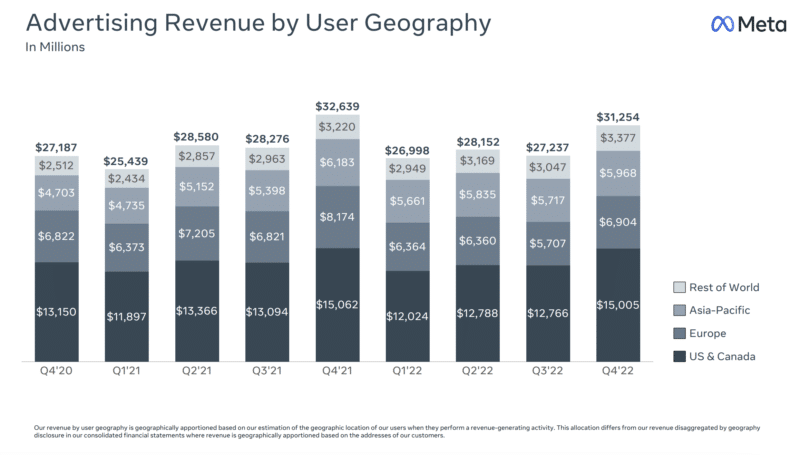
The decline was attributed to “weak advertising demand, which we believe continues to be impacted by the uncertain and volatile macroeconomic landscape,” by Meta CFO Susan Li.
Strategy shift for Facebook and Instagram content. “Facebook and Instagram are shifting from being organized solely around people and accounts you follow to increasingly showing more relevant content recommended by our AI systems,” Meta CEO Mark Zuckerberg said on the company’s earnings call.
Reels growth. Zuckerberg also said that Reels plays across Facebook and Instagram have more than doubled over the last year, and the social component of people resharing Reels has more than doubled on both in just the last 6 months.
The challenge for Reels is “improving monetization efficiency, or the revenue that’s generated per minute of Reels watched,” according to Zuckerberg.
The future for Meta ads. Meta will continue to monetize WhatsApp as well as messaging ads by utilizing an in-app feature allowing consumers to interact directly with businesses.
- Plans to continue monetizing messaging with click-to-message ads, which currently generate revenue of $10 billion
- Onboarding more businesses to the WhatsApp Business Platform, where businesses can answer customer questions, send updates and sell directly in chat
Apple’s App Tracking Transparency measures still reducing revenue. “I think what I would say is there is still certainly an absolute headwind to our revenue number,” Li said when asked whether Apple’s ATT (app tracking transparency) measures were reducing revenue.
“Having said that, we are lapping its rollout and adoption, and we’re making progress in mitigating the impact due to a lot of the work that … I just talked about, including the different advertiser tools, including ad formats that bring conversions on site and including the longer-term AI investments in privacy-enhancing technologies.”
Dig deeper. You can review the earnings transcript on Meta’s Investor Relations site.
The post Meta blames weak advertising demand, rivals for Q4 2022 revenue decline appeared first on Search Engine Land.
Courtesy of Search Engine Land: News & Info About SEO, PPC, SEM, Search Engines & Search Marketing
Wednesday, February 1st, 2023
Google has reportedly started testing a new desktop search page design that integrates chat technology.
We already knew Google wants to add chatbot features to search this year. A new CNBC report provides more details on what the experimental search page may look like.
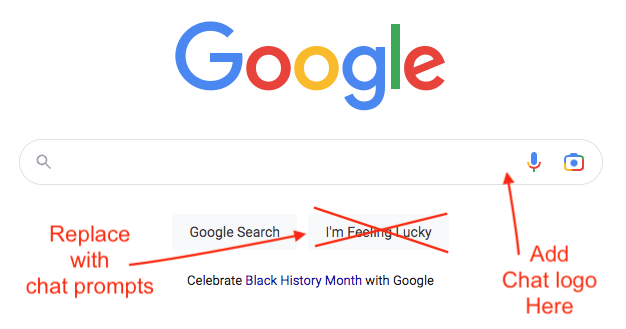
Google’s alternate search page. In one version of Google’s search results, the company replaced the iconic I’m Feeling Lucky button under the search bar with five prompts for potential questions. There was also a small chat logo” inside the far right end of the search bar, according to the report.
Based on this description, here’s a fairly terrible rendering of what that would look like:
Google’s alternate SERP. It sounds like this would push Google’s organic search results much further down the page. As CNBC explained:
When a question is entered, the search results show a gray bubble directly under the search bar, offering more human-like responses than typical search results. Directly beneath that, the page suggests several follow-up questions related to the first one. Under that, it shows typical search results, including links and headlines.
Now I haven’t seen this experimental design.
However, based on how this was described, it may look similar to certain SERPs where there is a featured snippet followed by People also ask, then organic results. For example, [what is cheese made of]:
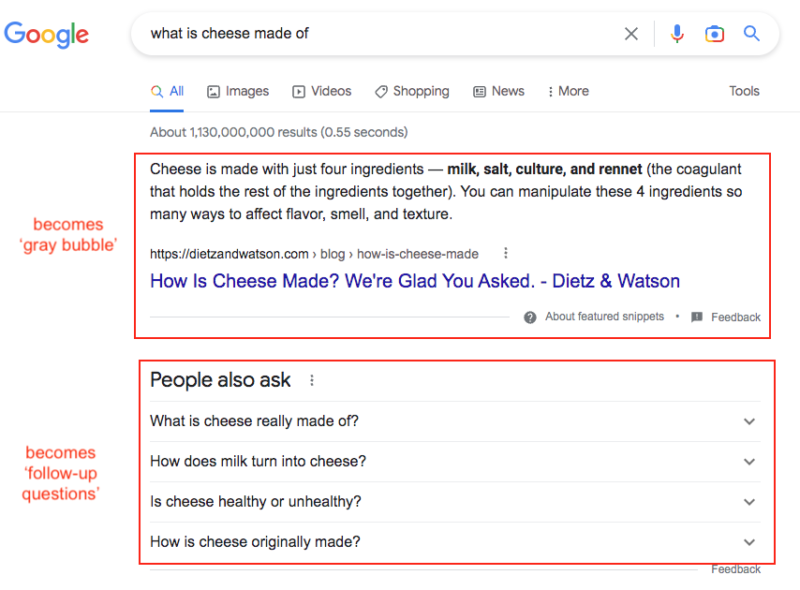
So you could imagine the “gray bubble” in place of the featured snippet explaining how cheese is made (with an answer generated by Google AI instead of awarded to the source of the featured snippet here), and the “follow-up questions” replacing PAA.
Why we care. Could this be what chatbot-style Google desktop search results will look like later this year? While it’s not a radical departure from the current Google desktop design, this would mean that visibility for websites – and perhaps traffic – will be impacted. If you thought Google was stealing your traffic and clicks before, well… it’s safe to say there will be many angry search marketers.
What Google is saying. According to a Google spokesperson:
- “We have long been focused on developing and deploying AI to improve people’s lives. We believe that AI is foundational and transformative technology that is incredibly useful for individuals, businesses and communities, and as our AI Principles outline, we need to consider the broader societal impacts these innovations can have. We continue to test our AI technology internally to make sure it’s helpful and safe, and we look forward to sharing more experiences externally soon.”
Dig deeper. Jennifer Elias on CNBC (Google is asking employees to test potential ChatGPT competitors, including a chatbot called ‘Apprentice Bard’) also reports on how Google is also testing out its version of ChatGPT, which uses its LaMDA technology that includes answers based on recent events (which is is something ChatGPT can’t do at this time).
The post Google testing new search design with AI answers over organic results appeared first on Search Engine Land.
Courtesy of Search Engine Land: News & Info About SEO, PPC, SEM, Search Engines & Search Marketing