Archive for the ‘seo news’ Category
Tuesday, February 14th, 2023
SEO has a lot of moving parts.
You have to worry about your content strategy, keyword selection, Google ranking signals, backlinks, and competition.
When clients ask me if they can rank their site for a particular keyword, I conduct a SERP analysis immediately.
I wouldn’t know how difficult it is to rank for a specific keyword without analyzing Google’s SERPs first.
If you’re not conducting base analysis, you might set your site up for failure by funneling all of your resources to a main keyword that is too far out of reach.
Defining SERP analysis
So, what is SERP analysis?
Search engine results page (SERP) analysis is the practice of analyzing the top-ranking pages for your desired keyword, spotting opportunities to rank for this keyword and trying to pinpoint difficulties in reaching the top of the search results.
A SERP analysis demands that you:
- Search for the desired keyword.
- Evaluate the top sites.
- Determine if the keyword is relevant to your site.
- Determine how you “could” rank for this keyword.
However, the final item on this list has a big question mark next to it.
You need to go beyond what you would need to do to rank today because your competitors are working diligently to maintain these rankings in most cases.
How to analyze a Google SERP
Learning how to analyze Google SERPs provides insights into a keyword and your ability to rank for the term. However, you’ll also uncover:
- Additional keywords that you may try to rank for on search engines.
- Opportunities that your competitors are missing.
- Content ideas.
- And more.
You can look through the SERPs manually, but when it comes to competitive keywords, you’ll want a tool to help you with looking at a page’s link profile, number of external backlinks and other factors.
A few tools work very well for this purpose, such as:
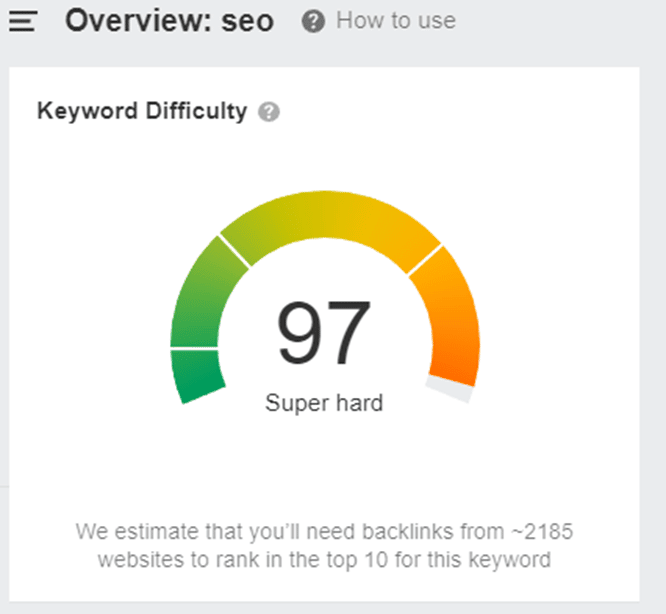
Plug in your keyword to these tools, and you’ll find a wealth of information on the top-ranking pages. For example, on Ahrefs, I just conducted a search for “SEO” and came out with the following:
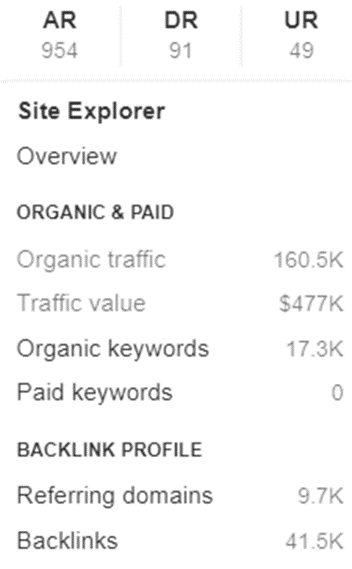
Search Engine Land’s What is SEO is ranked #2 and shows the following statistics:
Ranking for this keyword will be extremely difficult without a massive budget, a highly reputable website and a backlink campaign.
However, it’s important to look at other factors in a SERP analysis, such as:
- Search intent.
- Type of content ranking.
- The competition.
Search intent
When searching for your query, search intent can be determined by the different layouts and types of pages that you land on. You can tell the intent because it will be one of the following:
- Commercial: Users who are researching before making a purchasing decision.
- Informational: Users who are trying to find a solution to their problem and are educating themselves.
- Navigational: Users who are looking for a brand or website that they already know about.
- Transactional: Users who want to buy a product or service.
Considering these four categories of intent, you’ll find that the keyword “SEO” has informational intent, as all the top results aim to educate their readers. Your goal to outrank these competitors would be to educate the user.
Sites may look something like this:
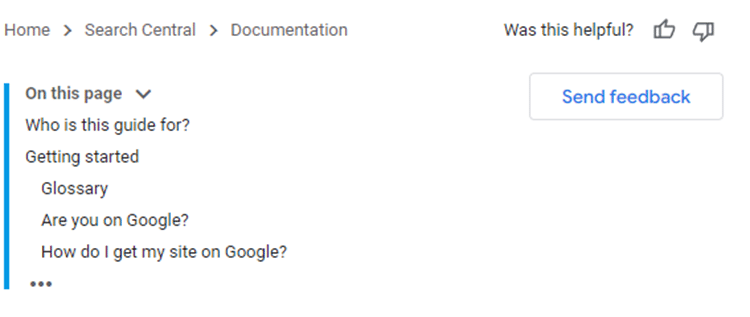
Google’s SEO starter guide
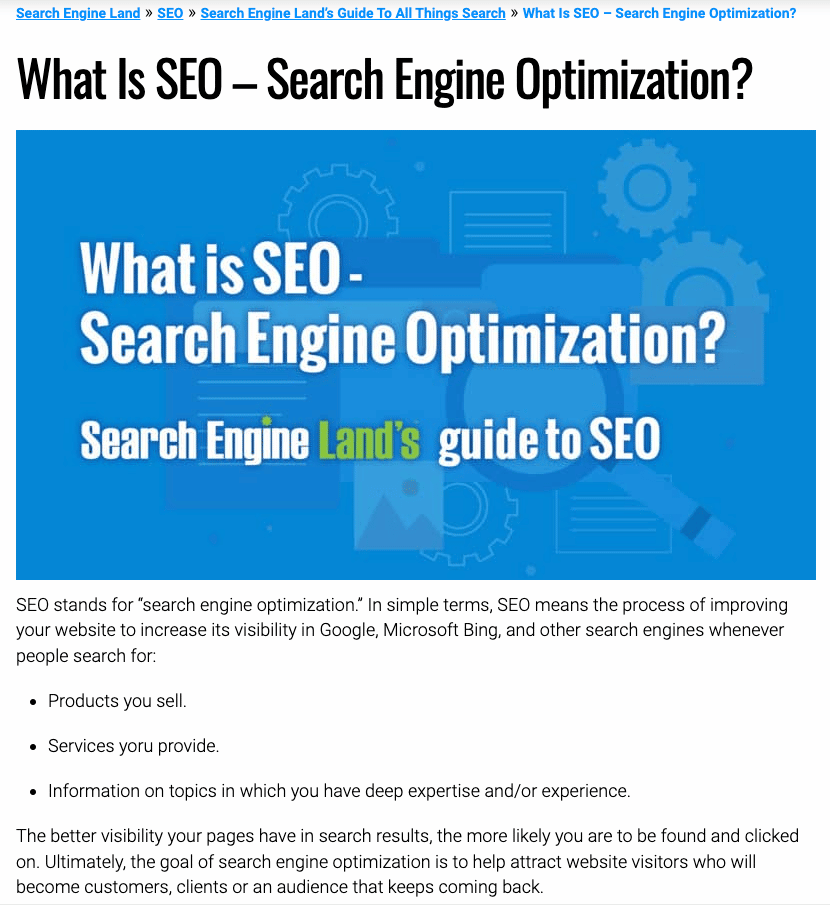
Search Engine Land’s What is SEO guide
If you changed the keyword to “books on SEO,” you would find Amazon as a transactional intent keyword because the site is laid out for products.
However, if you changed the keyword to “SEO books on Amazon,” this would be seen as a navigational keyword because the user is looking for these books specifically on Amazon.
Search intent is important because it will dictate your site’s:
- Layout.
- Navigation.
- Personalization.
- Common devices used to access the site.
Once you go through search intent, you can focus on the technical aspects of the site, UI/UX design and content.
Type of content ranking
Often, you’ll find an array of content ranking for a certain keyword. Going back to the “books on SEO” keyword, there are a lot of content types that are ranking:
- Ecommerce stores.
- Listicles.
- Guides.
- Book reviews.
This keyword is far easier to rank for than just “SEO” and you can create the above types of content to meet the needs of people querying this keyword.
When you perform SERP analysis, you have the opportunity to learn what content currently works for your competitors and don’t need to reinvent the wheel. Perhaps you can create a video guide on the top books to go along with your listicle or review article.
Now, you can learn a lot of information from just a few minutes of SERP analysis:
- Keyword difficulty.
- Backlink profile.
- Search intent.
- Content ideas or types to use.
You might even find videos ranking for a certain keyword, allowing you to target traffic via YouTube. It may be easier to show up at the top of the results in a snippet or video than with informational content.
Make a note of SERP features on the page that you may be able to leverage in your content creation, such as:
- Ratings.
- Shopping results.
- People also ask.
- Featured snippet.
- Images.
You can target the keyword from all angles to try and generate traffic from all sources.
The competition
You’ve already done a basic analysis of the top-ranking sites, but now it’s time to look into these sites further. You can look at things such as:
- Keyword difficulty.
- External backlinks to the entire domain.
- External backlinks to the page.
- Domain authority/page authority (or similar).
- Top domain presence.
- Social signals.
It is worth taking the time to look through the competing page and learn about the type of content created, length, proper on-page optimization, formatting, images and video use.
When you analyze competing sites, you can get an idea of what works and how well the site has targeted the keyword.
You may find opportunities to create better content or use on-page and technical SEO to improve your odds of ranking for the keyword.
Additionally, you can identify content gaps in the competitor’s content strategy that may improve your odds of ranking for the keyword.
However, if the entire top page is filled with truly tough competitors, it may be worth finding a new keyword to target.
For example, if the top results include Google’s own sites, Microsoft, Apple and Wikipedia, it will be very difficult to overcome them.
Get the daily newsletter search marketers rely on.
<input type=”hidden” name=”utmMedium” value=”“>
<input type=”hidden” name=”utmCampaign” value=”“>
<input type=”hidden” name=”utmSource” value=”“>
<input type=”hidden” name=”utmContent” value=”“>
<input type=”hidden” name=”pageLink” value=”“>
<input type=”hidden” name=”ipAddress” value=”“>
Use your SERP analysis in your SEO and content strategy
Can you rank for the specific keyword within budget and in a relatively timely manner? If so, you can begin to dig deeper by:
- Creating content that is more in-depth and better than your competitors.
- Focusing heavily on the content gaps that the competition is overlooking.
- Improving your on-page and technical SEO.
- Looking through the backlink profile of the top-ranked sites and seeing if there is any opportunity to replicate the backlinks.
If the search results include rich snippets for the query, you absolutely should incorporate structured data into your site, too.
Something as simple as a picture of one of the top-ranking books in SEO can bump up your click-through rate dramatically, even if you’re not ranked as high as some of your competitors.
When older pages or sites are ranking in the top 10 results, they often haven’t implemented structured data, opening up a golden opportunity for you to use it on your page.
You can now begin drafting your content ideas and looking for faults in the competition:
- Perhaps all of the books listed on the competitor’s site are 5+ years old. You can create a new list of books that are relevant to the best practices of today.
- You can create multiple forms of content, such as blog posts, videos and images to improve your chances of ranking higher in the results.
Your content must have its own unique selling proposition. When you create content, it’s important to take a step back and ask:
- Why would people like my content better than what already exists?
- Do I provide any unique insights or data?
- Can I improve readability or add custom images?
If you’re focused on creating generic content without original data or insights, you may not achieve the results that you had hoped for. You’ll find that adding something “special” is a selling point for readers and search engines.
You should spend time making your content or pages the “best.”
However, when the search intent is transactional or navigational, it may be hard to make the content the best. In other cases, you can certainly use a strong content strategy to rank for a keyword.
Once you have everything in place and start posting your content and working on off-page SEO, it’s important to track your keyword rankings.
Many of the tools listed previously offer keyword rank tracking and will allow you to:
- Monitor the keyword over time
- See when you begin improving your ranking for a specific word
- Discover when your rankings drop
Performance monitoring will help you understand what is and isn’t working for your site or a particular keyword.
You may find that you need to conduct another SERP analysis in a few months to see what changes have occurred and how you need to adjust your optimization strategy to see results.
The post How to analyze Google’s SERPs appeared first on Search Engine Land.
Courtesy of Search Engine Land: News & Info About SEO, PPC, SEM, Search Engines & Search Marketing
Tuesday, February 14th, 2023
Google Webmaster Tools comes out of beta
In 2007, Google Webmaster Tools officially came out of beta.
Launched in June 2005 as Google Sitemaps, its expansion led to a name change on Aug. 4, 2006.
Google also revealed that Webmaster Central had more than a million users.
Read all about it in Google Webmaster Central Leaves Beta; Its Blog Gains Comments.
Eventually, Google Webmaster Tools would be rebranded as Google Search Console, on May 20, 2015.
Also on this day
2022: This seemed to be a widespread reporting issue.
2022: The feature was designed to drive incremental ad revenue while encouraging more engagement from visitors.
2022: This expansion would increase the platform’s reach by 41 million customers.
2019: Controversial ‘link tax’ and content filtering provisions were part of the final language of the Directive.
2018: The new spec was available through the Gmail Developer Preview, with support in Gmail slated for later that year.
2017: People also ask got more frequent and prominent placement in Google.
2014: Search Engine Land would only write about it if there was some exceptional news value.
2014: A look at the evolution of weather-related searches and how Google handled them.
2014: The document contained extensive examples of how search results would look in Europe under the new agreement.
2014: The update gave users the option to override changes without having to review the conflicts first.
2014: The Bing search folks shared a few screenshots showing a 3D, three-panel search display that they came up with for search circa 2028.
2014: The game worked like “Donkey Kong,” but replaced the objects based off of Google ranking signals.
2014: The latest images showing what people eat at the search engine companies, how they play, who they meet, where they speak, what toys they have, and more.
2013: Google’s Matt Cutts answers “How many types of messages does the webspam team send to Webmaster Tools?”
2013: Google Now added movie ratings from Rotten Tomatoes and movie passes from Fandango.
2013: A comedy about what it was like to work at Google as interns (Vince Vaughn and Owen Wilson).
2012: Study was based on 1,000 unique one-word searches created by using a random noun generator on Google UK and conducted using Google Chrome on Incognito mode.
2012: Google said they “incorporate text from ads in your account that are related to your sitelinks,” to make up the Enhanced Sitelinks.
2012: Apparently it was business as usual.
2012: Google said it wasn’t manually blocking Scroogle but they had automated systems in place that “deter scraping or excessive queries to Google.”
2011: While Personal Blocklist was designed to allow individuals to build up their own unique blocklists, Google said it could use the data to influence the search results for others.
2011: Two updates for Google Search and Image Search.
2011: For most people, search quality had been declining, results were less personal, reflecting more of a standardized Google-centric view than ever before.
2011: It used Google Maps and enabled you to send an email card to a spouse/partner/lover/friend.
2011: Facebook, far and away, was the leader in total engagement with more than 3X the mobile time spent on Google.
2011: It helped create a perception that there were three mobile platforms that mattered and Windows was one of them.
2011: “It needs to be water. It’s instantly useful. It’s simple. I don’t have to re-learn how to use water. It’s always present,” said Twitter CEO Dick Costolo.
2011: The set of free developer tools was intended to challenge Google Maps and Places.
2009: MapQuest’s January monthly unique visitors were 41.5 million and Google’s were 42.2 million.
2008: Advertisers paid once on a CPC basis where any click counted. So if a user clicked on the URL link that counted as a click or if a user clicked to play the video that also counted as a click.
2008: One website saw a 87% decrease in traffic for the search term “car insurance”]” due to a Google penalty.
2008: Who was in and out. Related coverage: Official: Microsoft Management Reorg Announced; Dueling Ad Groups?
2008: He said Yahoo had a “unique combination of strengths,” including a strong brand and being a leader in display advertising, search advertising, mobile and online video.
2008: 43% of internet users have been frustrated by the lack of information they encounter while using the internet to find out about or buy goods or services.
2008: The two firms would share revenue from clicks or leads generated from AOL distribution.
2008: More search, tools and content, plus a marketplace.
2007: The most significant change in the algorithm: they would better handle keywords that had little data.
2007: Gmail restrictions were dropped.
2007: Google News came under far more criticism and attention than its apparent usage as a news resource.
2007: Google Search got an A-.
2007: Enabled you to search for Keyhole Markup Language.
2007: VSearch would be ad supported.
From Search Marketing Expo (SMX)
Past contributions from Search Engine Land’s Subject Matter Experts (SMEs)
These columns are a snapshot in time and have not been updated since publishing, unless noted. Opinions expressed in these articles are those of the author and not necessarily Search Engine Land.
< February 13 | Search Marketing History | February 15 >
The post This day in search marketing history: February 14 appeared first on Search Engine Land.
Courtesy of Search Engine Land: News & Info About SEO, PPC, SEM, Search Engines & Search Marketing
Monday, February 13th, 2023
With growing privacy concerns, consumers are rethinking what data they’re willing to give to brands, and over 80% of CMOs say privacy has changed their perception of personalization.
Join the webinar featuring BlueConic’s Khurram Moiz, principal customer success manager, and special guest, Forrester Senior Analyst, Jessica Liu, as they discuss the state of consumer personalization and outline the strategy, data and technology needed to successfully design and execute personalized experiences.
Tune in to find out:
• When consumers want personalization throughout their lifecycle.
• Why highly technical teams are not required.
• Real-world examples of how first-party data can unlock innovation.
Reserve your spot today.
The post Overcoming the paradox of personalization to meet consumer expectations appeared first on Search Engine Land.
Courtesy of Search Engine Land: News & Info About SEO, PPC, SEM, Search Engines & Search Marketing
Monday, February 13th, 2023
If writing isn’t your forte, good news: Content marketing isn’t limited to written formats.
Any type of content that your audience can consume, learn from, and enjoy is fair game. And that includes podcasts.
Podcasting is a popular and fast-growing medium – 79% of Americans aged 12 and up are familiar with podcasting, and 62% have listened to a podcast at least once.
Podcasts exist for every topic under the sun: movies, music, fashion, beauty, news, culture, gaming, true crime, cooking, mental health, books, marketing, the environment, fiction, self-help, education, finance, comedy – and more.
No matter your industry or expertise, you can create a podcast about it.
And there’s a lot of room for newcomers: Only about 4 million podcasts exist. Compare that to the number of blogs – nearly 600 million – and you’ll see that the competition is far less stiff.
In other words, creating a podcast is a smart move for brands looking to differentiate and build trust and authority with their audiences.
Let’s dive deeper into this great content type, including how to start a podcast.
What is a podcast?
Chances are, if you’re reading this, you’ve listened to at least one podcast in the past year but want to know more about them.
To define it as simply as possible, a podcast is an audio program focused on a specific topic and split into multiple episodes. Podcasts are pre-recorded, so listeners can download or stream episodes at any time through their preferred podcast channel, like Apple Podcasts, Stitcher, or Spotify.
Additionally, most podcasts feature people talking – whether they’re people telling stories, experts sharing knowledge, or a host interviewing interesting guests.
Some podcasts are nothing more than two people having a conversation in every episode. Some feature one person talking directly to the listener. There are even scripted podcasts with a continuing story like a TV show – but only dialogue and sound effects convey the fictional plot.
Whatever the format, podcasts are an audio experience that connects creators directly with listeners’ ears.
Why start a podcast?
Anyone can create a podcast – anyone.
Whether your brand is tiny or sprawling, the start-up costs are low and the equipment needed is minimal.
Plus, the continued and growing popularity of podcasts means that you’ll most likely have an audience out there who will be interested in what you produce.
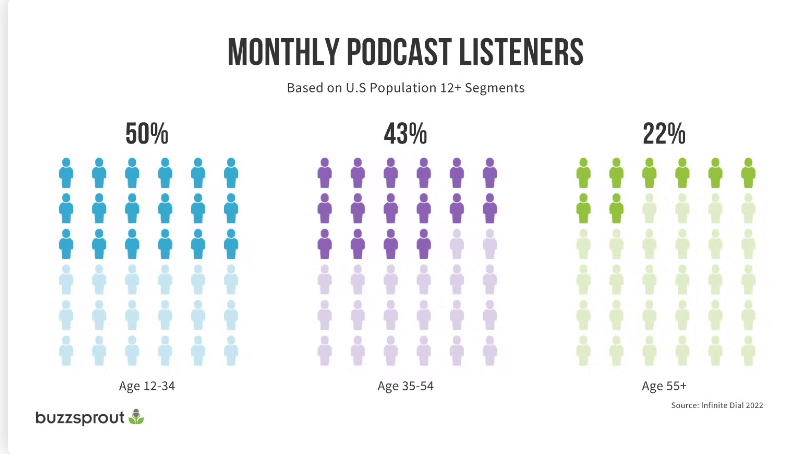
For example, 50% of Americans ages 12-34 listen to podcasts monthly, and 43% of 35-54-year-olds.
All that said, don’t forget the most important reason to start a podcast: a more intimate connection with your audience.
Podcast content allows you to speak directly to them and prove your expertise in a much more direct way.
Generally, podcast listeners give more time and attention to a podcast than a written article. You may have their undivided attention for 30 minutes, a stark contrast to the 90 seconds they might spend scanning a blog post.
This makes podcasts more intimate than written content and may build trust and brand awareness faster. Plus, a podcast is a fantastic demonstration of E-E-A-T, which adds to your credibility in both the eyes of searchers and search engines.
Lastly, if you publish your podcast episodes on your website with helpful show notes or transcriptions, those episodes can rank in search engines for queries your audience is searching for.
Bottom line: Podcasts are great for your brand and great for SEO.
Get the daily newsletter search marketers rely on.
<input type=”hidden” name=”utmMedium” value=”“>
<input type=”hidden” name=”utmCampaign” value=”“>
<input type=”hidden” name=”utmSource” value=”“>
<input type=”hidden” name=”utmContent” value=”“>
<input type=”hidden” name=”pageLink” value=”“>
<input type=”hidden” name=”ipAddress” value=”“>
7 best practices for starting a podcast
Interested in starting a podcast? Start here.
1. Start small, then invest
The second after you decide to start a podcast, don’t run out and immediately buy expensive equipment.
Instead, start small. Use your smartphone and an inexpensive microphone to record your first episodes. Test how your podcast is received and determine whether you can grow it.
If the answer is yes, you can slowly invest in better recording equipment (like a smart microphone that can hone in on your voice and filter out background noise, a headset, and audio editing software), creative help (like a sound mixer or editor), and fancy graphics for cover art.
2. Choose a topic and format
One of the first tasks for creating a podcast is to choose a topic and format.
- Topic: What will your podcast be about? What will you cover?
- Format: How will your podcast be presented? One host? Two or three? Will you tell stories? Do interviews? Share knowledge?
The best way to uncover your main topic and format? Research.
Audience research
What do they want to hear from you? What are they interested in?
What problems or pain points do they have that you could address in your podcast?
Topic research
Find a broad overarching topic that ties into your expertise and overlaps with your business.
If you publish other content, like blogs, consider choosing the same topic area for your podcast. This gives your podcast cohesion and ties it to your other content.
You can even repurpose blog content for podcast episodes, and vice versa, if they’re thematically and topically linked.
Competitor research
Do your competitors have podcasts? What podcasts exist out there on your topic?
Look at what the competition is doing, how they format episodes, and what information they share. How can you differentiate?
3. Outline or script episodes
Before you jump into recording, you need a rough idea of what you’ll cover in each episode and how you’ll do it.
Start by brainstorming topics for at least your first 10 episodes. This will give you an idea of the mileage you’ll get out of your podcast topic/theme and help you keep each episode cohesive and relevant.
(If you struggle to come up with podcast episode topics after the first 10, that might be a sign that you need to broaden your theme or tweak it.)
Then, after your first few episode topics are set, you can write a brief outline of talking points for episode one. You don’t have to script every word you say (unless that helps you!), but you should give yourself a roadmap so you don’t get lost while recording.
Remember, each episode should have a main topic and a goal attached. You need to give listeners a reason to stay with you. Just talking randomly for 20 minutes won’t provide any value.
4. Push through initial discomfort – just press record
With your first episode outlined or scripted, you can press record.
If you’ve never podcasted before, you may have a few false starts before you get into a groove. It may feel strange or unnatural.
The best thing to do is push through and just get your recording done. Over time, you’ll get more comfortable. Don’t give up just because things didn’t go perfectly the first time you tried. You will get better at this the more you do it!
5. Include an intro and outro
Almost all professional-sounding podcasts include a short introduction, where listeners may hear a snippet of music and the host welcoming them to the podcast and introducing the episode topic.
Then, to give listeners a satisfying sense of completion, include an outro (a.k.a., conclusion) that mirrors the intro but instead signs off and sets up expectations for the next episode.
These two bookends help your podcast sound more polished and organized, which listeners enjoy.
6. Optimize
Optimizing your podcast gives it the best chance of being found by listeners. There are a few key areas to focus on for optimization:
- Podcast title: Keep it short, sweet, and relevant to your brand and chosen theme.
- Podcast category: Choose the category that best fits the content of your podcast.
- Podcast description: This description is what potential listeners will read to discover what your podcast is about and whether they want to listen. Keep this user-focused and make sure to include relevant keywords.
- Podcast cover art: Keep it simple, clear, and eye-catching. Don’t try to cram too much text on your cover art. If you can, invest in a graphic designer to create this for you. If you don’t have the means for that right now, try using templates on Canva.
7. Choose a podcast hosting platform
Finally, when it’s time to submit your podcast to platforms like Spotify or Apple Podcasts, know that you need to have a separate host for your audio files first.
Your podcast hosting service stores your podcast episodes and generates an RSS feed, which is what you’ll submit to podcast platforms.
You’ll only have to do this once, as the RSS feed should update automatically when you upload new episodes to your host service.
Hosting services to check out include Podbean, Buzzsprout, or Transistor.
5 great podcast examples
Now that you understand the basic steps to starting a podcast, it’s time to get some inspiration.
Here are some excellent examples of brands, creatives, journalists, and businesspeople doing this medium justice.
Branded podcast: Inside Trader Joe’s
Trader Joe’s is a grocery chain known for its unique products and seasonal items.
On its podcast, hosts go inside stores and behind the scenes to give you the scoop on cult products and how the company works.
Advice podcast: Not Another Anxiety Show
Host Kelli Walker is a registered nurse, certified health and wellness coach, and former agoraphobe.
This anxiety-focused podcast offers guidance, tips, and resources for working through the disorder from Kelli and a myriad of experts.
Fictional podcast: Limetown
This fictional podcast tells the story of the strange disappearance of over 300 people from a small Tennessee town.
It plays out like you’re listening to a real investigative podcast, which makes it even more immersive. This podcast was so popular it was turned into a TV show.
Finance podcast: Money Girl
The Money Girl podcast is hosted by a personal finance and business expert, Laura D. Adams, who breaks down complex financial and small business topics for listeners, making them fun and easy.
Investigative podcast: In the Dark
This award-winning podcast features in-depth investigative journalism on true crime stories gone awry. Each season focuses on one case and dives into every detail. As it happens, the second season was instrumental in helping free a man from prison.
Note: True crime podcasts have exploded in popularity since “Serial” was released in 2014. The best of them are great examples of storytelling and are worth a glance for inspiration.
Ready to start your podcast?
If by now you’re excited to start your podcast, that’s a great sign.
The best thing you can do is dive in with enthusiasm because that passion will show up in your end product.
Any person, brand, or creator can start a podcast.
Just remember to start small, research and plan your topic based on what your audience would love to hear, roughly outline what you’ll say in each episode, and take the time to optimize.
Happy podcasting!
The post Podcasts: A content guide for beginners appeared first on Search Engine Land.
Courtesy of Search Engine Land: News & Info About SEO, PPC, SEM, Search Engines & Search Marketing
Monday, February 13th, 2023
Google AMP stories launch
In 2018, Google launched a new, visually rich mobile content format designed to generate more engagement from users.
Breaking with previous guidance, Google didn’t intend for this type of AMP content to match your non-mobile content. Instead, this mobile-only content was supposed to be unique.
Specifically, Google said AMP Story content should be “fulfilling and standalone.”
In addition to Hearst and The Washington Post, Google worked with CNN, Meredith, Mashable, Mic, Vox and Condé Nast to develop and roll out AMP Stories.
Dig deeper:
Also on this day
2020: Google’s Danny Sullivan referred to the company’s advice given around “several updates” in November 2019.
2020: There were new requirements for agencies to achieve and maintain Google Partner status starting in June.
2020: An update to the help page about adding keywords to improve visibility in local search results was disputed by local SEOs and quickly removed.
2020: In TechTarget’s recent earnings report, the company said unpaid traffic represented 94% of overall traffic in the quarter.
2019: Business owners with verified Google My Business listings could reply to reviews left about their business directly in Google Maps on desktop.
2019: With the Assistant on a billion devices, the move was inevitable.
2019: Clicking on the join waitlist button opened a screen that identifies the current wait time and enabled users to input their party size.
2018: The suggestions either loaded on delay or when a user clicked on a result and then clicked back to the search results.
2018: The new “inclusive” look was in response to the European Commission’s antitrust ruling against Google.
2017: Many webmasters and SEOs were noticing some significant changes in Google’s search rankings algorithm.
2017: Google’s people also ask feature gained a new way for searchers to explore topics in the desktop and mobile search results.
2017: Users could keep track of saved places and share lists with others via text, email and popular messaging apps.
2015: The data and tools had stopped updating Feb. 7.
2015: The latest images showing what people eat at the search engine companies, how they play, who they meet, where they speak, what toys they have, and more.
2014: Techniques to make infinite scroll pages and faceted navigation more search engine friendly.
2014: EU Commissioners were considering forcing additional discussions or preventing the settlement from becoming final.
2014: Bing Ads had enabled over 60% of the mobile traffic on the Yahoo Bing Network to run sitelinks in the U.S.
2013: Some of the interesting trends we saw on Google due to the State of the Union address.
2013: Google Flu Trends overshot the percent of the U.S. population with influenza-like illness by nearly double what the CDC reported.
2013: It contained snow depth statistics, new snow stats within 24 and 72 hours, the conditions of the snow, the lifts open on the mountain, the current weather and more.
2013: Search activity was up 11% in January over December, to almost 19.5 billion “core” searches.
2012: Google also initially reconfirmed that requiring cookies “is not something we’re testing or rolling out.”
2012: Google introduced improved results that shortened the time from symptom-related search to the discovery of potential medical causes and conditions.
2010: Google announced three tweaks to Buzz (including changing auto-follow to auto-suggest) and offered an apology for what it called a “challenging week.”
2009: Google said it shouldn’t be blamed for terrorist use of Google Earth.
2009: The good, bad, and ugly of Google Analytics apps on the iPhone (Analytics App, myAnalytics and Analytics Pro).
2009: “Google is great for Google, but it’s terrible for content providers, because it divides that content quantitatively rather than qualitatively.”
2009: developers can start charging for their apps and consumers will start gaining access to and paying for selected apps on Android phones.
2009: MyWeb launched in 2005, as part of Yahoo’s vision for a “very individual Web.”
2008: The policy was remaining the same, but starting April 1, Google would begin “strictly enforcing” it.
2008: They checked 66.5 million URLs and found that 3.4 million were “suspicious” and 3.4 million were malicious, pointing to 181,699 landing sites.
2008: Antitrust realities were likely at the heart of Google’s diminishing interest in a search deal.
2008: As Yahoo was laying off its promised 1,000 workers.
2008: The landing page was targeting U.S.-based Spanish-speaking customers.
2008: This consolidation created a global search agency with offices on multiple continents.
2008: The 12-page piece was named Fashion for Work at the Google Headquarters and highlighted model Britni Standwood throughout the Googleplex.
2007: For any unverified business listing, Google would show a “report incorrect data” link that took you to a page to easily notify Google of the problem.
2007: Google’s “This site may harm your computer” message linked directly to a Google help document explaining the message in more detail.
2007: The icon would be updated to a badge format similar to the Google Checkout buttons used by merchants since the program started.
2007: A Belgium court found that Google did violate copyright when including material from several Belgian newspapers in its search index.
2007: It sought to marry InfoSpace’s carrier relationships and content expertise with FAST’s search technology and PPC platform on mobile devices.
2007: Those wanting to target the UK region would have an option to specify UK keywords only and be shown related keywords based on that data.
2007: AOL purchased SingingFish.com in November 2003.
2007: Messages included “I love you more than links from Google itself,” “Roses are red, violets are blue, link bait is fun and so are you.”
2007: Eurekster added Q&A functionality to Swickis (social site-search widgets) and the ability for site users to add links directly into the site’s index.
From Search Marketing Expo (SMX)
Past contributions from Search Engine Land’s Subject Matter Experts (SMEs)
These columns are a snapshot in time and have not been updated since publishing, unless noted. Opinions expressed in these articles are those of the author and not necessarily Search Engine Land.
< February 12 | Search Marketing History | February 14 >
The post This day in search marketing history: February 13 appeared first on Search Engine Land.
Courtesy of Search Engine Land: News & Info About SEO, PPC, SEM, Search Engines & Search Marketing
Sunday, February 12th, 2023
Google penalizes JCPenney for link scheme
In 2011, JCPenney was caught engaging in link schemes and, as a result, found itself on the receiving end of a Google penalty.
The New York Times was apparently perplexed by how well jcpenney.com ranked in organic search for practically everything the retailer sold. So they asked someone familiar with SEO to look into it.
What they found: JCPenney’s site had thousands of peculiar links pointing to it with very descriptive anchor text. The Times shared its findings with Google – and Google took manual action. The JCPenney website was nowhere to be found on Google for the queries they had previously ranked number one for.
JCPenney said they knew nothing about the links – and subsequently fired their SEO firm.
Read all about it in New York Times Exposes JCPenney Link Scheme That Causes Plummeting Rankings in Google.
Also on this day
2020: Annotations were available in campaign-level change reports in the Google Ads UI.
2020: Smart ran MyBlogGuest, which got hit hard when Google cracked down on guest blogging.
2019: Fourth-quarter reports from Marin and Merkle highlighted the importance of Shopping ads for merchants’ search advertising strategies.
2019: Analyst firm Juniper Research predicted “nearly 8 billion digital voice assistants to be in use by 2023.”
2018: The deal effectively ended Getty’s European antitrust complaint against Google.
2016: Google discussed internally if they should add an SEO certification program and decided not to do so.
2016: Terminology changes came with some new functionality, including the ability to set different CPA targets at the ad group level within the same bid strategy.
2016: Google added a drop-down menu on the image search result page for mobile devices and tweaked some more user interface features.
2016: Streetmap had sued on grounds that putting Google Maps at the top of search results was an “abuse of competition.”
2016: The latest images showing what people eat at the search engine companies, how they play, who they meet, where they speak, what toys they have and more.
2015: Google released the alpha version of their new search queries report in Google Webmaster Tools to a small number of Webmasters for feedback and testing.
2015: After buying Travelocity the previous month, Expedia grabbed Orbitz in competitive bidding.
2014: He answers the question “What’s it like to fight webspam at Google?”
2014: When Google took action against itself – Google Chrome, Beat That Quote, Google AdWords (2x) and Google Japan.
2014: An article asserted that Bing search results for Chinese language speakers in the U.S. were radically different than those in English for controversial terms such as “Tiananmen Square” or “Dalai Lama.”
2013: The company said that as of December 2012, mobile devices accounted for 23.4% of all US paid-search clicks.
2013: Among the changes, Bing transitioned the training segments from video based to text based content.
2013: An “Explore” search box was added at the top of the screen.
2011: NPR’s “Wait Wait… Don’t Tell Me” quiz show did a funny send up over Google’s accusations that Bing was copying Google’s search results.
2010: The feature gave suggestions on if you should increase or decrease your bids on certain keywords.
2010: Google made some subtle changes to its mobile homepage and searchbox.
2010: “It’s clear that interest in Buzz may extend beyond the current Gmail base, and we’re open to serving that community.”
2010: So that people could get a look at new functionality and Google can get early feedback on potential new features to introduce.
2010: A transcript of an impromptu Q&A with Google cofounder Sergey Brin on Google’s decision to leave China.
2010: Bing’s January share wiped out its drop from December.
2010: Jerry Yang, the former CEO, would be selling 3 million shares and David Filo would sell up to 2 million shares.
2009: The birth of the rel="canonical" link element. The search engines would use this as a hint, not as a directive.
2009: Google Audio Ads and Google Radio Automation wasn’t as successful as they hoped
2009: It cost $51.7 million.
2009: It helped runners, skiers, bikers and other outdoor enthusiasts capture their routes and performance using the phone’s GPS chip.
2009: Yahoo executive Larry Heck would be working on Microsoft search.
2008: IDC reported that overall Internet advertising had grown 27% year over year to $25.5 billion in 2007.
2008: 30 cities had the street views feature.
2008: Yahoo appeared to have replaced Google as the search provider for T-Mobile in Europe, while Google became a major search partner of Nokia.
2008: The companies were seeking developers, project managers, and key executives who may have wanted to jump ship ahead of a possible Yahoo-Microsoft merger and upcoming layoffs. Related: Updated: Yahoo Layoffs Happening Now
2008: Microsoft announced changes to their Live Search crawler intended to reduce bandwidth resources during the crawl of a site.
2007: Google is said to have supported two websites that allegedly offered pirated movies in part by an ad rep suggesting they bid on terms like “bootleg movie download.”
2007: Many more people were reporting seeing Google Sitelinks update.
2007: A variety of expected mobile announcements ahead of 3GSM World Congress.
2007: We’ve never heard of a search engine advertising for those seeking another search engine on a third search engine. Until now.
2007: It was an incredible challenge.
2007: It featured the ability for consumers to search directly from maps and share oneSearch results, news articles and the service directly with friends.
2007: Was this a way for these companies to offer mobile services without having to work with mobile carriers?
2007: In related news, it seemed like Google’s North Carolina deal was going to be reviewed by the Senate Finance Committee.
Past contributions from Search Engine Land’s Subject Matter Experts (SMEs)
These columns are a snapshot in time and have not been updated since publishing, unless noted. Opinions expressed in these articles are those of the author and not necessarily Search Engine Land.
< February 11 | Search Marketing History | February 13 >
The post This day in search marketing history: February 12 appeared first on Search Engine Land.
Courtesy of Search Engine Land: News & Info About SEO, PPC, SEM, Search Engines & Search Marketing
Friday, February 10th, 2023
Google is updating its Lighthouse 10 tool to remove one of the overall Core Web Vitals metrics, Time To Interactive (TTI).
Google will be assigning the TTI weight to Cumulative Layout Shift (CLS), which will give CLS a total of 25% of the overall performance score.
TTI is not a Core Web Vitals metric used in Search Console or ranking, but it was used in Lighthouse, Google’s developer tool.
What Google said. Google posted on its Chrome developer blog:
“The venerable Time To Interactive (TTI) metric is being removed in Lighthouse 10, concluding the deprecation process started in Lighthouse 8. TTI’s 10% score weight is shifting to Cumulative Layout Shift (CLS), which will now account for 25% of the overall performance score.”
– Brendan Kenny, What’s new in Lighthouse 10
Does it matter for ranking? Technically, this might have zero impact on overall rankings in Google Search. Core Web Vitals is a minimal ranking factor in general and the current Core Web Vitals includes largest contentful paint (LCP), first input delay (FID), and cumulative layout shift (CLS). TTI is not included.
John Mueller from Google confirmed this change does not impact rankings, as we originally reported:
CWV are independent of Lighthouse scores (there might be some components that overlap, but the scoring Lighthouse does is separate).
— johnmu is a ranking factor and so are you  (@JohnMu) February 10, 2023
Lighthouse 10 changing. Just the Lighthouse tool is changing. The scores you see in Google Search Console specifically likely won’t change related to TTI being removed. Now, Lighthouse 10 will assign the weights as follows:
- Total blocking time 30%
- Cumulative layout shift 25%
- Largest contentful paint 25%
- Speed index 10%
- First contentful paint 10%
What are Core Web Vitals? It is a set of metrics Google introduced in 2020. Google defines it as:
“The subset of Web Vitals that apply to all web pages, should be measured by all site owners, and will be surfaced across all Google tools. Each of the Core Web Vitals represents a distinct facet of the user experience, is measurable in the field, and reflects the real-world experience of a critical user-centric outcome.”
The current set of Core Web Vitals focuses on three aspects of the user experience – loading, interactivity, and visual stability – and includes the following metrics (and their respective thresholds):
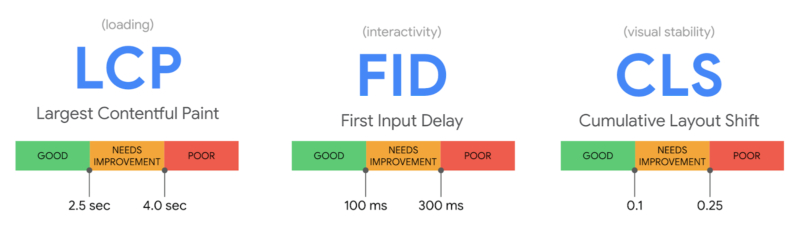
LCD, FID and CLS. Here are the thresholds for largest contentful paint, first input delay and cumulative layout shift:
- LCP: measures loading performance. To provide a good user experience, LCP should occur within 2.5 seconds of when the page first starts loading.
- FID: measures interactivity. To provide a good user experience, pages should have a FID of less than 100 milliseconds.
- CLS: measures visual stability. To provide a good user experience, pages should maintain a CLS of less than 0.1.
More details. Google has a help document for this specific report.
Google said that this report is based on three metrics: LCP, FID, and CLS. If a URL does not have a minimum amount of reporting data for any of these metrics, it is omitted from the report. Once a URL has a threshold amount of data for any metric, the page status is the status of its most poorly performing metric.
Status metrics are evaluated against the following boundaries:
| |
Good |
Need improvement |
Poor |
| LCP |
<=2.5s |
<=4s |
>4s |
| FID |
<=100ms |
<=300ms |
>300ms |
| CLS |
<=0.1 |
<=0.25 |
>0.25 |
Why we care. I asked Google if there will be any changes related to rankings with this change but it seems unlikely. It is worth noting that Google, in general web development, does not care about TTI anymore but does care more about CLS.
So if you see these changes in Lighthouse, just keep these in mind.
John Mueller from Google confirmed this change does not impact rankings, as we originally reported:
CWV are independent of Lighthouse scores (there might be some components that overlap, but the scoring Lighthouse does is separate).
— johnmu is a ranking factor and so are you (@JohnMu) February 10, 2023
The post Cumulative Layout Shift (CLS) may gain more weight in overall Google Core Web Vitals or maybe not… appeared first on Search Engine Land.
Courtesy of Search Engine Land: News & Info About SEO, PPC, SEM, Search Engines & Search Marketing
Friday, February 10th, 2023
Yahoo officially rejects Microsoft
In 2008, rumor became reality as Yahoo rejected Microsoft’s $45 billion bid to buy Yahoo.
The company concluded that the proposal substantially undervalued Yahoo and was not in the best interests of Yahoo and its stockholders.
Microsoft basically rejected Yahoo’s rejection, calling it “unfortunate” and pledging to “pursue all necessary steps” to get what it called its “full and fair” proposal to be accepted.
In other words, this wasn’t the end of the story.
Dig deeper:
Also on this day
2022: The company was working on recovering the data.
2022: The design was a throwback to 2017’s green, boxed ad labels.
2022: Automated and manual extensions could be shown together, Google Ads added a report and they could be added at ad group, campaign, or account level.
2021: Google said it could have a 7% impact on search queries.
2021: Google wanted to display images that were relevant yet visually distinct.
2021: Businesses could message customers through their web browser, not just the mobile app.
2021: Light mode showed a black ad label on a white background but on dark mode, it showed a gray ad label on a black background.
2021: Employers, landlords and credit providers could keep their ads from showing to people of “unknown gender,” enabling discrimination against nonbinary individuals.
2021: Keys to diversity and inclusion include mentorship and promotion of Black search marketers.
2020: It seemed like Google had pushed out some ranking algorithm change over the weekend, resulting in a large shift in the rankings of many websites.
2020: New Posts would publish after the “fix” and rejected Posts would go live that week.
2020: Scale expanded text ad messaging by device or audience – and it worked with Google import.
2020: The products were intended for national and multi-location brands.
2020: After a disappointing opening weekend, the film’s new title began showing up on movie ticket booking sites last night.
2019: The Google webmaster trends analyst also touched on topics like the possibility of an Indexing API, whether internal over-linking penalties exist and how the clustering of duplicate pages works.
2019: The rollout of click share could be seen as a follow-up to the position metrics Google introduced the prior fall, as average position had become less useful.
2019: Bing Ads issued additional guidance for advertisers wanting to target multi-lingual users who may search in multiple languages.
2019: Google was actively testing augmented walking directions with select Local Guides.
2016: GTINs would be required for brand name products sold by multiple merchants.
2015: Google’s John Mueller said there was no whitelist (or “exception lists”) for the Penguin and Panda algorithms.
2015: A $20 billion holiday in the U.S., Mother’s Day-related searches started rising roughly a month in advance, though search habits varied by gift category.
2014: Google started showing complete restaurant menus in its search results when a query specifically looked for menu information.
2014: Google was suggesting racist terms when users searched for a number of UK cities, including Bradford, Leicester and Birmingham.
2014: Bing Ads introduced the full set of conversion fields to all Performance reports.
2014: Business profile pages were changed to emphasize images, featured user reviews and key pieces of local content.
2013: Cutts answers: “How do I know which links to remove when I get an ‘unnatural links’ message?
2013: It was believed that Google paid Apple roughly $3.20 per iOS device, which would avoid the accounting issues arising from a revenue-sharing agreement.
2013: Google led in the number of searches, but had seen a marked drop in unique searchers over the past few months.
2013: The Apple-like ad showed people around the world getting useful and “just in time” information from Google Now.
2013: Although Gates never really said which search engine he used.
2012: Google registered 14 domains.
2011: Google dropped from 66.6% to 65.6% share, still way in front of Bing, Yahoo, and their combined numbers.
2011: Critics argued that once Google became a participant in the travel services market, it might use its advertising dominance to steer consumers to its services, further limiting competition.
2011: Google representatives would meet with local businesses to talk up the benefits of promoting their goods and services through Places.
2011: Nokia would build and distribute Windows Phones as its primary competitive offering to go head-to-head with the iPhone and Android.
2011: Search Engine Land’s 10 most popular stories from January 2011.
2010: A vocal contingent of SEOs were up in arms over Google “offering SEO consulting services.”
2010: For $50 million.
2010: Brin and other Googlers either needed to be enabled to tap into the public version of Google Buzz or open new accounts.
2010: If you searched for something and clicked through to a site with AdSense ads on them, Google would store the query that led to that website and use it 2 or so hours later, when you visited another website with AdSense ads on them.
2010: The PDF download was 28 pages long, 82 questions and answers deep and broken out in 12 categories.
2010: Bing announced that in the near future, it would allow people using StreetSide to look “up” virtually and see what was in the sky.
2010: Yahoo sought to dispel the “misconception” that Yahoo was no longer investing in search.
2009: Cutts said Google.co.jp PageRank was ~5 instead of ~9 and he expected it to stay that way for a while. He also confirmed it was a paid link penalty.
2009: It showed the continuing ascent of Google Maps and the simultaneous decline of MapQuest traffic during 2008.
2009: You could append your current location to your email signature, when you used Gmail or Google Apps email within the Gmail interface.
2009: Microsoft was starting to integrate FAST Search & Transfer’s capabilities into its other products and to market FAST more aggressively.
2009: Ask made a bid to improve its search index and efficiency, having completed a move to a new datacenter.
2009: In exchange for the introduction of fees, BOSS added several new features. Key among them was the ability to monetize results.
2009: Twhirl to the rescue.
2008: Complainant claimed when you turned his social security number upside down, it spelled Google.
2008: Rand Fishkin was slated to share how he popped the question to his fiancee.
2008: Instead of going skiing, as they had traditionally done for their annual company trips, Google went to Disneyland.
2008: Google Images search team debunked a rumor that Google censored an image of an Egyptian football player stripping off his team jersey during the African Cup Of Nations to show a “Sympathize With Gaza” T-shirt underneath.
2008: Maker of the T-mobile “Sidekick” device and the Danger operating system and platform.
2008: Would Android be the success Google was hoping for?
From Search Marketing Expo (SMX)
Past contributions from Search Engine Land’s Subject Matter Experts (SMEs)
These columns are a snapshot in time and have not been updated since publishing, unless noted. Opinions expressed in these articles are those of the author and not necessarily Search Engine Land.
< February 10 | Search Marketing History | February 12 >
The post This day in search marketing history: February 11 appeared first on Search Engine Land.
Courtesy of Search Engine Land: News & Info About SEO, PPC, SEM, Search Engines & Search Marketing
Friday, February 10th, 2023
Google will begin to accept and run ads for online horse racing in the following states:
- Maryland
- Pennsylvania
- West Virginia
- Virginia
The Google Ads Gambling and games policy for United States country-specifics will be updated in February 2023.
Advertisers must apply for certification. Application for certification will be open to advertisers who wish to promote online gambling content in the above states on February 22, 2023.
The Gambling and games policy page will be updated when the policy goes into effect.
Why we care. If you or your clients are involved in sports betting, or your brand is in this field, will soon have the opportunity to advertise on Google and target users in Maryland, Pennsylvania, Virginia, and West Virginia, thereby expanding your reach to potential customers.
The post New updates to Google’s gambling and games policy appeared first on Search Engine Land.
Courtesy of Search Engine Land: News & Info About SEO, PPC, SEM, Search Engines & Search Marketing
Thursday, February 9th, 2023
When a consumer chooses a business, one of the first things they look at is their Google reviews.
Consumers want to know what other people who have used a company previously think about that business before agreeing to give them their money.
This is why it is essential for business owners to keep track of their Google reviews as well as their competition.
Keeping track of your reviews
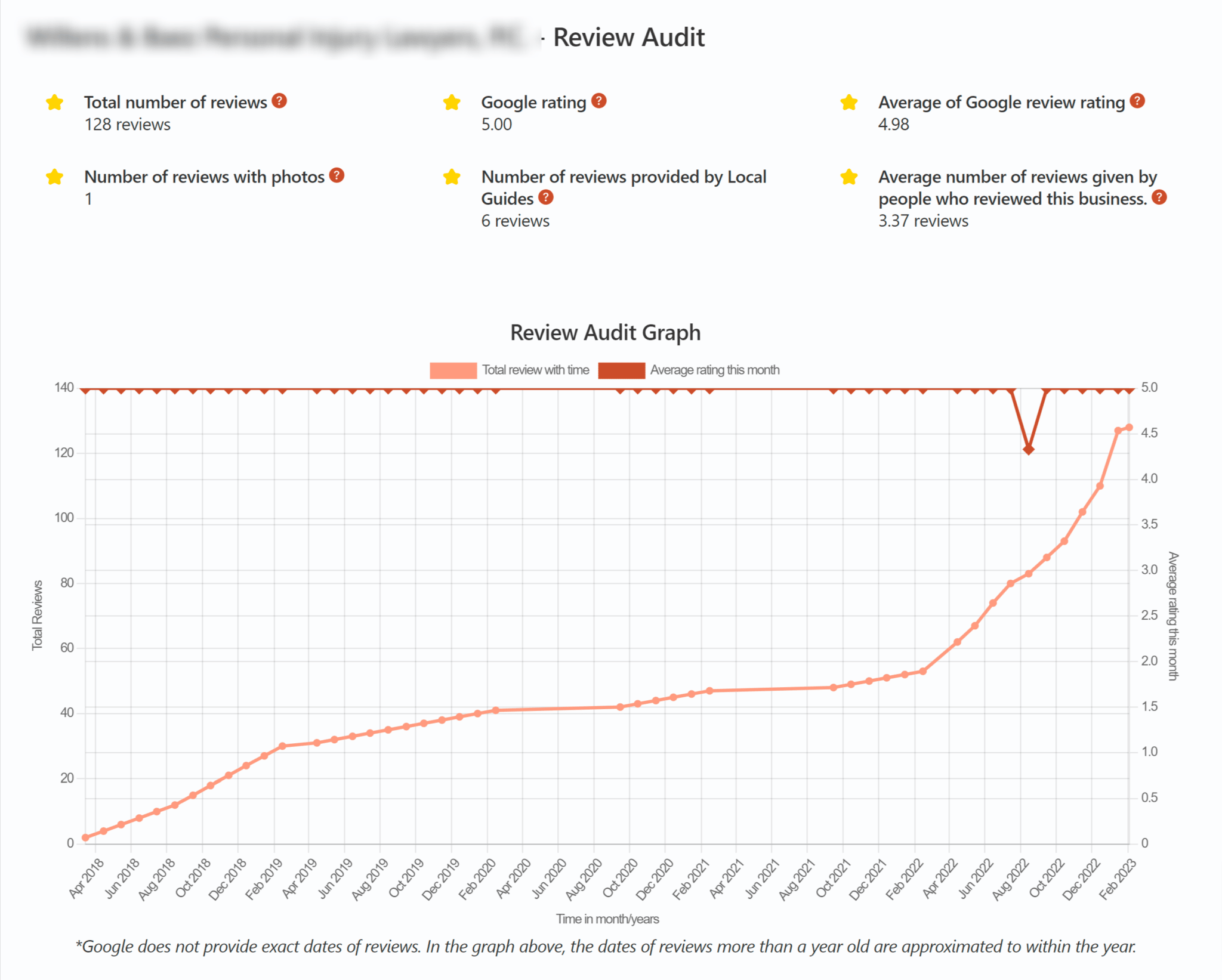
There are many tools on the market these days, but I have yet to find one that keeps track of reviews that get deleted. So, I think it is important to keep track of this yourself.
GMB Everywhere
GMB Everywhere is a great tool for keeping track of the number of reviews you have and your average rating.
If you keep track of the number of reviews you have in a spreadsheet you will be able to see if you are losing reviews when Google does “review sweeps.”
In addition, you can see if your average rating is increasing or decreasing.
Of course, if you realize your average rating is decreasing, you need to audit your reviews to determine what you can change about your business.
PlePer
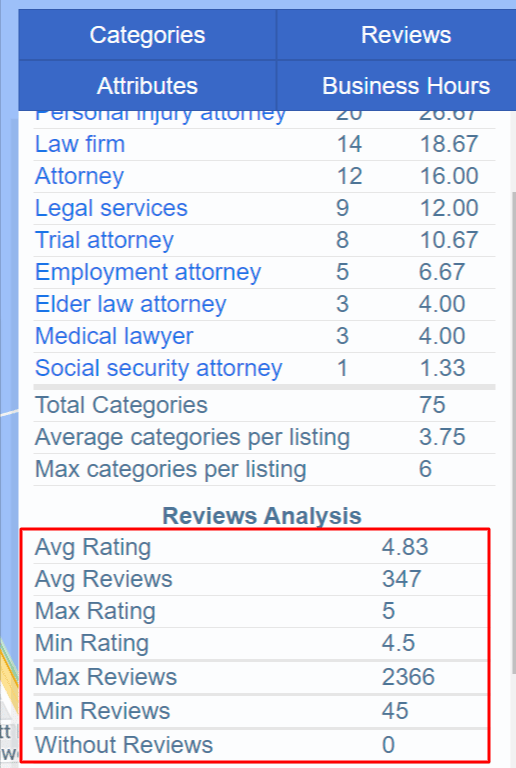
PlePer is another great tool to help businesses know about their competition.
To use it, enter a keyword the tool will tell you the average number of reviews and the average rating based on the businesses listed.
Since we know reviews are so important, keeping track of what your competition is doing matters.
If you keep track of this, you will know if you need more reviews (compared to your competitors) and what your average rating is (compared to your competitors).
All in all, we know that reviews are important for all businesses.
So, it is up to the business owner to ensure they are getting enough reviews and that their review rating stays consistent.
Get the daily newsletter search marketers rely on.
<input type=”hidden” name=”utmMedium” value=”“>
<input type=”hidden” name=”utmCampaign” value=”“>
<input type=”hidden” name=”utmSource” value=”“>
<input type=”hidden” name=”utmContent” value=”“>
<input type=”hidden” name=”pageLink” value=”“>
<input type=”hidden” name=”ipAddress” value=”“>
The post 2 free tools for tracking your Google reviews appeared first on Search Engine Land.
Courtesy of Search Engine Land: News & Info About SEO, PPC, SEM, Search Engines & Search Marketing



 Source: