Archive for the ‘seo news’ Category
Wednesday, March 29th, 2023
The Google March 2023 broad core update is now officially done rolling out. The update, which started rolling out March 15, took 13 days to complete.
Why we care. Google algorithm updates are critical for all brands, businesses and organizations to be aware of because they can impact how your site performs in search results. And any change in rankings from a core update – positive or negative – can impact your organic traffic, conversions and revenue.
Knowing when Google makes these updates gives you something to point to in order to understand if it was something you changed on your website or something Google changed with its ranking algorithm.
What now? It’s a good time to dig into your analytics to see what improvements you may want to make to your pages and content.
The announcement. Google updated its status dashboard that the update has completed rolling out today, as of 7:26 PDT:
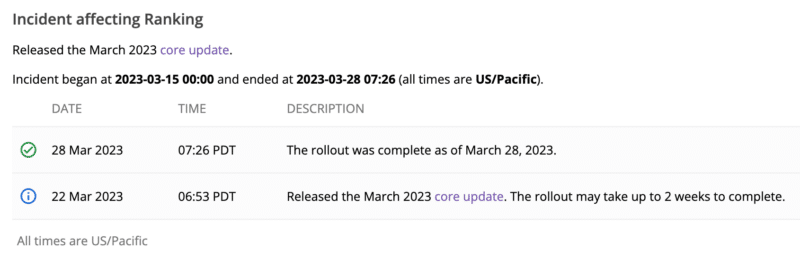
Core updates are big. In general. Google core updates are significant algorithm updates. The early SEO industry chatter suggested this update was a fairly impactful update compared to previous core updates. Now that the update is complete, we will do a report on the impact of this update in the coming days.
What to do if you are hit. Google has given advice on what to consider if you are negatively impacted by a core update in the past. There are no specific actions to take to recover – a negative rankings impact may not signal anything is “wrong” with your pages, according to Google.
However, Google has offered a list of questions to consider if your site is hit by a core update. Google said you can see a bit of a recovery between core updates but the biggest change you would see would be after another core update.
The post Google March 2023 broad core update done rolling out appeared first on Search Engine Land.
Courtesy of Search Engine Land: News & Info About SEO, PPC, SEM, Search Engines & Search Marketing
Wednesday, March 29th, 2023
Google is making two new updates to its Government documents and official services policy.
Why we care. Adhering to the policy helps prevent ad disapprovals, account warnings, or even account suspensions. Staying informed allows advertisers to adjust their ad content and strategy accordingly. Additionally, compliance with the policy demonstrates that advertisers and brands operate responsibly and professionally, which is crucial for building trust with consumers.
The new changes. The date when Google will begin enforcing policy changes from March 31 to May 24. The second change is that Google is removing Germany as a region-specific exception under “Public road access fees and passes.”
Google will begin enforcing the new policy globally on May 24, with full enforcement ramping up over approximately 6 weeks.
The new policy. To recap the changes, the Google Ads Government documents and official services policy will undergo the following updates:
- The policy will be revised to cover only an exhaustive list of applicable categories.
- Regional-specific category exclusions will be added.
- Germany, initially excluded under “Public road access fees and passes” in the January 31 update, will no longer be an exception in the final policy. Advertisers promoting this category and targeting Germany must qualify as a government or authorized provider and apply for the required certification as outlined in the policy.
- Government-issued business identification will fall within the policy’s scope.
- The policy will permit government-authorized providers and discontinue the requirement for “delegated providers.”
Good to know. In February, Google introduced a pilot program for authorized California car registration entities, enabling advertisers authorized by the state of California to process vehicle registrations on its behalf to run ads for the services they’re authorized to provide. This pilot remains unaffected by changes to the enforcement start date.
Breaching this policy will not result in immediate account suspension without prior notice. A warning will be given at least 7 days before any account suspension.
Google encourages advertisers to review this policy update to determine if any of your ads are subject to the policy, and if so, remove them before May 24.
Dig deeper. Review Google’s policy here.
The post Google delays enforcement of Government documents and official services policy appeared first on Search Engine Land.
Courtesy of Search Engine Land: News & Info About SEO, PPC, SEM, Search Engines & Search Marketing
Monday, March 27th, 2023
Google is experimenting with displaying blue badge icons and labels on certain search ads for advertisers who have been verified by Google Ads. The blue label features a blue circle with ridges and a checkmark inside it. This is part of Google’s ongoing advertiser verification program, and it appears that the company is now testing the use of small blue checkmarks for verified advertisers.
Spotted in the wild. Khushal Bherwani first spotted the badge on Twitter.
Why we care. Verification badges can increase brands credibility and trustworthiness with potential customers. When users see the blue badge, they know that the advertiser has been verified by Google, which means that the advertiser has met certain requirements for advertising on the platform. This can help users feel more confident in clicking on the ad and potentially making a purchase or taking another desired action.
Additionally, the blue badge can help the ad stand out from other ads that do not have the badge, potentially leading to higher click-through rates and conversions.
The post Google Ads testing verification badges appeared first on Search Engine Land.
Courtesy of Search Engine Land: News & Info About SEO, PPC, SEM, Search Engines & Search Marketing
Monday, March 27th, 2023

Driving sales, improving lead quality, and boosting conversions have never been more critical – especially in an age of increased privacy concerns. The right marketing technology is your key to getting it done.
Discover dozens of marketing technologies, tools, and solutions – all for FREE and all without leaving your desk: Grab your free MarTech pass now and join us online, this Tuesday and Wednesday (March 28-29)!
At MarTech, you’ll unlock nearly 50 data-rich sessions from world-class brands including Forrester, Sysco, Electrolux, Salesforce, and more:
 Kick-off each day with eye-opening keynotes…
… and get your questions answered in real-time during live Q&A (Overtime!) with select speakers, including the godfather of martech, Scott Brinker, Mission MarTech’s Milton Hwang, and more!
You’ll also explore the critical rise of AI and what it means for marketers during exclusive programming and networking opportunities, including…
Hungry for more? Discuss ChatGPT, GA4, and MOPs challenges with like-minded attendees and industry experts during Coffee Talk meetups – only available live!
And don’t miss these recent additions to the MarTech agenda!
After just a few hours, you’ll be ready to…
- Leverage automation and real-time insights to optimize KPIs
- Reduce marketing spend with a first-party data strategy
- Apply personalization strategies that accelerate customer loyalty
- Support additional revenue streams through audience monetization
- Execute campaigns to help fill your marketing funnel with new consumers
- Reach, engage, and convert more email marketing prospects
- Execute more effective targeting, increase personalization, and improve ROI
…and so much more. Can’t attend live? Explore at your own pace with instant on-demand access, included for free.
Don’t wait… grab your free MarTech pass now and join us online, this Tuesday and Wednesday, March 28-29!
The post Join us online THIS WEEK for MarTech… for free appeared first on Search Engine Land.
Courtesy of Search Engine Land: News & Info About SEO, PPC, SEM, Search Engines & Search Marketing
Monday, March 27th, 2023
Google has just released its Ads Editor version 2.3, advertisers can take advantage of several new features and updates. Let’s see what’s new.
New Features:
- File support for image assets: Advertisers can now conveniently import and export image assets as files in addition to using URLs.
- Card view for image assets: Image assets can now be viewed as cards in addition to the table view.
- Asset support: Full support is now available for upgraded assets such as image assets, automatically created assets, location assets, and business information assets. Legacy data will be deprecated when assets are upgraded.
- Primary Display Status buttons: Certain Primary Display Status (PDS) reasons are now clickable buttons, allowing advertisers to quickly fix issues that may prevent campaigns from serving.
- More PDS reasons: More PDS reasons are now available, including “Limited by bidding target” and “Limited by budget soon.”
- Performance Max text asset automation: Advertisers can now opt-in or opt-out of text asset automation for Performance Max campaigns.
- Add Google video partners recommendation: Editor now shows recommendations to add Google video partners, allowing advertisers to use the same targeting options across video partners for their video campaigns.
- Bid explorer: Editor now shows several recommended bids for Target CPA and Target ROAS bid strategies, including projected improvements for each option.
- Location targeting: Editor now has location targeting for “radius around location groups” and “radius around all locations in linked feed.”
- Discovery ads and campaigns with product feeds support: Editor now supports Discovery ads and campaigns with product feeds, allowing advertisers to show their products in Discovery ads.
- Proper pluralization in messages: Messages are now updated with the correct form of pluralization, which supports other languages.
- Notifications: More notification types are now available in Editor 2.3, allowing users to be more fully informed about the status of their accounts.
Deprecated Features:
- Top content bid adjustment: The “top content bid adjustment” setting is no longer supported and has been removed in Editor 2.3.
- Create Dynamic Search Ads recommendation: Editor version 2.3 no longer shows recommendations to create Dynamic Search Ads.
Dig deeper. Read the announcement from Google here.
Why we care. The new features can help improve the efficiency and effectiveness of your Google Ads campaigns. For example, the support for Discovery ads and campaigns with product feeds can help you expand your reach and show products to more potential customers. The notifications feature can keep you informed about the status of your accounts and allow you to take immediate action to resolve any issues.
The post Google Ads Editor version 2.3 is out with 12 new features appeared first on Search Engine Land.
Courtesy of Search Engine Land: News & Info About SEO, PPC, SEM, Search Engines & Search Marketing
Monday, March 27th, 2023
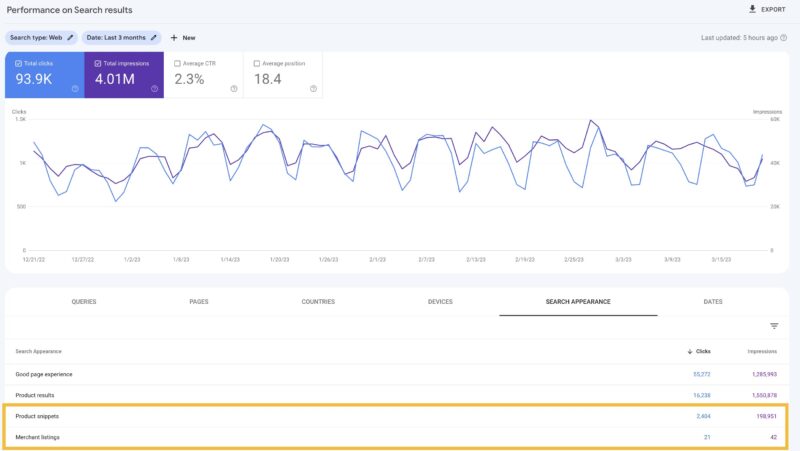
Google has broken out the merchant listings and product snippet reporting into two unique appearances that you can filter on within the performance reports in Google Search Console. Google also broke these out in the Merchant listings and product snippet reports, that it launched last September.
What is new. Google said, “we are adding the ability to measure the impact of Merchant listing by splitting the Product results search appearance into two: Merchant listings and Product snippets.” You can now see how many clicks and impressions you get for those appearances/experiences independently of each other.
The new Merchant listings and Product snippets search appearances can be viewed in two places in Search Console:
- Merchant listings and product snippets reports as an overlay on top of the report charts
- Performance report in the search appearance tab or through a filter
What it looks like. Here is a screenshot of the performance report:
The announcement. Google announced this on Twitter, in these set of tweets:
In September, Search Console launched a new report named Merchant listings, that allows you to check the validity of your product offers for merchant listings experiences. This came in addition to the Product snippet report. Read more at https://t.co/A83TSa4zSb  1/3
1/3
— Google Search Central (@googlesearchc) March 27, 2023
Why we care. Here is more reporting for you all to analyze and work with to implement improvements to your website on. If you have products on your site, you may see these reports and you may be able to use these to implement changes to your website that help you make for a better website and perform better in Google Search.
The post Google Search Console breaks out Merchant listings and Product snippets appearances appeared first on Search Engine Land.
Courtesy of Search Engine Land: News & Info About SEO, PPC, SEM, Search Engines & Search Marketing
Sunday, March 26th, 2023
The 2023 local search ranking factors survey is now out, it is a survey of what local SEO experts rank the most important ranking factors are for both ranking in the Google local pack and also in the Google organic local results.
More survey details. This survey was conducted by Whitespark and surveyed 44 different local SEO experts. It asked these local SEO experts to rank 149 potential local search ranking factors in order of importance across both the local pack and organic rankings.
Local pack factors. The local pack findings showed that these were ranked the most important ranking factors for Google’s local pack:
- Primary Google Business Profile category
- Keywords in your Google Business Profile title/name (which may be against the Google guidelines)
- Proximity of address to the point of search
- Physical address in the city of search
- Removal of spam listings through spam preventative mechasims
- High numerical Google ratings
- Additional Google Business Profile categories
- Verification in Google Business Profiles
- and more
Local organic factors. The local organic ranking factors showed these these were ranked the most important ranking factors for Google’s local pack:
- Dedicated page for each service
- Internal linking across website
- Quality and authority of inbound links to the domain name
- Geographic keyword relevance of domain content
- Keywords in Google Business Profile landing page title
- Quantity of inbound links to domain from locally relevant domains
- Topical keyword relevance across entire website
- Volume of quality content on service page
- and more
Disclaimer. Search ranking factor studies can and have been somewhat controversial over the years. This study asked local SEOs to rate what they think are the most important factors for ranking well in Google’s local results. So keep that all in mind and make sure to read the study in full before just accepting these results as is.
Why we care. While there may be a lot of debate between SEOs and local SEOs as to what are the most important ranking factors, going through a survey like this may help you think about areas that you may not have thought about prior. So give it a read and hope you come up with some new ideas to implement for your clients.
The post 2023 Survey: Local search ranking factors appeared first on Search Engine Land.
Courtesy of Search Engine Land: News & Info About SEO, PPC, SEM, Search Engines & Search Marketing
Sunday, March 26th, 2023
More sites move to Google mobile-first indexing
In 2018, Google announced it had enabled mobile-first indexing for more websites.
This was the first time Google had confirmed it was moving a large number of sites to this mobile-first indexing process. Google told us in October 2017 that a limited number of sites had been moved over.
Websites that were migrated in this batch were following mobile-first indexing best practices and were notified of the change via a Google Search Console message.
Read all about it in Google begins rolling out mobile-first indexing to more sites.
Also on this day
2020: Advertisers could run reports for up to 200 accounts in a Manager account.
2020: A new study looks at how contextual relevance of ads to content influences consumers.
2020: Engagement with the search choice screen had been slowed by stifled smartphone supply and decreased demand.
2020: Many expected client budget and project changes would have a negative effect on their businesses.
2020: A full takedown could result in losing Search Console data and make it more difficult to ramp back up.
2020: Upgrades included the new Verified Merchant Program, new conversion reporting opportunities, and updates to Catalogs and dynamic retargeting.
2019: The data was not conclusive on any specific tactic or type of site impacted by the algorithm change.
2019: Google was retiring the info command because it “was relatively underused” and said the new URL inspection tool gave users much of that data now anyway.
2019: Seed your keyword ideas with more terms, add keywords to existing campaigns and more.
2019: Increased competition between hotels and vacation rentals could increase visibility for rental providers and boost Google Hotel Ads revenue.
2018: More of a bargaining position, it was extremely unlikely to actually happen.
2018: Starting in the US, text ads would show only in the mainline at the top and bottom of search results pages.
2018: Bing also shared more about the platform it built to power intelligent search.
2015: Google was testing removing the divider between the ads and free listings in the search results. Would it lead to more searcher confusion?
2015: Google News ranking algorithm would not (yet) factor in if a publisher was mobile-friendly.
2015: Star ratings for specific products appeared in product listing ads.
2015: Google lobbying reportedly affected agency’s decision in antitrust case.
2015: Search query percentages didn’t line up with overall usage trends.
2014: He said instead, upload the new one, which will replace the old disavow file.
2014: Video Campaigns report in Google Analytics gave advertisers more insights into the performance of their YouTube TrueView ads that are managed through AdWords for Video campaigns.
2014: Another case of Google failing to keep its promise to provide more examples relating to penalties.
2014: After months of testing.
2013: Indeed, Google displayed links to its own vertical search results differently. But so did Bing.
2013: “Ungoogleable” would not become an official word in Sweden.
2013: Its voice search fell quite short of expectations.
2012: BuildMyRank.com confirmed Google had deindexed an “overwhelming majority” of their network as of March 19, 2012.
2012: A man lost his job several years ago and was rejected for new jobs due to the suggestions offered by Google.
2012: Marin also estimated that 23% of Google’s US paid-search spend [by December 2012] would come from mobile campaigns.
2012: It would have been strange for Apple to exclude China’s most popular search engine from the default options.
2012: Roughly one third of iPhone 4S owners used Siri “almost daily.”
2012: The combination offered convenience for local marketers who might have been trying to choose between Yext and UBL.
2010: “Get More” links appeared when a searcher came back to the search results page.
2010: Did this meeting signal that both men (and both sides) were interested in some sort of “healing” or rapprochement?
2010: Fischer would be the VP of Advertising and Global Operations at Facebook.
2009: The Google Webmaster Tools Access Provider Program was renamed Google Services for Websites and expanded to include AdSense, Custom Search and Site Search.
2009: The affected employees would be given time to find new positions at Google and/or help in locating a job elsewhere.
2009: Ask.com was the only “search engine” to have display ads on their search home page at the time.
2009: He was the latest in a string of ex-Yahoos to start working for Microsoft.
2009: Yahoo had “tested 141 different versions of the homepage in search of one that will get users to stick around for longer.”
2009: Yahoo was making a move onto television screens with the Yahoo Widget Engine (YWE), but its first iteration wouldn’t include a Yahoo search box.
2009: To see Yahoo and Microsoft set up offices in Israel and for Yahoo to fix its search marketing platform.
2008: Announced in February, BlackBerry and AT&T were testing the ads.
2008: Google’s founders Larry Page and Sergey Brin, along with CEO Eric Schmidt, renewed their contracts again at a $1 per year salary.
2008: It might have pleased Yahoo’s shareholders and put more pressure on Yahoo management to negotiate in earnest with Microsoft.
2007: More sightings of Google experimenting with additional navigational link placement ideas.
2007: Google showed off how to use Alerts, AdWords, Analytics and AdSense. They also discussed YouTube and how that can impact an election.
2007: Here’s how it happened.
2007: Yahoo removed the links from the individual search listings to the Yahoo Directory because they caused “clutter.”
2007: Yahoo created a “starter” tool that was extremely simple to use (template driven) and offered enough design choices to make it viable and interesting.
2007: Travelocity clarified that 20% of its bookings came from non-branded terms. When Travelocity bought a branded term, 4% of those got an “assist” or a click that converted after someone made an earlier visit via a non-branded term.
2007: ZipLocal was a consolidated “Web 2.0” local search destination growing out of a number of earlier local search sites including Zip411.net and redToronto.com.
2007: It had been offline for over 24 hours.
2007: UK yellow pages publisher and local search purveyor, Yell.com announced that it launched PPC ads on its site as well as targeted banner inventory.
2007: Using “white hat” recommendation, Neil Patel increased Jason Calacanis’s search traffic by 21%.
From Search Marketing Expo (SMX)
Past contributions from Search Engine Land’s Subject Matter Experts (SMEs)
These columns are a snapshot in time and have not been updated since publishing, unless noted. Opinions expressed in these articles are those of the author and not necessarily Search Engine Land.
< March 25 | Search Marketing History | March 27 >
The post This day in search marketing history: March 26 appeared first on Search Engine Land.
Courtesy of Search Engine Land: News & Info About SEO, PPC, SEM, Search Engines & Search Marketing
Saturday, March 25th, 2023
Google Panda patent granted
In 2014, a patent (Ranking search results) written by Google’s Navneet Panda and Vladimir Ofitserov – possibly describing the Google Panda algorithm update, or parts of it – was granted.
However, the fact that Google was granted this patent didn’t necessarily mean it was being used by Google at the time, or that it hadn’t been modified since the application was filed.
Read all about it in Google Granted Patent For Panda Algorithm and dive deeper into Bill Slawski’s Google’s Panda Granted a Patent on Ranking Search Results and Is Ranking Search Results the Panda Patent? on SEO by the Sea. And here’s the patent.
In short, it was about looking at inbound links and how many search queries were made about a particular page/resource, and it modified the “initial scores” for the pages/resources being ranked.
Slawski explained the patent had many parts that worked together:
- Determining, for many groups of resources, a count of independent incoming links to help in the group
- Deciding, for each of the plurality of groups of resources, a count of reference queries
- Choosing, for each of the plurality of groups of resources, a respective group-specific modification factor, wherein the group-specific modification factor for each group get based on the count of independent links and the count of reference queries for the group
- Associating, with each of the plurality of groups of resources, the respective group-specific modification factor for the group, wherein the respective group-specific modification for the group modifies initial scores generated for help in the group in response to received search queries
Also on this day
2022: Were both top results position one or did Google count the one on the right as position two?
2021: Between March 10 and 23 there was a data issue with the crawl stats report, no Google Search performance issues were associated with this data bug.
2021: Google came up with new structured data and Search Console reporting to help educational websites understand which pages had these content types.
2021: Microsoft wanted to build into the core of WordPress the ability to automatically push new and updated URLs to Bing and other search engines.
2021: Ad suggestions marked as auto-apply would start serving after 14 days if no action was taken.
2020: The new design featured an Explore tab with recommendations based on the listener’s interests.
2020: The tool was under ‘Close this business on Google.’
2020: What veteran SEOs were doing to help clients adapt to business during and after the pandemic.
2020: A large majority of consumers expected a recession next year but were spending up to 30% more online, according to a survey.
2020: The push to downgrade streaming quality was primarily focused in Europe with regulatory mandates to reduce network strain.
2020: And a bit about using Python.
2019: Google released its annual webspam report last week to highlight advances against content that seeks to manipulate ranking algorithms and harm users.
2019: Google announced that its AMP and mobile-friendly test tools supported the ability to edit code and rerun the test, live.
2019: Third-party tech support scams, cryptocurrency and weapons ad content topped the areas of attention.
2019: Users could search by time and make travel or transportation decisions accordingly.
2016: The feature was designed to help managers set up a lot of dynamic search ad categories quickly.
2016: Firm argued number of searchers and searches per user have grown significantly on the PC since last year.
2016: The latest images showing what people eat at the search engine companies, how they play, who they meet, where they speak, what toys they have and more.
2015: You could now communicate subdomain moves in Google Webmaster Tools Change of Address tool.
2015: There were no degrees of mobile-friendliness in this algorithm.
2015: New site offered tools, content and solicited business owners to update information.
2014: It was unclear if the issue was with Google or with the publishers.
2014: A website that was using Twitter to renew paid links appeared to have earned a Google penalty.
2014: BrandVerity added a process to its paid search ad monitoring system to give clients direct feedback from Google and the Yahoo Bing Network on trademark violation complaints.
2014: While this wasn’t entirely helpful it did offer some discovery potential.
2013: After over a year of the blocked sites feature not working (and two months after Google promised it would return) Google officially declared they were discontinuing the feature.
2013: Google announced an update to its AdWords trademark policy that streamlined the rules on using third-party trademark keywords in campaigns.
2013: Google’s tool was a result of an agreement with the US Federal Trade Commission over antitust charges.
2013: Bing announced support for HTML5 pushState as a way to implement AJAX on a site in a way that helped Bing crawl and index the URLs and content.
2013: The keyword data was passed from Facebook with a query string [q={keyword}] appended to the end of the referring URL.
2013: LinkedIn launched a new unified search feature and a smarter query intent algorithm that continuously served up more relevant results.
2013: Did Apple see indoor location as a future part of the iOS platform?
2011: “To make our schedule to ship the tablet, we made some design tradeoffs,” said Andy Rubin, vice-president for engineering at Google and head of its Android group.
2011: Facebook was testing new ad targeting options that displayed creative beside content that was contextually relevant, similarly to Google’s AdSense.
2011: He spent a fair amount of time talking about the “misconception” that advertisers can access your personal information, but rather, that Facebook does the targeting based on advertiser selection.
2011: The latest images showing what people eat at the search engine companies, how they play, who they meet, where they speak, what toys they have, and more.
2010: Google executives page was showing up in Chinese language.
2010: Google had initiated a trial of remarketing for display and text ads throughout its content network in March 2009.
2010: The reactions to Google’s partial withdrawal from China continued.
2010: Many of the improvements were focused on the UI, richer vertical experiences, maps and real-time information.
2010: The North American search engine marketing industry was expected to grow 14% from $14.6 billion in 2009 to $16.6 billion by the end of 2010.
2010: Divorce, depression, jealousy, cancer and more.
2009: The My Location feature let you search without needing to input a city name or some other geographic modifier.
2009: An alert on the FareChase website indicated it was the service’s final day and encouraged users to instead use Yahoo Travel.
2008: Google would increase the width of the search box if a query was long enough to warrant a wider search box.
2008: Google did not win any of the 700MHz bandwidth, although it secured the right of open access for third-party devices and software on the C Block.
2008: Was government intervention the secret hope of Yahoo management?
2008: Google, Yahoo, and News Corp.’s MySpace joined forces to announce that OpenSocial, the social networking platform alternative to Facebook’s platform, was going to become a non-profit foundation.
From Search Marketing Expo (SMX)
Past contributions from Search Engine Land’s Subject Matter Experts (SMEs)
These columns are a snapshot in time and have not been updated since publishing, unless noted. Opinions expressed in these articles are those of the author and not necessarily Search Engine Land.
< March 24 | Search Marketing History | March 26 >
The post This day in search marketing history: March 25 appeared first on Search Engine Land.
Courtesy of Search Engine Land: News & Info About SEO, PPC, SEM, Search Engines & Search Marketing
Thursday, March 23rd, 2023
As the sun begins to set on Google Analytics Universal Analytics (UA), businesses are (or should be) gearing up for the transition to Google Analytics 4 (GA4).
With just 100 days left until UA is officially retired, it’s crucial for organizations of all sizes to understand the benefits and challenges of migrating to GA4, as well as the essential steps to ensure a smooth transition.
A Q&A from Steve Ganem, Director of Product for Google Analytics, helps us gain invaluable insights into the key features, challenges, and advantages of adopting GA4.
What are the biggest misconceptions about GA4?
“It’s a new product that is not mature enough to use.”
Despite announcing the migration a little over a year ago, GA4 has been in use by advertisers since 2020, while the idea of web and app analytics has been around since 2019.
With GA4, businesses can access valuable insights to help them make informed and strategic decisions for their operations.
“It’s overly complex and doesn’t provide the same reporting as Universal Analytics”
GA4 has a learning curve, but it’s essential to move beyond the traditional session-based mindset. To address the complexity of the current digital landscape, we developed GA4, incorporating features like a novel event structure and redesigned user journeys.
Although these concepts might not be immediately clear or easy to grasp, businesses that overcome the learning curve will discover that GA4 is designed to efficiently navigate this evolving digital world and anticipate future changes.
“It’s not designed for small businesses.”
GA4 was developed to cater to businesses of all sizes, not just small or large enterprises. The aim was to establish a platform that offers comprehensive reporting capabilities and extensive customization options smoothly.
This seamless experience is evident in features such as the personalized homepage, which presents the most pertinent reports to customers, and predictive audiences, which help identify users with a higher likelihood of making a purchase. GA4 effectively takes on much of the analytical workload, delivering crucial insights directly to businesses.
Should I wait for Jumpstart?
The short answer is no.
For a more detailed response, manual migration remains the suggested method for all businesses. This approach allows for creating a customized property and ensures that everything aligns with your preferred configuration.
This is particularly crucial for advertisers, as their conversion bidding might be linked to Universal Analytics, and it is essential to guarantee a proper transfer to GA4.
While Jumpstart serves as a helpful tool for businesses with limited resources, it only establishes a basic property, making manual migration the preferred option. Furthermore, Jumpstart is being introduced progressively, and the earlier businesses transition, the sooner they can accumulate historical data for year-over-year comparisons.
What are the challenges to migrating and how is Google addressing those?
GA4 was developed for a new era of measurement, which entails new product features and a different measurement approach compared to Universal Analytics. While this doesn’t make it inherently harder, Google recognizes that change can be challenging, and the property’s distinct appearance and functionality compared to Universal Analytics may pose difficulties during migration.
The Setup Assistant. Each tool within the Setup Assistant has been purposefully designed to tackle specific challenges in the migration process, such as property creation, tagging, goal migration, conversion swapping, and more. During preliminary user testing, these aspects were identified by Google as potential challenges and areas where businesses might face difficulties while setting up a GA4 property for the first time.
Search Engine Land posted a guide late last year to give an in-depth look at the Setup Guide. Check it out here.
Additionally, this tutorial has been helpful for many businesses making the transition.
What are the key features in GA4 that businesses should know?
“One of the reasons we’re so excited about GA4 is all of the new features that not only allow for durability in this evolving privacy landscape, but also that bring to life a new way of measurement that has evolved with how the web and app experiences are evolving,” Ganem said.
That said, here are a few that are worth highlighting:
- Built with Google’s AI at its core: Google’s advanced machine learning helps businesses predict future consumer behavior, allowing marketers to get insights about future consumer behavior and activate on those insights. Additionally, marketers can tap into behavioral modeling, conversion modeling and data-driven attribution to get a complete and accurate view of their campaign performance, even as cookies go away.
- Privacy by default GA4 was designed for now and the future, where privacy is paramount. People’s expectations for privacy have changed and, as a result, so has the way we measure. Built with solutions like modeling, consent mode and data driven attribution baked in, it’s automatically set up to help businesses measure in a privacy-centric way, while still getting the insights they need.
- Web + app: By design, GA4 was built for both web and app – something that previous versions of Google Analytics dealt with separately. People move between web and apps seamlessly and measurement should reflect that.
- Customizable reporting: GA4 enables many different levels of reporting, both detailed and at the overview level – giving businesses either a quick look at a particular topic, while also giving them the opportunity to drill down into additional data. With Customized Overview Reports, you can quickly get a summary of your most important reports. Universal Analytics had a large reporting collection that many businesses found overwhelming – mainly because it was trying to be everything for everyone. That is why in GA4 we prioritized a smaller, curated baseline set of reports and a robust custom reporting tool, allowing businesses to create reports relevant for their business exclusively.
- Advertiser workspace: There are currently four advertising reports to provide a quick snapshot and enable you to drill down into performance metrics, attribution models and conversion paths to understand the impact of your advertising campaigns on the business.
- Robust API: GA4 supports a large number of APIs, enabling an even more customized measurement foundation. In GA4 we aim to keep the API up to speed with the features of the product so developers can always take advantage of the latest in GA4 – a notable difference from Universal Analytics, where the API often lacked functionality.
Why advertisers will lose out if they don’t move
Bottom line: for advertisers, ROI is on the line.
Once Universal Analytics property stops processing data on July 1st, 2023, conversions and audiences will stop flowing new data from that property into Google Ads. This could significantly affect the performance of their ad campaigns. It’s critical that advertisers make the switch to GA4, so that they are in a much more stable and durable position.
What happens to Universal Analytics properties after July 1st?
Universal Analytics properties will stop reporting new data July 1st.
To be a bit more specific, they will stop processing data, meaning your standard UA property will no longer operate the way it does today. That said, businesses shouldn’t be surprised when they can still log into their accounts after July 1st – it will take time to completely sunset the product for all businesses.
Historical data will be available for six months to aid with period-over-period comparisons, giving businesses a chance to export their historical data even after the sunset.
Why is it so important to make the move now?
Now is the time.
By making the move you will:
- Get comfortable with GA4. GA4 is a new platform and has new tools and capabilities. They will take time to adjust to and the earlier businesses get their properties setup, the sooner they’ll get accustomed to the new platform.
- Build historical data. Building historical, comparative data is important to a successful analytics property – of any kind.
- Side by side. Being able to use a GA4 property in parallel to an existing UA property will give businesses the ability to see what’s different, what’s the same and what they have in UA that they need to have in GA4. This side by side time is essential, especially for businesses who have put a lot of time and effort into their existing UA properties to date.
Dig deeper. Still confused? Check out more resources:
Why we care. Plain and simple, UA is going away. But according to ChatGPT, here is why GA4 could be better for advertisers.
- Improved insights: GA4 offers better data analysis and insights, allowing advertisers to make more informed decisions and optimize their campaigns effectively.
- Unified measurement: GA4 combines data from websites and mobile apps, enabling advertisers to track user behavior across multiple platforms and devices, providing a more comprehensive understanding of their audience.
- Enhanced audience targeting: With advanced audience segmentation tools, GA4 allows advertisers to create more personalized and targeted campaigns, leading to improved ad performance and higher ROI.
- Machine learning integration: GA4 leverages machine learning algorithms to provide automated insights, recommendations, and predictions, helping advertisers to identify trends and opportunities more efficiently.
- Future-proofing: GA4 is designed to adapt to future changes in user behavior, technology, and privacy regulations, ensuring that advertisers stay ahead of the curve and maintain a competitive edge.
- Privacy compliance: GA4 is built with a strong focus on user privacy and compliance with data protection regulations such as GDPR and CCPA, which is essential for responsible advertising practices.
- Better integration with Google Ads: GA4’s tighter integration with Google Ads simplifies the data import/export process between the platforms, allowing for better analysis and optimization of campaigns.
The post Countdown to GA4: 100 days to make the switch appeared first on Search Engine Land.
Courtesy of Search Engine Land: News & Info About SEO, PPC, SEM, Search Engines & Search Marketing


 Google now shows verified blue tick mark icon on sponsored.