Archive for the ‘seo news’ Category
Monday, April 10th, 2023
The Google search experience “will evolve substantively over the next decade,” according to Google CEO Sundar Pichai in a wide-ranging interview with The Wall Street Journal.
Why we care. AI has already changed Google search – and continues to do so. The question is how much Google search will change in the coming years and what it all means for the organic and paid channels.
Google Search in 10 years. How will large language models (LLMs) and chat (e.g., Bard) change search in the next decade? Is this the end of link-based search? Pichai said it’s tough to predict, but ultimately it will be about understanding what users want and helping them accomplish it:
- “I think the experience will evolve substantively over the next decade. We have to meet users in terms of what they are looking for.”
Pichai was also asked whether the future Google Search may look more like “the original” Google (“10 blue links”) or Bard:
- “It may look like neither, or it will have elements of all that. I think we’ll be able to help users in much deeper ways. If I take a 10-year outlook, this will all be more ambiently available to users in radically different ways than we use them today. I think you’ll be able to do all of this in a much more personalized way, which means by nature we’ll be able to impact users in a deeper, meaningful way.”
The role of AI chatbots in search. Google has been using LLMs to improve search quality and the search experience. Pichai wants to bring the modern LLM capabilities into search – but stopped just short of saying “search” will evolve into “conversation”:
- “We are testing a variety of approaches so I don’t want to comment on the future iterations of it yet, but yes at a high level people come to Google to ask follow-up questions. We’ll be able to give them more powerful tools to be able to do that.”
Commercial potential. Pichai was elusive when asked what kind of commercial potential (e.g., Google Ads) he saw for LLMs and LLM search:
- “It’s tough to carve it out that way. You may be interested in ideas for how to celebrate a birthday, and at some point aspects of it become more commercial. We don’t come into it with the view of, we want to give you this commercial journey. It’s important to get the order right.”
Bard vs. Search overlap. Pichai once again made the point that Bard is not a search product. But, ultimately, Google Search and Bard are searching the web to provide users with answers:
- “Would there be queries which are overlapping? Absolutely. There are things we can do in Bard which may be difficult to do in search, or vice versa. I don’t view this as a constraint. I view this as a great opportunity to innovate.”
He also said Bard was an example of a time when being first “doesn’t matter”:
- “Throughout our history, there are many areas where we haven’t been the first to market something. We didn’t develop the first search engine. We didn’t develop the first browser or the first email product or the first mapping product, and so on.”
From from Pichai. Conversational AI ‘absolutely’ coming to Google Search, says CEO Sundar Pichai.
The interview. You can read edited excerpts from Pichai’s interview with The Wall Street Journal.
The post Google CEO: Search will evolve substantively in next 10 years appeared first on Search Engine Land.
Courtesy of Search Engine Land: News & Info About SEO, PPC, SEM, Search Engines & Search Marketing
Monday, April 10th, 2023
Vidmob has just released its comprehensive report on global LinkedIn advertising trends, providing invaluable insights into the most effective visual elements, text, and creative strategies for capturing audience engagement on this prominent B2B social platform.
The report analyzes over 800 million ad impressions from brands executing paid video advertising campaigns on LinkedIn, spanning both the EMEA region and North America.
Let’s dive in.
The numbers. The survey found that videos including the following elements performed better than those that did not.
- +149% lift in view through 25% when displaying messaging in the opening quarter of a video
- +54% lift in engagement rates with 7-15 sec video duration
- +102% lift in view through 25% with high text contrast
- +175% lift in view through 25% when showing a person in the opening quarter
- +33% lift in click through rate when offer includes ‘Get a Quote’
- +17% increase in click through rate when featuring brand logo in the opening 2 sec
Key takeaways. The survey offers the following takeaways in five different categories.
Creative types. When used with the appropriate duration, video content effectively drives results throughout the entire marketing funnel. Shorter videos excel in engagement for consideration purposes, while videos of varying lengths, up to 30 seconds, demonstrate strong performance in both awareness and conversion. Notably, a 13% increase in click-through rate is observed with videos lasting between 15 and 30 seconds.
Branding. It is crucial to feature your brand’s logo or name consistently throughout the marketing funnel, including during conversion stages. A notable 17% increase in click-through rate has been observed when incorporating the brand logo within the initial two seconds of content.
Visualization. Incorporating numbers, percentages, and costs into your creative content can effectively demonstrate value. Utilizing data and statistics that highlight your brand’s competitive edge, industry expertise, or essential value propositions can significantly contribute to driving positive business outcomes.
Messaging. Using text effectively can enhance view-through rates and clicks. Although variations exist across the marketing funnel, featuring key messages prominently and employing contrasting colors have been shown to be successful in boosting views and clicks.
Humanity. Ensure that on-screen talent represents your brand authentically through their actions. Experiment with different approaches, such as product interactions, various testimonial styles, and showcasing individuals who embody your target audience. These techniques have been proven effective in resonating with viewers.
Dig deeper. You can download the report from Vidmob here.
Why we care. By leveraging insights from Vidmob’s report, advertisers can optimize ad creatives, target ideal audiences more effectively, and tailor your messaging for maximum engagement. In turn, this can lead to increased brand awareness, higher click-through rates, and ultimately, improved conversion rates, driving better overall business results.
About the data.
- VidMob analyzed 16.7K ads and 804M impressions from brands that ran paid advertising on LinkedIn in 43% EMEA (DE, ES, FR, UK, CH, IT), 52% NA (US & CA), and 5% APAC between 7/1/2021 and 7/1/2022 to identify key visual elements and creative strategies.
- 1.9K ads and 83.6M impressions were analyzed from brands that ran paid video advertising on LinkedIn in 20% EMEA (UK, DE) and 80% NA (US) between 7/1/2021 and 7/1/2022 to identify key visual elements and creative strategies.
- 9.9K ads and 393M ad impressions were analyzed from brands that ran paid video advertising on LinkedIn in 57% NA (CA & US) and 43% EMEA (UK, FR, DE) between 7/1/2021 and 7/1/2022 to identify key visual elements and creative strategies.
The post LinkedIn ads survey reveals humans, cities, and numbers increase performance appeared first on Search Engine Land.
Courtesy of Search Engine Land: News & Info About SEO, PPC, SEM, Search Engines & Search Marketing
Monday, April 10th, 2023
What are your customers’ most frequently asked questions? What do prospective customers most want to know about your services, industry, brand or products?
Compiling these questions on a FAQ page is a tried-and-tested way to provide a baseline level of customer service on your website.
What is a FAQ page?
FAQ stands for “frequently asked questions.” A FAQ page gathers the most common questions your audience and customers ask in one place and provides detailed answers.
With a FAQ page present as one of the foundational, informational pieces on your site, you’ll hit a few birds with one stone:
- It’s a crucial resource any of your customer-facing staff can direct customers to when a common question arises.
- A FAQ page can offer key details about your company in one convenient place.
- Customers can read your FAQ page and get answers that may help them make a buying decision or move them further along your marketing cycle.
How to create a FAQ page
Let’s get into writing a FAQ page, including where to find your most common customer questions, how to create high-quality FAQ page content, and how to ensure your FAQ page is a foundational content piece on your website.
1. Gather your most common customer questions
Before you create your FAQ page, you need to find out which questions your customers ask the most.
To find these, look in a few key places.
- Customer service data: Your customer service data is the first place to look to find customer questions. Specifically:
- CRM software: Your customer relationship management software can help you track and collect customer questions.
- Customer service team: If you have a customer service team, ask them to gather common customer questions.
- Social listening: Keep an eye on your social media channels and collect the questions your audience asks in comments and posts. Track mentions of your brand and pay attention to what people are saying.
- Blog comments: If your blog has enabled comments, track them and record any questions that pop up.
- Emails: If you have an engaged email list, your audience may often respond or reply to your emails with comments and questions. Keep an eye on these, too.
Note: The number of questions you’ll need to include on your FAQ page will depend on the complexity of the service/product you offer. The more complex it is, the more questions customers will have.
2. Format and organize your FAQ page
Next up, consider the format and organization of your page.
Your FAQ can exist on one single page or multiple connected pages.
- Multiple connected pages: If your FAQ page is extra long and robust, or your service/product is complex, you might want to opt for more of a knowledge base that includes FAQs. If you do go this route, make sure customers can search for questions to get the information they need quickly.
- Single page: If you go for a single page, make sure it’s categorized and organized well so all the questions don’t run together. You don’t want customers to hunt through a long list of questions – most won’t have the patience for that.
As you format the page, get creative as you consider how it will function for users. What kind of information are you conveying, and what would be the best way to display it?
For example, you could sort related questions into categories and include a keyword-rich header to label each category.
Always avoid creating a long list of questions on your page without some formatting or organization to make the information easier to navigate and read.
3. Provide definitive answers
As you answer each question on your FAQ page, don’t just write a line or two with general information. Instead, think about answering questions definitively.
This means you’ll need to draw from your business’s policies, processes, mission, backstory, and more to answer questions. It also means you must answer with depth – knowledge and expertise informing what you say.
Even further, each answer should reflect your brand’s voice and tone. To that end, the person writing out the FAQ needs to have a handle on how your brand sounds across its communications.
As you might have guessed by now, creating a FAQ page is much easier if the business already has a content strategy laid out that provides guidance on all these pieces.
If you don’t have a documented content strategy, you’ll have to research to understand how to provide definitive answers to common customer questions.
You might have to interview various team members or double-check policies.
Some questions might even require you to decide your policy or stance on a certain issue once and for all – not a bad thing, but worth considering as you prepare to create your FAQ page.
Get the daily newsletter search marketers rely on.
<input type=”hidden” name=”utmMedium” value=”“>
<input type=”hidden” name=”utmCampaign” value=”“>
<input type=”hidden” name=”utmSource” value=”“>
<input type=”hidden” name=”utmContent” value=”“>
<input type=”hidden” name=”pageLink” value=”“>
<input type=”hidden” name=”ipAddress” value=”“>
4. Be helpful and thorough
Along with definitive answers, ensure your FAQ page answers are helpful and thoroughly address each question.
In a nutshell, your answers should be satisfying and straightforward. Don’t beat around the bush, don’t get overly descriptive, and don’t hedge. Just aim to be helpful and give good information.
If you can’t answer a question fully in one paragraph (i.e., it’s too complex), consider the next tip.
5. Include links to related pages and blogs
Sometimes a FAQ page question is too multi-faceted or complex to answer fully on that page.
If that’s the case, point the reader to additional resources addressing their question. That might include additional pages in your knowledge base, related blog posts, or even a service page or contact page.
Link to these pages clearly so the reader does not doubt that their question will be answered in full, even if they have to navigate away from your FAQ page to find that answer.
6. Keep your FAQ page current
Review your FAQ page regularly to ensure it’s always up to date with the most current information. For example, you could plan to review it quarterly or after every new launch (or even more often) to update answers and links.
It’s also a good idea to keep track of your customers’ frequently asked questions continuously, as these may change over time, too. Some questions may become less relevant or less asked as your company grows and changes, so you’ll want to remove those if/when that happens.
7. Make your FAQ page easy to find
If a FAQ page is impossible to find, does it actually exist?
Don’t let this thought run through your customers’ and potential customers’ heads as they hunt fruitlessly for your FAQ page. Instead, do the opposite and make it stupidly easy for them to find it.
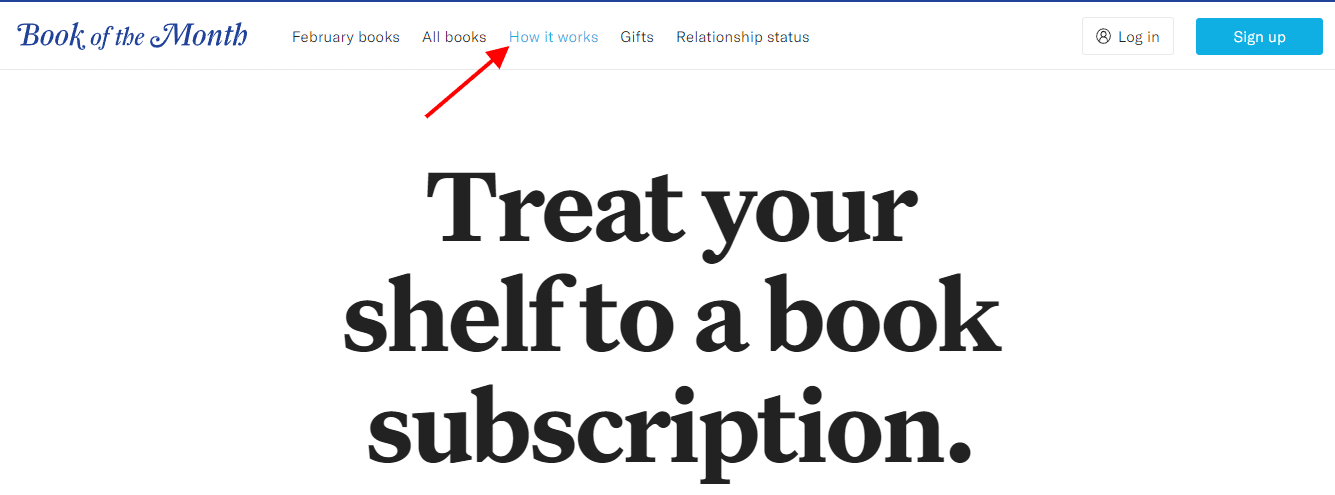
For example, you could include your FAQ page within your top navigation menu. For instance, Book of the Month features its “How It Works” page (which includes its FAQ) right in the top menu.
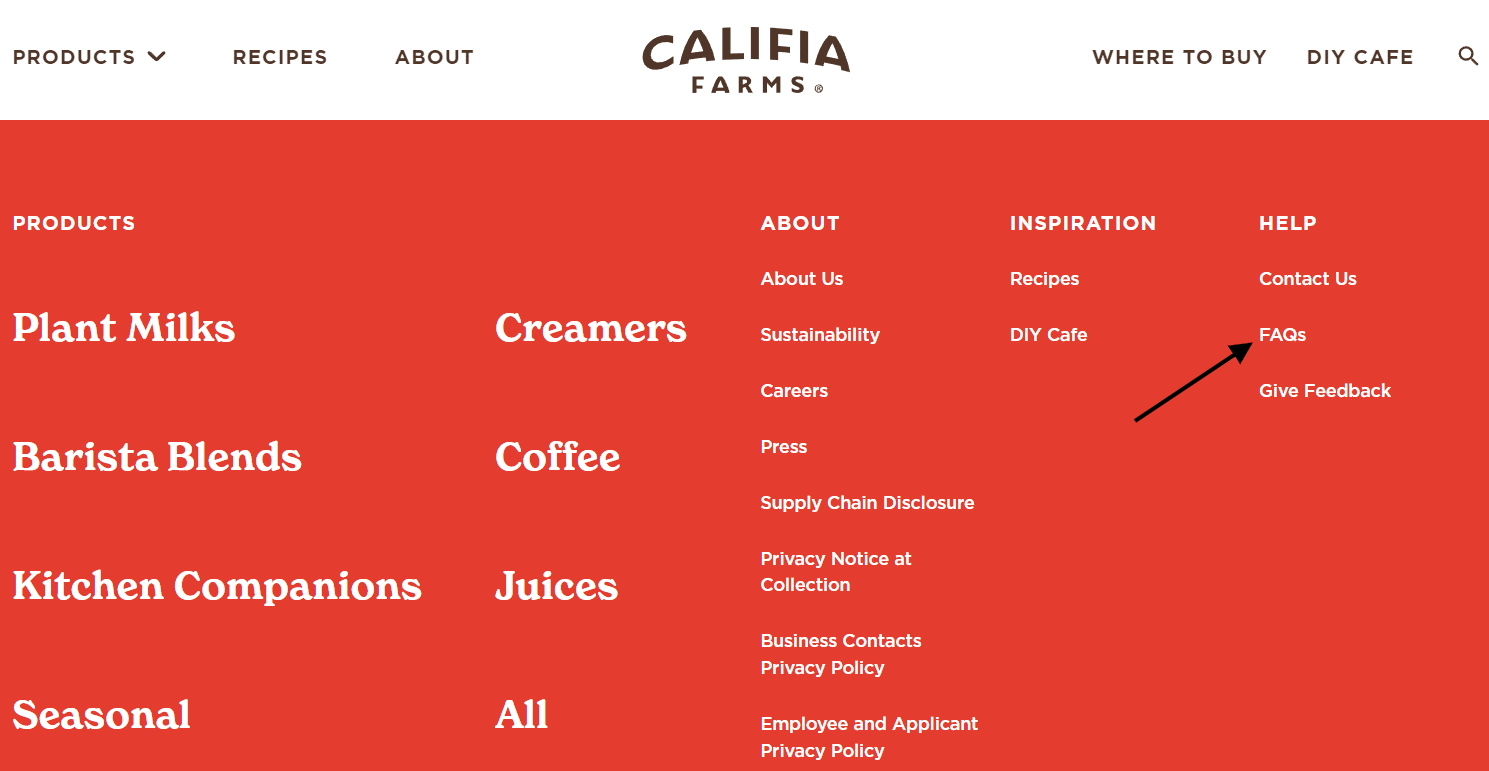
Or, include your FAQ page in a static footer that appears across every website page, as Califia Farms did.
8. Let customers know who to contact with additional questions
More than likely, your FAQ page won’t answer every possible question your audience has. That means an entire swathe of your audience may feel dissatisfied after reading your FAQ page.
Mitigate that by providing additional ways to get answers to questions on the FAQ page itself.
For example, you could direct customers with unanswered questions to start a live chat, email your customer service team, or talk to support staff on the phone.
Whatever you do, it’s a smart idea to ensure customers know additional help is waiting if they need it. That way, you’ll lessen the number of people who click away from your FAQ page in frustration.
FAQ page examples
For some inspiration and guidance, check out how these brands approached creating their FAQ pages.
As you’ll soon see, there’s no standard or set way to create a good FAQ page – do what works for your brand, what you sell, and your audience.
Glasses USA
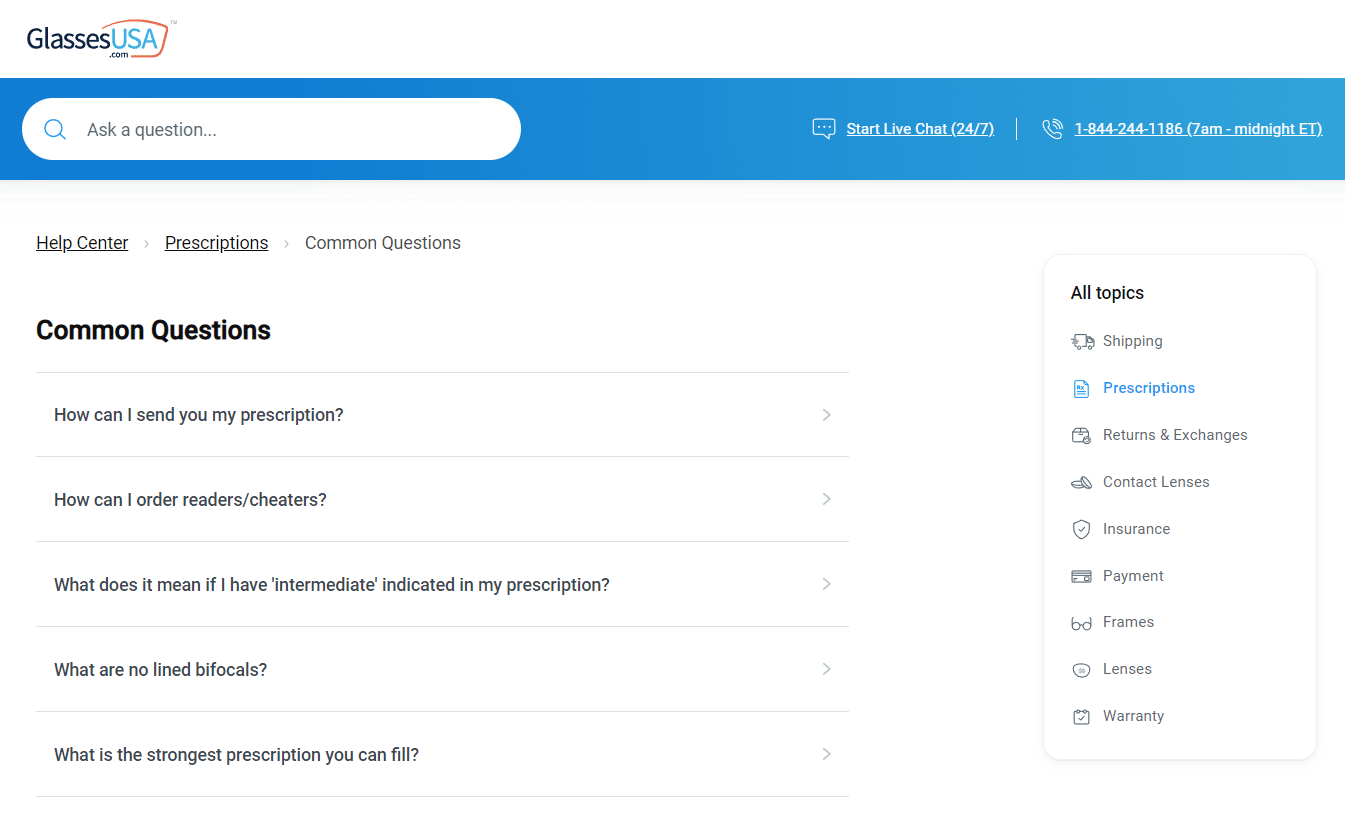
Glasses USA has a seemingly simple FAQ page that is very cleverly organized.
Questions are categorized by topic, and you can use the search bar to find the answer to your most pressing question quickly.
And, just in case your question isn’t covered in the FAQ, links to start a live chat or call customer service are right at the top.
Book of the Month
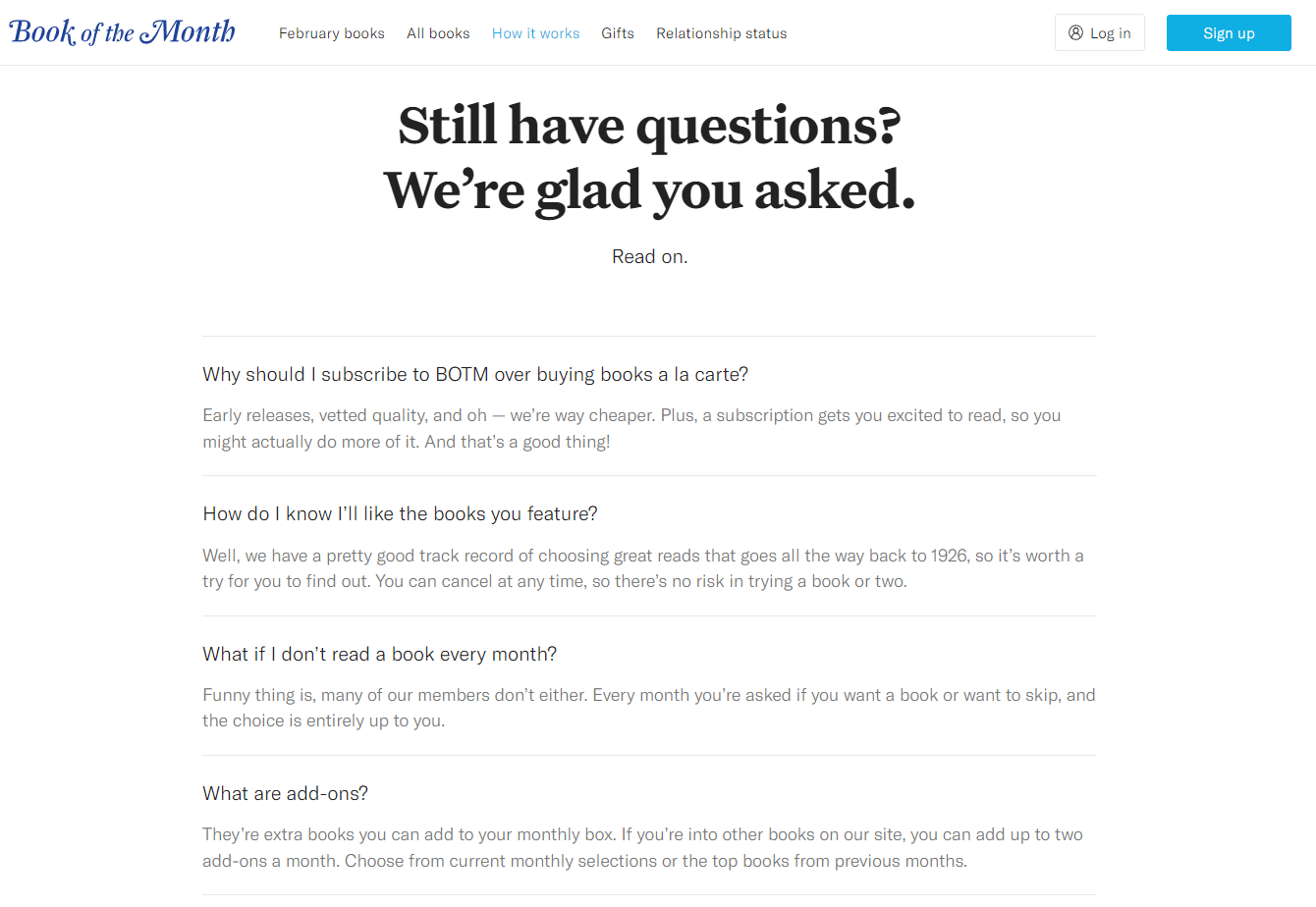
Book of the Month features a simple FAQ section as part of its “How It Works” page.
It’s short and sweet but to the point and ultimately helps potential customers make sense of the service they offer.
Bonus: Book of the Month’s brand voice is evident here.
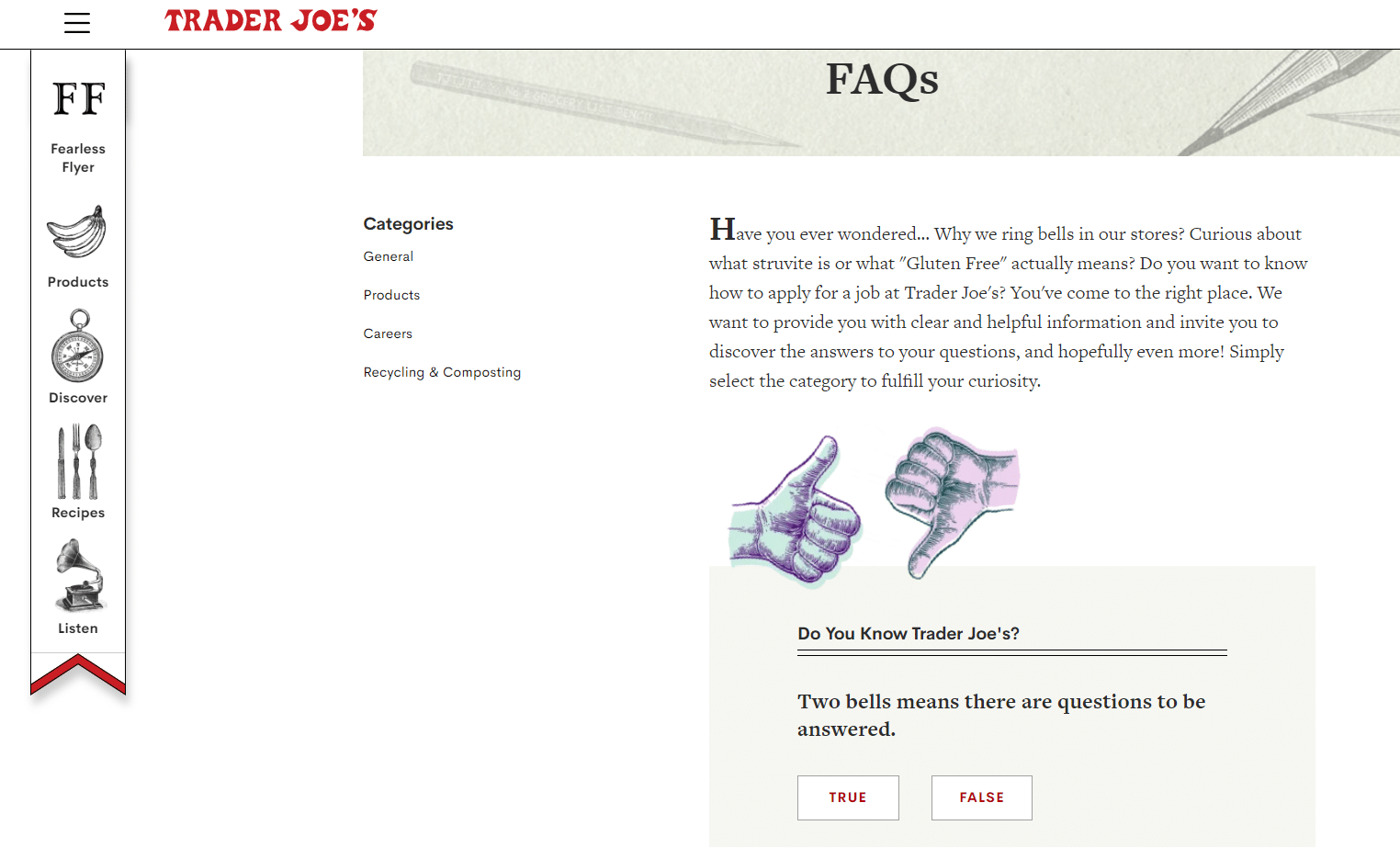
Trader Joe’s
True to form, Trader Joe’s has a little fun on their FAQ page.
Along with practical information about their products, their recycling policy, and the forms of payment they accept, you’ll find fun facts about the brand’s quirks – like why they ring bells in their stores. There’s even a mini trivia game on the main FAQ page.
Overall, this is an excellent example of leaning into your brand voice and identity everywhere you possibly can.
Just because you must convey important information doesn’t mean it has to be boring or sound like every other FAQ page.
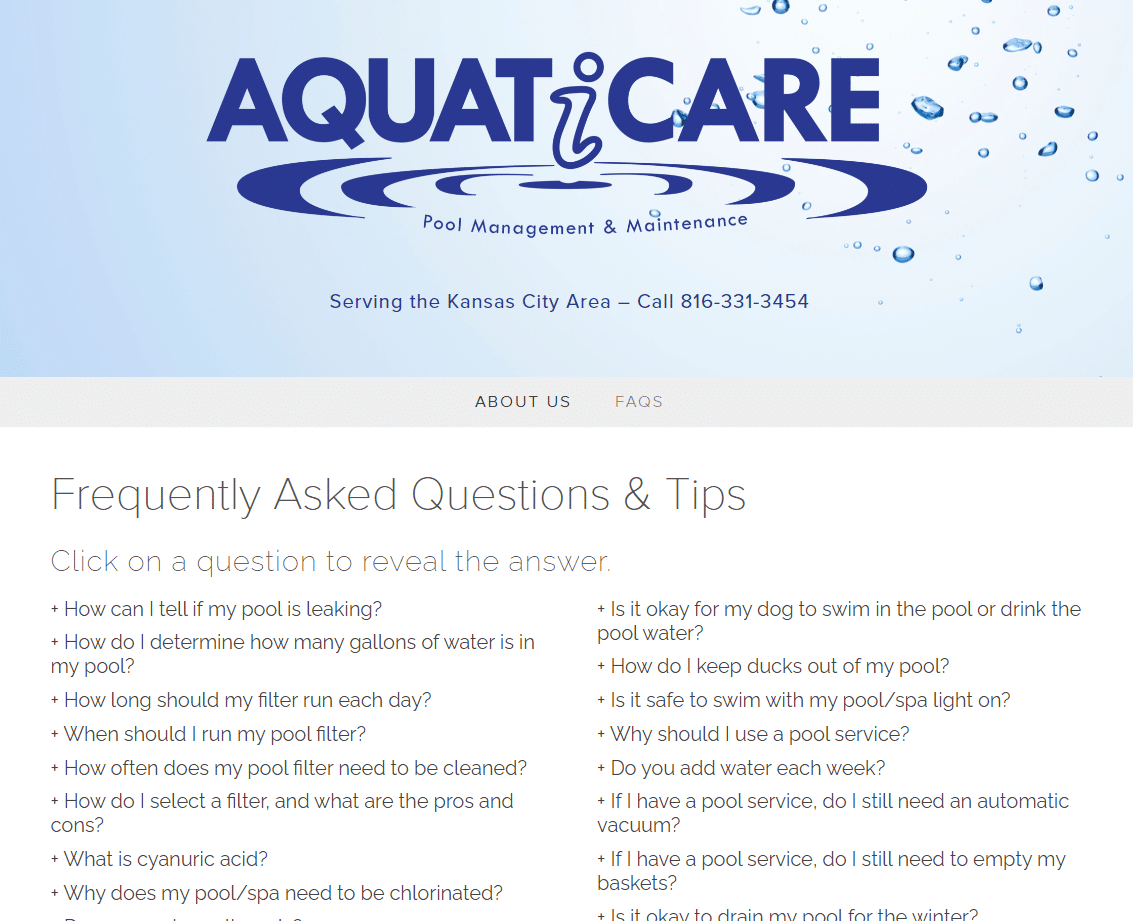
Aquaticare
This local pool cleaning service has a simple, straightforward FAQ page with much good information. Since the list is relatively short, categorizing the questions isn’t necessary.
The page is further decluttered by hiding the answers using some simple code. Clicking on a question reveals the answer to that question.
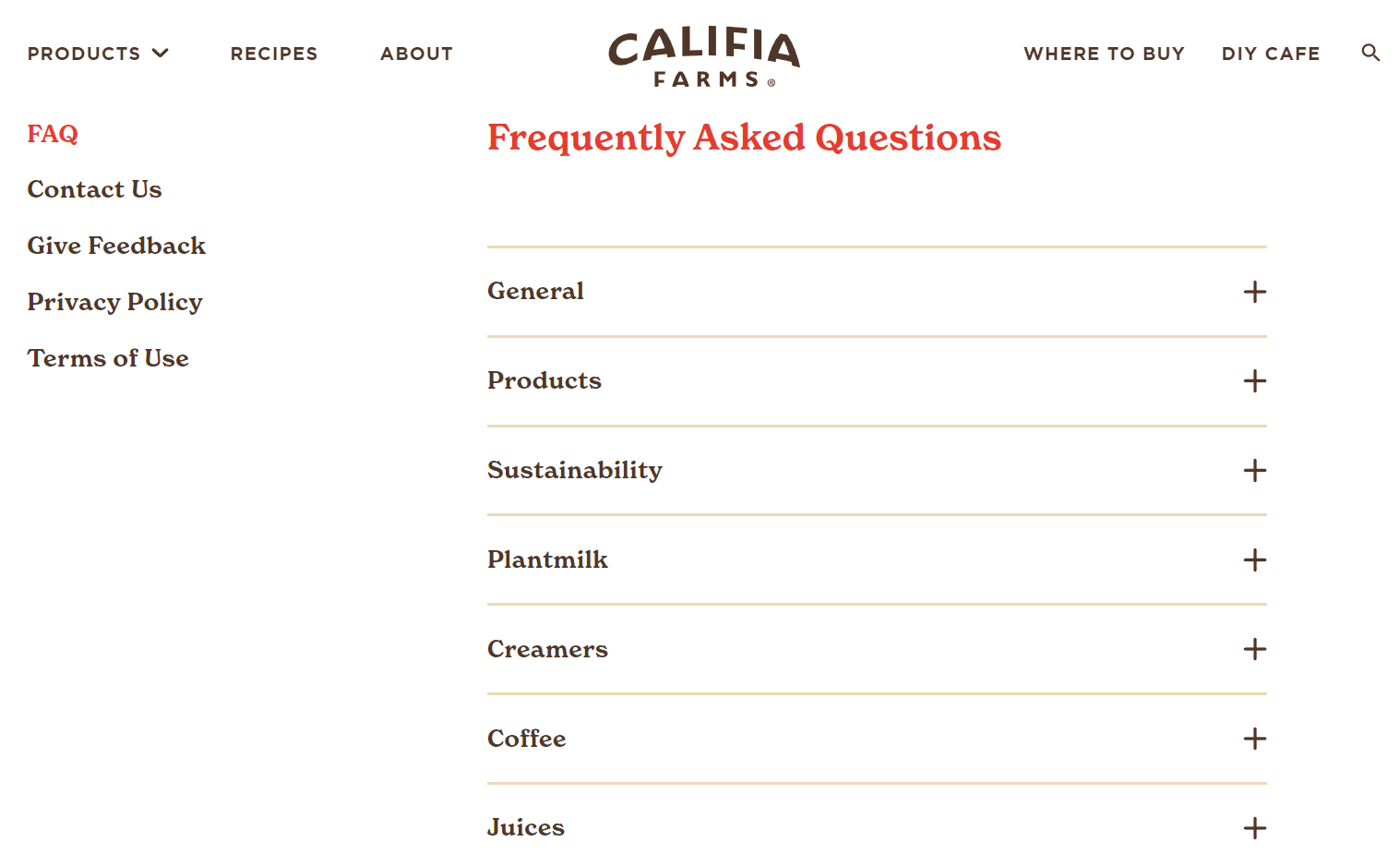
Califia Farms
The FAQ page on Califia Farms’ website is elegantly laid out and ridiculously easy to read.
Common questions are divided into seven categories, each expanding when you click on them. Clicking on a question reveals a short but satisfying answer.
And, just in case the customer still has questions even after browsing the FAQ page, Califia includes a “Help! I still have questions” answer with contact information.
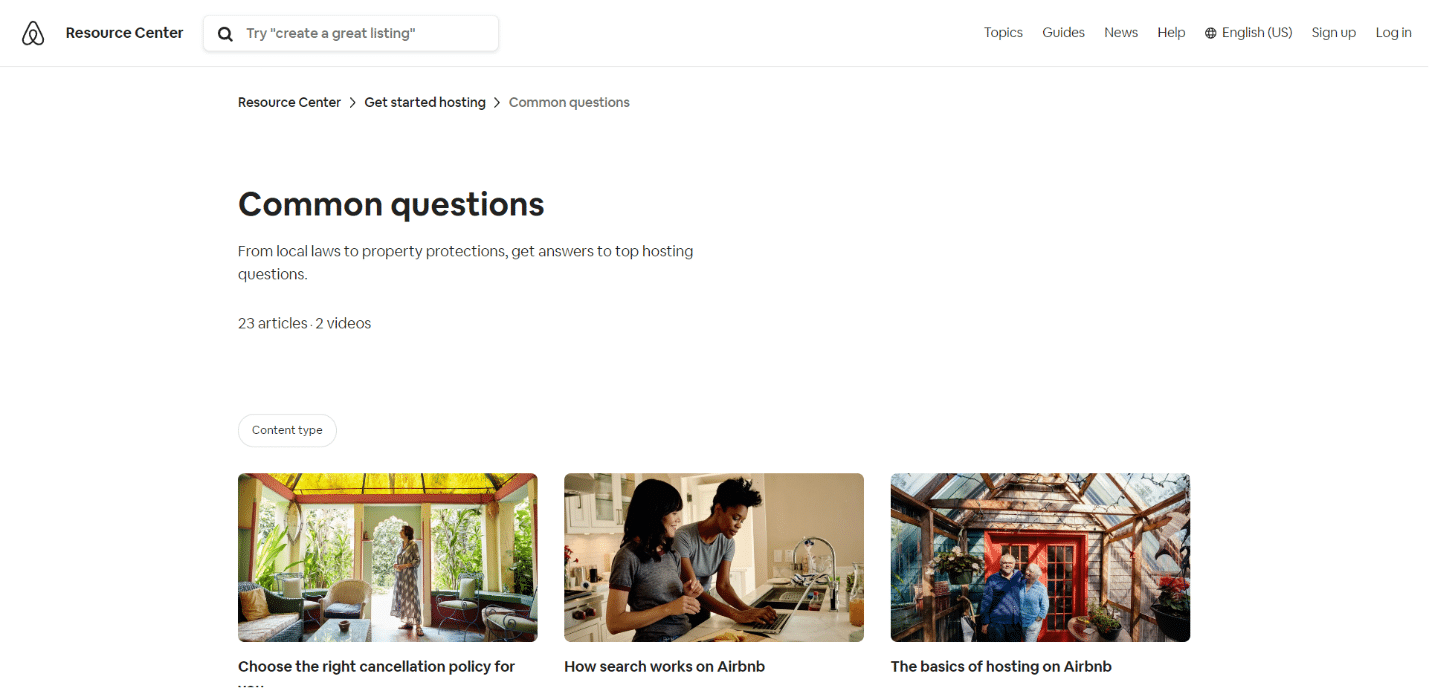
Airbnb
Airbnb takes a slightly different tack than the other examples on this list: Their FAQ page is, in fact, a library of articles on everything from hosting to cancellation policies.
For example, if you’re wondering how to get your rental listing more visible on Airbnb, you can read their guide on “How search works on Airbnb.”
SurveyMonkey
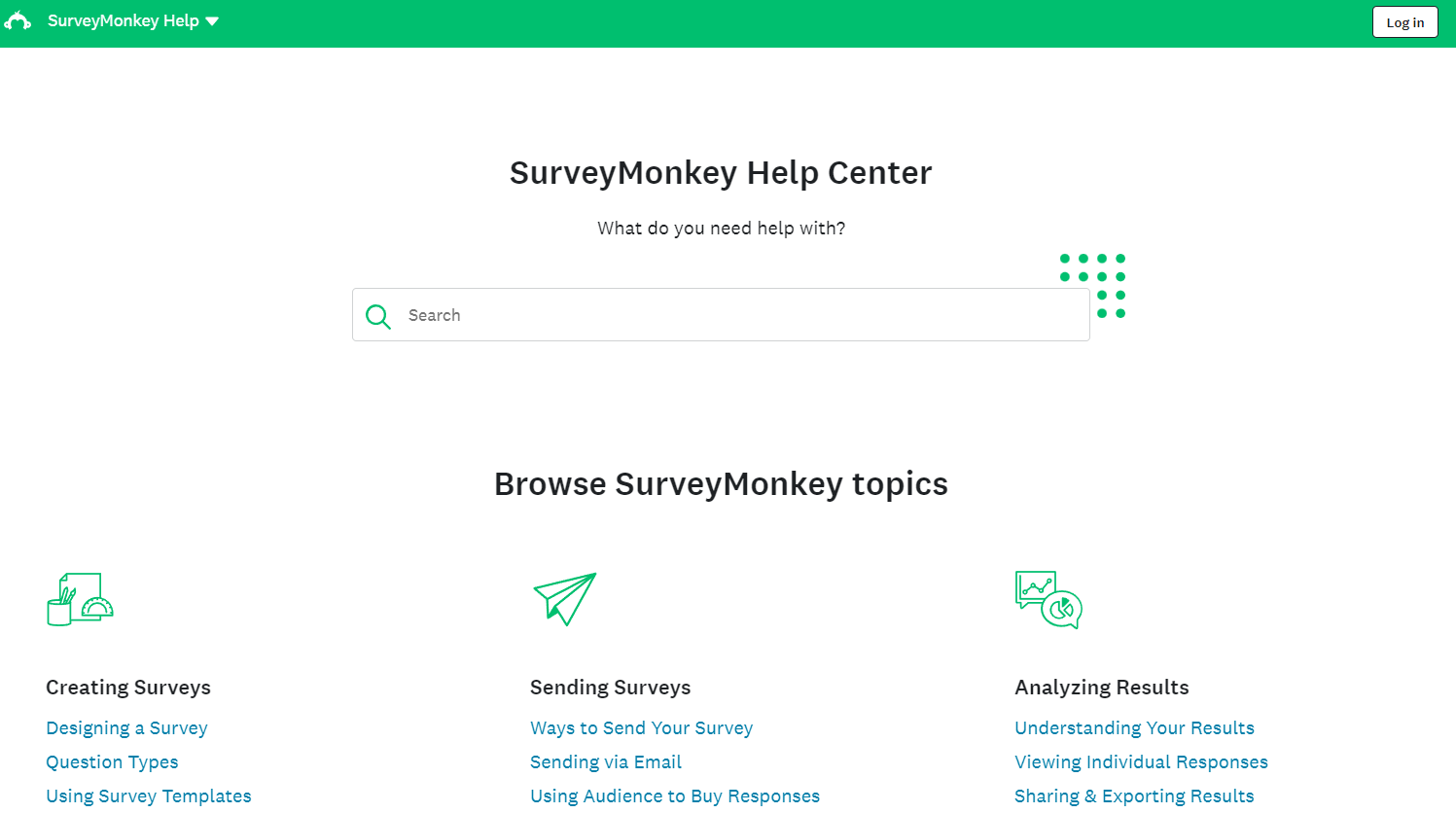
The more complex the service, the more complex the FAQ page becomes. It may even morph into a bigger entity, as SurveyMonkey demonstrates.
Instead of a simple one-page setup, they have an entire help center with guides divided by topic. And, of course, all of the guides are searchable, so you can quickly find the answer you need.
Most brands won’t have robust help pages, but seeing the entire range of possibilities is good.
Ready to write a useful FAQ page?
A truly useful FAQ page is a great resource to publish and update on your website.
Customers who find the answers they need on this page often won’t have to talk to customer service. They’ll feel informed and may even use that information to help them make a purchase decision.
Overall, a good FAQ page saves your staff time and nurtures your audience. However, none of that is possible if your FAQ page is messy, hard to read, or thin and unhelpful.
So, build your FAQ page with care and consider it an investment in your website’s overall usefulness. It might just pull more weight than you think, resulting in happier customers.
The post How to create a helpful FAQ page (with 7 examples) appeared first on Search Engine Land.
Courtesy of Search Engine Land: News & Info About SEO, PPC, SEM, Search Engines & Search Marketing
Friday, April 7th, 2023
Google has prioritized rating chatbot prompt responses above rating the quality of search results, at least for some of its contract workers, since January, Insider reports.
Why we care. Google is clearly committing a lot of resources to Bard and other AI initiatives right now. Search remains its core product – and chief money-maker – so it’s interesting to learn that Google is so heavily invested in Bard that they have reportedly taken resources away from rating search results, which could potentially impact quality.
Reviewing AI prompts, not search. Raters are given a user prompt (e.g., a question, statment or instruction), along with two possible responses generated by an AI chatbot (the name “Bard” was not used). Raters were instructed to pick the best response.
But. Raters are finding themselves guessing vs. assessing and verifying the chatbot responses. That’s because some raters said they don’t have enough time to research which answer was better, especially on technical or complex topics they may not be familiar with, according to Insider.
So much for E-E-A-T. Google’s raters have a specific amount of time to complete their tasks, which vary from 60 seconds to several minutes.
- “Three hours of research to complete a 60-second task, that’s a great way to frame the problem we’re facing right now,” a rater told Insider.
Search quality raters. Google has employed human raters since at least 2005 – tasking them to rate the quality of pages, websites and search results, using an extensive set of guidelines. Google has always said the feedback from raters doesn’t directly impact organic search rankings but their feedback could be used to evaluate changes.
Googlers also were asked to help improve Bard. Google asked its employees to spend 2-4 hours testing Bard, rewriting answers or providing other forms of feedback, as we reported in February.
Read the Insider report (warning: paywall). Google contractors say they don’t have enough time to verify correct answers from the company’s AI chatbot and end up guessing via Thomas Maxwell.
The post Google search quality raters shift focus to chatbot response rating appeared first on Search Engine Land.
Courtesy of Search Engine Land: News & Info About SEO, PPC, SEM, Search Engines & Search Marketing
Friday, April 7th, 2023
Large language models (LLMs) will eventually be part of the Google search experience. We still don’t know when conversational AI will appear in Search, but Google CEO Sundar Pichai promises it’s coming.
Why we care. The new BingGPT search with integrated AI chat generated a lot of excitement, but so far has only resulted in small gains in search engine market share. The biggest questions we’re all waiting to find out the answers to when Google deploys AI-powered chat into search:
- How much of an impact will it have on the amount of organic traffic Google sends?
- Will it impact the ROI for the brands and organizations who use Google Ads?
What he’s saying. “Will people be able to ask questions to Google and engage with LLMs in the context of search? Absolutely,” Pichai said in an interview with The Wall Street Journal.
Also of note: Google is “testing several new search products, such as versions that allow users to ask follow-up questions to their original queries,” according to Pichai.
Chatbots are an opportunity. Search ads generated $162 billion in revenue for Google in 2022. There has been lots of speculation about whether chatbots and generative AI pose a legitimate threat to Google’s core search business. Pichai downplayed any threat, saying:
- “The opportunity space, if anything, is bigger than before.”
The bigger picture. We’ve known since January that Google had plans to debut chatbot features within search. We got our first look at those with the preview of Bard on Feb. 6.
This is when the confusion began. Google has since tried to make clear that Bard is not search – Bard is a standalone, generative AI product like ChatGPT.
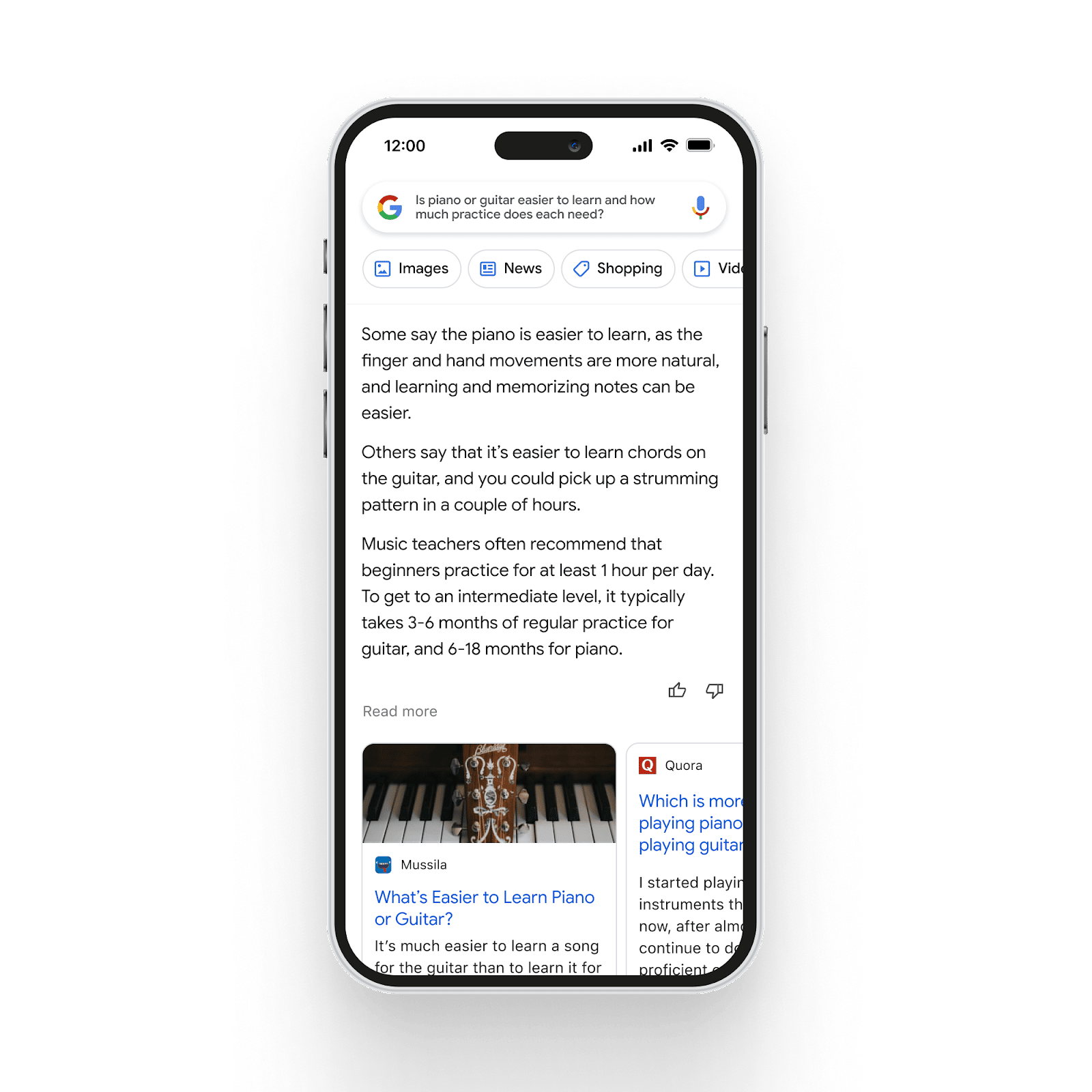
However, at the same time Google announced Bard, Google previewed what its AI-generated answers would look like in search. Not surprisingly, Bard became short-hand for these new AI chat features. As a reminder, here’s what those might look like:
Google is “committed to getting it right with the publisher ecosystem.” Meanwhile, in a separate interview, Pichai was recently asked a question by Casey Newton that several digital publishers have been eagerly wanting an answer to:
“Today, lots of digital publishers rely on the traffic they get from Google. They get ad impressions. That pays their bills. When Bard is at its best, it answers my questions without me having to visit another website. I know you’re cognizant of this. But man, if Bard gets as good as you want it to be, how does the web survive?”
– New York Times podcast, Google C.E.O. Sundar Pichai on Bard, A.I. ‘Whiplash’ and Competing With ChatGPT
Pichai’s answer:
“I think through our work across, I think we’ll be committed to getting it right with the publisher ecosystem. In search today, while these things are contentious, in search, we take pride, it’s one of the largest sources of traffic. If I look at it year-on-year, the traffic we send outside has only grown. That’s what we’ve accomplished as a company.
Part of the reason we are also being careful with things like Bard, amongst many reasons, we do want to engage with the publisher ecosystem, not presume how things should be done. And so you will see us thoughtfully evolve there as well.”
That doesn’t read like Pichai has any answers right now. Meanwhile, Microsoft is discussing ad revenue sharing – at least with some publishers.
The post Conversational AI ‘absolutely’ coming to Google Search, says CEO Sundar Pichai appeared first on Search Engine Land.
Courtesy of Search Engine Land: News & Info About SEO, PPC, SEM, Search Engines & Search Marketing
Friday, April 7th, 2023
Lost in the non-story about Bing adding ads to Chat (ads were already there) was a blog post by Microsoft attempting to assure content creators that the goal of new Bing is to “drive more traffic and revenue to publishers.”
“The Internet works because of an important ecosystem which starts with publishers creating great content which drives traffic and interest by people to consume that content, and then ultimately advertisers that want to reach people in a high quality and targeted environment.”
– Yusuf Mehdi, Microsoft corporate vice president, Modern Life, Search, and Devices, “Driving more traffic and value to publishers from the new Bing“
Mehdi was addressing concerns in the content creator community that search engines that provide results assembled by generative AI (a.k.a., “Chat” and “Answers” in Bing) will upend the ecosystem. The value exchange (content providers creating content in exchange for search engines sending monetizable traffic) will overwhelmingly favor the search engines.
Mehdi admits the concern is widespread by authoring this post. Why else would Microsoft need to assure content creators that things will be better in an AI-driven search results world?
Microsoft knows that content creators – publishers, content marketers, brands, and SEOs – are fretting about the prospect of less traffic and revenue.
Microsoft’s goals are laudable
Microsoft is expressing the best of intentions for all of its constituencies.
Searchers first. “The new Bing is helping to better address people’s search needs with new capabilities like chat, answers, and content creation,” Mehdi wrote.
Microsoft’s vision is to move “beyond search to create your copilot for the Web.” “People are finding value in having search, chat, answers, and creation capabilities all in one experience,” Mehdi wrote.
It’s difficult to argue with putting users first, but that doesn’t ensure that results generated in this way won’t disadvantage content creators.
For publishers, Mehdi said Microsoft’s goals are to:
- Drive more traffic to publishers. Measure success in part by how much traffic is being sent from the new Bing/Edge.
- Increase publisher revenue. Drive more traffic to publishers with new features like chat and answers, and pioneer the future of advertising in these new mediums by sharing revenue directly.
Traffic/revenue for all, more for Microsoft Start participants
Microsoft claims the benefits of adding a chat interface to search will inure to all publishers. But members of its Start program will reap the lion’s share of those rewards.
For all publishers, additional engagement generated by chat and the inclusion of citations in chat results will drive more traffic and create an opportunity for publishers to monetize that traffic.
Microsoft has experienced a traffic gain of about 15% since launching the new Bing. The service has approximately 100 million users and 100 million chats daily, the company said. About one-third of those users are new to Bing; Microsoft concludes those new users are an opportunity for publishers to get more traffic and sell more ads.
Start, launched and in beta September 2021, is Microsoft’s version of Google News or Apple News. It’s a personalized news portal, available as a website or mobile app, where you can manually add or remove interests and content from Start publishers.
Start publishers include heavy-hitters (e.g., The Wall Street Journal, The New York Times, Fox News and USA Today) along with less mainstream publications like Past Factory, The Stock Dork and Neon Moon.
Microsoft is exploring placing ads in chat and sharing ad revenue with Start partners whose content contributed to the chat response.
Traffic-driving tactics for Start members include:
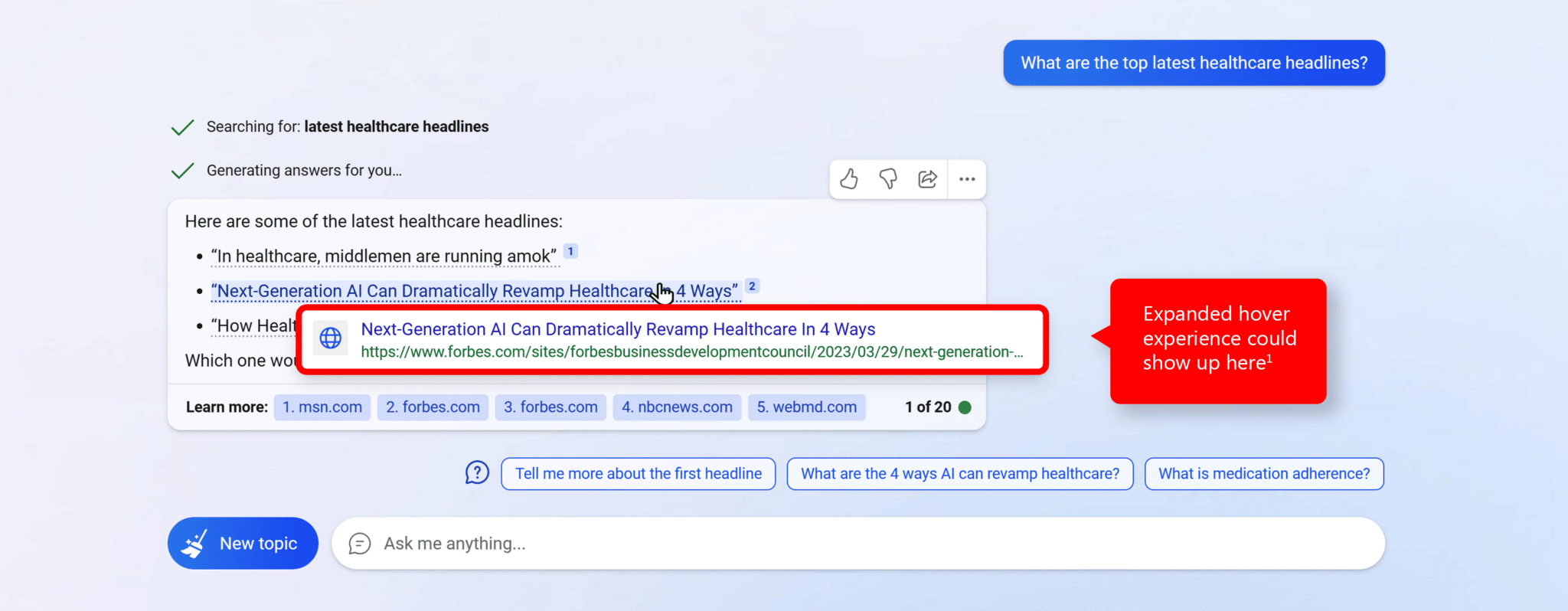
- An “expanded hover experience” where hovering over a link from a publisher will display more links from that publisher, increasing user engagement and driving more traffic to the publisher’s website.
- A “rich caption” beside the chat answer helping to drive more user engagement with the content on Microsoft Start. Users engaging with content on Start will be the catalyst for sharing ad revenue with partners.
Start participation is ‘limited’
Start “participation is limited right now while this program is in beta,” Mehdi wrote. It’s been in beta for 18 months. Publishers/bloggers can apply if they meet these criteria:
- Are based in the U.S., Germany, Spain, France or Italy.
- Post frequently and have an “active content site.”
- Bloggers/non-news content producers generally need to produce five articles or more per month.
- News publishers need to produce a minimum of 10 articles per day, including live/breaking coverage.
- All must use WordPress, Substack, or Medium – or have a website that generates an RSS feed.
- Fiction isn’t permitted.
As for benefits? Microsoft says Start has “millions” of daily users, so it’s good for brand building. You can also earn ad revenue from your content and reader gratuities.
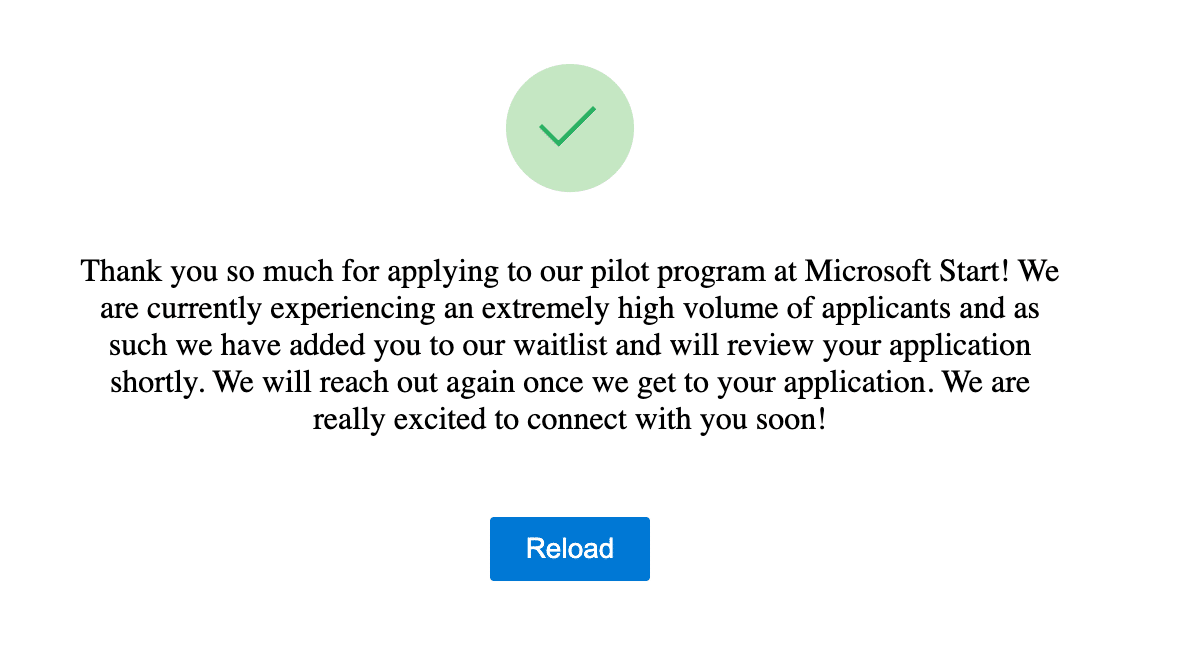
This is the message we received after filling out the “Start” application.
Paying publishers: The Facebook experience
Facebook dabbled with paying news publishers from 2019 to 2022.
The company shelled out more than $100 million to publishers including “more than $15 million to the Washington Post, just over $20 million to the New York Times, and more than $10 million to The Wall Street Journal,” according to a June 2022 WSJ article.
Meta stopped paying U.S. publishers in July 2022, after deciding to diminish the prominence of news in members’ newsfeeds.
Why we care
Microsoft has boldly stated its ambition to double the sales of its ad business to $20 billion in the next several years. Clearly, the company is betting on generative AI to play a role in its ascendance.
Microsoft also knows that it can’t do it alone, and is trying to convince publishers that its vision of a win-win publishing ecosystem will materialize.
At this early stage, who’s to say the brain trust in Redmond is incorrect?
It’s clear that traffic-hungry content creators have to go along with the ride for now. There is no alternative. (Although doubling down on building brand and non-mediated channels like email are wise investments.)
It’s heartening to see Microsoft acknowledge that publishers should be compensated for fueling new Bing, but we’re looking for more transparency on the Start program.
We understand that managing Start is an enormous task, even for a company of Microsoft’s resources. Microsoft’s minimum obligation should be to tell aspiring Start participants more about it. Here are some examples:
- How many applications are being approved each month?
- How many program participants do you expect by the end of this year? 2024?
- Are you committed to publishing a roadmap for the program that informs participants and aspiring participants of plans and progress, e.g., how much traffic are you driving to member sites?
Finally, not mentioning Google’s silence on its vision for the future of content creators would be an omission. Consider it done.
The post Microsoft’s vision for a prosperous content ecosystem in a generative AI world appeared first on Search Engine Land.
Courtesy of Search Engine Land: News & Info About SEO, PPC, SEM, Search Engines & Search Marketing
Friday, April 7th, 2023
Google will soon retire four rules-based attribution models in Google Ads and Google Analytics:
- First-click.
- Linear.
- Time decay.
- Position-based.
Why we care. This will impact anyone who still uses these models in Google Ads. Anything that isn’t last-click will be much harder to track because the data-driven attribution formula is different for each advertiser – and not visible.
- “In the past, you could use linear and give each touch the same credit. You will no longer be able to do so. There will be no impact on last touch, as that is still available. But finding some of the first-touch information will be much muddier because there will no longer be a way to see the formulas that compute the attribution scores,” said Greg Finn, director of marketing for Cypress North.
Why the change. These attribution models will be sunset due to “increasingly low adoption rates, with fewer than 3% of conversions in Google Ads using these models” according to a Google spokesperson.
- Switching to the data-driven attribution model typically results in a 6% increase in conversions for advertisers, Google said.
Sunset timeline. The first-click, linear, time decay and position-based models will all sunset in Google Ads and Google Analytics beginning in September. Before that, for newly created conversion actions, these attribution models will no longer be available in:
- GA4 starting in May.
- Google Ads starting in June.
Data-driven attribution as the default attribution model. Google announced its shift to data-driven attribution in September 2021. For advertisers who didn’t want to use data-driven attribution, Google had continued to support open attribution models:
- First click (100% of conversions go to first click).
- Linear (all conversions split across all clicks).
- Time decay (conversions based on a half-life formula).
- Position based (40% to first and last click and 20% to others).
Data-driven attribution does not share any percentages or formulas on how the clicks are counted for conversions, but is rather custom-built based on account history.
Now the only way that advertisers will be able to credit all clicks will be with data-driven attribution. This model will vary by the advertiser, as it leverages conversion data from the account to determine which touches have the most impact.
Dig deeper. Data-driven attribution: How to think about Google’s default attribution model
The post Google to sunset 4 attribution models in Ads and Analytics appeared first on Search Engine Land.
Courtesy of Search Engine Land: News & Info About SEO, PPC, SEM, Search Engines & Search Marketing
Wednesday, April 5th, 2023

Are you a brand looking to take advantage of the explosive growth of TikTok and its wide audience? DISQO has just released a report that provides answers to your most pressing questions about the platform.
With data from 28,139 adult consumers, DISQO’s TikTok Ad Effectiveness report provides an in-depth look on how U.S. consumers engage with brands on TikTok and how ads impact buying behavior.
Learn who uses TikTok, what they’re looking for, and how to measure your ad effectiveness. Get the insights you need to create effective campaigns and measure their impact on perceptions and buying behaviors. Learn:
- How TikTok usage vary across demographic cohorts
- What TikTok users think about efforts to market to them on the platform
- How brands can effectively engage the TikTok audience, from creating content that fits with what users love about the platform and leveraging the platform’s native formats.
Visit Digital Marketing Depot to download the TikTok ad effectiveness report now!
The post New report: Get insights into who uses TikTok and what they’re looking for appeared first on Search Engine Land.
Courtesy of Search Engine Land: News & Info About SEO, PPC, SEM, Search Engines & Search Marketing
Wednesday, April 5th, 2023
Quality score. Two words that strike fear in the hearts of paid search professionals everywhere.
OK, not really.
But quality score can be a confusing metric that sparks debate.
A vanity metric?
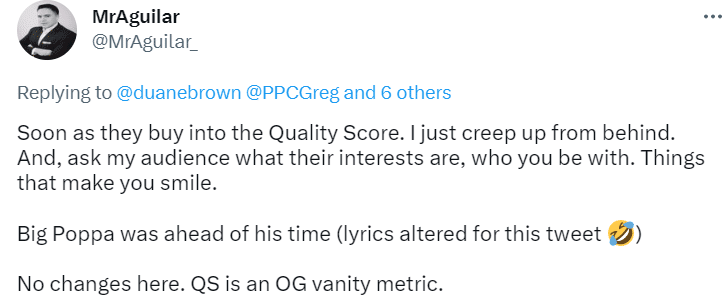
Some practitioners contend that quality score is a vanity metric.
Others view quality score as a KPI to be optimized and reported regularly.
The discussion rages on.
There’s also the question of whether quality score is a factor in ad rank.
(Spoiler alert, it is indeed a factor.)
Quality score might be the most confusing PPC metric ever.
Defining quality score
Let’s take a step back and talk about what quality score actually is.
In this article by Navah Hopkins, she defines quality score as “a score calculated by Google and Microsoft alongside your bid to determine your ad rank.” To understand the basics of quality score, read this excellent article if you haven’t already.
Bottom line: quality score determines where your ad appears on the page and how much you pay for each click.
Is quality score important?
Should you focus on improving quality score? Or is it really just a vanity metric?
Google’s official help files say this:
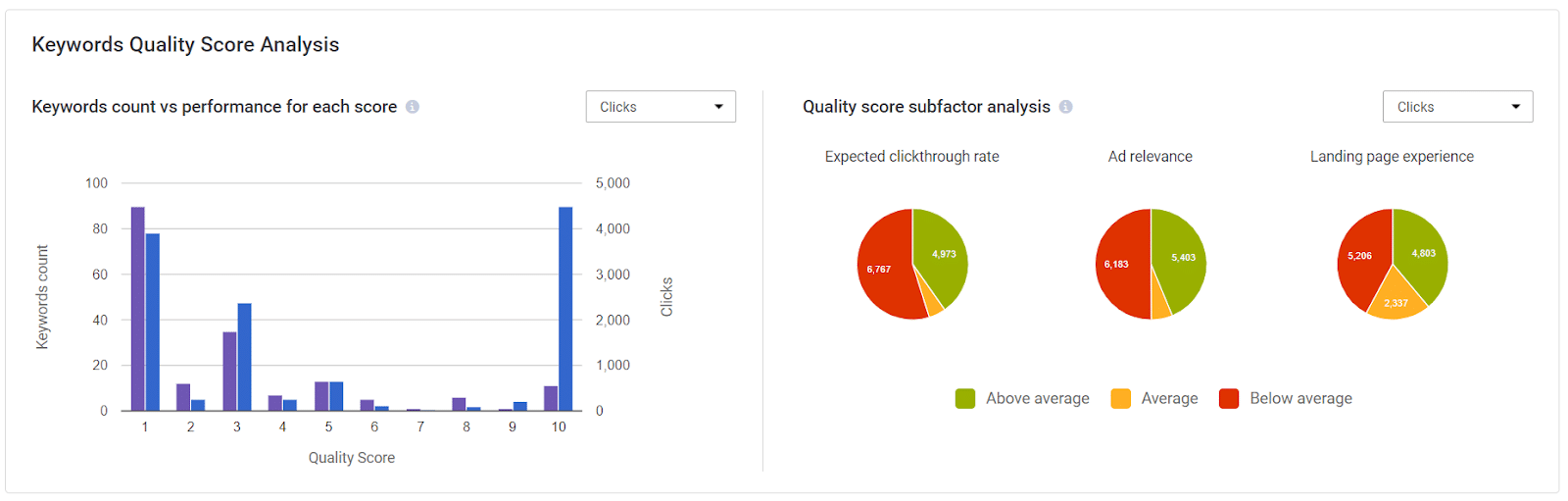
“Quality Score is calculated based on the combined performance of 3 components:
- Expected clickthrough rate (CTR): The likelihood that your ad will be clicked when shown.
- Ad relevance: How closely your ad matches the intent behind a user’s search.
- Landing page experience: How relevant and useful your landing page is to people who click your ad.
Each component is evaluated with a status of “Above average,” “Average,” or “Below average.” This evaluation is based on a comparison with other advertisers whose ads showed for the exact same keyword, over the last 90 days.
If one of these components has a status of “Average” or “Below average,” this may indicate an opportunity to make improvements.”
– About Quality Score, Google Ads Help
From reading the above, Google thinks it’s important for advertisers to improve their quality score.
However, we all know that Google often tells advertisers to focus on things that make Google money but don’t help the advertiser’s bottom line.
Some paid search pros posit that quality score is significant as a metric. In this 2013 article, Larry Kim claims that quality score is “king of the KPIs.”
However, Kim is making a circular argument. He rightly states that quality score can impact CPA.
Yes, it does.
Quality score impacts CPC, so it also impacts CPA. If you’re paying a high CPC, then by definition, you will pay more for each conversion than an advertiser paying a low CPC.
It’s basic math. You could just as easily argue that an advertiser should reduce their max CPCs to reduce CPA.
It’s not really that simple, but is the time spent focusing on quality score worth it?
What the experts say
Many experts in the field believe it is.
Brad Geddes, founder of PPC tool Adalysis, has written several posts about improving quality scores. The tool also features modules to help advertisers improve their quality score, showing quality score data at various levels.
In one article, Geddes illustrates how to improve quality score by moving low quality score keywords to a new ad group.
Optmyzr, another PPC tool created by former Googler Fred Vallaeys, also features modules to improve quality score.
In this article from late 2022, Ashwin Balakrishnan of Optmyzr states that quality score is still important.
I have a great deal of respect for both Geddes and Vallaeys. They’ve been mentors of mine in the search industry.
If these tool founders feel that quality score is so important that they’ve invested time and resources building modules to improve it, it must be important. Right?
Then why do advertisers say quality score is a vanity metric?
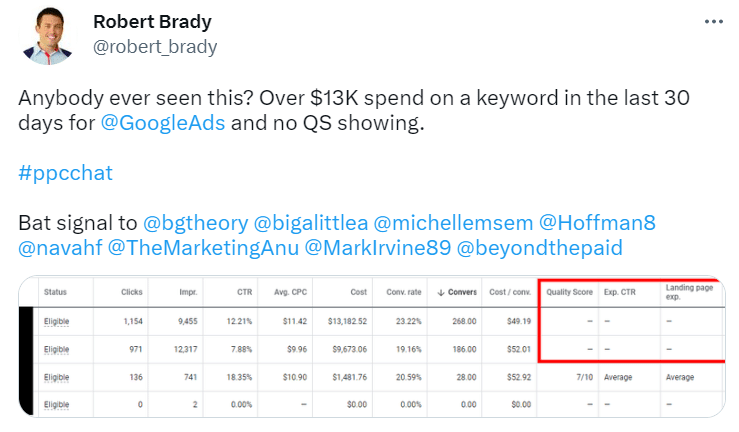
There are several reasons. First off, there’s the fact that Google doesn’t even show a quality score for every keyword.
Robert Brady showed an example of a keyword spending over $13,000 in 30 days with no quality score showing.
I’ve seen similar things in my accounts – keywords with large spend yet no quality score showing.
Google Ads liaison Ginny Marvin said quality scores will only show for keywords with “enough” exact match impressions. Keywords also need “recent” exact match impressions.
If quality score is so important, why doesn’t it appear for every keyword? And how does one optimize for data we don’t have?
Next, there’s B2B, the world I live in.
B2B keywords are notorious for having low quality scores. While we’ll never know all the reasons for this, it likely has to do with a few factors:
- Low search volume compared to B2C searches.
- Niche, industry-specific search terms that Google doesn’t understand.
- Ambiguity with B2C searches (e.g., “security solutions,” “renewable energy,” etc.).
- Competition – many deep-pocketed advertisers vying for relatively few ambiguous searches.
- Search engine algorithms don’t understand intent, especially in B2B.
The last bullet is especially important (and frustrating). Because:
- As Geddes puts it, “algorithms don’t think – they just examine numbers.”
- B2B volume is lower than B2C.
- There’s overlap with B2C.
Ultimately, engine algorithms don’t understand intent, and B2B advertisers are often punished with low quality scores – sometimes even on brand terms.
Hopkins’ quality score article states that:
“[T]hese scores are determined based on how your campaign did against comparable advertisers. However, depending on the advertisers Google chooses [to] compare you with, it is possible for a good CTR sometimes to get downgraded to average (or even below average).”
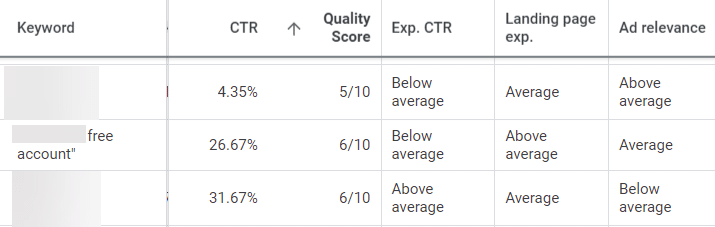
Here’s an example from one of our clients:
We have three brand keywords with middling quality scores.
Two of the three keywords have double-digit CTR, yet one of the keywords – for a “free account,” no less – shows that the expected CTR is below average!
It’s enough to make an advertiser throw up their hands in frustration.
As a result, we often do not strongly focus on optimizing quality score for our B2B clients.
Dealing with engines that don’t understand ambiguity or B2B is just banging your head against the wall. It takes time away from other, more leveraged optimizations like landing page and ad copy testing.
Settling the (quality) score
We’re back to the original question: Is quality score truly important?
It is, but maybe not in the way you think.
Quality score shouldn’t be a KPI on its own. You should not report to clients or obsess over it daily.
But you shouldn’t ignore it either. Instead, use quality score directionally. Let low quality scores point you to other optimizations.
Use tightly themed ad groups
For example, small, tightly-themed ad groups are still important.
We’ve improved quality score (and performance) by splitting up large ad groups into smaller ad groups around a theme and using ad copy that mirrors the theme.
Even in today’s RSA world, tightly themed ad groups still matter.
Improve your landing pages
Another way to use quality score directionally is to improve landing pages.
This is an often-overlooked optimization that can pay huge dividends in quality score and in increasing conversion rates.
Here’s an example from the same client I featured above, the one with lower-than-expected quality scores for brand:
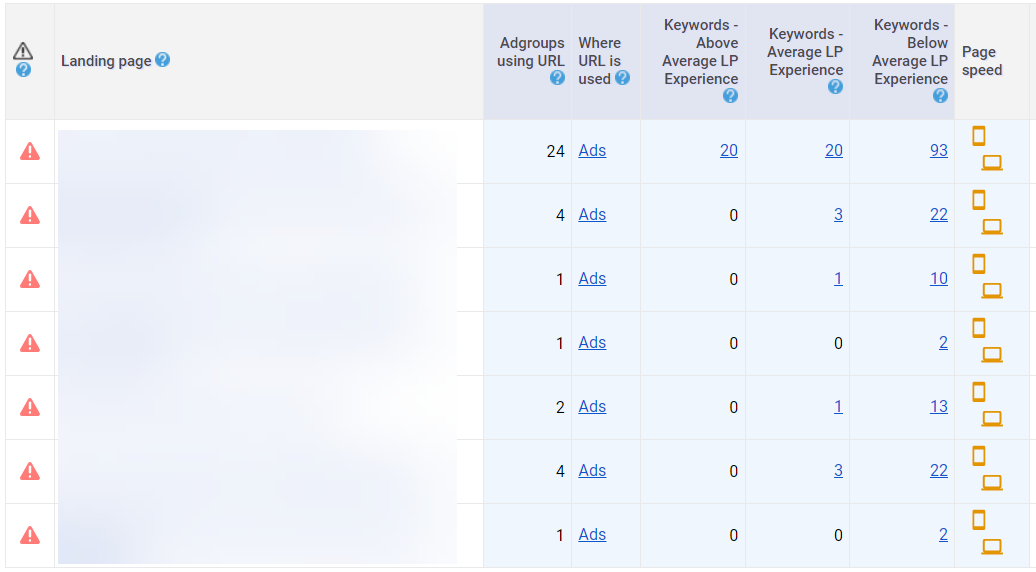
This screenshot from Adalysis shows several landing pages with below-average landing page experiences.
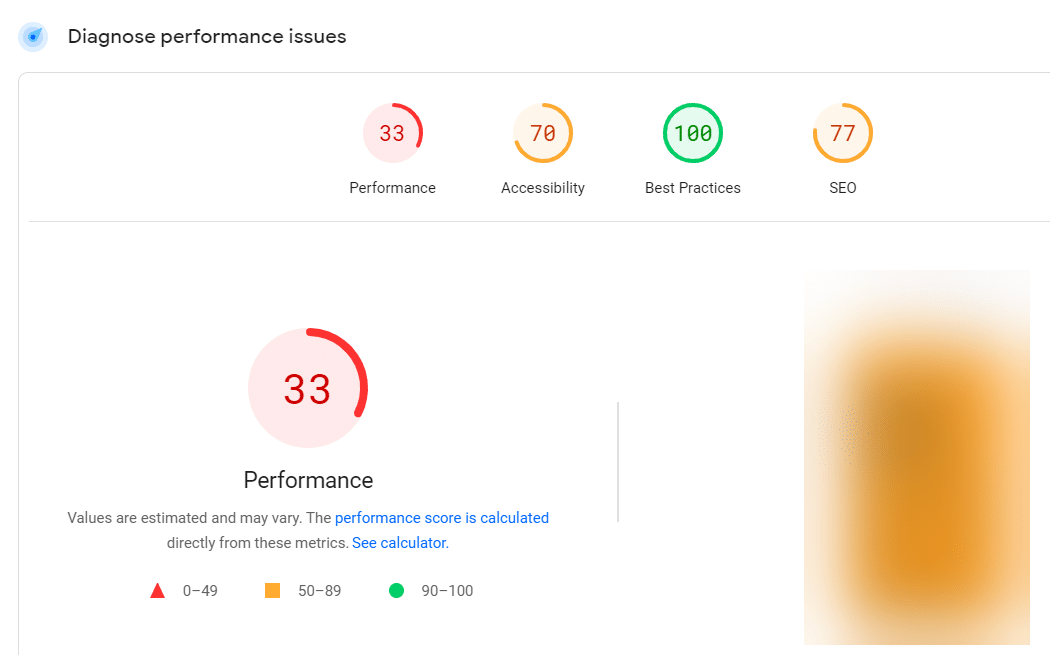
Adalysis links to the PageSpeed Insights tool, a free and useful tool to diagnose issues with page load speeds. Here’s how one of the client’s pages scored:
33 out of 100. Not so great.
It’s easy to see why this landing page is pulling down quality score – and user experience along with it.
The PageSpeed Insights tool offers diagnostics for “opportunities” to improve pages:

In this case, unused elements or blocking issues slow down page load time.
Clicking the down arrow next to the “estimated savings” for each element gives step-by-step instructions on how to fix the issue.
Many PPC marketers might view the PageSpeed Insights tool as an “SEO thing.” It’s unfamiliar to us.
But, as Hopkins points out in her article, “SEO is integral to a healthy PPC performance – and a holistic search marketing strategy.”
See if you can work with your client’s SEO team (or web dev team if they don’t have an SEO team) to improve their landing pages.
Even just speeding up page load can positively impact quality score and performance.
So is quality score a vanity metric? In a way, it is – especially for B2B advertisers. But it’s also a useful tool for improving PPC performance.
The post Quality score in paid search: Vanity or valuable? appeared first on Search Engine Land.
Courtesy of Search Engine Land: News & Info About SEO, PPC, SEM, Search Engines & Search Marketing
Wednesday, April 5th, 2023
In ecommerce SEO, ranking category, product or brand pages should be the main focus of most efforts.
Sitewide conversion rates for ecommerce hover around 2-3%, but product pages can reach over 30% (average of 7%) in the right scenario.
But getting links directly to these pages can be time-consuming for many in-house SEOs.
This article covers six effective link building tactics for ecommerce brands today.
 Image by author using Bing Image Creator
Ecommerce link building: Challenges and solutions
For ecommerce sites, driving traffic to category, brand and product pages can lead to greater returns.
But earning links to these pages is complicated as many of the highest quality publishers prefer to link to informational content.
Many ecommerce sites also don’t build long-form, helpful content because blogs and content hubs tend not to yield direct sales and often take months to rank.
In addition, affiliate sites with robust link profiles to long-form content frequently outrank established brands.
But SEOs have found ways to overcome common ecommerce link building hurdles.
- Content-led link building coupled with internal linking for ecommerce provides links to your target pages indirectly. This is important because long-form content generates up to 70% more links than short-form content.
- Building homepage links or profile image links through guest posting, podcast guest appearances, PR, and webinars. Typically, you can get the site or podcaster to link to the homepage of your site and even a link to your headshot hosted on your website.
- Paying for links is just as common now as it has ever been, but it’s important to note that it’s against Google’s link spam guidelines
- Build and maintain a list of relationships with publishers. Cold email campaigns typically have a reply rate of under 10%, so having a contact that knows you will save a lot of time with a higher response rate.
- Find content that already mentions your brand or the brands you sell with unlinked brand mentions.
Let’s explore these ecommerce link building techniques in depth.
1. Unlinked brand mentions
An unlinked brand mention is an existing article or webpage that mentions your brand name, the brands you sell or team members’ names but doesn’t have an active link pointing to your site. These options work to secure links to the homepage or brand pages.
You can find unlinked brand mentions using Google Alerts or Ahrefs.
Set up Google Alerts
Start by setting up Google Alerts for your brand name and variations of it. This will send you an email notification whenever your brand is mentioned online.
You can then check if the mention includes a link to your website and, if not, reach out to the site owner to request a link.
Use Ahrefs Content Explorer and Batch Analysis tool
Ahrefs’ Content Explorer can help you find unlinked mentions of your brand or the brands you sell.
Just follow these steps:
- Log in to your Ahrefs account and click on “Content Explorer” in the top menu.
- Type in your brand name in the search bar and press Enter.
- Apply the “One article per domain” filter to avoid multiple results from the same website.
- Export the list of articles mentioning your brand.
- Go through the exported list and manually check if each mention has a link to your website. You can use the “Find” function in your browser (Ctrl + F or Command + F) to search for your brand name and check if it’s linked.
Once you have a list of URLs with unlinked brand mentions, you can use Ahrefs’ Batch Analysis tool to gather more information about each website.
This will help you prioritize which websites to contact for link building opportunities.
- Go to “More” in the top menu of Ahrefs and click “Batch Analysis.”
- Paste the list of URLs with unlinked brand mentions and click “Start Analysis.”
- Once the analysis is complete, you can see metrics like Domain Rating (DR), Ahrefs Rank (AR), and the number of referring domains for each website. Use these metrics to prioritize which sites to contact for link building opportunities.
2. Reverse product image link building
Reverse image link building involves finding websites using your images without proper attribution or a link.
Finding images that are not properly attributed is relatively simple but still time-consuming.
Identify your original images
Choose the images on your website that are original and unique, such as infographics, custom illustrations, or high-quality and custom photographs.
Perform a reverse image search
Use a reverse image search engine like Google Images or TinEye to find websites that have used your images.
Analyze the results
Manually review the list of websites and check if they have provided proper attribution and a link to your site.
Gather contact information
Find the contact details of the website owners or content creators on each site, such as email addresses or contact forms from the site.
Get the daily newsletter search marketers rely on.
<input type=”hidden” name=”utmMedium” value=”“>
<input type=”hidden” name=”utmCampaign” value=”“>
<input type=”hidden” name=”utmSource” value=”“>
<input type=”hidden” name=”utmContent” value=”“>
<input type=”hidden” name=”pageLink” value=”“>
<input type=”hidden” name=”ipAddress” value=”“>
3. Resource page link building
A resource page is a webpage specifically designed to list and link to valuable resources, tools, or content related to a particular topic or industry.
The process of resource page link building typically involves the following steps:
Identify your link-worthy content
Start by identifying or creating high-quality, valuable, and informative content on your website that would fit resource pages well.
This could include blog posts, articles, tutorials, guides, infographics, tools, or other content types that provide users value.
Find relevant resource pages
Search for resource pages in your niche or industry that might be interested in linking to your content. You can search Google for queries like these (replace “keyword” with your target keyword or niche topic):
- “keyword” + “resources”
- “keyword” + “useful links”
- “keyword” + “helpful resources”
- “keyword” + “links”
Evaluate the resource pages
Analyze the quality and relevance of the resource pages you find. Look for pages with high domain authority, good user engagement, and relevant content.
Craft a personalized outreach email
Write a polite, personalized email to the website owner or editor explaining who you are and why you believe your content would be a valuable addition to their resource page.
Be sure to mention the specific benefits your content provides and how it would be helpful to their audience.
4. Build a database of publishers
Plenty of tools can help you prospect lists of sites, but not all allow you to upload your own list and then manage outreach to the contacts.
I’ve found that Pitchbox works well for this, but you can also use tools like Buzzstream, which is much cheaper.
Pitchbox is an outreach and link building tool that simplifies finding potential websites to connect with, automating outreach, and managing relationships.
Here’s how you can build a database of sites using Pitchbox:
Set up a new campaign
In the Pitchbox dashboard, click on the “Campaigns” tab and select “Create New Campaign.”
Enter a name for your campaign and choose your desired campaign type (such as “Blogger Outreach” or “Link Building”).
Configure your campaign settings
Customize your campaign settings, such as the email account you’ll use for outreach and the domains you want to exclude (e.g., competitors or sites you’ve already connected with).
Conduct a prospect search
In your campaign’s “Prospects” tab, click “Add Prospects” and select a method for finding potential websites to include in your database.
You can use Pitchbox’s built-in search, import a list from another tool like Ahrefs or Semrush, or manually add websites.
- If you choose Pitchbox’s built-in search, enter your target keywords and select your desired search method (such as “Blogger,” “Resource Page,” or “Guest Post”). Pitchbox will then generate a list of relevant websites for your campaign.
- If you prefer to import a list of websites, export the list from your preferred SEO tool in CSV format and then upload the file to Pitchbox.
Review and filter your prospects
Once you have a list of potential websites, review the list and filter out any irrelevant or low-quality sites.
You can use Pitchbox’s built-in metrics, such as domain authority (DA), to help evaluate the quality of each website.
Click the checkbox next to each website you want to include in your database and click “Add Selected Prospects.”
5. Podcast interviews
You can use simple podcast directories to pitch your own or find a podcast booking service. Preparing for a podcast can consume a lot of time, so you’ll want to find a few targeted podcasts that are hyper-relevant to your niche.
Try searching through Stitcher, Podbean, or TuneIn and building custom outreach.
Identify your niche
Determine the niche you want to reach and the goals you want to achieve by appearing on a podcast.
Research podcast directories
Look for podcast directories that are relevant to your niche or industry, and make a list of potential podcasts that you want to pitch.
You can use the examples provided earlier or do a Google search to find additional directories.
Listen to episodes
Before pitching, listen to a few episodes of the podcasts to better understand the show’s format, style, and tone.
Develop your pitch
Craft a compelling pitch highlighting why you would be a valuable guest on the podcast.
Be sure to include a brief introduction of yourself, your area of expertise, and why you would be a good fit for the show. Also, mention any relevant topics you could discuss or offer a unique perspective.
Send your pitch
Contact the podcast host or producer via email or Twitter. Keep your pitch concise, personalized, and professional.
6. Rank curated statistical pages
This is one of my favorite approaches to securing links for ecommerce sites.
Ecommerce sites don’t always have a ton of resources to do unique studies, so a simple way to execute this is by curating statistical pages.
Curate a list of statistics from government data websites or primary data studies and spend time aggregating them for the reader so they don’t have to.
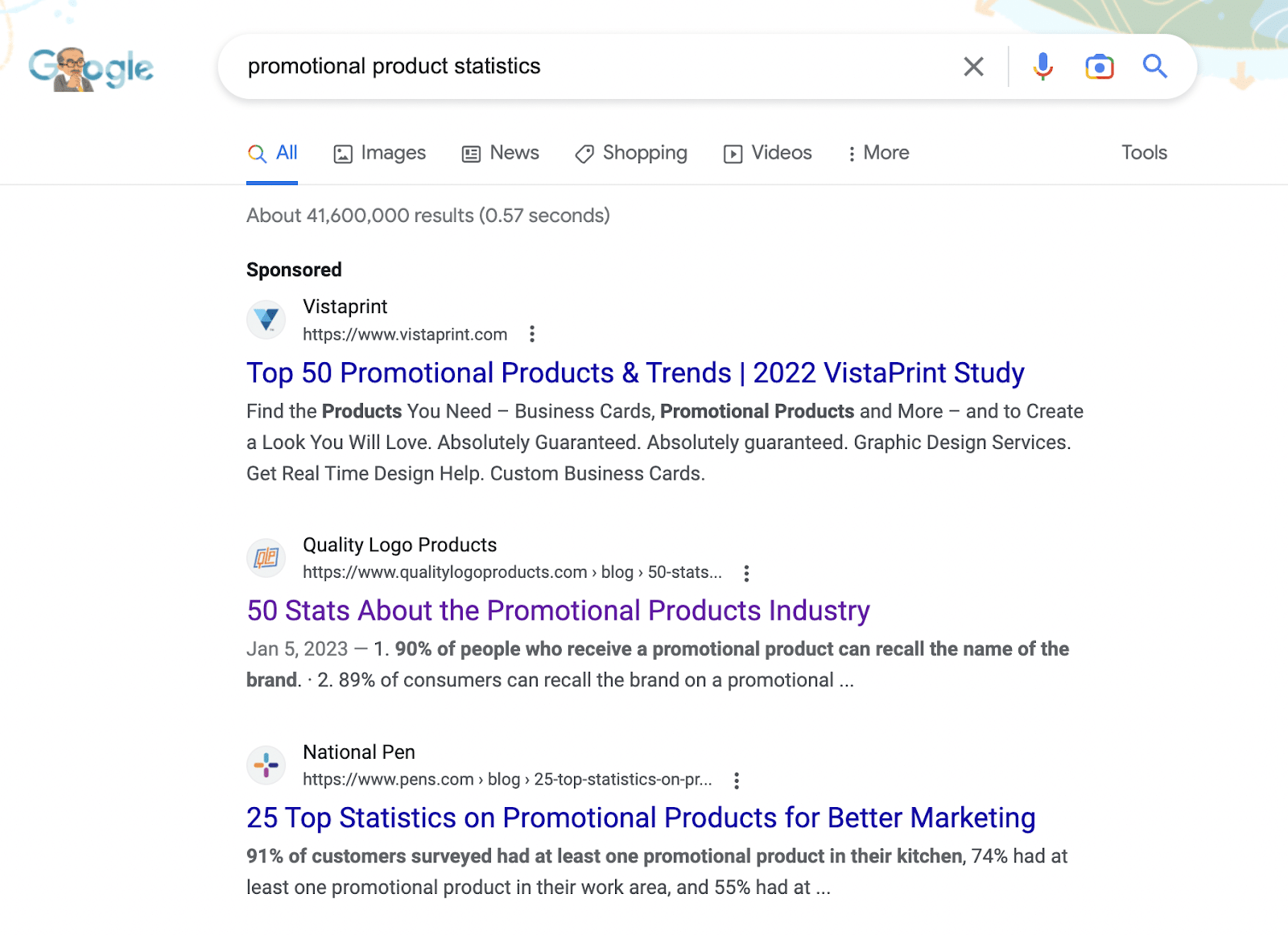
As you can see in the screenshot below, this list of 50 crazy stats and facts ranks for “promotional product statistics,” and as a result, will secure links naturally as journalists and bloggers search for statistics to reference.
Conclusion
Ranking category, product, or brand pages in Google search results is essential for ecommerce businesses to drive high conversion rates. However, securing high-quality backlinks to these pages can be challenging due to the nature of ecommerce.
To overcome these challenges, you can combine content-led link building, strategic internal linking and creative outreach techniques.
By employing these strategies, ecommerce businesses can overcome the challenges associated with ecommerce linking and improve their search engine visibility.
The post 6 link building techniques for ecommerce appeared first on Search Engine Land.
Courtesy of Search Engine Land: News & Info About SEO, PPC, SEM, Search Engines & Search Marketing