Archive for the ‘seo news’ Category
Tuesday, April 18th, 2023
SEO or PPC?
Like everything in marketing, it would be great if there was a simple answer to the SEO vs. PPC question.
Unfortunately, despite the human temptation to simplify this into a binary answer, the answer is complicated.
SEO helps your webpages rank higher on the non-paid search results by improving the quality and relevance of the content on your website. This improved visibility comes without the expensive costs per click of PPC.
PPC ads are paid online advertisements that are laser targeted by demographics and keywords to get in front of the right people at the right time.
Typically, PPC ads show in highly prominent positions on the search results and hoover up the majority of clicks for highly commercial terms.
What is right for you?
This article will provide an overview of the search landscape and the two key search engine marketing (SEM) tactics, plus five simple questions you can ask yourself to determine where your efforts should be spent.
Defining SEO and PPC
In a nutshell, SEO stands for “search engine optimization” and is the process of improving your website to increase its visibility on Google, Bing and other search engines.
PPC, or pay-per-click, are the ads that appear on a page of search results (typically in premium positions).
The search landscape
The key to making an educated SEO vs. PPC decision is understanding the makeup of the search engine result pages (SERPs) for the keywords that matter to you.
While the search results were once just “10 blue links,” modern search engines provide a rich array of page features, all designed to provide comprehensive answers along with the means to dig further into a topic.
Modern SERPs feature:
- Ads
- Knowledge panels.
- Featured snippets.
- Maps.
- Images.
- Videos.
- Top stories (news).
- People Also Ask.
- Carousels.
- Organic listings.
- Search tools (related searches, etc.)
- And more ads.
Search results are complex and diverse and each of these areas offers an opportunity for keen-eyed search marketers.
Now we understand the search landscape, we can dig into the relative merits of SEO and PPC and how these apply to your situation.
SEO: The pros
How can you benefit from SEO? How do the organic listings differ from the paid listings that sit above the organic listings?
Awareness
Visibility in search engines for your targeted keywords drives awareness of your business.
Branding
Visibility around commercial search terms and informational queries related to your business area can have a positive branding benefit.
Your brand can become associated with and trusted by searchers asking questions as they conduct the research that will lead to a purchase.
Credibility and trust
Having your site return in the organic results can influence your perceived credibility with an audience looking for your services.
Many users skip ads and trust organic results more highly, particularly in the research stage of a purchase. Being visible gives your business that all-important stamp of approval.
Versatility
As we covered in our review of the search landscape, organic search results are highly varied and versatile.
As such, there is a range of opportunities to present your business to your prospective clients as they research a purchase.
Reputation and reviews
Search results include reviews from several sources and having strong review and reputation signals in place further boosts trust signals.
Website traffic
Increasing website traffic gives you more opportunities to engage and educate a prospect as to why they would buy from you.
Cost per click
Traffic from organic search is free – sort of. Developing that visibility will take time and effort (money), but there is no direct charge for each impression or click.
Return on investment (ROI)
As paid clicks continue to get ever more expensive, smart SEO can provide an improved ROI over paid clicks.
Cost
While SEO is neither cheap nor easy, it will generally be more cost-effective than other marketing tactics for delivering brand awareness and relevant traffic to your website.
Sustainability
Unlike PPC, organic traffic does not dry up when you stop paying. As such, efforts to develop organic traffic can sustain a business when marketing budgets are tight.
Not paying for every click
Not all keywords convert the same and SEO can help you target users earlier in the purchase cycle without paying for those low conversion rate clicks.
Scope
There are so many new queries every day that to maximize scope, you will need strong organic visibility. You will not want to pay for all kinds of clicks or advertise every piece of content on your website.
Strategic advantage
Visibility in organic search is not quick or easy – which is a good and a bad thing.
Once you have established yourself in the organic results, your competitors can’t simply buy their way in (assuming you have done things the right way).
This can provide a strategic advantage over the competition if they rely on paid search.
80/20 rule
With modern CMS platforms, SEO is simplified, and you can often generate 80% of the possible SEO results with only 20% of the work.
SEO: The cons
SEO has many benefits, but it is not without its challenges.
- Highly competitive.
- Search results can be very busy with several types of results.
- Ads dominate the top of the search results.
- Many search results are dominated by titans (Amazon, eBay, etc.).
- Local results can be hyperlocalized resulting in poor organic radius.
- Content development is tricky for smaller businesses.
- Tactics like link building are difficult and shrouded in bad information online.
- Algorithm changes can create turbulence and unexpected change.
- Lots of bad information out there that can waste your time.
One of the key problems with SEO is that it is just so easy to spend a lot of time and effort on SEO tasks that do little or nothing to help.
Blog posts that will never rank, meta descriptions that don’t matter, technical SEO – the list goes on.
SEO tools, which are supposed to help with this problem, tend to make matters worse and generate endless lists of SEO tasks that are essentially just busy work.
These tools have utility, but they require experience to know what should be done and what can be ignored.
While highly valuable, SEO can be tricky to implement and highly competitive.
It is important to develop realistic goals and measurements.
Get the daily newsletter search marketers rely on.
<input type=”hidden” name=”utmMedium” value=”“>
<input type=”hidden” name=”utmCampaign” value=”“>
<input type=”hidden” name=”utmSource” value=”“>
<input type=”hidden” name=”utmContent” value=”“>
<input type=”hidden” name=”pageLink” value=”“>
<input type=”hidden” name=”ipAddress” value=”“>
PPC: The pros
How does paid search differ from organic search? If SEO provides free traffic, why would a business consider paid search?
Targeting
PPC provides a laser-targeted way to get in front of potential customers.
Ads can be targeted by search keywords, time of day, day of the week, geography, language, device and audiences based on previous visits. Organic traffic, by comparison, is far more scattershot.
Speed
While developing organic visibility can take time, a PPC campaign can be created in days and ramped up in weeks. There is no faster way to get in front of customers when they are primed to buy than paid search engine advertising.
Position on the page
Paid search dominates above-the-fold content.
With typically four ads on desktop and three on mobile, a user will always see the paid search ads, even if they choose to scroll past them.
Improved ads
PPC ads are just that: advertisements. You have far more granular control and more space for delivering your marketing messages.
Calls, locations, site links, pricing and bullet points (callouts) are just some of the options for creating ads that dominate the page.
Dynamic ad copy
Google’s responsive search ads have 15 titles and four descriptions providing over 30,000 variations with built-in split testing. This ensures your ads are customized to help generate clicks.
Visual product ads
Where you sell a product, Google provides the option of visual shopping ads (product listing ads, or PLAs) that can help a user see what they will be clicking on.
Brand visibility
Running paid search advertisements gets you seen by the right people. Even if they back off and conduct a brand search before clicking on your site, that visibility will pay dividends to your marketing.
Budget
While costly, PPC allows for budget control. Determine how much you are willing to spend per day (ideally with some initial and ideal ideas of returns), and set that fixed limit.
Agile
Speed provides agility. Want to test a new product? A new marketing message?
You can get rapid feedback on a new product launch (or minimum viable product) by running a short PPC ad campaign.
Marketing intelligence
Where organic largely hides keyword data in the name of privacy, there is no such restriction with paid search.
With integration with analytics software (like Google Analytics), we can determine what keywords convert and at what percentage and cost.
This intelligence can be fed directly into SEO and inform all other advertising to improve results across the board.
A/B testing
Easily split-test ads, landing pages, and even call-to-action buttons to determine where the very best results lie.
Again, this information can be fed back into all other digital (and traditional) marketing endeavors.
Stability
Despite the competition, paid search does not typically suffer the same turbulence as organic.
There are changes, but they tend to have a far lower impact and are more easily managed.
Careful use of match types and analysis of the search term reports allow for the removal of junk searches and an increase in ROI over time.
Cost
Despite what many advertisers believe, a PPC account that’s set up and managed well can be a low-cost way to generate leads for your business.
If you are a local business targeting a small geographic area and a small set of keywords, you may find that you can generate more than enough leads without breaking the bank.
Additionally, over time, accounts can be further optimized to reduce costs and increase returns.
PPC: The cons
There are clearly many benefits to PPC. However, there are also some pitfalls advertisers must be wary of.
- PPC can be expensive.
- PPC can be highly competitive for commercial terms.
- PPC requires constant investment. Stop spending and traffic dries up
- Strategically easy to copy.
- Easy to start, difficult to master.
PPC on search engines is a highly powerful, and quite possibly the most powerful marketing system that has ever existed.
To succeed in a highly competitive environment, everything must be set up correctly: keywords, ads, landing pages and analytics.
It is not unusual to get into bidding wars with other advertisers, which can drive costs up.
As you start to run your ads, you are often taking a bite out of other advertisers’ digital apple. Doing so can result in spiraling costs (or revising your strategy).
Successful PPC needs skilled management and optimization – from monitoring bids, Quality Scores, positions and click-through rates.
Some of this can be done with scripts, but if you are too busy to do this properly, ensure you have an expert on hand to take care of keeping your account in tip-top shape.
PPC is incredibly powerful, but you must ensure all aspects are optimized to maximize results while keeping costs reasonable.
Hopefully, you have an idea of the pros and cons of SEO and PPC now and are better positioned to review the landscape.
The next step is to work through a series of questions to determine the correct approach based on your target keywords and current situation.
SEO or PPC: 5 questions to ask
The following are five simple questions you can ask to help determine where you should spend your time and resources.
1. What keywords are you targeting?
This question is crucial as your target keywords will strongly influence your choice between SEO and PPC.
A useful exercise here to aid keyword research is to create a persona and answer the who, why and how customer questions.
- Who are your customers?
- Why do they buy? (Is something broken?)
- How do they buy? (What is the search journey?)
This can be a useful framework to help with the keyword research process (in addition to any tools you may want to use).
2. What do the results look like for each keyword?
Google each keyword and summarize the search results for each.
This does not need to be complicated; some simple bullets will do the job.
Keyword: “Plumber”
- 3 x local service ads
- 1 x text ad
- Find results on links (3 x external sites)
- Local pack
- Local listing
- Local listing
- Local listing
- People also ask
- Question
- Question
- Question
- Question
- Organic 1: Directory
- Organic 2: Wikipedia
- Organic 3: Directory
- Organic 4: Government careers site
- Organic 5: Portal
- Organic 6: Local business
Here we see that the three-pack has good organic visibility right at the top of the page so SEO is likely useful if targeting a small geographic area.
However, if you are targeting a larger area and can’t likely rank in the pack then the first non-directory or portal listing is the position 6 organic listing.
This is around the 22nd link on the page (so unlikely to generate significant organic traffic).
By conducting this relatively simple analysis for your keywords and reviewing the landscape you can make some estimates regarding whether ad coverage or SEO will generate the required results.
3. How do the results vary by location?
There is a common mistake that a lot of local businesses make, which is to assume that what they see when they Google their target keywords at their location is what everyone sees.
It is important to track your results from different locations as the ads, local pack and organic results (typically localized) will vary.
What we recommend here is that you either conduct manual rank reports from different locations or ideally, use a rank tracking tool that will show you your rankings at various points across the geography you cover.
Note: You may see that your results are strong within a given distance of your location but drop off further away from your location. Sometimes, a combined SEO and PPC approach can be useful.
4. How much business do you need?
This is an important question and where we start to see some intersectionality from these questions.
If you are a small business servicing a local area and need maybe one or two good leads a week, then SEO may give you more than you need.
We have helped hundreds of small businesses that fall into this category, and once SEO is dialed in, they never spend a penny on PPC.
If you are a larger business, have multiple teams and service a large city or geographic area, you may also need some coverage with PPC on top of SEO to ensure you generate enough work.
5. What do you have more of – time or money?
An important difference between SEO and PPC is that you can do SEO yourself or within your business without any real costs.
All the information you need is out there to improve your visibility.
Time is money. So, if you have a larger team costing you money, then spending money to generate leads quickly makes sense.
This is where we have to consider the pros and cons we discussed earlier, as improving SEO can take a while, whereas PPC can be almost instant.
It is important to determine what is right for your completely unique situation and objectives and lean in that direction.
SEO vs. PPC: Your unique roadmap
Hopefully, you can see it is impossible to answer this question in a generic way. You really have to consider all the variables.
A hyper-local business with little competition and a requirement for just a few leads per week could likely develop good visibility in the local and organic search results with a little spend or some DIY SEO.
A new ecommerce store that is competing with a page of results from Amazon, eBay and other major department stores and online retailers is likely going to struggle in organic search (in the short term, at least).
Do you need leads now? Are you looking at the long game? Do you have much in the way of website authority? What is the competition like in organic search? What is the cost per click in paid search?
A clear digital marketing strategy and short- and long-term goals are essential in making an SEO or PPC decision.
The third option: SEO and PPC
In most cases, the right approach will not be either SEO or PPC. It will be a holistic SEM strategy that combines both.
SEO and PPC work best when they are strategically aligned to work together.
A blended approach will typically drive overall results greater than their parts.
The benefits of running SEO and PPC together include:
- Keyword and conversion data from PPC can be fed into organic search (SEO).
- Geographic areas with weaker SEO coverage can be covered by PPC.
- The total traffic volume can be increased by targeting clicks in paid and organic for high-performing keywords.
- High-cost, high-volume or low-converting (yet still important) keywords can be moved from PPC to organic search.
- A/B testing of ad copy and landing pages can be fed into your organic listing and landing pages.
- Remarketing allows you to stay in front of visitors after an initial touch via organic search and customize messaging around their engagement with your site.
- Test your keyword strategy in PPC before committing to long-term SEO strategies.
- Target users at all customer journey stages, from research to comparison to purchase with commercial keywords.
- Increase confidence and awareness by having both strong organic and paid visibility.
In our experience with thousands of businesses, an integrated search strategy that looks at both SEO and PPC is the optimal approach.
We may often start with heavy PPC while organic is built up and then dial that back a little. Alternatively, PPC may be the icing on the cake to bag sales that were set up with SEO traffic.
What is right will always depend on your situation and goals, but the smart mindset is to look at how to get these two titans of modern marketing working together.
The post SEO vs. PPC: Differences, pros, cons & an integrated approach appeared first on Search Engine Land.
Courtesy of Search Engine Land: News & Info About SEO, PPC, SEM, Search Engines & Search Marketing
Tuesday, April 18th, 2023
Creating awareness, driving qualified traffic, and boosting conversions – especially in a world with near-constant ranking factor rollouts, platform changes, and evolutions in AI – requires continued training with trusted experts.
Join dozens of the world’s most respected search marketing minds at SMX Advanced – online June 13-14 for an unrivaled training experience. Together, you’ll explore the latest, most sophisticated SEO and PPC topics – including ChatGPT and other generative AI bots, Google Analytics 4 (the July 1 deadline is drawing near!), Google algorithm updates, and more… all without leaving your desk, and all for free.
Your free All Access pass unlocks the entire program, featuring 40+ tactic-rich sessions, hours of live Q&A (Overtime!) with speakers, invigorating “Coffee Talk” networking, and more.

The entire program is available live and on-demand, so you can train at your own pace. And it’s all free. No plane ticket. No expense report. No kidding.
Join the ranks of more than 150,000 search marketers who have trusted SMX to deliver actionable tactics and expert insights that drive measurable results. Secure your free pass now!
The post Meet and learn from search marketing experts at SMX Advanced appeared first on Search Engine Land.
Courtesy of Search Engine Land: News & Info About SEO, PPC, SEM, Search Engines & Search Marketing
Monday, April 17th, 2023
If you’ve ever googled instructions for how to perform a specific task, then you the importance of high-quality how-to content.
The person desperately searching for an excellent how-to article on fixing a leaky sink will find immense relief when they finally hit on a blog post that lays it out simply and clearly, for instance.
In almost any scenario where somebody needs instructions and help on how to do something, great how-to content can swoop in and improve their lives.
That’s what we’ll explore in this article – why how-to content matters and how to create it effectively.
Why create how-to content?
The right how-to content, created with clear steps and instructions, saves a lot of hassle. It might even save someone’s day.
So, if you’re the one creating this content for your audience, that’s immensely valuable.
You’re rescuing them from the dreaded Google search that never ends by not only fulfilling their search needs but giving them content that’s actually helpful.
And it’s easy to see how those actions could help grow your brand – by proving your expertise and thus building trust and affinity with your readers.
Along with that, if your how-to content is properly optimized for search, you’ll help people outside of your audience whom you can then pull into your brand orbit.
To sum up, how-to content is incredibly valuable for both the brand and the audience – so why wouldn’t you create it?
How to create how-to content
Great how-to content is born once you know your goals for that content, understand whom you’re writing to, and know exactly what your content will help them accomplish.
1. Zero in on your content goal: teaching/educating
Every piece of content has a goal, and if your goal is to teach/educate about a particular topic, make sure that’s clear from the outset.
Your goal will influence how you approach creating a piece of content and creating how-to content requires a teaching mindset/approach.
Why does this matter?
Because a teaching mindset is entirely different from an information-sharing, entertaining, or analytical mindset.
Teaching through content, especially, needs a specific method if you expect to teach successfully:
- Detailed explanations.
- Step-by-step instructions.
- Lots of examples.
- Helpful visuals (photos, video, illustrations, etc.).
- Presenting not just the “what” but also the “how” and the “why” of the topic.
- Putting yourself in the reader’s shoes and seeing how you can build their understanding from A to B, to C, to D, and beyond.
So, as you plan out your content, keep track of the goals for each piece. Your goals will influence the outcome, especially for how-to content.
2. Find your how-to topic
Sometimes the how-to topic you’ll use for your content will be obvious.
You might even have a whole list of how-to topics you want to create content for that tie into your brand goals, what you sell, and what your audience wants to see.
But, if the right how-to topics aren’t presenting themselves this easily, don’t worry. You can research to find your perfect topics.
Think about the needs of your target audience
What are some problems they have (big or small!), relevant to your industry, that you could help them solve with how-to content?
Don’t know this? Ask them. Polls, surveys, interviews, and just plain chats are your friends.
Consider the wants of your target audience
What questions are they asking, directly or indirectly?
- Look for potential how-to topics inside your customer service data.
- Have your sales reps keep tabs on the most common questions they hear.
- Do some social listening to find out what your audience wants to know how to do.
Look for how-to keywords relevant to your industry/what you sell
You can also find how-to topics with some keyword research.
A good keyword can easily inspire an equally good how-to topic.
- Search for keywords starting with “how to”, but also ones starting or ending with terms like “step-by-step guide”, “how do I…”, or “tutorial” – these also imply a how-to topic.
- If you’re starting with a topic, find a closely related keyword for which your brand can still rank. Avoid any keyword that’s too competitive.
- Look at metrics like search volume to determine whether anyone is actually searching for the keyword and keyword difficulty (KD) to determine how competitive the keyword is to rank for.
Get the daily newsletter search marketers rely on.
<input type=”hidden” name=”utmMedium” value=”“>
<input type=”hidden” name=”utmCampaign” value=”“>
<input type=”hidden” name=”utmSource” value=”“>
<input type=”hidden” name=”utmContent” value=”“>
<input type=”hidden” name=”pageLink” value=”“>
<input type=”hidden” name=”ipAddress” value=”“>
3. Research and plan your how-to topic for SEO and readers
With a topic/focus keyword in hand, you can start figuring out how you’ll write your how-to content. There are a few ways to do this to ensure you hit the bullseye for readers and search engines.
Research what already exists on Google
If you want to rank in Google for your how-to topic, you need to see what’s already ranking for your keyword and determine how to make your content better.
You should also see what’s ranking in Google to study how these pieces are structured, which facets of the topic they focus on, and how they address the searcher intent for the keyword.
Since these pieces are winning the rankings for the keyword, you already know they are in the vein of what searchers and Google are looking for – so you should definitely take notes and inspiration from them.
Look at the competition
In some cases, what’s ranking in Google for your how-to keyword/topic may be content from one of your direct competitors.
In this case, focus on how you can differentiate your content from theirs.
- What’s missing from your competitor’s content piece?
- Could you go deeper on the topic – e.g., provide more granular steps in your how-to, more insights, or additional research?
- How can you differentiate visually? For example, maybe your competitor has completely overlooked the visual aspect of their how-to content. In this case, you could go further by adding photos or screenshots of the how-to process.
Choose the right format
Not every how-to topic will call for the same format, like a list of steps.
Some how-to topics are better suited for an instructional video, while others might call for a simple written explanation or a long, detailed guide with tips and photos.
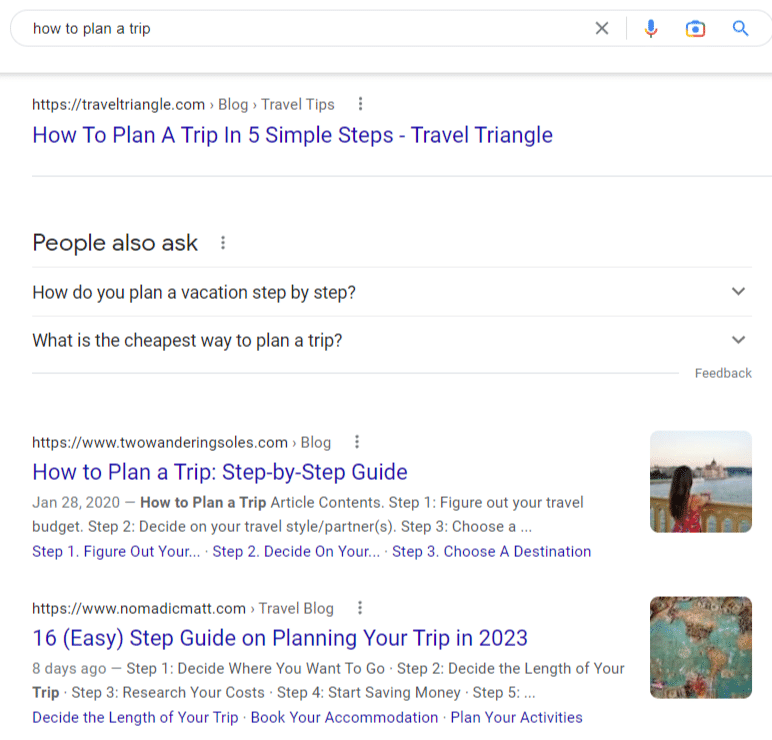
For example, for the keyword “how to plan a trip,” the top of Google is populated with written guides. This makes sense because trip planning is very much a thinking-based activity.
Written guides are well-suited for this kind of how-to.
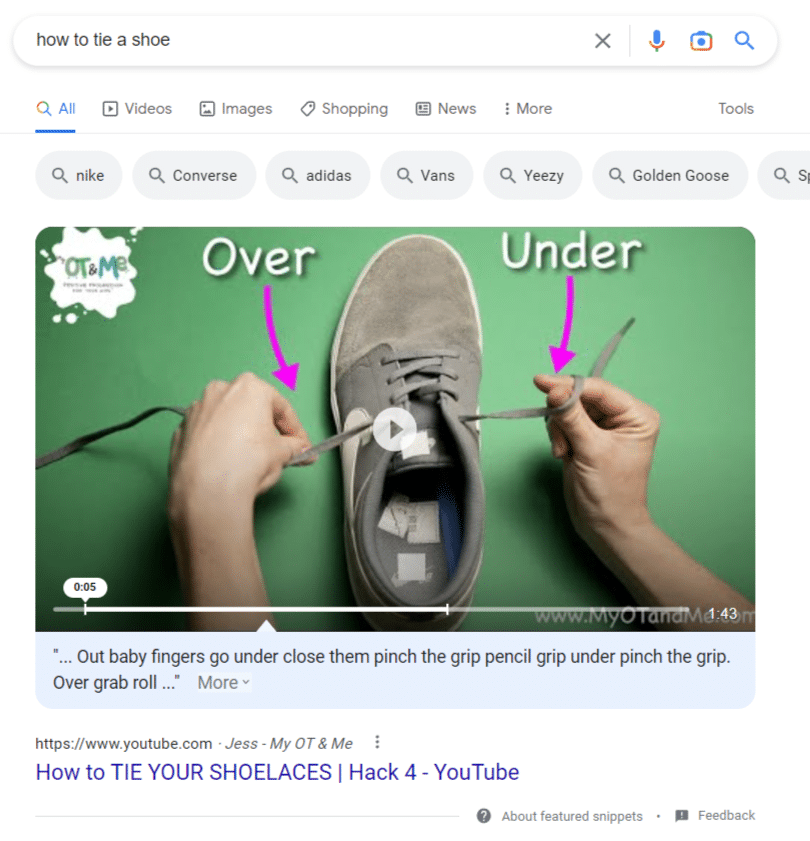
In contrast, the top of Google for the keyword “how to tie a shoe” contains mostly video content.
This makes sense because understanding how to tie your shoes would be difficult without someone demonstrating it.
It’s not a complex process but relies heavily on spatial understanding. Videos are best for this kind of how-to.
With these examples in mind, choose the format for your how-to content carefully.
Consider the medium through which your audience will best learn about your topic and what that topic requires in terms of total understanding.
4. Write with the aim of teaching effectively
You already have your goal in mind – teaching your audience to build affinity and trust – as you set out to write your how-to content.
But how do you teach effectively? Keep these tips in mind.
Remember who your audience is and write to them
Your best guide is always your audience. To teach them effectively, you need to know them – really know them.
First, you must have a grasp of their level of knowledge.
What do they know already about your topic? What do they not know? How can you bridge the gap between the two?
You also need to know what they’re most concerned with and what is less important to them.
Which parts of your how-to topic need a deeper explanation? Which parts are satisfactory with only cliff notes?
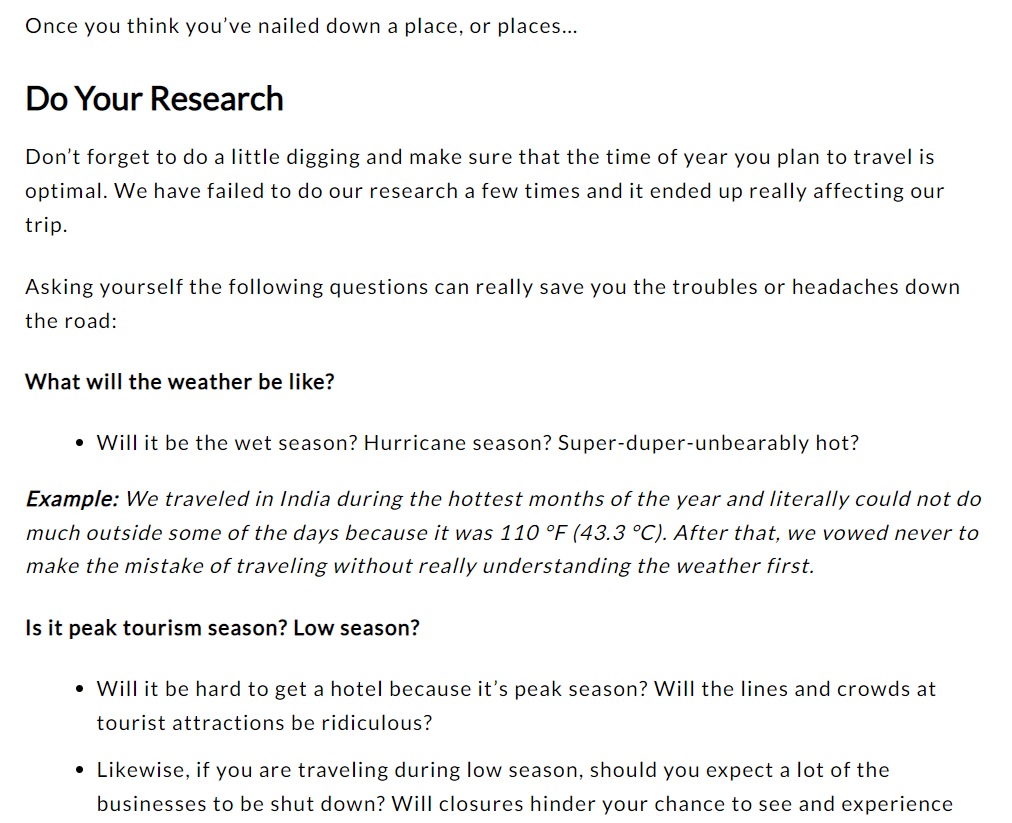
For example, in this blog about how to plan a trip, the author assumes their audience already has a destination in mind, or won’t need much help picking one out.
Instead, they offer tips and advice about researching and planning your trip based on your destination (such as researching the weather during your trip window, visa requirements, and more).
Put yourself in a beginner’s shoes
If you’re an expert, sometimes it can be hard to go back in time and try to remember what it felt like to be new and inexperienced at your specialty.
But to write great how-to content, you need to be able to do this.
The better you empathize with your readers, the better you can help them with how-to content.
So think hard about what it was like to start fresh with little knowledge about your topic. Use that to make your content more helpful, real, and useful for beginners.
Avoid using technical terms or industry jargon
As a practitioner in a specific industry, it’s pretty easy to fall into “industry speak” without realizing it.
But this can turn off or even alienate readers who aren’t yet familiar with those terms. Here’s a great example from Brand Chemistry of jargon:
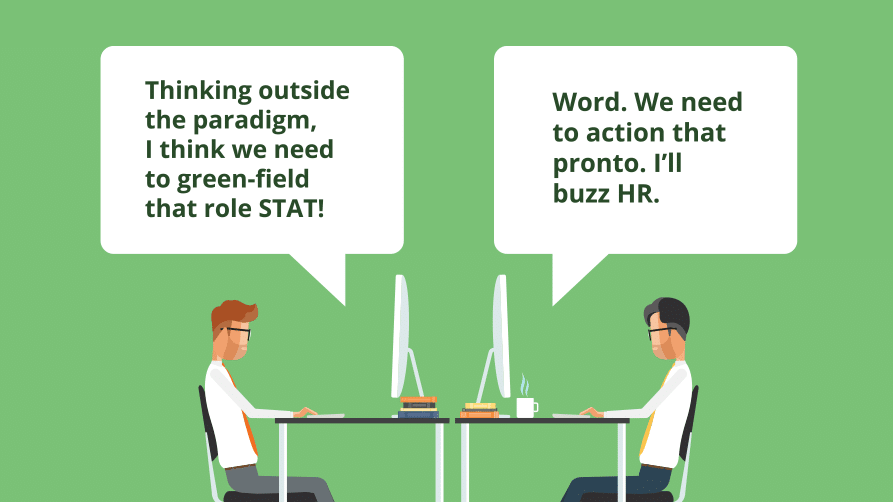
To an outsider, this sounds like a different language.
At worst, using jargon will make your audience feel lost from the beginning of your how-to content. That’s the opposite of what you want.
At a base level, this all goes back to knowing your audience and speaking to them in a way they’ll understand.
Instead, avoid falling back on cliches and buzzwords and aim for clarity in how you explain and describe concepts.
5. Add your unique angle and expertise on the topic
Nearly 7 million blog posts are published daily. How will you stand out from the crowd?
Answer: Use your expertise – the mix of knowledge, skills, and experience that forms your unique brand perspective.
Many brands are built on the expertise of their founders, but many others rely on the diverse skill sets of their teams.
This knowledge and skill combination is fundamental to the brand and how they solve customers’ problems.
Whichever category your brand falls into, ensure you understand that expertise, where it comes from, and how it’s expressed in the content. (If you don’t – start interviewing your team to get that understanding.)
For example, perhaps the brand founder has a story explaining how they became an expert with some unique twists and turns influencing how they approach their industry.
Where relevant, referencing and using these stories in content can be an incredible differentiator and may give extra gravitas to your how-to content.
6. Explain the ‘why’ behind your points
This point is true not just for how-to content but also for most other long-form types.
Great educational content doesn’t just explain the “what” – it also delves into the “how” and the “why.”
Let’s return to the blog about how to plan a trip to show you an example.
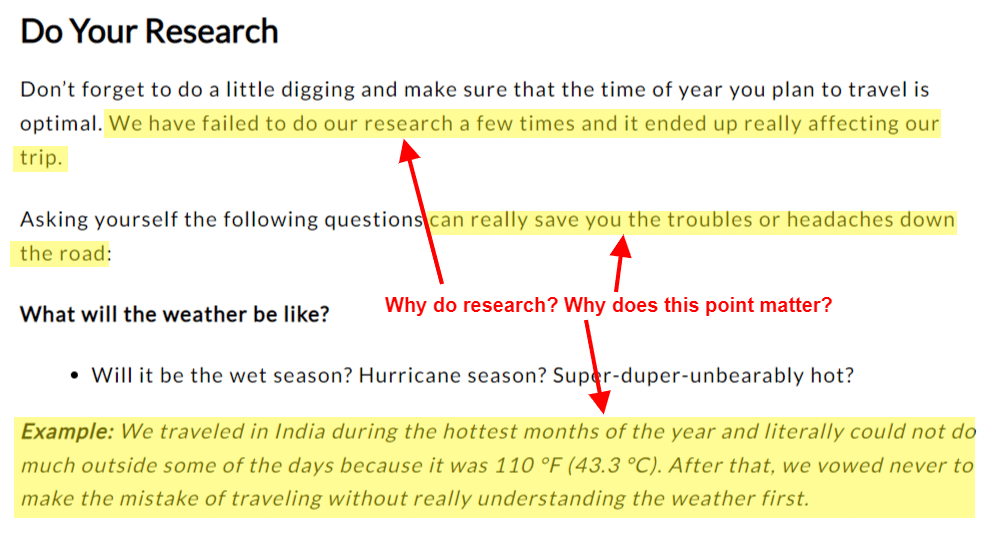
In the section on choosing a destination, the authors could have just told you to research the weather and travel requirements before you plan your trip and left it at that.
But instead, they give you reasons why researching before planning is a good idea based on their experience and expertise:
- In their experience, when they failed to research, their trips didn’t meet their expectations.
- Researching as a part of vacation planning “can really save you troubles or headaches down the road,” such as when the authors traveled to India without researching the weather first and ended up there during the hottest months of the year.
Using their expertise, they explain the WHY behind their point. They give you solid reasoning with examples from their extensive experience traveling.
See the difference it makes? Without these things, this blog would lack evidence of E-E-A-T, and the information would seem shallow and less trustworthy.
7. Include helpful visuals
We already touched on this briefly, but it’s worth a second glance.
Most content, especially blogs, needs visuals to be more engaging, but how-to content practically begs for them.
In your written content, look for opportunities to help your reader understand concepts better with a well-chosen, well-placed image, photo, or screenshot.
For example, this blog on how to block a knitting project has much-needed pictures that clarify the text instructions.
Effectively educate your audience with how-to content
How-to content presents a huge opportunity to provide value to your audience immediately.
If you can teach them effectively, the benefits will roll outward for a long time – including building trust and affinity with your brand.
That makes educational, how-to content one of the best investments for a content marketing strategy.
It’s like that old saying, “Give a man a fish and you’ll feed him for a day. Teach a man to fish and you’ll feed him for a lifetime.”
What will you teach your audience?
The post How to create how-to content in 7 steps appeared first on Search Engine Land.
Courtesy of Search Engine Land: News & Info About SEO, PPC, SEM, Search Engines & Search Marketing
Monday, April 17th, 2023
Google is in the process of building an “all-new search engine” powered by its new A.I. technology while at the same time working on adding new A.I.-based features to its current search engine under the project name Magi. “The new search engine would offer users a far more personalized experience than the company’s current service, attempting to anticipate users’ needs,” the NY Times reports.
New Google search engine
Google has put a team of designers, engineers and executives in charge of building out this new search engine that “could put new A.I. technology in phones and homes all over the world,” according to the report.
The new Google search engine are still in its early stages, with no timeline for when it will be released. But it this new effort does “demonstrate Google’s ambitions to reimagine the search experience.”
The new search engine would “learn what users want to know based on what they’re searching.” In addition, it would “offer lists of preselected options for objects to buy, information to research and other information.” At the same time, being more conversational, like talking to a person. Earlier reports has Google talking about big changes coming to Google Search.
In 2009, Google tried to heavily personalize search results where it actually said all search results were being personalized for all users. But a decade later, Google admitted personalization offered little benefit to searchers. Personalization in search was very limited and pulled back in a big way, outside of immediate previous query and some localization based on the user’s location. That may have been a privacy play but here we are in a world where now Google seems like it can potentially lose market share to Microsoft Bing and other players.
Project Magi
While Google is working on an all-new search engine, a team of more than 160 Googlers are working full-time on adding new features to the existing Google Search. This project is being code-named Magi, according to these reports and may be released as early as next month to a subset of users.
Magi would allow searchers to complete transactions, such as buying shoes or booking flights, according to the report. This would allow searchers to complete financial transactions, all while still incorporating the existing search ads that Google Search makes a huge profit on today.
These changes can allow searchers to answer questions about “software coding and write code based on a user’s request.” “Google may place an ad under the computer code answers, according to a document,” the report added.
Other Google projects
Google is also working on other efforts, including:
- Google Earth’s mapping technology with help from A.I. and search for music through a conversation with a chatbot.
- GIFI would use A.I. to generate images in Google Image results.
- Tivoli Tutor, would teach users a new language through open-ended A.I. text conversations.
- Searchalong, would let users ask a chatbot questions while surfing the web through Google’s Chrome browser.
Lara Levin, a Google spokeswoman, said told the New York Times that “not every brainstorm deck or product idea leads to a launch, but as we’ve said before, we’re excited about bringing new A.I.-powered features to search, and will share more details soon.”
Lara Levin from Google reached out to us with the following statement as well, “We’ve been bringing AI to Google Search for years to not only dramatically improve the quality of our results, but also introduce entirely new ways to search, such as Lens and multisearch. We’ve done so in a responsible and helpful way that maintains the high bar we set for delivering quality information. Not every brainstorm deck or product idea leads to a launch, but as we’ve said before, we’re excited about bringing new AI-powered features to Search, and will share more details soon.”
Why we care
Watching how fast Google changes and reacts to OpenAI and Microsoft has been interesting. Search is changing incredibly fast and over the next several months will be fascinating to see how search ads, SEO and other forms of marketing change with it.
Stay tuned, we will keep you posted on these changes.
The post Google planning new search engine while working on new search features under Project Magi appeared first on Search Engine Land.
Courtesy of Search Engine Land: News & Info About SEO, PPC, SEM, Search Engines & Search Marketing
Monday, April 17th, 2023
With the rise of ecommerce, consumers now have more choices than ever before and expect seamless and personalized experiences from the brands they interact with. D2C businesses must rely on digital marketing to position themselves for success. It provides a direct and cost-effective way to reach the brand’s target audience at the right time, with the right content and through the right channel.
Through the use of various digital channels, such as email marketing, mobile marketing (SMS, WhatsApp, app) and web and ad optimization, D2C brands are able to build strong and lasting relationships, increase customer loyalty, and drive repeat business.
In a highly competitive online environment, it’s a must for D2C businesses to prioritize customer engagement in order to stand out. How? By understanding their customers’ needs, preferences, and behaviors and using this data to provide them with relevant and valuable experiences that meet those needs. This will allow brands to build strong and lasting relationships, increase customer loyalty, and drive repeat business — the dream, right?
To help you stay ahead of the game, we have created a unique compilation of fast time-to-value use cases that have proven successful for leading brands by generating revenue, maintaining their customers, and expanding brand awareness.
To help you master the art of DTC marketing, we’ll dive into acquisition-boosting campaigns, conversion-driven campaigns, customer retention campaigns, and more.
READ THE GUIDE
The post A must-read Guide for DTC Marketers appeared first on Search Engine Land.
Courtesy of Search Engine Land: News & Info About SEO, PPC, SEM, Search Engines & Search Marketing
Friday, April 14th, 2023
Twitter’s ad revenue recovery appears to be slower than its owner, Elon Musk, claimed earlier this week in an interview with the BBC. Data from research firms Sensor Tower and Insider Intelligence, as well as statements from multiple companies, indicate that many advertisers are not rushing back to the platform.
Ad spend down roughly 20%. Twitter’s top 50 advertisers spent a combined $83 million over the past two months, down from $102 million in the same period last year. Insider Intelligence has also slashed its forecast for Twitter’s global ad revenue this year by 37%, to $2.98 billion, representing a 28% decline from its 2022 ad revenue of $4.14 billion.
Scaring off big brands. Before Musk’s acquisition of Twitter in late October, major brands such as Mondelez International, Unilever, and Coca-Cola were among the platform’s top 10 advertisers. However, these companies are no longer listed in the top 50 advertisers in the past two months, according to Sensor Tower. Mondelez CEO Dirk Van de Put had previously cited concerns over their ads being placed next to “wrong messages,” including hate speech.
Some advertisers, including AT&T, Volkswagen, Stellantis, and Mars, have confirmed they have not resumed ads on the platform. Several others, like Merck & Co, Google, Kellogg, and Meta Platforms, have not responded to requests for comment on their ad spending.
Twitter’s ad portal also experienced an 18.7% drop in web traffic in March compared to the same time last year, as reported by research firm Similarweb. The firm added that Twitter’s ad business is “eroding” and its subscription product, Twitter Blue, is only moderately successful.
The platform faces the added challenge of competing for brands’ marketing budgets during a time when companies are cutting or reevaluating their ad spend due to economic concerns. Enberg noted that advertisers are focusing on platforms that can offer the highest return on investment, and Twitter has not been that platform.
Dig deeper. Review the entire article from Reuters here.
Why we care. Twitter is still a popular platform with millions of users, offering potential for targeted ad campaigns and engagement with a wide audience.
However, they need to weigh the risks associated with the platform’s recent controversies, management changes under Elon Musk’s ownership, and the overall decline in advertising revenue. Brands should make informed, educated decisions on whether to invest in Twitter advertising or allocate their marketing budgets to platforms with higher returns on investment and less controversy.
The post Advertisers slow to return to Twitter despite Musk’s claims appeared first on Search Engine Land.
Courtesy of Search Engine Land: News & Info About SEO, PPC, SEM, Search Engines & Search Marketing
Friday, April 14th, 2023
Instagram has just introduced 4 new features for Reels, including:
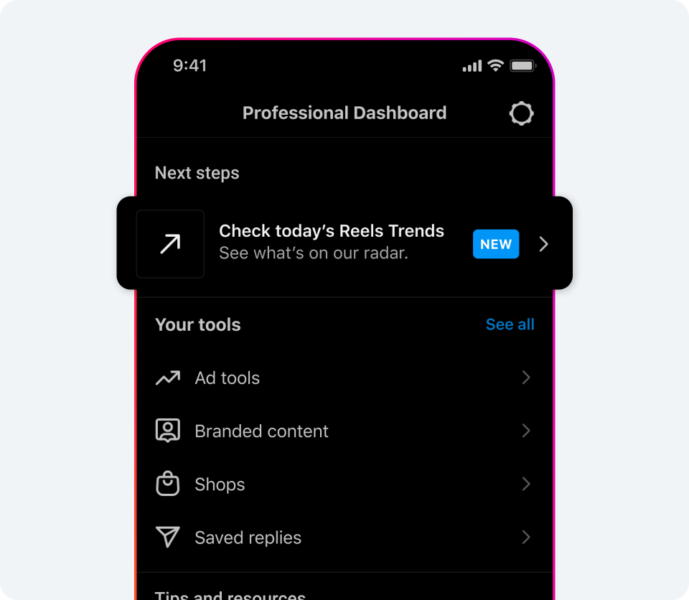
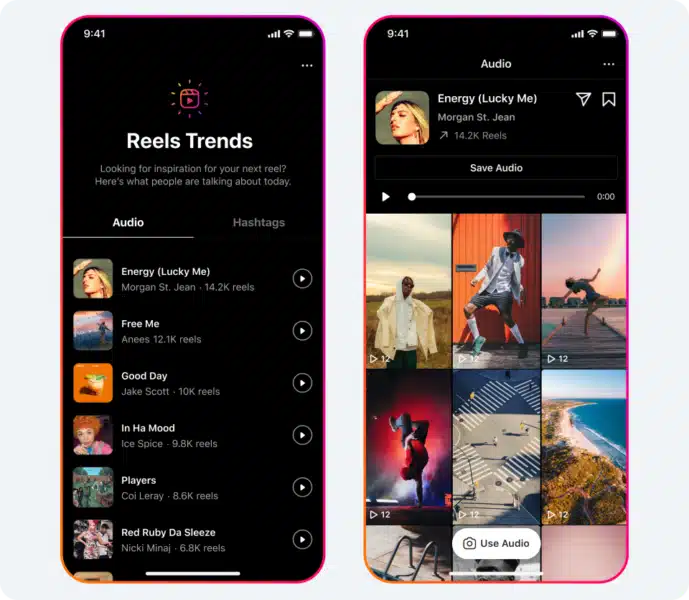
- A dedicated destination to discover inspiration through trending audio and hashtags on Instagram Reels.
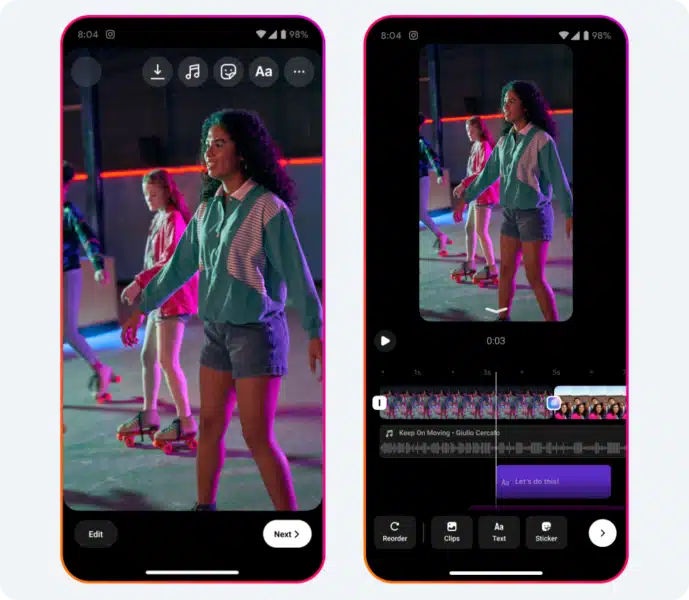
- Easier Reels editing
- Two new metrics to Reels insights: total and average watch times.
- Expanded availability of gifts on Reels to additional countries and incorporated a feature that allows creators to acknowledge fans’ gifts.
Find out what’s trending. Creators continually seek new content ideas, and to facilitate this, a dedicated space is being introduced to provide inspiration from the latest trends. This will enable users to view the most popular songs on Reels, check the number of times the audio has been used, and either use or save the audio for themselves.
Users will also have the ability to explore the top trending topics and hashtags on Reels, which can inform their content creation. For instance, the festival season might gain traction earlier than anticipated.
Editing Reels, easier. Instagram is streamlining the process of editing reels on Instagram by consolidating video clips, audio, stickers, and text into a single editing interface. This enhancement allows users to more visually align and time elements of their reels to the appropriate moments. As they continue to invest in developing methods to simplify and ease the editing process, users can look forward to additional exciting tools. This feature is accessible worldwide on both iOS and Android devices.
Updates to insights. Instagram is enhancing Reels insights to provide a better understanding of content performance. Two new metrics are being introduced: total watch time and average watch time – and they are simplifying the process of viewing insights directly on users’ reels.
Total watch time records the cumulative duration of time a reel was played, including any replays. Average watch time calculates the mean time spent playing a reel by dividing the watch time by the total number of plays. For instance, if the average watch time is 17 seconds, it means that on average, viewers watched 17 seconds of the Reel. This information will help users identify where their audience is engaged or where they might need to develop a stronger hook to retain viewers for a longer period. Additionally, they are introducing a new method to track how reels contribute to user growth. Users will now receive notifications regarding new followers gained from their reels.
Improving and expanding gifts. Instagram has made gifts available to more creators by expanding to additional markets in the coming weeks, including Australia, Canada, France, Mexico, New Zealand, and the UK.
Additionally, they’re introducing a feature that displays which fans have sent a gift, enabling creators to acknowledge their supporters. By tapping the heart icon next to their supporters, creators will send a notification to the fans, letting them know that their gift has been seen and appreciated.
Dig deeper. You can read about Instagram’s new features here.
Why we care. Instagram’s continuous improvement and expansion of features create a more interactive environment for creators and users. These enhancements also help advertisers better understand user behavior, identify trending content, and develop targeted campaigns that resonate with their audience.
The post 4 new Instagram Reels features appeared first on Search Engine Land.
Courtesy of Search Engine Land: News & Info About SEO, PPC, SEM, Search Engines & Search Marketing
Thursday, April 13th, 2023

Attracting interest in a tool or product may be the easy and fun part of building a business, but converting inquiries to purchasers is when it gets hard. So many brands today continue to struggle with acquiring, converting, retaining and creating loyal customers for life. Yet leading companies across the globe seem to be accomplishing all of that and then some.
Want to know how? Register and attend “Harnessing the Power of Customer Data to Stay Ahead of the Competition,” presented by Tealium.
Click here to view more Search Engine Land webinars.
The post Harness the power of customer data to stay ahead of the competition appeared first on Search Engine Land.
Courtesy of Search Engine Land: News & Info About SEO, PPC, SEM, Search Engines & Search Marketing
Thursday, April 13th, 2023
Google has opened registration for Google Marketing Live – the company’s annual event for showing off its newest ad formats, products and updates.
When is Google Marketing Live. Tuesday, May 23, starting at 9 a.m. PT.
The agenda so far. The event will explore how Google’s AI-driven ads solutions can amplify your marketing skills and generate impressive business outcomes in the evolving economic landscape.
The pre-show starts at 8:55 a.m. PT, followed by the opening keynote at 9 a.m. PT. Technology Broadcast Journalist Laurie Segall and Google VP Jason Spero will then lead an in-depth session discussing Google’s latest product unveilings, complete with a Q&A featuring the teams behind their creation.
Google Marketing Live 2022. Here are links to our coverage of Google Marketing Live 2022:
Reaction at SMX Advanced. Join us for SMX Advanced 2023 for a roundtable discussion on GML 2023 and hear reactions and insights straight from Google Ad experts. Here’s our panel from SMX Advanced 2022: Google Marketing Live 2022: Reactions from the experts.
How to register. You can register for Google Marketing Live 2023 here.
Why we care. In the fast-paced world of digital marketing, staying up-to-date with the latest tools, technologies, and strategies is crucial for maintaining a competitive edge. Google Marketing Live 2023 is a free event and allows advertisers to stay ahead of the competition and on top of industry trends and changes.
The post Google Marketing Live registration opens appeared first on Search Engine Land.
Courtesy of Search Engine Land: News & Info About SEO, PPC, SEM, Search Engines & Search Marketing
Thursday, April 13th, 2023
Merging Microsoft and Roku campaigns proves to be more effective in encouraging lower-funnel search activities when executed concurrently. According to a new report from Microsoft:
- Television streaming triggers a surge in search behavior, with Roku TV streaming advertisements resulting in a 9% growth in brand searches per user and an 11% uptick in clicks per user.
- Multi-channel exposure enhances engagement, as evidenced by an almost 18% overall increase in click-through rates on the Microsoft Audience Network when users are exposed to Roku ads.
- When users are exposed to both the Microsoft Audience Network and TV streaming, there is an 11% rise in searches and a 10% increase in clicks.
The whitepaper. The study, published on Thursday, seeks to assist marketers in comprehending how TV streaming, native, and search ads collaborate to boost full-funnel effectiveness. Achieving full-funnel measurement is more challenging in the context of a disjointed media-buying landscape.
While TV streaming ads are commonly believed to generate awareness, they can also lead to purchases. Search ads are known for fostering engagement and promoting lower-funnel activities, but they can also raise awareness.
The alliance between Microsoft and Roku enables both to access a vast audience. Microsoft’s platforms can reach over 1 billion users, while Roku boasts over 200 million active streamers.
How it works. Advertisers execute TV streaming ads on Roku, as well as native ads and search ads on Microsoft. Anonymized and encrypted Roku ad exposure data is transferred from LiveRamp to Microsoft.
Microsoft examined the ad activity correlated with Roku exposures before and after the Roku ads are delivered. Subsequently, advertisers obtain a report containing cross-channel performance metrics and audience insights. This information empowers advertisers to optimize their strategies across multiple channels.
Download the whitepaper. You can download and review the whitepaper from Microsoft here.
Why we care. Cross-channel advertising with Microsoft and Roku allows advertisers to target audiences more accurately, understanding their preferences and behavior across various platforms. This enables advertisers to deliver more relevant and personalized ads, increasing engagement and conversions.
The post Microsoft’s integration with Roku reveals increased engagement across CTV and search appeared first on Search Engine Land.
Courtesy of Search Engine Land: News & Info About SEO, PPC, SEM, Search Engines & Search Marketing