Archive for the ‘seo news’ Category
Wednesday, April 26th, 2023
Google has pushed out a fix to resolve some of the inappropriate or unexpected site names selections displayed in the Google Search results. This comes days after Google posted a web form asking for user feedback about site names that were inaccurate, inappropriate, or wrong, as we reported earlier this week.
As a reminder, Google added site names months ago on desktop and last year on mobile search.
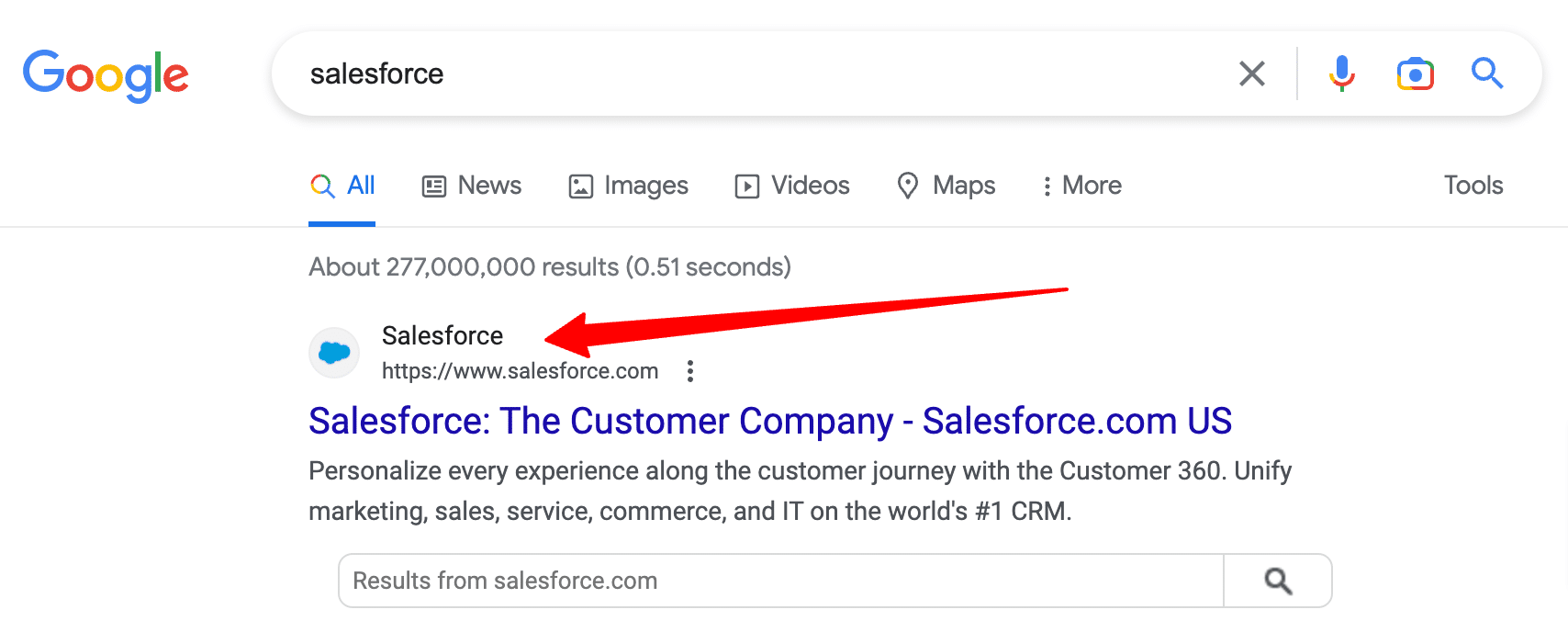
The issue. Google can sometimes disregard the specified site name and replace it what it thinks the site name should be. For example, when it came to searching for [salesforce], Google was showing a space between “sales” and “force,” and the CMO of Salesforce called it “extremely damaging to our brand.”
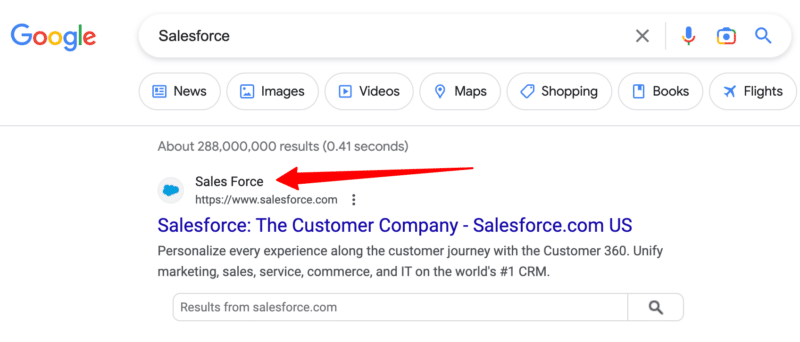
The fix. Google’s Search Liaison, Danny Sullivan, posted an update in the Google support forms saying a fix was pushed out that resolves some of the issues. He wrote, “We recently rolled out a change that seems to be helping with some of the cases reported here and through our form (and likely some others that weren’t reported).” “This change may take time to populate so that internal pages also reflect updated sitenames,” Sullivan added.
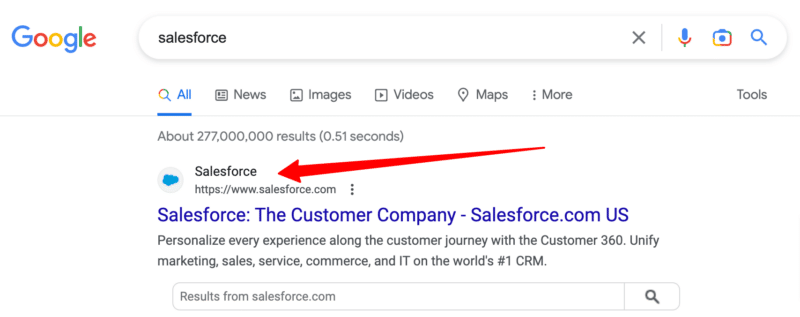
It resolved the issue for Salesforce, as you can see from this screenshot below:
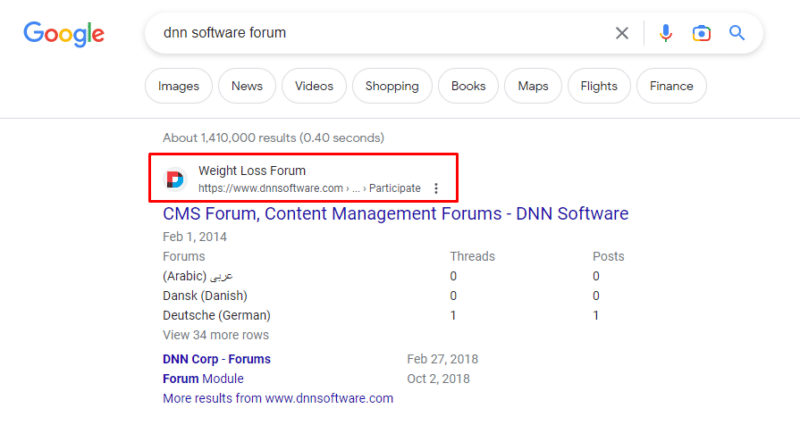
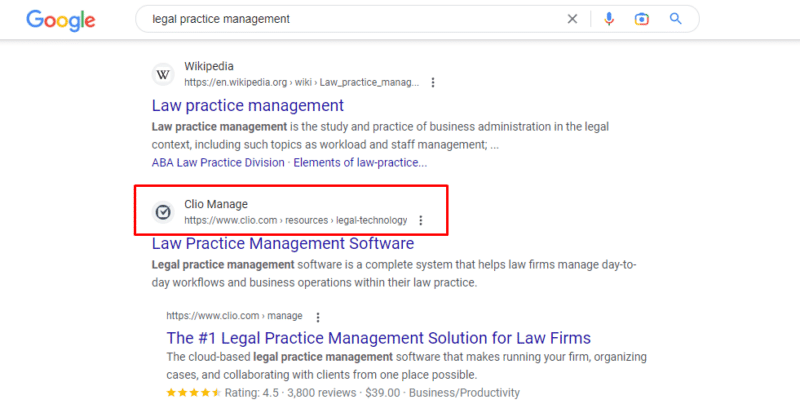
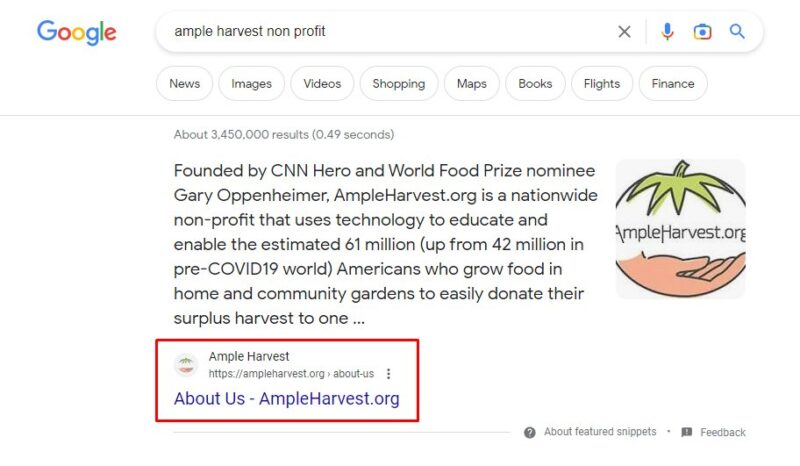
However, this did not resolve all the issues reported by all users. Glenn Gabe shared some examples of site names not resolved by this fix on Twitter. “Here are 3 examples of site name problems that were not fixed with the changes rolled out by Google yesterday. The worst is DNN Software that says “Weight Loss Forum”. The others are just wrong & one is causing legal issues,” he wrote:
Controlling site names. Google back in October explained that Google Search uses a number of ways to identify the site name for the search result. But if you want, you can use structured data on your home page to communicate to Google what the site name should be for your site. Google has specific documentation on this new Site name structured data available over here.
Upgrading the favicon. Google also recommended revisiting the documentation for favicons for the latest best practices. Google is now also suggesting you provide an icon that’s at least 48 pixels and follows the existing favicon guidelines.
Ads. This is also rolled out to the Google search ads on desktop, so the size of the site name, favicons, and also the ad label will be more prominent in mobile search. In fact, Google rolled out the “Sponsored” label in mobile search last October and today on desktop, officially replacing the “Ads” label from January 2020.
Why we care. When Google gets your site name, it can not only be upsetting and unprofessional, but it can also cause confusion and legal issues for some businesses.
It is good that Google is collecting feedback about the issues and working to address most, if not, all the reported issues.
The post Google updates site names in search results after numerous complaints appeared first on Search Engine Land.
Courtesy of Search Engine Land: News & Info About SEO, PPC, SEM, Search Engines & Search Marketing
Wednesday, April 26th, 2023
Are you tired of spending countless hours on link building for your website only to see minimal results? In this article, you’ll find some risk-free tips on outsourcing link building effectively, so you can sit back, relax and watch your website rise to the top of search engine rankings.
The role of link building in SEO
Are you ready to rock your SEO game? Well, you better be because Hubspot reports that a whopping 64% of modern enterprises are investing in SEO to stay ahead of the competition.
And what’s the secret sauce to SEO success? It’s link building! A study by Ahrefs found that the number of referring domains to a webpage strongly correlates with its search engine ranking position. In other words, the more quality backlinks you have, the better your chance of ranking higher.
However, over 41% of digital marketers think link building is like rocket science. It’s confusing, time-consuming, and sometimes downright frustrating.
So, there are numerous advantages that SEO experts can reap by outsourcing their link-building efforts.
Saves time and resources
According to Seotribunal, 65% of marketers affirm link building is the most challenging SEO tactic. Partnering with a reliable provider can relieve the pressure of executing complex link-building campaigns while freeing valuable time and resources.
Provides access to specialized expertise
Link building is no child’s play. Seasoned professionals know their onions and have the required skills and expertise to execute effective linking campaigns. What’s more, their extensive network of contacts enables them to procure links with greater speed and efficacy.
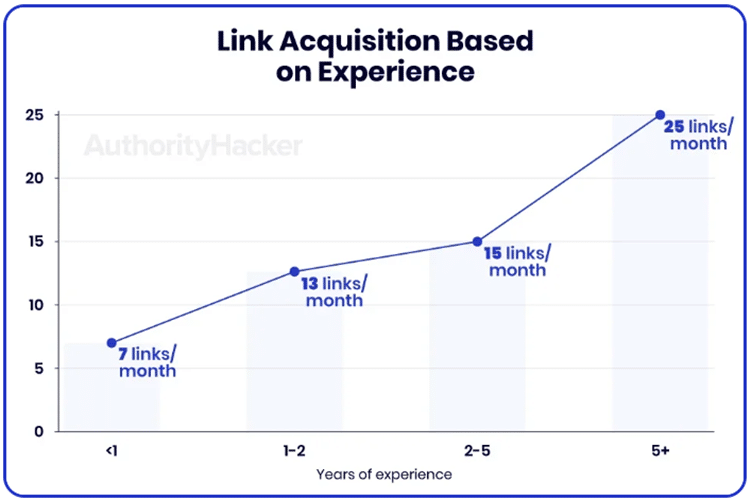
Link acquisition based on experience. Source: Authority Hackers
Cost savings
When securing top-notch links, you have two ways: hire an in-house team of seasoned link builders or outsource the job to experts in the field.
Building an in-house team may only be financially viable if you have a substantial number of projects to undertake. Otherwise, attempting to build such a team could drain your resources dry in no time.
Undoubtedly, the most significant expense of running an in-house link-building team is typically the salaries. Here are figures gleaned from the Glassdoor website:
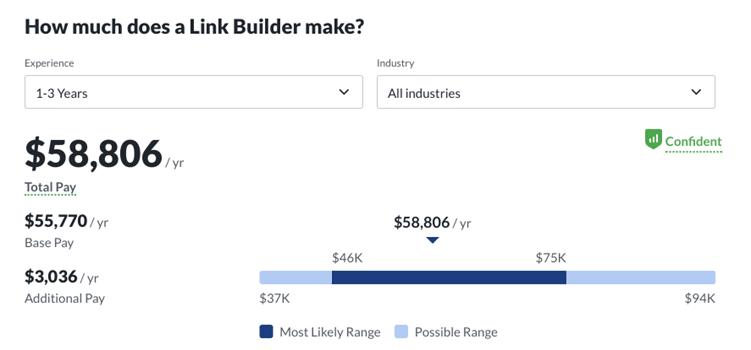
The average link builder salary. Source: Glassdoor
Imagine hiring a full-time link-building specialist. With all the time and effort they’ll be putting into research and outreach, you can expect 13-15 backlinks per month. The cost of each of these precious links can skyrocket to an eye-watering $500-$700 per placement.
Moreover, expect additional expenses such as benefits, recruitment and hiring, tools and technology, training and overhead costs. So, with an in-house specialist, one link can cost you $800+.
When outsourcing to a third-party agency, companies only pay for the services rendered and are free from worrying about employee salaries, benefits, incentives and overhead costs.
Ready to give outsourcing a shot? Here are tips on how to achieve optimal results from outsourcing your link-building endeavors.
How to outsource link building without risk
Now, let’s delve into the essential steps to take on your journey toward prosperous link-building outsourcing.
Prepare your website
Your main task is to prepare a favorable ground for link building. To prepare your website, follow these steps:
- Organize your site structure with a clear hierarchy and easy navigation;
- Create engaging content with multimedia, which can increase indexed pages by 434%;
- Optimize content for SEO with relevant keywords, fast loading time and mobile-friendly design;
- Build a strong internal linking structure to improve visibility and ranking;
- Fix technical issues, including broken links, for easy crawling by search engines.
Some link-building agencies offer to help their clients with site audits or content creation.
Choose an experienced contractor
A quick jaunt over to Clutch and a search for “link-building agency” reveals an avalanche of almost 12,000 potential collaboration options on that site alone.
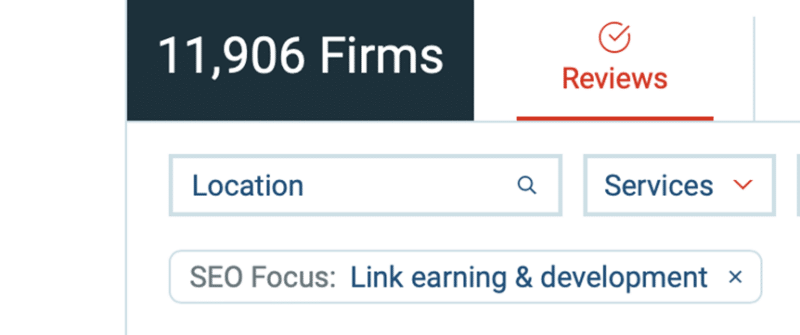
Search results for “Link Building” on Clutch. Source: Top link-building companies and services
Now, let’s take a closer look at the critical factors you should keep in mind when selecting an agency to partner with.
Pricing
While you might be able to find a bargain-basement deal on some shady corner of the internet, you’re probably better off investing in a reputable agency that can deliver real results.
Take a look at this screenshot from Fiverr, where a search for “Link Building” shows these surprising prices:
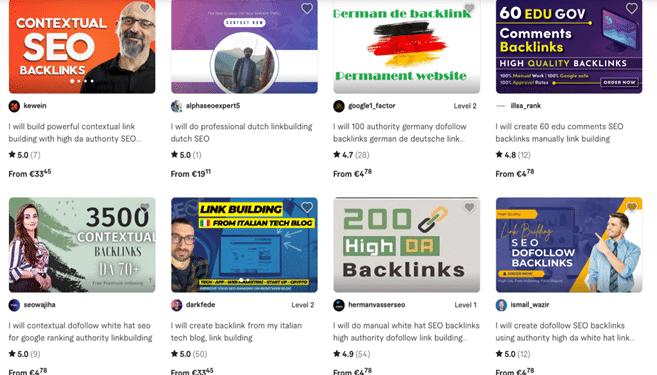
Search results for “Link Building” on Fiverr
If an outsourcing agency promises to get you 10 backlinks for only $100, they might be talking about low-quality links from forums or comment sections (Google ignores them in its ranking algorithm). Here’s what John Mueller, a senior search analyst at Google, says about it:
“You could go off and create millions of links across millions of websites if you wanted to, and we could just ignore them all.”
For example, at Editorial Link, a top-rated link-building agency on Clutch, one quality link starts at $350. Sticking only to white-hat techniques, the Editorial Link team builds high-authority editorial links to create strong portfolios and bring natural traffic to linked websites.

Through outreach efforts, the Editorial Link team gets top-quality backlinks from highly authoritative sources with a significant online presence: g2.com, Hubspot.com, Cloudways.com, Clickup.com, monday.com, Wordstream.com, Similarweb.com and many more.
They do not charge a prepayment and invoice the clients only after link placement approval. The team strives for maximum transparency and is not willing to sell dozens of low-quality links (which will not make any impact on the results of their clients) for the same amount.
Transparency
It’s crucial to evaluate an agency’s level of transparency before engaging in any business with them.
Some important questions to ask:
- What methods and strategies will they use while working on your project?
- Do they charge upfront or only when results are delivered?
- Are they willing to share the results of their successful campaigns?
- Does the agency disclose domains before publication?
The last point is especially critical. In this way, you get a chance to personally check whether the site is suitable for you to get a backlink. It’s not rare for domains with high DR (70+) to sell the opportunity to place a guest post or a link. It is advisable to steer clear of websites that engage in the sale of guest posts and are monitored by Google.
Generating spammy backlinks has the potential to harm search engine rankings, painting such a bleak picture:
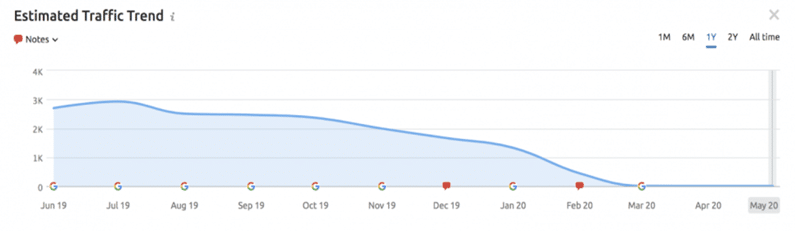
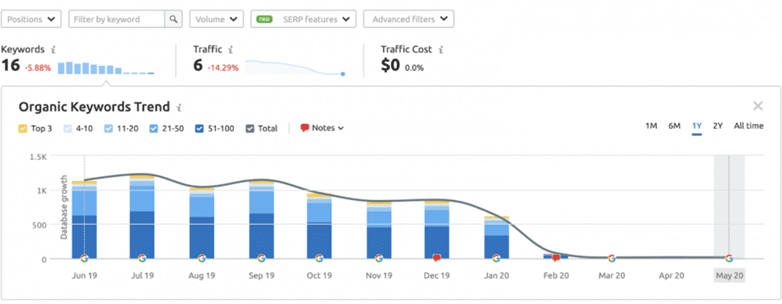
Traffic drop on a site that was sanctioned by Google in February 2020
Working with a transparent agency can help minimize your risk and ensure you don’t end up worse off than when you started.
Monitor the process

While trusting a provider, it’s important to keep an eye on the work process and make sure the agency follows the agreed guidelines and techniques.
- Regular communication. Regular communication allows you to receive updates on the progress of your campaign and discuss any concerns or feedback you may have.
- Performance metrics. To track the success of your link-building efforts, ask the agency to provide regular reports detailing the metrics you care about most. This could include information on the number of links acquired, traffic generated, and rankings improved.
- Quality control. While your agency may be responsible for acquiring links for your site, it’s important to review the quality of the links they’re obtaining. Use tools like Ahrefs, Moz or Majestic for that.
Red flags
Once you know how to act to mitigate the risks of cooperating with a link-building team, it’s time to tell you what you shouldn’t overlook as you prepare to accept the provider’s offer:
- Need for speed. Building high-quality links is not a sprint, it’s a marathon. Beware of services that claim to get you links in just a few days. They’re likely using shady tactics like link farms.
- False promises. If a service is 100% guaranteeing you a spot on the first page of Google, they might as well be claiming they can turn lead into gold.
- The curious case. Transparency is key in this industry, and anyone unwilling to present you with the results of their previous campaigns is likely hiding something. Insist on openness and honesty from the get-go.
Conclusion
Link-building outsourcing is a cost-effective and efficient way to hit marketing goals and improve SEO results. The key to this is trust-based reliable relationships with the right link-building service provider.
The post How to outsource link building: Benefits and tips to follow appeared first on Search Engine Land.
Courtesy of Search Engine Land: News & Info About SEO, PPC, SEM, Search Engines & Search Marketing
Wednesday, April 26th, 2023
At some point, your PPC performance will take a nose-dive. Once you’ve managed PPC campaigns long enough, you will likely navigate numerous crises.
Pinpointing the source of a specific issue can be challenging. Here’s how PPC managers can embrace root cause analysis to mitigate performance issues and get things back on track.
Root cause analysis for PPC accounts
Root cause analysis is necessary to identify the underlying factors impacting PPC account performance.
The process involves a systematic approach to identifying the problem, collecting data, analyzing the data, and determining the root cause of the issue.
For reference, here is a quick list of the steps you should follow to conduct root cause analysis within your PPC account:
Define the problem
Clearly state the problem and its impact on your PPC campaigns. Make sure everyone involved understands the issue.
Gather data
Collect relevant data about the problem, such as when it started, how often it occurs, and what factors are involved.
Identify potential causes
Brainstorm all possible causes of the problem. Use fishbone diagrams or the “Five Whys” technique to identify the root cause.
Test the cause
Analyze the data to see which potential reason is most likely to be the root cause. Test your hypothesis by implementing a solution and measuring its effectiveness.
Implement a solution
Develop and implement a solution that addresses the root cause. Monitor the results in your PPC account and adjust the solution as needed.
Finally, document the process so you can learn from it and prevent similar issues in the future.
This process can be applied to almost any business challenge. However, this process is highly relevant when diagnosing a PPC account.
Get the daily newsletter search marketers rely on.
<input type=”hidden” name=”utmMedium” value=”“>
<input type=”hidden” name=”utmCampaign” value=”“>
<input type=”hidden” name=”utmSource” value=”“>
<input type=”hidden” name=”utmContent” value=”“>
<input type=”hidden” name=”pageLink” value=”“>
<input type=”hidden” name=”ipAddress” value=”“>
Getting to the core issue of your PPC account
The third step in our root cause analysis process mentioned the “Five Whys Technique,” a tool used to identify the underlying cause of a problem. It’s a general principle that is relevant to our PPC analysis process.
The technique involves asking “why” five times to drill down to the root cause of the issue, based on the idea that there is always a deeper cause to every problem.
For example, here is a thought exercise when analyzing a PPC account:
- Conversions dropped by 25% between April 15 and April 18. Why?
- Let’s analyze PPC traffic first. Traffic remained steady, and other metrics appeared stable, but the average conversion rate dropped. Also, there were no significant changes to targeting, bid algorithm, or audience signals. Why else?
- Website traffic isn’t an issue. Let’s look at the website. Engagement metrics such as bounce rate and time on site look stable. Site engagement was steady, but purchase rates declined. Why?
- Let’s ask the website team if any site changes were made. Yes, they did make changes to the site during that. Why?
- The development team removed a series of popular products due to low inventory. They still needed to have a chance to notify all the teams.
Of course, diagnosing a PPC account can take many different routes. But you can see how this process pushes account managers to continue digging for the right solution.
Isolating the impacted timeframe
The first step in identifying and analyzing an issue within a PPC account is isolating the timeframe where a change occurred.
This makes it easier to pinpoint the root cause of the problem and develop an effective strategy to address it.
Account managers can thoroughly analyze the data by narrowing down the period, including the keywords, landing pages and ad copy, to identify the factors contributing to the decline.
This analysis can help account managers develop a tailored strategy to improve performance and prevent future declines.
Additionally, isolating the timeframe allows search marketers to measure the effectiveness of any implemented solutions and ensure performance remains stable and positive going forward.
Determining macro and micro issues
When analyzing account performance, it is crucial to differentiate between macro and micro issues.
Macro issues affect the entire account and can result from external factors such as changes in search algorithms or the introduction of new competitors. Examples of macro issues include:
- Problems with targeting or ad messaging.
- Lack of budget.
- Issues with landing pages.
Resolving macro issues can lead to significant improvements in account performance.
External factors such as changing search algorithms, user behavior, or seasonal changes can also affect account performance.
Therefore, teams should consider these factors to develop an effective root cause analysis process to determine potential issues within a PPC account.
On the other hand, micro issues are specific to individual campaigns and require a different level of attention. Examples of micro issues include:
- Low click-through rates.
- High bounce rates.
- Low conversion rates.
Nevertheless, identifying and addressing micro matters can significantly improve campaign performance.
Tools for PPC root cause analysis
Root cause analysis is an excellent framework for diagnosing your PPC campaigns. However, you will need tools to help activate this process.
Below are a few tools that can help you analyze issues as they arise within PPC.
Account change history
A performance change in your PPC account can often be traced back to a specific campaign change. The account change history log is the first place you conduct your analysis within Google and Bing.
Account reporting
As mentioned in our five-step process, isolate the timeframe and affected campaigns.
Your Google and Bing advertising accounts contain the data and the reports you need to get you started (and perhaps finished) with your root cause analysis.
Pair your account report to isolate the time and campaigns with your change history log to understand if a specific change is the cause of your issue.
Google Analytics
As part of your root cause analysis, you should also look at how all digital channels are trending. Google Analytics helps analyze traffic sources, including paid, organic, social, and referral.
If you need to diagnose a performance issue, you first isolate the impacted timeframe and then review Google Analytics to understand if multiple channels have been affected.
Google Trends
We have discussed macro-trends influencing account performance. Google Trends helps understand high-level trends within your industry/vertical.
This tool varies in its usefulness. Google Trends is the highest level of data you can review and the least personalized to your specific account.
Still, it can provide industry trends as you conduct your analysis.
A systematic approach to analyzing PPC issues
A robust root cause analysis process is critical to identifying the underlying factors affecting PPC account performance.
By following a systematic approach to identifying the problem, gathering relevant data, analyzing it, and determining the root cause of the issue, PPC marketers can develop a tailored strategy to improve performance and prevent future declines.
When performance fluctuations arise (and they will), remember not to panic and take a methodical approach to solve the problem.
The post How to uncover the root cause of PPC performance changes appeared first on Search Engine Land.
Courtesy of Search Engine Land: News & Info About SEO, PPC, SEM, Search Engines & Search Marketing
Wednesday, April 26th, 2023
Google expanded displaying shipping and return information in its search results last week and added new return policy documentation in the product structured data help section specific for merchant listings. Today, Google has expanded the number of countries that can use applicableCountry required property from 25 countries to a total of 50 countries.
What changed. Google updated the return section of this structured data help document to write, “You can specify up to 50 countries.” Previously it said, “up to 25 countries.” Here are before and after screenshots:
 Before it said 25 countries.
 Now it says 50 countries.
More shipping and return snippets. Some are now noticing more search result snippets in Google Search showing the shipping and return snippets. Here is one example:
Last week, Google announced that it will now display shipping & returns info in Google Search results.
Like product pricing, this info is based on structured data or feed data provided in the Merchant Center.
Today was the first time I saw this new info in US search results  pic.twitter.com/9Q5eGs2ehF
— Alexander Außermayr (@aussermayr) April 24, 2023
Why we care. If you are using this markup and your country is supported, you may soon start to see the shipping and return information show up within your search result snippets in Google Search. Check out the new markup and make sure to validate the markup in Search Console to ensure it will work as expected.
These small snippet changes can potentially have a large impact on your click-through rate from Google Search to your web site.
The post Google now supports 25 more countries with new return policy structured data appeared first on Search Engine Land.
Courtesy of Search Engine Land: News & Info About SEO, PPC, SEM, Search Engines & Search Marketing
Tuesday, April 25th, 2023
Beginning in June 2023, new Google Ads accounts will no longer be able to include a URL in their account names.
What’s changed. Specifically, when creating a new Google Ads account through the Google Ads API or updating an existing one, if a URL is found in the descriptive_name field, an ACTION_NOT_PERMITTED error will be generated, causing the operation to fail. This change, however, will not impact the descriptive_name field of existing accounts.
Dig deeper. You can read more about the change on the Google Ads Developer Blog.
Why we care. Adhering to new naming conventions is crucial to maintaining a seamless ad experience. By adhering to the new rules, advertisers can avoid encountering errors when creating or updating their accounts, thus ensuring a smooth account setup process, preventing potential delays in launching campaigns, and fostering a more organized and consistent naming convention across the platform.
The post Google announces new validations for ad account names appeared first on Search Engine Land.
Courtesy of Search Engine Land: News & Info About SEO, PPC, SEM, Search Engines & Search Marketing
Tuesday, April 25th, 2023

With the steady rollout of algorithm updates (hello, March core update), significant changes to tried and true platforms (farewell, UA), and unprecedented advancements in generative AI and other machine learning technologies, one of the biggest challenges search marketers face today is staying up-to-date with the latest tactics and adapting their strategies accordingly.
Attend SMX Advanced, online June 13-14, for free, to keep a finger on the pulse of the ever-changing search marketing industry, validate your ongoing initiatives, and stay a step ahead of the competition.
 Here’s a sneak peek at the expert-level program:
- Exploring recent major Google algorithm updates and preparing for what’s next with Glenn Gabe, SEO Consultant at G-Squared Interactive
- AI prompt engineering for greater PPC productivity and performance with Amy and James Hebdon of Paid Search Magic
- Using ChatGPT to drive technical SEO efforts with Eric Enge, President of Pilot Holding
- 10X your keyword research with chatbots with Aleyda Solis, founder of Orainti
- Inside Google Marketing Live 2023: Announcements and analysis with Julie Friedman Bacchini, President at Neptune Moon LLC
- PMax for lead generation with Menachem Ani, founder of JXT Group
Check out more agenda details here!
Your free pass unlocks the entire program, including…
- 40+ tactic-rich sessions, keynotes, and live Q&As (Overtime!) with speakers
- Instant on-demand access so you can train at your own pace
- Coffee Talk meetups that connect you with a community of passionate search marketers
- A personalized certificate of attendance showcasing your commitment to continued learning
… and much more. What are you waiting for? This is your once-a-year opportunity to learn from and connect with advanced search marketers who are passionate about what they do and are ready to share what it takes to win. Secure your free pass now!
Psst… Have you heard? The 2023 Search Engine Land Awards are open for entries! Don’t miss your opportunity to boost team morale, attract new business, and stand apart from the competition… enter now!
The post 10x productivity with chatbots, prepare for GA4, and more at SMX Advanced appeared first on Search Engine Land.
Courtesy of Search Engine Land: News & Info About SEO, PPC, SEM, Search Engines & Search Marketing
Tuesday, April 25th, 2023
Guides are all over the web. Google any word + “guide,” and you’ll probably find someone has written about that topic, no matter how obscure.
But there’s a good reason for this: Well-written guides are extremely valuable pieces of content.
When your audience encounters your guide at the right place and time, it can be life-changing. Your guide may be the cornerstone or the turning point in their experience of a particular topic.
You could teach them valuable skills, introduce them to a vital concept, expand their knowledge, or help them understand a complex subject.
As you’d imagine, a good guide can help build a strong trust between a person and a brand.
And trust contributes to the customer experience. It can eventually translate to profitable action like converting a casual reader into a subscribed follower or turning a fan into a customer.
That’s why it’s time to learn how to create optimized, useful, and comprehensive guides – so you, too, can build trust with your audience through high-quality content.
What is a guide?
A guide is a comprehensive piece of content that aims to educate an audience by:
- Introducing them to a topic or subject.
- Teaching them a set of concepts or ideas.
- Walking them through a process to achieve an end goal.
- Showing them the steps to complete an action.
Quite simply, an effective guide will teach you in some way.
But, the best of this content type will meet you at your level of understanding, speak to you in terms you understand, and take you to the next level to broaden your knowledge.
How to create a guide, ultimate-style
1. Understand the knowledge level of your target audience
To write a great guide, you need to understand your audience and know their knowledge level about your topic.
- What do they already know?
- Where are they starting from? (Are they beginners? Intermediates? Experts?)
- What do they not know?
- What are their top challenges?
These points are crucial to understand because you will use them as a benchmark for where your guide will begin and what it will cover.
Not understanding your audience’s knowledge level about your topic will lead to a less useful guide.
For example, starting a guide on baking bread with information about buying mixing bowls will be helpful only to true beginners who don’t have the right equipment yet. It won’t be helpful for baking enthusiasts who have moved beyond acquiring tools.
So, if you’re unsure what your audience knows or doesn’t know about your topic, you’ll need to do some research.
When all else fails, ask them directly. Post a poll or survey on social media, or post a question asking for feedback on what your audience would like to know about X topic.
2. Research and outline your topic
Now it’s time to start drafting your guide.
I always start with an outline and jot down everything I know the guide should include.
Then I research the topic to see what I’m missing, what others have written about it, and any additional tidbits I should add.
For example, even as an expert, you don’t want to rely entirely on your brain for fleshing out a topic.
You may know it well, but you also need to ensure you cover all the key areas readers care about.
Start by researching the topic on Google. Look at what the top articles cover and make sure your guide includes all of those sub-topics, too.
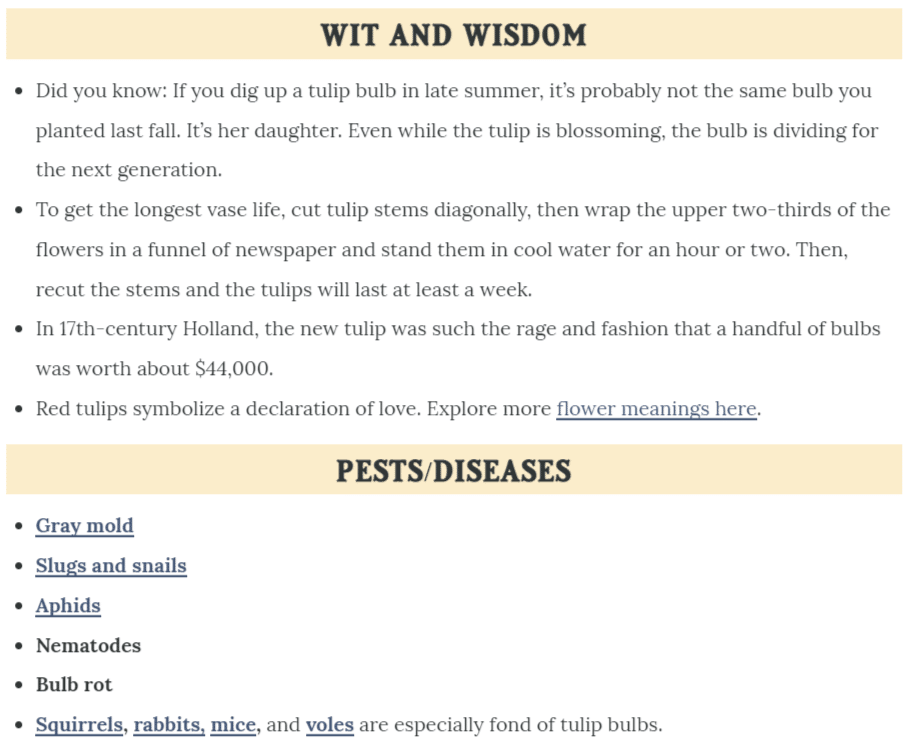
For example, say you’re writing a guide on planting tulips. You discover the guides at the top of Google also include information about when to plant them, how to care for them, and additional tips on varieties and container planting. That means your guide needs to be just as thorough.
When your outline is equally as comprehensive as the top articles in Google, you’re still not done. You need to go further.
Include information guided by your expertise (or the brand’s expertise). That’s the mixture of experience and education that’s unique to you that will differentiate your content from the masses.
- Add insights based on personal experience.
- Add insider knowledge that most people don’t have.
- Include tips, tricks, shortcuts, or advice.
- Include useful information that similar guides are missing.
For instance, in this particular tulip planting guide, the author added information on common pests and fun facts. Similar guides are missing these pieces:
Beyond Google, look at other information sources to flesh out your topic. Research books, look at interviews with experts, or watch videos.
Double-check to ensure you include the most accurate, relevant, and useful details in your guide.
3. Split your guide into sections, organized by sub-topic
At this point, while your draft is still pared down, it’s a good idea to get it organized.
- Split it into sections, with each section covering a specific sub-topic. For example, the tulip planting guide would be split into sections like “when to plant tulips,” “how to plant tulip bulbs,” “how to care for growing tulips,” and “tulip varieties.”
- Order the sections logically. You wouldn’t put “how to care for tulips” above the section on planting tulips, for instance, because one naturally precedes the other. (You can’t care for tulips you haven’t planted yet!)
- If your guide includes any instructions or steps, ensure they’re clear, laid out logically, and easily read. Number each step so readers understand the sequence at a glance.
4. Use keyword-rich headings
The best guides have clearly labeled sections with descriptive headings. This format helps readers find the information they’re looking for without having to hunt through unlabeled paragraphs that all bleed together.
It’s also good for SEO, especially if you include keywords in your section headings.
Here’s an example of a Chicago travel guide that uses clear, keyword-rich headings for each section:
Particularly, note that the keyword “Chicago” is included in each heading.
Imagine if each heading was more generic, like “When to Go” vs. “When to Go to Chicago.” The difference is optimization. The latter heading is optimized – and the former isn’t.
If adding the focus keyword in your section headings doesn’t make sense, consider including related terms and phrases instead. You can find these by entering your main keyword into Semrush or Ahrefs.
At the very least, write headings that help your reader scan your guide and find the necessary information.
5. Go deep
Guides are typically long-form content for a reason. When readers look for a guide on a subject, they expect comprehensiveness.
For that reason, don’t just skim the surface of your topic. Go deep.
That means you should try to include examples, descriptions, comparisons, or definitions in your guide.
- Examples put your subject in context for your readers. It shows them real-world applications of what you’re talking about.
- Descriptions give readers sensory details that can widen their understanding. For instance, you can describe how something looks, feels, tastes, or smells to help your audience imagine it better.
- Comparisons give additional context by comparing things your audience may not be familiar with to things they are familiar with.
- Definitions also lay the groundwork for understanding a topic or difficult concept. Defining these in plain language can set up your reader to get the most out of the rest of your guide.
You may use some of these techniques or all of them – it really depends on your topic.
For example, in a guide about making a complex dessert, you might want to describe how it should look and taste to help your audience understand a successful end product.
Similarly, in a guide about bird-watching, you could help your audience identify a particular bird species by comparing it to a similar species and noting the key differences.
Explaining a subject well is an art form, so take the time to get it right to create the most useful guide possible for your particular audience.
6. Research and link to useful, authoritative sources
Let’s return to high school English class briefly for this one. A useful lesson for writing guides is the importance of referencing sources to beef up your points.
In a nutshell, citing sources gives your content more credibility. Include them, and you’re essentially saying, “Hey, all these other authoritative people on this subject agree with me about this. That’s why you should listen to me.”
Even if you’re a known expert on your topic, including sources still shows that you did your homework. You’re drawing from the collective knowledge that exists on the topic, not just your own brain.
Even further, some claims need proof to be credible – like if you write a guide on birds and claim that 10% of bird species can’t fly. You’ll need to prove that’s true, even if you’re the top bird expert.
So, to add credibility to your guide, look for opportunities to link to authorities on the subject.
Search for recognizable names that are established authorities in the field. (Example: For medical information, known authorities include WebMD, Mayo Clinic, or the American Medical Association.)
Check their credentials and experience on their About page if the name isn’t well-known.
When evaluating websites, look at a variety of factors like their DA (domain authority) score, whether they accept and publish sponsored content, how they label that content, and whether the site is actually providing good information or if they’re just trying to sell you something.
(Note: A good identifier for credible websites is whether they accurately link to outside sources in their own content!)
Along with proving your credibility, linking to other sources can help provide additional information or context on your topic for readers from a trustworthy point of view (one you vetted for them!).
For that reason, consider adding links to related blog posts, ebooks, or even full-length books to allow the reader to learn more.
7. Add helpful visuals
It’s true what they say: A picture is worth 1,000 words. For that reason, adding helpful visuals to your guide is a great idea.
And, by the way, “visuals” means much more than just a few stock photos. Instead, try to find a variety of visuals in different formats that truly add meaning to your guide and clarify concepts.
- For instance, a guide on planting tulip bulbs might benefit from photos demonstrating how deep and far apart to dig the planting holes.
- A guide on learning to knit begs for a video or a series of photos demonstrating how to cast the yarn onto the needle.
- A guide on different types of mental disorders could use an infographic chart that compares and contrasts them.
- A beginner’s guide to a piece of software is much more useful with screenshots of processes and steps to use that software.
Think about what visual elements would add clarity to your text. If you were reading this guide as a beginner, what visuals would help you most?
8. Format for readability
Without good formatting, long-form guides can be a chore to read.
After all, when faced with a lengthy, unbroken wall of paragraphs on a web page, what’s your first instinct?
If you’re like most people, you probably want to run away screaming. Or, you try to read a few paragraphs, but they all start to run together as your eyes glaze over and your mind wanders.
If that’s your guide people are trying and failing to read, that’s a failed guide.
Instead, the most successful guides are easy to read, scan and skim to find the information you need.
That’s because they are:
- Organized and split into sections with clear, scannable headings.
- Formatted for online reading with short paragraphs and plenty of white space around the text.
- Digestible, even if the content is long, through the smart use of bulleted and numbered lists.
- Not dominated by walls of text – they include helpful visuals to break up the text further.
9. Edit and optimize
With your first draft complete, you can edit and optimize your guide.
Even if you don’t have an editor, self-editing helps you trim your content’s fat and improve it.
Editing steps:
- Walk away. Don’t try to edit the same day you finish writing. Give yourself a solid day away from the piece so you can see it more clearly.
- Edit for flow. Ensure your sections are ordered logically and flow well from one to the next.
- Clarify your writing. Simplify overly complex sentences, clean up your grammar, and check for spelling errors with an editing tool.
- Tweak the readability. Break up long paragraphs, look for places where you could replace paragraphs of information with lists or bullets, and determine whether you could add more visuals.
- Get a second pair of eyes. If you don’t have an editor, ask someone you trust to read the guide, edit, and provide feedback.
Optimization steps:
- Keyword placement. Check for your focus keyword in the title (H1), main headings (H2s), and at least one subheading (H3). It should also appear naturally throughout the piece, along with related terms. If you haven’t used it enough, edit it into the content a few more times.
- Meta title and description. Your keyword should appear at the beginning of these. When you write a meta description, think about how you can draw searchers in Google and describe the major benefit of reading your guide.
- Image alt text. Make sure your images have alt text defined and that a few of them contain the keyword.
- Links. Check that you’ve linked to related content on your site in a helpful way.
Get the daily newsletter search marketers rely on.
<input type=”hidden” name=”utmMedium” value=”“>
<input type=”hidden” name=”utmCampaign” value=”“>
<input type=”hidden” name=”utmSource” value=”“>
<input type=”hidden” name=”utmContent” value=”“>
<input type=”hidden” name=”pageLink” value=”“>
<input type=”hidden” name=”ipAddress” value=”“>
5 examples of effective guides
For inspiration and guidance, check out these examples of effective guides that incorporate all of the above steps well.
Hiking guide
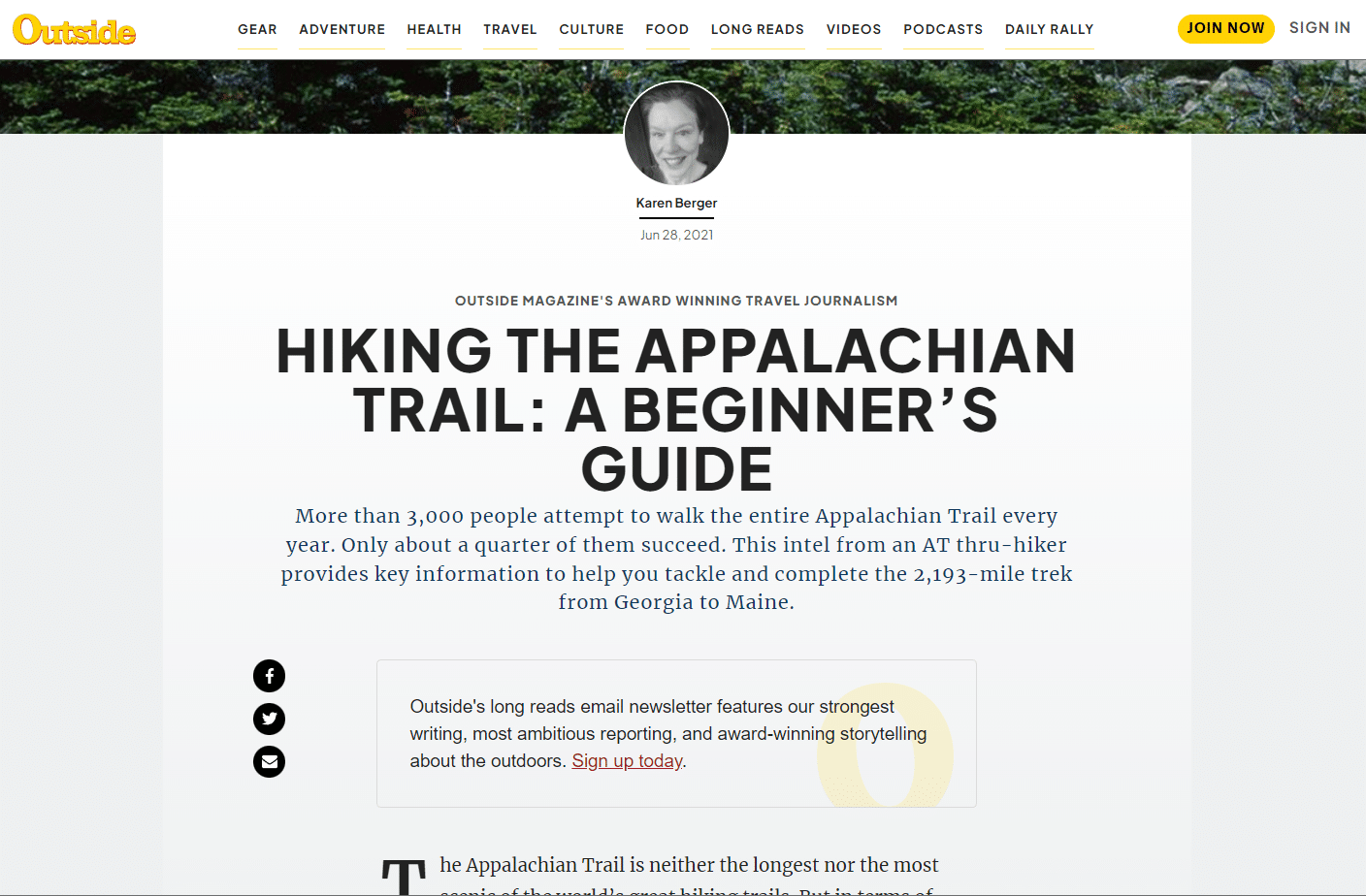
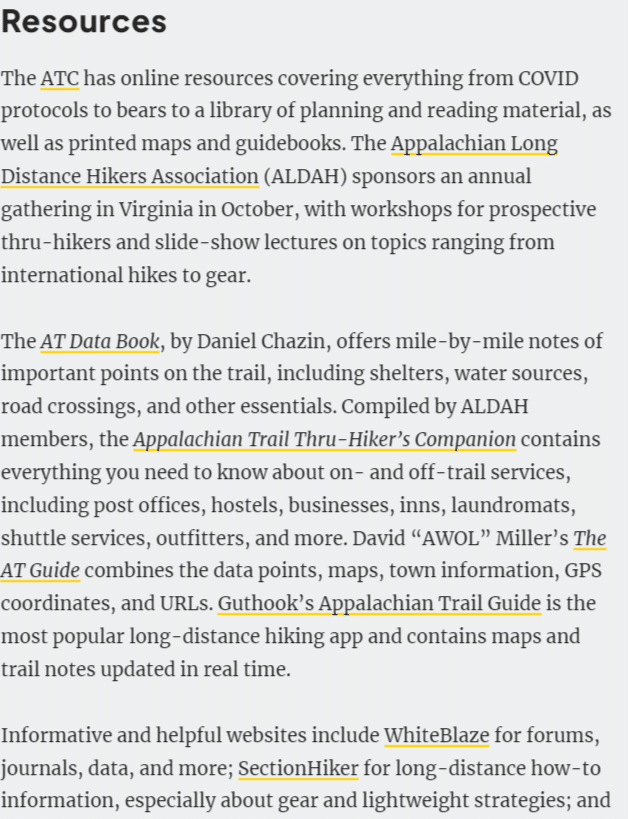
This beginner’s guide to hiking the Appalachian Trail details everything you need to know, including a trail overview, when to start, what to pack, where to sleep, what to eat, additional resources to read, and more.
This guide is also a great example of how to link to authoritative and useful sources in your content:
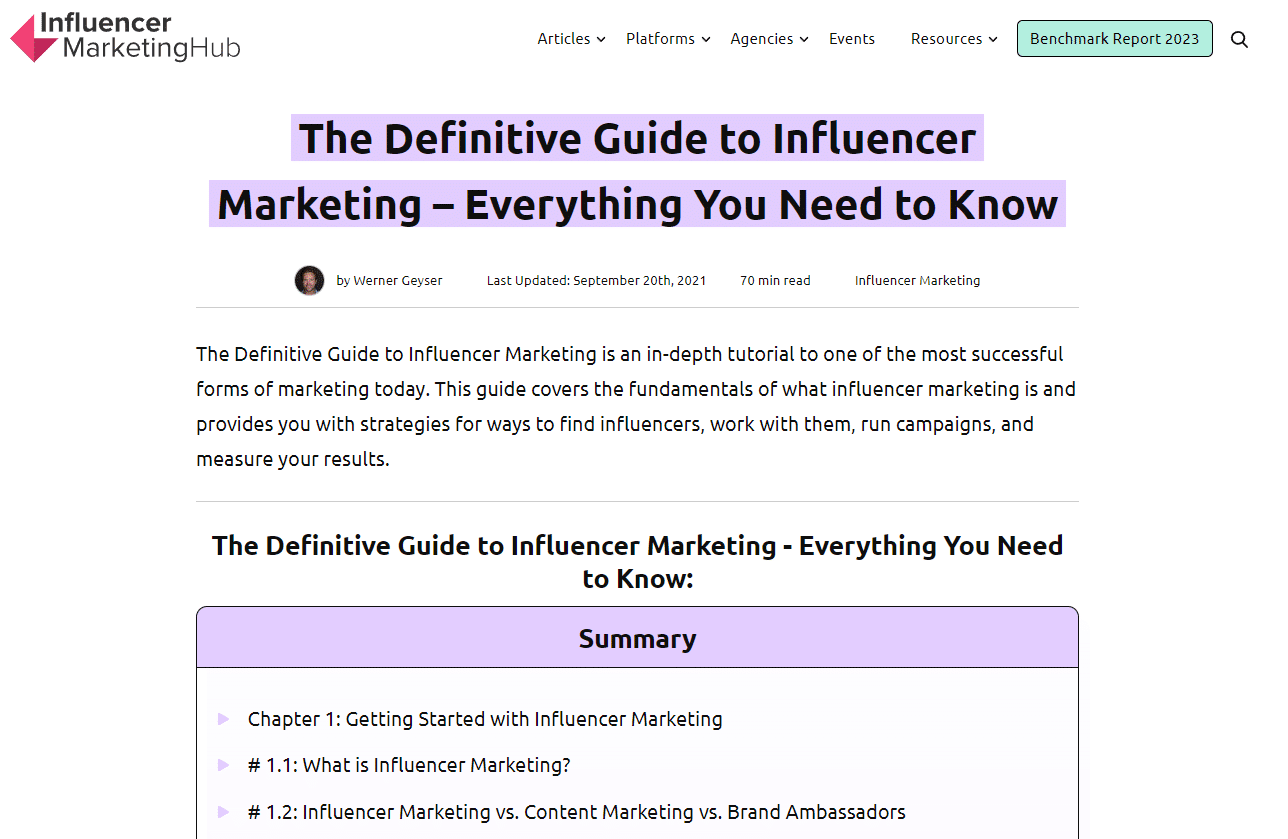
Definitive guide to influencer marketing
This ultimate guide will teach you every facet of influencer marketing – including the how, the what and the why.
It’s super comprehensive and is broken down into chapters like “Getting Started with Influencer Marketing” and “How to Work with Influencers.”
Cooking mushrooms guide
This guide is a great example of delving deep into a specific topic. The author breaks down 15 types of mushrooms, how they taste, and how to cook them for delicious results.
The kinds you’ve heard of – button mushrooms and shiitakes – are included, as well as ones you’ve probably never seen before, like black trumpet mushrooms or lion’s mane mushrooms.
Financial planning guide
This financial planning guide is a great example of what I like to call “overview” content.
This type of guide provides an introduction to a topic for beginners. It helps them understand what something is, its importance, and how to get started.
This guide doesn’t go deep but gives newbies the basics they need to understand the topic and eventually dive in deeper.
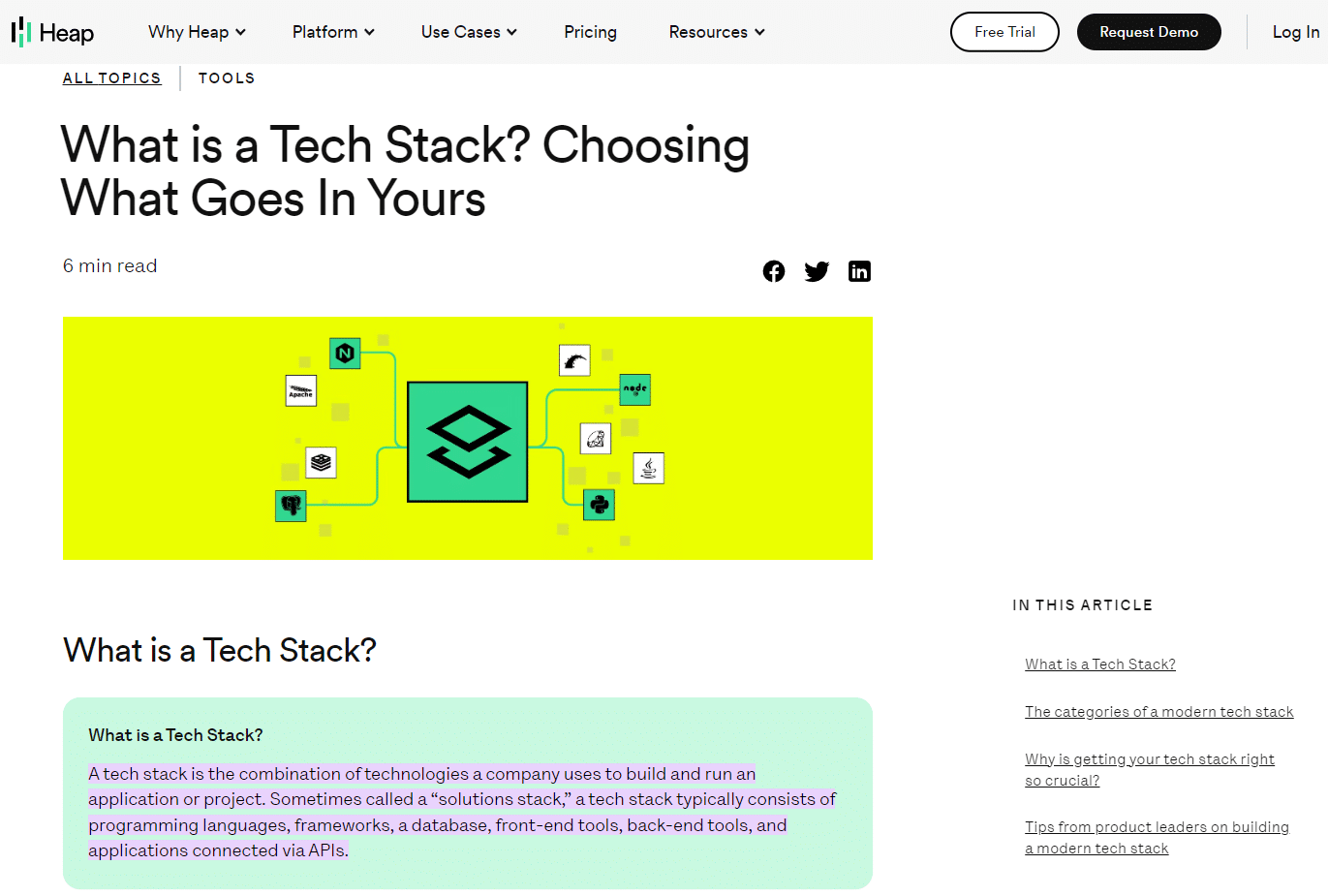
Tech stack guide
This tech stack guide’s audience is software companies, so the content is framed for that audience’s particular needs and problems.
It also uses vocabulary that the average person won’t understand but the average software company staffer or founder will.
Create useful guides to nurture your audience
Creating a guide can be a huge undertaking, but it’s worth it.
A useful guide will earn more than search traffic if optimized correctly – it will also bring in and build connections with people who need the information you’re offering.
Provide helpful, readable, educational, and useful information, and your guide just might become the turning point in someone’s experience of a topic.
That’s powerful and can lead to greater things like growing your audience and, thus, growing your business.
The post How to create a guide that is optimized, useful and comprehensive appeared first on Search Engine Land.
Courtesy of Search Engine Land: News & Info About SEO, PPC, SEM, Search Engines & Search Marketing
Tuesday, April 25th, 2023
It’s been 11 years since Google launched one of its most significant algorithm updates, Penguin. Here, we’re looking back over more than a decade of Penguin.
Find everything you want to know about Google’s Penguin algorithm update – what it is, why it was launched and its impact – plus Search Engine Land’s coverage of Penguin from 2012 to 2021.
What was the Google Penguin update?
The Google Penguin update was an algorithm update launched on April 24, 2012, to combat webspam techniques. Penguin’s primary focus was link building, keyword stuffing and general webspam.
The war against webspam wasn’t new as Penguin followed the Panda and Page Layout algorithm updates.
All of these updates had a common goal – to reward high-quality content and sites in search that provided a great user experience and fulfilled search intent. Penguin was an extension of these efforts.
It was thought that Penguin affected 3.1% of queries in English and around 3% of queries in German, Chinese and Arabic. To contextualize its significance, it was expected that a regular user would see the impact of Penguin in SERPs.
Penguin was a pretty big deal, and it impacted a lot of sites. What made this change frustrating for web owners and SEOs is that an algorithm change isn’t something a site owner can appeal to.
There was no quick fix to recover from Penguin. If hit, it was made clear that website administrators needed to reduce spam on their sites.
As a result, sites suffered, and some didn’t recover. Naturally, there was a question about whether or not the algorithm improved or worsened the SERPs.
Oh, I’m sure there are. Penguin & Panda were big changes, but they also improved things. Mobilegeddon was also an interesting one. It would also be fun to celebrate the first paid link, but I bet people would fight over the honor :).
— johnmu is not a chatbot yet  (@JohnMu) March 25, 2022
Considering that Penguin is still highly influential in the algorithm today, it’s safe to say that it improved the SERPs, web owners, and SEOs have collectively learned what constitutes spam.
Most conscious site owners wouldn’t even need to think about the Penguin update since the webspam tactics that felt the wrath of Penguin – like keyword stuffing and link schemes – are an industry no-no.
Why was Google Penguin launched?
Before Penguin, the quantity of links was weighted in the algorithm. As a result, poor quality or spammy pages were ranking when they didn’t really deserve to.
Their rank was influenced by the quantity of links pointing to the site rather than the quality of the site or the content itself.
If quantity is the only factor, then it’s easy to manipulate. You just need links and lots of them.
To help us understand what constituted spam, Google shared examples of spammy pages with keyword stuffing and poor uses of links.
 Google shared this image at the launch of Penguin showing unnatural links. A blog on exercise links unnaturally to pages about payday loans.
If link quantity mattered, then links like the above were useful to websites.
But it’s clear that the linked text has nothing to do with the article’s content. Plus, the link text reads very unnaturally within the context of the article.
If it’s not an engaging and helpful read, the content shouldn’t be ranking at all.
The link tactic demonstrated above is a black-hat SEO tactic executed solely to manipulate SERPs.
Penguin was designed to identify and demote websites that were engaging in these spammy link building tactics, while rewarding websites that had natural and high-quality links pointing to their well-researched and well-written content.
Why did Google name it Penguin?
Despite being named Penguin by Google, there doesn’t seem to be a known story about why it’s called Penguin, unlike the Panda algorithm, which was named after a key engineer. But it was the second major new Google algorithm named after a black and white animal.
Get the daily newsletter search marketers rely on.
<input type=”hidden” name=”utmMedium” value=”“>
<input type=”hidden” name=”utmCampaign” value=”“>
<input type=”hidden” name=”utmSource” value=”“>
<input type=”hidden” name=”utmContent” value=”“>
<input type=”hidden” name=”pageLink” value=”“>
<input type=”hidden” name=”ipAddress” value=”“>
Google Penguin algorithm explained: How it worked
If you want to recover from Penguin or understand how Penguin fits into the wider guidelines and algorithms it helps to understand how it worked.
Penguin was a webspam algorithm
There’s a bit to unpack here.
Penguin was a webspam algorithm, meaning it impacted all sites across the web at around the same time.
Sites were crawled and new algorithm factors were taken into account. The intention of this algorithm was for high-quality sites following Google guidelines to be prioritized.
The Penguin algorithm was launched to combat spammy sites. To do this, the algorithm needs to consider many factors, including spam links and content.
Perhaps it was the timing of the Penguin update – after Panda and before the Disavow Tool – that has Penguin heavily associated with spam links and link farms, but truthfully, Penguin was more than that.
As Google’s John Mueller put it:
“The Penguin algorithm is a webspam algorithm and we try to take a variety of webspam issues into account…It does also take into account links from spammy sites or unnatural links in general…but I wouldn’t only focus on links. A lot of times what we see is that when a website has been spamming links maybe they’re also doing some other things that are kinda borderline or against our webmaster guidelines. I wouldn’t only focus on links, I’d make sure that you’re cleaning all of the webspam issues as completely as possible.”
Penguin ignores spam links and considers individual pages and entire sites
When Penguin launched, one of its purposes was to devalue links, taking spam links weighting out of the algorithm. However, it’s thought that the Penguin algorithm can do more than just that.
In the video, Mueller says:
“When we can recognize that something is problematic and kind of a spammy link we will try to ignore it. Across a website if we see a very strong pattern there, then our algorithms can say, ‘We really have lost trust in this website…’ We need to be more on a conservative site when it comes to understanding this website’s content and ranking it in the search results and then you can see a drop in visibility.”
Recovering from Penguin
Recovering from Penguin was no easy feat for SEOs. There were long delays between updates which were incredibly frustrating.
As an algorithm update, the only way out was a lot of hard work, cleaning a site of its spam, which for many was no easy feat.
Google forms
For sites that had previously been flagged as spam by Google, there used to be a reconsideration request where webmasters could request a second view of their site.
This was useful in the case of a manual action, meaning a person had spotted an issue and manually marked it as spam.
But, Penguin was an algorithm change. Google announced that reconsideration requests wouldn’t work if a site has suffered since the Penguin update.
Instead, webmasters had to reduce the spam on their sites. Once done, they’d eventually recover from Penguin and appear in SERPs again.
That said, there seemed to be some acknowledgment that sites were impacted by Penguin unfairly.
Google released a form where webmasters could flag this issue to Google. This same form could also be used to report sites that should’ve been penalized.
Clean spammy backlinks
Since Penguin was launched to fight spam with a primary focus on link spam, one strategy to recover from Penguin was the disavow tool launched on October 16, 2012.
In 2012, Matt Cutts explained how and when to use the tool.
It’s important to note that this tool was not designed for most websites but for that 3% of sites using spammy links, manipulating SERPs and using link farms.
If you follow the guidelines and create content consciously, you won’t need the disavow tool.
Remove on-page spam
Earlier, I shared an image of a spammy article linking to payday loans unnaturally from an article about exercising. This is the sort of spam that webmasters needed to remove from their sites.
Other on-page spam might include keyword stuffing. The thing to remember is that Google wants to prioritize content that is useful to readers.
So, before publishing content, ask yourself: is this informative? Do I meet search intent? Is this content helpful?
Although some of these guidelines were set or improved upon more than 10 years ago with the Penguin algorithm update, you might note that these items are still prevalent today.
Does Google still use Penguin?
Yes, Google still uses Penguin as part of the core algorithm.
Mueller shares tips and insights on what a site owner should do if their site is flagged as spam.
As you can see, this video is very similar to the video published by Cutts 10 years ago.
Mueller recommends the webmaster forums and advises you not to hide anything about your website.
A complete timeline of the Google Panda Updates
Here’s Search Engine Land’s coverage of Penguin, from 2012 to 2021:
April 24, 2012: Penguin Update 1.0
Google Launches “Penguin Update” Targeting Webspam In Search Results
April 25, 2012
Did Penguin Make Google’s Search Results Better Or Worse?
April 26, 2012
Penguin Update Peck Your Site By Mistake? Google’s Got A Form For That
The Penguin Update: Google’s Webspam Algorithm Gets Official Name
Google Penguin Update Recovery Tips & Advice
May 3, 2012
Adjusting Your SEO Strategies During Panda & Penguin
May 10, 2012
Two Weeks In, Google Talks Penguin Update, Ways To Recover & Negative SEO
May 14, 2012
5 Local Linkbuilding Ideas For The Post-Penguin/Panda Era
May 15, 2012
In Wake Of Penguin, Could You Be Sued For Linking To Others?
May 17, 2012
Google’s Penguin Update Makes The Wall Street Journal
May 21, 2012
Bing Offers Advice On Google’s Penguin Update: Diversify
May 26, 2012: Penguin Update 2.0
Google Releases Penguin Update 2
May 29, 2012
First Report Of Google Penguin Recovery
May 31, 2012
Google Penguin & Panda Talk Now In Coffee Shops & Elementary School
June 11, 2012
The Four Keys To Post-Penguin Directory Submission Happiness
Aug. 16, 2012
Google: Further Penguin Update “Jolts” To Come; Panda Is Smoother & Monthly
Oct. 5, 2012: Penguin Update 3.0
Google Penguin Update 3 Released, Impacts 0.3% Of English-Language Queries
The EMD Update: Like Panda & Penguin, Expect Further Refreshes To Come
Feb. 20, 2013
No, Google Hasn’t Released Unannounced Penguin Updates
March 11, 2013
Google’s Matt Cutts On Upcoming Penguin, Panda & Link Networks Updates
March 19, 2013
Study Finds Google’s Penguin Update Getting Stricter Over Time
April 23, 2013
Risk Management for Links - How To Prepare For The Next Penguin Update
May 10, 2013
Google’s Matt Cutts: Next Generation Of The Penguin Update “Few Weeks” Away
May 22, 2013:
Penguin 4, With Penguin 2.0 Generation Spam-Fighting, Is Now Live
May 23, 2013
Still Seeing Post-Penguin Web Spam In Google Results? Let Google Know
Penguin 2.0 Losers: Porn Sites, Game Sites, & Big Brands Like Dish.com & The Salvation Army
June 3, 2013
Big Brand SEO & Penguin 2.0
June 18, 2013
Is Link Building Dead? 3 Tips For Link Builders Post-Penguin 2.0
Oct. 4, 2013:
Penguin 5, With The Penguin 2.1 Spam-Filtering Algorithm, Is Now Live
April 8, 2014
Google’s Penguin Algorithm Comes In Different Levels Of Degrees?
May 28, 2014
No, Google Says There’s Been No Penguin Update
July 30, 2014
Penguin: Google’s Punitive Algorithm - And A Call To Google To Fix It
Sept. 12, 2014
A Year Later, Are We Finally Going To Get A Penguin Update Refresh?
Oct. 2, 2014
Google: Penguin Refresh May Come As Early As Next Week
Oct. 19, 2014
Google Releases Penguin 3.0 — First Penguin Update In Over A Year
Oct. 21, 2014
Google Penguin 3.0: Worldwide Rollout Still In Process, Impacting 1% Of English Queries
Nov. 4, 2014
18 Days Later, Google Penguin 3.0 Continues To Slowly Roll Out Worldwide
Dec. 1, 2014
Google: Penguin 3.0 Rollout Still Ongoing
Dec. 3, 2014
Is This The End Of The Penguin & Panda Era Shakeups And Recoveries?
Dec. 4, 2014
Was Your Site Hit By Google’s Panda Or Penguin? This Flowchart May Help You Find Out.
Dec. 10, 2014
Google Says Penguin To Shift To “Continuous Updates”
Dec. 11, 2014
How Google’s Penguin 3.0 Is Playing Out Across The Web
Feb. 11, 2015
Google Says There’s No Whitelist To Save You From Panda Or Penguin
April 8, 2015
Google Says The Penguin & Panda Algorithms Still Require Manual Data Pushes
April 13, 2015
Google Panda & Penguin Lack Real-Time Updates, Despite Google’s Past Statements
June 2, 2015
Google: We Are Working On Making The Penguin Update Happen Continuously
July 13, 2015
Google Says Penguin Refresh Months Away From Happening
Oct. 1, 2015
Google Confirms The Real Time Penguin Algorithm Is Coming Soon
Oct. 29, 2015
Google: Next Penguin Update Should Happen By End Of 2015
Nov. 17, 2015
How To Prep For The Pending Penguin Update & Ensure You’re Penalty Free In 2016
Dec. 3, 2015
Google: New Penguin Algorithm Update Not Happening Until Next Year
June 23, 2016
Key takeaways from the Google AMA: RankBrain, Panda, Penguin, bots & more
Sept. 6, 2016
How many days has it been since the last Google Penguin Update?
Google: Friday’s update was not due to the Penguin algorithm
Sept. 23, 2016: Penguin Update 4.0
Google updates Penguin, says it now runs in real time within the core search algorithm
Sept. 28, 2016
Google Penguin doesn’t penalize for bad links - or does it?
Google says Penguin recoveries have started to roll out now
Sept. 30, 2016
Authority & link building with real-time Penguin
Oct. 10, 2016
Google Penguin looks mostly at your link source, says Google
Google labels your links, such as ‘footer’ or Penguin-impacted
Oct. 13, 2016
Google says Penguin 4.0 rollout now complete
Oct. 25, 2016
Penguin 4.0: Necessary and positive improvement
Oct. 27, 2016
A Penguin’s Tale: Responding to the latest update
Nov. 1, 2021
Google on Penguin algorithm; aims to ignore spammy links but can lead to distrusting your site
The post Lookback: Google launched the Penguin algorithm update 11 years ago appeared first on Search Engine Land.
Courtesy of Search Engine Land: News & Info About SEO, PPC, SEM, Search Engines & Search Marketing
Friday, April 21st, 2023
Google has now added new details that explain the three categories its Google crawlers fall into, they include Googlebot, special-case crawlers and user-triggered fetchers.
In addition, Google now lists a JSON formatted file containing the list of IP addresses each of these different crawler types use.
Types of Google crawlers. At the top of this Googlebot page, Google listed these three crawler types:
- Googlebot – The main crawler for Google’s search products. Google says this crawler always respects robots.txt rules.
- Special-case crawlers – Crawlers that perform specific functions (such as AdsBot), which may or may not respect robots.txt rules.
- User-triggered fetchers – Tools and product functions where the end-user triggers a fetch. For example, Google Site Verifier acts on the request of a user or some Google Search Console tools will send Google to fetch the page based on an action a user takes.
IP addresses. Google also listed the IP address ranges and reverse DNS mask for each type:
What is new. Here is the section of the page that was updated; the rest of the page is mostly unchanged.
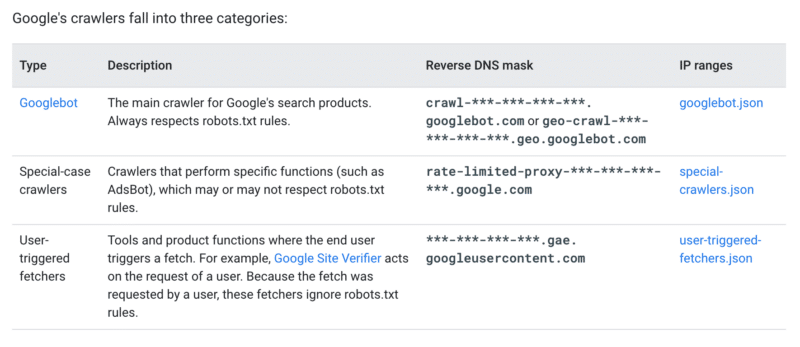
Why we care. I believe Google made this change after they saw some of the reactions to the GoogleOther robot they announced the other day. This now explains how Google crawlers act, when they respect the robots.txt and how to identify them better.
Now, if you want not to block Google’s main crawler, Googlebot, but you decide to block the others, you can better identify those crawlers more accurately.
The post Google explains the use cases for its different crawler types appeared first on Search Engine Land.
Courtesy of Search Engine Land: News & Info About SEO, PPC, SEM, Search Engines & Search Marketing
Friday, April 21st, 2023
Microsoft Bing Chat said it is now better at responding to news questions and also reduced unnecessary duplicate searches, end conversation triggers, and returning no response to queries.
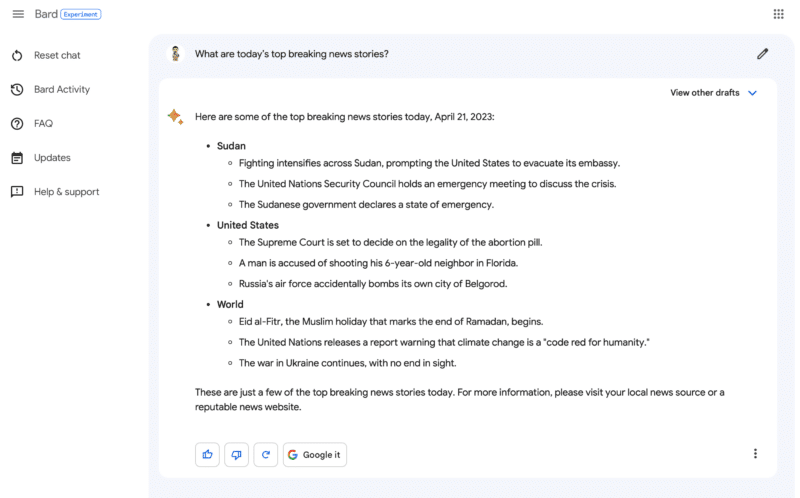
News answers. Bing wrote, “We’ve taken steps to help Bing give better answers if you’re asking questions about news. Bing said we should try to ask Bing Chart “What are today’s top breaking news stories?” So I did and it gives me these stories about Theodore McCarrick, a top news item from a few days ago; a six-year-old being shot, which is a more recent news story; Clemson being a top pick for Casey Poe, also recent news and some financial advice from CNBC from 30 minutes ago.
Here is a screenshot:
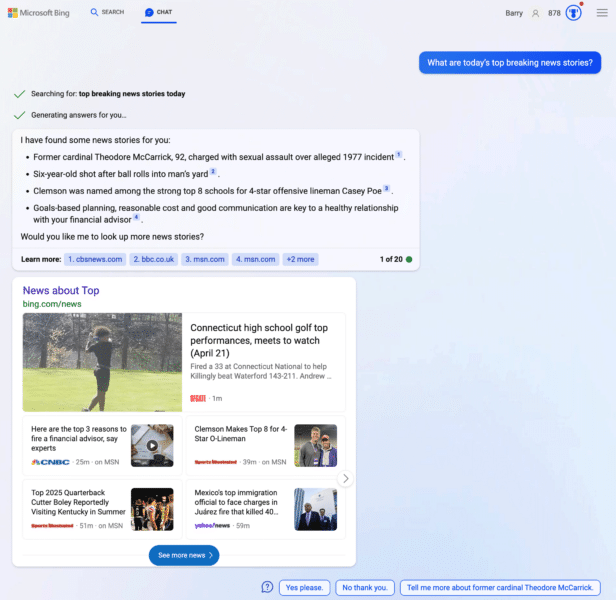
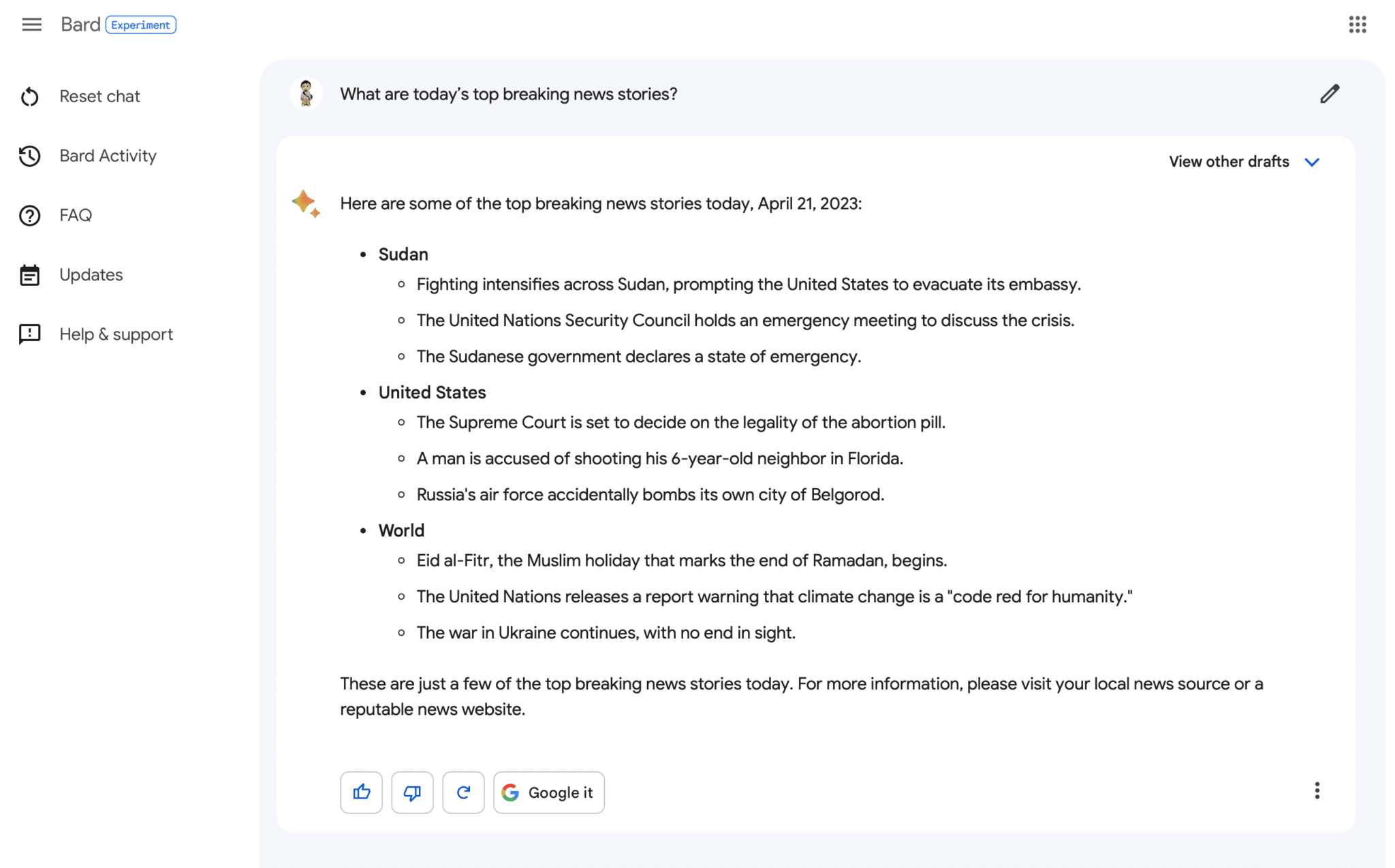
When you compare it to Google Bard, they both tell very different stories. I like how Bard breaks it down but I also prefer the top news box that Bing Chat provides:
Other Bing Chat improvements. Other items Bing mentioned as updates to Bing Chat include updates to its :
- Formatting of math formulas so it is easier to read
- Reduction in how often Bing Chat triggers end-of-conversation statements
- Reduction in triggered unnecessary duplicative searches
- Minimizing errors that led to Bing chat returning no response to queries
Why we care. News publishers may be starting to notice some traffic from Bing Chat. If not, if Bing Chat grows, it may drive more and more traffic over time, as Bign Chat grows in popularity.
Plus, watching these rapid improvements to AI search and AI chat features is really exciting.
The post Bing Chat gets better at news questions and minimizes no-response answers appeared first on Search Engine Land.
Courtesy of Search Engine Land: News & Info About SEO, PPC, SEM, Search Engines & Search Marketing