Archive for the ‘seo news’ Category
Thursday, May 4th, 2023

The art of attracting and selling to customers is undergoing rapid and unprecedented transformation. To stay relevant and competitive, brands must keep up with technological advances and ever-evolving consumer behavior.
However, adapting to these changes is not straightforward, as each generation has unique needs, values and expectations that brands need to consider when developing marketing strategies.
Join marketing experts from Zeta Global as they reveal extensive research and insights into the newest consumer trends.
Register and attend “The Changing Face of Marketing: Connecting with Gen X, Millennials and Gen Z,” presented by Zeta Global.
Click here to view more Search Engine Land webinars.
The post How to connect with Gen X, Millennials and Gen Z appeared first on Search Engine Land.
Courtesy of Search Engine Land: News & Info About SEO, PPC, SEM, Search Engines & Search Marketing
Thursday, May 4th, 2023
Microsoft is now rolling out its new Bing Chat to all users who download Microsoft Edge, there is no more waitlist. Over half a billion chats were conducted on Bing Chat since it launched 3-months ago, Yusuf Mehdi, Corporate Vice President, said.
What is new
There are four main points of what is new with Bing Chat:
- Removal of the waitlist for Bing Chat by going from a “Limited Preview” to an “Open Preview”
- Gaining more visual answers for Bing Chat with rich images and videos
- Offering a multi-session experiences with new chat history and persistent chats within the Edge browser
- Exporting and sharing Bing Chats
- Developer access to build third party apps on top of Bing Chat
Let’s dig in a bit more into these changes.
Bing Chat waitlist is gone
Bing has moved from a “Limited Preview” to an “Open Preview,” removing the “waitlist” to access Bing Chat. You still need to use Microsoft’s browser, Edge, and/or the Bing mobile app to access Bing Chat.
You also need to be logged in to your Microsoft account while on Bing Chat within the Edge browser for it to work.
Bing Chat more visual
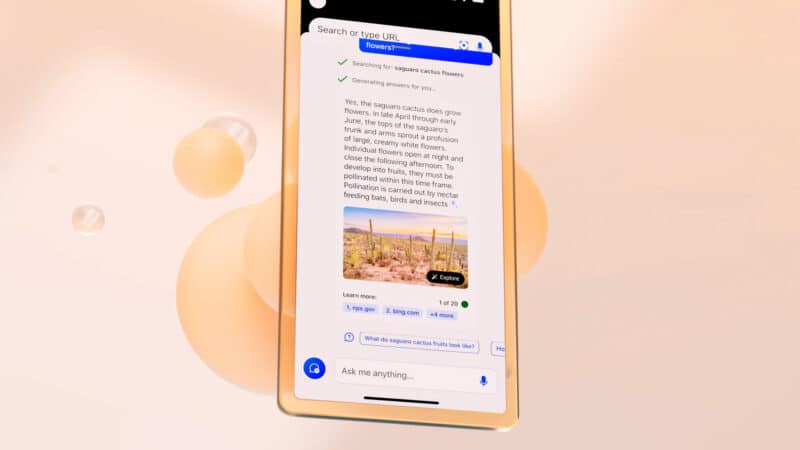
Bing has updated the answers within Bing Chat to be more visually appealing by improving the formatting and layout, adding more rich images and rich videos, and also by adding charts and graphs when relevant.
Here is a screenshot of the new more visual look for Bing Chat on mobile:
Also, Bing Image Creator is available in all languages, which means over 100 different languages, talk about getting more visual:
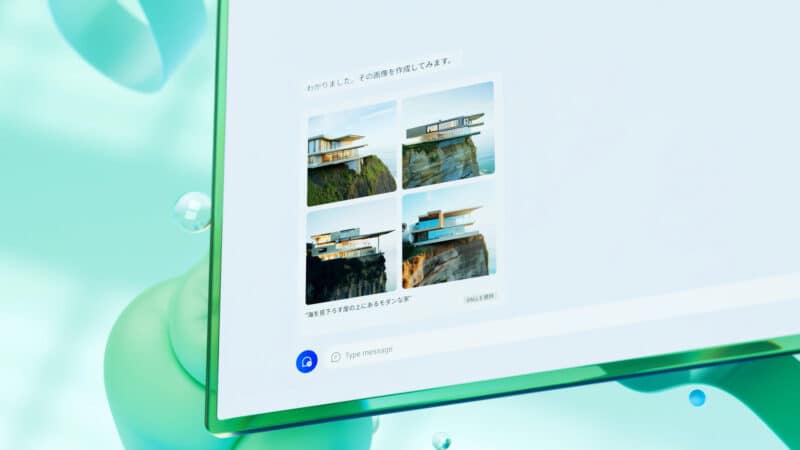
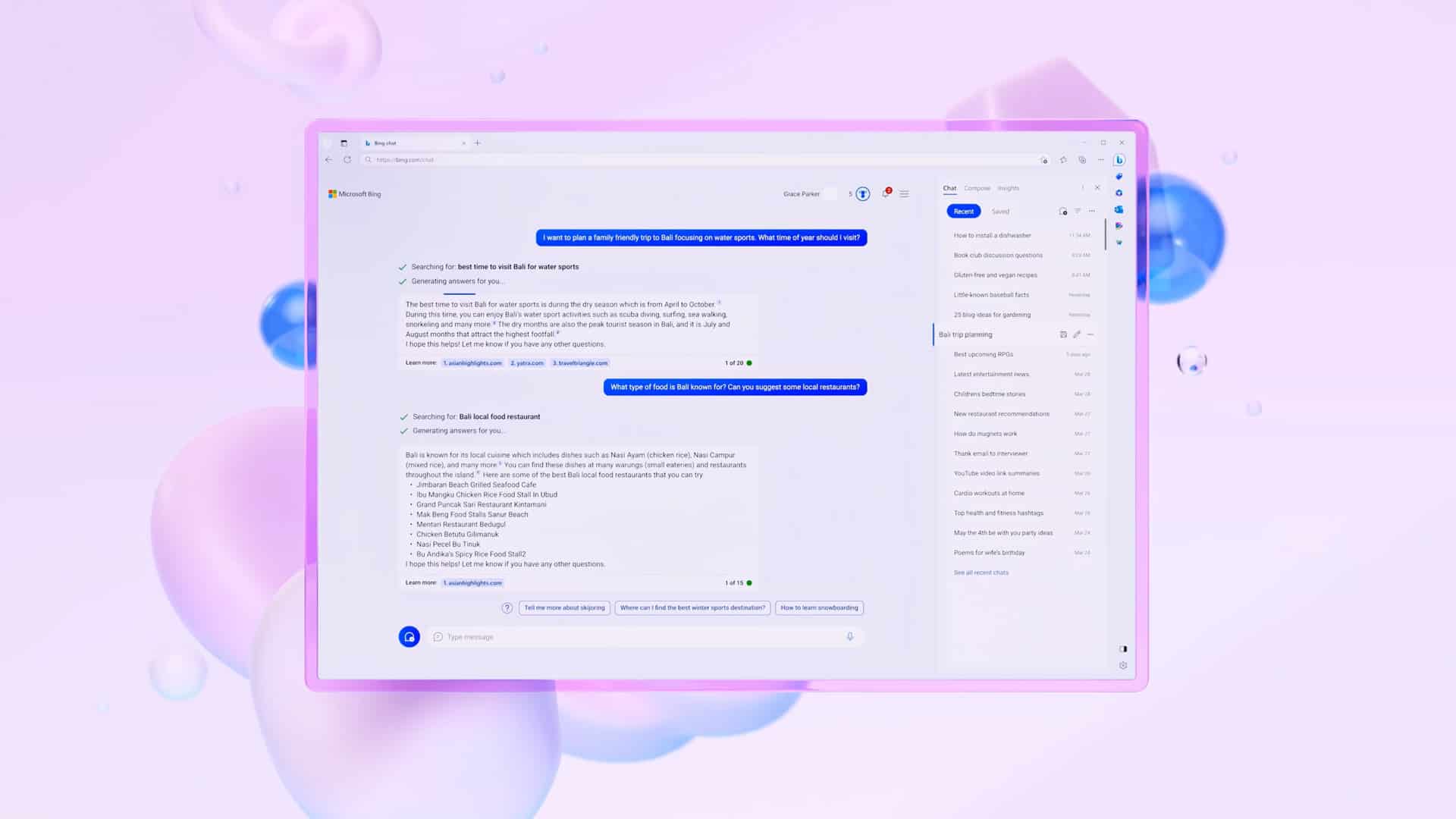
Microsoft also redesigned Edge to show chats in a better and more visual format. This includes streamlined look, rounded corners, organized containers and semi-transparent visual elements, the company said. Here is what that looks like:
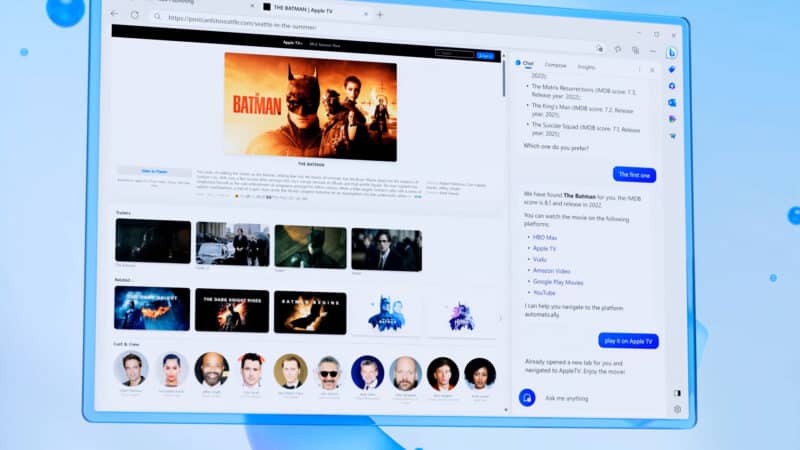
You will also be able to ask Bing Chat for answers by uploading images as part of your chat. After you upload an image, Bing Chat can search the web for related content.
In addition, Bing Chat in Microsoft Edge has improved summarization capabilities for long documents, both in PDF and HTML formats.
Bing Chat multi-session experiences
Microsoft has been talking about adding chat history for some time now and now Microsoft is rolling it out for Bing Chat. You can use Bing Chat and be able to pick up where you left off, then you can return to previous chats in Bing’s chat history.
There is a “recents” tab on the right side to pickup where you left off. You can also see a “saved” tab for chats you saved for later.
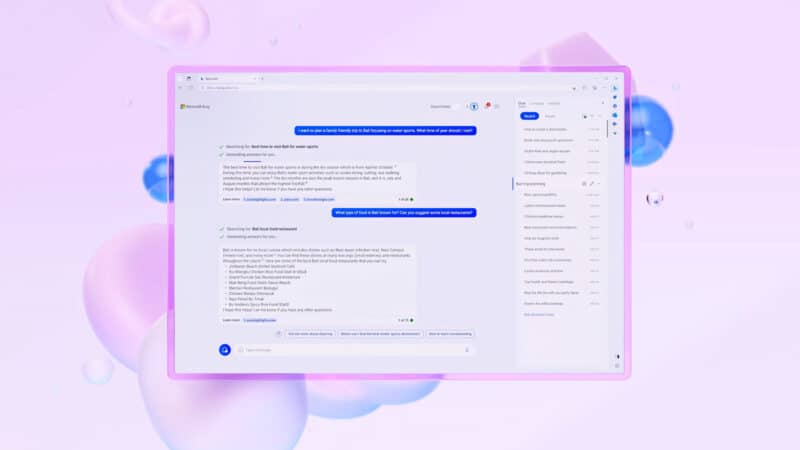
You can even go from the Bing Chat interface into the Edge sidebar interface, so you can browse the web and continue your chat. The screenshot below shows that in action:
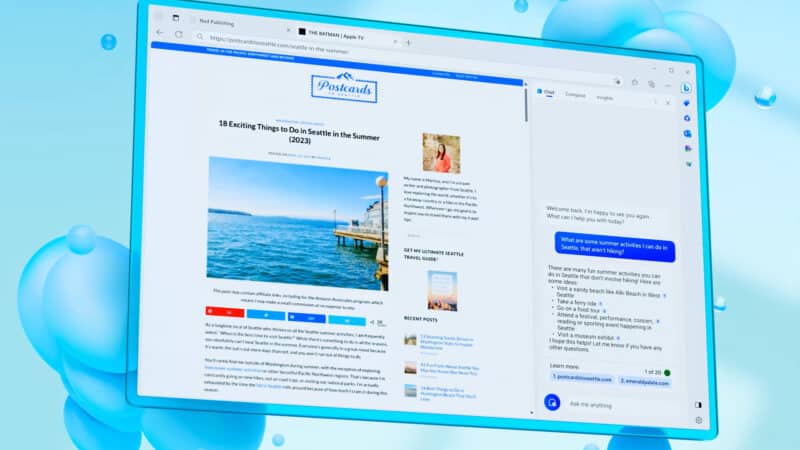
Export and share your chats
Microsoft is also adding the ability to export and share your chats from Bing Chat or Edge sidebar. You will be able to share your chats on social media or move them into tools like Microsoft Word, if you so desire.
In this screenshot, you can see the export and share icons at the top right of the chat window:
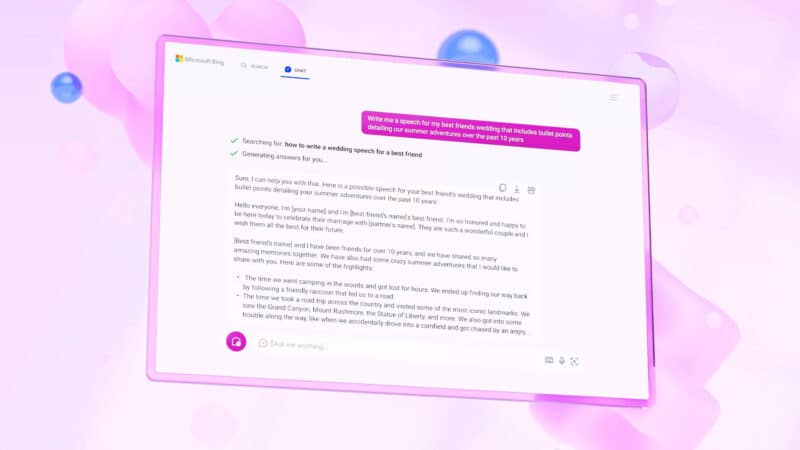
Third-party developer access
Microsoft said soon, developers will be able to build third-party plug-ins into the Bing chat experience. This is also something Bing hinted was coming weeks ago. In the screen shot below, you can see an example of OpenTable helping you find and book a reservation with a restaurant. This is something OpenAI’s ChatGPT already supports.
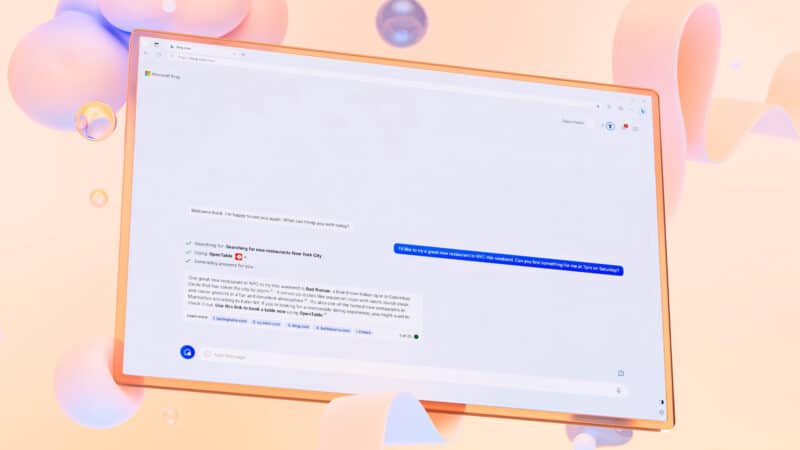
Why we care
Watching how Microsoft continues to evolve these AI chat features is exciting. Watching how it may shape the future of a new search experience is even more exciting.
We all know Google I/O is around the corner, and seeing Microsoft and Google go at it with these fast-paced emerging technologies is thrilling.
The post Bing Chat available to more users, gains more visual answers, chat history and third-party developer capabilities appeared first on Search Engine Land.
Courtesy of Search Engine Land: News & Info About SEO, PPC, SEM, Search Engines & Search Marketing
Thursday, May 4th, 2023
Following a significant overhaul last year, it appears that YouTube may be undertaking another visual transformation, this time targeting the video page, which has remained relatively unchanged in recent years.
The change was noticed and posted on Twitter by @XenoPanther.
The new design. At present, the web-based video page features a video window accompanied by the title and other details/descriptions displayed below it. However, with the redesign witnessed by a select few over recent weeks, this information is now situated to the right of the video and appears much narrower. Buttons for likes, dislikes, sharing, and more are located underneath, along with a selection of five or so recent comments.
This creates an interface that closely resembles a mobile layout. Consequently, the “Up Next” videos and additional recommendations no longer appear on the right edge of the screen. Instead, they are presented in a grid at the bottom, mirroring the appearance of the YouTube homepage. Users might even encounter a “Latest YouTube posts” section while scrolling.
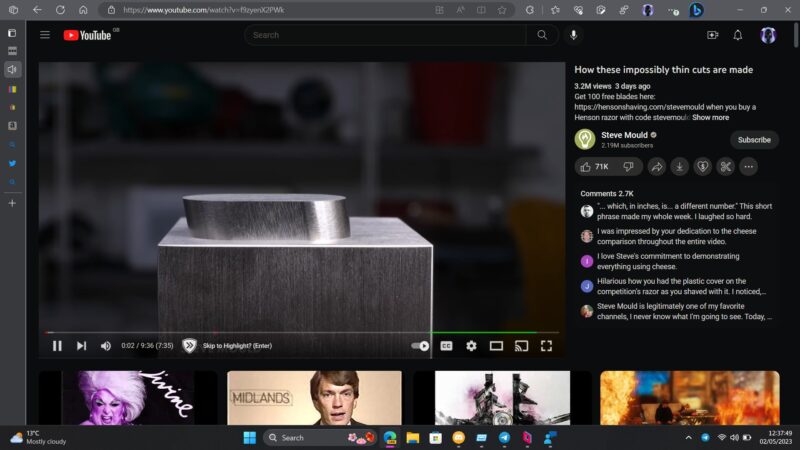
While the experience of watching a video remains largely unaffected, the relocation of comments and other details to the periphery constitutes a significant change in the interface. It is evident that the redesign’s primary objective is to emphasize other videos for viewers to watch, using much larger thumbnails. This provides a more relaxed viewing experience, although it remains uncertain whether the redesign strikes the right balance between information, comments, and recommendations.
Not everyone is thrilled. The angriest comment comes from u/Psyren1317, who replied “Holy hell is this new layout disastrous,” before saying “Whoever designed this mess should be fired. Yikes.”
Redditor u/DaGrumpyOne lived up to their username, replying “It’s unusable now.” While u/texaslegrefugee decried the change saying “The entire “library” experience is absolutely terrible. It’s as over-designed as it can get, and nothing but confusing chaos. It takes forever to find anything.”
“Yo @YouTube The new video UI layout is absolutely awful. The massive thumbnails from other videos on the bottom of my screen are so distracting. Literally, no one asked for this.”
Why we care. Naturally, any modifications to the interface can potentially influence watch time and user engagement, ideally in a positive manner. Advertisers should be concerned about these changes because an enhanced viewing experience, which encourages users to spend more time on the platform, could lead to increased ad impressions and higher chances of their advertisements being seen by their target audience. Consequently, a well-balanced and captivating interface that seamlessly integrates information, comments, and recommendations can prove advantageous for advertisers, as it can potentially amplify their reach and impact on viewers.
The post YouTube has a new interface, and not everyone is excited about it appeared first on Search Engine Land.
Courtesy of Search Engine Land: News & Info About SEO, PPC, SEM, Search Engines & Search Marketing
Thursday, May 4th, 2023
TikTok has just announced the launch of a new product, Pulse Premiere, aimed at enabling publishers to sell advertisements alongside their content.
How it works. Pulse Premiere is an extension of TikTok’s existing Pulse program, where a select group of top creators receive half the revenue from video advertisements shown immediately after their posts.
The new offering extends similar benefits to select publisher accounts, such as Condé Nast, BuzzFeed, and NBC. Unlike the original Pulse program, which only covers the top 4% of creators’ posts based on metrics like likes, watch time, and comments, Pulse Premiere will allow ad sales against all posts from participating publishers.
What TikTok says. The ability to sell advertisements on one of the most popular social media platforms comes as a relief for many publishers grappling with challenging economic conditions, leading to cost-cutting measures and layoffs throughout the industry. Ray Cao, Global Head of Monetization, Product Strategy, and Operation at TikTok, expressed the company’s desire to support publishers while also creating new business opportunities for the platform.
Cao emphasized TikTok’s aim to diversify its portfolio and help publishers expand their presence on the platform, as well as gain insights into what content resonates with users.
Dig deeper. Read the announcement from the Wall Street Journal.
Why we care. This new product offers an opportunity to reach new audiences on one of the fastest-growing social media platforms. By partnering with reputable publishers like Condé Nast, BuzzFeed, and NBC, TikTok’s Pulse Premiere allows advertisers to associate their brand with quality content, enhancing their credibility and visibility.
Furthermore, as the platform’s user base grows, advertisers can tap into its diverse and engaged audience, potentially resulting in higher engagement rates, increased brand awareness, and, ultimately, better ROI for their advertising efforts.
The post TikTok’s new ad product gives publishers 50% stake appeared first on Search Engine Land.
Courtesy of Search Engine Land: News & Info About SEO, PPC, SEM, Search Engines & Search Marketing
Tuesday, May 2nd, 2023
Microsoft has just announced six new updates, focusing on tools and features that aim to assist advertisers in refining their campaigns and improving performance. Let’s dive in.
Roku. The collaboration between Roku TV streaming ads, Microsoft Audience Ads, and Bing’s paid and organic search is now underway. Advertisers interested in using the new cross-channel marketing approach, download the whitepaper for more info.
Simplifying video management for ad campaigns with the Asset Library. Considering using video ads? Now the Microsoft Ads Asset Library accommodates video assets, streamlining video uploading and management for campaigns. You can directly upload videos into the Asset Library from local files or URL links and apply filters such as asset type and video duration. It’s time to invigorate ad campaigns with captivating, dynamic video content.
Simple conversion setup for Smart Campaigns accounts using Multi-platform. In the upcoming weeks, Microsoft Advertising Smart Campaigns accounts utilizing Multi-platform will have access to code-free conversion goal setup. Rather than manually adding code snippets to websites, you can simply choose the relevant buttons and enable conversion tracking within minutes.
To activate this feature, tick the Enable Microsoft Clarity box during the goal setup process. This also grants access to free Microsoft Clarity insights, enabling users to comprehend post-click user behavior and engagement on landing pages through session recordings, instant heatmaps, and an analysis dashboard.
Change history for campaign-level conversions. Over the next few weeks, the change history report will be updated to include campaign-level conversions, raising awareness of any alterations and assisting users in troubleshooting. The addition and removal of campaign-level goals from campaigns will be visible.
English language support expanded for Shopping Campaigns in 52 new markets. The option to add the English language when creating a product feed within a Merchant Center has been extended to 52 new markets. Customers running Shopping Campaigns in these regions can now generate further shopper interest in their products.
Postponement of Enhanced CPC migration on the Microsoft Audience Network. The previously announced migration of all Audience Ads using Manual cost per click (CPC) to Enhanced CPC (eCPC) has been delayed, with a new migration date to be revealed later. Advertisers employing eCPC on the Microsoft Audience Network have experienced an 18% reduction in cost per acquisition (CPA) and a 7.5% reduction in CPC. Trying eCPC is recommended to improve performance on the Microsoft Audience Network.
Dig deeper. Review the announcements on the Microsoft Advertising Blog.
Why we care. The Microsoft and Roku collaboration, streamlined video management in the Asset Library, and code-free conversion goals in Smart Campaigns simplify the advertising process, leading to improved performance and efficiency.
Additionally, the expanded language support for Shopping Campaigns allows for increased shopper interest in new markets, while the success of Microsoft Store Ads showcases the potential for heightened brand awareness, preference, and engagement. By leveraging these advancements, advertisers can optimize their marketing strategies and elevate their overall campaign performance.
The post Roku streaming collaboration and 5 other Microsoft Ads updates for May appeared first on Search Engine Land.
Courtesy of Search Engine Land: News & Info About SEO, PPC, SEM, Search Engines & Search Marketing
Tuesday, May 2nd, 2023
Facebook is introducing three new ways for users to find short-form videos that are most relevant to them, as well as new controls to help customize their video experiences on the platform.
Discovering relevant Reels. Facebook is making it simpler for users to find Reels throughout the app, including some updates to their appearance in Facebook Watch.
Reels have also been added to the primary navigation at the top of Facebook Watch, providing quick access to short-form videos and making it easier for users to discover creators, trends, and content that aligns with their interests. Moreover, when watching videos on Facebook, users can now smoothly scroll between reels and long-form videos.
New ways to personalize Reels. Facebook is attempting to offer users more control over the reels they see across the app, similar to other personalization tools on the platform. There are two new ways to do this:
- Show more, Show less: Facebook wants reels to mirror users’ interests, enabling them to explore current passions while also helping them uncover interests, creators, and communities they may appreciate in the future. Users can now influence the types of reels they see more or less of by tapping the three-dot menu at the bottom of the video player and selecting either Show More or Show Less. This option will also start to appear below reels and videos in the Watch feed. Choosing Show More on a reel will temporarily increase its ranking score and that of similar reels. Opting for Show Less will temporarily decrease its ranking score. By collecting direct user feedback, Facebook can make reels ranking more intelligent and better aligned with user preferences.
- Contextual labels: Facebook is introducing new labels on the Reels video player to clarify why users are seeing particular reels — for instance, because a friend liked it.
Dig deeper. Review the announcements on the Meta blog.
Why we care. By leveraging the platform’s intelligent ranking system and contextual labels, advertisers can effectively target users with interests that align with their brand or product offerings, resulting in more meaningful interactions and potentially higher conversion rates. The integration of Reels within the Facebook app and its navigation system further ensures a steady stream of user attention, making it an ideal channel for advertisers to invest in and capitalize on for maximum visibility and impact.
The post 3 new Facebook Reels features appeared first on Search Engine Land.
Courtesy of Search Engine Land: News & Info About SEO, PPC, SEM, Search Engines & Search Marketing
Tuesday, May 2nd, 2023
Evaluating the true ROI of a customer data platform means understanding how the technology improves key business metrics and enables working more efficiently.
That’s why BlueConic commissioned Forrester Consulting to conduct a Total Economic Impact study that measures both the profit and operational efficiency gains that can be unlocked with BlueConic.
On May 4th, guest speakers Forrester’s Joe Stanhope, VP, Principal Analyst and Julia Fadzeyeza, Principal Consultant, will join BlueConic’s CMO, Patrick Reynolds, to explore current CDP market trends and discuss the findings of the TEI study, including how BlueConic helped customers achieve:
- Up to 90%-time savings on segmentation, customer journeys, and reporting tasks
- Increased profit of $5.4M from improved conversion rates, new data monetization revenue streams, and strategic partnership growth
- Faster, higher-quality decision-making and support for future growth
Forrester’s TEI Study: How BlueConic Customers Reduced Operational Costs by Up to 90% Time Savings
Thursday, May 4 | 11AM ET | 5PM CEST
If you can’t join us live, be sure to register anyway so you can receive a link to the recording.
The post Forrester Total Economic Impact study reveals increased efficiency for marketers appeared first on Search Engine Land.
Courtesy of Search Engine Land: News & Info About SEO, PPC, SEM, Search Engines & Search Marketing
Tuesday, May 2nd, 2023
Whether you’ve sailed through Q1 and early Q2 with optimism intact or battling challenges exacerbated by macro turbulence, there’s plenty of opportunity to stretch yourself and find competitive gains in the coming months.
This article discusses four initiatives I’ve seen drive great results for my B2B clients, including:
- Testing new channels to meet your audience where they are.
- Testing AI tools to increase your tactical efficiency and free strategic-planning bandwidth.
- Leaning into video.
- Incorporating customer feedback.
You’ll also learn how you can put them to work in your campaigns.
1. Test new channels – and new features
Advertising platforms, large and small, have been busy releasing new B2B-friendly features.
Social platforms, particularly, have recently added contextual and search-based targeting functionality.
- Instagram recently initiated testing for search result ads.
- TikTok is also testing search ads.
- Reddit is testing contextual functionality and (according to our reps) plans to roll out a search beta in the coming months.
- Facebook, along with improving its algorithm to beef up the quality of conversions of its lead gen ads, has added lead form options to target based on volume, higher intent, or custom goals – all of which can help cut down on spam and focus spend where it counts.
The time is ripe for carving out aggressive test budgets for new channels, particularly if you’re laboring under the high engagement costs of Google and LinkedIn.
My advice for expansion testing is to start with social channels and ignore programmatic until or unless you’re desperate for new traffic sources.
Exercise these testing muscles now and watch updates from the platforms that show the most promise for engaging your ideal client profiles as they roll out features.
2. Take advantage of AI
You might be sick of hearing about AI, but I’d be remiss if I didn’t join the crowd urging you to wade in and test its capabilities.
On the paid media side, there are three main functions I recommend you start using AI to help with:
Our favorite copy AI tools besides ChatGPT are Jasper, Grammarly and Quillbot. All the usual caveats apply about needing to QA any AI-generated copy before it goes anywhere external-facing.
But at minimum, AI can give you a great starting point to get over writer’s block since it’s almost universally easier for people to edit than to start from a blank slate.
Supplementing the AI copy options available is an emerging crop of visual tools. Whether it’s video (more on that in a bit), enhanced static-image creation from Canva, or motion graphics like Storyblock or Dribbble, marketers have plenty of tools to help bring their creative to life.
The last area where you can use AI to save time and create efficiency is analytics. You can pay for fancy AI-powered analytics platforms like Segment Tealium, Pecan, etc., but plenty of low-cost options help your campaign performance.
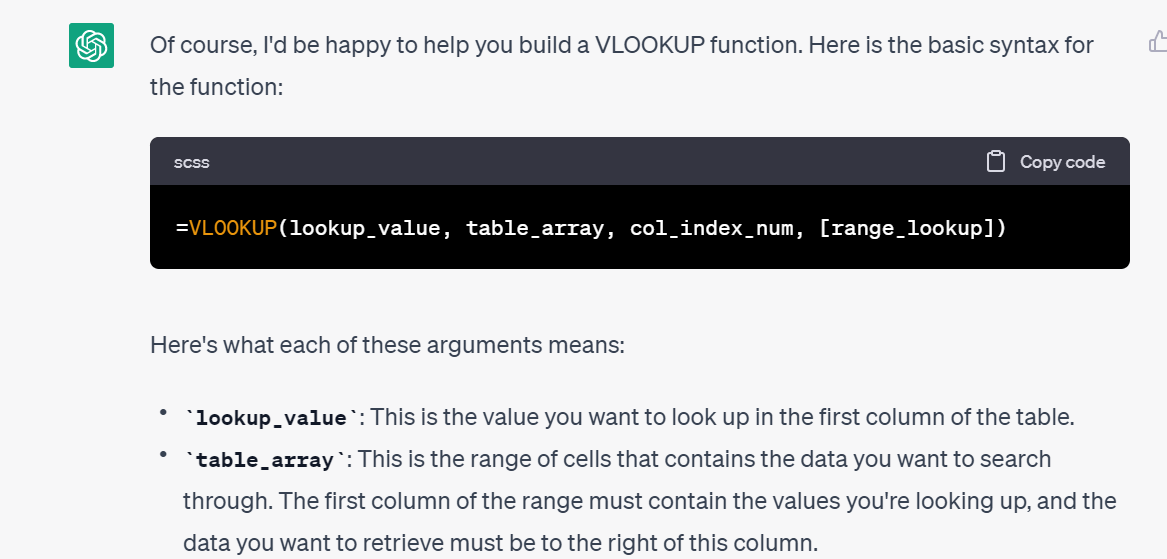
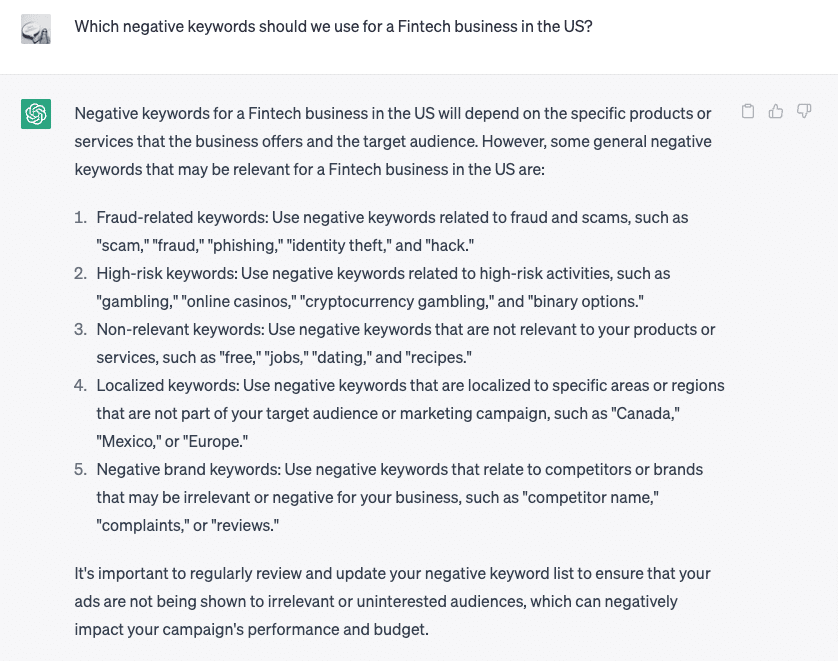
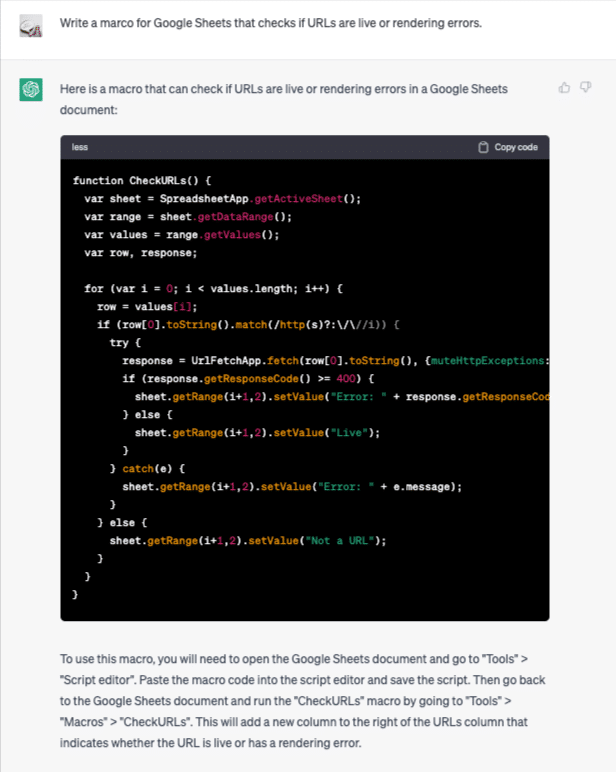
Even if you’re stuck in Google Sheets, you can use ChatGPT to:
- Set up some basic functions to smooth out your reporting.
- Build negative keyword lists.
- Write macros for spreadsheets.
Get the daily newsletter search marketers rely on.
<input type=”hidden” name=”utmMedium” value=”“>
<input type=”hidden” name=”utmCampaign” value=”“>
<input type=”hidden” name=”utmSource” value=”“>
<input type=”hidden” name=”utmContent” value=”“>
<input type=”hidden” name=”pageLink” value=”“>
<input type=”hidden” name=”ipAddress” value=”“>
3. Get serious about video
Many marketers still aren’t fully embracing video in their campaigns.
Whether on LinkedIn, Facebook, TikTok, or YouTube, there’s plenty of room for B2B engagement – if you can build compelling enough video content to harness it.
Even with a burgeoning marketplace of low-cost AI tools (e.g., Synthesis, DeepBrain, Pictory) that make video production and editing quick and cheap, many marketers have yet to dip a toe.
As a starting point, think about the resources you already have available. If you aren’t versed in production development, you can test animations in static ads.
You may have some old YouTube videos to practice chopping up in bite-sized segments. Maybe you have product demos or client testimonials that would piece together a great brand story.
The upshot is you’re likely starting with at least some inventory, not a blank slate.
And there may be folks on your marketing team who have at least dabbled in video editing – if you don’t have time to learn skills right now, take a quick straw poll of interest and experience on your team.
On the other hand, if you’re really down to learn, you can take matters into your own hands with tools like Loom or VideoAct and get content by recording yourself.
Video is only getting bigger. It’s time to join the fun.
4. Use the gift of customer feedback
Customer feedback has been around as long as things have been sold – and it’s never easier to gather it than it is right now.
Your customer service team, sales team, product reviews, online reviews, and social media accounts are great resources for insights about:
- Why people buy.
- Why they don’t buy.
- What they love most (and least) about your product or service.
All that feedback, especially the feedback that coalesces into themes, is fodder for marketing campaigns.
Problems solved can become case studies or testimonials.
Great experiences can become ad copy.
Questions you can immediately answer should be placed somewhere prominent on your website’s product or service pages.
One of the marketing team’s most important functions is to gather feedback and absorb its significance.
The most interactive a marketing team is with sources of customer insight, the more precise the targeting and messaging of its campaigns will be.
Set up your B2B brand for paid media success
If, a few months after reading this, you’re still focused on Google and LinkedIn, using ads without motion or animation, applying manual rigor to all of your creative and analytics processes, and crafting strategic and tactical plans without considering audience feedback, you’ll be locking in a series of competitive disadvantages.
Especially lately, free and budget-friendly features have emerged to help marketers do their jobs.
No matter what size your company, team and budget, ensure you’re using what’s available to help you do your job more effectively – and reap the performance rewards.
The post 4 B2B paid media strategies to stay ahead of the curve appeared first on Search Engine Land.
Courtesy of Search Engine Land: News & Info About SEO, PPC, SEM, Search Engines & Search Marketing
Monday, May 1st, 2023
For some accounts, Meta has just updated its location targeting settings.
What’s changed. In the past, Facebook’s default setting for targeting locations was “Living in or recently in this location.” This meant that without making any alterations to the settings, advertisers would reach individuals who either resided in the selected locations or had recently visited them, regardless of their permanent address.
There were four available options to choose from:
- People living in or recently in this location
- People living in this location
- People recently in this location
- People traveling in this location
Now, the dropdown menu for location targeting has been eliminated, leaving only the “Living in or recently in this location” option. This change signifies that the other options have been removed, and advertisers no longer need to choose a specific type of location targeting.
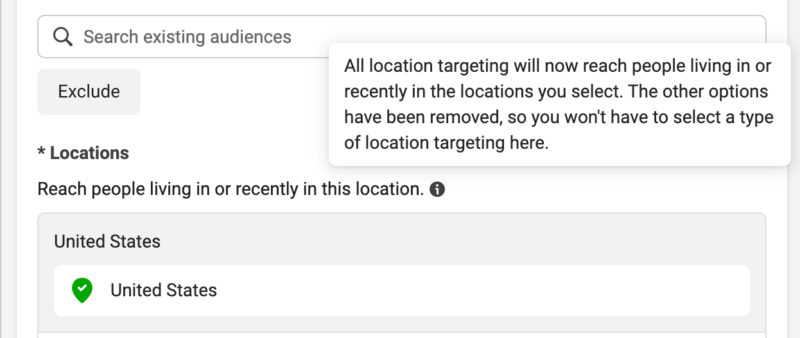 John Loomer
No exceptions have been identified for campaign objectives or optimization. The campaign objective represents the primary goal of a Facebook ad, and the chosen objective influences various options, including optimization and delivery. Optimization, on the other hand, determines who sees the Facebook ad, as the platform will display the ad to those most likely to perform the desired action.
Furthermore, Meta’s documentation, although not explicitly mentioning the change, seems to have been updated to reflect this new approach in location targeting.
Why we care. With the elimination of multiple targeting options and the focus on “Living in or recently in this location,” understanding this new approach is essential to successfully reach your desired audience. Adapting to these changes and optimizing campaign objectives accordingly will ensure that your ads are displayed to the most relevant users, ultimately leading to better ad performance and higher return on investment.
The post New update to Meta Ads location targeting appeared first on Search Engine Land.
Courtesy of Search Engine Land: News & Info About SEO, PPC, SEM, Search Engines & Search Marketing
Monday, May 1st, 2023
Staying current with the latest search marketing tactics and adjusting accordingly can be a major challenge for search marketers. Why? Continuous algorithm updates, major changes to platforms, and advancements in AI technologies, for starters.
Turn this challenge into an opportunity – and stay ahead of competitors while you’re at it: Attend SMX Advanced, online June 13-14, for free. Together with a team of industry experts, you’ll explore the latest industry developments, learn actionable tactics you can put to use right away, and validate your existing search marketing initiatives.
Here’s a sneak peek at the expert-level program:
- Entity SEO and AI: How to dominate SERPs in the next two years — with Tim Warren, CEO of Helium SEO
- Get organized: Ad campaign structure in a changing world: A panel discussion
- Performance Max + lead gen: How to make it work — Menachem Ani, Founder and CEO of JXT Group
- How a search-first strategy can drive revenue and boost your brand in 2023 and beyond — with Laurel Stewart, VP of Marketing and Growth at Victorious
- Generative AI and the future of SEO: A panel discussion
- Exploring recent major Google algorithm updates and preparing for what’s next — with Glenn Gabe, SEO Consultant at G-Squared Interactive
The complete program will be posted May 8. Check out more agenda details here!
Your free pass unlocks the entire event, including…
- 40+ sessions and keynotes designed to equip you with actionable tactics you can implement immediately to drive measurable success
- Hours of live Q&As (Overtime!) with speakers so you can get specific answers to your search questions
- Instant on-demand access so you can train at your own pace
- Coffee Talk meetups that let you connect with a community of passionate search marketers
- A personalized certificate of attendance so you can showcase your commitment to continued learning
… and much more. Don’t wait. You and your career deserve this. Secure your free pass now!
Psst… Have you heard? The 2023 Search Engine Land Awards are open for entries! Don’t miss your opportunity to boost team morale, attract new business, and stand apart from the competition… enter now!
The post Explore the latest in generative AI, PMax, and more for free at SMX Advanced appeared first on Search Engine Land.
Courtesy of Search Engine Land: News & Info About SEO, PPC, SEM, Search Engines & Search Marketing




 (@XenoPanther)