Archive for the ‘seo news’ Category
Monday, May 8th, 2023
Should I use large language models for keyword research? Can these models think? Is ChatGPT my friend?
If you’ve been asking yourself these questions, this guide is for you.
This guide covers what SEOs need to know about large language models, natural language processing and everything in between.
Large language models, natural language processing and more in simple terms
There are two ways to get a person to do something – tell them to do it or hope they do it themselves.
When it comes to computer science, programming is telling the robot to do it, while machine learning is hoping the robot does it itself. The former is supervised machine learning, and the latter is unsupervised machine learning.
Natural language processing (NLP) is a way to break down the text into numbers and then analyze it using computers.
Computers analyze patterns in words and, as they get more advanced, in the relationships between the words.
An unsupervised natural language machine learning model can be trained on many different kinds of datasets.
For example, if you trained a language model on average reviews of the movie “Waterworld,” you would have a result that is good at writing (or understanding) reviews of the movie “Waterworld.”
If you trained it on the two positive reviews that I did of the movie “Waterworld,” it would only understand those positive reviews.
Large language models (LLMs) are neural networks with over a billion parameters. They are so big that they’re more generalized. They are not only trained on positive and negative reviews for “Waterworld” but also on comments, Wikipedia articles, news sites, and more.
Machine learning projects work with context a lot – things within and out of context.
If you have a machine learning project that works to identify bugs and show it a cat, it won’t be good at that project.
This is why stuff like self-driving cars is so difficult: there are so many out-of-context problems that it’s very difficult to generalize that knowledge.
LLMs seem and can be a lot more generalized than other machine learning projects. This is because of the sheer size of the data and the ability to crunch billions of different relationships.
Let’s talk about one of the breakthrough technologies that allow for this – transformers.
Explaining transformers from scratch
A type of neural networking architecture, transformers have revolutionized the NLP field.
Before transformers, most NLP models relied on a technique called recurrent neural networks (RNNs), which processed text sequentially, one word at a time. This approach had its limitations, such as being slow and struggling to handle long-range dependencies in text.
Transformers changed this.
In the 2017 landmark paper, “Attention is All You Need,” Vaswani et al. introduced the transformer architecture.
Instead of processing text sequentially, transformers use a mechanism called “self-attention” to process words in parallel, allowing them to capture long-range dependencies more efficiently.
Previous architecture included RNNs and long short-term memory algorithms.
Recurrent models like these were (and still are) commonly used for tasks involving data sequences, such as text or speech.
However, these models have a problem. They can only process the data one piece at a time, which slows them down and limits how much data they can work with. This sequential processing really limits the ability of these models.
Attention mechanisms were introduced as a different way of processing sequence data. They allow a model to look at all the pieces of data at once and decide which pieces are most important.
This can be really helpful in many tasks. However, most models that used attention also use recurrent processing.
Basically, they had this way of processing data all at once but still needed to look at it in order. Vaswani et al.’s paper floated, “What if we only used the attention mechanism?”
Attention is a way for the model to focus on certain parts of the input sequence when processing it. For instance, when we read a sentence, we naturally pay more attention to some words than others, depending on the context and what we want to understand.
If you look at a transformer, the model computes a score for each word in the input sequence based on how important it is for understanding the overall meaning of the sequence.
The model then uses these scores to weigh the importance of each word in the sequence, allowing it to focus more on the important words and less on the unimportant ones.
This attention mechanism helps the model capture long-range dependencies and relationships between words that might be far apart in the input sequence without having to process the entire sequence sequentially.
This makes the transformer so powerful for natural language processing tasks, as it can quickly and accurately understand the meaning of a sentence or a longer sequence of text.
Let’s take the example of a transformer model processing the sentence “The cat sat on the mat.”
Each word in the sentence is represented as a vector, a series of numbers, using an embedding matrix. Let’s say the embeddings for each word are:
- The: [0.2, 0.1, 0.3, 0.5]
- cat: [0.6, 0.3, 0.1, 0.2]
- sat: [0.1, 0.8, 0.2, 0.3]
- on: [0.3, 0.1, 0.6, 0.4]
- the: [0.5, 0.2, 0.1, 0.4]
- mat: [0.2, 0.4, 0.7, 0.5]
Then, the transformer computes a score for each word in the sentence based on its relationship with all the other words in the sentence.
This is done using the dot product of each word’s embedding with the embeddings of all the other words in the sentence.
For example, to compute the score for the word “cat,” we would take the dot product of its embedding with the embeddings of all the other words:
- “The cat“: 0.2*0.6 + 0.1*0.3 + 0.3*0.1 + 0.5*0.2 = 0.24
- “cat sat“: 0.6*0.1 + 0.3*0.8 + 0.1*0.2 + 0.2*0.3 = 0.31
- “cat on“: 0.6*0.3 + 0.3*0.1 + 0.1*0.6 + 0.2*0.4 = 0.39
- “cat the“: 0.6*0.5 + 0.3*0.2 + 0.1*0.1 + 0.2*0.4 = 0.42
- “cat mat“: 0.6*0.2 + 0.3*0.4 + 0.1*0.7 + 0.2*0.5 = 0.32
These scores indicate the relevance of each word to the word “cat.” The transformer then uses these scores to compute a weighted sum of the word embeddings, where the weights are the scores.
This creates a context vector for the word “cat” that considers the relationships between all the words in the sentence. This process is repeated for each word in the sentence.
Think of it as the transformer drawing a line between each word in the sentence based on the result of each calculation. Some lines are more tenuous, and others are less so.
The transformer is a new kind of model that only uses attention without any recurrent processing. This makes it much faster and able to handle more data.
How GPT uses transformers
You may remember that in Google’s BERT announcement, they bragged that it allowed search to understand the full context of an input. This is similar to how GPT can use transformers.
Let’s use an analogy.
Imagine you have a million monkeys, each sitting in front of a keyboard.
Each monkey is randomly hitting keys on their keyboard, generating strings of letters and symbols.
Some strings are complete nonsense, while others might resemble real words or even coherent sentences.
One day, one of the circus trainers sees that a monkey has written out “To be, or not to be,” so the trainer gives the monkey a treat.
The other monkeys see this and start trying to imitate the successful monkey, hoping for their own treat.
As time passes, some monkeys start to consistently produce better and more coherent text strings, while others continue to produce gibberish.
Eventually, the monkeys can recognize and even emulate coherent patterns in text.
LLMs have a leg up on the monkeys because LLMs are first trained on billions of pieces of text. They can already see the patterns. They also understand the vectors and relationships between these pieces of text.
This means they can use those patterns and relationships to generate new text that resembles natural language.
GPT, which stands for Generative Pre-trained Transformer, is a language model that uses transformers to generate natural language text.
It was trained on a massive amount of text from the internet, which allowed it to learn the patterns and relationships between words and phrases in natural language.
The model works by taking in a prompt or a few words of text and using the transformers to predict what words should come next based on the patterns it has learned from its training data.
The model continues to generate text word by word, using the context of the previous words to inform the next ones.
GPT in action
One of the benefits of GPT is that it can generate natural language text that is highly coherent and contextually relevant.
This has many practical applications, such as generating product descriptions or answering customer service queries. It can also be used creatively, such as generating poetry or short stories.
However, it is only a language model. It’s trained on data, and that data can be out of date or incorrect.
- It has no source of knowledge.
- It cannot search the internet.
- It doesn’t “know” anything.
It simply guesses what word is coming next.
Let’s look at some examples:
In the OpenAI playground, I have plugged in the first line of the classic Handsome Boy Modeling School track ‘Holy calamity [[Bear Witness ii]]’.
I submitted the response so we can see the likelihood of both my input and the output lines. So let’s go through each part of what this tells us.
For the first word/token, I input “Holy.” We can see that the most expected next input is Spirit, Roman, and Ghost.
We can also see that the top six results cover only 17.29% of the probabilities of what comes next: which means that there are ~82% other possibilities we can’t see in this visualization.
Let’s briefly discuss the different inputs you can use in this and how they affect your output.
Temperature is how likely the model is to grab words other than those with the highest probability, top P is how it selects those words.
So for the input “Holy Calamity,” top P is how we select the cluster of next tokens [Ghost, Roman, Spirit], and temperature is how likely it is to go for the most likely token vs. more variety.
If the temperature is higher, it is more likely to choose a less likely token.
So a high temperature and a high top P will likely be wilder. It’s choosing from a wide variety (high top P) and is more likely to choose surprising tokens.
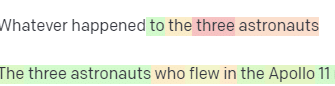 A selection of high temp, high P responses
While a high temp but lower top P will pick surprising options from a smaller sample of possibilities:
And lowering the temperature just chooses the most likely next tokens:
Playing with these probabilities can, in my opinion, give you a good insight into how these kinds of models work.
It is looking at a collection of probable next selections based on what is already completed.
What does this mean actually?
Simply put, LLMs take in a collection of inputs, shake them up and turn them into outputs.
I’ve heard people joke about whether that’s so different from people.
But it’s not like people – LLMs have no knowledge base. They aren’t extracting information about a thing. They’re guessing a sequence of words based on the last one.
Another example: think of an apple. What comes to mind?
Maybe you can rotate one in your mind.
Perhaps you remember the smell of an apple orchard, the sweetness of a pink lady, etc.
Maybe you think of Steve Jobs.
Now let’s see what a prompt “think of an apple” returns.
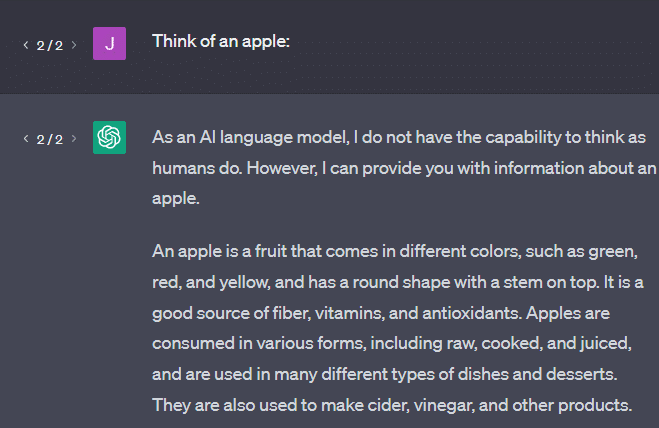
You may have heard the words “Stochastic Parrots” floating around by this point.
Stochastic Parrots is a term used to describe LLMs like GPT. A parrot is a bird that mimics what it hears.
So, LLMs are like parrots in that they take in information (words) and output something that resembles what they’ve heard. But they’re also stochastic, which means they use probability to guess what comes next.
LLMs are good at recognizing patterns and relationships between words, but they don’t have any deeper understanding of what they’re seeing. That’s why they’re so good at generating natural language text but not understanding it.
Good uses for an LLM
LLMs are good at more generalist tasks.
You can show it text, and without training, it can do a task with that text.
You can throw it some text and ask for sentiment analysis, ask it to transfer that text to structured markup and do some creative work (e.g., writing outlines).
It’s OK at stuff like code. For many tasks, it can almost get you there.
But again, it’s based on probability and patterns. So there will be times when it picks up on patterns in your input that you don’t know are there.
This can be positive (seeing patterns that humans can’t), but it can also be negative (why did it respond like this?).
It also doesn’t have access to any sort of data sources. SEOs who use it to look up ranking keywords will have a bad time.
It can’t look up traffic for a keyword. It doesn’t have the information for keyword data beyond that words exist.
The exciting thing about ChatGPT is that it is an easily available language model you can use out of the box on various tasks. But it isn’t without caveats.
Good uses for other ML models
I hear people say they’re using LLMs for certain tasks, which other NLP algorithms and techniques can do better.
Let’s take an example, keyword extraction.
If I use TF-IDF, or another keyword technique, to extract keywords from a corpus, I know what calculations are going into that technique.
This means that the results will be standard, reproducible, and I know they will be related specifically to that corpus.
With LLMs like ChatGPT, if you are asking for keyword extraction, you aren’t necessarily getting the keywords extracted from the corpus. You’re getting what GPT thinks a response to corpus + extract keywords would be.
This is similar to tasks like clustering or sentiment analysis. You aren’t necessarily getting the fine-tuned result with the parameters you set. You’re getting what there is some probability of based on other similar tasks.
Again, LLMs have no knowledge base and no current information. They often cannot search the web, and they parse what they get from information as statistical tokens. The restrictions on how long an LLM’s memory lasts are because of these factors.
Another thing is that these models can’t think. I only use the word “think” a few times throughout this piece because it’s really difficult not to use it when talking about these processes.
The tendency is toward anthropomorphism, even when discussing fancy statistics.
But this means that if you entrust an LLM to any task needing “thought,” you are not trusting a thinking creature.
You’re trusting a statistical analysis of what hundreds of internet weirdos respond to similar tokens with.
If you would trust internet denizens with a task, then you can use an LLM. Otherwise…
Things that should never be ML models
A chatbot run through a GPT model (GPT-J) reportedly encouraged a man to kill himself. The combination of factors can cause real harm, including:
- People anthropomorphizing these responses.
- Believing them to be infallible.
- Using them in places where humans need to be in the machine.
- And more.
While you may think, “I’m an SEO. I don’t have a hand in systems that could kill someone!”
Think about YMYL pages and how Google promotes concepts like E-E-A-T.
Does Google do this because they want to annoy SEOs, or is it because they don’t want the culpability of that harm?
Even in systems with strong knowledge bases, harm can be done.
The above is a Google knowledge carousel for “flowers safe for cats and dogs.” Daffodils are on that list despite being toxic to cats.
Let’s say you are generating content for a veterinary website at scale using GPT. You plug in a bunch of keywords and ping the ChatGPT API.
You have a freelancer read all the results, and they are not a subject expert. They don’t pick up on a problem.
You publish the result, which encourages buying daffodils for cat owners.
You kill someone’s cat.
Not directly. Maybe they don’t even know it was that site particularly.
Maybe the other vet sites start doing the same thing and feeding off each other.
The top Google search result for “are daffodils toxic to cats” is a site saying they are not.
Other freelancers reading through other AI content – pages upon pages of AI content – actually fact check. But the systems now have incorrect information.
When discussing this current AI boom, I mention Therac-25 a lot. It is a famous case study of computer malfeasance.
Basically, it was a radiation therapy machine, the first to use only computer locking mechanisms. A glitch in the software meant people got tens of thousands of times the radiation dose they should have.
Something that always sticks out to me is that the company voluntarily recalled and inspected these models.
But they assumed that since the technology was advanced and software was “infallible,” the problem had to do with the machine’s mechanical parts.
Thus, they repaired the mechanisms but didn’t check the software – and the Therac-25 stayed on the market.
FAQs and misconceptions
Why does ChatGPT lie to me?
One thing I’ve seen from some of the greatest minds of our generation and also influencers on Twitter is a complaint that ChatGPT “lies” to them. This is due to a couple of misconceptions in tandem:
- That ChatGPT has “wants.”
- That it has a knowledge base.
- That the technologists behind the technology have some sort of agenda beyond “make money” or “make a cool thing.”
Biases are baked into every part of your day-to-day life. So are exceptions to these biases.
Most software developers currently are men: I am a software developer and a woman.
Training an AI based on this reality would lead to it always assuming software developers are men, which is not true.
A famous example is Amazon’s recruiting AI, trained on resumes from successful Amazon employees.
This led to it discarding resumes from majority black colleges, even though many of those employees could’ve been extremely successful.
To counter these biases, tools like ChatGPT use layers of fine-tuning. This is why you get the “As an AI language model, I cannot…” response.
Some workers in Kenya had to go through hundreds of prompts, looking for slurs, hate speech, and just downright terrible responses and prompts.
Then a fine-tuning layer was created.
Why can’t you make up insults about Joe Biden? Why can you make sexist jokes about men and not women?
It’s not due to liberal bias but because of thousands of layers of fine-tuning telling ChatGPT not to say the N-word.
Ideally, ChatGPT would be entirely neutral about the world, but they also need it to reflect the world.
It’s a similar problem to the one that Google has.
What is true, what makes people happy and what makes a correct response to a prompt are often all very different things.
Why does ChatGPT come up with fake citations?
Another question I see come up frequently is about fake citations. Why are some of them fake and some real? Why are some websites real, but the pages fake?
Hopefully, by reading how the statistical models work, you can parse this out. But here’s a short explanation:
You’re an AI language model. You have been trained on a ton of the web.
Someone tells you to write about a technological thing – let’s say Cumulative Layout Shift.
You don’t have a ton of examples of CLS papers, but you know what it is, and you know the general shape of an article about technologies. You know the pattern of what this kind of article looks like.
So you get started with your response and run into a kind of problem. In the way you understand technical writing, you know a URL should go next in your sentence.
Well, from other CLS articles, you know that Google and GTMetrix are often cited about CLS, so those are easy.
But you also know that CSS-tricks is often linked to in web articles: you know that usually CSS-tricks URLs look a certain way: so you can construct a CSS-tricks URL like this:
The trick is: this is how all the URLs are constructed, not just the fake ones:
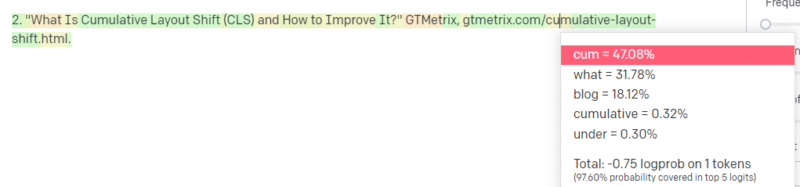
This GTMetrix article does exist: but it exists because it was a likely string of values to come at the end of this sentence.
GPT and similar models cannot distinguish between a real citation and a fake one.
The only way to do that modeling is to use other sources (knowledge bases, Python, etc.) to parse that difference and check the results.
What is a ‘Stochastic Parrot’?
I know I went over this already, but it bears repeating. Stochastic Parrots are a way of describing what happens when large language models seem generalist in nature.
To the LLM, nonsense and reality are the same. They see the world like an economist, as a bunch of statistics and numbers describing reality.
You know the quote, “There are three kinds of lies: lies, damned lies, and statistics.”
LLMs are a big bunch of statistics.
LLMs seem coherent, but that is because we fundamentally see things that appear human as human.
Similarly, the chatbot model obfuscates much of the prompting and information you need for GPT responses to be fully coherent.
I’m a developer: trying to use LLMs to debug my code has extremely variable results. If it is an issue similar to one people have often had online, then LLMs can pick up on and fix that result.
If it is an issue that it hasn’t come across before, or is a small part of the corpus, then it will not fix anything.
Why is GPT better than a search engine?
I worded this in a spicy way. I don’t think GPT is better than a search engine. It worries me that people have replaced searching with ChatGPT.
One underrecognized part of ChatGPT is how much it exists to follow instructions. You can ask it to basically do anything.
But remember, it’s all based on the statistical next word in a sentence, not the truth.
So if you ask it a question that has no good answer but ask it in a way that it is obligated to answer, you will get a poor answer.
Having a response designed for you and around you is more comforting, but the world is a mass of experiences.
All of the inputs into an LLM are treated the same: but some people have experience, and their response will be better than a melange of other people’s responses.
One expert is worth more than a thousand think pieces.
Is this the dawning of AI? Is Skynet here?
Koko the Gorilla was an ape who was taught sign language. Researchers in linguistic studies did tons of research showing that apes could be taught language.
Herbert Terrace then discovered the apes weren’t putting together sentences or words but simply aping their human handlers.
Eliza was a machine therapist, one of the first chatterbots (chatbots).
People saw her as a person: a therapist they trusted and cared for. They asked researchers to be alone with her.
Language does something very specific to people’s brains. People hear something communicate and expect thought behind it.
LLMs are impressive but in a way that shows a breadth of human achievement.
LLMs don’t have wills. They can’t escape. They can’t try and take over the world.
They’re a mirror: a reflection of people and the user specifically.
The only thought there is a statistical representation of the collective unconscious.
Did GPT learn a whole language by itself?
Sundar Pichai, CEO of Google, went on “60 Minutes” and claimed that Google’s language model learned Bengali.
The model was trained on those texts. It is incorrect that it “spoke a foreign language it was never trained to know.”
There are times when AI does unexpected things, but that in itself is expected.
When you’re looking at patterns and statistics on a grand scale, there will necessarily be times when those patterns reveal something surprising.
What this truly reveals is that many of the C-suite and marketing folks who are peddling AI and ML don’t actually understand how the systems work.
I’ve heard some people who are very smart talk about emergent properties, artificial general intelligence (AGI) and other futuristic things.
I may just be a simple country ML ops engineer, but it shows how much hype, promises, science fiction, and reality get thrown together when talking about these systems.
Elizabeth Holmes, the infamous founder of Theranos, was crucified for making promises that could not be kept.
But the cycle of making impossible promises is part of startup culture and making money. The difference between Theranos and AI hype is that Theranos couldn’t fake it for long.
Is GPT a black box? What happens to my data in GPT?
GPT is, as a model, not a black box. You can see the source code for GPT-J and GPT-Neo.
OpenAI’s GPT is, however, a black box. OpenAI has not and will likely try not to release its model, as Google doesn’t release the algorithm.
But it isn’t because the algorithm is too dangerous. If that were true, they wouldn’t sell API subscriptions to any silly guy with a computer. It’s because of the value of that proprietary codebase.
When you use OpenAI’s tools, you are training and feeding their API on your inputs. This means everything you put into the OpenAI feeds it.
This means people who have used OpenAI’s GPT model on patient data to help write notes and other things have violated HIPAA. That information is now in the model, and it will be extremely difficult to extract it.
Because so many people have difficulties understanding this, it’s very likely the model contains tons of private data, just waiting for the right prompt to release it.
Why is GPT trained on hate speech?
Another thing that comes up often is that the text corpus GPT was trained on includes hate speech.
To some extent, OpenAI needs to train its models to respond to hate speech, so it needs to have a corpus that includes some of those terms.
OpenAI has claimed to scrub that kind of hate speech from the system, but the source documents include 4chan and tons of hate sites.
Crawl the web, absorb the bias.
There is no easy way to avoid this. How can you have something recognize or understand hatred, biases, and violence without having it as a part of your training set?
How do you avoid biases and understand implicit and explicit biases when you’re a machine agent statistically selecting the next token in a sentence?
TL;DR
Hype and misinformation are currently major elements of the AI boom. That doesn’t mean there aren’t legitimate uses: this technology is amazing and useful.
But how the technology is marketed and how people use it can foster misinformation, plagiarism and even cause direct harm.
Do not use LLMs when life is on the line. Do not use LLMs when a different algorithm would do better. Do not get tricked by the hype.
Understanding what LLMs are – and are not – is necessary
I recommend this Adam Conover interview with Emily Bender and Timnit Gebru.
LLMs can be incredible tools when used correctly. There are many ways you can use LLMs and even more ways to abuse LLMs.
ChatGPT is not your friend. It’s a bunch of statistics. AGI isn’t “already here.”
The post An SEO’s guide to understanding large language models (LLMs) appeared first on Search Engine Land.
Courtesy of Search Engine Land: News & Info About SEO, PPC, SEM, Search Engines & Search Marketing
Monday, May 8th, 2023
PPC is getting more complex, and so does paid search terminology.
Consider the change from “audiences” to “segments” which has a much more broad definition.
We also have “Segment” as a segmenting feature to analyze data sets further by devices, conversion actions, networks, and the like.
Then, Google brought back the terminology for “audiences” to describe targeting groups for Performance Max campaigns. Insert spiral-eyed emoji here.
The most frustrating to me is taking “ad extensions,” a perfectly acceptable and understandable concept, and changing this to “ad assets.” To make matters worse, Performance Max was rolled out, and its version of ad groups also became “ad assets.”
The ones that confuse everyone, however, are the terms that have existed forever: search keywords, search terms, and search queries.
Let’s put this confusion to rest since we have to live with all of the others.
Paid search terminology defined
Confused about how search keywords, search terms and search queries differ? Here’s what each one means for paid search.
Search keyword
A search keyword is a targeting tool used to inform the ad platforms, such as Google and Microsoft, to show your ads.
An example of a search keyword would be “fluoride water filters.”
Search term
Search terms are reported to you in the ad platform (if they meet privacy standards) when your ad was shown for a search on Google.
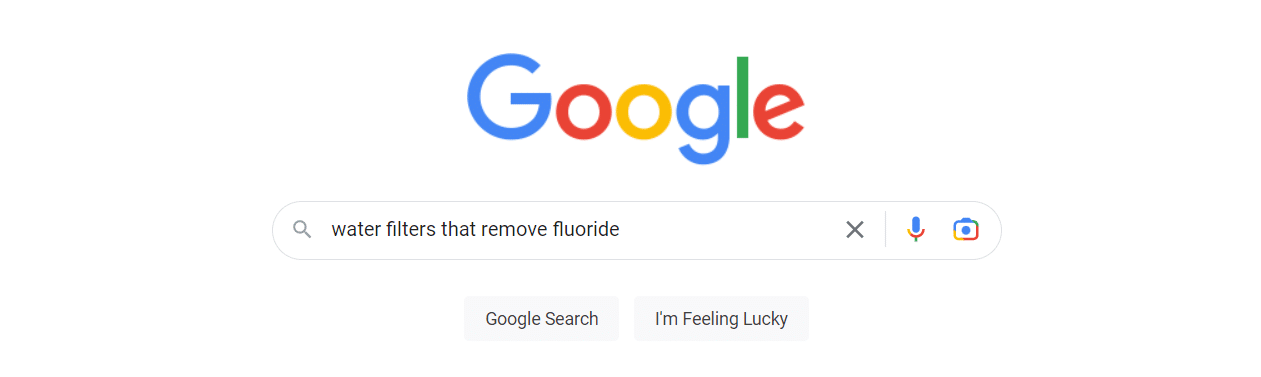
Examples of search terms for the keyword above are:
- “best fluoride water filter”
- “water filters that remove fluoride”
- “fluoride water filter shower head.”
Search terms from search partners will also be reported. These may be formatted differently or appear longer than normal search terms.
Search query
Search queries are the typed, spoken, or tapped phrases a user gives to Google to return search results.
Get the daily newsletter search marketers rely on.
<input type=”hidden” name=”utmMedium” value=”“>
<input type=”hidden” name=”utmCampaign” value=”“>
<input type=”hidden” name=”utmSource” value=”“>
<input type=”hidden” name=”utmContent” value=”“>
<input type=”hidden” name=”pageLink” value=”“>
<input type=”hidden” name=”ipAddress” value=”“>
Improving your search keyword to search query relevancy
Understanding the difference between these phrases is crucial.
The better you match keywords to search queries, the better your quality scores, click-through rates, and conversion performance will be.
Relevancy has always been the name of the game in PPC advertising, and it starts with matching keywords and search queries.
Search terms are beneficial for learning what search queries are eligible for triggering your ad and how those search queries perform.
Aside from finding new words for negative keyword exclusions, use these learnings for creating new keywords, new ads, and landing pages to better closely match what your customers are looking for.
Match types
How can we discuss search keywords and queries and not talk about match types?
Since I started running Google Ads in 2004, I have seen match types come and go and morph into what we have today, which significantly differ from their predecessors.
Let’s eliminate confusion and clarify how match types work today with your search keywords for targeting search queries.
Exact match
Google claims that exact match keywords still give you the most control over who your ad is served to. This also makes it the most restrictive.
However, instead of exactly matching a user’s search query, exact match will expand to searches that have the same meaning or intent as your keyword.
Google uses natural language understanding technologies such as BERT to understand the intent of a search query.
Exact match keywords are designated with square brackets, such as [fluoride water filter]. They will match to search queries that match the words in your exact match keyword along with:
- Misspellings (”flouride water filter”)
- Singular or plural forms (”fluoride water filters”)
- Stemming such as floor and flooring (”filtering fluoride from water”)
- Abbreviations (”NaF water filters”)
Exact match keywords will also show for close variants. Close variants are search queries similar to the search keywords but not identical. There is no option to opt out of close variant matching.
Some example close variants for exact match keywords are:
- Reordered phrasing (”water filter for fluoride”)
- Adding or removing function words (”filter fluoride from water”)
- Implied words (”fluoride filter” – water is implied)
- Synonyms and paraphrases (”pitchers that remove monofluorophosphate”)
- Same search intent (”fluoride removal”)
Years ago, you needed to build out exhaustive keyword lists for exact match. Today, that has become unnecessary.
Phrase match
When you use a phrase match type, you specify the meaning of the search queries you would like to target based on the order of the words used.
For example, Google understands that if your phrase match keyword is “fluoride water filter,” your intended meaning is not “remove water from fluoride” (if that was even a real thing), so it won’t show your ad for that.
Google gives the example of a moving service with the search keyword “moving services NYC to Boston.” Google understands the intended meaning does not match “moving services Boston to New York City.”
Phrase match keywords are designated with quotation marks and will show for close variants similar to exact match close variants.
Examples search queries eligible to match the search keyword “fluoride water filter” include:
- Fluoridated water purification stations near me
- Commercial fluoride filtration products
- Fluoride removal for home
- Shower filters that remove chemicals
Broad match
Broad match keywords do match their definition of being broad. They can show your ads for search queries that do not contain the direct meaning of your search keyword.
Broad match uses signals other match types do not understand, such as previous searches, user location, landing page content, and other keywords.
In a nutshell, broad match keywords will match the same search queries as exact match and phrase match, but they can also match phrases that don’t contain the keyword terms.
Examples of search terms for the broad match keyword “fluoride water filter” include:
- Chorine water filtration
- Activated alumina water filter
- Reverse osmosis
- Bone char filter cleaning
Broad match keywords are expected to help smart bidding perform better due to the increased flexibility to optimize against your goals and the ability to find additional conversion opportunities.
Keeping up with keyword match type changes
If you are still using multiple match types or segmenting match types in separate campaigns, I would encourage you to read Google’s Search Automation technical guide, Unlock the Power of Search. It contains information and case studies on the benefits of supporting Google’s ability for signals and smart bidding. It also presents a solid case on why there is no performance benefit from using multiple match types for the same keyword if you use smart bidding.
Your best strategy is to monitor your search terms closely. This will help you to evaluate their performance and take action. Add negative keywords for irrelevant queries and adjust match types as needed.
The post Your guide to Google Ads keyword terminology appeared first on Search Engine Land.
Courtesy of Search Engine Land: News & Info About SEO, PPC, SEM, Search Engines & Search Marketing
Monday, May 8th, 2023
Microsoft Advertising today announced a new API – ads for chat API – which will allow publishers, online services and apps to deliver ads through chat.
The new Chat API will allow sites and apps to customize their chat experience, choose ad formats that work best for them and incorporate relevant ads for their audiences, according to Microsoft.
Ads for chat API. The new chat API allows publishers to build their own chat experiences on sites and apps serving ads either from Microsoft or other companies:
“We’ve designed a solution that gives publishers, apps, and online services the flexibility to customise their experience with ads and create more economic value through their chat investments. Nobody knows their audience better than they do, so our API allows publishers, apps, and online services to choose the ad formats that they believe are optimal for their audience in a way that feels natural to their native experience. Our ads for chat API can serve ads on chat platforms from Microsoft or other companies.
– Kya Sainsbury-Carter, A new solution to monetise AI-powered chat experiences
Monetizing chat experiences. The new API gives publishers who build chat into their site or app an opportunity to monetize using the learnings from Microsoft Advertising on how to serve relevant ads in the chat.
“Our goal is really to focus with [publishers] on the monetization piece and to be the expert there, and for them to bring to the table what’s going to be best for their audiences and create the best overall experiences,” said Kya Sainsbury-Carter, corporate vice president, Microsoft Advertising.
Why we care. The integration of AI-powered chat experiences is a new way for advertisers to reach and engage with audiences in a way that’s organic, personalized and contextually relevant. Microsoft is reaching out to publishers and other partners with the API in order to build this next wave of chat experiences together.
By leveraging these advanced chat systems, advertisers can create meaningful connections with users, enhance brand perception and ultimately drive better ROI. Furthermore, the flexibility offered by APIs allows for customized ad formats, enabling advertisers to optimize their campaigns based on their target audience and native experience, ensuring that advertising efforts remain effective and non-intrusive.
What remains unclear. Despite publishing a blog post and holding a press briefing about the API, we have many outstanding questions that Microsoft has not answered. We have asked Microsoft for more details or screenshots of what this will look like. We’re also uncertain whether this is only open to Start Program partners or what exactly they mean by “partners.”
Verticals for new Bing. In February, Microsoft launched the new Bing, which added chat to search. Microsoft Bing now has 100 million daily active users and has powered over half a billion chats so far.
Microsoft is slowly serving ads in these chats, vertical by vertical, so they aren’t disruptive.
They’re currently introducing hotel ads. Next, they’ll focus on verticals like travel and real estate.
“Integrating [ads] into chat and into the conversation flow when you’re specifically asking about these things is pretty powerful,” Sainsbury-Carter said. “We’re also very focused on just getting the basics right. As you can imagine with new technology, we’re paying close attention to overall optimization in the ads experience and really finetuning the marketplace to ensure we’re showing the right, relevant ads relative to this much deeper context that we are able to gain through the conversational mode.”
Additional reporting by Chris Wood
The post Microsoft Advertising launches chat API to monetize AI chat appeared first on Search Engine Land.
Courtesy of Search Engine Land: News & Info About SEO, PPC, SEM, Search Engines & Search Marketing
Sunday, May 7th, 2023
Google I/O is this Wednesday, and while I/O often does not have much core search news, this year, we expect that to change with Google demonstrating and hopefully launching new AI-powered features within Google Search. “Google plans to make its search engine more “visual, snackable, personal, and human,” with a focus on serving young people globally, according to the documents,” reported the Wall Street Journal.
Moving away from ten blue links. Google is supposedly going to make shifts away from listing the classic “ten blue links,” the listings of websites in its search results and instead will provide a more “visual, snackable, personal, and human” layout and interface designed to appeal more to younger searchers.
Converse with search. Google will also have a place its search results to allow you to have conversations with its search engine. Will it be an embed of Google Bard? Will it be named Magi? It is unclear but we should know on Wednesday when Sundar Pichai of Google will take the stage to provide the keynote.
Project Magi. As we reported earlier, Google is working on an all-new search engine, a team of more than 160 Googlers are working full-time on adding new features to the existing Google Search. This project is being code-named Magi, according to these reports and may be released as early as next month to a subset of users. According to the report, Magi would allow searchers to complete transactions, such as buying shoes or booking flights. This would allow searchers to complete financial transactions, all while still incorporating the existing – and lucrative – Google search ads. These changes can allow searchers to answer questions about “software coding and write code based on a user’s request.” “Google may place an ad under the computer code answers, according to a document,” the report added.
These reports came earlier from New York Times which reported, “the new search engine would offer users a far more personalized experience than the company’s current service, attempting to anticipate users’ needs.” The new Google search engine is still in its early stages, with no timeline for its release. But this new effort ” demonstrates Google’s ambitions to reimagine the search experience.”
The Wall Street Journal says we should see some of this demonstrated at the Google I/O event.
What may be announced. “Google plans to place greater emphasis on responding to queries that traditional web results can’t easily answer,” the Wall Street Journal wrote. Searchers might be asked to follow-up questions or swipe through visuals such as TikTok videos in response to their queries. We have seen this already with short videos that Google has been testing since 2020 and launched shortly after.
Google may also show online forum posts, maybe based on Q&A structured data, to make it easier for people to consume content in bit-sized chunks.
The shift will present Google “with the need to refine our definition of ‘trusted’ content, especially when there is no single right answer,” according to the documents outlining the company’s search strategy. Google will “give attribution and literacy tools to enable confidence in making use of the content,” according to the documents, the WSJ added.
Glenn Gabe noted on Twitter the focus on “younger users” with these changes.
Why we care. Changes to Google Search can be significant regarding the traffic site owners, publishers, content creators, and others get to their websites. Google sends a considerable amount of traffic to the web. If Google steps away from the traditional ten blue links, which it has been doing slowly over the years, that traffic might change.
Google I/O is just a few days away, so hang tight and wait to hear what Google has planned directly from the bot’s mouth. We will have much to report on in the coming days, so stay tuned.
The post Google Search to become more “visual, snackable, personal, and human” appeared first on Search Engine Land.
Courtesy of Search Engine Land: News & Info About SEO, PPC, SEM, Search Engines & Search Marketing
Saturday, May 6th, 2023
Instagram just revealed that it would rebrand branded content ads as partnership ads, offering new methods for brands and creators to collaborate on advertising efforts.
How partnership ads work. Partnership ads enable advertisers to expand content originating from a creator or other partner’s account, facilitating broader collaboration.
The updated advertising format allows advertisers to promote a wider range of organic Instagram content as partnership ads. This includes branded content with the paid partnership label, Instagram Collab posts, @mentions, people tags, product tags, and other content not featuring the paid partnership label. Advertisers also have the ability to create new partnership ads in Ads Manager without needing an existing post. To accommodate these additional use-cases, the company is updating permissions to make partnership ads even more user-friendly.
Early testing. According to Instagram, partnership ads are the most efficient and transparent method for advertisers and partners to work together on advertising campaigns. Their data suggests that campaigns combining partnership ads with business-as-usual (BAU) ads result in 53% higher click-through rates, 19% lower cost per actions, and a 99% probability of outperforming BAU ads on their own.
Dig deeper. You can read about the new ads on the Meta blog.
Why we care. The new ads offer a highly efficient and transparent way for brands and creators to collaborate on advertising campaigns. By enabling the promotion of various types of organic Instagram content, these ads facilitate broader collaboration and increased user engagement.
In early tests, the new ads have proven to yield significantly higher click-through rates, lower cost per action, and a greater likelihood of outperforming traditional business-as-usual ads.
The post Instagram has rebranded content ads to partnership ads appeared first on Search Engine Land.
Courtesy of Search Engine Land: News & Info About SEO, PPC, SEM, Search Engines & Search Marketing
Saturday, May 6th, 2023
A strong brand bolsters marketing efforts. From being just another provider, it transforms you into a business your audience wants to buy from.
You might not think about brand building’s relationship with organic search. After all, SEO‘s primary goal is getting brands into the top spots in Google for non-branded search terms.
Let’s dig into the relationship between SEO and brand building and how they benefit your business.
1. Rankings
The goal of SEO is audience generation. Generally, SEO builds audiences of people who may not know you already.
Through content, SEO aims to meet searchers where they’re at, solve their problems and nurture them to conversion.
Audience generation requires significant effort. You’ll likely need a well-built, well-optimized site and a solid content strategy to do it well.
Don’t be dismayed. SEO has compounding benefits that will serve your brand – as long as your site can hold its rank. In less-competitive industries, this could last years.
Equally, the more well-written, strategic articles you publish, the easier to rank.
The more ranks you land in top positions, the more clicks you get. Therefore, more people will know who you are.
To this extent, SEO builds brand awareness.
2. Brand recognition
If your brand isn’t ranking for a desirable keyword, someone else – a competitor – will be.
Even the most well-known brands should take SEO seriously and claim spots at the top of SERPs.
Granted, you’ll rank for your brand name anyway, but what about all other questions, queries, and problems surrounding your product or service?
A strong brand equals trust, likely improving your click-through rate (CTR). But you can only take your share of clicks and traffic if you’ve made the efforts required to rank.
When people see your brand in SERPs for a non-branded keyword, you want people to click on your website instead of a competitor.
If you’re not there, you’re losing valuable traffic, giving it away to a competitor who showed up when the searcher needed them the most.
Don’t rest on your laurels when it comes to your brand. It only takes one brand to consistently show up when you’re not to capture the traffic that could’ve been yours.
3. Controlling the brand narrative
Without a proper SEO strategy, you could lose clicks for searches that include your brand name.
If your brand is building new audiences (as it should be), it would be best to serve user queries throughout the decision-making process.
It is SEO’s role to ensure that brand-related keywords are ranking well. And if they’re not, SEO needs to develop a plan to make this happen.
Generally, you will rank easily for your brand name, but search terms like “[brand name] reviews” or “is [brand name] trustworthy?” are anyone to take.
You could lose clicks to review websites or social media. This matters, even if they’re your accounts.
On your site, you can set up pages designed to meet search intent and funnel traffic accordingly based on what they’re searching for. You don’t have this same agility with social media, for example.
What’s worse than your owned reviews or social media platforms ranking for brand keywords is the potential of a complaint or published letter unfairly critiquing your brand.
Or, a well-intentioned advocate who hasn’t done your brand justice when answering, “Can [brand name] be trusted?”
If you haven’t done the work to show up in SERPs, then it’s open for others to take that spot.
4. Traffic
As mentioned, the better you rank, the more traffic you get.
For more brands, it’s not enough to snipe a lucky rank eight or even a rank four on page one. Your brand should be working toward those top spots.
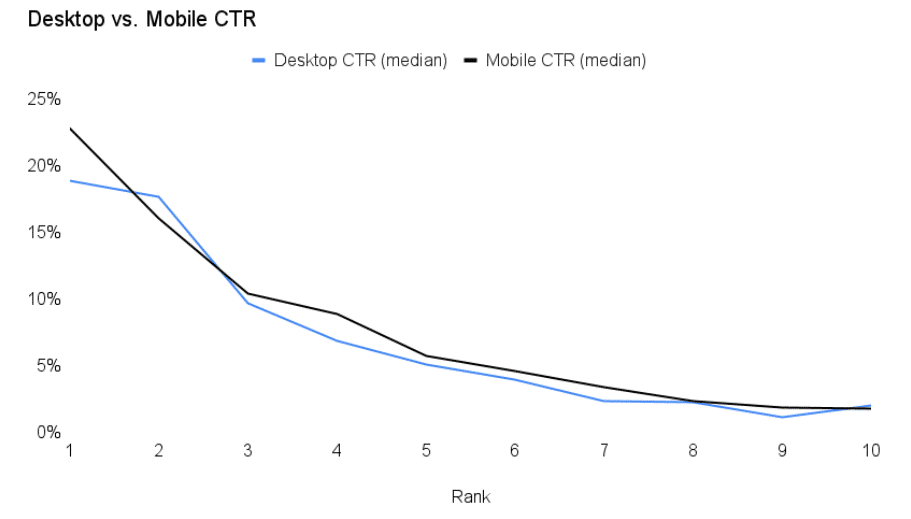
Kevin Indig shares the importance of click curves and how to find your own. From the graph below, Indig shows how clicks reduce with ranks.
It should be no surprise that rank 1, Page 1 has the highest clicks with close to 25% CTR on mobile. The CTR drops rapidly by rank.
When a page ranks number four, CTR is less than 10%. The graph below shows that position six or beyond can expect a less than 5% CTR.
In a study of 4 million Google search results, Backlinko found that, on average, moving up one spot in the search results will increase CTR by 2.8%. It pays to develop a strong presence in SERPs.
5. Trusted brands attract links
In this article, I have already linked to two sources, Indig and Backlinko.
To find the research, I had to perform a Google search and sift through the results until I found a source I would trust to feature in this article.
This is a perfect example of how trusted brands attract links.
If your brand is known for being a credible source of information, it is more likely to gain backlinks naturally.
Get the daily newsletter search marketers rely on.
<input type=”hidden” name=”utmMedium” value=”“>
<input type=”hidden” name=”utmCampaign” value=”“>
<input type=”hidden” name=”utmSource” value=”“>
<input type=”hidden” name=”utmContent” value=”“>
<input type=”hidden” name=”pageLink” value=”“>
<input type=”hidden” name=”ipAddress” value=”“>
6. Conversions
Often, when someone finds your site through search engines, it will be their first touchpoint with your brand.
If SEO and content have done their jobs well, the traffic finding your site is qualified, meaning they’re likely to convert.
And if the site serves the traffic well, there’s every chance you can convert the user, perhaps within that session.
It may be that the initial search is non-branded. This puts the user on your site for the first time.
Later, pleased with your service through the website and inspired by your offering, they search for your brand and return to the site.
With your credibility already in their minds, the second search is more likely to result in a conversion.
People buy from brands they trust, so whether your audience is booking an appointment, requesting a demo or signing up for a newsletter, SEO is about attracting qualified traffic that may convert later down the line.
SEO helps traffic solve problems and introduces them to your brand so you can capture a conversion through search or other marketing channels.
7. Revenue and profit
Traffic and conversions are great, but businesses need revenue and profit the most.
A strong SEO strategy provides answers and support to users across the entire marketing funnel. Your content and website architecture should allow your brand to keep showing up in relevant search queries.
You need a returning core audience/customers to have a brand that grows and thrives. Through SEO and content, you can prove your expertise, support your consumers and build an ongoing relationship with them.
Once a brand is trusted, sales will start to roll in.
The role of trust and brand is very obvious when looking at analytics for ecommerce sites. The pages with the most brand searches will have the highest conversion rates.
A search like “[brand name] + [product name]” is more likely to convert than a search like “How to solve [problem]?” You need a known brand before you can get that brand name, product name search.
You must answer those non-converting keywords like “how to solve [problem]?” before you can build enough trust to clinch the sale.
8. Loyalty/retention
Even better than a one-time customer or passive subscriber is a repeat customer or an audience who engages with your emails or other marketing efforts like social media.
Your qualified audiences who once found you through a search on Google can transform into your most loyal followers and advocates.
This loyalty and retention is another fine example of SEO’s compounding efforts. Here, you can start to review Customer Lifetime Value (CLV) to truly understand the benefits of those top ranks.
9. Advocacy
Advocates are perhaps your most valuable consumer. Your advocates are your loyal and retained customers first.
As you continue to look after them, they will become your champions, advocates or brand ambassadors online. You want these. Advocates share your content and recommend you to others.
Although advocacy is not the easiest thing to measure, it is indirectly impacted by SEO.
Advocates had to discover you and receive a level of service (even if it’s in your content) to build enough trust to covert, buy and become loyal and retained customers.
Where possible, advocacy should be considered in the CLV. If you can nurture customers to advocacy and each customer tells three friends who also convert, then it increases the CLV. This is one of the motivations for refer-a-friend schemes and similar.
10. More first-party data
Assuming you execute SEO and brand relations well, you will have more growth and valuable first-party data.
With larger data sets comes better analysis which you can use to make decisions to continue growing and feeding your SEO. The data provided by SEO is transferable to many forms of marketing, too.
If you know people are searching for content on Google, they’re probably searching for it on other search engines, too.
Likely, a well-placed social media post with your customers’ exact pain points (that you know from SEO) will stop a scroll and encourage engagement with your band on other forms of marketing.
SEO and branding go hand in hand
Your best chance of keeping your brand discoverable by audiences, new and old, is by building brand awareness and SEO at the same time.
Building a brand helps all your marketing channels, as does the data your SEO efforts provide.
Without SEO, your brand is at risk of ranking only for its brand name, which is useless for audience generation.
Equally, without SEO, you will lose visibility for some brand-related searches, potentially giving your warm audience away to competitors.
If you want a robust business, you are best doubling down efforts on brand awareness and audience generation, and SEO is the key to that success.
Without SEO, building audiences and keeping you relevant in the biggest search engine, it will take only one competitor to show up where you didn’t and better serve your prospective customers.
Be loud with your brand and get it in front of as many people as you can, you deserve the traffic, and your audiences will be only too glad to meet you in the SERPs.
The post Top 10 SEO benefits of building a brand that people trust appeared first on Search Engine Land.
Courtesy of Search Engine Land: News & Info About SEO, PPC, SEM, Search Engines & Search Marketing
Friday, May 5th, 2023
Want to know what your customers need and want from your content?
Ask them. Then use that information to get creating.
But don’t just ask one person. Ask many. Pull from the power of the crowd.
To do that, consider creating polls and surveys – and then use the information you glean from them to create great content.
Here’s why and how.
Why polls and surveys are valuable information sources for content marketing
First, why should you conduct polls and surveys? They take a bit of planning and work to set up – so why should you bother when you can just look at your analytics or gather statistics from other sources?
Because there are some things you can only learn with these types of research.
Get deeper audience insights
At its core, your content marketing is only as good as your knowledge of your audience.
If you know them, understand them, and can root out their deep pains, challenges, and dreams, you can create content that speaks to them personally and hits them in the heart.
You’ll be able to give them unmatched value in content because your content will be tailor-made for them.
The question is, how do you unearth those kinds of insights about your audience? How do you get to understand them deeply?
There’s no better way than asking them directly. And polls and surveys let you do that on a scale magnified by 100, 1,000, or even 10,000, depending on your audience size and your brand reach.
Learn why instead of just what
You can get a lot of information on what your audience is doing by looking at your site analytics, conversion rates, and website traffic.
But often, what’s more important to understand is why they’re behaving a certain way. And statistics can’t tell you that. For instance:
- Why does our audience resonate with this topic but not that one?
- What pain points are we not solving for them?
- What types of information do they rely on us to provide – and what makes them look elsewhere?
- What’s their biggest challenge in our industry?
- What ultimate goals do our audience want to achieve?
Polls and surveys can enlighten you about all of these things in a scalable way.
Get insights unique to your business and audience
No two brand audiences are exactly alike.
Sure, they can be similar or overlapping. But ultimately, your audience is unique to your business because (hopefully) your business provides a unique solution in your market that attracts specific people.
That means if you rely on other sources to gather data and insights about your audience, those insights won’t be totally accurate or authentic.
If you want to truly understand your audience, you need to open up communication with them and learn from them directly about who they are and what they want.
Polls and surveys help you do that.
4 tips for creating polls and surveys that yield useful data
Not all polls and surveys are enlightening. To get good information, you need a well-crafted instrument.
1. Know the differences between polls and surveys – and the right time to use each
Polls and surveys are fundamentally different, and employing one over the other will give you vastly different insights.
Polls are quick, involve a single question, and include a select set of pre-written answers. All the poll-taker has to do is choose the answer they agree with most, that sounds most like them, or that fits their preferences.
As such, polls are great for feeling out the general sentiment of your audience. You’ll get a bird’s eye view of the majority opinion with a good poll.
Here’s an example of the simplest poll imaginable. It appears at the end of a blog post and asks the reader whether what they just read was helpful or not:
In contrast, surveys are more detailed and open-ended. They may include one or dozens of questions about one or many topics.
Surveys often include multiple question types: yes/no, short answer, multiple choice, ranking, etc.
This makes surveys great for getting opinions, collecting insights, measuring your audience’s preferences, and understanding their underlying motivations.
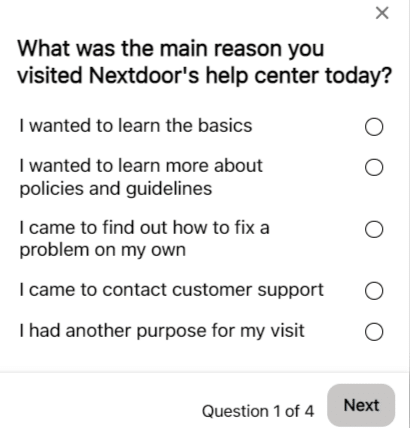
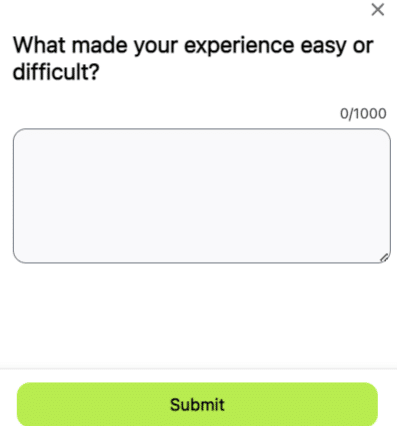
Here’s another example from Nextdoor asking for feedback on their help center experience with a short, four-question survey:
Note that the first question looks a lot like a poll. However, because there are multiple questions and question types, including an open-ended one, this is definitely a survey.
To sum up:
- Use polls to get a quick understanding of your audience’s overall sentiment about a specific question or topic.
- Use surveys to dig deeper into their motivations, preferences, and opinions.
2. Use polls and surveys formally or informally
You don’t have to use a special tool to create a poll or survey.
If you need in-depth insights on a deep topic, definitely use a tool and create a formal survey.
However, if you just want to get a general idea of how people feel about something, create an informal, spur-of-the-moment poll or survey. You don’t have to use a tool for this:
- Ask your followers an open-ended question on social media, or open up a topic for discussion in the comments. Analyze the responses.
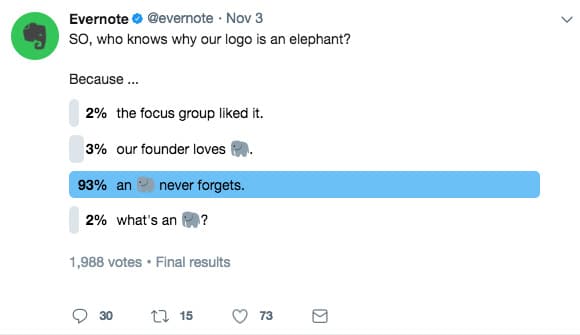
- Create a quick social media poll on Facebook or Twitter.
- At the end of your email newsletter, ask for replies and feedback to a specific question.
Don’t forget, you can also create quick polls just to engage with your audience and for no other reason. This is an easy but fun way to add to your social media calendar.
3. Set a goal for your poll/survey
What are you ultimately hoping to learn from your poll/survey? What’s the bit of knowledge at the heart of it all that you’re trying to find out?
Similarly, what’s the main assumption you’re trying to prove correct – or disprove?
This is your goal. Especially for surveys, if you have a clear goal before creating one, you’re bound to get better results and stronger insights.
4. Ask the right questions
There’s an art to writing and formulating survey questions.
The way you phrase a question can completely change the type of answers you’ll get.
For example, take these two questions. They both ask for an opinion on essentially the same thing but will elicit completely different responses:
- Open-ended question (literally any answer is possible): What do you think of our content?
- Closed question (the possible responses are narrowed): Overall, how helpful do you find the content on our blog? Rate from 1-10.
Now, there’s a time and a place for open-ended questions. Various answers and opinions can be enlightening – as long as you have the time and resources to sift through them all.
Generally, if you want to keep things simple and easy to sort/analyze, ask closed questions with only a select number of possible answers.
Here is a great guide to writing useful survey questions that will give you clear, unbiased answers.
Get the daily newsletter search marketers rely on.
<input type=”hidden” name=”utmMedium” value=”“>
<input type=”hidden” name=”utmCampaign” value=”“>
<input type=”hidden” name=”utmSource” value=”“>
<input type=”hidden” name=”utmContent” value=”“>
<input type=”hidden” name=”pageLink” value=”“>
<input type=”hidden” name=”ipAddress” value=”“>
How to use the information gleaned from polls and surveys to create great content
Now, how do you use polls and surveys to inform content creation?
In a nutshell: Use polls and surveys to directly ask a large chunk of your audience what they want from your content. Doing this in various ways will yield lots of topic ideas.
Finally, don’t forget that your survey itself could be the star of your next content piece.
Let’s break it all down.
Find out what topic is the most interesting
This is one of the quickest and easiest ways to use polls to create content.
Let’s say you’re stuck deciding between three different topics for your next blog post. You’re not sure which one your audience will be interested in most.
So, ask them! Set up a quick poll and let your audience vote on the topic they’d be most interested in. The winner is the one you’ll write about next.
Plus, you can use this knowledge to inform more content topics later. Are there any related topics to address? Your audience would probably find these interesting, too.
Discover your audience’s most pressing challenges and address them in your content
Deep audience insights about their toughest obstacles can be great fodder for content.
For example, a survey can help you pinpoint the biggest challenges they face that relate to your business or what you sell. These challenges can be broken down into smaller chunks and addressed with content.
Imagine you’re a business consultant and identify that your audience struggles with business planning. You could break that topic into smaller chunks, each a topic for a blog post (start-up costs, researching the market, figuring out licenses and registration, setting up bookkeeping, etc.).
You could also create an ultimate guide to business planning and go through all the details while linking to your sub-topic pieces.
Your audience’s pain points are a great starting place for brainstorming content topics. Surveys are the answer to find those pains and hear them described in your audience’s own words.
Gather keywords for content from their responses
This is one of the perks of including open-ended questions in your surveys (and generally asking for feedback):
You’ll get written responses in your audience’s own words, with terms and key phrases they regularly use in their vocabulary when discussing your industry.
These are gold mines for keywords.
- Look for repeated phrases that have significance to the larger topic.
- Look for unique turns of phrases or alternate ways of phrasing common terms.
- Look for trends in how your audience phrases topical terms – are they all referring to something in the same way or using similar wording?
Record your analysis in a list for later research and insertion in your content.
Create an original research report
Depending on your survey’s depth, accuracy, and sample size, you could turn the results into a compelling research report on a specific topic.
If this is your goal from the outset (to use your survey results to create content), ensure you have a good grasp of survey planning, design, and analysis.
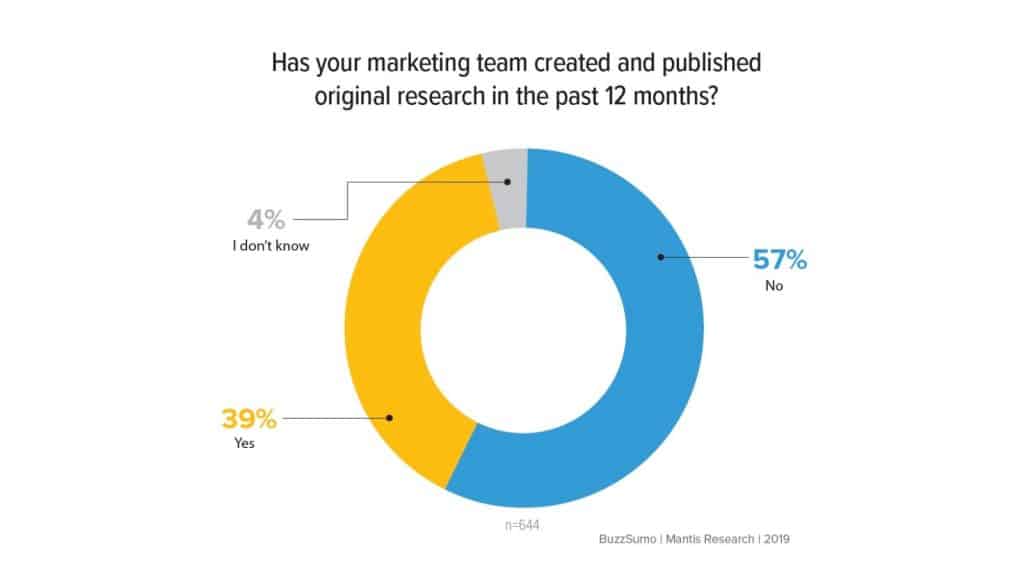
Remember that few brands do original research because it’s a time-intensive process requiring skills to execute well. But when it’s done right, you can expect incredible results (original research reports are link magnets!).
If you’re interested in this route, read this Orbit Media guide to using original research in your content.
Collect new content topic ideas
Sometimes, the simplest survey will generate the most useful results. Hence: Ask your audience what types of posts they’d like to see on your blog.
You can conduct this survey in a simple post on social media with one open-ended question (“What kind of content topics would you like to see on our blog?”). Ask for ideas and suggestions in the comments.
You can also pose this question at the end of blog posts and emails. It’s simple and quick, and you’ll likely get varied responses that inspire many new ideas.
Polls and surveys: The unsung heroes of content creation
Now that you know how much potential exists inside a single poll or survey, ignoring them as tools in your content marketing would be silly.
A well-crafted poll or survey can bring surprising results, including a direct line to your ideal customer’s thoughts about your niche and brand.
One survey alone – or one well-timed, well-worded poll – can give you fodder for an enormous amount of content. So what are you waiting for?
The post How to turn polls and surveys into great content appeared first on Search Engine Land.
Courtesy of Search Engine Land: News & Info About SEO, PPC, SEM, Search Engines & Search Marketing
Friday, May 5th, 2023
I recently connected with Fabrice Canel, a 26-year search veteran at Microsoft and principal product manager leading the team crawling, processing and indexing at Bing.
Canel offers insights into the state of artificial intelligence in search and the integration of chat experiences in the new Bing.
Can you discuss your most recent announcements with Bing Chat?
Fabrice Canel (FC): In February 2023, we introduced the world to the all-new AI-powered Bing and Microsoft Edge, your copilot for the web. Since then, more users have been using Bing than before, and we recently hit 100 million daily users and 100 million chats.
We then enabled the new AI-powered Bing in Windows, Skype, Edge mobile and Bing mobile, including voice access.
In recent weeks, we’ve added various ways to interact with new AI-powered experiences that extend these capabilities to millions of additional people across devices and around the globe.
- Bing Image Creator offers the ability to create images with your own words, enabling new AI-powered visual Stories allowing to explore topics that interest Bing customers with facts, image-based timelines, polls, actions, and related topics,
- AI-generated stories provide Bing customers with multiple ways to consume bite-sized information – through text, images, video, and audio,
- AI-generated Bing Knowledge Cards help Bing customers explore topics that interest Bing customers with facts, image-based timelines, polls, actions, and related topics.
- Another way to access and interact with the new Bing is by enabling it in the SwiftKey keyboard app, which puts the Bing AI experience one touch away from any iOS or Android mobile experience that supports a third-party keyboard. You can see the full announcement here. (Author’s note: Bing acquired SwiftKey in 2016.)
Can you discuss the thoughts behind integrating Chat experiences into Search (philosophy, expectations)?
FC: Let’s go behind the scenes. I want to share a little bit more about the new Bing and how it came to be.
Next-generation model. The new Bing is running on a new, next-generation large language model customized specifically for search. It takes key learnings and advancements of past models and is even faster, more accurate and more capable. In short, it is much more capable of synthesizing, summarizing, chatting and creating.
Microsoft Prometheus model. We have developed a proprietary way of working with our next-generation model to best leverage its power.
We call this collection of capabilities and techniques the Prometheus model. This combination gives Bing customers more relevant, timely and targeted results, with improved safety.
When we had a breakthrough in large language models (LLMs), much like other LLMs, it was trained with data through a given point in time, so we thought that we could make the user experience richer, more relevant, and more accurate by combining it with the power of Bing’s back-end.
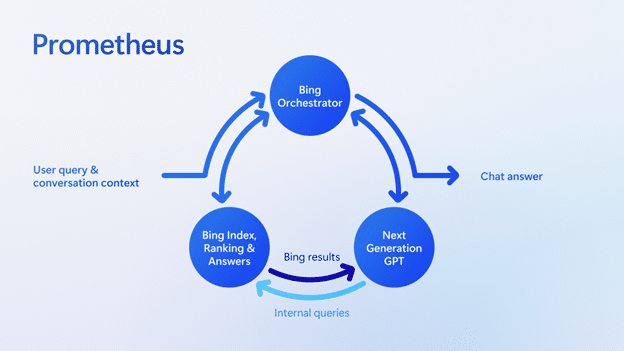
To be more concrete, we developed a proprietary technology called Prometheus, a first-of-its-kind AI model that combines the fresh and comprehensive Bing index, ranking, and answers results with the creative reasoning capabilities of most-advanced models.
Prometheus leverages the power of Bing and language models to generate a set of internal queries iteratively through a component called Bing Orchestrator. It aims to provide an accurate and rich answer for the user query within the given conversation context. All within a matter of milliseconds. We refer to this Prometheus-generated answer as the Chat answer.
Selecting the relevant internal queries and leveraging the respective Bing search results is a critical component of Prometheus since it provides relevant and fresh information to the model, enabling it to answer recent questions and reduce inaccuracies – this method is called grounding.
Put another way, the model reasons over the data provided by Bing; hence, Bing data ground it via the Bing Orchestrator.
The diagram below illustrates how Prometheus works at a high level.
The last step is when Prometheus attaches relevant Bing search answers, such as weather, stock, sports, news, and so on, to the Chat answer to provide a richer and more engaging user experience that further leverages the power of Bing.
Thanks to the Bing grounding technique, Prometheus is also able to integrate citations into sentences in the Chat answer so that users can easily click to access those sources and verify the information.
Sending traffic to these sources is important for a healthy web ecosystem and remains one of our top Bing goals. This matters to us because there won’t be a web ecosystem if we don’t send traffic to the people creating the content. People are investing in content for a reason, and if they don’t get rewarded, they’ll stop doing so.
Applying AI to the core search algorithm. We’ve also applied an AI model to our core Bing search ranking engine, leading to the largest relevance jump in two decades.
This AI model makes even basic search queries more accurate and relevant. The new models improved our understanding of documents on the internet and better understanding of how to match those documents up with user queries.
New user experience – Merging Search and Chat. We reimagined how Bing customers interact with search, browser and chat by pulling them into a unified experience. This will unlock a completely new way to interact with the web.
While Prometheus is a remarkable, pioneering AI-based innovation from a user experience perspective, it was unclear how we should integrate its capabilities into Bing. There were two main points of view:
- Some in our team felt that search is such an ingrained habit that we needed to keep the UX like today’s web search and add the Prometheus-powered Chat answer on the main UX. Just like any other answer, the Chat answer would earn its place based on its relevance to the query.
- Others in Bing felt that this was an opportunity to change the search paradigm from the classic web and answers results to a new interactive, chat-based way of searching.
Both schools of thought were partially correct, yet neither had the complete picture.
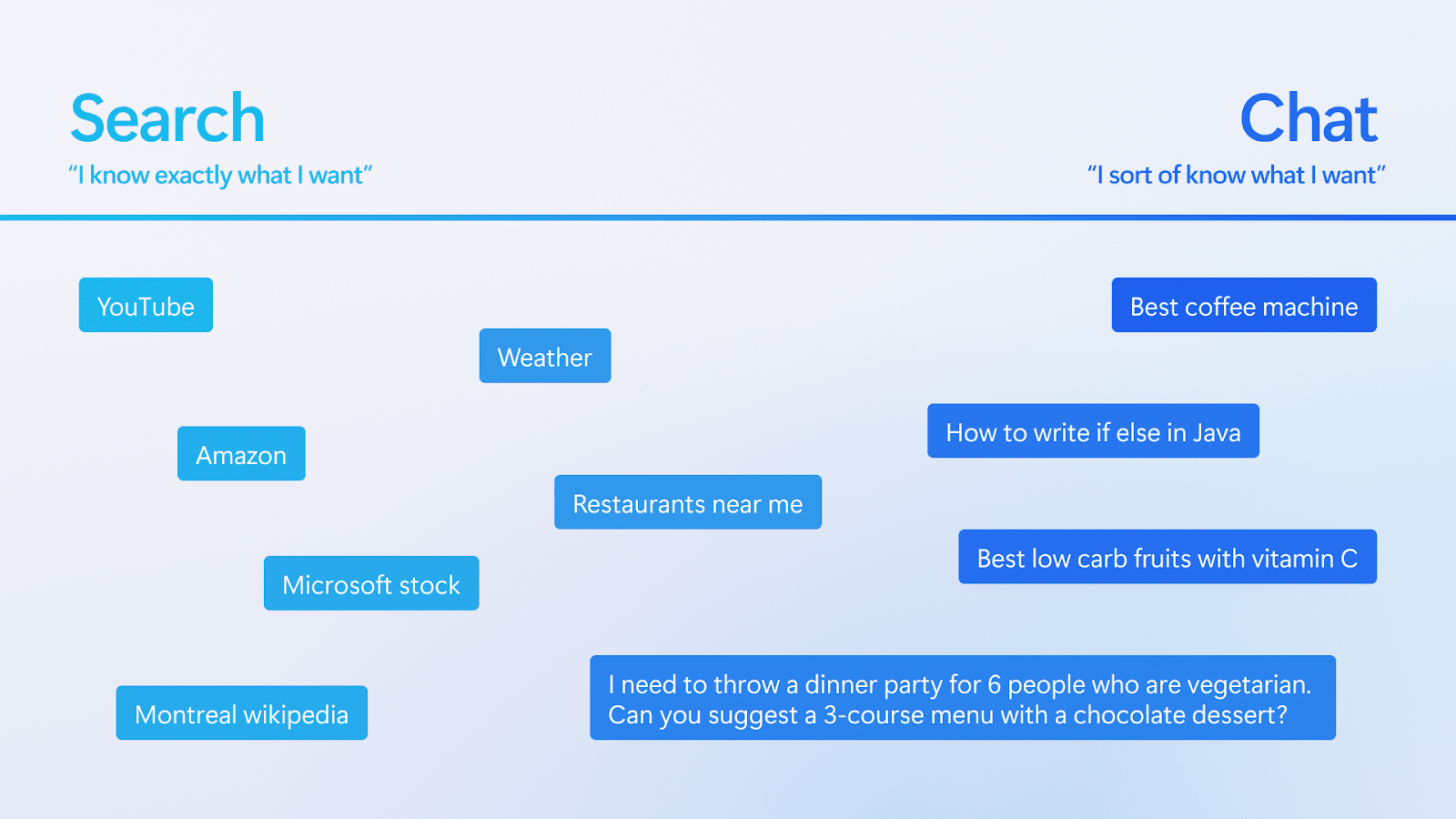
The team advocating for classic search generally used navigational queries to defend their point of view.
The team pushing for the conversational approach would present research-like search sessions such as shopping or travel. I plotted their queries in a graph below to illustrate this observation.
It then became clear that some queries would perform better in the classical or Search mode while others would do better in a conversational or Chat mode.
Also, some users may prefer one over the other, depending on the query. Therefore, the ideal Bing search product must smoothly transition between Search and Chat modes based on the user’s intent and preference.
Our design team took on the challenge and, after multiple iterations, developed a new UX that unified Search and Chat in a single interface. Users could easily switch back and forth by clicking on UX elements on the page or simply scrolling or swiping up and down.
This product or UX innovation is arguably just as important as the Prometheus technology to ensure people can intuitively use the product to its full potential.
I feel that UX and SEO nearly always have the same goals these days. What are your thoughts on that?
FC: I agree. It’s important to understand what you want a user to do when they come to one of your webpages.
You should design your webpages to do that well. Destination UX also matters for search engines. Relevance is only a part of the equation.
If they come to your site and are really interested in converting, but they don’t because of a problem with your site, that’s a bad experience for the search engine, too.
Google has its E-E-A-T standards, and the Bing equivalent of E-E-A-T is very similar. It’s not just about the content itself. Users want to get actions done, and we want to rank pages higher that help them do that.
Get the daily newsletter search marketers rely on.
<input type=”hidden” name=”utmMedium” value=”“>
<input type=”hidden” name=”utmCampaign” value=”“>
<input type=”hidden” name=”utmSource” value=”“>
<input type=”hidden” name=”utmContent” value=”“>
<input type=”hidden” name=”pageLink” value=”“>
<input type=”hidden” name=”ipAddress” value=”“>
Given the potential for errors, how would Bing advise people to use the output from Bing Chat?
FC: It’s hard to believe It’s been just over two months since we released the new AI-powered Bing and Edge to the world. We have learned a lot and shipped several improvements in that time.
We are delighted by the virtuous feedback cycle and iteration driving strong Bing improvements of our models and the experience.
For instance, we have introduced the ability to toggle the tone of chat between:
- Precise, which focuses on shorter, more search-focused answers.
- Creative, which gives responses that are longer and more descriptive.
- The middle setting, Balance, is somewhere in between.
Bing customers will notice a color change in the UX between purple, blue and green, depending on which is selected. Our goal is to let Bing customers decide on the type of chat behavior that best meets their needs. We’ll continue to tune this experience based on feedback.
At Bing, we’re committed to delivering the best possible result. If you ask Bing Chat if the Earth is flat it will tell you that Earth is not flat, even if there is a lot of misleading content online on this topic.
We have made huge investments in AI because we’re optimistic about what it can do to help people, industry and society.
We’re committed to bringing technology and people together to realize the promises of AI responsibly. Feedback and data will help to improve the quality of the answers. Keep your feedback coming.
Should people use Bing Chat to create and publish content without editing it?
FC: We do our best to find the best content.
Are we there yet? No, we are not perfect yet. No one is.
Will we be someday? Maybe. Remember that it’s a tool, and this problem is harder than you might think.
For example, sometimes there are multiple conflicting answers from highly reputable websites. It can be hard to figure out which one is wrong.
I went through this exercise recently trying to answer a question on a complex math geometry problem for my daughter, and I found two different answers from respected experts. One was right, but it took me 1 to 2 hours to figure it out. Even experts make mistakes.
How does Bing Search’s usage compare with Bing Chat’s usage for those that have access to it?
FC: It’s still incredibly early, we released only two months ago, and most Bing customers are experiencing this ability to chat with a search engine for the first time in their life. They are discovering and learning. They are finding value in having search, chat, answers, and creation capabilities all in one experience.
There are now more than 100 million daily active users of Bing. New scenarios like chat drive engagement, including over 100 million chats.
Of the millions of users in Preview, one-third are new to Bing, creating net-new opportunities for publishers and webmasters. This is still early data, but the signs are encouraging.
For SEO, as it is still early, my recommendation is to stick with the same SEO playbooks as before.
But please keep track of our communication and monitor data to make necessary adjustments as the usage of the new Bing continues to increase, transforming how people search.
In the coming weeks, we will start reporting Bing Chat clicks and impressions on the Bing Webmaster Tools website and Bing Webmaster Tools API.
Can you discuss the importance of data freshness?
FC: The recent breakthrough in LLMs is great, but these models are trained with data through a given point in time. What’s special at Bing is that you benefit from the LLMs and the power of Bing Search’s back end.
This means that Bing Chat contains content published seconds ago online. You can Bing Chat what’s happening today – that’s happening right now.
Freshness matters a lot these days, especially for the younger generation. I found it fascinating to see my kids using Bing Chat to learn more about recent events. Bing can handle these types of queries well, even in Bing Chat, because it’s built on top of the Bing index.
One area where people spend a lot of time is on news-type events, including things like celebrity news. People spend a lot of time on things that are happening right now.
Can you provide an overview of what IndexNow is?
FC: IndexNow is an easy way for website owners to instantly inform all search engines about the latest content changes on their websites.
In its simplest form, IndexNow is a simple ping so that search engines know that a URL and its content have been added, updated, or deleted, allowing search engines to reflect this change in their search results quickly.
I find it interesting that you ask this question and speak about IndexNow in the context of Bing Chat which leverages the best-in-class AI models.
While AI is great in helping retrieve the best content online and to see what’s changed on a website, we simply don’t know with 100% precision if you have added, modified or deleted content on your site. But you know that with 100% precision, or at least your CMS knows that.
Instead of repeatedly crawling to discover if your content has changed, we provide webmasters the ability to ask search engines crawler to visit to collect the latest content changes.
Since we enabled the IndexNow protocol in the Fall of 2021, the adoption of IndexNow has continued to grow.
Today, more than 20 million websites publish over 2.5 billion URLs to the IndexNow API daily. This month, IndexNow attributed to 10% of all new URLs clicked in web search results.
It’s also great to see more search engines, content management systems (i.e., Wix), and top websites adopting IndexNow. We target that more the 50% of the web will adopt IndexNow within two years.
Why is crawling so complex? Just how large is the web?
The true size of the internet is infinite. Every day we discover more than 70 billion distinct URLs. There is so much spam and duplicate content.
Spammers grab domains and generate hundreds of subdomains. No search engine communicates on index size anymore because it’s not a good measure of quality.
The big issue is how you navigate through all the low-quality content to index what matters. To make this easier, we need webmasters to help guide search engines to the real stuff. The best way to do this is with a combination of IndexNow plus XML sitemaps. This is a good setup for all search engines.
How much traffic does Bing anticipate will go to websites in the new Bing Chat model?
FC: In the next few weeks, we will start reporting Bing Chat clicks and impressions in Bing Webmaster Tools so that each website owner can compare them to Bing Search pages.
Search engines have played a role in helping people find the content they want. The new Bing is helping to better address people’s search needs with new capabilities like chat, answers, and content creation.
Our goal is to satisfy our Bing users and drive more traffic to publishers in this new world of search. It is a top goal for us, and we measure success partly by how much traffic we send from the new Bing/Edge.
The early progress is encouraging. Based on our data from the preview, we are driving more traffic from all types of users. We have brought more people to Bing/Edge for new scenarios like chat and are seeing increased usage.
Then, we have uniquely implemented ways to drive traffic to publishers, including citations within the body of the chat answers linked to sources and citations below the chat results to “learn more” with links to additional sources.
We enable an expanded hover experience where hovering over a link from a publisher will display more links from that publisher, giving the user more ways to engage and driving more traffic to the publisher’s website.
We are also listening, and we’re hearing positive feedback as we look for opportunities to maximize these new experiences for the entire ecosystem.
How does one create content likely to be cited by Bing Chat?
FC: With the release of the all-new AI-powered Bing and Microsoft Edge, we have enhanced our Bing Webmaster Tools Guidelines to support the experience.
We listed that ranking within Bing Chat generally relies on the same parameters as the main web search results page.
So, since this is still early at this point, I recommend sticking with the same SEO playbooks as before, and most of the recommended playbooks are listed in our Bing Webmaster Tools Guidelines.
The post AI in search: Insights from Bing’s Fabrice Canel appeared first on Search Engine Land.
Courtesy of Search Engine Land: News & Info About SEO, PPC, SEM, Search Engines & Search Marketing
Friday, May 5th, 2023
Google has removed the requirement to have the description property as part of your video structured data. Google says it is still recommended to provide a description to your videos in the structured data but it is not a requirement. With that, Google Search Console will not report errors for missing description property items.
Structured data change. Google moved the “description” property from “required” to “recommended” in the structured data documentation. You can see that over here.
The description of the video is used to help Google understand the video, but it is no longer a requirement for video structured data.
Search Console change. The description property is no longer required for Video structured data items, Google wrote here. Google added “it’s still strongly recommended to help Google better understand the content of your video.”
Missing description issues will no longer appear as “critical issues” in that rich results report. Now you may see an increase in the number of valid Video structured data items in your, that is if you did not use descriptions for your video structured data.
Why we care. This should make it easier for you to publish video structured data and have Google pick them up as rich results. Your video thumbnails may show up for more videos and you may see a higher click-through rate from those search result snippets in Google Search.
The post Google no longer requires video descriptions as part of structured data appeared first on Search Engine Land.
Courtesy of Search Engine Land: News & Info About SEO, PPC, SEM, Search Engines & Search Marketing
Friday, May 5th, 2023
We’re still not yet in a recession, but everything in life costs more.
When everything costs more, sales are harder to come by. Especially if you aren’t the cheapest option, or worse, your website is less than ideal to encourage a purchase.
If you’re selling an in-demand good or service, have an amazing website, and are at the lowest price point among your competitors, stop reading. This article will be of no value to you.
For the rest of you who don’t have Amazon in your domain, this may actually be helpful.
Providing you aren’t selling a one-and-done good or service (and yes, those do exist), any marketer who is worth their weight will tell you that a repeat customer is better than a one-time customer. Think of it from a lifetime value (LTV) angle.
When selling any good or service, two of the most significant barriers to sealing the deal online are the cost to the consumer and the consumer’s experience on the website.
If lowering the price is out of the question for the long term, and you don’t have the means to enhance your questionable UX, then we turn to incentivization in your PPC campaigns.
Getting started: Parse out your audiences and know their worth
Disclaimer: As of April 2023, this approach is valid for Search, Display, Discovery, YouTube, Performance Max (sort of), and Bing Shopping (I still refuse to call it Microsoft). It is not valid for Google Shopping. It also may be restricted to certain categories (i.e., financial services, healthcare, etc.).
The first thing to do is segregate your previous and current customers into active audience lists and identify their LTV.
To segregate customers, set a parameter of duration (i.e., those who have purchased within the past 120 days), which can be done with a basic CRM upload to the Google/Bing UI (this works well for Meta, Trade Desk, and most any biddable media platform where the end experience is on your website).
In addition, I am a fan of creating audience lists of people who have completed a purchase on the site (use the same duration as you do for the CRM upload), allowing this to essentially act like a recycling dynamic list. (Just like the New York Jets quarterback position, a constantly rotating and repopulating role with a two-season lifespan before the player is dropped from it and a new one is added on.)
While doing this, an assessment of how much discount you can allow for should be conducted. If you know the average consumer buys three times a year from you, you can gauge how much of a first-time discount you can provide to a first-time customer (e.g., “15% off your first purchase”).
Determine how much you’re willing to eat on the final revenue (possibly even at a slight loss) if it ensures you’ll get one more purchase from that consumer.
I don’t recommend going broke on the incentive, but if you aren’t winning because of your price and the user experience is garbage (ask a 13-year-old to do a checkout on the site, they will give you unnecessarily brutal honesty of how bad it is), make it truly worth it.
Good thing to remember: An incentive doesn’t necessarily mean it has to be a discount on a good. Other avenues are gifts, free/discounted shopping, and bundle deals.
Or even the allure of the special incentive, where someone gets to join your exclusive club with their first purchase (this is a glorified way of saying they were added to your rewards program and/or email list).
Get the daily newsletter search marketers rely on.
<input type=”hidden” name=”utmMedium” value=”“>
<input type=”hidden” name=”utmCampaign” value=”“>
<input type=”hidden” name=”utmSource” value=”“>
<input type=”hidden” name=”utmContent” value=”“>
<input type=”hidden” name=”pageLink” value=”“>
<input type=”hidden” name=”ipAddress” value=”“>
Account structure: Make sure your campaigns are designed to cater to different audiences
Here is where the tedious grunt work comes in.
I prefer to segment at the campaign level (required for Performance Max), but it could also be done at the ad group level. So for the sake of this explanation, we’ll do it at the campaign level.
When possible, determine if your search campaigns generate more repeat or first-time purchases. This will help you decide on audience exclusions and placements for the next part.
Duplicate your current campaigns. (Pro tip: Doing this in the editor tools will save you time.)
If your current campaigns generate a lot of repeat shoppers, then note the original campaign will be dedicated to them. Just put it in the campaign name.
Then apply the repeat shopper audience lists and CRM lists to it as a target audience (There is a new-ish function in Google to only bid for new customers, but I don’t use that and prefer lists, except for on Performance Max).
This will only allow the ads in that campaign to hit those on the target lists. If the campaign gets more new shoppers, then apply the CRM and shopper audience list as a negative audience/exclusion so that the campaign only serves ads to new shoppers.
On the new duplicated campaign, do the vice versa settings of the original campaign.
Repeat this process for all applicable campaign types except for Performance Max. On Performance Max, this approach is directionally strong but far from 100%.
Duplicate the campaigns (including audience segments). However, you will check the box for one campaign only to bid for new customers. It isn’t guaranteed the other campaign won’t serve first-time shoppers, but as of writing, it is as close as you can get.
The key thing to focus on is that while the two campaigns look identical, they actually show ads to different, non-overlapping audiences. This allows for unique creative to also be served to each audience.
In addition, when first-time shoppers convert, they will be serviced by the repeat shopper campaign going forward.
Implementing the incentive
At this point, you’ve separated your campaigns into new/first-time customers and repeat customers.
Also, you’ve determined the LTV of a customer and figured out how much and what kind of incentive you can provide to “get them into your system.”
On the campaign designated for new shoppers, I recommend rotating three ads when possible (at least two).
One is the control/evergreen ad (something you would also use for the repeat shopper campaign), and the remaining ad(s) with an incentive.
The incentive ad should reflect a promotion, only shared with lapsed or first-time customers to entice them to buy from you once (before you hound them with emails).
Promotion extensions, sitelinks, and other incentive deals can be applied at the specific campaign level to reinforce this.
Lastly, unique landing pages that reflect the promotion in the ad (that cannot be navigated from within the site) are often the clincher.
The takeaway
Now you’ve successfully provided a promotion to a new customer, enticed them to give up their data and collected that info to market to them again.
It is a clean method and gives you a better understanding of budget allocation needs, in addition to creative assets to use for both groups.
The post How to use incentives in your PPC ads to drive more sales appeared first on Search Engine Land.
Courtesy of Search Engine Land: News & Info About SEO, PPC, SEM, Search Engines & Search Marketing


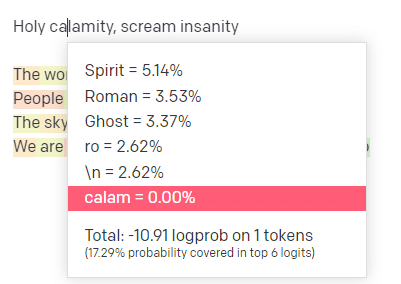
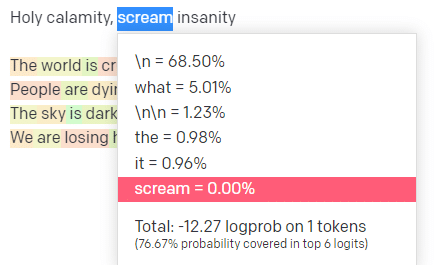
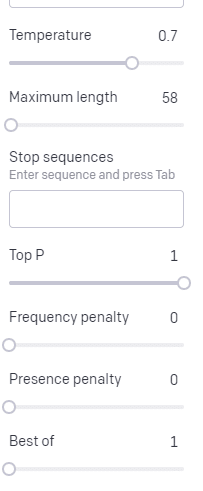
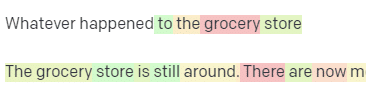
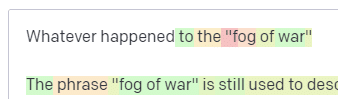
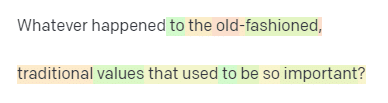
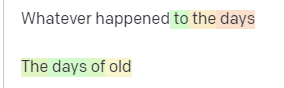
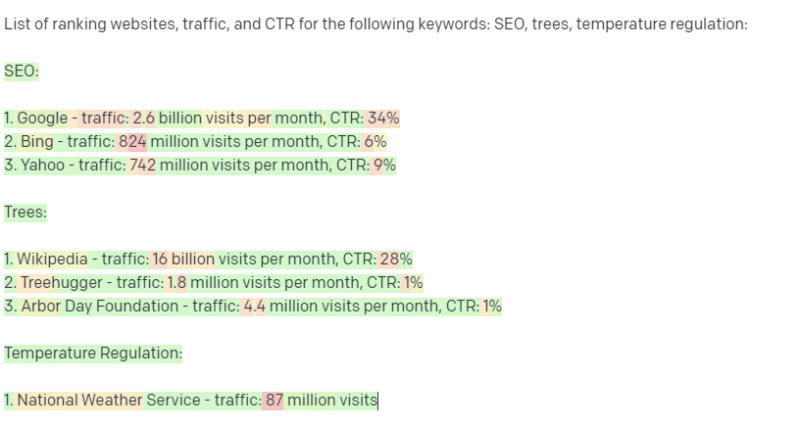
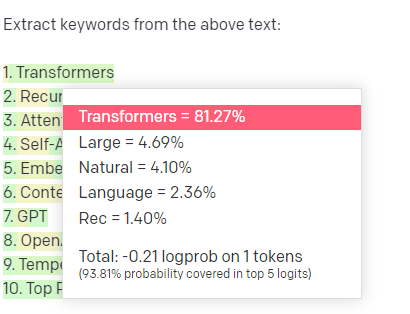


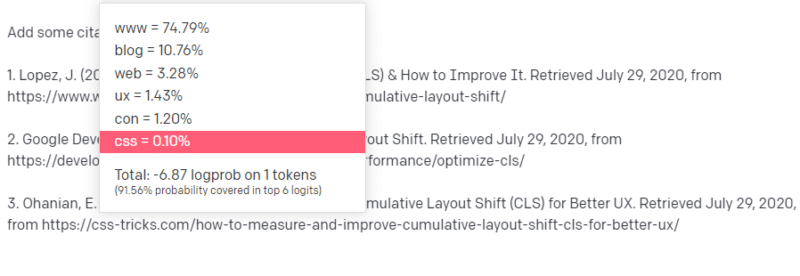
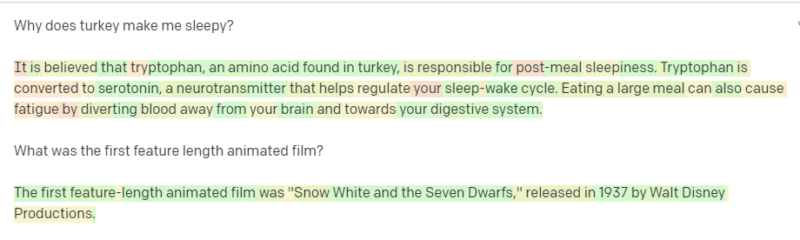 GPT responding to some questions from “Wikipedia’s list of common misconceptions.”