Thursday, May 18th, 2023
The Privacy Sandbox initiative, a project led by Chrome, is introducing new key relevance and measurement APIs to Chrome Stable. This move is scheduled for the third quarter of 2023, with the spotlight focused on Chrome Stable 115 as the specific launch pad.
Unveiling the specifics. The APIs set to go live are:
- Topics: Generate signals for interest-based advertising without third-party cookies or other user identifiers that track individuals across sites.
- Protected Audience: Select ads to serve remarketing and custom audience use cases, designed to mitigate third-party tracking across sites. (This API was previously named FLEDGE. As we head towards launch, we’ve updated the name to better reflect the functionality.)
- Attribution Reporting: Correlate ad clicks or ad views with conversions. Ad techs can generate event-level or summary reports.
- Private Aggregation: Generate aggregate data reports using data from Protected Audience and cross-site data from Shared Storage.
- Shared Storage: Allow unlimited, cross-site storage write access with privacy-preserving read access.
- Fenced Frames: Securely embed content onto a page without sharing cross-site data.
The APIs will gradually roll out to all users. The Chrome team to closely monitor for issues to ensure a seamless integration.
Why we care. The six new relevance and measurement APIs will deliver tools to generate interest-based advertising signals and correlate ad clicks or views with conversions, all without the use of third-party cookies. This approach not only offers more privacy-focused methods for ad targeting and measurement but also prepares advertisers for a future where third-party cookies may no longer be viable.
Updated user controls. A major improvement with this launch is the addition of advanced Ad privacy controls. These controls offer users more granular management of the new APIs, providing an extra layer of privacy and giving users control over their browsing experience.
Here’s what the new user controls may look like:
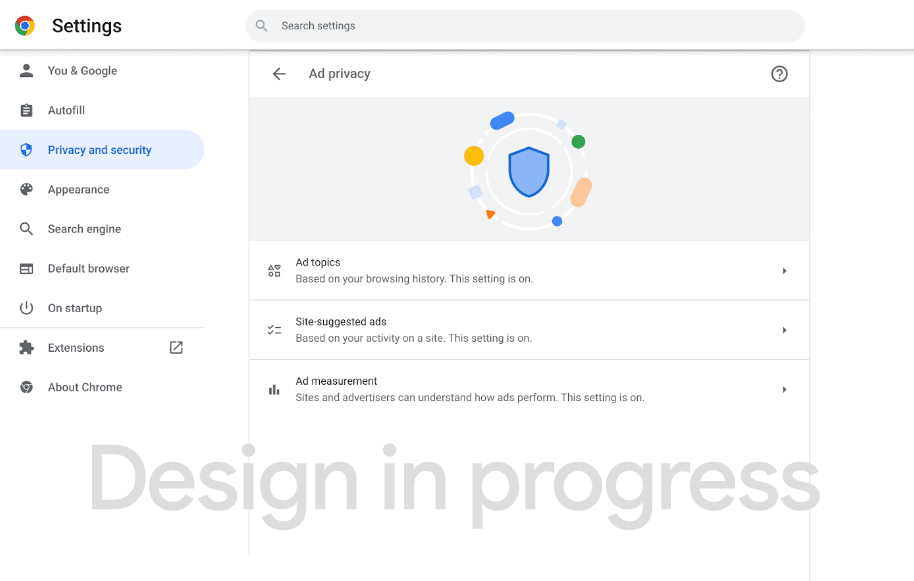 Test version of an updated Chrome Ad privacy interface.
Open application dates. To handle the expected developer interest, an enrollment process has been created. Starting in June, developers can apply for API access, which will be granted in August. This ensures a controlled and organized introduction of the APIs to the wider developer community.
General Availability (GA), as it’s referred to in the project timeline, implies that these APIs will become available by default in Chrome. However, immediate availability in all Chrome browsers is not guaranteed. The gradual rollout strategy will allow users to directly control the activation of these APIs.
Providing feedback. Feedback can be shared here. The Chrome team also has created this feedback form.
Read the announcement. Preparing to ship the Privacy Sandbox relevance and measurement APIs.
The post Google Chrome will soon add 6 relevance and measurement APIs appeared first on Search Engine Land.
Courtesy of Search Engine Land: News & Info About SEO, PPC, SEM, Search Engines & Search Marketing
Thursday, May 18th, 2023
Paid search spend is expected to reach $110 billion this year, according to a new eMarketer forecast.
Search and retail media. Paid search represents 41.8% of total digital spending. If it reaches $110 billion, its growth will remain slightly higher (at 8.2%) than overall U.S. digital ad spend, which is expected to increase by 7.8%.
Within search, retail media networks (RMNs) are a rising star, with 18.7% growth in retail media search. This segment is projected to be near $30 billion in spending in 2023.
RMN digital ad revenue (not just in search) is on course to rise from $31 billion in 2021 to $45 billion this year. If spending continues at its current rate it should surpass $106 billion in 2027.
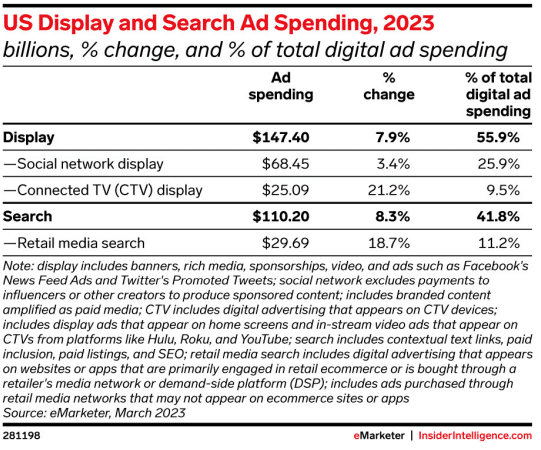 Image source: eMarketer
Why we care. We expect 2023 to be a challenging year in search. There have been many changes related to generative AI and chat in search (both on Google and Microsoft Bing), and we’re hoping to get more clarity soon about what these changes will mean in terms of engagement and ad performance. Until then, it’s good to see overall paid search spend growth rising – especially in retail.
More on U.S. search ad revenue. It hit a record $84.4 billion in 2022, according to IAB.
U.S. digital ad spend. While it’s dropping below 10% for the first time in 14 years, digital ad spending is projected to rebound to 11.2% growth in 2024, the forecast said. Yearly increases are predicted to hover around 10% through 2027.
Digital ad spend saw a dramatic rebound in 2021 following the initial wave of the COVID pandemic — when it saw growth of 37.6%. In 2022, the numbers fell dramatically, with 10.6% growth.
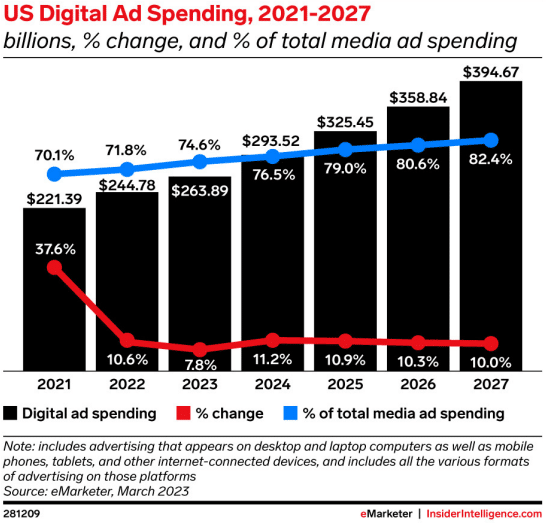 Image source: eMarketer
Digital slice of the pie. Overall media spending is expected to increase 3.8% this year as traditional media investments continue to migrate to digital.
Digital media should make up 74.6% of total U.S. media spend, which is expected to reach nearly $264 billion in 2023. The digital slice of total media spending is projected to grow about 2% annually in the coming years.
Display and CTV. Connected TV (CTV) advertising keeps charging ahead.
For some perspective, over half (55%) of digital spending is in display ads whose revenue is expected to grow 7.9% this year. CTV’s projected growth for 2023, however, is 21.2% – nearly triple digital’s growth.
CTV ad spend is on pace to hit $25 billion this year and account for 9.5% of total digital ad revenue, according to eMarketer.
Social display, on the other hand, is projected to only see a growth increase of 3.4% in 2023. Social network display advertising is about a quarter of total digital spending.
The post U.S. paid search spend forecast to hit $110 billion in 2023 appeared first on Search Engine Land.
Courtesy of Search Engine Land: News & Info About SEO, PPC, SEM, Search Engines & Search Marketing
Thursday, May 18th, 2023
Google Analytics 4 (GA4) has made significant enhancements to the audience builder. New dimensions and metrics, enhanced alternatives for manipulating event value and event count, and a novel option to match dates have been added.
Here’s what’s new.
New Dimensions and Metrics in the Audience Builder. The GA4 audience builder now supports the creation of audiences via new dimensions and metrics. The following dimensions and metrics are freshly introduced in the audience builder:
Item-Scoped Dimensions
- Item ID
- Item affiliation
- Item brand
- Item category
- Item category 2
- Item category 3
- Item category 4
- Item list name
- Item name
- Item promotion ID
- Item variant
Item-Scoped Ecommerce Metrics
- Item revenue
- Items added to cart
- Items checked out
- Items purchased
- Items viewed in list
Event-Scoped Ecommerce Metrics
Session-Based Metrics
Low engagement sessions help identify users showing low engagement with a website or app. For instance, it allows the creation of an audience segment of users having more than three low-engagement sessions within the past five days.
Once you’ve identified such users, you can then target them with ads to prompt them to return (e.g., retailers highlighting upcoming sales or events).
Independent Use of Event Value. Event value can now be used independently without associating it with a specific event.
In earlier versions, the event value parameter was only used to modify specific events, such as locating users who completed “event X” where the event value exceeded 50.
An example of this would be creating an audience of users who have any event with a value above 50.
Expanded Operators for Event Count. The update also expands the operators that can be used when creating audiences using the event count metric. While earlier only greater than (>), less than (<), and equals to (=) were available, and only when selecting “the most recent time period,” the update introduces a complete set of operators.
These include:
- Greater than or equal to (>=)
- Less than or equal to (<=)
- Not equal to (!=)
These operators are available when choosing “at any point in time” and “most recent time period.”
Matching Between Dates. A new “between match types” option has been introduced for dates.
This feature could be used to, for example, build an audience of users who visited a website during Black Friday and target them with ads in the run-up to Black Friday the following year. The selected range, such as November 24 to November 26, would include all three days.
Why we care. These new dimensions and metrics, more robust manipulation of event value and event count, and being able to match dates can all lead to more targeted and effective advertising. Being able to identify users with low engagement sessions, or matching event value across various events, can help you create more nuanced and relevant audience segments.
What’s new in GA4. These updates were announced via the Google Analytics Help page, which you can find here.
The post Google Analytics 4 audience builder gets a refresh appeared first on Search Engine Land.
Courtesy of Search Engine Land: News & Info About SEO, PPC, SEM, Search Engines & Search Marketing
Wednesday, May 17th, 2023
An entity is a uniquely identifiable object or thing characterized by its name(s), type(s), attributes, and relationships to other entities. An entity is only considered to exist when it exists in an entity catalog. I used this definition in my entity SEO article.
The first part of this entity SEO series should be used when you need to justify a tactic associated with optimizing for an entity.
TL;DR from Part 1:
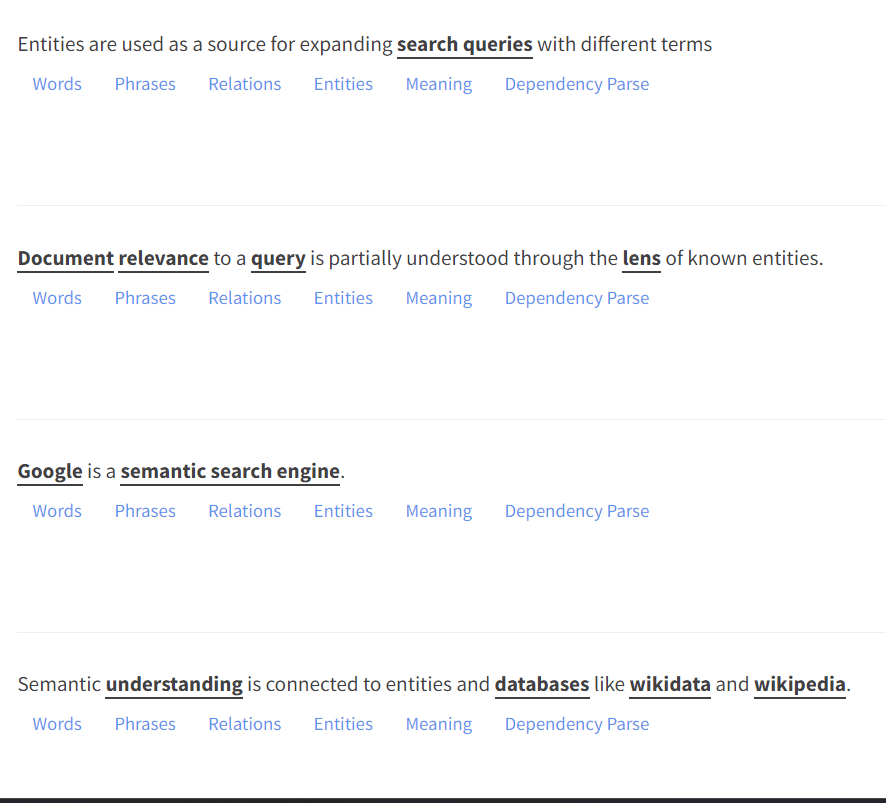
- Entities are used as a source for expanding search queries with different terms.
- Document relevance to a query is partially understood through the lens of known entities.
- Google is a semantic search engine. Semantic understanding is connected to entities and databases like Wikidata and Wikipedia.
- Wikipedia and Wikidata are the most beginner-friendly sources of knowledge on the kind of information you should write about as you optimize for entities. Look at the hyperlinks, the table of contents, the sourcing, etc.
- Entity understanding is impacted by documents on the web. Google’s understanding changes frequently, and algorithm updates are known moments in time when this updated understanding is applied.
- Three data structures exist on the web: unstructured (blogs), semi-structured (Wikipedia), and structured data (Wikidata and JSON schema).
- Optimize around search intent when attempting to cover a topic.
- Speed of publishing, the number of articles published, and the depth of the articles you publish are the three primary levers you can pull as an SEO focused on entities.
This article will dive right into the actionable advice. We will go over page structure, site structure, important schemas to use and tools that can help you.
Getting started with entity optimization
Every page and every collection of pages has a context. Pages don’t exist in a vacuum.
Why does it exist?
Let’s use Nike as our example. Nike sells shoes. Their website exists to sell running shoes.
How do you figure out the primary entity associated with selling running shoes?
It’s tempting to just say “shoes” or “running shoes,” but that wouldn’t be the best answer.
The best answer requires further abstraction.
Optimizing entities is largely a task meant for our brains, so let’s go through some options.
Running
- Shoes
- Running shoes
- Exercise
- Sneakers
- Sports
- Tennis shoes
- Athletics
- Athleisure
So what types of intent exist for Nike?
Necessary gear for sports, exercise empowerment, shopping guides for each specific shoe type.
You can expand this further, but the goal is to provide an oversimplified example. If I had to guess, I’d say that the primary search intent is about sports.
While Nike has evolved into a style, the core purpose of Nike and the core intent for searchers is all about sports equipment.
If we ask the “why” question for sports, we could go a step further and say “personal development” or “lifestyle improvement” is the primary search intent.
It’s up to the SEO to figure out the best choices because the entire optimization process is contingent upon:
- The search intent.
- The context of the website.
- The primary entity associated with that context.
If you’d like to dig deeper into this idea, I recommend Koray Tuğberk GÜBÜR’s Topical Authority course (be warned, it’s complicated and designed for a skilled SEO audience).
This realm of SEO has its own vocabulary, and GÜBÜR has spent countless hours extracting terms and formalizing the concepts associated with this area.
Some important terms you’ll want to familiarize yourself with if you’re interested in entities and semantic search:
- Topic coverage
- Responsiveness
- Query processing
- Semantic distance
- Contextual flow
- Contextual bridge
Get the daily newsletter search marketers rely on.
<input type=”hidden” name=”utmMedium” value=”“>
<input type=”hidden” name=”utmCampaign” value=”“>
<input type=”hidden” name=”utmSource” value=”“>
<input type=”hidden” name=”utmContent” value=”“>
<input type=”hidden” name=”pageLink” value=”“>
<input type=”hidden” name=”ipAddress” value=”“>
What are the core concepts associated with entity optimization?
The core concepts associated with entity optimization focus on entity attribute values (EAV), information dilution, language usage, site organization and page organization.
Entity attribute values and Amazon
When optimizing around entities, you’ll want to focus on the attributes that are associated with your entity.
Remember that the context can change the attributes that are most important to use.
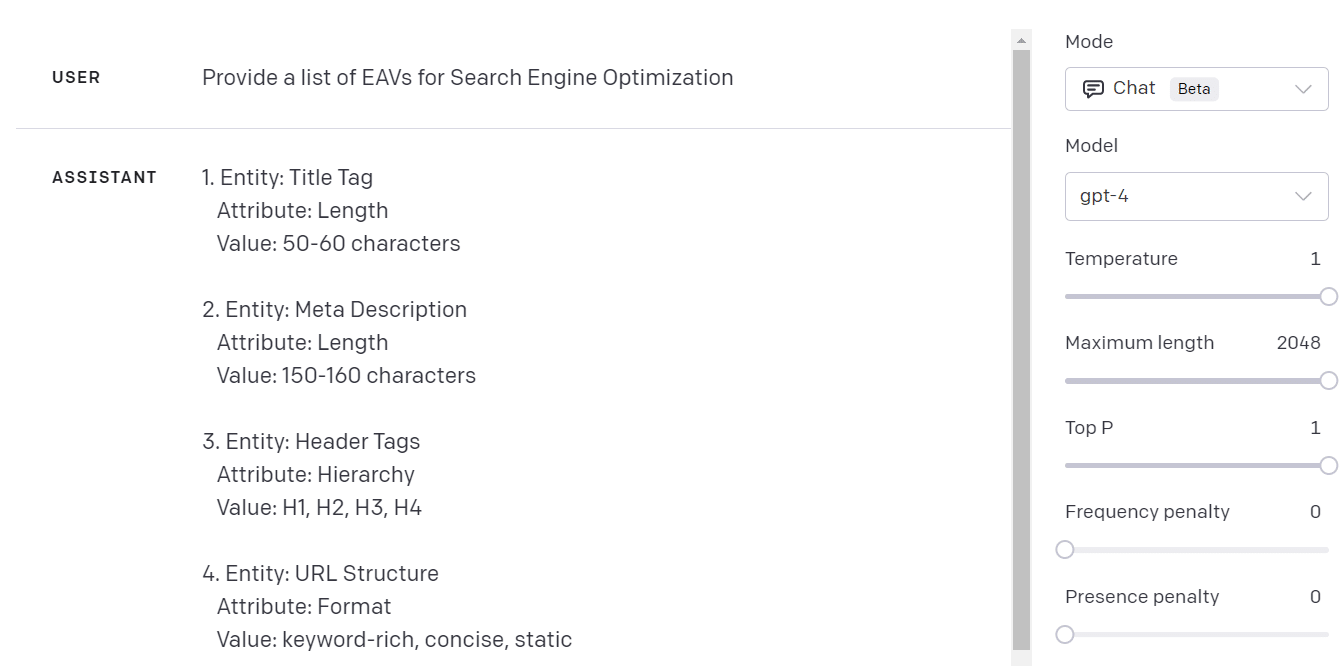
We use OpenAI and a simple prompt to get a list of attributes. You can get creative with it, but use the image as your starting point.
Amazon’s plethora of information on each product is a great example of entity optimization. They have videos, images, multiple angles, buyer guides, reviews, tags, and detailed technical information on their products.
Do you need to be worth a trillion dollars to achieve this depth of attribute information? No.
If you are selling products of any kind, more scientific and data-centric information will help achieve the attribute depth and width required for entity optimization.
Information dilution and disambiguation
Are you writing about SEO for lawyers? How do you connect two entirely distinct entities without diluting Google’s understanding?
Do you target lifestyle, technology, business, and health on one website?
Have you properly covered each distinct category and made the necessary connections to assist Google’s understanding of your content?
You’ll fail to optimize for entities if you don’t provide adequate context.
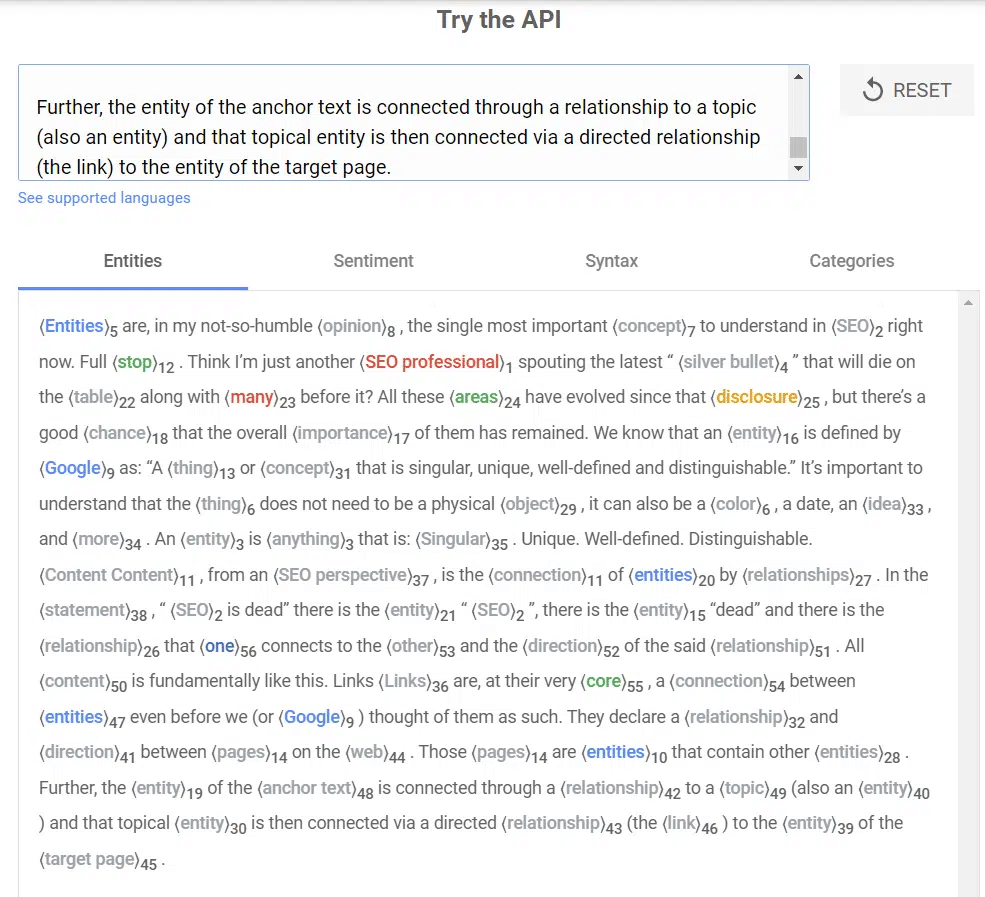
For disambiguation, we like to use Google NLP.
This is an example from Google. Input your text and review the score.
Oftentimes, a few word changes and a small tweak to how you order your sentences are all it takes to drastically improve.
The lesson here is to remember that writers are providing information and it’s important to know your audience when writing.
You can provide helpful content to humans while providing a structure for AI to digest and understand. Content for humans and for robots is a needless bifurcation that largely exists due to SEO practitioners lacking knowledge in this area.
The importance of language
Focus on the way you use language. The book “Entity-Oriented Search” provides almost 400 pages of deep insights into entities.
The author, Krisztian Balog, reveals that the subjects, objects, and predicates are all used in order to understand a website and each of its documents (pages/posts).
You must have your core topic on every page if you are Nike. Exercise, fitness, or shoes could all be options here. The actions and attributes associated with your core topic should also be present throughout your website.
This doesn’t mean you need to say the same thing repeatedly because the context of an attribute or an action can change (i.e., exercising by running in the rain, exercising by sprinting, exercising on an outdoor track, etc.).
Logical site structure, page structure and schema
Google’s Lizzi Sassman recently shared how they prefer to digest schemas. Google wants sites to nest their schema.
Use the dropshipping outline as an example. Context isn’t just about the content, it’s about the way you connect the content.
Examples of page structure (you’ll learn how you can replicate this with schema later)
- Dropshipping
- Low barrier to entry leading to high competition
- Difficulty in finding unique products
- Long delivery times leading to poor customer experience
- Digital marketing agency
- High demand for quality digital marketing services
- Potential to scale up to $1 million or more in revenue
- Difficulty in scaling beyond a certain point
- Brick-and-mortar business
- Easy to advertise locally using Facebook and Instagram
- Operational challenges and significant startup costs
- Difficult to scale and often generate small profits
- Online coach/consultant
- High demand for coaching and consulting services
- Ability to work remotely and set your own schedule
- Difficulty in scaling due to time limitations
- Software as a Service (SaaS) Business
- Huge potential rewards if successful
- High risk and significant upfront investment
- Difficulty in developing a winning product
- Ecommerce and Amazon FBA
- High demand for online products and scalable business model
- Challenges in differentiating from competition
- Amazon FBA’s fees and lack of control over pricing
If you’re looking for a great example of what an entity-optimized blog architecture looks like, then I highly suggest that you review Docusaurus, a CMS of sorts, which handles content structure well.
Look at any of their showcases, and you’ll see a hierarchy of information presented on the left.
You will get a top-down view of the cluster. The articles have a table of contents, so you get a top-down organizational structure for each article.
The only additional thing to do is optimize the article’s internal link structure.
Using Wikipedia to jumpstart your entity-focused SEO campaign
Wikipedia is a semi-structured knowledge base that Google heavily uses in its quest to understand and use entities.
Because we know what it is and how Google uses it in its systems, we can use a Wikipedia page to grow our understanding of entities and semantic search.
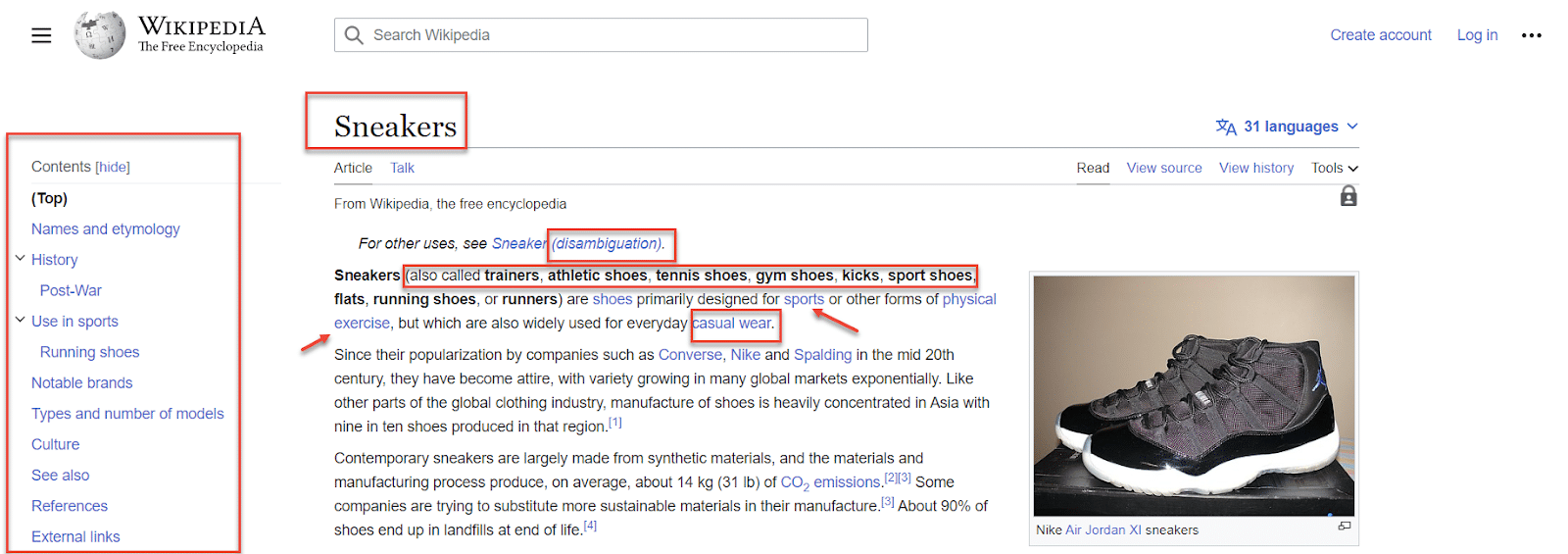
Case in point: the Wikipedia page for “sneakers.” Below are key elements to note:
- The table of contents demonstrates solid topic coverage designed to approximate all we need to know about the topic (sneakers).
- The first sentence of the page is packed with brief and clear information directly related to sneakers. The sentence provides synonyms and disambiguates the subject.
- The internal links use anchor text that signals which page should rank for the term, and it demonstrates strong connections with the semantically close subjects.
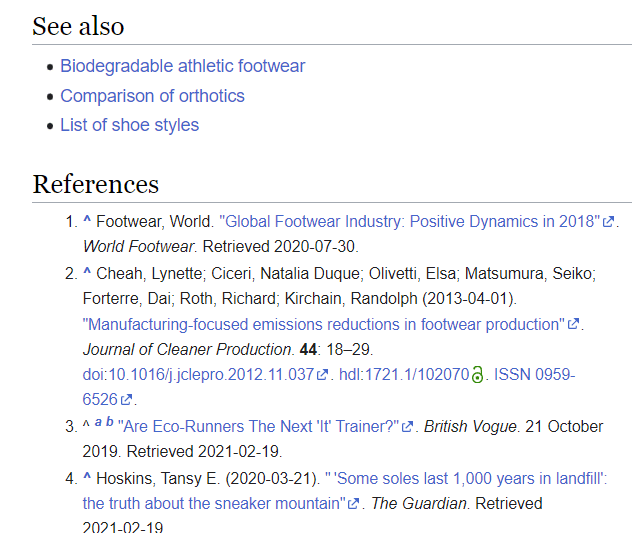
- The See also section is an example of creating content designed to cover the topic.
- The References section is an external validator that shares where you can find more trusted sources of info. Ideally, these should be authority sites that don’t compete with you. This section is a great support for digital PR. Conducting studies that help the industry is exactly how you get referenced.
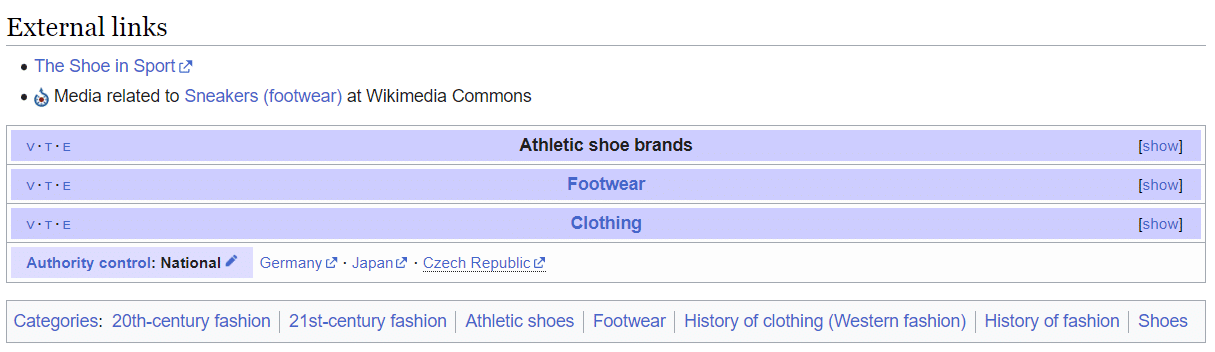
- The bottom of the Wikipedia page shows a hierarchy. While it is not picking out the exact entity or search intent for your brand, it’s helpful to see that this page provides multiple formats for the content presentation, numerous connection points to internal pages of relevance, and multiple hierarchies. If you count Wikidata, you even have a schema version of this information.
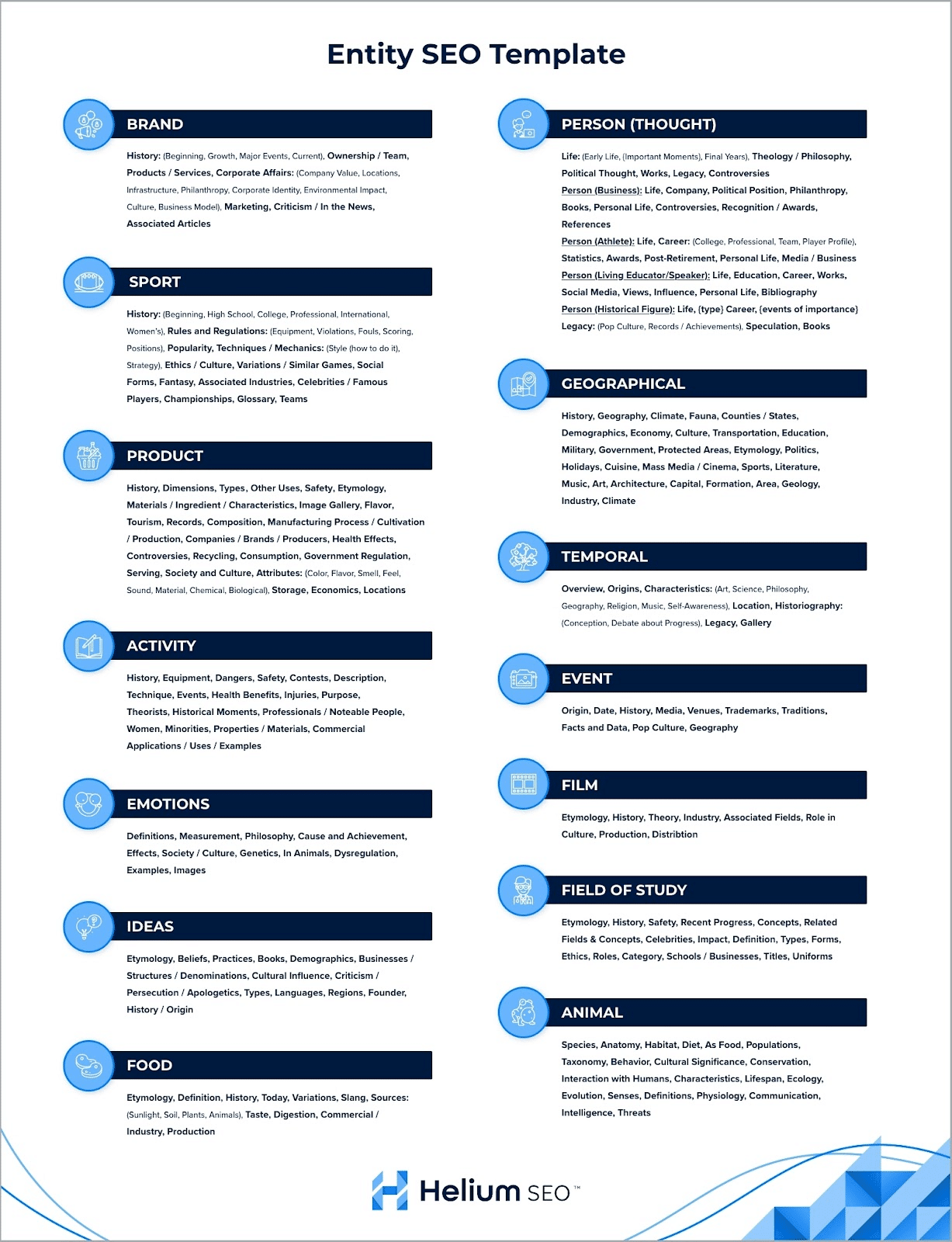
After analyzing hundreds of Wikipedia pages, we created an entity template that can be used as a quick reference when writing.
Generally, the most common entities are associated with brands, people, sports, activities, products, geographies, events, temporal, emotions, ideas, animals, fields of study, food, and music or film.
No one has the full list of entities, but I shared a list of 150+ types of entities in the previous article.
It’s important to note that you should not expect to rank by just copying everything on a Wikipedia page. The example of Wikipedia is meant to provide context for understanding.
Ask yourself how your specific website context connects with your main entity. Think about the types of search intent that exist.
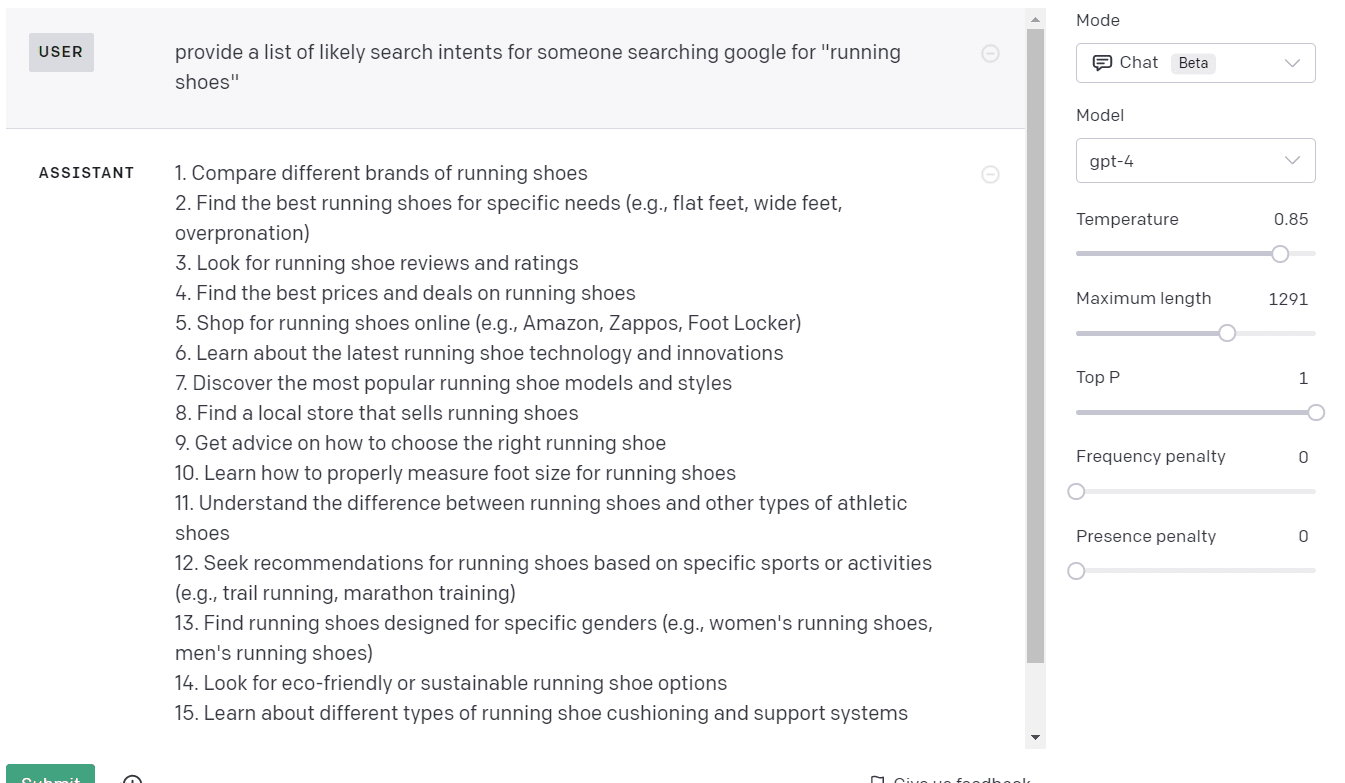
AI is very helpful in giving you a headstart with this. Ask GPT-4 to “provide a list of likely search intents for someone searching Google for [running shoes],” and you’ll get a list of ideas.
This might not be perfect, but it’s a great way to identify search intent and grease the wheels for thinking through this on your own.
Handy tool for generating 1,000-2,000 topics
While AI is the focus of the next article in this series, this particular use case of AI is incredibly helpful for topic maps built to cover an entity.
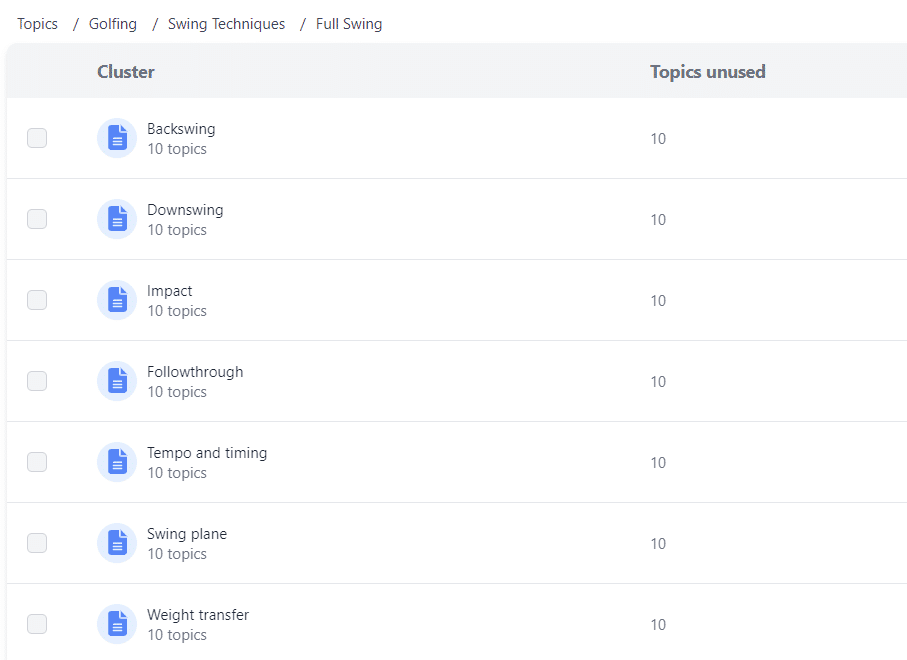
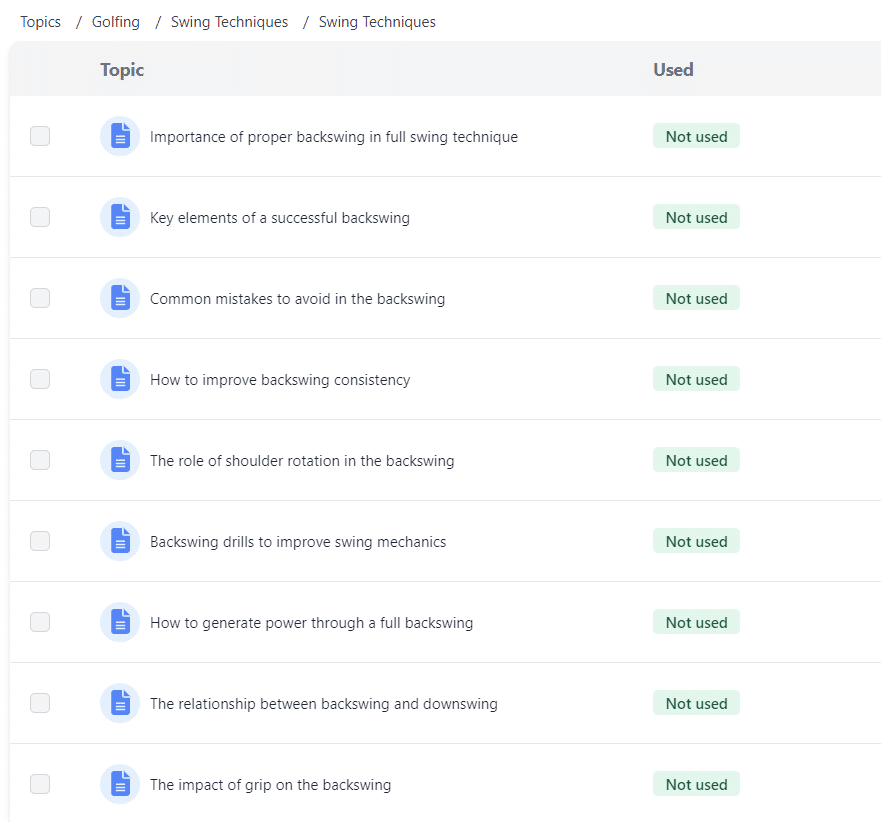
With the ContentSprout topic generator, you enter the niche (e.g., “golf”) and get categories, sub-categories, and clusters.
The final piece provides a list of topics to write about inside the cluster.
AI helps reduce the time it takes to do a lot of SEO tasks related to entity optimization. Invest in AI tools, and it will pay off.
Now that we’ve covered the topic of targeting, it’s time to dig into identifying entities.
Identifying entities in text
Let’s use the TL;DR section above as the input text we will analyze. Open up textrazor.com/demo and paste the text into the box.
When you run the analysis, you’ll see a helpful collection of insights about the text you provided.
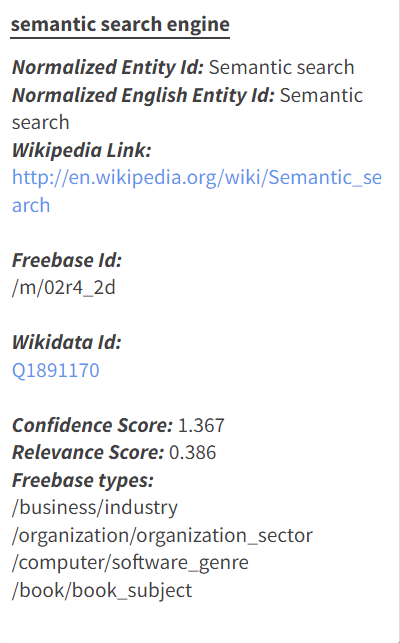
If you hover over an underlined word, you get some sweet info that can be used for your schema or for your analysis of your topic.
You get a Wikipedia link, the Freebase ID (a structured knowledge graph), and a Wikidata ID (like Freebase, but better). You also get a list of scores and entity types.
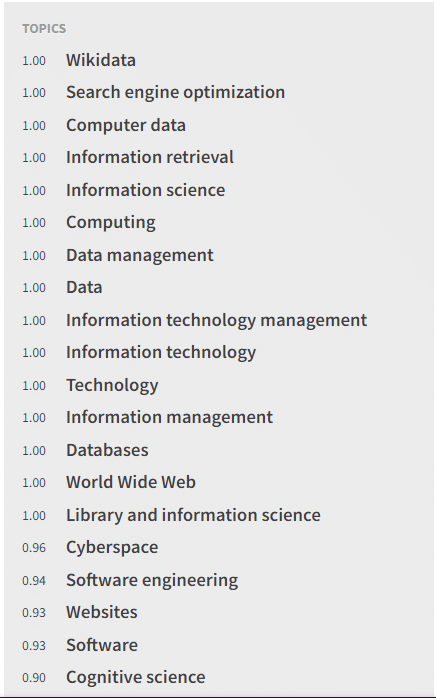
The right side of the screen provides the identified topics.
Remember that this isn’t Google, but it’s attempting to do something similar to what Google is doing, which makes this tool useful.
I can now see many scores connected to topics, organized by the strength of the topic understanding.
Using schema to connect the dots for Google
Schema has become mainstream in SEO communities, but that doesn’t mean people use schema to the fullest. Most people stick with a generic schema and avoid anything custom.
While this article isn’t designed to provide a crash course on schema, it is important to share the two underutilized schemas that help connect the dots for Google.
Mentions schema
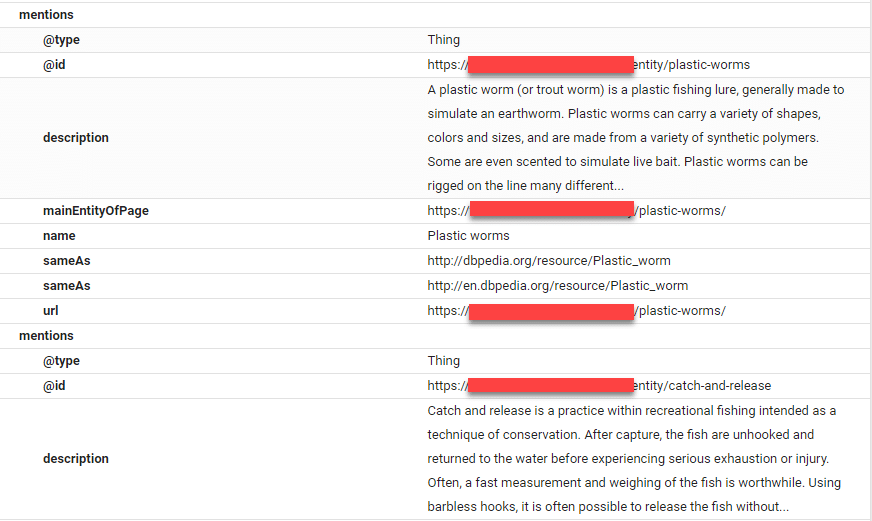
By using mentions schema, you’re declaring that your page mentions a specific thing. You can then tie in a Wikipedia page and connect that declaration.
Why is this helpful?
You are disambiguating information and providing important information in the easiest format for Googlebot. Don’t sleep on mentions schema.
In the image above, you can see a ContentSprout test website on fishing.
The main entity of the page is declared, a description is provided, mention is used, and SameAs is incorporated.
These pieces send an abundantly clear message to Googlebot so it understands your content.
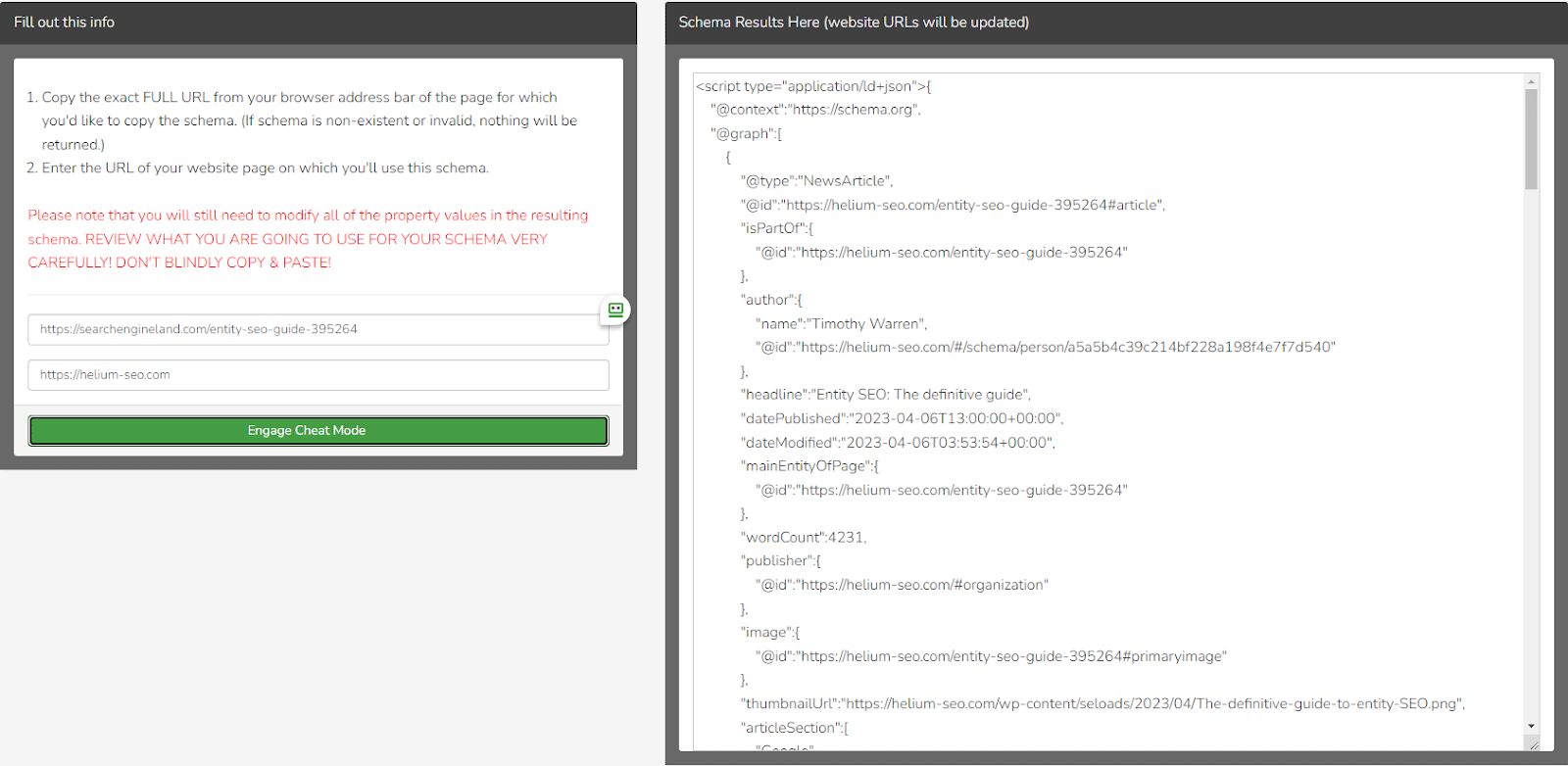
If you’d like to visualize the schema, we suggest Schema Zone. We plugged in a URL containing a custom schema, which is what it looks like.
If you’ve ever used Sitebulb or Screaming Frog, you’ll recognize that this is essentially a schema version of what those tools do with internal links.
We all try to get our visuals to look like this, but did you know you could replicate that structure in schema?
Schema Zone has a few other features, but our favorite is the competitor schema stealer.
Using competitors as your starting point is always easier, and this tool is designed to do exactly that.
A new company called Entity Clouds released a programmatic schema solution that has blown us away. According to its founder Cory Hubbe:
“Entity Clouds is a programmatic entity optimization tool set that leverages the science of bot crawl patterns and classification systems to give search engines precisely what they want. We use internet database classification systems and structured data as our foundation, strengthening the association between your business and relative, authoritative entities.”
It won’t give you cool visuals, but it gives similar results, and you install it with GTM or a WordPress plugin.
Optimizing for entities
As we learned in the first article, Entity SEO: The definitive guide, entities are the future of SEO.
They help Google understand your content and its relevance to keyword searches.
Optimizing for entities will help your content perform better in search engines.
Your website is much more likely to continue to rank through algorithm changes as Google and Bing continually improve their understanding of the web and the vast amounts of content on it.
The post How to optimize for entities appeared first on Search Engine Land.
Courtesy of Search Engine Land: News & Info About SEO, PPC, SEM, Search Engines & Search Marketing