Archive for the ‘seo news’ Category
Thursday, June 8th, 2023
Google has released two updates to Google Bard, its AI chat bot. The first update is to make Bard better at mathematical tasks, coding questions and string manipulation. The second update is to allow you to export tables that Bard generated directly into Google Sheets.
Improved math and data analysis. Google Bard has a new technique called “implicit code execution” that helps it “detect computational prompts and run code in the background,” the company wrote. This allows Google Bard to respond “more accurately to mathematical tasks, coding questions and string manipulation prompts,” Google added.
Here is a GIF of it in action, but Google posted more details in its blog post:

Google Sheets. Now, when Bard generates tables, those tables can now be exported into Google Sheets. This allows you to continue your work in Google Sheets and outside of Google Bard.
Why we care. These two improvements makes Bard a bit more useful for your daily tasks. AI is getting smarter fast and watching these updates is exciting.
The post Google Bard update improved math and data analysis and Google Sheets exports appeared first on Search Engine Land.
Courtesy of Search Engine Land: News & Info About SEO, PPC, SEM, Search Engines & Search Marketing
Thursday, June 8th, 2023

Building a landing page is easy. But creating one that engages your audience and drives conversion is a challenge. To achieve higher conversion rates, it’s essential to elevate your page beyond aesthetics.
So are you ready to learn the secrets of high-converting landing pages?
Join conversion rate optimization experts in this webinar as they uncover everything you need to know about how to create landing pages that increase ROI.
Learn more by registering for and attending “7 Ways to Make Your Landing Pages Work Harder For You!” presented by iQuanti.
Click here to view more Search Engine Land webinars.
The post 7 ways to maximize landing page conversions appeared first on Search Engine Land.
Courtesy of Search Engine Land: News & Info About SEO, PPC, SEM, Search Engines & Search Marketing
Thursday, June 8th, 2023
The significant value of B2B content marketing is paving the way to the new wave of content-first link building.
A targeted Google search will return lists of articles around topics like “lists of,” “alternative,” or just “how to.” With the right search queries, you can find an endless list of prospective domains to pitch.
SaaS companies can target these prospects by producing a wide range of content types and topics, which provides a unique opportunity to find link prospects across a wide range of niche topics.
This list provides methods to identify link opportunities based on the type of content typical for SaaS brands.
Identifying link opportunities for SaaS brands
Although using Google search operators will yield the largest list of opportunities, the following link building tools will reduce the time to organize and outreach to each prospect.
- BuzzStream: Low-cost list building and outreach CRM. This is a fast way to get started.
- Pitchbox: Robust list-building and outreach campaign management. Use this tool for custom prospecting, outreach, and reporting features. The default campaigns can reduce the time for new link builders to build a list and start outreach.
Whether you use Google or a tool, the type of content created on the software’s site will determine the success of a link building campaign.
Note that some pages yield more links than others. Most of your focus will be on high-authority homepage links and deep links to blogs and informational articles.
1. Statistical roundup links for unique research
A “statistical roundup” article that collects and presents statistical data from various sources relevant to a particular topic or field.
These articles provide an informative, insightful and potentially compelling overview of a topic from a data-centric perspective.
Statistical roundup articles are often used in fields including business and economics, sports, health and medicine, science and education.
They often present data in a visually compelling format, including charts, graphs, tables and infographics that enhance reader comprehension.
This Top 50 Cybersecurity Statistics article might be a target to secure links to your company’s unique research in cybersecurity.
Finding these links is a simple Google search away for “{keyword} statistics.” Or get more specific with a search operator:
- intitle:”statistics” intext:{keyword}
Or narrow the list down to focus on company blogs with:
- inurl:blog intitle:”statistics” intext:{keyword}
2. Blogger outreach to hybrid commercial + informational pages
Bloggers and many publishers will likely link to content that clarifies or enhances the concepts they are writing about.
These pages are optimized to convert traffic to leads or demo requests with informational content that can be used to acquire links.
I see this used heavily in cyber security, with NordVPN having a great example of a hybrid page.
Use these pages to find bloggers that have written about the topic and request that they link to your hybrid page.
- Identify the bloggers by searching Google with the blogger search operator:
- inurl:blog intitle: {keyword}
- Copy the top 100 URLs over to Ahrefs’ batch analysis.
- Export list.
- Filter down by metrics.
- Repeat this process for each target keyword.
3. Product alternatives for the product page or homepage links
Find blog articles that list alternatives to a competitor. These articles list all the alternative direct competitors or processes that can yield the same results.
- Intitle:{competitor name} alternatives -{your company name}
Although this method isn’t scalable, it can yield high-quality traffic-driving links.
This example from AuthorityHacker shows a list of Ahrefs alternatives that may be an outreach target for a new SEO SaaS product.
AuthorityHacker’s founders are known to produce actionable and relevant content on affiliate and SEO topics. If you have a truly useful tool, they may even add your site to the list.
4. Link insert requests to integration pages
Integration pages are fodder for articles about the integration partner. Articles that mention features, how to use them, or even negative reviews.
In this example with Zapier, articles about Slack or Google Drive might make sense to approach for backlinks.
To find link opportunities for an integration page, use the search operator:
- Intitle:{keyword} -{your domain} -{integration partner domain}
Example: intitle:automate slack -zapier.com -slack.com
Get the daily newsletter search marketers rely on.
<input type=”hidden” name=”utmMedium” value=”“>
<input type=”hidden” name=”utmCampaign” value=”“>
<input type=”hidden” name=”utmSource” value=”“>
<input type=”hidden” name=”utmContent” value=”“>
<input type=”hidden” name=”pageLink” value=”“>
<input type=”hidden” name=”ipAddress” value=”“>
5. Competitors mention links to product comparison content
Product or feature comparison pages is either blog article or webpage that compares various features of your software to a direct or indirect competitor.
Monday.com, a project management software, has a single comparison page where users can select a dropdown of some direct competitors.
Creating a single page for each competitor is also common.
The project management niche is highly competitive, with plenty of helpful content being produced. This includes bloggers writing about ways to optimize time management to breakdowns down agile methodologies.
Use these article topics to build an outreach list. Create a variation of the following example of a search operator that a project management website could use.
- intext:asana intitle:project management -Monday.com -asana.com
6. Case study blog articles with social ads
Case studies are a coveted asset because they tend to have actionable takeaways from real-world learnings.
SaaS companies have access to unique data and case studies using their software to gather data. Because of their unique value, these assets can be used in social ads to attract readers and links.
This Ahrefs case study analyzes Linktree’s traffic drop using several reports in Ahrefs, including the Top Pages and Avg. organic traffic reports. The screenshot below shows the steep increase in traffic along with a rapid decline.
This sort of trendline entices an SEO to look deeper.
They took the case study and ran ads on Facebook – and potentially other platforms.
Plugging the case study URL into Ahrefs Site Explorer, I find that the article received links from 65 unique referring domains.
Although it doesn’t appear to generate much organic traffic, it will increase the overall site’s topical relevancy for SEO topics. Thus, other optimized pages will rank more easily.
7. Listicle outreach for product and homepages
Content listing out companies or expert roundups in niche markets has become very popular.
Listicles are a popular form of content because they’re easy to read and digest. They’re often used in content marketing and journalism as a way to present information in a concise, organized, and engaging way.
A cybersecurity digital marketer can build a campaign to find listicles around general or vertical-specific article searches.
Build a list of these opportunities with the “intitle:” search operator. However, the more niche the niche or keyword used to search, the fewer articles will be available. Repeat this article search for all relevant product keywords.
- intitle:”supply chain cybersecurity” intitle:top
- intitle:”cybersecurity” intitle:top
To expand opportunities, replace “top” with “best,” “tools” or other generally descriptive terms for your niche.
8. Executive and team guest posting byline for high-authority sites
Securing a guest post on high-authority publications often means a valuable byline, complete with a branded link to your homepage.
However, it’s important to note that earning a spot in these high-traffic platforms necessitates real expertise and considerable time commitment to develop quality content.
While these links hold significant value in terms of SEO, their principal objective goes beyond that. Primarily, these articles serve as a strategic tool for enhancing brand visibility and establishing thought leadership.
For instance, as you can see at the bottom of this article, my byline in Search Engine Land includes a link that directs readers to my company’s homepage.
9. Passive PR request for homepage links
In public relations (PR), a “passive journalist PR request” typically refers to a situation where a journalist seeks information, quotes, or a story from PR professionals, companies, or individuals, usually via social media or other public platforms.
These requests are “passive” because the journalist is not actively reaching out to specific individuals or companies with a pitch or query but rather posting a broad request to which any relevant party could respond.
This approach can benefit journalists by enabling them to access a wider variety of sources and stories than they might be able to through direct outreach.
For PR professionals, these requests present opportunities for their clients or organizations to gain exposure.
Although passive PR isn’t specific to SaaS, creating content around various topics will allow for many more placement opportunities.
Two methods to find these requests are with Help a Report Out (HARO) or searching the hashtag #journorequest on Twitter.
10. Non-competing Informational links, Internal linking to commercial pages
This method entails building links to informational content, then placing internal links to the target ranking pages.
The reasoning is that bloggers and publishers are more likely to link to informational articles than commercial pages, thus increasing the total volume of link opportunities in less time. More so, this method also uses internal linking to pass PageRank and topical relevancy to the commercial pages from the linking site.
The outreach will focus on related but non-competitive articles. An article that is not competing for the same target keywords is more likely to link to content than content that is competing for the same keywords.
For example, an article about “Top 10 HR Management Software” will not easily link to another listicle about HR management software, but it might link to an article detailing the software’s features.
To find these types of articles, use this search operator template with your own keywords:
inurl:blog intitle:HR software -top
Content-first link building in B2B SaaS
SaaS websites have the unique ability to target a wide range of topics and content, which is aligned well with the new wave of content-first link building.
Tools like Buzzstream, Pitchbox, and Respona can streamline the prospecting and outreach process, but having the right content is important to a high response rate.
Use search operators to find these opportunities, but test multiple quires to find as many sites to pitch as possible.
Link building is critical in B2B SaaS traffic generation, and those companies that get it right will drive real growth.
The post 10 ways B2B SaaS companies can use link building for better rankings appeared first on Search Engine Land.
Courtesy of Search Engine Land: News & Info About SEO, PPC, SEM, Search Engines & Search Marketing
Thursday, June 8th, 2023
Google has released two updates to Google Bard, its AI chat bot. The first update is to make Bard better at mathematical tasks, coding questions and string manipulation. The second update is to allow you to export tables that Bard generated directly into Google Sheets.
Improved math and data analysis. Google Bard has a new technique called “implicit code execution” that helps it “detect computational prompts and run code in the background,” the company wrote. This allows Google Bard to respond “more accurately to mathematical tasks, coding questions and string manipulation prompts,” Google added.
Here is a GIF of it in action, but Google posted more details in its blog post:
Google Sheets. Now, when Bard generates tables, those tables can now be exported into Google Sheets. This allows you to continue your work in Google Sheets and outside of Google Bard.
Why we care. These two improvements makes Bard a bit more useful for your daily tasks. AI is getting smarter fast and watching these updates is exciting.
The post Google Bard update improved math and data analysis and Google Sheets exports appeared first on Search Engine Land.
Courtesy of Search Engine Land: News & Info About SEO, PPC, SEM, Search Engines & Search Marketing
Thursday, June 8th, 2023
Over the last 20 years, I have implemented campaigns with hundreds of global businesses and learned about Baidu and other Chinese platforms.
Here are key insights to help set your search campaigns for success in this market.
1. Understand the Chinese market and audience
Gaining insight into the Chinese market and its audience should be your goal to succeed in China.
Remember that this country has a distinct customer base with its own language, culture, customs and habits which need careful consideration for effective campaigns that will strike home with them.
Getting off on the right foot means you’ll need to research what’s happening locally thoroughly. Discern between different kinds of buyers, from tech-savvy people active on social platforms such as WeChat, Taobao or Weibo to those who aren’t.
The country and its population are massive, and the behavior and dialects can change from one region to the next, to one city to the next.
Shanghai vs. Beijing, for example, is about as different as London is vs. San Francisco. Take note of seasonal trends and special occasions like Chinese New Year and Singles Day.
Knowing when these happen can really give you an edge over competitors so your efforts are at maximum potential during key parts throughout the year.
Finally, cultural awareness must also apply when making up marketing materials. Navigating sensitive subjects like politics, religion, etc., remains a central factor here lest any negative reception could arise.
Keeping an appropriate tone free from contentious topics helps ensure we get our message heard. The Chinese mostly have a very “collective” behavior. That means they often work together, socialize more to help and learn from their broader community.
2. Know the importance of Baidu and the other platforms in China’s digital landscape
Gaining success in the Chinese market requires recognizing the significance of Baidu.
The search engine remains the most popular in China and is many steps ahead compared to its rivals such as 360 Search or Sogou.
Baidu has about a 75% share of desktop search engines’ market. Similar to Google’s guidelines, researching Baidu’s own algorithm guidelines, such as:
- Avoiding keyword stuffing.
- Forming captivating titles and descriptions along with internal links.
- Applying tags and meta-data features correctly so bots can effortlessly crawl pages.
- Optimizing images for faster load speed on mobile devices.
Additionally, those living in this country opt more for social media websites and apps like WeChat, Weibo, Xiaohongshu, Zhihu and Douyin (TikTok).
Thus, you will want to ensure these channels are integrated seamlessly while planning your SEO and PPC initiatives.
3. Compliance and licensing are critical
Compliance
China has stringent policies regarding what they may consider unhealthy to their culture and laws. This includes nothing politically sensitive (i.e., gambling and pornography) and the types of advertisers, what they sell, and how they sell it.
You may not think it’s fair, but voicing or appealing your own idea of fairness based on Western culture will get you nowhere in China, at worst, banned forever.
You might not try to get into the Chinese search space if you are not compliant.
ICP licensing
Your advertising agency or partner should be able to apply for you to get hosting in China. Depending on meeting all of the requirements, the license should take anywhere from two weeks to three months.
There are two different types of licenses:
- ICP filing: For non-commercial websites.
- ICP commercial license: For commercial websites.
Without hosting your site in China, you lose credibility with your users and risk devaluation with search. This devaluation comes from slower levels of access (stuck behind the Chinese Firewall) and not being local.
If the advertiser doesn’t have a registered office in China, they can’t get a .cn domain. And without a .cn domain, they are not qualified to get an ICP.
However, there are ways around this, for example, getting a sub-ICP license from a CDN provider. The rules here change a lot. Your Chinese partner should help navigate your case, especially if it’s unique.
Additional regulations, such as the 2017 Cybersecurity Law and the Personal Information Protection Law, are similar to GDPR and require all sites to protect user data and obtain user consent before collecting and using any personal data.
Some ecommerce laws cover aspects such as ecommerce platform responsibilities, contracts, dispute resolution, and more. Baidu’s policies will mirror the government policies, so remember that it is not as easy as it is to get on Google as it is with Baidu—the same with other platforms in China.
4. Analytics and your data
Set up Baidu Analytics. If you depend on Google Analytics and other Western analytic software, you may risk inaccuracy as the signals fired may never be recorded.
Baidu Analytics will allow you to evaluate discrepancies between analytic tech stacks. However, they may not have the deeper level’s of attribution and data that Google and others may have.
5. Design toward the market
When designing your website and display ads, remember that the images used should also follow cultural appropriateness standards.
Ensure they do not contain offensive symbols from different countries and that they are mirroring established customs (where possible). This gives an added level of confidence and trust by showing Chinese cultural understanding and respect.
Get the daily newsletter search marketers rely on.
<input type=”hidden” name=”utmMedium” value=”“>
<input type=”hidden” name=”utmCampaign” value=”“>
<input type=”hidden” name=”utmSource” value=”“>
<input type=”hidden” name=”utmContent” value=”“>
<input type=”hidden” name=”pageLink” value=”“>
<input type=”hidden” name=”ipAddress” value=”“>
6. Payment gateways are different here
Payment gateways must also be carefully considered when building sites here.
Even though PayPal works fine overseas due to its global acceptance, inside the Chinese Mainland, web payment systems such as Alipay and WeChat Pay remain more popular.
Implementing them into the design will help establish trust outside of just the obvious, sales.
7. Social in China is a must for building credibility and trust
Social in China should also be in your strategy to help both paid and organic’s credibility and elevate your brand.
Social is crucial because Chinese users often use social media to discuss offers with others. This enables Chinese users to further their research and provides you with the trust and credibility points you need to establish yourself in the market. The two most critical social sites are WeChat and Weibo.
WeChat, developed by Tencent, is an all-in-one app widely used for various purposes. It’s aa social media app that also serves as a platform for instant messaging, voice and video calls, moments sharing (similar to Facebook’s news feed), mobile payments (WeChat Pay), shopping, ride-hailing, and much more.
Its comprehensive features make it integral to daily life in China. WeChat is also very easy to advertise on and highly recommended as soon as you launch your search campaigns.
Weibo, often called China’s Twitter, is a microblogging platform where users can post, share, and comment on short messages or “weibos.”
It’s popular for news dissemination, public discussions, and celebrity updates. It allows users to follow individuals, companies, and topics of interest.
8. Translating and localizing
Be very attentive with your translation. “Simplified Chinese” is what is used.
Do not use automatic translation without a true local optimizing it appropriately.
Colors, fonts and other nuances may limit your success in the market if it’s not designed with the Chinese user in mind. Also, do not use it unless you have someone who is Chinese who can review, adjust and correct it.
This is the simplest thing to get right, yet many companies try to take shortcuts and fail miserably in China.
9. Starting with Baidu’s paid search
Before jumping into SEO, paid search provides some important starting points critical to learning your market. Most importantly, you will be able to identify what works and what doesn’t regarding your keyword research, conversions, issues with your website (site structure, speed, analytics), etc.
The keyword research process holds immense importance here. Before jumping onto creating campaigns, you will need to conduct comprehensive analyses to identify those words most likely leading towards conversions.
Moreover, having a good understanding of the different types of keywords available via Baidu (brand-specific ones alongside generic terms and long-tail phrases) will ensure you maximize reachability while getting the highest defined ROI possible from your ad campaign.
When launching Intel into the Chinese market in the early days, we identified 15 different dialect characters per keyword. This was while employing a strategy around targeting and treating every region of China and major metropolitan area as its own country. (When you add the behaviors, context, keywords and monstrous populations, you’d see why that was a smart strategy.)
It is also not uncommon for you to find or even get to use English keywords. A form of “Chenglish” in major sophisticated metro areas such as Shanghai and Beijing, where the population has more Western influences integrated into the culture, may mix English and Chinese search terms while searching.
Another key aspect lies with creative optimization too. Unlike Google Ads or Bing Ads, where certain standards apply across all ad copies alike regardless of which region is targeted.
Things are not really cut and dry when dealing with Chinese audiences through paid search with Baidu. Thus, extra precaution must be taken into account during crafting such display/textual titles or descriptions accurately encapsulating what each respective service offers customers-wise.
Simultaneously, making sure images used comply by set standards within given regions helps maintain high clickthrough rates (CTRs).
Let me be clear here, brand strength, trustability and CTR are more critical than conversions.
It’s not uncommon for your Chinese user to use your website as an infomercial, buying from other trusted portals after they are convinced your site is not a scam.
Budget allocations
Due consideration must be made based on factors like seasonal competition levels, industry demand trends, competitive demand trends etc., to determine your budget.
Like any platform worldwide, it does take time, money and a lot of patience to see things work.
Allocate your beginning campaigns high with the expectation that the trial period is not to make sales but rather to find what is failing to succeed. Starting with simple PPC campaigns makes sense before diving into other Baidu ad products or off Baidu.
Long-tail and sentences
Chinese users often use Baidu as step one in their research for a product or service. Especially if they are not very familiar with the brand. Therefore, do not just translate your English keywords into Chinese; expect those to work.
Instead, pay attention to the questions asked about your product and services, making them your priority keywords and also employing the same factors as you would with Google (i.e., quality, relevance, intent, local signals, ad extensions, negatives).
Ensure the landing page content is also relevant to the question and response you are addressing.
10. Getting started on Baidu SEO
As you can see from reading the paid search tips, gaining visibility in the Chinese market is obviously not easy.
However, they are necessary for you to build the data from your keywords to know what you will be optimizing organic for.
The good news is that Baidu’s organic works in many ways, like Google. Here are some useful pointers and similarities when optimizing for the Baidu search engine:
Localizing your content
Customize your content by translating it into Mandarin. Tailoring it according to different regions of China that speak various dialects will help make sure that users who use Baidu as their main search engine get what they’re looking for quickly.
Having dialect versions is nice to have, not a must-have. So unless it’s not Cantonese, you will be fine running in China with Mandarin.
I know I am being repetitive here, but if there is anything you get out of this article, it’s critical that it’s written so well that a Chinese person would feel you are a Chinese company.
Structure your URLs
Structuring your URL properly can benefit crawling and indexing.
All links should lead back to valid pages with canonical tags so there won’t be any broken ones or redirect loops, which could negatively affect rankings in SERPs.
Internal linking is very crucial to the search engine for it to understand what your website is about and to be able to crawl and index appropriately.
Optimize page titles and meta descriptions
Similar to other SEO strategies, page titles and meta descriptions need optimization too.
The title needs relevant keywords but we recommend not more than 50 characters, including spaces.
The meta description shouldn’t exceed 160 characters with important words related to its topic. Getting truncated within SERPs would bring down click-through rates drastically.
Click-through rate is critical to ranking well. Baidu wants to see users clicking through to your website as it signals to them that it’s relevant and has the speed levels to give Chinese users the experience they want and expect.
’d recommend also following Baidu’s editorial guidelines. For example, they don’t use pipes (|) as separators but recommend using a dash(-).
Build quality backlinks
Building quality backlinks from authoritative websites alongside having attention to both do-follow/no-follow links matters when executing a link building campaign here.
Furthermore, working together with local influencers or bloggers would be great since opinion leaders have a massive influence over audiences all across China.
Other important factors
Make sure your site is optimized for mobile. With the high rate of mobile internet usage in China (by the end of 2022, the mobile penetration is 99.8%), ensure your website is mobile-friendly. Baidu values quick loading speeds. Optimize your website’s load speed by reducing image sizes, using caching, and minimizing JavaScript and CSS.
Finally, fresh and “helpful” content is crucial. Regularly update your site with fresh, original content relevant to what you provide. Baidu values content that is unique and provides value to its users.
The key to running successful search campaigns in China
Running SEO and PPC campaigns in China is no easy task.
That said, with some knowledge on your side, you can substantially enhance your chances of success.
The post Top 10 insights for SEO and PPC success in China appeared first on Search Engine Land.
Courtesy of Search Engine Land: News & Info About SEO, PPC, SEM, Search Engines & Search Marketing
Tuesday, June 6th, 2023
In this article, you’ll learn how to use some scraping and Google’s Knowledge Graph to do automated prompt engineering that generates an outline and summary for an article that, if well written, will contain many key ingredients to rank well.
At the root of things, we’re telling GPT-4 to produce an article outline based on a keyword and the top entities they have found on a well-ranking page of your choice.
The entities are ordered by their salience score.
“Why salience score?” you might ask.
Google describes salience in their API docs as:
“The salience score for an entity provides information about the importance or centrality of that entity to the entire document text. Scores closer to 0 are less salient, while scores closer to 1.0 are highly salient.”
Seems a pretty good metric to use to influence which entities should exist in a piece of content you might want to write, doesn’t it?
Getting started
There are two ways you can go about this:
- Spend about 5 minutes (maybe 10 if you need to set up your computer) and run the scripts from your machine, or…
- Jump to the Colab I created and start playing around right away.
I’m partial to the first, but I’ve also jumped to a Colab or two in my day. 
Assuming you’re still here and want to get this set up on your own machine but don’t yet have Python installed or an IDE (Integrated Development Environment), I will direct you first to a quick read on setting your machine up to use Jupyter Notebook. It shouldn’t take more than about 5 minutes.
Now, it’s time to get going!
Using Google entities and GPT-4 to create article outlines
To make this easy to follow along, I’m going to format the directions as follows:
- Step: A brief description of the step we’re on.
- Code: The code to complete that step.
- Explanation: A short explanation of what the code is doing.
Step 1: Tell me what you want
Before we dive into creating the outlines, we need to define what we want.
query = input ("What do you want to rank for :")
print(query)
url = input("What URL should I be inspired by : ")
print(url)
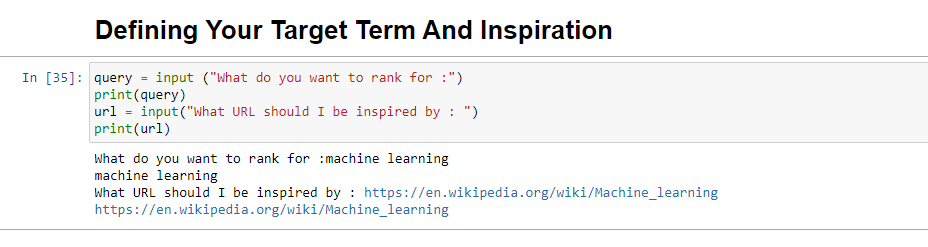
When run, this block will prompt the user (probably you) to enter the query you’d like the article to rank for/be about, as well as give you a place to put in the URL of an article you’d like your piece to be inspired by.
I’d suggest an article that ranks well, is in a format that will work for your site, and that you think is well-deserving of the rankings by the article’s value alone and not just the strength of the site.
When run, it will look like:
Step 2: Installing the required libraries
Next, we must install all the libraries we will use to make the magic happen.
!pip install google-cloud-language beautifulsoup4 openai
!pip install wandb --upgrade
!pip install --force-reinstall -Iv protobuf==3.20.00

import requests
import json
from bs4 import BeautifulSoup
from google.cloud import language_v1
from google.oauth2 import service_account
import os
import openai
import pandas as pd
import wandb
We’re installing the following libraries:
- Requests: This library allows making HTTP requests to retrieve content from websites or web APIs.
- JSON: It provides functions to work with JSON data, including parsing JSON strings into Python objects and serializing Python objects into JSON strings.
- BeautifulSoup: This library is used for web scraping purposes. It helps in parsing and navigating HTML or XML documents and extracting relevant information from them.
- Google.cloud.language_v1: It is a library from Google Cloud that provides natural language processing capabilities. It allows for the performing various tasks like sentiment analysis, entity recognition, and syntax analysis on text data.
- Google.oauth2.service_account: This library is part of the Google OAuth2 Python package. It provides support for authenticating with Google APIs using a service account, which is a way to grant limited access to the resources of a Google Cloud project.
- OS: This library provides a way to interact with the operating system. It allows accessing various functionalities like file operations, environment variables, and process management.
- OpenAI: This library is the OpenAI Python package. It provides an interface to interact with OpenAI’s language models, including GPT-4 (and 3). It allows developers to generate text, perform text completions, and more.
- Pandas: It is a powerful library for data manipulation and analysis. It provides data structures and functions to efficiently handle and analyze structured data, such as tables or CSV files.
- WandB: This library stands for “Weights & Biases” and is a tool for experiment tracking and visualization. It helps log and visualize the metrics, hyperparameters, and other important aspects of machine learning experiments.
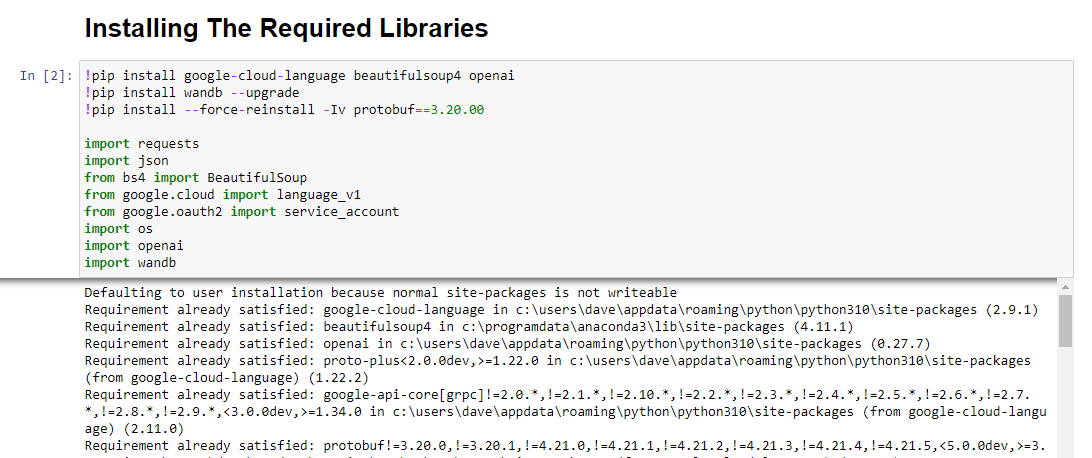
When run, it looks like this:
Get the daily newsletter search marketers rely on.
<input type=”hidden” name=”utmMedium” value=”“>
<input type=”hidden” name=”utmCampaign” value=”“>
<input type=”hidden” name=”utmSource” value=”“>
<input type=”hidden” name=”utmContent” value=”“>
<input type=”hidden” name=”pageLink” value=”“>
<input type=”hidden” name=”ipAddress” value=”“>
Step 3: Authentication
I’m going to have to sidetrack us for a moment to head off and get our authentication in place. We will need an OpenAI API key and Google Knowledge Graph Search credentials.
This will only take a few minutes.
Getting your OpenAI API
At present, you likely need to join the waitlist. I’m lucky to have access to the API early, and so I am writing this to help you get set up as soon as you get it.
The signup images are from GPT-3 and will be updated for GPT-4 once the flow is available to all.
Before you can use GPT-4, you’ll need an API key to access it.
To get one, simply head over to OpenAI’s product page, and click Get started.
Choose your signup method (I chose Google) and run through the verification process. You’ll need access to a phone that can receive texts for this step.
Once that’s complete, you’ll create an API key. This is so OpenAI can connect your scripts to your account.
They must know who’s doing what and determine if and how much they should charge you for what you’re doing.
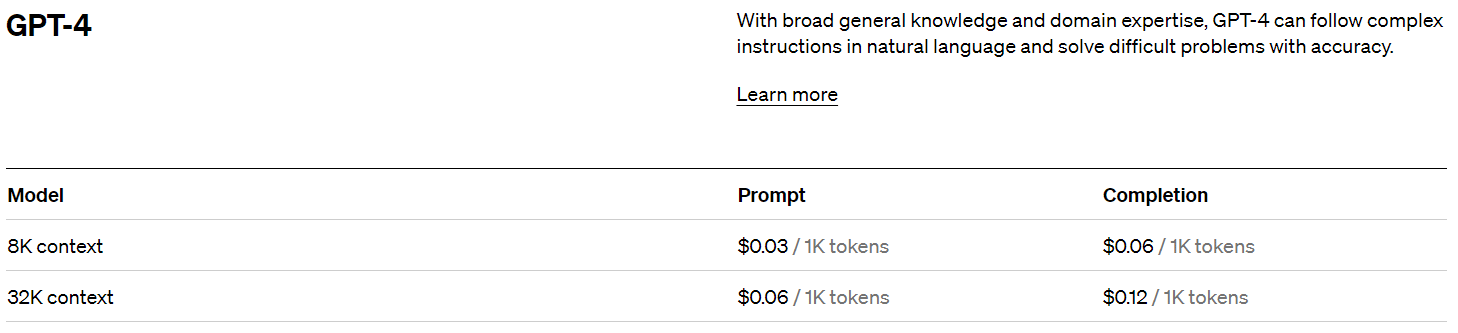
OpenAI pricing
Upon signing up, you get a $5 credit which will get you surprisingly far if you’re just experimenting.
As of this writing, the pricing past that is:
Creating your OpenAI key
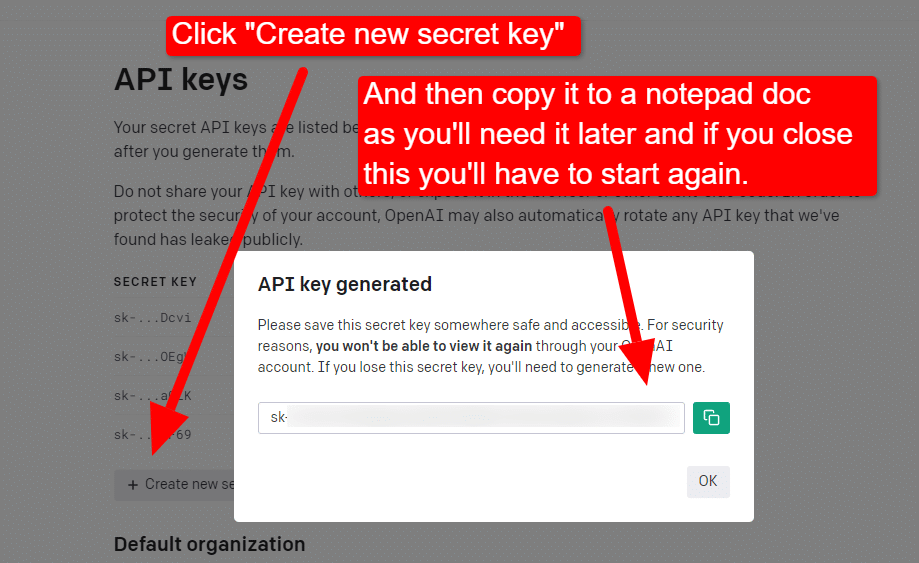
To create your key, click on your profile in the top right and choose View API keys.
…and then you’ll create your key.
Once you close the lightbox, you can’t view your key and will have to recreate it, so for this project, simply copy it to a Notepad doc to use shortly.
Note: Don’t save your key (a Notepad doc on your desktop is not highly secure). Once you’ve used it momentarily, close the Notepad doc without saving it.
Getting your Google Cloud authentication
First, you’ll need to log in to your Google account. (You’re on an SEO site, so I assume you have one.  )
)
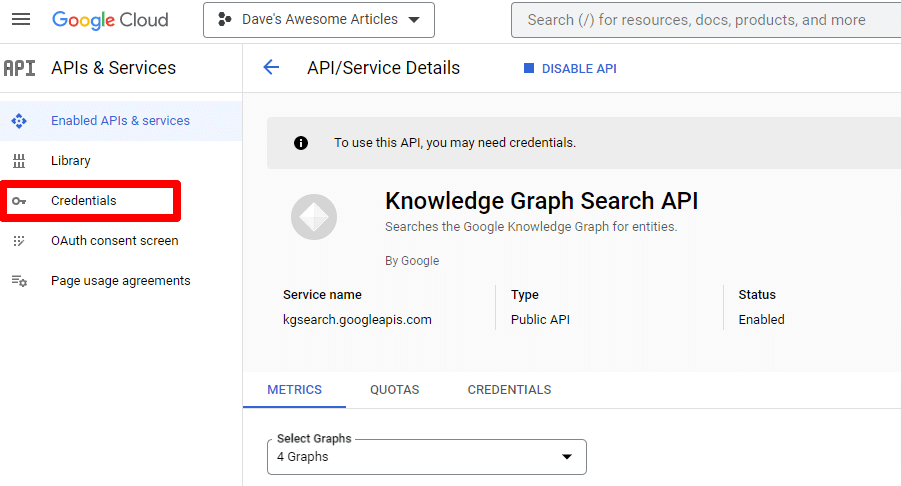
Once you’ve done that, you can review the Knowledge Graph API info if you feel so inclined or jump right to the API Console and get going.
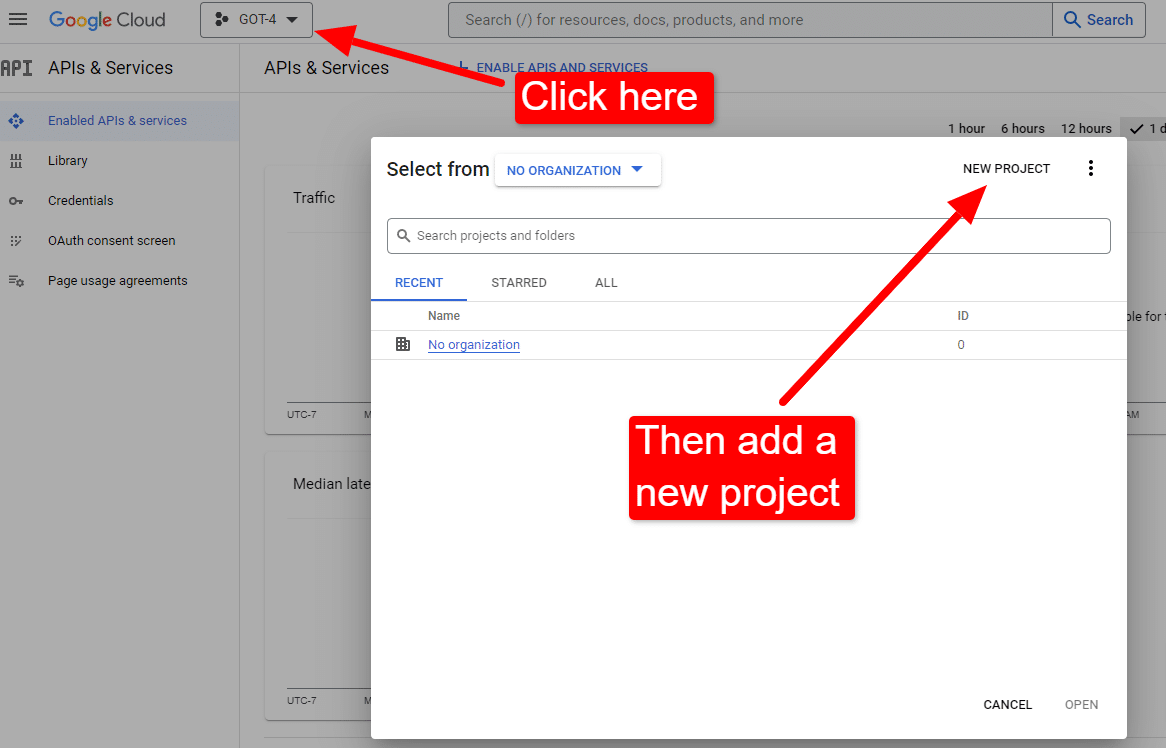
Once you’re at the console:
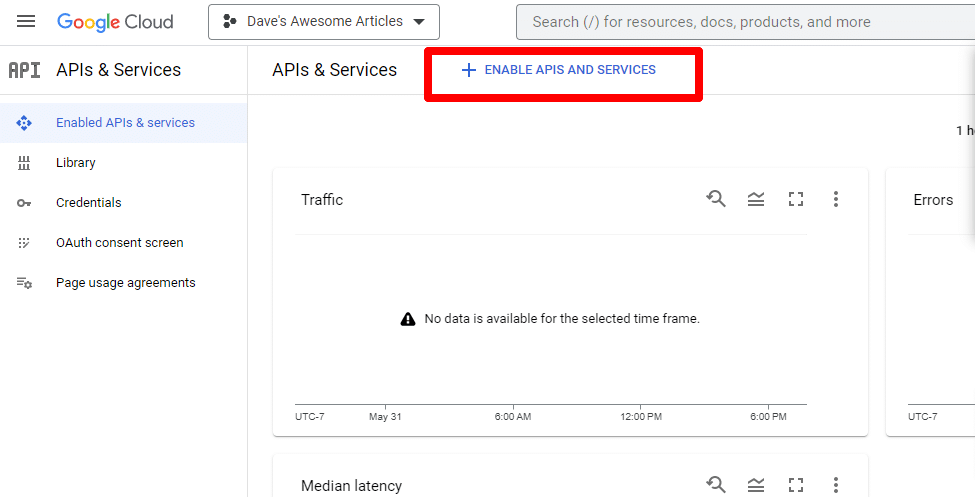
Name it something like “Dave’s Awesome Articles.” You know… easy to remember.
Next, you’ll enable the API by clicking Enable APIs and services.
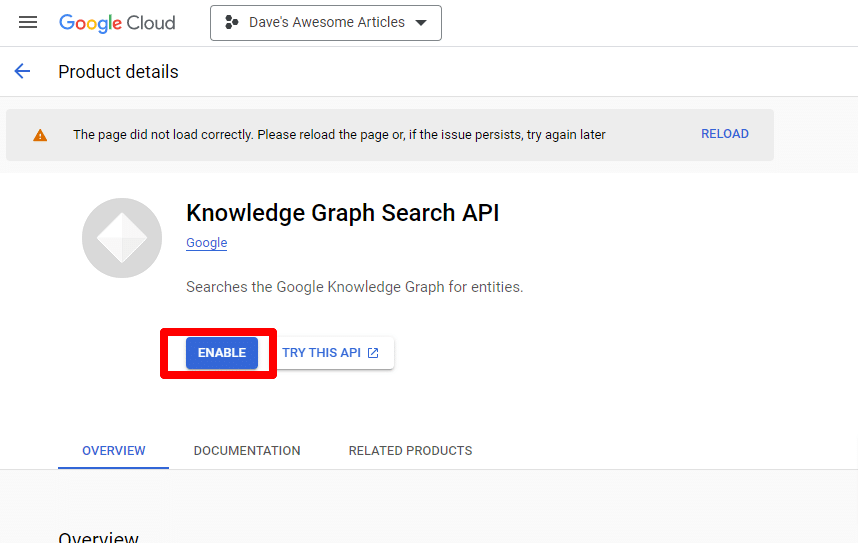
Find the Knowledge Graph Search API, and enable it.
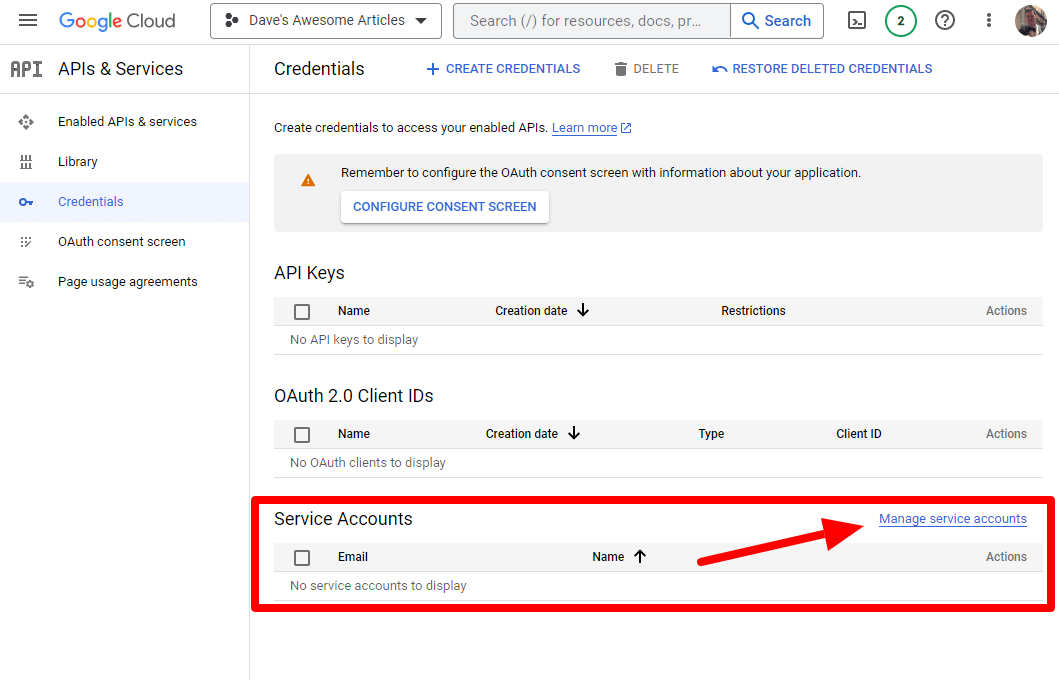
You’ll then be taken back to the main API page, where you can create credentials:
And we’ll be creating a service account.
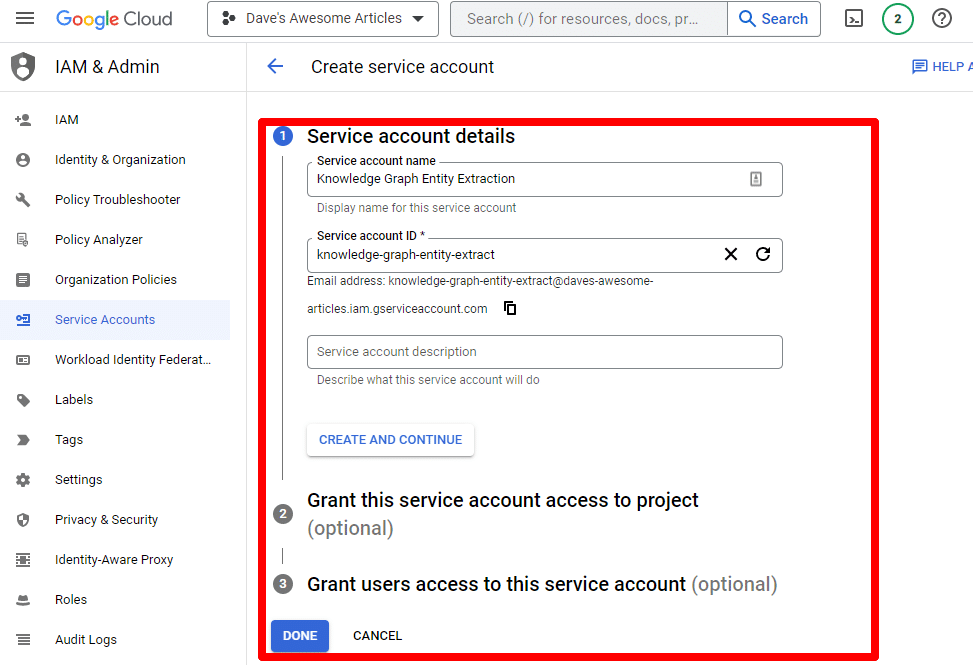
Simply create a service account:
Fill in the required information:
(You’ll need to give it a name and grant it owner privileges.)
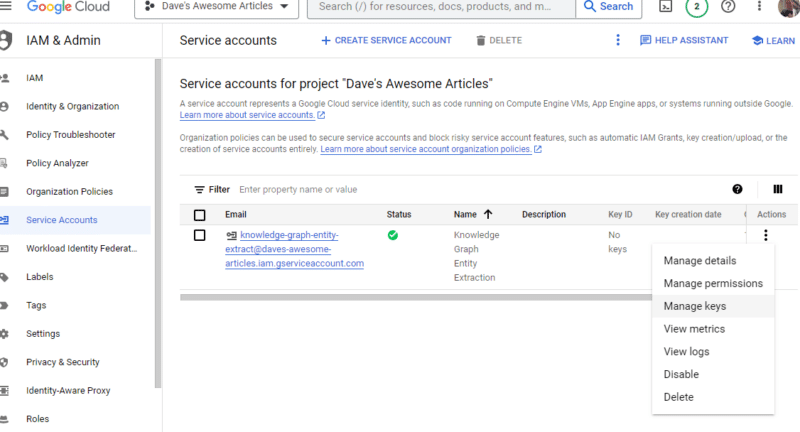
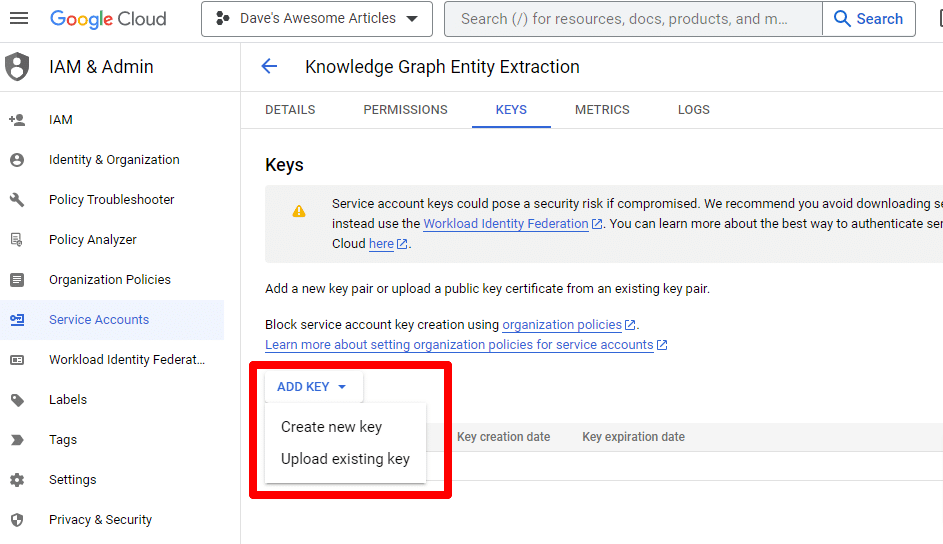
Now we have our service account. All that’s left is to create our key.
Click the three dots under Actions and click Manage keys.
Click Add key then Create new key:
The key type will be JSON.
Immediately, you’ll see it download to your default download location.
This key will give access to your APIs, so keep it safe, just like your OpenAI API.
Alright… and we’re back. Ready to continue with our script?
Now that we have them, we need to define our API key and path to the downloaded file. The code to do this is:
os.environ['GOOGLE_APPLICATION_CREDENTIALS'] = '/PATH-TO-FILE/FILENAME.JSON'
%env OPENAI_API_KEY=YOUR_OPENAI_API_KEY
openai.api_key = os.environ.get("OPENAI_API_KEY")
You will replace YOUR_OPENAI_API_KEY with your own key.
You will also replace /PATH-TO-FILE/FILENAME.JSON with the path to the service account key you just downloaded, including the file name.
Run the cell and you’re ready to move on.
Step 4: Create the functions
Next, we’ll create the functions to:
- Scrape the webpage we entered above.
- Analyze the content and extract the entities.
- Generate an article using GPT-4.
#The function to scrape the web page
def scrape_url(url):
    response = requests.get(url)
    soup = BeautifulSoup(response.content, "html.parser")
    paragraphs = soup.find_all("p")
    text = " ".join([p.get_text() for p in paragraphs])
    return text
#The function to pull and analyze the entities on the page using Google's Knowledge Graph API
def analyze_content(content):
    client = language_v1.LanguageServiceClient()
    response = client.analyze_entities(
        request={"document": language_v1.Document(content=content, type_=language_v1.Document.Type.PLAIN_TEXT), "encoding_type": language_v1.EncodingType.UTF8}
    )
    top_entities = sorted(response.entities, key=lambda x: x.salience, reverse=True)[:10]
    for entity in top_entities:
        print(entity.name)
    return top_entities
#The function to generate the content
def generate_article(content):
    openai.api_key = os.environ["OPENAI_API_KEY"]
    response = openai.ChatCompletion.create(
        messages = [{"role": "system", "content": "You are a highly skilled writer, and you want to produce articles that will appeal to users and rank well."},
                  {"role": "user", "content": content}],
        model="gpt-4",
        max_tokens=1500, #The maximum with GPT-3 is 4096 including the prompt
        n=1, #How many results to produce per prompt
        #best_of=1 #When n>1 completions can be run server-side and the "best" used
        stop=None,
        temperature=0.8 #A number between 0 and 2, where higher numbers add randomness
)
    return response.choices[0].message.content.strip()
This is pretty much exactly what the comments describe. We’re creating three functions for the purposes outlined above.
Keen eyes will notice:
messages = [{"role": "system", "content": "You are a highly skilled writer, and you want to produce articles that will appeal to users and rank well."},
You can edit the content (You are a highly skilled writer, and you want to produce articles that will appeal to users and rank well.) and describe the role you want ChatGPT to take. You can also add tone (e.g., “You are a friendly writer …”).
Step 5: Scrape the URL and print the entities
Now we’re getting our hands dirty. It’s time to:
- Scrape the URL we entered above.
- Pull all the content that lives within paragraph tags.
- Run it through Google Knowledge Graph API.
- Output the entities for a quick preview.
Basically, you want to see anything at this stage. If you see nothing, check a different site.
content = scrape_url(url)
entities = analyze_content(content)
You can see that line one calls the function that scrapes the URL we first entered. The second line analyzes the content to extract the entities and key metrics.
Part of the analyze_content function also prints a list of the entities found for quick reference and verification.
Step 6: Analyze the entities
When I first started playing around with the script, I started with 20 entities and quickly discovered that’s usually too many. But is the default (10) right?
To find out, we’ll write the data to W&B Tables for easy assessment. It’ll keep the data indefinitely for future evaluation.
First, you’ll need to take about 30 seconds to sign up. (Don’t worry, it’s free for this type of thing!) You can do so at https://wandb.ai/site.
Once you’ve done that, the code to do this is:
run = wandb.init(project="Article Summary With Entities")
columns=["Name", "Salience"]
ent_table = wandb.Table(columns=columns)

for entity in entities:
    ent_table.add_data(entity.name, entity.salience)

run.log({"Entity Table": ent_table})
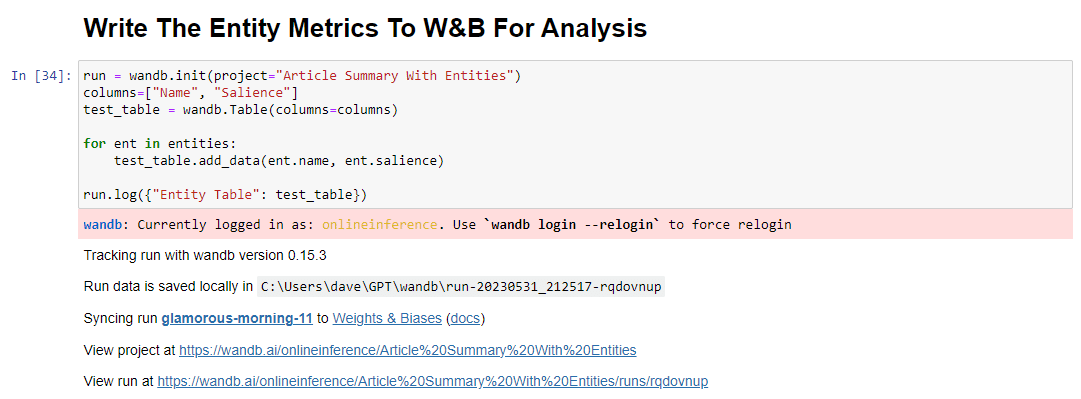
wandb.finish()
When run, the output looks like this:
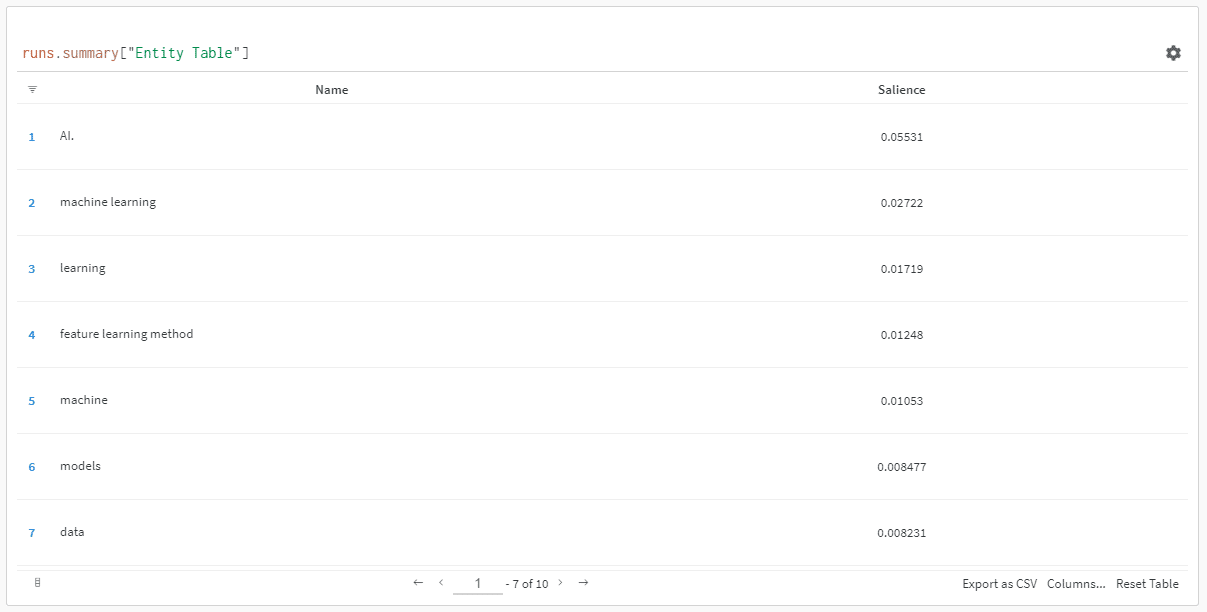
And when you click the link to view your run, you’ll find:
You can see a drop in salience score. Remember that this score calculates how important that term is to the page, not the query.
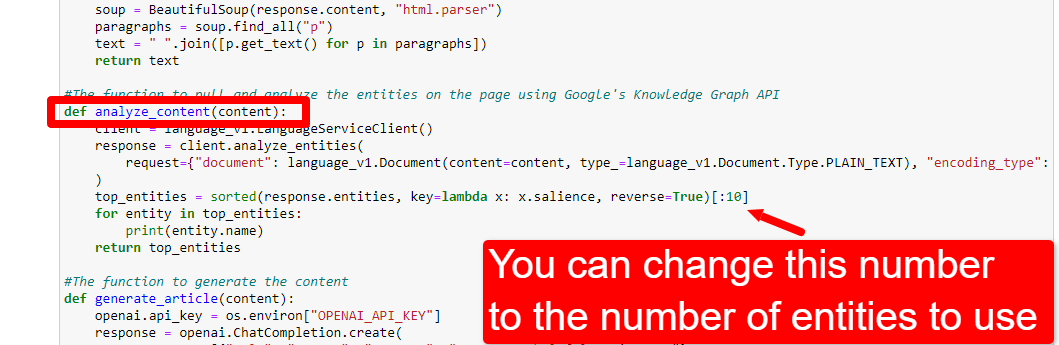
When reviewing this data, you can choose to adjust the number of entities based on salience, or just when you see irrelevant terms pop up.
To adjust the number of entities, you’d head to the functions cell and edit:
You’ll then need to run the cell again and the one you ran to scrape and analyze the content to use the new entity count.
Step 7: Generate the article outline
The moment you’ve all been waiting for, it’s time to generate the article outline.
This is done in two parts. First, we need to generate the prompt by adding the cell:
entity_names = [entity.name for entity in entities]
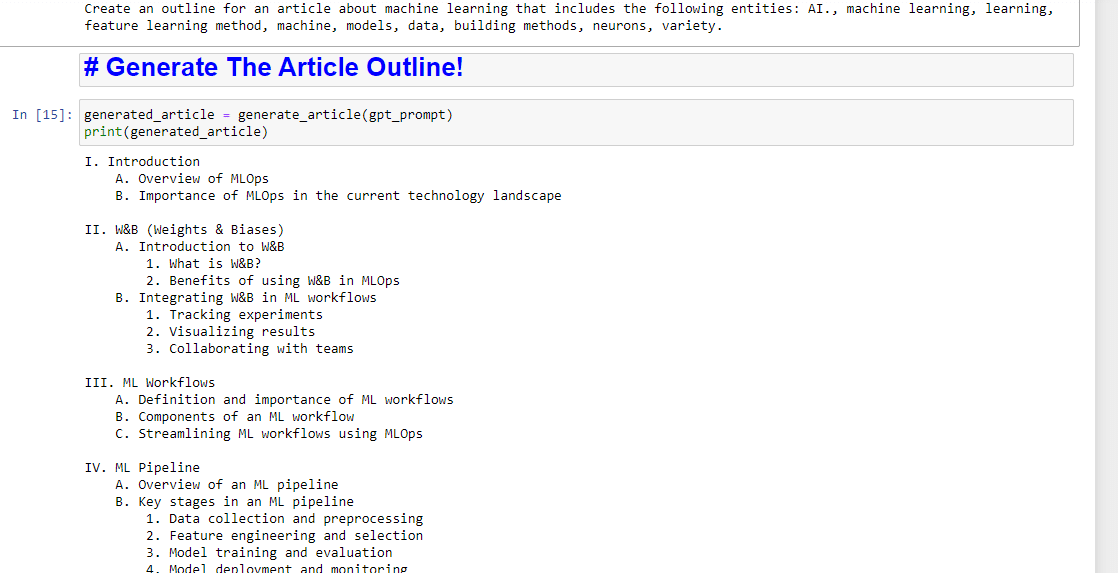
gpt_prompt = f"Create an outline for an article about {query} that includes the following entities: {', '.join(entity_names)}."
print(gpt_prompt)
This essentially creates a prompt to generate an article:
And then, all that’s left is to generate the article outline using the following:
generated_article = generate_article(gpt_prompt)
print(generated_article)
Which will produce something like:
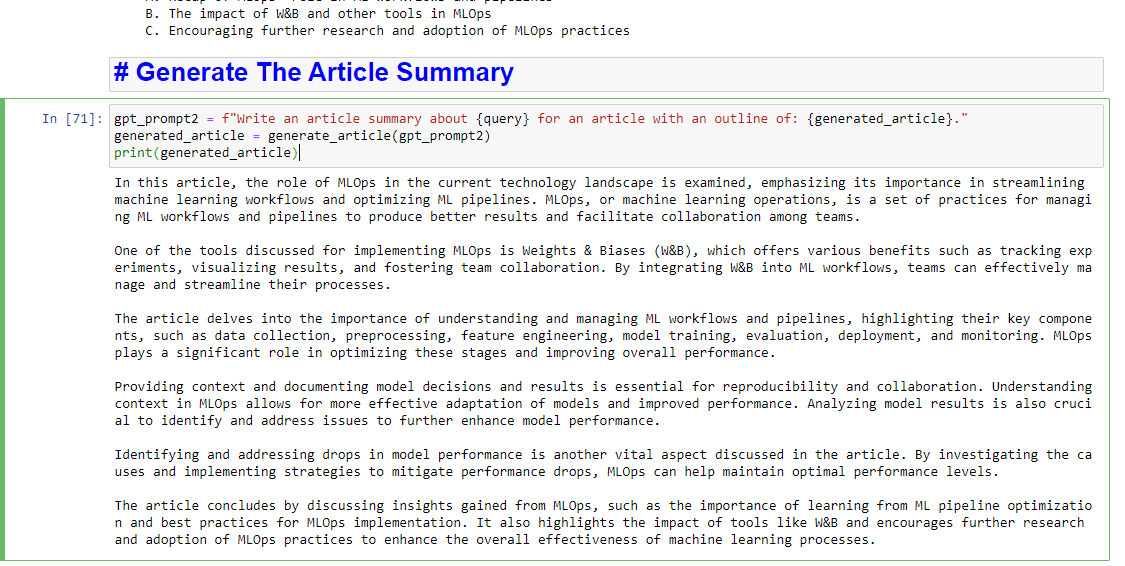
And if you’d also like to get a summary written up, you can add:
gpt_prompt2 = f"Write an article summary about {query} for an article with an outline of: {generated_article}."
generated_article = generate_article(gpt_prompt2)
print(generated_article)
Which will produce something like:
The post How to use Google entities and GPT-4 to create article outlines appeared first on Search Engine Land.
Courtesy of Search Engine Land: News & Info About SEO, PPC, SEM, Search Engines & Search Marketing
Tuesday, June 6th, 2023
Microsoft Advertising will only show ads from verified advertisers, starting Aug. 1, the company announced.
Why we care. If you haven’t completed the Microsoft Ads verification requirements, you’ll need to do so before Aug. 1 to avoid any ad delivery interruptions.
Timeline. The Microsoft Ads Advertiser Identity Verification program was announced in June 2022. Key upcoming dates to know:
- July 1: New advertisers must be verified before Microsoft will serve any ads.
- July 15: Contact Microsoft support if your account isn’t verified and you haven’t received an email from Microsoft about account verification.
- Aug. 1: Microsoft Advertising will only serve ads from verified advertisers.
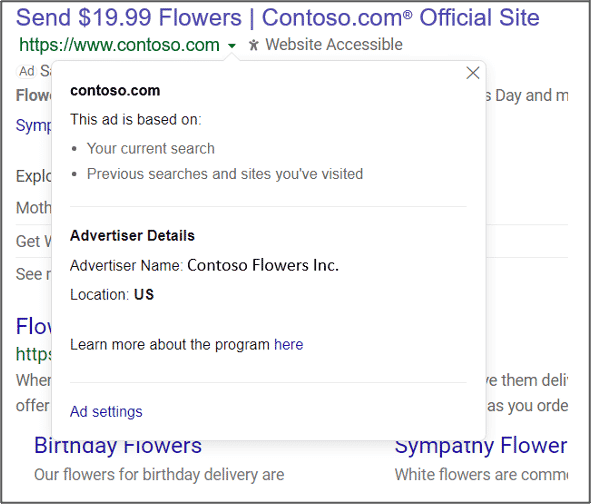
What users will see. All ads will show:
- The advertiser’s name and location.
- The business or individual paying for the ad.
- Information about why they’re seeing an ad (e.g., targeting parameters).
Here’s what it looks like:
New Ad Library. Microsoft Advertising also announced it is launching a new Ad Library:
- “All users will be able to view ads shown on Bing which have any impressions in the European Union. Users can search for ads in the Ad Library via the advertiser’s name or words in the ad creative. The advertiser’s details will be displayed in the Ad Library.”
Identity verification help. You can read the official help documentation here.
The post Microsoft will only show ads from verified advertisers starting Aug. 1 appeared first on Search Engine Land.
Courtesy of Search Engine Land: News & Info About SEO, PPC, SEM, Search Engines & Search Marketing
Tuesday, June 6th, 2023
Creators who meet certain eligibility requirements can now apply to join TikTok’s premium content feature, Series.
Who is now eligible. Creators must be at least 18 years old and have:
- An account that is at least 30 days old.
- Posted four or more public videos in the last 30 days.
- At least 1,000 “authentic” video views in the last 30 days.
- 10,000 or more followers.
- If you have less than 10,000 followers but meet the other criteria, you can apply by providing a link to premium content you’ve previously sold on other platforms via TikTok’s Creator Center.
The announcement. It was added today as an update to TikTok’s original announcement of Series.
What is Series. One TikTok Series can consist of up to 80 videos, each up to 20 minutes long. TikTok creators can set their own prices, anywhere from $1 to $190. All the content in a TikTok Series is behind a paywall.
Why we care. Creators now potentially have a new revenue stream, that rewards them for creating higher-quality content that attracts more viewers.
Dig deeper in TikTok introduces a “Series” feature enabling creators to sell premium episodes.
The post TikTok opens its premium content feature, Series, to more creators appeared first on Search Engine Land.
Courtesy of Search Engine Land: News & Info About SEO, PPC, SEM, Search Engines & Search Marketing
Tuesday, June 6th, 2023
Google Ads advertisers were unable to access Google Ads for nearly two hours today, starting around 9:10 am ET. (This issue has now been fixed and our story updated, see our Postscripts.)
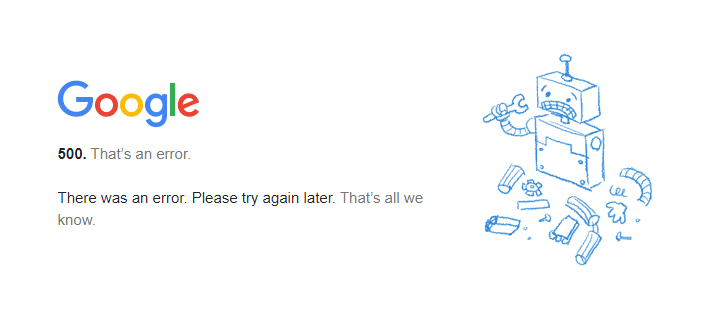
The issue Advertisers who were trying to log in to manage their accounts saw a 500 server status error.
That’s an error. A flurry of complaints on Twitter are collected here. Here’s a screenshot of the error advertisers saw when trying to access their accounts:
ETA. Frustratingly, the Google Ads status dashboard showed no issues during the outage. So advertisers never got an estimated time for a fix from Google.
Why we care. If you are worried, just know, you are not alone. Everyone cannot access the Google Ads system. Try back in an hour or so and hopefully access will be restored.
Postscript. Ginny Marvin, Google’s Ad Liasion, tweeted about the issue at 10:15 am ET:
- “We’re investigating reports of an issue with Google Ads. We will provide more information shortly. The affected users are unable to access Google Ads.”
We're investigating reports of an issue with Google Ads. We will provide more information shortly. The affected users are unable to access Google Ads. Please see the dashboard for updates: https://t.co/EnkDDMtimZ
— AdsLiaison (@adsliaison) June 6, 2023
There also appear to be issues with Google Merchant Center, according to Google, probably related to this.
Postscript 2. Update at 10:50am ET: Google seems to have fixed the issue, I am now able to log in.
Postscript 3. At 12:20 p.m. ET, The following was posted on the Google Ads Status Dashboard:
- “This issue has now been fully mitigated as of 8AM PST June 6th 2023. At this time, we do not have additional details to provide, but our teams are working to identify impact with high priority and will provide more details when available.”
The post Google fixes issue that took down Ads for about 2 hours appeared first on Search Engine Land.
Courtesy of Search Engine Land: News & Info About SEO, PPC, SEM, Search Engines & Search Marketing
Monday, June 5th, 2023
The clock is ticking for search marketers: July 1st marks the long-anticipated (read: dreaded?) forced switch to GA4, the 2023 Google Marketing Livestream has come and gone (what are the implications?), and generative AI is taking the world by storm (now is the time to pounce!).
Join thousands of search marketers online next week for SMX Advanced — June 13 and 14 — to learn expert-level, actionable tactics that will help you take advantage of the latest trends in search marketing and stay a cut above the competition.
Your FREE All Access pass unlocks two exclusive keynotes with Microsoft and Google, plus nearly 60 tactic-rich sessions, Overtimes live Q&As, engaging demos, and invigorating Coffee Talk meetups – all exploring the latest search marketing issues, from leveraging generative AI to bolster PPC productivity to confidently configuring GA4 for your business needs. See the complete agenda!
 You’ll jumpstart your SMX experience with a straight-from-the-source keynote featuring Cathy Edwards, VP of Google Search, and Michael Schechter, Vice President of Bing Growth and Distribution at Microsoft. Together with Search Engine Land’s own Barry Schwartz, they will discuss how Google and Bing are incorporating generative and conversational AI into their search engines and what it means for SEOs.
Bonus: Join Barry Schwartz and Greg Sterling on Day 2 for a just-announced live demo of the new Bing and Google Search Generative Experience! Bring your queries to this highly-engaging demo, and Barry and Greg will input them live.
Day 2 will kick off with another conversational AI keynote featuring Kya Sainbury-Carter, Corporate Vice President at Microsoft Advertising. Kya and Search Engine Land contributor Greg Finn will explore the impact of conversational search on PPC and how you can adapt your PPC strategies to remain competitive.
After two days of intense training, you’ll be ready to…
- Limit volatility during future major algorithm updates
- Effectively use AI to create high-quality content
- Drive up indexing for maximum content visibility
- Create compelling ad copy that resonates with your audience
- Test different RSAs to increase your revenue
- Leverage AI plug-ins to automate and scale PPC efforts
- Restrict spam and bot form submissions to improve lead quality
… and much more. Don’t miss your final chance in 2023 to attend the only search marketing conference designed by advanced search marketers for advanced search marketers. You and your career deserve this! Secure your free All Access pass now!
Psst… Think you have what it takes to be an “award-winning” search marketer? Enter the 2023 Search Engine Land Awards for your chance to boost team morale, attract new business, and stand apart from the competition!
The post SMX Advanced is online next week… don’t miss out! appeared first on Search Engine Land.
Courtesy of Search Engine Land: News & Info About SEO, PPC, SEM, Search Engines & Search Marketing