Archive for the ‘seo news’ Category
Thursday, June 29th, 2023
Buy on Google for Search and Shopping will shut down Sept. 26, the company announced today via an email sent to participating retailers.
Why we care. Google says it is dropping Buy on Google to create a new “streamlined buying journey for shoppers” that makes it easier for retailers to sell on Google and YouTube.
What Google is saying. A Google spokesperson told Search Engine Land:
- “Our goal is to support an open ecosystem by connecting shoppers directly with merchants, and this is a big priority for us. We developed a new streamlined checkout process that allows shoppers to go directly from Google to the checkout flow on a merchant’s website when they’re ready to buy. We’ve received great feedback from merchants and users. Buy on Google was a small feature that a very limited number of merchants used, so we’re investing in this new buying experience instead.”
New pilot. We’re told that more merchants are already using Google’s new checkout pilot than Buy on Google. Google has created a new form if you’re interested in the new checkout pilot.
Here’s what we know about Google’s plan for a “more streamlined buying journey for shoppers,” according to this page:
- “Instead of a multi-step buying journey, people who are ready to buy will now have the option to go directly from Google to the checkout flow on your website. Once there, they will see the chosen product already in their shopping cart and can checkout on your site with whatever payment method they select. We will be piloting this experience on Google and YouTube with select merchants and will share more information as we’re ready to take on additional partners.”
The email. Here’s a copy of an email Google is sending to merchants today:
Building great checkout experiences is something we’re focused on, and are always evolving. We’re writing to inform you that, as of September 26, 2023, the current Buy on Google program will be ending in the United States. We have some new channels that we’re excited to be testing (more info below), however, we wanted to share some key details about Buy on Google.
- Your participation in Buy on Google will end on September 26, 2023 and no listings on Search or Shopping will show the Buy on Google option. If you are currently onboarding, you will be removed from the process today.
- All orders received through September 2023 should be fulfilled with return policies honored, regardless of program termination.
- You have the option to terminate your participation in the program sooner than September if you feel this choice is more beneficial for your business. Please reach out to support for assistance with doing this.
- Order data will be available for one year post program ending. You can access your reports via the instructions here.
- No action is required from you to end the program.
We will continue to introduce new ways to optimize the way users navigate to checkout on our platforms, and look forward to continued engagement with our retail partners on other products such as our new checkout pilot and all other areas of collaboration through our tools, insights and training.
We’re excited about the streamlined checkout experience we introduced last year, wherein consumers who are ready to buy will have the option to go directly from a listing on Google to the checkout flow on your website. Once there, they will see the chosen product already in their shopping cart and can checkout on your site with whatever payment method they select. *Merchants using the new Google checkout feature see an improvement in gross merchandise value (GMV) between 1-10%
- *Source: Google Data, US, Retail, March 2023. [Caveat: Data pulled for existing pilot merchants]
Learn More:
- If you are interested in joining the checkout pilot, please complete the interest form here.
- Please note, if you are selected to join the checkout pilot ahead of September, any current Buy on Google experiences you have running will stop showing effective immediately.
- For those not selected to participate in the pilot, we will reach out to you once the solution is more widely available so you can onboard then!
For any questions or support regarding terminating your participation, please contact our support team or reach out to your Google contact.
The post Buy on Google program to shut down Sept. 26 appeared first on Search Engine Land.
Courtesy of Search Engine Land: News & Info About SEO, PPC, SEM, Search Engines & Search Marketing
Thursday, June 29th, 2023
Starting July 1, Universal Analytics will no longer collect data. B2B companies looking to track their web or app performance must use Google Analytics 4 (GA4).
GA4 provides extensive capabilities for visualizing and analyzing data.
To avoid being overwhelmed by the abundance of data, it is crucial to fully understand the tool and determine key metrics for your business. This ensures effective measurement of web traffic in GA4.
This guide explores how to set up and track events and conversions for B2B companies.
How to measure web traffic through GA4?
To properly analyze website traffic in GA4, the first thing to understand is GA4’s acquisition reports, which are divided into two main groups with different purposes:
- User acquisition report: This report provides insights into how users were acquired and captured for the first time on the website.
- Traffic acquisition report: This report operates at the session level and helps identify the campaign from which each session comes from.
Hence, companies, whether B2B, ecommerce or SaaS, can use these reports to analyze the sources of users or traffic on their websites.
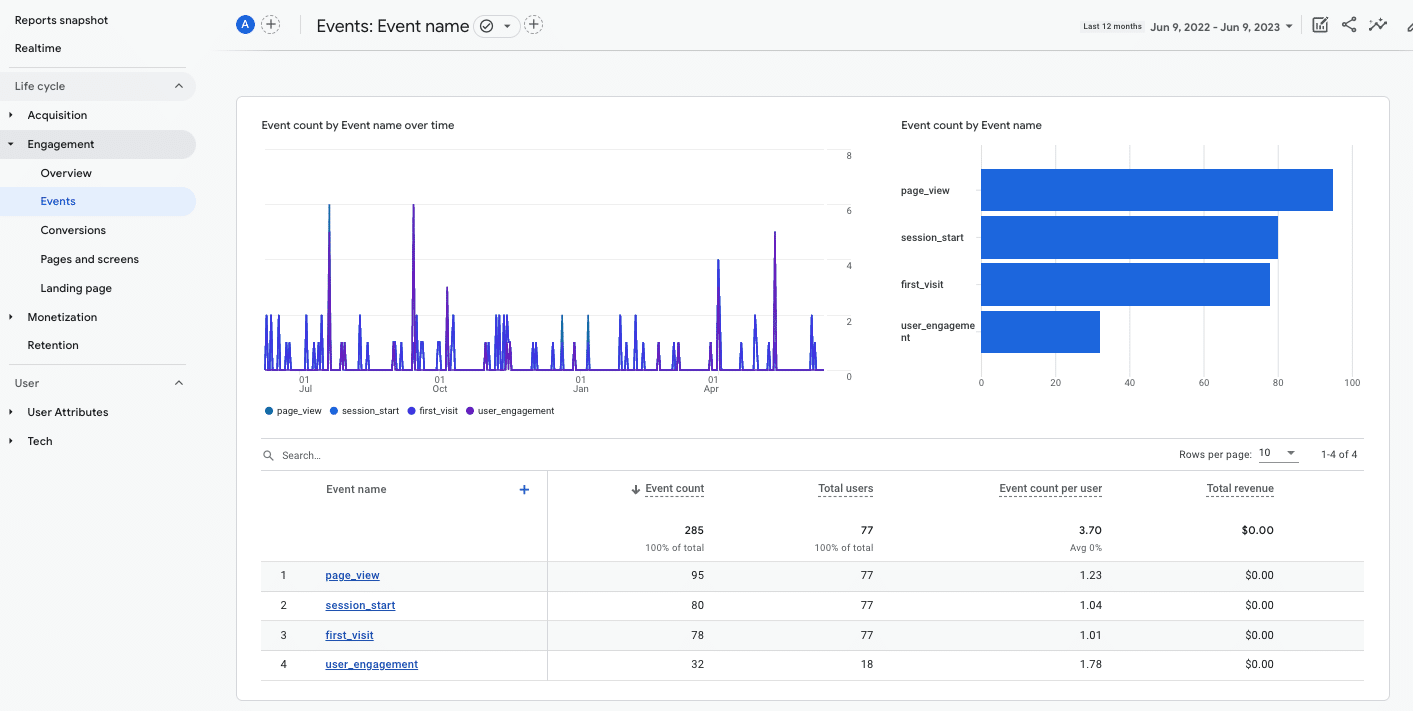
However, the situation changes when you move on to the next report provided by GA4, the Engagement report, which enables you to analyze events and conversions.
By default, the tool offers a wide list of events on our website. While they may all look useful, not all are equally important.
So, how do you identify the most valuable events for B2B companies and properly measure them? Let’s find out.
How to track events and conversions in GA4 for B2B companies
Define key KPIs for your business
To effectively track the main conversions on a B2B website, the first step is to define the most relevant KPIs for the company.
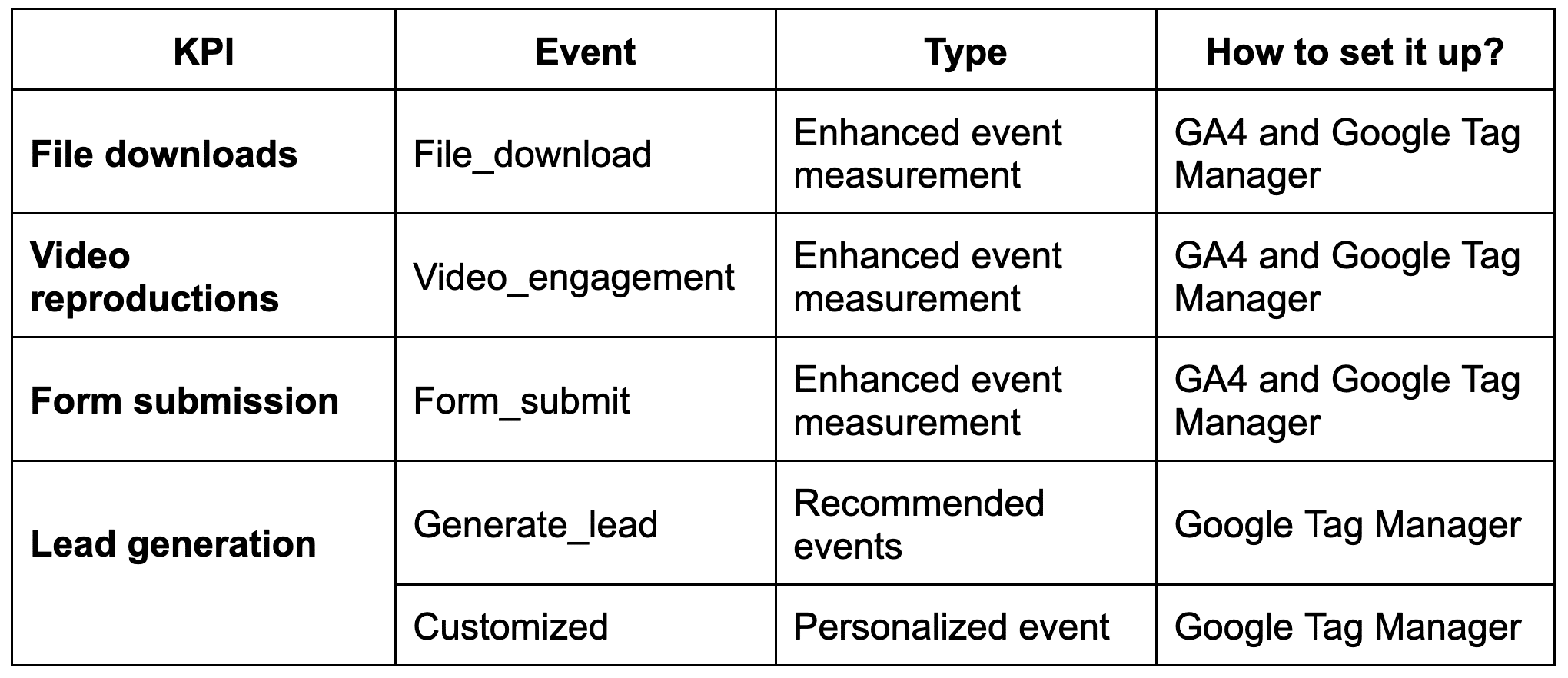
Generally, the main conversions for B2B companies include:
- Form submissions (requests, budgets, etc.)
- Lead generation (newsletter subscriptions, calls, information requests, etc.)
- File downloads (handbooks, instructions, technical data sheets, etc.)
- Video reproductions (videos on machinery operation, maintenance, installation processes, etc.)
When visualizing the events or conversions report for the first time, you’ll notice that GA4 records different events.
However, none correspond to the defined KPIs for a B2B website.
To track the main conversions for your B2B company, you need to identify each type of event and set it up.
GA4 event classification
In GA4:
- Events are the metrics that allow you to measure specific user interactions on a website, such as loading a page, clicking on a link or submitting a form.
- Conversions are the most important events for a website that you want to highlight.
There are four ways of classifying how to measure events in GA4:
- Events that are recorded automatically, which are subdivided into:
- Recommended events: Events you can implement yourself with predefined names and parameters. You will mostly do it through Google Tag Manager.
- Custom events: Events that are fully defined by the owner through Google Tag Manager.
It is best to follow the GA4 event classification guidelines to create your website’s own events. You can also create them in a recommended or customized way using Google Tag Manager.
Get the daily newsletter search marketers rely on.
<input type=”hidden” name=”utmMedium” value=”“>
<input type=”hidden” name=”utmCampaign” value=”“>
<input type=”hidden” name=”utmSource” value=”“>
<input type=”hidden” name=”utmContent” value=”“>
<input type=”hidden” name=”pageLink” value=”“>
<input type=”hidden” name=”ipAddress” value=”“>
From the KPI to the event: How to configure events in GA4 for B2B
Once you have defined the main KPIs for your B2B company, you need to identify the event to collect and learn how to set it up accurately.
Key events for B2B websites are not automatically triggered. They need to be tracked using GA4 and Google Tag Manager.
Let’s take a closer look at each one.
File downloads
Need to track when a user opens or downloads a file (such as a product manual or datasheet) from the website?
One of the best solutions is to use the enhanced measurement event called file_download.
This event is triggered when a user clicks a link to a file with common file extensions such as documents, text files, executables, presentations, compressed files, videos, or audios.
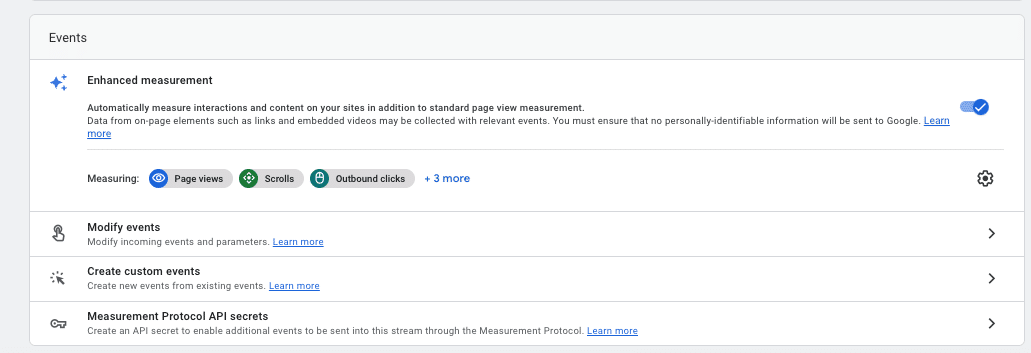
To activate this event, go to Admin > Data Streams, select the data, and enable Enhanced measurement.
Then, check if the File downloads event is activated.
Google Analytics 4 triggers the file_download event when the clicked file extensions match the following regex:
pdf|xlsx?|docx?|txt|rtf|csv|exe|key|pp(s|t|tx)|7z|pkg|rar|gz|zip|avi|mov|mp4|mpe?g|wmv|midi?|mp3|wav|wma
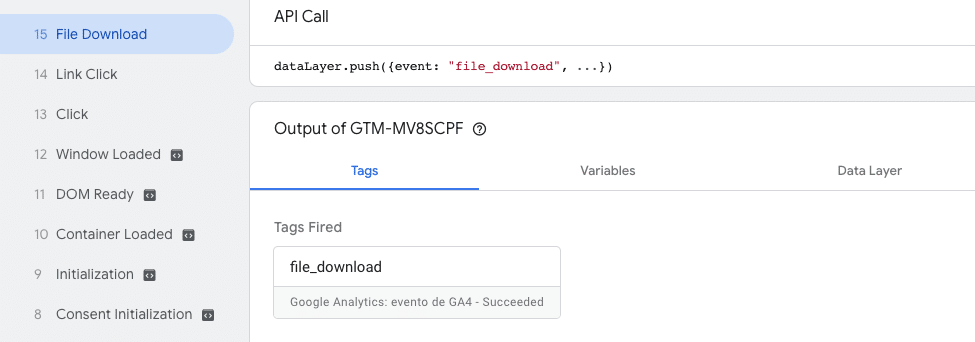
To check if it is triggered correctly, go to DebugView (Admin > DebugView):
If the event is being tracked, everything works as intended.
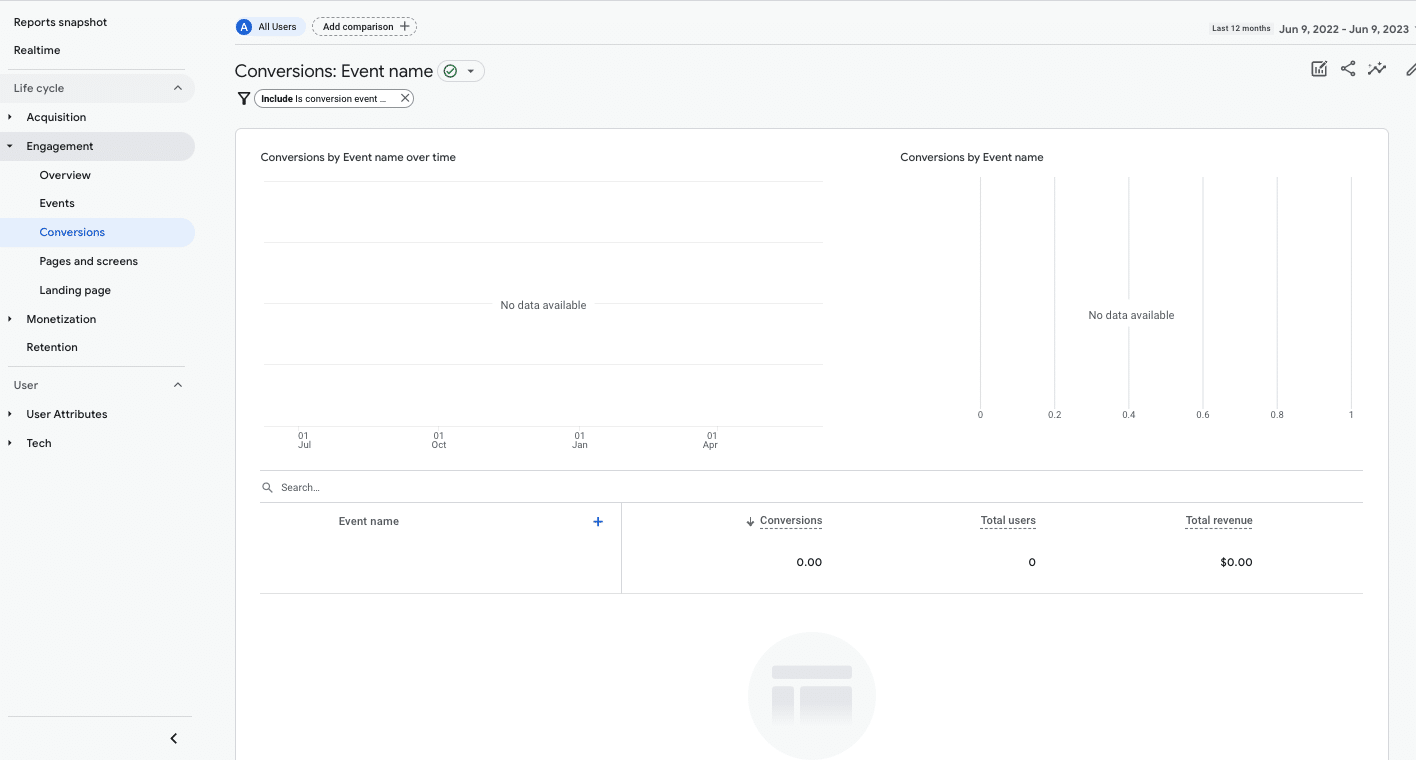
You can now mark it as a conversion so that the results for this metric will appear in the events and conversions reports.
To mark the event as a conversion, go to Admin > Conversions.
After marking it as a conversion, when you validate using DebugView, the event will no longer appear in blue as a general event.
Instead, it will appear in green, indicating it has been marked as a conversion.
Triggering file download events via Google Tag Manager
The event may not be triggered correctly depending on the website’s CMS or how it is coded.
In such cases, you’ll need to create a trigger using Google Tag Manager. (You must have a Tag Manager account set up and linked to GA4.)
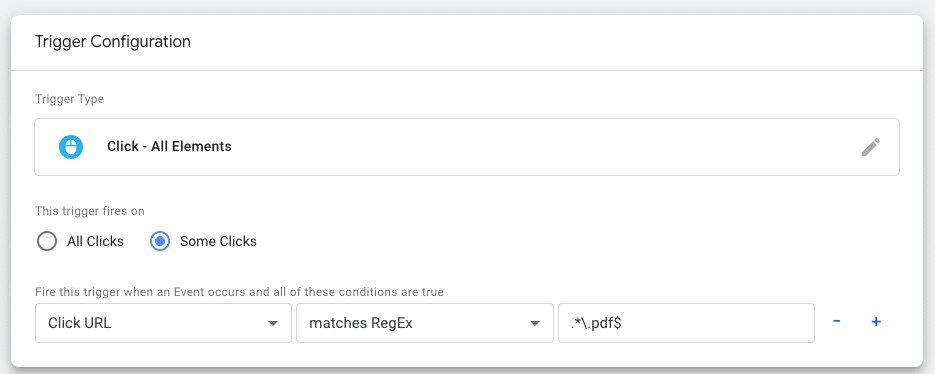
A trigger for when the file is clicked: You will configure the necessary parameters to track file downloads on our website.
For example, in the case of a PDF file, you can do it as in the following image:
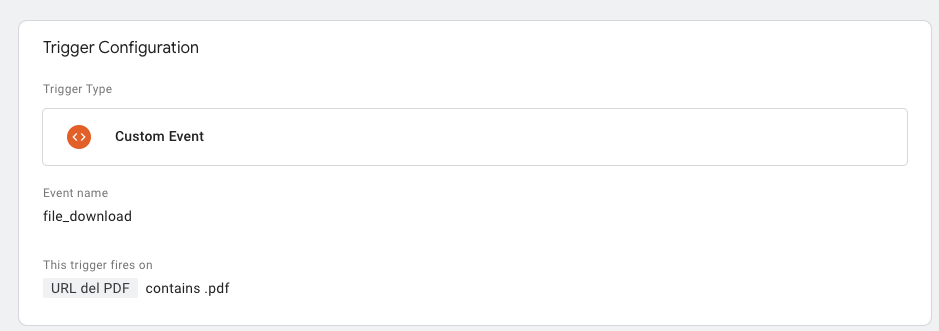
A customized trigger: If the previous method doesn’t work, you will create a custom event based on web insights. For instance:
Finally, create the tag with the necessary parameters, either based on your own judgment or following GA4’s recommendations for this event.
Once the tag is created, analyze and verify that the event is correctly triggered.
This step ensures that the event tracking functions as expected and the data is accurately recorded.
The parameters associated with the event will provide you with additional information about how users interact with the website through these events. It helps you gain insights into user behavior and engagement.
Every time you include events via Google Tag Manager, you must add them to GA4 through the Admin > Custom definitions section.
Video reproductions
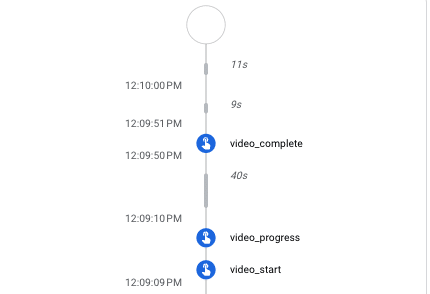
Want to track interactions with videos on the site? You can use the video engagement event, which is also an enhanced measurement event.
This event is activated in phases:
- video_start: When the video starts playing.
- video_progress: When the video progresses past 10%, 25%, 50%, and 75% duration time.
- video_complete: When the video ends.
To set up the tracking, check if Enhanced measurement is enabled and ensure that the Video engagement event is enabled within it.
Next, verify if the tracking of the video engagement event is properly monitored and recorded.
If it works successfully, activate it as a conversion.
However, if the data is not collected correctly, you need to trigger it via Google Tag Manager.
Form submission
To monitor form submissions, such as requests for quotations or to ask for more information, use the enhanced measurement event: form_submit.
Check if Form interactions is enabled in Enhanced measurement.
If it is being registered correctly via DebugView, you can configure it as a conversion.
Form submits via Google Tag Manager
If, for some reason, the event is not triggered, you can set it up through Google Tag Manager.
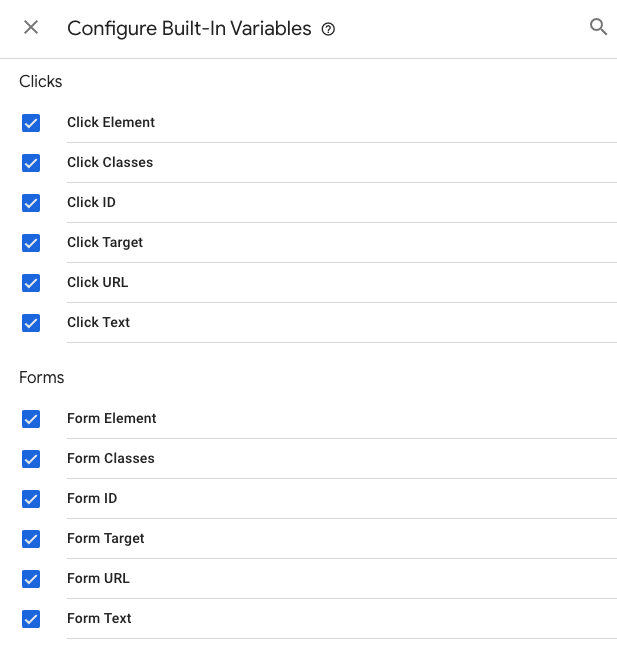
To do so, activate all the variables to collect the required data for forms.
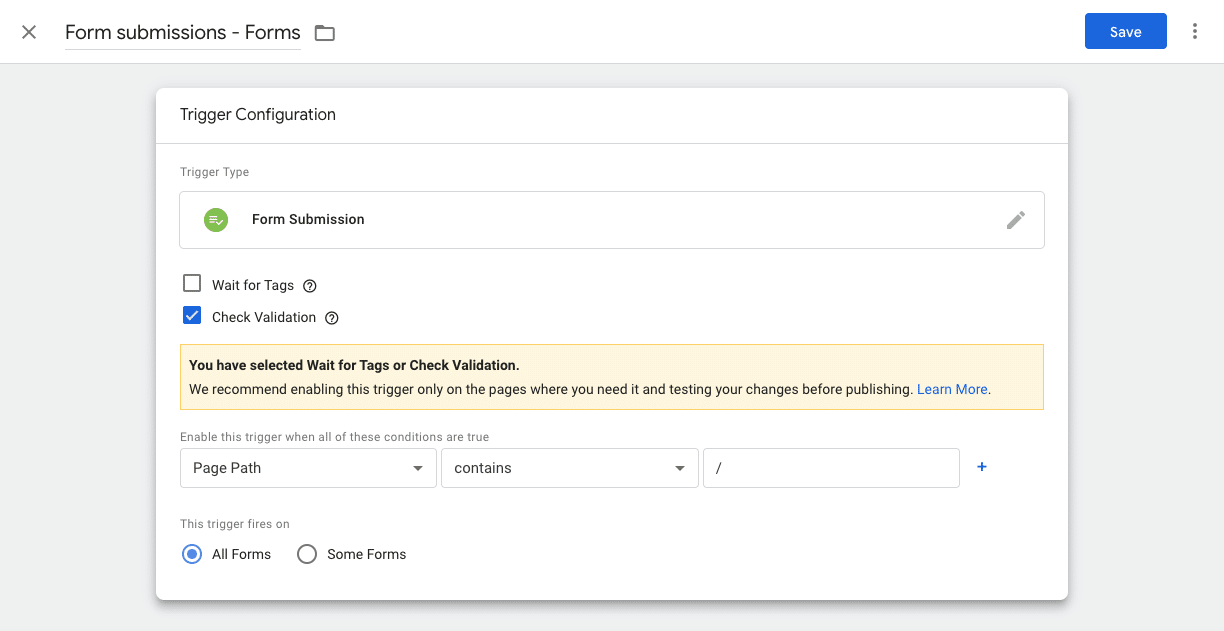
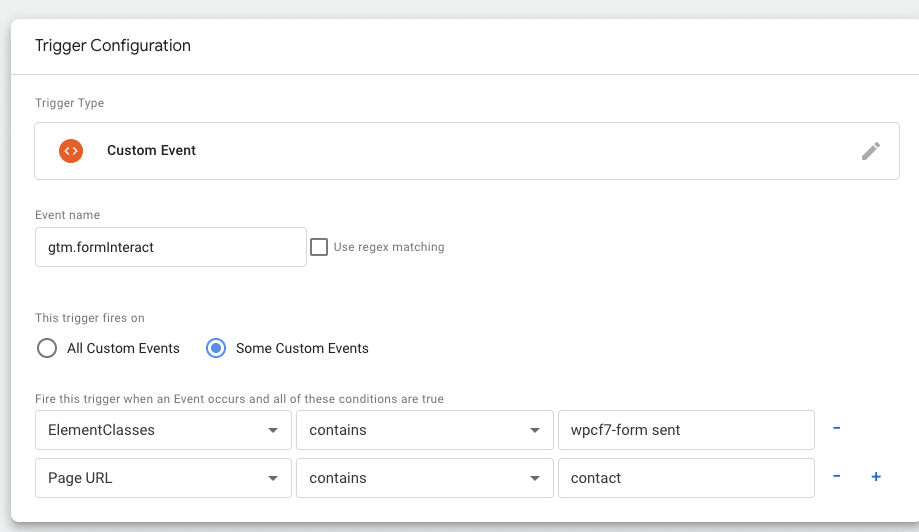
Then, create a general trigger for all forms in GTM. From here, you can generate tags and triggers either for all forms or specific to each form.
An example of a trigger configuration for a contact page form:
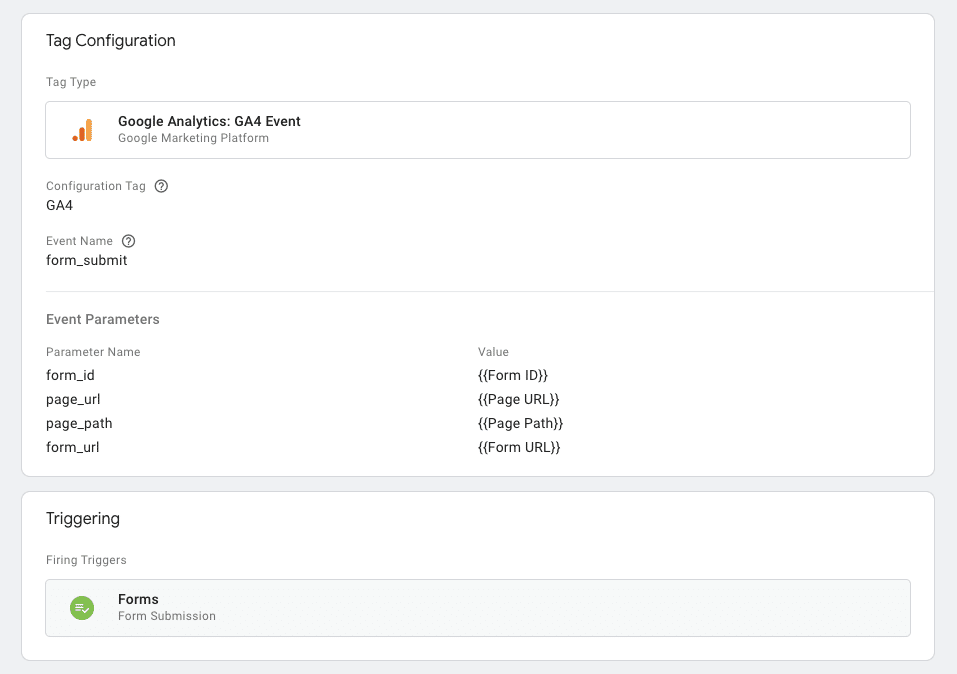
Once this is done, create the tag with the recommended parameters or whatever is necessary according to your goals:
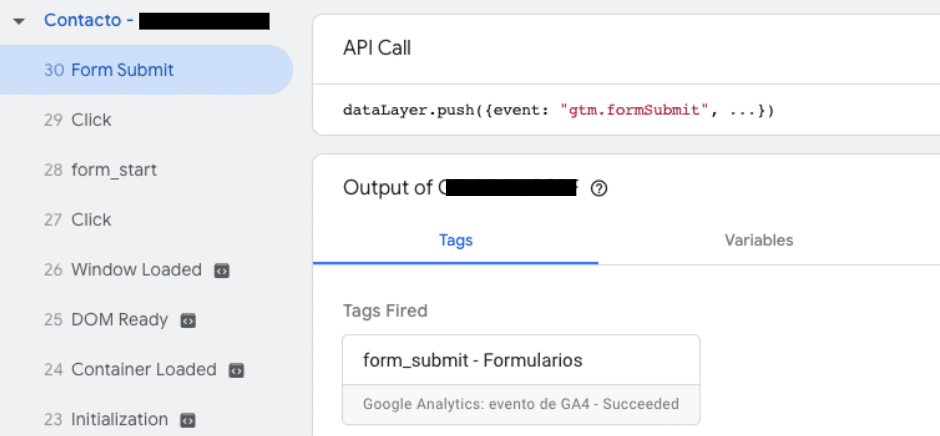
Finally, verify that the event is triggered.
Lead generation, calls and emails
As a B2B company, tracking various leads from calls, emails, or subscriptions to forms like newsletters are important.
GA4 does not define these events automatically. So, below are two ways to monitor these interactions on your website.
Generate_lead as recommended event
You can collect interactions such as newsletter form subscriptions using the recommended event generate_lead, which can be triggered when a user submits a form or a request for information.
To trigger it, in this case, the quickest recommended method is via Google Tag Manager.
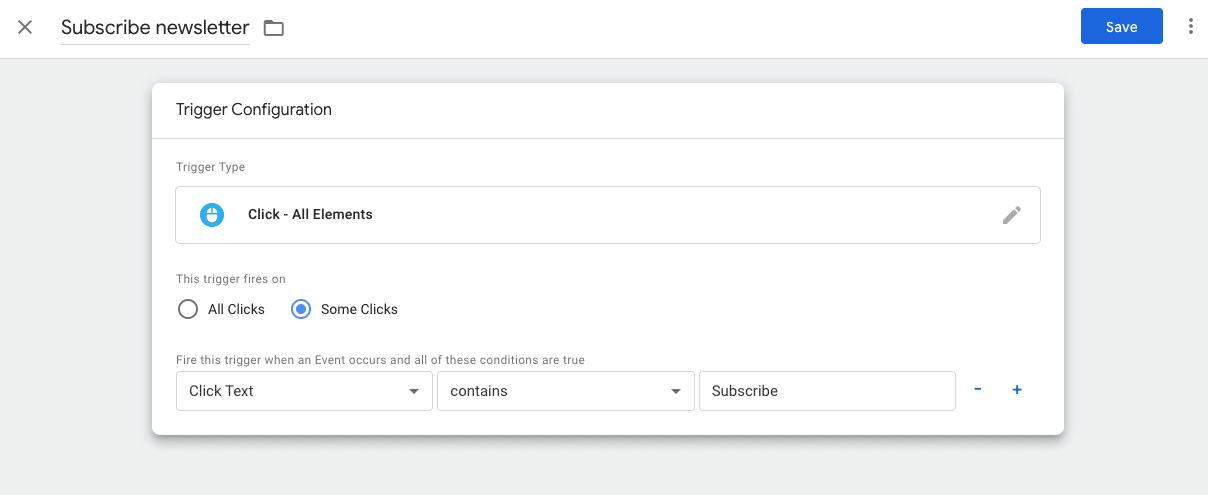
First, you need to create the trigger. For example, when a user subscribes to a newsletter:
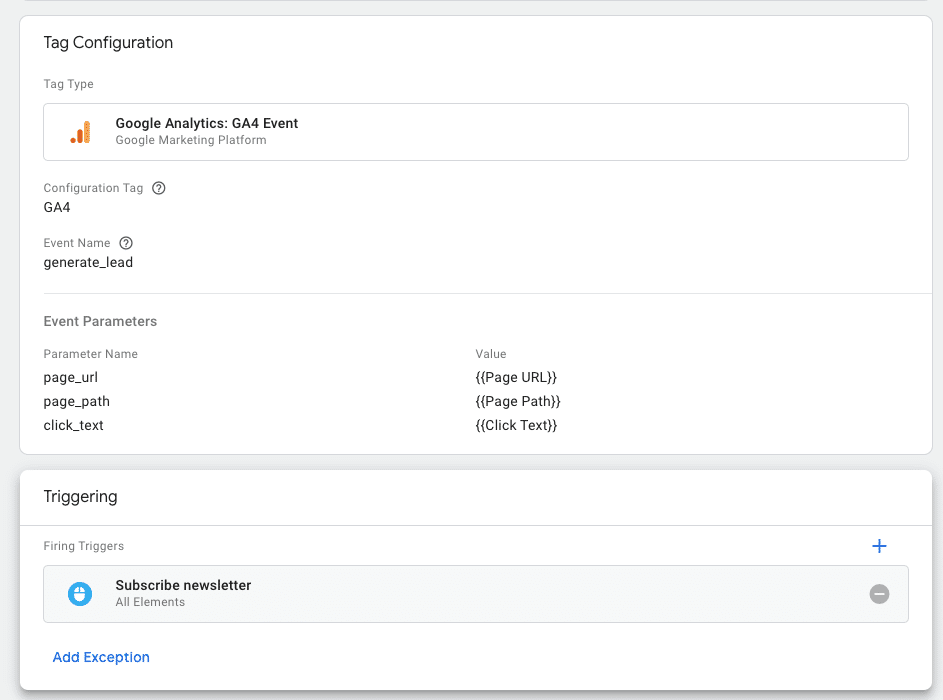
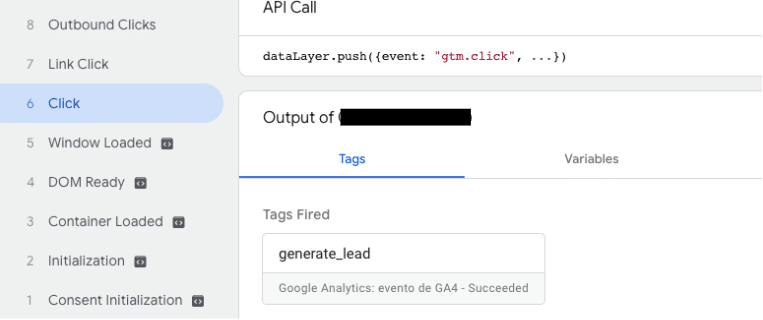
And then generate the tag and check that it is working:
Finally, check with DebugView that it is activated and flag it as a conversion. It may take a few hours for this option to appear.
Leads as custom events
However, suppose you don’t want to group subscriptions or other forms of requesting information with, for instance, calls or emails within the same analysis group. In that case, this can be done using custom events.
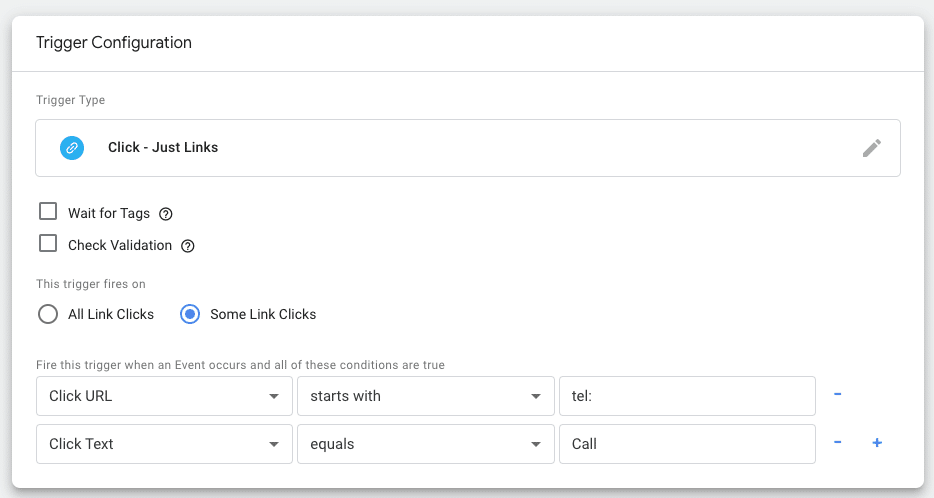
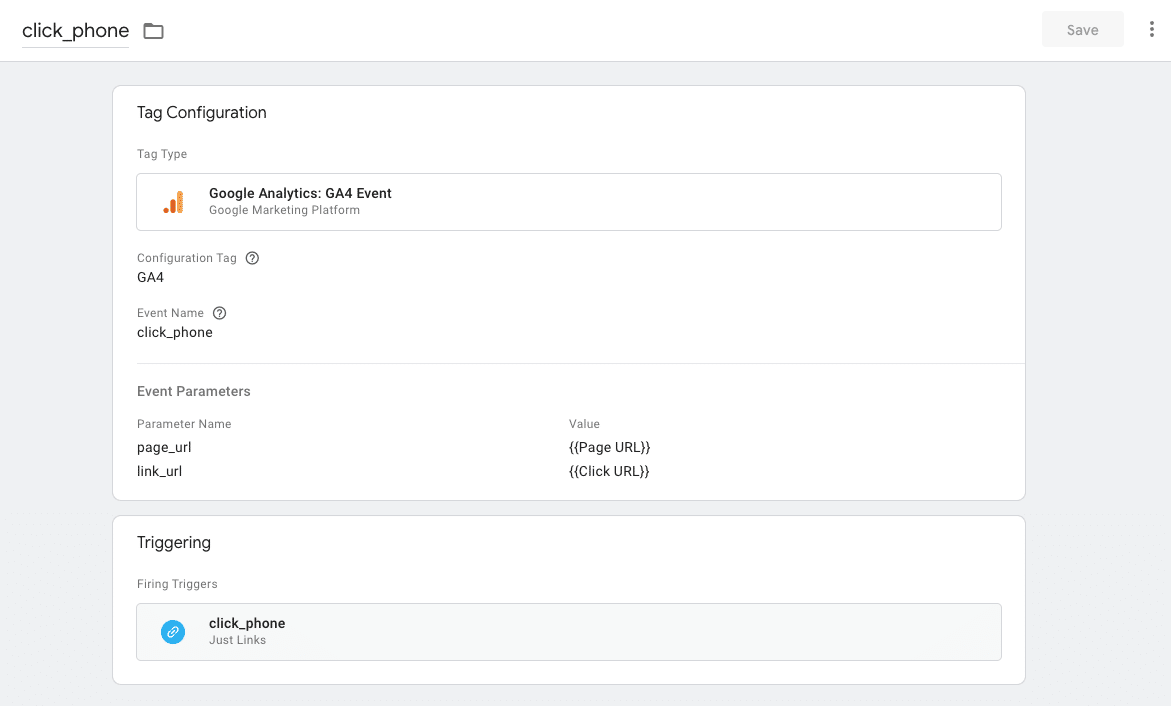
When naming the event, it’s ideal to make it similar to other events to simplify the data analysis. For example, when clicking on a phone to call, the event could be called click_phone.
To create this event, you would follow the same process as in the generate_lead, using Google Tag Manager.
First, create the trigger.
And then, set up the tag:
How to visualize the data?
Collecting key metrics for B2B websites is crucial, but it’s also important to visualize them quickly.
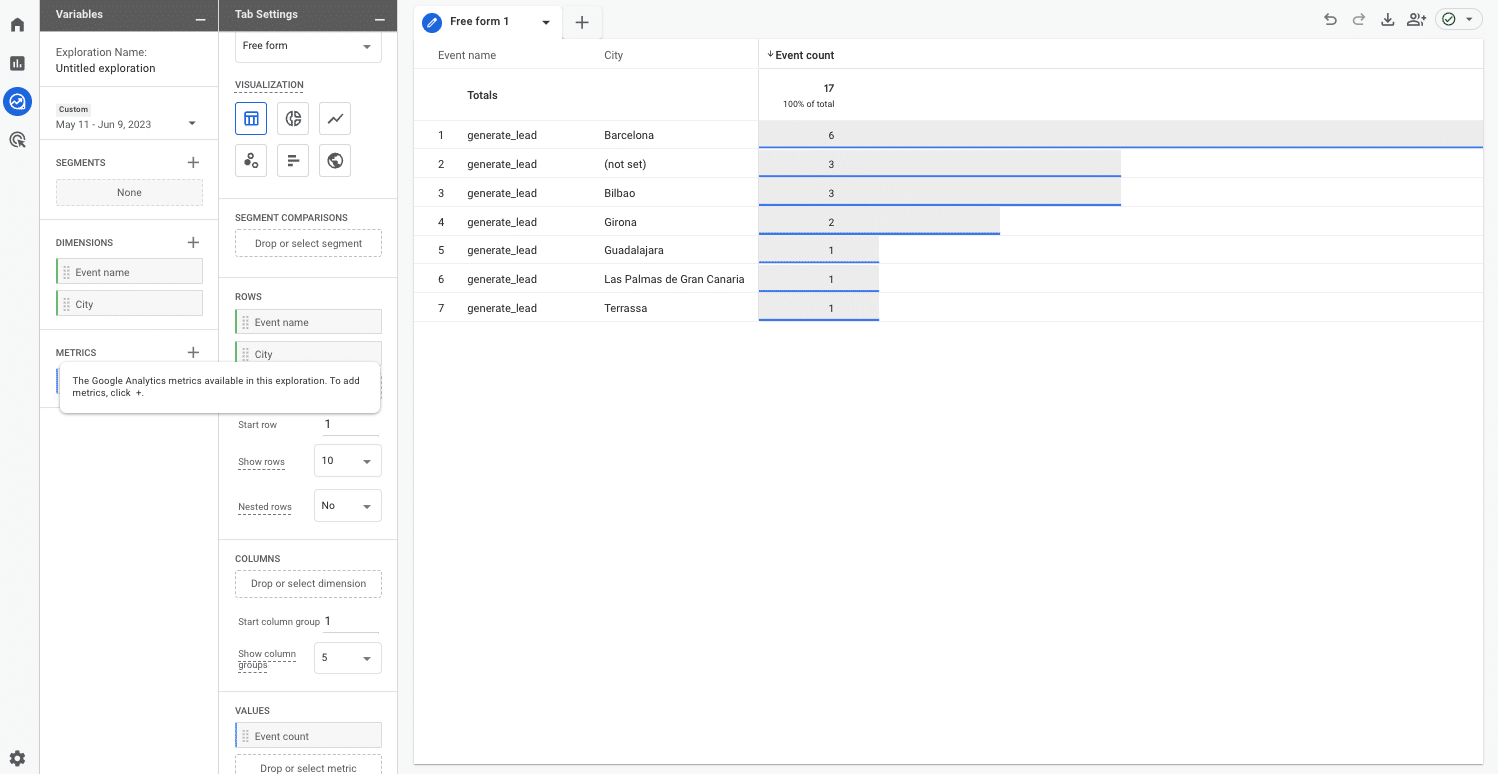
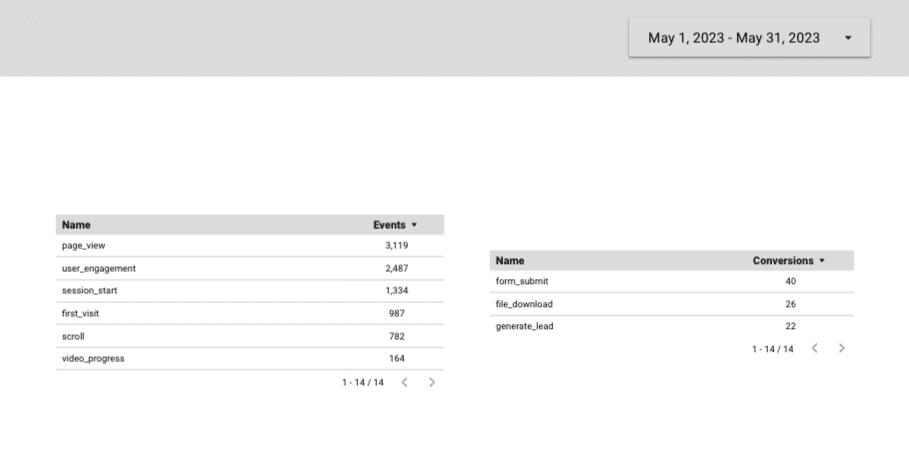
To visualize the generated conversions, go to Reports > Engagement > Conversions or create customized reports through the GA4 Exploration section.
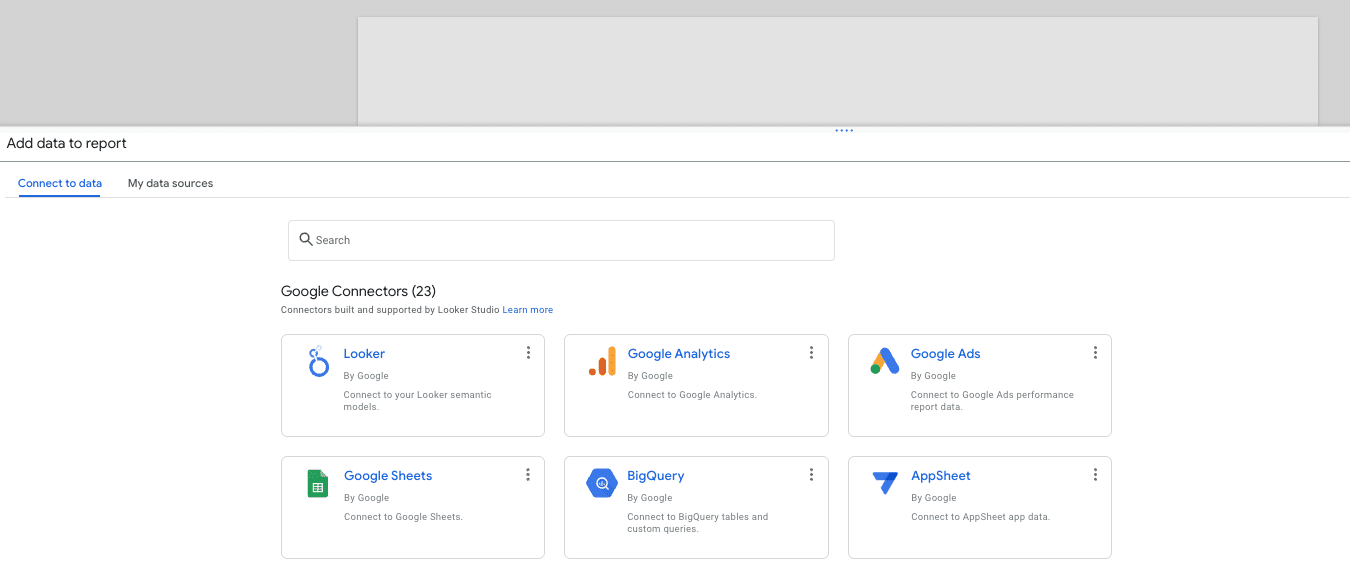
You can also create these reports using Looker Studio, as it allows easy integration with GA4.
Then, you can create dynamic reports with all the events and conversions set up.
GA4 for B2B: Hone in on what matters to your business
GA4 provides a lot of data. This is why defining the most relevant metrics for your business is so important.
This way, you can track priority KPIs and analyze your performance efficiently.
The post GA4 for B2B: How to track events and conversions appeared first on Search Engine Land.
Courtesy of Search Engine Land: News & Info About SEO, PPC, SEM, Search Engines & Search Marketing
Thursday, June 29th, 2023
Microsoft has announced new AI-powered shopping tools powered by Bing and Bing Chat. These include new price match monitors, AI-generated buying guides, and review summaries, all aimed to “help you shop and save with confidence,” Microsoft said.
Price match monitors. These new price match monitors show you a product’s price after you purchase that product. This is so you can request a pricing match from the store you bought it from if that price changes after you ordered it.
Microsoft said they have “partnered with top US retailers with existing price match policies and will be adding more over time.” This is launching in the US search results soon, Microsoft told us.
Here is a video of how Bing’s sidebar shows you the price history over time and also alerts you after the price drops:
Buying guides. Bing now uses AI to generate buying guides based on the product or category of products that you are researching. The AI-generated buying guides will also provide you with product suggestions, show you the specifications of those items side-by-side and potentially offer other smarter comparison interfaces to help you along your buying journey.
These buying guides will launch in Bing in the US today and in the Edge browser worldwide today.
Here is a video of those buying guides in action:
Review summaries. Bing will also give you review summaries if you ask for them in Bing Chat or the Edge sidebar. The review summaries will summarize what customers are saying online about the product you are researching. It will also use AI to generate top insights and popular opinions about the products.
This rolls out worldwide today across Bing.
Here is what it looks like:

Here is a video of it in action:
Why we care. It is fascinating to watch how Bing Chat and other AI-based search features are expanding, getting more useful and being more human-like. Clearly, if you are a retailer, getting your products into Bing Shopping is important here. But what opinions and summaries the AI-generates also will be interesting to follow.
The post Bing adds new AI-powered shopping tools appeared first on Search Engine Land.
Courtesy of Search Engine Land: News & Info About SEO, PPC, SEM, Search Engines & Search Marketing
Thursday, June 29th, 2023
Whether you’re opening retail locations in a new state or selling your software in a new country, entering a new geographic location requires a well-thought-out marketing strategy.
Paid media can be a foundational tool for cost-efficient sales generation from prospective customers in the new market.
This article provides several suggestions for tailoring your PPC efforts toward a region new to your brand.
1. Estimate search volume
Looking at projected search volume in advance will help you:
- Determine realistic budgets.
- Consider how wide a set of keywords you can include in your initial campaigns if you have strict budget limitations.
Google’s and Microsoft’s respective Keyword Planner tools offer free solutions to estimate volume for each platform.
Note that any data is approximate based on historical searches and can be particularly inaccurate for more niche queries.
Ultimately, you can use data after launching the campaigns to get an idea of actual volume.
2. Add regional keywords
If you’re promoting a business with local presence, think through regional terms that make sense to incorporate into keywords. These could include:
- City/town names
- County names
- State/province names
- Popularly used references for a particular area (i.e., “Capital Region”)
Additionally, your phrase and broad match keywords should pick up on queries that include local modifiers.
For instance, the keyword “furnace repair” may show for the query “charlotte furnace repair.”
Watch your search terms for local queries and add the ones that show significant enough volume or have converted.
3. Customize assets
While you may take learnings from existing markets as to what ad copy assets perform best, you should consider where to tailor ad copy to the region.
For instance, use location insertion to show city names in ads if applicable.
On the landing page end, include location callouts and pictures of landmarks from the region you’re targeting so prospects can see you’ve taken the time to identify with their area.
Additionally, consider offers you can put in front of people in the new area.
If you just opened new brick-and-mortar locations, you may be able to offer a free gift to the first 1,000 customers who visit and can mention that in your ad to promote while supplies last.
Get the daily newsletter search marketers rely on.
<input type=”hidden” name=”utmMedium” value=”“>
<input type=”hidden” name=”utmCampaign” value=”“>
<input type=”hidden” name=”utmSource” value=”“>
<input type=”hidden” name=”utmContent” value=”“>
<input type=”hidden” name=”pageLink” value=”“>
<input type=”hidden” name=”ipAddress” value=”“>
4. Check conversion tracking and tagging
This is an area that can all too easily slip through the cracks when launching a new marketing effort.
You need to be sure you’re getting accurate conversion data from the start to report on performance and allow ad platforms time to learn.
If you’re pushing traffic to new landing pages from new ad campaigns, make sure that you’re tracking results properly.
You may need to configure new conversion tracking or ensure existing pixels are carried over to these pages.
Depending on how you track lead performance on the backend, you may also need to ensure that URLs are properly tagged.
UTM parameters must be unique to these campaigns. Incorporate any custom parameters necessary to sync up with your CRM or automation platform.
If you’re offering a coupon code for the new market, you may also need a separate parameter for that.
5. Find local competitors
Competitor bidding can be an effective way to reach potential customers if they are searching for a business in a similar realm. They are likely looking for your products/services.
Research local competitors that appear popular in your market and incorporate their names into keywords.
Because competitor keywords can often be pricier, test segmenting out these keywords into their own campaign.
As a bonus, research top selling points for competitors and read their reviews to identify pain points to capitalize on.
For instance, if one competitor gets frequent complaints about poor customer service, emphasize the quality of your service in ad copy.
Your core search campaigns will also be valuable for identifying new competitors to bid on as you review search terms.
You’ll see what competitor names appear the most and which ones are likely to convert.
6. Support search with other channels
While this article focuses primarily on tactics for paid search, no marketing channel operates in a bubble.
Particularly in a new market, branding efforts via other channels can help to establish familiarity and legitimacy for your business. You can build credibility before people search and recognize your brand name.
Additionally, you can create audiences based on people who visit your site or engage with videos and social posts.
You can then retarget them with offer-focused messaging and layer these audiences onto search campaigns.
Some potential options for alternate channel efforts include:
- A YouTube campaign teasing the launch of your product/service in the new market.
- Social campaigns on TikTok, Facebook, Instagram, Snapchat, and/or other networks. Upload an existing customer list and target lookalike audiences to reach people with similar characteristics to existing buyers.
- A Google Discovery campaign incorporating in-market audiences for products/services in your industry and custom audiences based on top converting search queries and competitor URLs.
7. Set realistic expectations
Establishing CPA/ROAS goals for a new market will inevitably be crucial to planning conversations with business stakeholders.
Particularly when entering regions where people are unfamiliar with your brand, you should not expect to be able to drive conversions as efficiently as in markets where you’ve operated for years.
The team involved should know that CPAs will likely be higher (and ROAS lower) than in existing markets, at least while getting off the ground.
People will just be starting to become familiar with your products or services, and campaigns must go through the learning phase to bid efficiently.
Additionally, prepare to be flexible and adapt to trends as you monitor them.
You may find users have a higher conversion rate than expected, and you may be able to scale budget more quickly than anticipated.
Or you may discover that responses are lower than expected and need to experiment with a few different tactics before finding the right combination of messaging and channels that works.
Start planning
With these tips in mind, it’s time to get to work planning your campaigns for entering a new market.
Think through the channels, keywords, and budget. Work with your technical team to ensure conversion tracking is firing properly and links are properly tagged.
Finally, set reasonable expectations for performance and prepare to watch campaigns closely as they get off the ground.
The post 7 PPC planning tips when entering a new geographic market appeared first on Search Engine Land.
Courtesy of Search Engine Land: News & Info About SEO, PPC, SEM, Search Engines & Search Marketing
Wednesday, June 28th, 2023
You’ve been tasked to optimize a site that is so massive it makes the Great Wall of China look like a picket fence. And it’s your sole responsibility. You need to make a big SEO impact with fewer resources. What do you do?
In this article, I’ll share five approaches you can focus on when you’re optimizing massive websites.
By the end, you’ll feel confident knowing that you have a battle plan to conquer that great wall of webpages that lie ahead:
- Sharpen your weapon, then go to battle.
- Focus on global changes.
- Improve the top-performing pages.
- Focus on pages that target head terms.
- Clean up the content.
1. Sharpen your weapon, then go to battle
It’s useful to have a certain mindset about your SEO program before you start.
That said, two key steps will help you create an SEO game plan:
- Site analysis.
- Competitive analysis.
Let’s look at those in more detail.
Site analysis
In the battlefield of the search engine results pages, your website is the weapon.
So your first mission: Sharpen that weapon by making the site the best it can be so that you’re not your own worst enemy.
A site analysis will uncover the things that are hindering your rankings.
You can do this in a couple of ways:
- Run some SEO diagnostic tools.
- Get an SEO audit.
Diagnostic tools
The average SEO tool is meant to repair your site, not rank it. In other words, it will not tell you how to rank but what you need to fix based on best practices.
Most businesses use diagnostic tools to do a self-audit. While it can uncover some useful information, there are a couple of limitations:
- The recommendations are based on best practices and are surface-level suggestions. They don’t take into account the unique needs of the business. They do not know your competitors. They do not know the nuances of your particular industry niche.
- Some people will not know how to discern the things that need to be done and the things that can be left alone, nor will they know how to prioritize the recommendations based on the unique situations of their websites.
For example, let’s say you’re seeing a drop in organic search traffic. The diagnostic tool will not be able to understand what factors contribute to that – is it due to an algorithm update? Did your site recently migrate? Is your content bad?
So, it is the diagnostic tool operator’s job (a.k.a. you) to be able to take the data and apply wisdom to ensure you are focusing on the most impactful things.
Some tools you might consider for diagnosing your site include:
- Nibbler
- SEOptimer
- UpCity’s SEO Report Card
- WebPageTest.org
- Semrush
- SEOToolSet (Disclaimer: This is my company’s software)
SEO audits
Nothing beats the strategies you can uncover from a professional-level SEO audit that marries diagnostic tools with expert wisdom from an SEO vendor.
In addition to running the best tools, an SEO expert conducting a site audit can:
- Get to know your business, its site, past SEO decisions and your goals, and then take all of that into consideration when diagnosing your site and creating a strategy.
- Uncover the real reasons you are not performing well in the search results using expert, technical analyses.
- Prioritize the recommendations so that you know exactly which steps to take in which order to make the strongest impact.
Competitive analysis
Once you’ve sharpened your tool, it’s time to go to the battlefield in the SERPs, where your second mission is to beat the competition (not the algorithm).
Remember, you cannot attempt to beat an infinitely large algorithm.
By focusing on what your competition is doing, and trying to do as well as them or better, you set the stage for a more manageable battle.
Here again, you will rely on tools to help you uncover your competition’s strategy.
You are looking to find things like who your true competitors are, and recommendations on optimizing your webpages based on the top-ranked pages in the SERPs.
Some tools you might consider for competitive research include:
- Semrush’s Traffic Analytic and Organic Research tool
- Moz’s Domain Authority Checker
- Ahrefs Content Gap and Site Explorer tools
- SEOToolSet’s Single Page Analyzer, Research Summary report, Multi Page Analyzer, Links Report and Site Checker
- Bruce Clay SEO WP plugin (Disclaimer: This is also my company’s tool)
By understanding your site and your competition, you can enter the battlefield with a clearly defined plan. This makes managing a large site’s SEO less overwhelming.
2. Focus on global changes
When you have a massive website, every change needs to count. That means looking at the things that can elevate the entire site or key pages across the site.
One of the obvious wins here is improving your website performance (and your content, but more on that later).
You can tackle things like:
- Website speed
- Core web vitals
- Mobile-friendliness
- Code optimization
Website speed
Website speed can impact many things: The user experience, your website rankings and conversions … so this is something to take seriously.
Google conducted some research on speed and its impact on users back in 2017 (highlighted below), and while the data is a bit old, the message still holds.
As you look at your site, you may find that some of your pages may load slower than others. If that happens on your most important pages, you want to start there.
And you may have groups of pages with the same template where making a few changes can improve speed across all those types of pages.
Some things you may need to address are:
- Compressing the information between your web server and search engine browser.
- Minifying JavaScript, and cleaning up and externalizing CSS code.
- Choosing the best file formats for images.
Some helpful tools and resources for this include:
(Note that, technically, the old page speed algorithm has been replaced by core web vitals, which I’ll cover next.)
Core web vitals
Core web vitals focus on factors that create a good user experience on your website, this includes:
- Largest contentful paint: Having an optimal webpage load time.
- First input delay: Ensuring users can easily interact with the page quickly.
- Cumulative layout shift: Making sure the elements on a webpage are stable.
Google says that “if at least 75 percent of page views to a site meet the ‘good’ threshold, the site is classified as having ‘good’ performance for that metric.”
This most likely only matters to the top-performing pages on the site, though, not the entire site, as pointed out in this Google SEO office hours:
However, Google has noted that some sites may not need to dedicate too many resources to core web vitals, or obsess about the scores:
IMO most people don't need to do anything different. This is not a change in how ranking works, it's more about how we've been thinking about these elements. We've seen people hyper-focus on these numbers, that's not a good use of time & energy. Think holistically instead.
— John Mueller (official) · #StaplerLife (@JohnMu) April 22, 2023
Several tools offer lab and field data that can help you understand core web vitals:
- PageSpeed Insights
- Search Console (Core Web Vitals report)
- Web Vitals Extension
- Chrome UX Report
- Lighthouse
- Chrome User Experience Report
- Firebase Performance Monitoring
- Chrome DevTools
- WebPageTest
So look at the most critical pages on the site, and run some tests to see what can be improved.
Mobile-friendliness
Ensuring your site is mobile-friendly is a no-brainer in today’s mobile-centric world. Of course, there’s also Google’s mobile-first indexing.
There is more to consider than you may think in order to have a mobile-friendly site. In general, you will want to think about:
- The mobile website configuration (for example, is it responsive?).
- How you prioritize the content for mobile users and make the content mobile friendly.
- Mobile-friendly design.
Tools that can help you along the way include:
Code optimization
Because the code on your website can impact a search engine’s ability to crawl your website, you can consider optimizing that code.
Again, you can start with certain page templates or key page types and go from there.
Checking out W3.org’s developer tools can be helpful.
But a warning for beginners: You can spend a lot of time and resources trying to chase perfect code and the effort doesn’t always match the outcome.
So it’s wise to know how to prioritize the recommendations, and you may need expert help from a developer who also understands SEO or vice versa.
Get the daily newsletter search marketers rely on.
<input type=”hidden” name=”utmMedium” value=”“>
<input type=”hidden” name=”utmCampaign” value=”“>
<input type=”hidden” name=”utmSource” value=”“>
<input type=”hidden” name=”utmContent” value=”“>
<input type=”hidden” name=”pageLink” value=”“>
<input type=”hidden” name=”ipAddress” value=”“>
3. Improve the top-performing pages
Another area to laser focus your SEO efforts when you are contending with a large website is the top-performing pages.
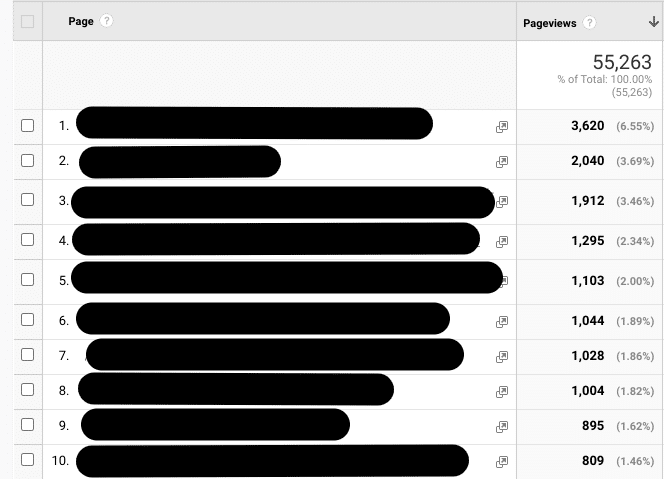
Typically, a handful of webpages drive the majority of organic traffic to a website. Look at those first.
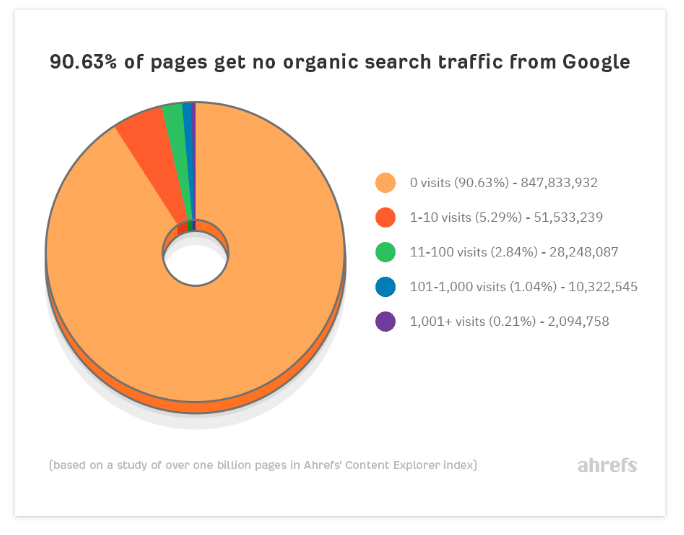
This is consistent with an Ahrefs study which found that out of billions of webpages, only about 4% of them received any meaningful traffic at all.
In other words: If you have to choose between optimizing a product page that drives a lot of traffic to your site versus a lesser-known product page featuring a left-handed socket wrench with a light on it, choose the top performer.
You can easily track down your top-performing pages using Google Analytics, and you can also use information from Search Console.
In terms of how you improve these pages, again, you’ll want to focus on page analysis and competitor analysis.
Run some diagnostic tools like those linked earlier to get a sense of where those pages are, then compare that to the top-ranked pages in the SERPs for the queries you are targeting.
As part of this, you may need to strengthen the content, so look at your content with a critical eye, too.
4. Focus on pages that target head terms
In my experience, maybe 15% of a website is targeting its “head” terms – the broader, more generic keywords/queries that people use when searching for what you have to offer.
Ultimately, you can drive a ton of traffic if you can rank for these more generic terms – and they can be million-dollar keywords.
So if I were to focus my efforts on a large site, I would want to optimize the pages that target head terms (the landing pages), and then secondly, optimize all the subpages that support them.
This typically means you need solid information architecture – how you organize your content.
If you already have well-organized content that supports your head terms, then you’d focus on optimizing those pages using some of the tools and strategies I’ve already mentioned.
If you don’t, however, you may need to do some reorganization of the content, links and navigation on your site. This is where SEO siloing comes in handy.
SEO siloing is a form of website content organization and internal linking practices. One of the goals of this strategy is to maximize your site’s relevance for head terms.
Not only that, but SEO siloing can help by:
- Enabling your site to show expertise and authority.
- Ranking pages better in the SERPs.
- Helping users navigate your website with ease.
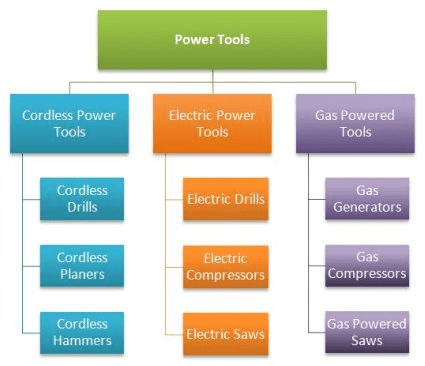
Just to give a quick example: Say you own a power tools business that sells cordless power tools, electric power tools and gas-powered tools.
You’d start by organizing the website content (and site navigation) into categories supporting the three product lines you sell.
Your SEO program aligns with this because these categories will be the head terms you are after, too.
Practically, each product line will have its own section on the site with a landing page and supporting pages.
The goal is to have well-organized landing pages and supporting pages with helpful, expert content that aligns with how people search and learn about the things you have to offer.
Links between the landing pages and their own subpages clarify the relationships for search engine spiders crawling the website.
You can apply siloing to all types of sites, including ecommerce, B2B and informational sites.
Of course, this is a highly simplified explanation, and the details of how to make SEO siloing work well are vast.
Can this be a massive project? Yes. But it depends on the state of the site.
For some, they may have to do a larger reorganization of the content to achieve their goals, while others may need less effort with perhaps some new internal linking.
How big of a job this is depends on things like:
- Your ability to make changes to the site (roadblocks could be buy-in or CMS issues).
- How organized or disorganized the site’s content currently is.
- If you need to create new content to fill in the gaps or significantly update content.
It can be a challenge but well worth it in most cases – it’s one of the ways we get our clients to rank for highly competitive one-word terms.
For our final step in optimizing massive websites, let’s look at how you can elevate the quality of a website from an SEO perspective by focusing on the content.
5. Clean up the content
Last but not least, having excellent content is a priority. And this can be a huge challenge for large sites.
When you have massive amounts of content, you will need to divide and conquer.
I’ve said previously that website publishers should spend half the time creating new content, and half the time updating old content.
(And by the way, if you plan on creating new AI content, see my article on ChatGPT and SEO content.)
Large websites need a system for:
- Evaluating the content on the site, starting with key pages, but also looking at those pages that haven’t been touched in years.
- Updating old pages that still offer value but need new information.
- Updating meta tags so that you have unique, original content on every key page.
- Handling the irrelevant content that exists on the site (301 redirects, removing the page, etc.).
Google’s helpful content system looks at the site as a whole, not just at a page level.
So if you have some great content, and then a whole bunch of “search engine first” content, it can negatively impact the ability of the site to do well in the search results.
As you are evaluating your content, keep some important guidelines in mind from Google:
Then you will go through all the steps of optimizing those pages after the content is of the highest quality.
Making SEO for large websites more manageable
Large sites have their own unique issues. As you stand before the towering fortress that is your website, the divide-and-conquer attitude will help you stay sane.
While the task may seem daunting, you can remind yourself that SEO is an ongoing job – so play the long game.
The post A 5-step approach to optimizing websites with millions of pages appeared first on Search Engine Land.
Courtesy of Search Engine Land: News & Info About SEO, PPC, SEM, Search Engines & Search Marketing
Wednesday, June 28th, 2023
As Google continues to push for automation, advertisers have gotten more creative about making updated best practices, including smart bidding strategies, work for their companies and verticals.
While value-based bidding has become a staple for ecommerce and retail brands, non-retail verticals have struggled to incorporate it effectively into their holistic PPC strategies.
This article explores the challenges faced by non-retail industries in embracing value-based bidding in Google Ads and how to make it work for your unique business.
Making value-based bidding work for non-retail brands
Most ecommerce and retail brands can seamlessly update their bidding strategies to value-based models.
The revenue is already set up.
The conversion path is clearly valued (i.e., add to cart, purchase, first-time or returning purchaser value)
The steps to transition make sense.
But for finance? SaaS? Insurance? Healthcare and education? It’s been a trickier shift for many advertisers in these fields.
At its core, value-based bidding takes designated signals noting the quality of a customer into consideration while ultimately optimizing for the highest possible value to the business.
This is absolutely attainable for non-retail companies and will function the same way. But it should be treated a bit differently in terms of strategy and setup.
Think about your business and what you’re most proud of from an advertising or website analytics standpoint:
- Do your users spend an average of 10 hours on your site per visit? (This could be a world record, so congratulations!)
- Have you spent a ton of time and energy making sure your attribution method is accurate?
- Does your YouTube channel statistically and unwaveringly contribute to 99% of your conversions?
- Are you struggling with conversion drop-off rates from a lead start to lead submit? If so, you are, in fact, a perfect candidate for value-based bidding.
Consider what’s valuable to your company and what tagged activities contribute to the lifetime value of your customers.
Once you’ve answered these questions, you’ve proven that value-based bidding will work for your business.
In the meantime, there are several bigger-picture factors to consider:
- Identifying the conversion actions to include
- Defining conversion rates and assigning values.
- Considering whether to include offline conversions in your data.
Below are different options and thought-starters for each step.
Defining goals: What matters most?
The funnel stage is an incredibly important piece of the puzzle.
For many advertisers, it can feel like there are limited options for which conversion actions are most important to their bid strategy.
For example, a B2B company whose main KPI is qualified leads generally cannot optimize that low in their funnel in a bid strategy due to data limitations or low conversion volume.
The best case scenario will be to have ~2-4 conversion actions marked with a value for value-based bidding to work effectively.
However, many non-retail companies may have difficulty deciding what else is important to them outside their final lead submission or last-step conversion item.
In many cases, lead form submissions are the last tracked data point via a conversion tag or Floodlight for advertisers to optimize for.
Marketers need to remember that every touchpoint is important in a customer’s journey.
Maybe you mark a pageview, time on site, and a lead start as your set of conversion actions to include in a bid strategy.
Each is a tick in the consumer journey to become a qualified lead. Foundationally, value-based bidding is optimizing for more than lead volume or an efficient tCPA.
Any data that advertisers can tag for the algorithm is helpful.
The fine line here, however, is determining conversion actions with a high enough conversion volume per month (30-50 actions at minimum) while also being low enough in the funnel to drive higher and more qualified conversion rates.
Secondary and tertiary touchpoints: The middle of the iceberg
If you’re struggling to identify secondary and tertiary goals to include values for, imagine your customers’ journey from their perspective.
How many pages do they need to visit or buttons do they need to click before completing the primary conversion?
If the primary goal is a button click on the homepage, consider including a minimum time on the page as a secondary conversion action to increase the number of qualified leads.
If a pageview feels too broad, how about creating an engaged visit action, where the time on page needs to be higher than 30 seconds to count as a conversion?
Or visiting 3-4 pages, using Google Analytics data to create a custom conversion?
From there, you can hone in on the most impactful chunk of the funnel before losing out to offline data that may be unavailable or hard to import on a consistent cadence.
In these scenarios, it’s crucial to align on the best inflection point.
Can we optimize for lead form submissions since they’ll be higher volume, or should we import offline data from submissions or scrubbed leads as a last touch even though we know the drop-off is steeper?
If offline conversions are less than 30 per month, even if they’re worth 100X of a lead submit, it would be better to aim higher in the funnel so that the bid strategy can best optimize.
Get the daily newsletter search marketers rely on.
<input type=”hidden” name=”utmMedium” value=”“>
<input type=”hidden” name=”utmCampaign” value=”“>
<input type=”hidden” name=”utmSource” value=”“>
<input type=”hidden” name=”utmContent” value=”“>
<input type=”hidden” name=”pageLink” value=”“>
<input type=”hidden” name=”ipAddress” value=”“>
Defining values: What’s it worth to you?
Once a goal has been agreed upon, it’s time to look at values. Google has released a helpful calculator as a starting point.
Still, it will also be good to have an internal contact and an analytics resource on hand to help comb through the known data points, conversion rates, lifetime values, and any other important variables for your business.
The conversion rates will be your easiest entry point.
If you’re looking at 100 engaged page visitors, 60 lead form starts, and 50 lead form submissions, with a lead form submission worth $100, you can calculate the trickle-down metrics using Google’s calculator.
This will tell you that your lead submission is worth $100, your lead form start is $83, and your pageview is $50.
If your approach requires lifetime values to be calculated, use your CRM as a source of truth to gauge your customers’ fullest potential within your company.
Once you’ve calculated the highest value (within the ~30 conversions per month guideline), work backward with your analytics team to determine specific values for the events leading up to the main goal.
Offline data: To ingest or not?
The last major commonality in a non-retail bidding strategy is the ingestion of offline conversion data to include in optimizations.
In a best-case scenario, offline conversions are set up and directly available in Google Ads or SA360 for conversion action with minimal proxies or gaps.
In reality, there are often data lags, connectivity issues, and other unforeseen hurdles when setting up offline conversions.
To get ahead of this, consider what resources you have available.
- Do you have a 20+ person team that can help get everything in order?
- Do you need to work with six different vendors to attach each puzzle piece?
Evaluate your appetite for a heavy lift and how you can set smaller goals to reach full value-based bidding. Can you set up value-based bidding using only online tags to start?
I’d offer that most of your customer journey on your website or in your ads is helpful to inform value-based bidding.
You’ve set up a great user experience online for your customers to find you (paid ads), reach you (your contact information is listed somewhere, I’m sure – if not, please make sure it is!), and raise their hand showing interest in your company (a lead form, a phone call, an appointment booking, and so forth).
Anything outside the web for the majority of these industries (a closed booking, showing up to an appointment, scheduling a follow-up meeting) will happen more naturally and at higher rates by strengthening the online footprint using value-based bidding.
Embracing what sets your industry and business apart
The shift into more automated bidding and the emergence of value-based bidding as an option for many verticals come with both headwinds and tailwinds.
Any businesses considering shifting to value-based bidding but wary of the effort or setup should zoom out and consider the strategies outlined above to start their journey towards bidding to value.
The future of advertising will only get more automated in exciting ways, so ensure the “best practices” work best for you before they are no longer optional and/or continue to evolve.
The post How non-retail advertisers can embrace value-based bidding in Google Ads appeared first on Search Engine Land.
Courtesy of Search Engine Land: News & Info About SEO, PPC, SEM, Search Engines & Search Marketing
Wednesday, June 28th, 2023
Trust and credibility are traits everyone strives to earn in life.
In SEO, backlinks are an essential part of earning those coveted traits.
But many people overcomplicate how easy it is to generate backlinks.
There’s no need to beg site owners with a digital tin cup asking for favors or shell out thousands of dollars to pay for links.
Buying links is considered spam, consequently reducing your brand’s trust and credibility, and possibly putting you up as a manual penalty case from Google.
There are simply many more effective ways to generate backlinks and build an effective digital PR strategy.
What’s more, it’s well known that backlinks are an important part of SEO, but they have just as much impact on other parts of your business, too.
It comes down to one key aspect: third-party social proof.
When backlink efforts are combined with high-quality PR, these tactics drive more traffic to your site, boost quality inbound leads and – ultimately – generate more revenue to grow your business.
What is the difference between digital PR and link building?
Here’s how I’d define them from a basic conceptual perspective:
- PR: Using media coverage to gain attention for your brand.
- Link building: Tactics that encourage other websites to link back to your own.
Both are considered highly effective marketing tactics. While they’re technically different at the root, they should be used interchangeably to support your overarching business goals.
The best successes I’ve seen have come from earned link building. The most effective brands have something unique to say through thought leadership that incentivizes other sites to associate with your brand.
For example, using data and success stories to create compelling content are the best ways to earn trust and credibility.
This is particularly true when you contribute this information through media like a guest article, podcast, or webinar, in which you then get a backlink because the platform owner needs to cite who you are.
So, if you focus link building efforts on complementing what you’re already doing for digital PR, you kill two birds with one stone and reap the benefits from both efforts.
The advantages of using digital PR for link building
If you’re still on the fence about combining digital PR with link building efforts, here are the primary benefits of doing so:
Build brand authority based on thought leadership
When you repeatedly showcase your expertise on third-party platforms relevant to your audience, your audience begins to trust your advice.
This is what turns you into an authoritative brand within your industry.
Third-party social proof generates inbound leads and conversions
Once other sites recognize your brand as a trusted expert, they’ll start sharing your content with their own audiences and followers.
As those people see more of your own content, they’ll feel motivated to contact you and learn more about how you can help them.
Reduces hesitation and speeds up your sales cycle
When you’ve earned that authority, demonstrated your leadership, and boosted your organic inbound traffic flow, over half of your sales cycle is already complete.
Once an inbound lead requests a conversation, they’ve shown active intent and placed their trust in your brand. This is a major step towards closing a new sale for your company.
Creates a digital PR flywheel
Over time, you’ll become known as a go-to expert, so much so that you won’t need to pitch for links anymore.
Other brands will voluntarily contact you to collaborate, in which you automatically get backlinks for this.
This creates “the digital PR flywheel,” i.e., a system that constantly feeds into itself with less required input from your side.
Grow a highly targeted network
As the Digital PR Flywheel gains enough momentum to constantly create new PR link building opportunities, you’ve created an effective mechanism to expand your network and following.
The industry now identifies you as an authority figure in your niche space. Other players in the game will regularly involve you in their own promotional activities.
Generate backlinks without begging or paying
If you’ve followed closely, you’ll notice that none of this process for generating links involves cold outreach or payment – and when put into practice correctly, all backlinks come from authoritative sites.
As the results bear their own fruit, cold outreach and paying for links by your PR or SEO teams becomes a completely inefficient use of time and resources.
Get the daily newsletter search marketers rely on.
<input type=”hidden” name=”utmMedium” value=”“>
<input type=”hidden” name=”utmCampaign” value=”“>
<input type=”hidden” name=”utmSource” value=”“>
<input type=”hidden” name=”utmContent” value=”“>
<input type=”hidden” name=”pageLink” value=”“>
<input type=”hidden” name=”ipAddress” value=”“>
The 5 key steps to generate backlinks and grow your business with digital PR
Here are five of the key steps that you can use to fuel your backlink strategy, establish trust and credibility, and successfully grow your business.
Step 1: Identify the primary places your audience uses to learn and get advice
Like any good business strategy, the first step to earning quality PR backlinks is to conduct the proper research.
Look into the places where you know your target audience willfully spends their own time. You can do this by identifying resources like:
SparkToro is a great tool for doing audience research. It lists relevant platforms backed by search data and organized by audience types, interests, and other variables. Use a tool like SparkToro as a starting point to do your own research, and then build from there.
As you conduct your research, include a mix of large and niche publications that you can target for your digital PR strategy – both are important to an organic growth strategy.
Smaller publications are relatively easy to get featured on, resulting in more quantitative coverage within that niche.
Larger publications are important as well because everyone recognizes their name authority.
Any links you can earn on these sites translate into instant credibility for your brand – both from Google and your audience.
Step 2: Submit topics that you’re an expert in and are relevant to your audience
Since the best way to earn links is to lean into your strengths, contact the manager of the sites you’re targeting and contribute ideas for topics you’re an absolute expert in.
You’re much more likely to be approved when you have proof, such as bylined content and event recordings.
Topics you submit should be relevant both to the platform and your target audience. Don’t go wild on product promos – instead, focus on being helpful to your target audience.
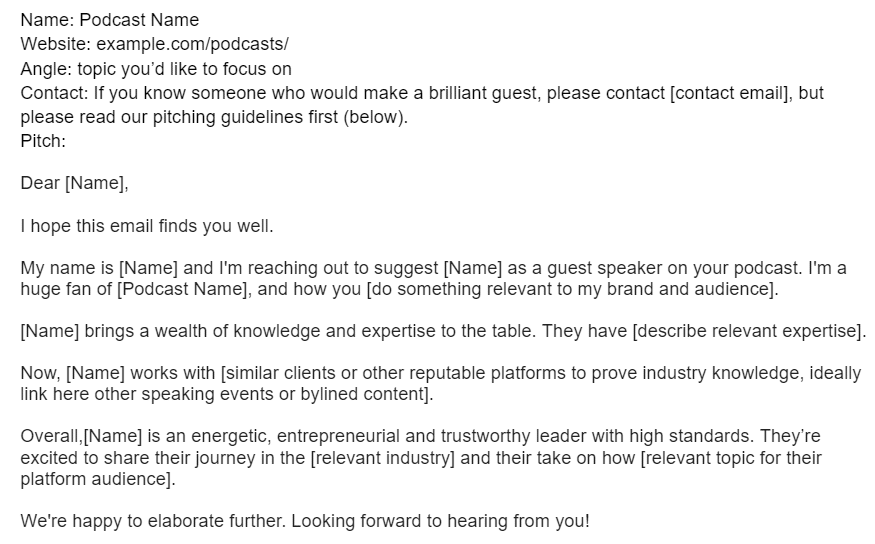
Here’s an example of how you could pitch for a podcast:
If your data or expertise tells a compelling story, you’re far more likely to create something that stands out and warrants earned backlinks from highly valuable sources.
Step 3: Start generating inbound leads, conversions, and high-quality backlinks
Repeatedly showcasing your expertise on third-party platforms is how to build those highly valuable traits of trust and credibility with your audience. This turns you into an authoritative brand.
Because your audience deems you a trusted expert, people will voluntarily contact you when they need help solving a core problem. This is precisely how digital PR generates high-quality inbound leads.
Depending on your business and the relative ease of your sales cycle, this approach can even translate into direct purchases that grow your business.
Additionally, events, publications, and anything that gains publicity automatically generate high-quality backlinks. This is the most effective way to do link building to support SEO and grow your business.
Remember that Google clearly states that buying or selling links can be considered spam.
These tactics are not only unnecessary (especially when you use the tactics I’ve described), but they can actually do more harm than good to the rest of your business.

Step 4: The digital PR flywheel starts to build
Follow the above steps, again and again, to create the digital PR flywheel – other brands willfully contact you to collaborate, so you no longer need to pitch.
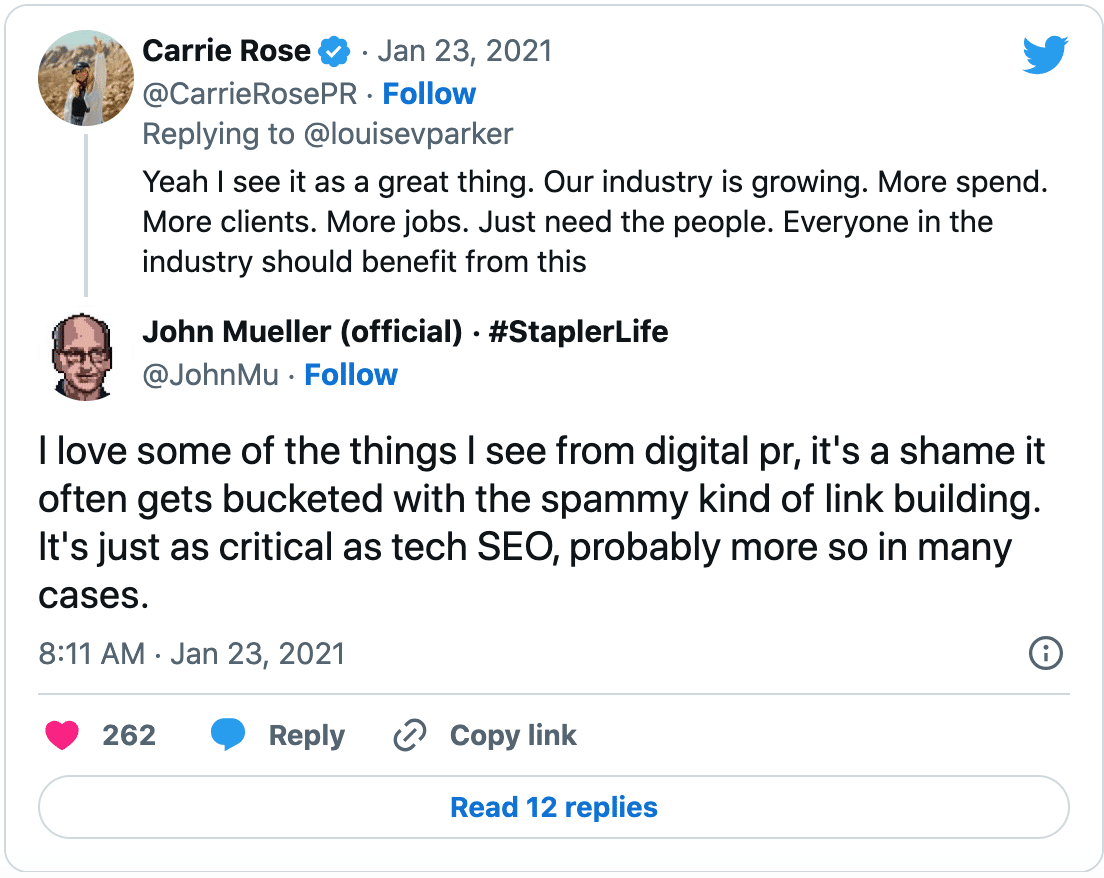
In 2021, Google’s John Mueller, one of the greatest authority figures in digital PR, SEO, and organic marketing, gave his own stamp of approval on digital PR link building.
He encouraged brand builders to disregard misinformation that digital PR link building is part of an outdated spammy tactic by doubling down on efforts to build your own digital PR flywheel.
Step 5: Showcase everywhere how trusted you are across multiple highly reputable platforms
Include links within your own content to everything you’ve created in collaboration with other brands, including:
- Events you’ve hosted with another brand.
- Guest articles you’ve contributed.
- Podcasts you’ve participated in.
Those backlinks become your social proof because you’ve been cited as earning approval from a third-party site.
Think of it as earning a “peer review” for scientific journals.
Once you’ve been cited by a highly authoritative brand in the industry, you’ve earned those traits of trust and credibility for your brand that make all the difference to help grow your business.
This is again how to generate more inbound leads and direct conversions directly. People are coming to you because they trust what you have to say. You’re now selling to a warm audience, not cold.
Publish, rinse and repeat this strategy to generate more backlinks and grow business revenue
Please remember that outreach and/or buying links are not only unnecessary but it’s also an entirely effective use of resources.
You can do more harm than good if you revert to tactics that Google and other search engines have deemed to be spammy. Don’t diminish your efforts to earn trust and credibility by falling into the link buying trap.
Overall, your PR and link building strategies should work in tandem: Link building shouldn’t just be for SEO, and when combined with PR, they bring a deeper impact on the brand authority.
A highly strategic and fully aligned digital PR and link building strategy translates into long-term benefits.
Invest your time and resources into creating highly valuable content that has something valuable to offer to give other sites a quality reason to associate their brands with your own.
Once the digital PR flywheel runs on its own steam, you’re well on your way to scalable growth!
The post How to use digital PR to drive backlinks and business growth appeared first on Search Engine Land.
Courtesy of Search Engine Land: News & Info About SEO, PPC, SEM, Search Engines & Search Marketing
Wednesday, June 28th, 2023

While AI can assist in drafting marketing materials and offering prompt responses to customer inquiries, its capabilities extend far beyond these basic functions.
Join this webinar as experts as they explore how GPT empowers marketers with powerful tools to act upon real-time insights and deliver personalized experiences on a large scale.
Register and attend “Reshape Your Marketing with GPT,” presented by Salesforce.
Click here to view more Search Engine Land webinars.
The post Reshape your marketing with GPT appeared first on Search Engine Land.
Courtesy of Search Engine Land: News & Info About SEO, PPC, SEM, Search Engines & Search Marketing
Tuesday, June 27th, 2023
YouTube is piloting a new feature to help marketers pick the perfect thumbnail for their videos.
The Test & Compare tool, also known as A/B thumbnail testing, will provide performance data, revealing which designs drive the highest click through rates (CTRs).
Why we care: This new feature will help advertisers better understand the behaviour of their audience, so that they can create a winning thumbnail, potentially resulting in a higher CTR and improved engagement.
How it works: Marketers will be able to upload a maximum of three thumbnails per video using the Test & Compare tool. YouTube bots will then run experiments on these images to identify which one is the strongest performer, allowing advertisers to make an informed decision when selecting which thumbnail they’d like to accompany their video.
What’s new? Currently, the pilot is only being tested on a few hundred creators, however, YouTube is planning to launch a beta version in the coming months to expand the scheme to thousands more. Next year, the video platform is planning to the feature more broadly available next year.
Why now? According to YouTube, the Test & Compare tool has been one of its most top requested features and so it is responding to consumer demand.
Get the daily newsletter search marketers rely on.
<input type=”hidden” name=”utmMedium” value=”“>
<input type=”hidden” name=”utmCampaign” value=”“>
<input type=”hidden” name=”utmSource” value=”“>
<input type=”hidden” name=”utmContent” value=”“>
<input type=”hidden” name=”pageLink” value=”“>
<input type=”hidden” name=”ipAddress” value=”“>
What has YouTube said? “The team is working to make the tool available more broadly starting next year, but we wanted to share that testing is officially underway because we know that this is a top requested feature and it will help you make more data driven decisions about your thumbnail strategy,” a YouTube spokesperson said. “We know that you have been anxiously waiting this capability so thank you to our community for your patience and feedback along the way.”
What’s next? According to YouTube, there will be more announcements as testing gets underway later this year with regards to a more general roll out in 2023. A spokesperson added: “If you’d like to help us test features like this in the future, you can sign up to be considered on our Creator Research page.”
Deeper dive: For more information from the YouTube Creator technical team and the wider Creator community, check out Creator Insider’s YouTube channel.
The post YouTube Test & Compare helps you pick the best video thumbnail appeared first on Search Engine Land.
Courtesy of Search Engine Land: News & Info About SEO, PPC, SEM, Search Engines & Search Marketing
Tuesday, June 27th, 2023
Advertisers were shown how to improve their YouTube marketing strategies with cost-efficient, high-impact, tried and tested methodologies at SMX Advanced.
The secret to creating high-reach, low-cost environments and making campaigns more effective lies within four specific variables, according to digital advertising expert Corey Henke.
Unlocking high-impact, low-cost campaigns
The four variables marketers need to look into as a top priority are:
- Ad type / bid type: Henke advised that these fields are the most important variables and specifically encouraged marketers to take advantage of new ad types, noting that he personally has seen tremendous success with YouTube’s recently-launched in-feed video ads. He also stressed the importance of choosing the right bid type for your campaign for optimal conversions.
- Creative variation: There are many creative variables, so advertisers must test wisely. Length of videos is always a great way to start, but creative variables must also be considered. Henke advised looking at factors such as male versus female, different actors, different intros, different music, product demonstration versus funny, and so on.
- Target with intent: Research and strategize with custom audiences, target with intent and grow your YouTube audiences with optimized detailed demographics. Henke said this approach should help marketers achieve significant performance improvement.
- Data analysis (attribution): To measure the success of your campaign, review multiple areas of importance and make sure that they are the right areas.
Henke added:
- “I think this approach is the best opportunity for high-reach, low-cost campaigns.”
Ad types – how to get the best bang for your buck
Researchers have studied the effectiveness of various ad types. The most scalable solutions:
- Skippable video ads: Play before, during or after videos. Viewers can skip the video after five seconds.
- Non-skippable video ads: These ads are 15 seconds or shorter, and play before, after or during the video. Viewers can’t skip this content.
- Bumper video ads: Six seconds or shorter and play before, during or after another video. Viewers can’t skip this ad type.
YouTube has recently prioritized these ad formats, while longer forced content has been deprioritized. They also have the most inventory, according to Henke, meaning:
- “Marketers can get the best bang for their buck on YouTube.”
Get the daily newsletter search marketers rely on.
<input type=”hidden” name=”utmMedium” value=”“>
<input type=”hidden” name=”utmCampaign” value=”“>
<input type=”hidden” name=”utmSource” value=”“>
<input type=”hidden” name=”utmContent” value=”“>
<input type=”hidden” name=”pageLink” value=”“>
<input type=”hidden” name=”ipAddress” value=”“>
Bid types – getting TV-level results from YouTube
Choosing the right bid type can help marketers achieve TV-level volume success within YouTube. However, the bid type that is best for your campaign will depend on your brand’s goals and objectives. The two bid types Henke put forward for comparison were:
- Direct response bid types: Primarily desktop
- Branding bid types: Minimal desktop
The big difference between the two options lie within the CPM (cost per mile), view rate and conversion rate – but not the CPC (cost per click). Henked added:
- “If you want somebody to fill out a form or buy a product, you will definitely use a conversion campaign.
- “There are a variety of ways to reach users at scale for minimal cost inside of CPM and cost per view campaigns. So you have your bumpers, your non-skippables, your in-stream which will be your skippables – and how those compare.
- “Non-skippables don’t come with any views and that’s because nobody’s making it past 30 seconds. It’s either 15 seconds or below. So they really only have the advantage of impressions at a lower CPM. Whereas if you’re doing in stream, which is skippable, you are going to get the app the upside of views and also the amount of people which make it past 30 seconds.
- “I think YouTube has a good understanding of who is going to convert.”
Creative variation for optimal impact
Marketers have multiple ad types to choose from and users consume these various formats in different ways. Henke discussed the advantages of feed ads, skippables, non-skippables, stories, reels and live TV. He noted that skippable and non-skippable ads are great options because of the attention they attain – but skippable is his favorite go-to because of the unlimited link feature.
- “With unlimited link, you have a huge opportunity to engage a user over a long period of time. What we’re seeing is more users want to spend more time within their platforms as opposed to brands’ websites. That’s where we have the biggest advantage with unlimited link and being able to optimize creative for view rate,” Henke said.
To determine whether this is the right option for your campaign, Henke encouraged advertisers to test the different video ad options. Henke noted that 2 minutes 24 ads have more people completing the ads than other options.
- “This is a huge opportunity. It’s close to one minute of time with a user and your ad on average – some spend more, some spend less. But then also being able to have a competitive CPC along with a great view rate really shows that the long form is going to be the best value,” Henke added.

Targeting and retargeting are ‘huge opportunities’
Thorough research to identify user intent will give marketers an important advantage when it comes to understanding consumers who are relevant to your product or service. Retargeting is another necessary and big opportunity for brands wanting to expand their reach.
Reflecting on his own approach to targeting and retargeting, Henke revealed his favorite targeting tool is the detailed demographic combination report, which focuses on age, gender, parental status and household income.
Looking at demographics, in combination with the creative, will help drive maximum success, he said:
- “These variables when combined together give you a unique look at which specific audience might be converting the best and being able to segment this audience. When you can segment immediately you should see results faster. So that’s why this is so important, the targeting, the creative, the bid type and the ad type to create this high reach, low-cost environment,” Henke said.
Success with in-feeds
In-feeds are a new ad product launched by Google Ads and one of the biggest changes to the system since bumpers rolled out five years ago.
In-feed ads appear on YouTube’s personalized feed and allow users to click the ad thumbnail, while the video is simultaneously autoplaying. Some key benefits to in-feed ads as opposed to shorts include:
- More impressions
- Increased views
- Higher spend
- Longer ad length
- Unique call to action
- Authority of face to camera
- Auto-play in the feed
- Premium placement at top of feed
- “I think the value really is that you’re getting more earned views. That’s a clear indicator that that is a quality audience that we have here,” Henke said.

YouTube attribution tips
It’s important to be able to identify the causes of wins and losses in your campaign in order to make informed decisions and necessary adjustments.
Think about the Halo Effect. Henke offered some implementation strategies here:
- Precision targeting: “When I talk about precision targeting, that means really looking at that detailed demographic and dialing in almost immediately because if you’re hitting your target audience, they’re going to make those Halo effect type of user behaviors, meaning they’re going to go and search,” he explained. “They’re going to go to another platform and find your brand on Instagram or LinkedIn. They’re going to make these other things that don’t necessarily involve a direct click. And that’s important. You want your quality audience to be there. Another thing is checking your placement report to make sure your ads aren’t running on kids’ channels and that they’re mostly running in the places that you want them to run.”
- Trend analysis: This will be different for every advertiser. The big question here is what is this experience with creative competitive to a website’s first visit? And secondly, how does your video compare to somebody coming to your website for the first time? Henke added:
- “I believe that your video should be competitive and it should possibly give a better experience because it’s in platform and it’s long form.”
Getting started
Ready to get started with Henke’s high-reach low-cost approach to YouTube Ads? Here’s what he suggested:
- Targeting: “Dialing into those combination audiences out the gate,” he said.
- Device: For high reach, it’s advised to exclude computers and tablets – but keep these options in if you’re trying to convert a user immediately. “Ultimately, this is a high reach low-cost strategy and we’re going to probably be paying a premium for those devices,” he said.
- Bid type: This should be either CPV or CPM.
- Ad length and variation: As a general rule, the longer the ad length, the better it is for your campaign. However, Henke emphasized that you should do your own research and find out what works best for your brand. “It could potentially unlock some really good cost,” he said.
- Ad type: Keep your ad types to in-feed, skippable, non-skippable or shorts.
The post YouTube Ads: Unlocking high impact at minimal cost appeared first on Search Engine Land.
Courtesy of Search Engine Land: News & Info About SEO, PPC, SEM, Search Engines & Search Marketing