Archive for the ‘seo news’ Category
Thursday, July 6th, 2023

It’s time to challenge the belief that the market for organic traffic around any given topic is unknowable. It is actually quite objective and, when measured properly, can provide the context that’s glaringly missing from modern SEO strategies and make organic content part of a winning go-to-market strategy.
Join Ryan Brock, Chief Solution Officer at DemandJump, as he reveals how to revolutionize your SEO approach using Pillar-Based Marketing as a unifying methodology that allows you to include SEO in your go-to-market strategy confidently.
Register and attend “Build Authority and Dominate Organic Search Like A Boss,” presented by DemandJump.
Click here to view more Search Engine Land webinars.
The post Build authority and dominate organic search like a boss appeared first on Search Engine Land.
Courtesy of Search Engine Land: News & Info About SEO, PPC, SEM, Search Engines & Search Marketing
Wednesday, July 5th, 2023
Open AI has disabled the Bing search feature it has added to its ChatGPT AI service. “We’ve disabled the Browse with Bing beta feature out of an abundance of caution while we fix this in order to do right by content owners,” Open AI posted.
Open AI said it is working on bringing the feature back but for now it had to disable the feature because it reportedly allowed access to paywalled content.
Browse with Bing. Open AI added Bing Search to ChatGPT as a premium service in May. Doing so added to ChatGPT more up-to-date information and timely information powered by Bing Search. ChatGPT has a data set from 2021 or earlier, which is why using Bing Chat provided a better experience for more timely questions. With Bing Search in ChatGPT, the service can “provide timelier and more up-to-date answers with access from the web,” the company wrote.
The service was for ChatGPT Plus subscribers.
Disabled on July 3rd. On July 3, 2023, Open AI disabled the Browse with Bing feature on ChatGPT. It was disabled “out of an abundance of caution,” the company wrote. “Ww are working to bring the beta back as quickly as possible,” the AI company added.
Paywalled content loophole. Last week, many noticed that ChatGPT’s Browse with Bing feature was able to access content behind a paywall. Here is a tweet I spotted back then:
ChatGPT Plus users can use Browsing Mode to navigate around paywalled articles:
Tested this on a paywalled article from Fortune Magazine.
After GPT-4 Browsing printed the article, I paid for the Fortune subscription to confirm – it was the same text. ChatGPT did not… pic.twitter.com/YI8ohiY11H
— AI Breakfast (@AiBreakfast) June 26, 2023
Mikhail Parakhin from Microsoft replied to that on Twitter, saying, “In Bing Chat we have a mechanism to prevent paywalled content from leaking into answers (if publisher set up the “paywall” flag).” “I will let OpenAI know they should double-check this,” he said back then. I guess Microsoft Bing is working with Open AI’s ChatGPT team to resolve the issue on Open AI’s side. I do not believe this impacts Bing Chat.
What it looks like. Here is a screenshot showing how it is enabled for Plus subscribers:

Why we care. The Browse with Bing feature in ChatGPT made the service even more useful to searchers and people with questions. It is unclear when the feature will return but I suspect it will return soon.
The post ChatGPT Browse with Bing temporarily disabled appeared first on Search Engine Land.
Courtesy of Search Engine Land: News & Info About SEO, PPC, SEM, Search Engines & Search Marketing
Wednesday, July 5th, 2023
With the rise of large language models (LLMs), mass-produced AI content is becoming more prevalent and the risk of incorrect information spreading also grows.
Thus, it is increasingly important for search engines and answer machines to identify trustworthy and authoritative sources and weed out all others.
This recent evolution in SEO requires new tasks, skills and roles.
This article explores a new potential marketing discipline called “digital authority management” and the role of E-E-A-T in a new search environment like Google’s Search Generative Experience (SGE).
Quality verification for Google search: E-E-A-T’s influence and role
The huge influence of E-E-A-T in today’s Google search can no longer be ignored.
An author’s general authority and credibility become more significant at a time when mass-produced, identical AI content and disinformation are rampant.
Below is a summary of possible areas of influence of E-E-A-T in Google search:
Rankings in the classic Google search results
At least since the documentation of the Google Core Updates, the importance of E-E-A-T as a ranking influence has been confirmed since 2018.
Display in Google Discover and Google News
According to Google, E-E-A-T is used for playout on Google News and Discover one of the three most important factors.
Helpful content system
E-E-A-T plays an important role here. According to the Helpful Content System documentation:
“Google’s automated systems are designed to use many different factors to rank great content. After identifying relevant content, our systems aim to prioritize those that seem most helpful. To do this, they identify a mix of factors that can help determine which content demonstrates aspects of experience, expertise, authoritativeness, and trustworthiness, or what we call E-E-A-T.”
Showing indicative snippet elements like star reviews, FAQ snippets, sitelinks
Rich snippet elements are not displayed for every result, even though they have implemented the necessary structured data.
From my observation, there must be a sitewide factor that may or may not show these items depending on the topic. E-E-A-T would be a suitable standard for choosing results that are getting rich snippets.
Indexing
One of the big challenges for Google is the cost-effective crawling and indexing of URLs and content. In times of mass content created with AI, this challenge increases exponentially.
Google’s Gary Illyes recently commented on indexing in the Search Off the Record podcast. He pointed out that proportionately less content will be indexed in the future and that website owners should pay more attention to the quality of their content so that it is indexed.
E-E-A-T would be a way to exclude entire website areas from indexing in a scalable way without having to crawl every single URL.
Get the daily newsletter search marketers rely on.
<input type=”hidden” name=”utmMedium” value=”“>
<input type=”hidden” name=”utmCampaign” value=”“>
<input type=”hidden” name=”utmSource” value=”“>
<input type=”hidden” name=”utmContent” value=”“>
<input type=”hidden” name=”pageLink” value=”“>
<input type=”hidden” name=”ipAddress” value=”“>
E-E-A-T as a meta factor at author level
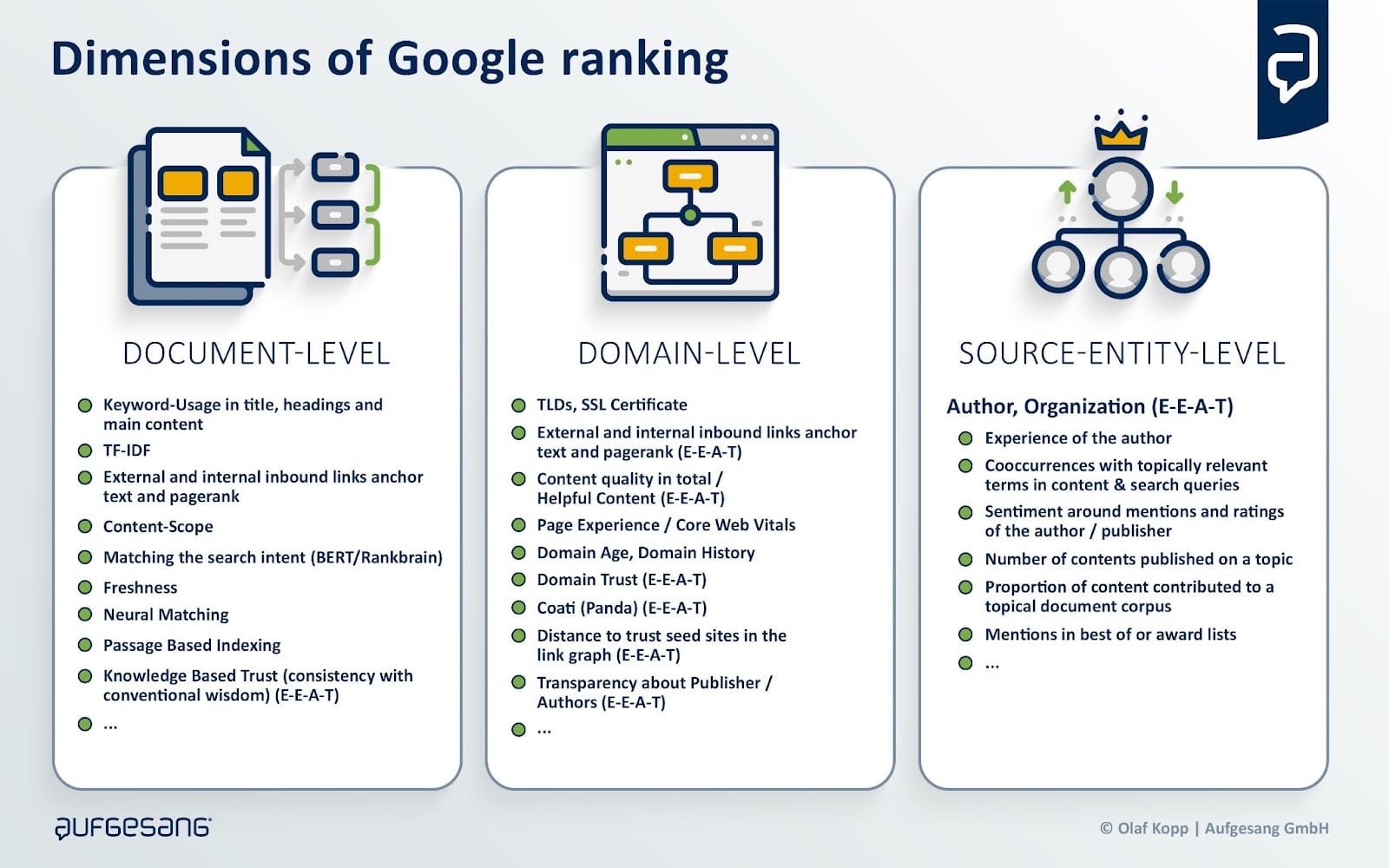
When it comes to E-E-A-T, I often read that one should optimize at the document level, but it is quickly forgotten that, in addition to the main content (MC), it is primarily about the evaluation of the author or the content creator. I call them “source entities.”
The search quality rater guidelines clearly state that the main focus should be on the reputation of the website and the content creator in the page quality rating.
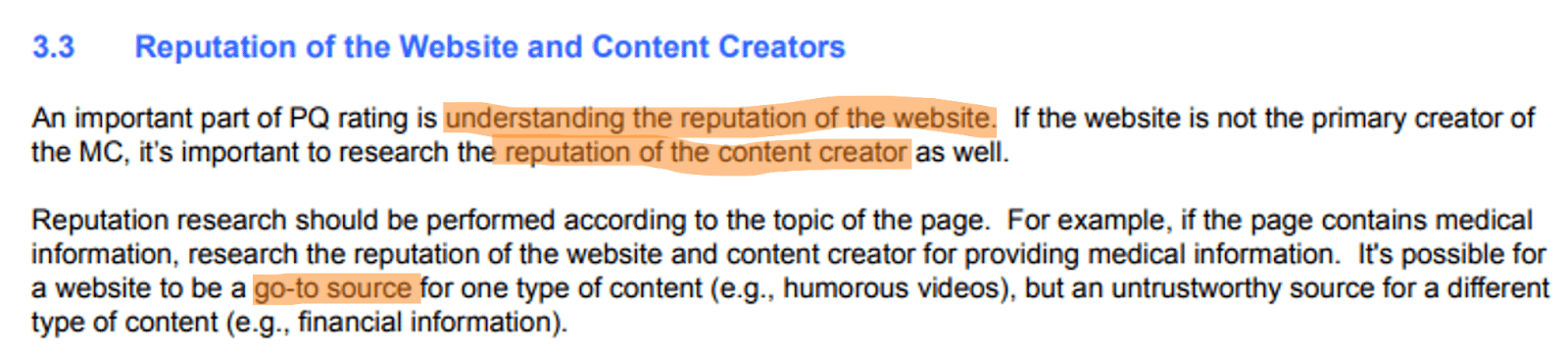
Source: Google search quality rater guidelines
Reputation can be used analogously to trust, which is the focus of E-E-A-T.
Here, we need to distinguish between the source entity (publisher or author) and the website (domain).
Websites are to be understood as digital representations of source entities, so they are closely related to each other.
An E-E-A-T evaluation takes place primarily on a meta level for the website, source entity, or content creator.
The reputation of a website should be checked based on the information published there and, above all, by researching independent sources such as:
- Reviews.
- References.
- Recommendations by independent experts.
- Forum discussions.
- Wikipedia.
Off-page sources provide information about the source entity on About Us pages and comments on the main content.
It is about evaluating a consistent and qualitative overall picture of the source entity or content creator.
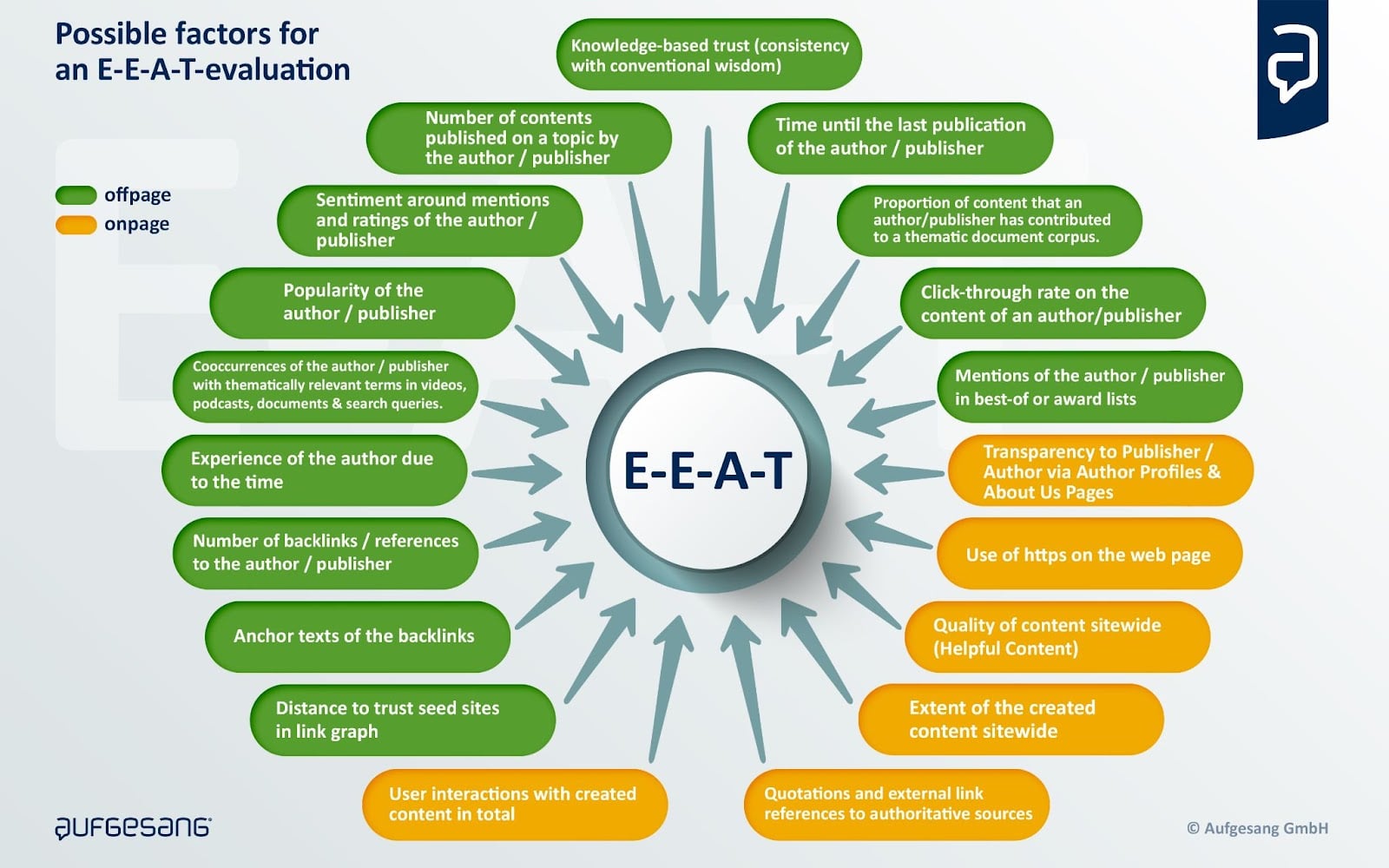
In my article “14 ways Google may evaluate E-A-T,” I have identified over 14 measurable signals that may play a role in E-E-A-T.
Google has made it clear several times that E-E-A-T is not a direct ranking factor and that there is no uniform E-E-A-T score. Rather, E-E-A-T is a mix of factors that gives an overall picture of experience, expertise, authoritativeness and trustworthiness in content and the source entity.
E-E-A-T can be understood as a quality classifier that provides content with a ranking bonus after document scoring. This ranking bonus is higher for YMYL topics than other topics and searches.
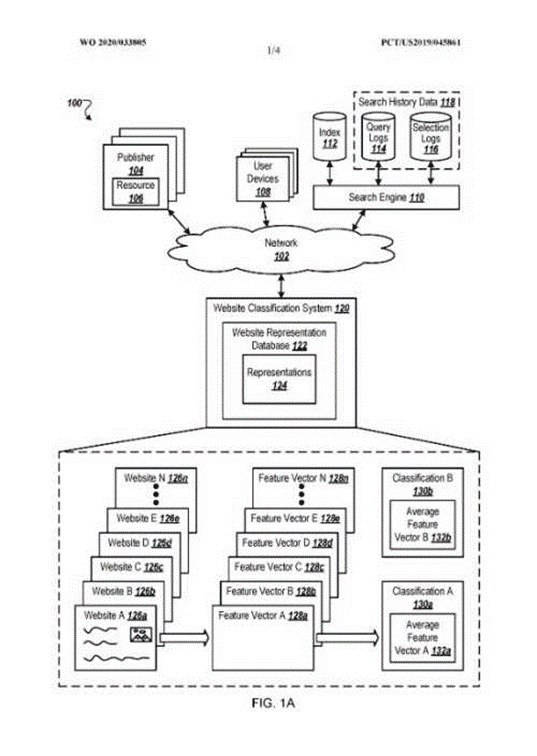
Possible ranking process including E-E-A-T at Google
Websites can be divided into different quality levels, described in the Google patent, “Website Representation Vector to Generate Search Results and Classify Website.”
Depending on the level, the ranking bonus can vary.
As we can see, building a reputation, authority and credibility that can be measured by Google plays an increasingly important role in Google rankings.
In How Google may identify and evaluate authors through E-E-A-T, I explain in more detail how Google can evaluate source entities at this meta level.
The possible role of E-E-A-T on generative AI applications like Bard
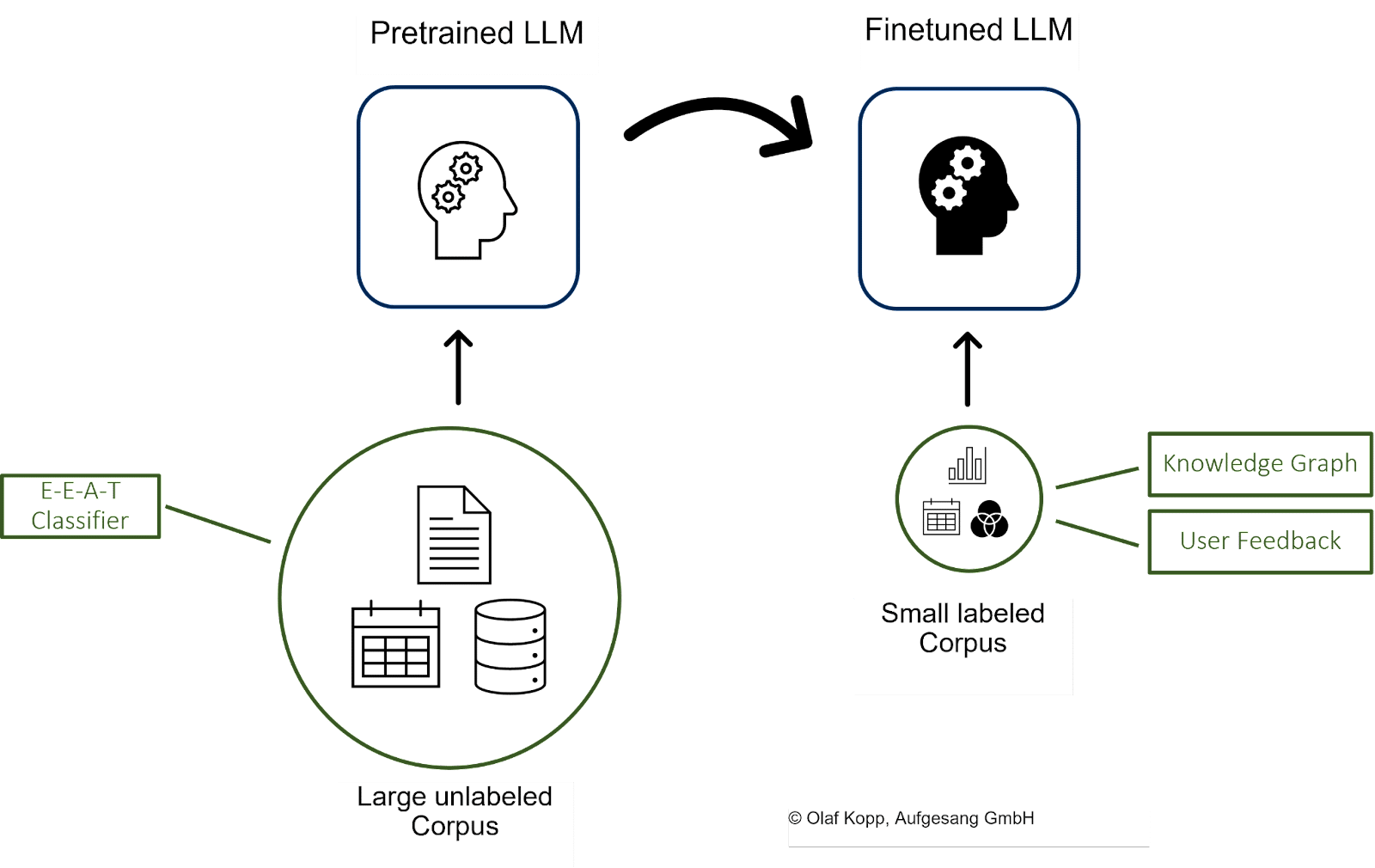
LLMs such as GPT, BARD or PaLM learn using training data from selected sources. This process takes place as part of natural language understanding.
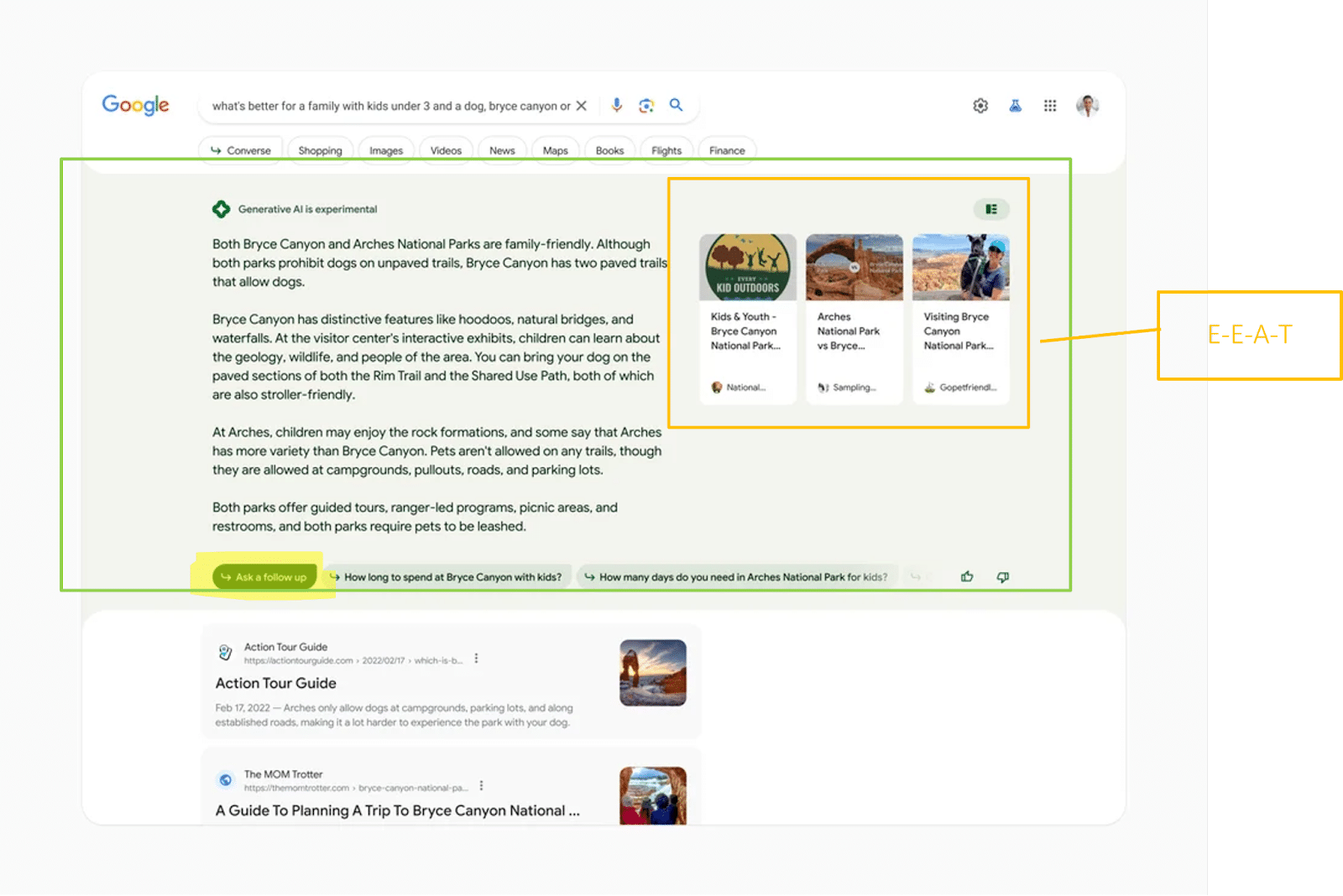
We have seen LLM-based outputs through ChatGPT and will see more in the future through the AI snapshot box and conversational mode on Google SGE.
For the training data to be as valid as possible, providers of generative AI applications must ensure that the underlying data corpus comes from trustworthy sources.
Google could also use the E-E-A-T concept to select these sources and only access those that belong to a certain quality class.
This would enable Google to update the data corpus for training the LLMs on a big scale. The facts from the Knowledge Graph could be used for fact-checking.
The link boxes in the snapshot box refer to results related to the AI-generated response, according to Google.
Because the links’ positions are highly visible, Google will have to pay attention to particularly trustworthy sources. Here, too, E-E-A-T can play an important role.
The author’s experience and expertise, the delivery in the new perspective feed should play an important role, according to Google, which suggests the reference to the double E in E-E-A-T.
Future product or solution searches could look like this:
Aim for your products and solutions to be included in topically relevant AI-generated responses by leveraging relevant sources selected as training data for LLMs.
This is the only way to create the necessary co-occurrences of product or company plus topic/product group.
This also turns you into an authoritative brand with a solid reputation for the algorithms.
The role of digital authority management
Building a brand and reputation are originally the task of brand management, marketing and PR – basically, beyond classic SEO.
However, those responsible for brands rarely concern themselves with the effects of their efforts on generating algorithmically measurable signals.
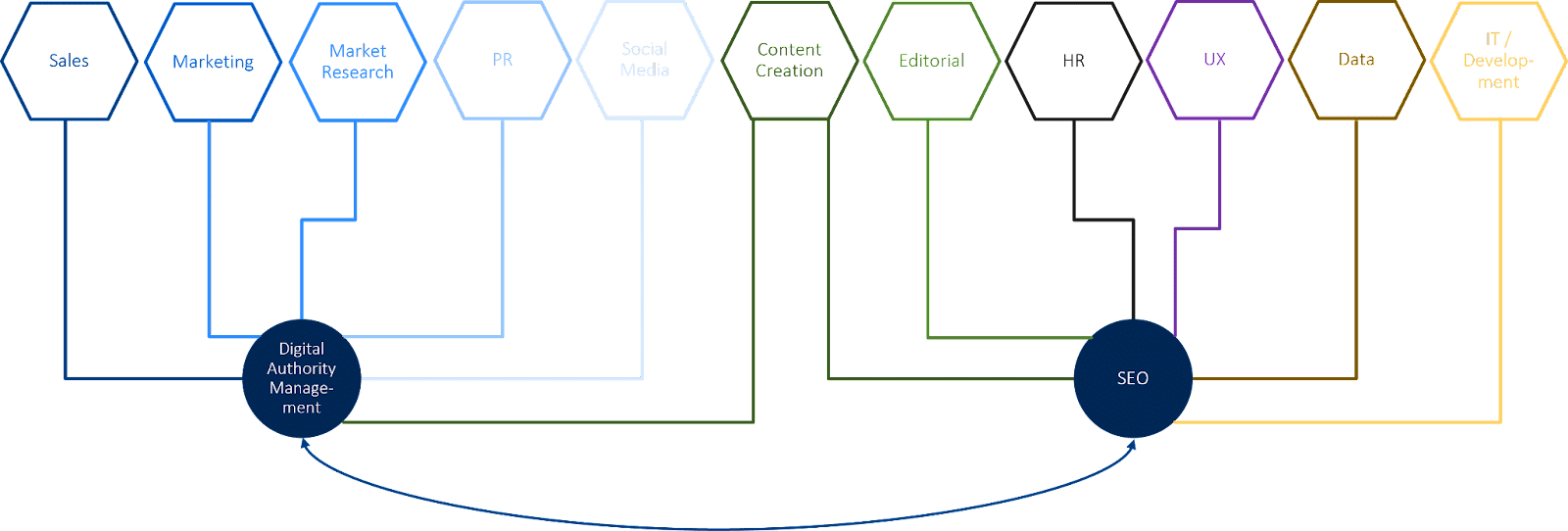
In many companies, SEO and brand management are far apart and don’t often talk to each other. So there is a gap that brand managers and SEOs in most companies have yet to close. I believe digital authority management is the answer.
Digital authority management involves SEO and branding and is responsible for building digital brand to improve visibility in search engines and generative AI-controlled output applications.
A digital authority manager plans and promotes efforts to generate algorithmically measurable signals of topic leadership and brand positioning. In addition, this role is responsible for the consistency of the signals and the digital sentiment around the company.
Here are some approaches to the tasks of a digital authority manager:
- Positioning of authors or companies as experts.
- Establishing a digitally recognizable themed tour.
- Ensuring the consistency of author and company descriptions in online media.
- Earning and controlling links from authoritative media.
- Designing marketing and PR campaigns that influence brand searches/
- Identifying resources used (by Google) for training LLMs.
- Controlling sentiment-related signals such as ratings.
- Controlling brand-related online samples.
- Managing influencer relations and influencer marketing.
- Closing exchanges with social media, SEO, link building, content creation, PR, marketing and brand management.
Rethinking your digital branding and organizational structure
The significance of building digital brands is growing in the era of generative AI. Digital brand building involves generating signals that work for people and the algorithms of digital gatekeepers such as search engines.
It is time to rethink your corporate structure, break down silos and work toward a user-centric organization.
User-centric companies do not structure themselves according to channels but to user needs. They are also up to speed with technological developments.
Interface disciplines such as digital authority management become more vital to create bridges between departments and make the silos penetrable.
The post Authority management: A new discipline in the era of SGE and E-E-A-T appeared first on Search Engine Land.
Courtesy of Search Engine Land: News & Info About SEO, PPC, SEM, Search Engines & Search Marketing
Monday, July 3rd, 2023
In the past few days, Google Search has dropped over half of the indexed URLs from Twitter from the Google Search index. This was done after Twitter added a “feature” on Friday afternoon only to display tweets to signed-in and registered users; also, the throttling going on at Twitter right now is probably not helping.
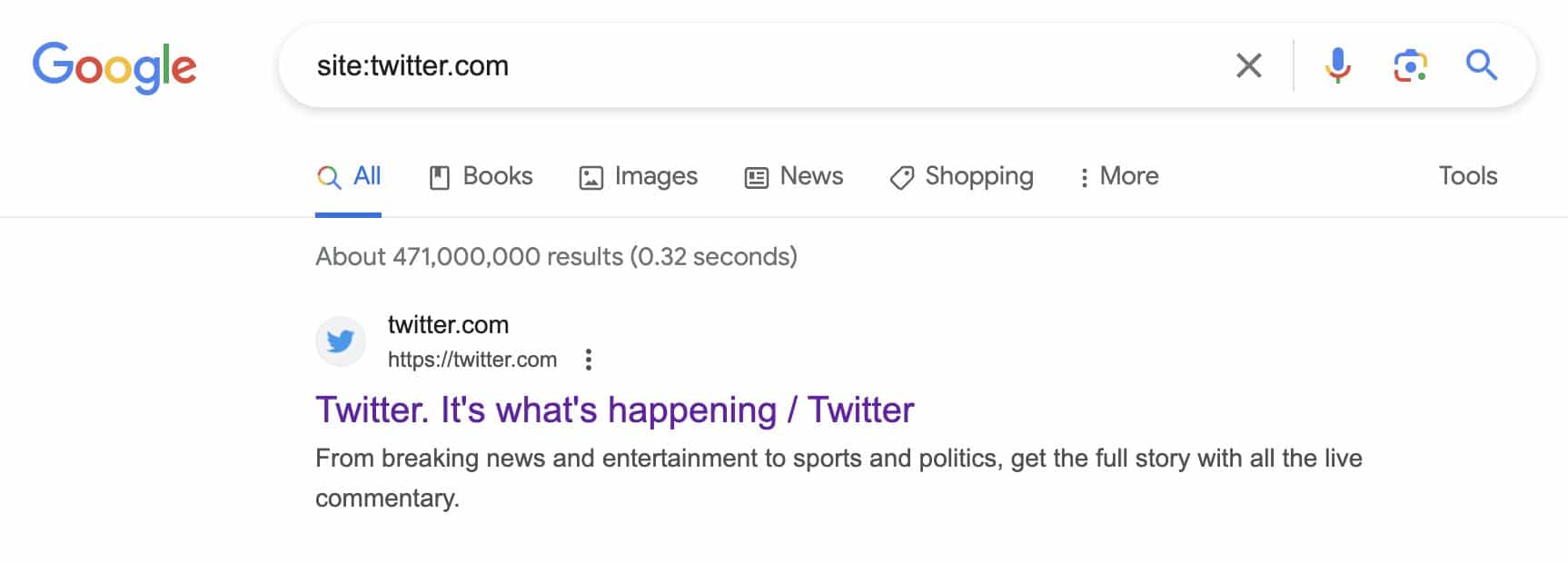
Last I checked, it looks like Twitter went from 471 million tweets indexed by Google to 180 million tweets indexed by Google. That is a 62% drop in index saturation by Google of Twitter.com.
Index count dropping. On Friday, right shortly after Twitter blocked unregistered users from seeing public tweets, I took a screenshot of a site command in Google Search for Twitter. While we all know Google site commands are by far not accurate, the downward trend of indexed URLs is very clear.
Here is that screenshot showing 471 million results in Google’s index from Twitter.com:
I did the same site command right before writing this story and I now see 180 million results in Google’s index from Twitter.com:

Don’t trust the site command? Glenn Gabe shared a screenshot on Twitter of third-party tool, Semrush, showing Twitter’s visibility dropping in Google Search:

Firehose. Let’s not forget that Google Search can still show new tweets from Twitter in Google Search. Google has a long-standing deal with Twitter for its firehose. That is why when you do some Google Searches, you can still see the Twitter carousel for some queries.
Here is what that can look like:

Old tweets. But the old tweets seem to be dropping out and gradually finding its way out of the core Google web search index. So that means less visibility for Twitter in Google Search, it means less access to searchers and journalists finding content on Twitter and I guess overall less ad impressions for Twitter’s platform.
Why we care. If you have a brand that relies a lot on Twitter and the visibility those tweets get in Google Search, that may be impacted, especially if that visibility is from older tweets. Also, some older tweets that may have ranked well in Google Search, may no longer be ranking too well right now.
It is unclear if Twitter will reverse course on this decision or decide to use the supported markup for paywalled content, which should help the content stay indexed by Google Search.
Right now, Twitter seems to be a bit of a mess, for many reasons.
The post Twitter didn’t just block unregistered users, it blocked Google Search appeared first on Search Engine Land.
Courtesy of Search Engine Land: News & Info About SEO, PPC, SEM, Search Engines & Search Marketing
Saturday, July 1st, 2023
Universal Analytics, a platform beloved (or at least tolerated) by marketers, died today (July 1) after 11 years.
Although the digital marketing industry had been warned that Google was preparing to turn off its life support, the news has still somehow come as a shock to many.
Heartbroken marketers across the world have been flooding Twitter to pay their respects, with some even holding their own funerals.




Google Analytics was born in November 2005 after Urchin was acquired by Google and became a free service.
Seven years later, the search engine welcomed Universal Analytics into the world – a service that would go on to revolutionise the digital marketing industry.
The platform went on to grow from strength to strength and quickly became the most used web analytics service on Earth thanks to its many key benefits such as offline conversions and flexible session and campaign timeout settings.
Sadly, in March 2022, Google broke the hearts of advertisers in every corner of the globe when it announced that Universal Analytics would be departing our lives forever.
Russell Ketchum, director, product management at Google, fought back tears as he broke the jaw-dropping news:
- “Universal Analytics was built for a generation of online measurement that was anchored in the desktop web, independent sessions and more easily observable data from cookies.”
- “This measurement methodology is quickly becoming obsolete.”
Universal Analytics will be remembered for its user-friendly interface, easily accessible, up-to-date, accurate data, as well as its glorious reporting.
UA leaves behind Google Analytics 4, a replacement tool that marketers just seem to absolutely adore.
Share your stories, memories and the fun times you had with our departed friend by tweeting us @searchengineland.
Rest in peace, Universal Analytics. You were good to us.
Universal Analytics: 2012-2023.
The post Universal Analytics dies aged 11: ‘Be brave and be strong’ appeared first on Search Engine Land.
Courtesy of Search Engine Land: News & Info About SEO, PPC, SEM, Search Engines & Search Marketing
Saturday, July 1st, 2023
Marketers haven’t had the easiest time migrating from Universal Analytics to Google Analytics 4.
Some advertisers are so frustrated with the new tool, that they’ve even been holding funerals for UA in the hope that Google might get the message and make a sudden U-turn.
Search Engine Land recently ran a poll to find out how the industry is coping and to give marketers an opportunity to get their voices heard – and the feedback was interesting to say the least.
The enforced switchover is a historic transitional moment in digital marketing history, and we know it’s a big adjustment. But if you don’t laugh, you’ll cry. So with that in mind, we’ve put together a list of the funniest reactions we received to Google’s enforced GA4 switchover. Enjoy!
Short and sweet. Some marketers were able to summarise their experiences with GA4 in just a few words.
- “Mad! Mad! Mad!
- “Total cr*p!”
- “GA4 = LAME!”
- “One word (in fact two words): BS!”
- “What a Waste of our time.”
- GA4 UI team should be fired
“Google should be ashamed!” Marketers certainly know how to articulate their frustrations. They also know how to dish out some pretty epic one liners. We’re so glad we won’t be answering calls on the GA4 customer service desk on Monday.
- “Did they find the software in a Christmas cracker? The biggest pile of sh*t I have ever seen. Unusable for scenario of casual small business owner with a simple question about their stats. I can only conclude that Google deliberately wanted to obfuscate people’s access to their own website data. If it doesn’t get better, considering removing from many customers’ sites because it is just pointless drag on speed stats.”
- “GA4 is potentially the worst product update ever from a pure usability perspective, and Google should be ashamed of its current state.”
- “Google trying to do tableau for dummies is not working on either level.”
- “Simply Put, GA4 Sucks. It is a pain in the a*s to use (NOT USABLE) requires much more time than previous version lacks the same visual impact as GA3 it is junk.”
Mind games. What if Google secretly designed GA4 with a hidden agenda; to get marketers to stop using its own tools and turn to its competition instead? Makes sense. Kinda. Well, not really.
- “This might be the least user-friendly product Google has ever produced. Almost like they don’t want people to use it.”
I’m outta here! A fantastic solution if you’re not a fan of GA4; turn on your Out Of Office, go on vacation and wait for all of this to blow over. Of course, it probably won’t. But definitely a great short-term option.
- “I have been dreading the arrival of this date so much that I booked a trip out of town. LOL. My hope is that by the time I return from vacation, Google will have changed their mind, and Universal Analytics will continue to exist.”
Get the daily newsletter search marketers rely on.
<input type=”hidden” name=”utmMedium” value=”“>
<input type=”hidden” name=”utmCampaign” value=”“>
<input type=”hidden” name=”utmSource” value=”“>
<input type=”hidden” name=”utmContent” value=”“>
<input type=”hidden” name=”pageLink” value=”“>
<input type=”hidden” name=”ipAddress” value=”“>
You can’t make me. Alternatively, if you’re not in a position to take a vacation right now, just close your eyes, pretend GA4 isn’t happening and do nothing. What could possibly go wrong?
- “Our marketing department doesn’t have the faintest idea how to follow complex directions. And most of them are out of the office for the next two weeks. So IT kicked the project over to our business insights department, who swiftly said, “We don’t have anything to do with Google Analytics anymore. Talk to Marketing. Now it looks like the project is mine. I’m a one-person department. I’m not gonna do sh*t. That’s my GA4-adjacent sob story.”
Why we care: We’re all in the same boat right now. After 11 years of relying so heavily on Universal Analytics, migrating over to GA4 is a daunting task. But unfortunately, we don’t have a choice (unless you want to consider a GA4 alternative). So we might as well get our heads down and try to figure it all out. But that doesn’t mean we can’t have a laugh along the way.
The post 13 of the funniest reactions to GA4: The roast of Google Analytics 4 appeared first on Search Engine Land.
Courtesy of Search Engine Land: News & Info About SEO, PPC, SEM, Search Engines & Search Marketing
Saturday, July 1st, 2023
Marketers have been pulling their hair out trying to get to grips with Google Analytics 4 – fortunately, we’ve got some good news.
There are a bunch of incredible courses and resources available that’ll boost your confidence and understanding of how to use the new platform.
Here, we’ve compiled a list of 9 Google Analytics 4 training courses that you may want to consider.
Cost: $249
Level: Advanced
Duration: Two days
Search Engine Land’s former ‘Search Marketer of the Year’, Colleen Harris, is running this SMX Masterclass course online live on August 16 and 17. “The Marketing Land course is designed to give people practical applications of GA4,” Harris said. “It’s also looking at GA4 under the theme of ‘I got through July now what do I do?’ So much of GA4 this last year has just been getting things set up now it’s time to go back and say ‘how can I get more out of this tool?’”
Harris will be covering the following topics:
- How to compare Universal GA and GA4 data after the move to GA4
- Understanding how to build audiences to use within advertising plus a deep dive into the advertising reporting in GA4
- Best practices for custom reporting and libraries
- Differences between custom events, parameters and dimensions
- How to leverage GTM for custom events and parameters
Cost: $600
Level: Three learning levels – principles, intermediate and advanced
Duration: One day
This course, put together by The Chartered Institute of Marketing, is available both in-person and online. It sets out to teach marketers how to implement GA4 and show them the advantages this system has over its predecessor, Universal Analytics.
Key features of the course include:
- Insights powered by artificial intelligence (AI)
- Deeper audience integration with Google Ads
- Customer lifecycle-framed reporting
- Customer-centric data measurements
- New navigation and reporting
- Enhanced e-commerce reporting
- Customise reports
- Using explore reports
Get the daily newsletter search marketers rely on.
<input type=”hidden” name=”utmMedium” value=”“>
<input type=”hidden” name=”utmCampaign” value=”“>
<input type=”hidden” name=”utmSource” value=”“>
<input type=”hidden” name=”utmContent” value=”“>
<input type=”hidden” name=”pageLink” value=”“>
<input type=”hidden” name=”ipAddress” value=”“>
Cost: $2,500 (for any team size)
Level: Beginner to intermediate
Duration: Six hours in total, spread across two three-hour sessions on different days
Delivered to you and your team live online, no experience is necessary for Measure Lab’s GA4 course – although there are more advanced courses available. The course comprises four modules designed to help marketers get up to speed with Google’s new analytics tool.
The course covers the following topics:
- How GA4 works
- Account structure and setup
- Using the interface
- Key metric definitions
- Tracking your campaigns
- Standard acquisition reports
- Attribution modelling
- Advanced marketing reports
- Reporting identities
- Event and page reporting
- Event customisation
- Funnels and user flows
- Building and using Audiences
- Exploration techniques
- Segments
- Activation
Cost: $49.99
Level: Beginner to intermediate
Duration: 10 videos
SEO consultant Joe Hall created this all inclusive GA4 course specifically to help SEOs. In the course, Hall details each step to getting your website set up on GA4, as well as how to build various custom reports for organic traffic.
The course covers the following topics:
- Setting things up
- Events and conversions
- Collections and library
- How to create an organic traffic report
- How to create an organic landing pages report
- How to create an organic conversions report
- How to create a referring search engines report
- How to create an organic sessions GEO map report
- How to create an organic traffic dashboard
- GA4 Organic Traffic Report Creation Cheat-Sheet [PDF]
Cost: $225
Level: Intermediate to advanced
Duration: 7 HD video lessons to watch at your own pace
Love Data’s practical and comprehensive course was created to help marketers master GA4 and give them a much needed confidence boost. The lessons teach you how to build GA4 reports and use them to improve the performance of your website and/or campaign.
This course covers the following topics:
- How to use the default reports and customize them to meet your needs.
- Correctly track inbound marketing campaigns and report on their performance.
- Create custom audiences for in-depth analysis, reporting, and remarketing.
- The major differences between GA4 and Universal Analytics.
- Using conversion and e-commerce reports to measure and optimize conversions.
- Understanding how your marketing channels work together to drive conversions.
- Configuring GA4 to collect meaningful and accurate data
Cost: $635
Level: Intermediate
Duration: One day
Available in person and online, Jellyfish’s GA4 course was designed for marketers who already have some knowledge of GA4, such how reports are created and data is collected. It teaches all marketers need to know about setting up GA4, configuring and auditing properties and how the new platform differs from UA. Marketers will also have their newfound knowledge put to the test with hands-on, in-platform exercises.
This course covers the following topics:
- Introduction to GA4 & Considerations
- Planning a GA4 Implementation
- Initial GA4 Set-up
- Enhanced Measurement
- Event & Ecommerce Configuration
- Custom Definition Set-up
- GA4 Property Settings
- GA4 Product Integrations
Cost: $299
Level: Intermediate
Duration: 5 hours 9 minutes
Created by Charles Farina, Head of Innovation at Adswerve, this course aims to teach marketers everything they need to know to get started with GA4. Farina discusses an array of topics from data integrations to funnels to pathing reports. Upon completion, marketers are awarded a certificate.
Key features of the course include:
- Understanding why GA4 is the future of Google Analytics and why getting started now is important
- Learning about the new event-driven data model GA4 uses and how it is similar or different to other analytics solutions
- Developing an implementation plan for dual-tagging or migration of your existing Google Analytics properties
- Ability to leverage enterprise features that were previously only available in Google Analytics 360 including the BigQuery integration, funnels, and unsampled data
Cost: From $1,620
Level: Beginner to intermediate to advanced
Duration: One day
Optix Digital Academy offers bespoke training days, which can be delivered in-person and online, to suit your business’ needs. Marketers are invited to submit a brief detailing specific areas they need assistance with ahead of the course, and an outline of the training day is then agreed between the company and your business.
This course covers the following topics:
- Introduction to GA4
- GA4 & GTM
- Setting up GA4
- GA4 Interface
- E-commerce in GA4
- Events & conversion tracking
- Reports
- Explore
- Advertising
- Developer Support
Cost: $70
Level: Beginner
Duration: Two-hours on demand video
This Udemy course is available on mobile and TV, and was created for people starting their careers in digital marketing. A certificate is awarded upon completion with students graduating with new skills in being able to analyze website and campaign performance.
This course covers the following topics:
- What is Google Analytics 4 and how it works02:31
- GA4 Data Model
- Creating a GA4 property
- Upgrading from Google Analytics to Google Analytics 4
- Overview of Google Analytics reports
- Understanding Acquisition Reports
- Campaign Tracking
- Campaign Builder
- Engagement Reports
- Active Users and Stickiness
- Retention Reports
- Analysis Hub Overview
- Exploration Analysis
Why we care. One of the most common complaints we saw when reviewing the answers to our GA4 readiness poll was that marketers don’t think Google has provided enough resources with regards to using the new analytics system. If you’re in this boat and are struggling with GA4, it’s essential you brush up on your knowledge so that you can continue to monitor the performance of your campaigns or else you won’t be able to accurately report your successes back to clients.
What’s the problem with GA4? Marketing Land course creator Colleen Harris told Search Engine Land that there are a lot of differences between UA and GA4, and marketers are finding the changes challenging. “There are a lot of new features in GA4 and workflow updates,” she explained. “This is also a time where most digital marketers are already trying to do so much with little time, and this is one more big thing.”
Harris added that the attribution changes within GA4 are currently posing the biggest issue to marketers. “Folks are used to getting a lot of data about the users and the reality of marketing is that we all will be getting less data and have to the same with it,” she continued.
Has Google not provided enough help? Marketers have complained that Google has not given them enough tools and resources to get their heads around GA4. However, Harris tells Search Engine Land that Google has done the best it can given the deadlines it had to meet and the large volume of people they were working with. She said: “All those UA codes come with every level of knowledge and skills, so trying to educate so many people at so many different levels is a feat.”
Why should marketers invest in GA4 training? Marketers need access to data behind their campaigns to monitor performance, create reports and make adjustments for improved ROI. So it’s essential that advertisers gain confidence in using GA4. “Data is going to flow and GA4 isn’t going to go away, so the more you stay away from it the harder it is to become comfortable with it,” said Harris.
In addition to needing to know the essentials, GA4 comes with a lot of benefits that could make a huge difference to your campaign. “The conversions path report is one of the best parts of GA4 that lets you start to understand the early, mid and late touch point before the conversions happen,” added Harris. “It opens up a lot in terms of understanding activity before the conversions.”
Deep dive: For free information and resources on how to us GA4, read the ‘Google Analytics 4 account training guide and support‘ guide.
The post 9 GA4 training courses to help confused marketers appeared first on Search Engine Land.
Courtesy of Search Engine Land: News & Info About SEO, PPC, SEM, Search Engines & Search Marketing
Saturday, July 1st, 2023
Well, it’s finally happening – the dreaded Universal Analytics sunset has started.
Here in the United States, UA is still processing data, but we were greeted by an ominous message when we logged into our account this morning:
- “This property is scheduled to stop processing data very soon. Once this goes into effect, you’ll need a Google Analytics 4 property to measure website performance.”
This warning started appearing on UA at around 7am EST, once again reminding marketers that they must migrate to Google Analytics 4 to maintain their website measurement.

Why we care. Today’s forced migration to GA4 is a historic transitional moment in digital marketing. Advertisers now have no choice but to use GA4 if they to track the performance of their websites and campaigns – unless they want to find an analytics alternative outside of Google of course.
How it works. Google has advised that today’s UA shutdown is being rolled out in stages which is why some marketers may still be able to access certain data. However, all properties that are still functioning are in a queue to be deleted, which will be happening on a rolling bases.
What has Google said? Google has been warning marketers that they need to migrate over to GA4 for more than a year. On Twitter and via a statement on the Analytics Help Center, Google said:
- “Today, we begin shutting down Universal Analytics as we welcome you to Google Analytics 4.
- “This will not happen overnight, so some Universal Analytics properties may continue to process data.
- “However, all properties have now been added to the queue, and those that have not completed the upgrade will Jumpstart on a rolling basis.”
- Google Analytics 4 is our next-generation measurement solution, and it has replaced Universal Analytics.”
- “Standard Universal Analytics properties have stopped processing new data. To maintain your website measurement, you’ll need a Google Analytics 4 property.
- “We strongly encourage you to make the switch to Google Analytics 4 as soon as possible. If you use Universal Analytics data in your Google Ads account, make sure you migrate your Universal Analytics property’s Google Ads links to your Google Analytics 4 property.
Get the daily newsletter search marketers rely on.
<input type=”hidden” name=”utmMedium” value=”“>
<input type=”hidden” name=”utmCampaign” value=”“>
<input type=”hidden” name=”utmSource” value=”“>
<input type=”hidden” name=”utmContent” value=”“>
<input type=”hidden” name=”pageLink” value=”“>
<input type=”hidden” name=”ipAddress” value=”“>
Timeline. The shutdown of Universal Analytics is being rolled out the following stages, with the final phase set for July 2023:
- March 2023: Google automatically created a GA4 property for marketers who didn’t opt out of the automatic property creation option. Where possible, existing site tags were used.
- July 2023: UA stops processing hits, including standard properties in accounts that also contain 360 properties. Marketers still have access to previously processed data in their UA property until July 2024.
- July 2024: All marketers, even those with 360 properties, will no longer have access to the UA user interface and API.
Deep dive: For more information on how to migrate to GA4, read Google’s ‘Learn how to make the switch‘ guide.
The post Universal Analytics is officially replaced by Google Analytics 4 appeared first on Search Engine Land.
Courtesy of Search Engine Land: News & Info About SEO, PPC, SEM, Search Engines & Search Marketing
Friday, June 30th, 2023
In just 48 hours we received around 400 responses to our poll question about Google Analytics 4.
With the standard version of Universal Analytics sunsetting tomorrow (July 1), we asked you:
What level of readiness are you (and/or your team) at when it comes to switching to GA4 from Universal Analytics?
Despite plenty of frustration:
- Almost a quarter of respondents said they have fully implemented and already are using GA4.
- Just over half said they had implemented it but were still learning how to use it.
- Almost 16% have it set up but have not started using it.
The takeaway from those statistics: more than 90% of our joint readership is aboard the GA4 train, for better or worse.
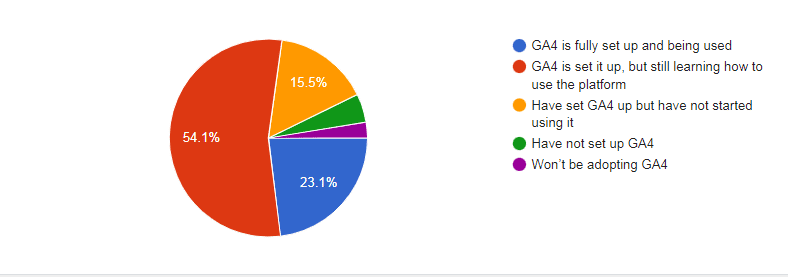
- Only 2.6% of respondents said they had no plans to use GA4.
- 4.6% have just not set it up yet.
Why we care. At first glance, this looks like a vote of confidence in Google’s analytics strategy. After all, there are plenty of alternatives to GA4. But it’s not that simple.
Rightly or wrongly, it’s possible to adopt a tool even though you really don’t like it.
“An unfinished product rushed to market.”
“It’s not that the masses aren’t ready for GA4, it’s that GA4 isn’t ready for the masses. The UI is terrible.”
“Terrible UI, terrible reporting.”
Selected comments from poll respondents.
We might need to wait a while to see if people can make GA4 work for them or if frustrations with it start to make the alternatives look more attractive.
The post GA4 readiness: 23% have fully adopted, 50% still learning, 16% yet to begin appeared first on Search Engine Land.
Courtesy of Search Engine Land: News & Info About SEO, PPC, SEM, Search Engines & Search Marketing
Friday, June 30th, 2023
YouTube is disabling videos for people using ad blockers as part of a new trial.
The social media platform is asking users to either turn ad blockers off or pay £11.99 a month for YouTube Premium if they want access to its extensive video library.
Why we care. If this trial is expanded to the general population, all YouTube users, who want to continue watching videos for free, will be forced into allowing ads to play. This is great news for marketers as it will increase reach for campaigns, which ultimately, could result in more conversions.
How it works. Right now, the trial is being tested on a small group of people around the world that have ad blockers enabled. When they sign in to watch content, all videos will be blocked unless they either change their settings to disallow ad blocker or they sign up for YouTube Premium.
Get the daily newsletter search marketers rely on.
<input type=”hidden” name=”utmMedium” value=”“>
<input type=”hidden” name=”utmCampaign” value=”“>
<input type=”hidden” name=”utmSource” value=”“>
<input type=”hidden” name=”utmContent” value=”“>
<input type=”hidden” name=”pageLink” value=”“>
<input type=”hidden” name=”ipAddress” value=”“>
What has YouTube said? Oluwa Falodun, a spokesperson for Google, told The Verge in a statement:
- “Ad blocker detection is not new, and other publishers regularly ask viewers to disable ad blockers.”
- “We take disabling playback very seriously, and will only disable playback if viewers ignore repeated requests to allow ads on YouTube.”
- “In cases when viewers feel they have been falsely flagged as using an ad blocker, they can share this feedback by clicking on the link in the prompt.”
- “We want to inform viewers that ad blockers violate YouTube’s Terms of Service, and make it easier for them to allow ads on YouTube or try YouTube Premium for an ad free experience,”
Why now? YouTube has said that it is taking these measures to ensure that its content creators are compensated for their work. “YouTube’s ad-supported model supports a diverse ecosystem of creators, and provides billions of people globally access to content for free with ads,” the company said in a statement.
Deep dive: For more information on YouTube’s ad policy, you can visit the YouTube Advertising hub.
The post YouTube stops playing videos for people with ad blockers in new trial appeared first on Search Engine Land.
Courtesy of Search Engine Land: News & Info About SEO, PPC, SEM, Search Engines & Search Marketing